
C4 Architect
# C4 Architect
**Explore a TypeScript codebase without pasting the whole repository into a prompt.**
C4 Architect is a local [Model Context Protocol](https://modelcontextprotocol.io/) server that turns source imports into a versioned dependency graph, lets you review and name its architectural boundaries, and produces compact C4 diagrams. Use it from Codex, Claude Code, Claude Desktop, or another client that supports local MCP servers over `stdio`.
**0.2.0-alpha.10 · TypeScript / TSX · Local parsing · MIT licensed**
[Get started](#get-started) · [npm package](https://www.npmjs.com/package/c4-architect-mcp) · [See the diagrams](#c4-diagrams) · [Contribute](https://github.com/zrack/c4-architect-mcp/blob/main/CONTRIBUTING.md) · [Roadmap](https://github.com/zrack/c4-architect-mcp/blob/main/ROADMAP.md)
## Start with evidence
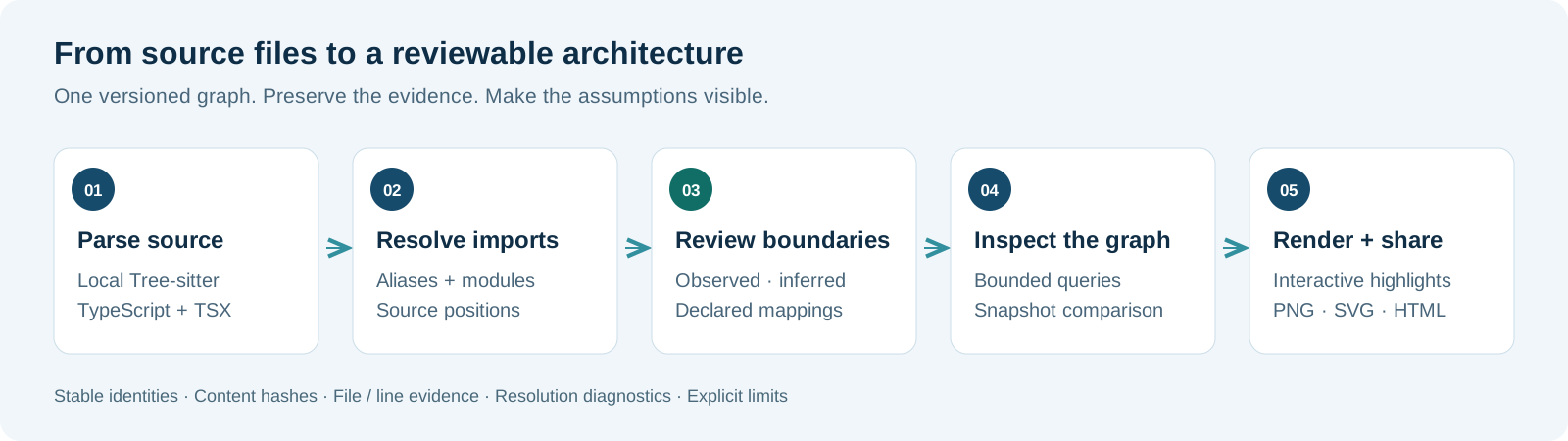
An import is evidence of a code dependency. It does not, by itself, prove that two modules are separately deployed services, that an SDK call uses a particular protocol, or that a data flow is secure.
C4 Architect keeps that distinction visible. Source locations and content hashes support observed dependencies. Naming heuristics remain inferences. A separate boundary configuration records the systems, containers, and components that a person has declared. Rescanning the source preserves those declarations.
The result is a starting point for application and solution architecture review. Runtime behavior, organization structure, and enterprise architecture still need other evidence.
| Available in this alpha | Purpose |
| --- | --- |
| Local Tree-sitter analysis | Extract TypeScript and TSX dependencies without an LLM parsing the source files. |
| Versioned graph and source evidence | Save a graph for review, with source locations, file hashes, and analysis diagnostics. |
| Explicit boundary mapping | Give systems, containers, and components stable names through a separate configuration file. |
| Summary, neighborhood queries, and comparison | Inspect a saved graph without returning the entire graph every time. |
| Context, Container, and Component diagrams | Render a graph projection or a graph supplied by the caller. |
| Deployment, Dynamic, System Landscape, and Code diagrams | Render explicit nodes and relationships supplied by the caller. |
| Compact PNG, SVG, and interactive HTML | Trace orthogonal connections, inspect relationship labels, and export a selected view. |
Export native shapes, nested deployment groups, and connector labels that you can edit in Draw.io. [Editable Draw.io export](#export-editable-drawio-diagrams)
Export a Structurizr DSL workspace with up to four views of the same model. [Structurizr DSL export](#export-a-structurizr-dsl-workspace)
Preview a diagram bundle as an Azure DevOps Wiki page and publish it with its PNG attachments. [Preview and publish a wiki page](#publish-to-azure-devops-wiki)
Cross-repository mapping, additional languages, and assisted threat modeling are planned. [Roadmap](https://github.com/zrack/c4-architect-mcp/blob/main/ROADMAP.md)
## C4 diagrams
### Trail Notes examples
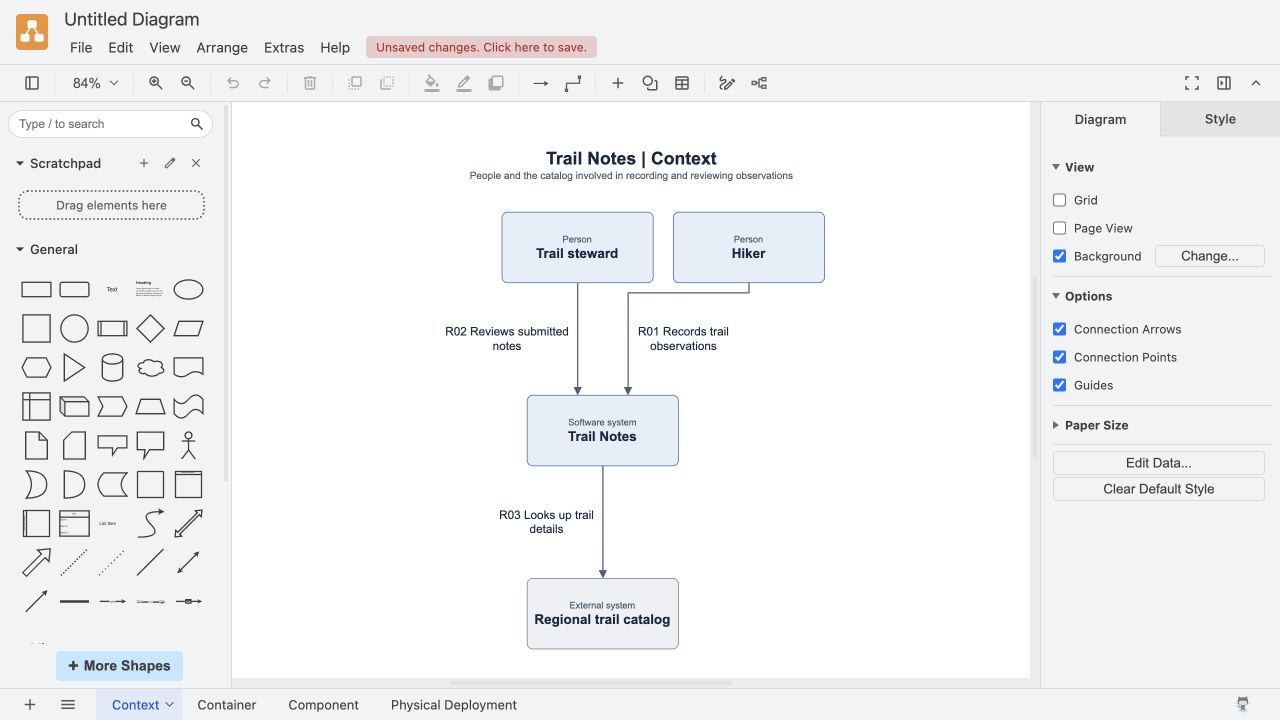
Start with the whole system, then zoom in as far as the question requires. These diagrams use the same fictional trail journal app. Select a preview to open the full-size PNG, or download its JSON to render it yourself. [C4 model diagram guide](https://c4model.com/diagrams)
#### Static structure
| 1. Context | 2. Container |
| --- | --- |
| See who uses Trail Notes and the system it depends on. | Zoom into the web app, Notes API, and database. |
| [](https://github.com/zrack/c4-architect-mcp/releases/download/v0.2.0-alpha.5/trail-notes-context.png) | [](https://github.com/zrack/c4-architect-mcp/releases/download/v0.2.0-alpha.5/trail-notes-container.png) |
| [Download Context JSON](https://github.com/zrack/c4-architect-mcp/releases/download/v0.2.0-alpha.5/trail-notes-context.json) | [Download Container JSON](https://github.com/zrack/c4-architect-mcp/releases/download/v0.2.0-alpha.5/trail-notes-container.json) |
| 3. Component | 4. Code |
| --- | --- |
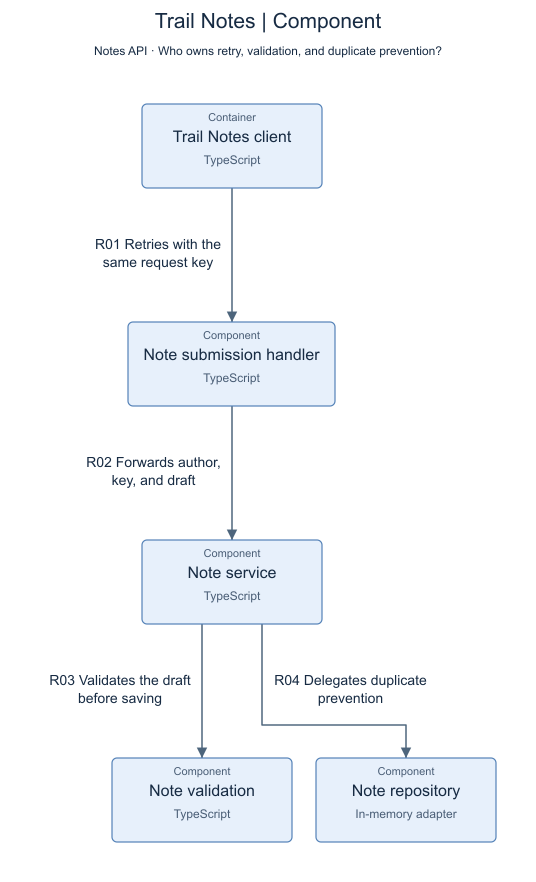
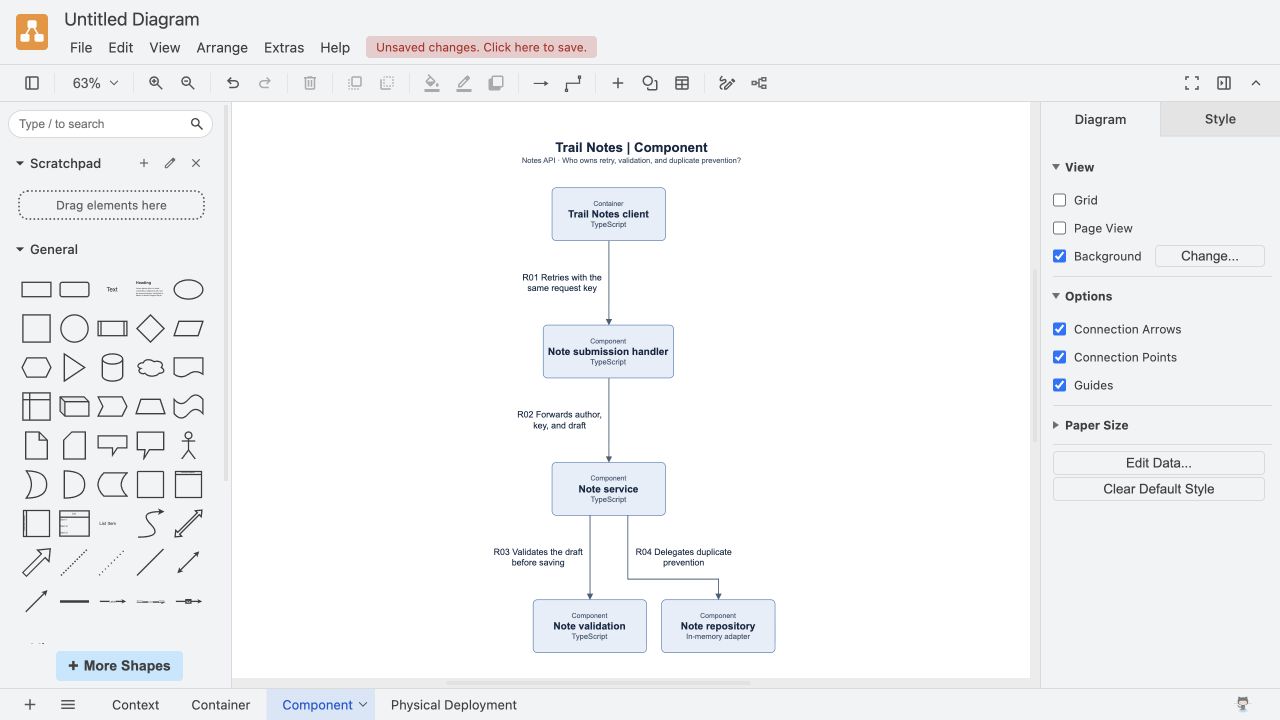
| Follow a timed-out note submission and see who owns the retry. | See how the repository returns the original note ID or rejects a changed draft. |
| [](https://raw.githubusercontent.com/zrack/c4-architect-mcp/5a48bd36068821d44fa266884759e30f7dd6738d/docs/images/trail-notes-retry-component.png) | [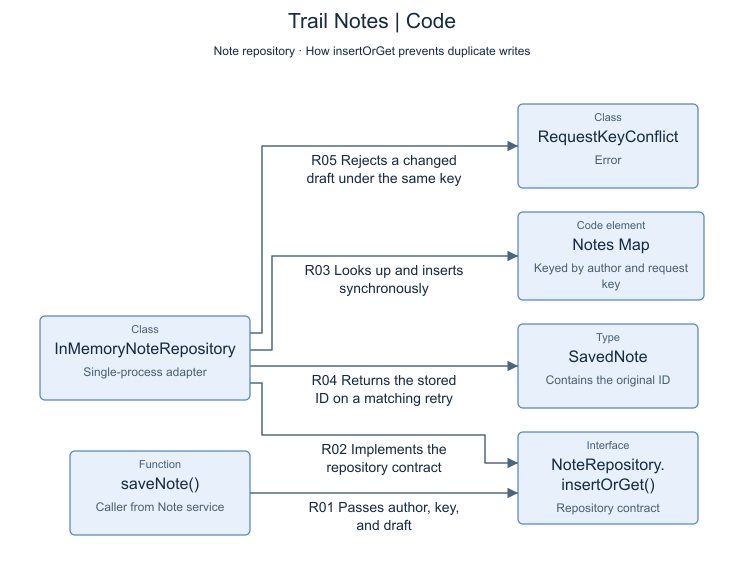](https://raw.githubusercontent.com/zrack/c4-architect-mcp/5a48bd36068821d44fa266884759e30f7dd6738d/docs/images/trail-notes-retry-code.png) |
| [Component JSON](https://raw.githubusercontent.com/zrack/c4-architect-mcp/5a48bd36068821d44fa266884759e30f7dd6738d/examples/trail-notes/diagrams/component.json) · [Retry with the same request](https://github.com/zrack/c4-architect-mcp/blob/5a48bd36068821d44fa266884759e30f7dd6738d/examples/trail-notes/src/trail-client.ts#L21) · [All Component source links](https://github.com/zrack/c4-architect-mcp/blob/5a48bd36068821d44fa266884759e30f7dd6738d/examples/trail-notes/README.md#component) | [Code JSON](https://raw.githubusercontent.com/zrack/c4-architect-mcp/5a48bd36068821d44fa266884759e30f7dd6738d/examples/trail-notes/diagrams/code.json) · [Return the existing note](https://github.com/zrack/c4-architect-mcp/blob/5a48bd36068821d44fa266884759e30f7dd6738d/examples/trail-notes/src/note-repository.ts#L30) · [All Code source links](https://github.com/zrack/c4-architect-mcp/blob/5a48bd36068821d44fa266884759e30f7dd6738d/examples/trail-notes/README.md#code) |
The first save commits before the simulated timeout. The retry returns the same note ID and leaves one stored note. [Run the TypeScript sample](https://github.com/zrack/c4-architect-mcp/blob/5a48bd36068821d44fa266884759e30f7dd6738d/examples/trail-notes/README.md#run-the-demo) · [See the timeout in source](https://github.com/zrack/c4-architect-mcp/blob/5a48bd36068821d44fa266884759e30f7dd6738d/examples/trail-notes/src/demo.ts#L22)
For a Component example based on a real scan, follow the `App.tsx` → `CaseWorkspace.tsx` import in the [ReplayCase alpha.5 diagram](https://github.com/zrack/c4-architect-mcp/releases/tag/v0.2.0-alpha.5#replaycase-component-diagram).
#### Supporting views
Use these views to show the wider landscape, a sequence of interactions, or where the software runs.
| System Landscape | Dynamic | Deployment |
| --- | --- | --- |
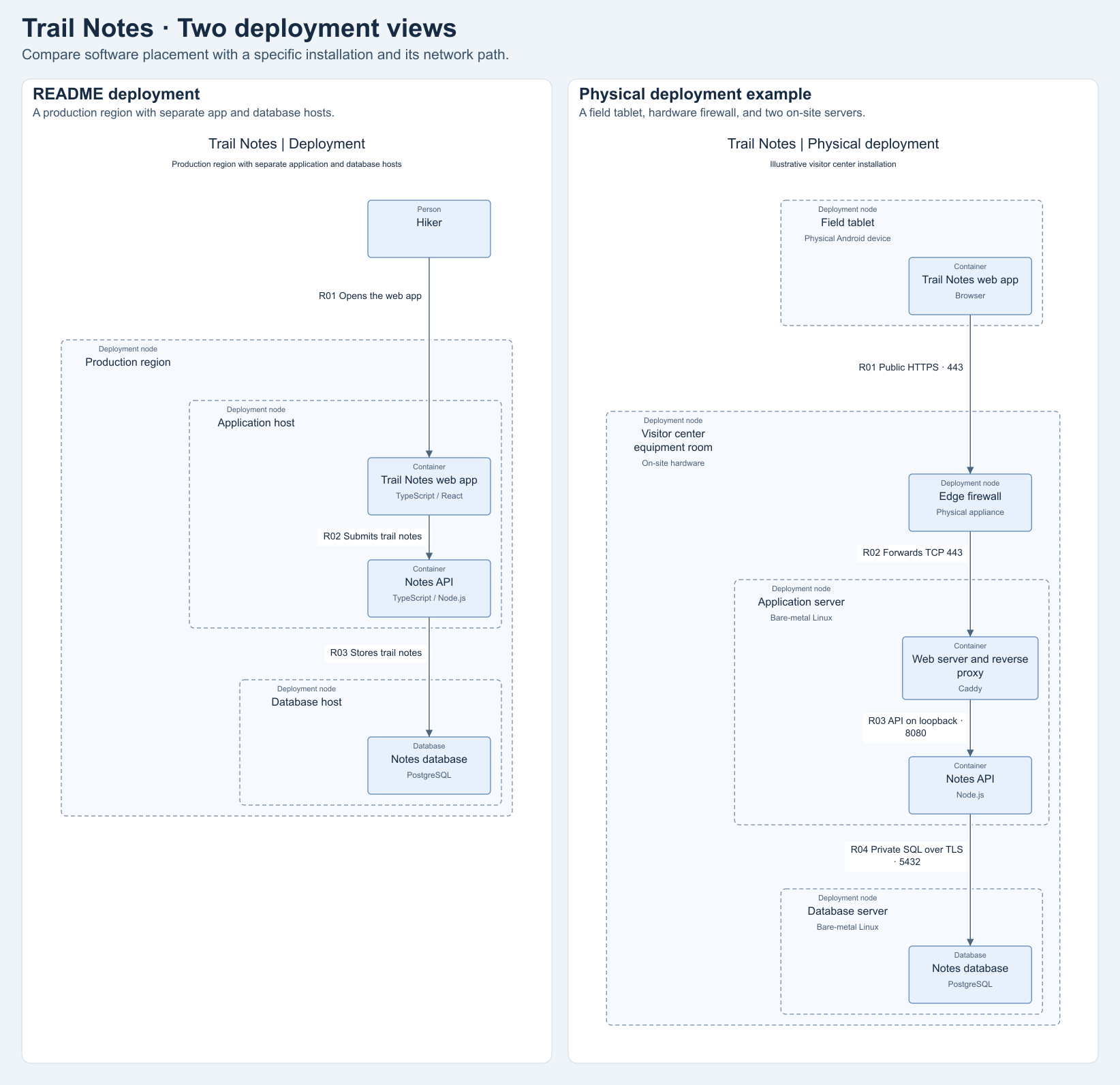
| Place Trail Notes in the wider set of people and systems. | Follow the five steps for submitting a note. | See which hosts run the web app, API, and database. |
| [](https://github.com/zrack/c4-architect-mcp/releases/download/v0.2.0-alpha.4/trail-notes-system-landscape.png) | [](https://github.com/zrack/c4-architect-mcp/releases/download/v0.2.0-alpha.4/trail-notes-dynamic.png) | [](https://github.com/zrack/c4-architect-mcp/releases/download/v0.2.0-alpha.4/trail-notes-deployment.png) |
| [Download System Landscape JSON](https://github.com/zrack/c4-architect-mcp/releases/download/v0.2.0-alpha.4/trail-notes-system-landscape.json) | [Download Dynamic JSON](https://github.com/zrack/c4-architect-mcp/releases/download/v0.2.0-alpha.4/trail-notes-dynamic.json) | [Download Deployment JSON](https://github.com/zrack/c4-architect-mcp/releases/download/v0.2.0-alpha.4/trail-notes-deployment.json) |
##### Deployment comparison
The left view places the app and database on separate hosts. The right view shows the equipment at an illustrative visitor center and traces traffic from a field tablet through the firewall to the two servers.
[](https://raw.githubusercontent.com/zrack/c4-architect-mcp/aed76d5f7c48a1f6c6c36eeee01acd5fbc60601d/docs/images/trail-notes-deployment-comparison.png)
[README deployment JSON](https://github.com/zrack/c4-architect-mcp/releases/download/v0.2.0-alpha.4/trail-notes-deployment.json) · [Physical deployment JSON](https://raw.githubusercontent.com/zrack/c4-architect-mcp/aed76d5f7c48a1f6c6c36eeee01acd5fbc60601d/examples/trail-notes/diagrams/physical-deployment.json)
Download any example JSON and run `render-diagram` from the folder where you saved it. This command renders the Context example.
```sh
npx -y c4-architect-mcp@0.2.0-alpha.10 render-diagram trail-notes-context.json --out TRAIL-NOTES.md
```
Open `TRAIL-NOTES.html` to explore the diagram.
## Get started
Use Node.js 22 or 24 and npm. Run the pinned alpha without a checkout:
```sh
npx -y c4-architect-mcp@0.2.0-alpha.10 --help
```
The examples pin `0.2.0-alpha.10` for a repeatable setup. `c4-architect-mcp@alpha` follows the prerelease channel and currently selects `0.2.0-alpha.10`. npm's `latest` tag remains on `0.2.0-alpha.1`, the initial prerelease. There is no stable release yet.
The server communicates over `stdio`; starting it without a subcommand waits for an MCP client rather than opening a browser page or an HTTP port. The following configurations let your client start it through `npx`.
<details>
<summary><strong>Codex</strong></summary>
Add this to `~/.codex/config.toml`, or use the MCP server settings in the Codex desktop app:
```toml
[mcp_servers.c4-architect]
command = "npx"
args = ["-y", "c4-architect-mcp@0.2.0-alpha.10"]
```
You can also register it from the Codex CLI:
```sh
codex mcp add c4-architect -- npx -y c4-architect-mcp@0.2.0-alpha.10
```
Reconnect the server after configuration changes. See the [official Codex MCP setup guide](https://learn.chatgpt.com/docs/extend/mcp).
</details>
<details>
<summary><strong>Claude Code</strong></summary>
```sh
claude mcp add --transport stdio c4-architect -- npx -y c4-architect-mcp@0.2.0-alpha.10
```
Use `/mcp` to inspect the connection. See the [official Claude Code MCP documentation](https://code.claude.com/docs/en/mcp).
</details>
<details>
<summary><strong>Claude Desktop</strong></summary>
Open **Settings → Developer → Edit Config** and merge this entry with your existing `mcpServers` configuration:
```json
{
"mcpServers": {
"c4-architect": {
"command": "npx",
"args": ["-y", "c4-architect-mcp@0.2.0-alpha.10"]
}
}
}
```
Completely restart Claude Desktop after saving. For Windows JSON paths, use forward slashes or escape each backslash. See the [official local MCP server setup guide](https://modelcontextprotocol.io/docs/develop/connect-local-servers).
</details>
These are local `stdio` configurations. Verify the connection in your chosen client. If a desktop app cannot find `npx`, use the executable's absolute path. On Windows, a client that cannot launch `npx` directly can use `command: "cmd"` with `args: ["/c", "npx", "-y", "c4-architect-mcp@0.2.0-alpha.10"]`.
### Optional global installation
```sh
npm install -g c4-architect-mcp@0.2.0-alpha.10
c4-architect-mcp --help
```
With a global installation, use `c4-architect-mcp` as the MCP command with no arguments, or use it in place of the pinned `npx` command below. Use an absolute executable path if your desktop client's PATH differs from your terminal's.
### Use the CLI directly
You can analyze and render without an MCP client:
```sh
npx -y c4-architect-mcp@0.2.0-alpha.10 analyze /absolute/path/to/project/src --level Component --out /absolute/path/to/project/architecture.graph.json --summary
npx -y c4-architect-mcp@0.2.0-alpha.10 summary /absolute/path/to/project/architecture.graph.json
npx -y c4-architect-mcp@0.2.0-alpha.10 render /absolute/path/to/project/architecture.graph.json --out /absolute/path/to/project/ARCHITECTURE.md
```
Replace `/absolute/path/to/project` with your project's location. Open the generated `ARCHITECTURE.html` beside the Markdown to explore the diagram.
For explicit compiler settings, add `--tsconfig /absolute/path/to/tsconfig.json` to `analyze`. The nearest `tsconfig.json` is otherwise discovered and read as data. Boundary configuration is loaded only when `--config` is supplied. The CLI also provides `query`, `diff`, and `review` commands. Use `--help` for their options.
### Run from a checkout or try the sample
Clone the repository to contribute, inspect the source, or try the included [synthetic order-service example](https://github.com/zrack/c4-architect-mcp/blob/main/examples/README.md):
```sh
git clone https://github.com/zrack/c4-architect-mcp.git
cd c4-architect-mcp
npm ci
npm test
node dist/index.js analyze examples/order-service/src --level Component --config examples/c4-architect.config.json --out output/order-service.graph.json --summary
node dist/index.js render output/order-service.graph.json --out output/ORDER-SERVICE.md
```
`npm test` builds `dist/index.js` and runs the automated tests. Open `output/ORDER-SERVICE.html` to explore the sample. To connect an MCP client to your checkout, use `node` as the command and the absolute path to `dist/index.js` as its only argument. After changing TypeScript, run `npm run build` and reconnect the server to load the new code.
## Analyze a project
Ask your connected client:
> Use c4-architect to analyze `/absolute/path/to/project/src` at the Component level. Save the graph to `/absolute/path/to/project/architecture.graph.json` and return a summary. Review the diagnostics and inferred boundaries, then use `render_architecture_graph` to save `/absolute/path/to/project/ARCHITECTURE.md`.
The analysis tool accepts:
```json
{
"targetDir": "/absolute/path/to/project/src",
"c4Level": "Component",
"outputPath": "/absolute/path/to/project/architecture.graph.json",
"responseMode": "summary"
}
```
`responseMode: "summary"` saves the complete graph locally and returns counts and status, keeping it out of the model's context until needed. It requires `outputPath`. The default `"graph"` mode returns the graph.
Use absolute paths: an MCP client's working directory may differ from the repository you want to analyze. Check diagnostics before treating a missing edge as an absent dependency. Static analysis cannot resolve every computed import or establish every runtime connection.
The current parser covers `.ts` and `.tsx`, excluding declaration files, dependency/build/output directories, and symlink trees. It uses one nearest or explicitly supplied `tsconfig.json` per scan; nested project configurations are not orchestrated automatically. Static imports, re-exports, and literal `import()` / `require()` dependencies are supported; computed dependencies and parse problems remain visible through diagnostics.
Existing CSS, SVG, and other local assets found through relative imports, `paths` aliases, or `baseUrl` produce an `UNSUPPORTED_MODULE_TYPE` diagnostic. The graph contains the TypeScript/TSX dependencies. An unresolved specifier that matches a configured alias produces an `UNRESOLVED_IMPORT` diagnostic.
To name architectural boundaries, supply `configPath` explicitly. The [example configuration](https://github.com/zrack/c4-architect-mcp/blob/main/examples/c4-architect.config.json) demonstrates the format:
```json
{
"schemaVersion": "1.0",
"system": { "id": "shop", "label": "Shop" },
"defaultContainer": {
"id": "application",
"label": "Application",
"technology": "TypeScript / Node.js"
},
"components": [
{ "id": "orders", "label": "Order orchestration", "paths": ["orders"] },
{ "id": "payments", "label": "Payments", "paths": ["payments"] }
]
}
```
`paths` are literal file or directory prefixes relative to `targetDir`, not globs. Give a component a `containerId` when mapping it into an explicitly configured container. Ambiguous matches are rejected. Unmapped files use the default container, which is inferred unless you configure it. Keep this configuration separate from the generated graph.
```json
{
"targetDir": "/absolute/path/to/project/src",
"c4Level": "Component",
"configPath": "/absolute/path/to/project/c4-architect.config.json",
"tsconfigPath": "/absolute/path/to/project/tsconfig.json",
"outputPath": "/absolute/path/to/project/architecture.graph.json",
"responseMode": "summary"
}
```
## Inspect before drawing
| Tool | Input | Result |
| --- | --- | --- |
| `analyze_architectural_boundaries` | `targetDir`, `c4Level`; optional `configPath`, `tsconfigPath`, `outputPath`, `responseMode` | A saved graph, full response, or compact summary at the requested C4 level. |
| `get_architecture_summary` | `graphPath` | A compact overview of a saved graph and its diagnostics. |
| `query_architecture_graph` | `graphPath`; optional `nodeId`, `search`, `direction`, `maxDepth`, `maxNodes`, `maxEdges`, `maxBytes`, `includeEvidence` | A bounded neighborhood or search, with truncation reported. |
| `compare_architecture_graphs` | `beforePath`, `afterPath`; optional `limit`, `maxBytes` | Change counts and bounded details for snapshots at the same C4 level. |
| `render_architecture_graph` | `graphPath`; optional `title`, `outputPath`, `focus`, `format` | Render a saved graph or a focused neighborhood. Use `format: "drawio"` for editable XML. |
| `render_c4_mermaid` | `title`, `c4Level`, `nodes`, `relationships`, optional `outputPath` | Mermaid source and a compact server-rendered PNG; saved SVG, PNG, HTML, and Markdown when requested. |
| `render_c4_drawio` | Authored diagram fields and an optional `outputPath` ending in `.drawio` | Editable Draw.io XML, with a file when requested. |
| `render_structurizr_dsl` | `input` with an authored diagram or workspace bundle and an optional `outputPath` ending in `.dsl` | Structurizr DSL with Context, Container, Component, or Deployment views. |
| `publish_to_ado_wiki` | `input` with `title`, optional `description`, and `diagrams`, plus `outputDir`. For publishing, add `publish: true` and `target`. | Local Azure DevOps Wiki preview with PNG attachments, and optional publication. |
| `publish_to_confluence` | The same diagram bundle and `outputDir`. For publishing, add `publish: true` and a Confluence Cloud `target`. | Local Confluence preview, storage XHTML, and PNG attachments, with optional publication. |
| `publish_to_notion` | The same diagram bundle and `outputDir`. For publishing, add `publish: true` and `target: { parentPageId }`. | Local Notion preview, page manifest, and PNGs. Publishing creates a child page with native image blocks. |
Queries default to `direction: "both"`, `maxDepth: 1`, `maxNodes: 25`, `maxEdges: 50`, and `maxBytes: 16000`. Source evidence is opt-in. Start with a summary, then search for a component or request its incoming or outgoing dependencies. Smaller views are usually easier to review than a complete repository drawing.
Render a saved graph directly:
```json
{
"graphPath": "/absolute/path/to/project/architecture.graph.json",
"outputPath": "/absolute/path/to/project/ARCHITECTURE.md"
}
```
For caller-supplied graphs, `render_c4_mermaid` remains available. To adapt an analysis projection manually, preserve its `nodes` and convert its `edges`:
```js
const relationships = analysis.edges.map(edge => ({
from: edge.source,
to: edge.target,
label: edge.label,
technology: edge.protocol === "unknown" ? undefined : edge.protocol,
}));
```
Source analysis produces `Context`, `Container`, and `Component` graphs. The corresponding renderer levels are `C4Context`, `C4Container`, and `C4Component`. Do not invent a protocol when the analysis has no evidence for it.
### Render authored architecture views
All seven C4 views can render explicit nodes and relationships. Use `render_c4_mermaid` with the diagram fields and an optional `outputPath`, or save the same diagram as JSON and run `npx -y c4-architect-mcp@0.2.0-alpha.10 render-diagram diagram.json --out DIAGRAM.md`. Both entry points produce Mermaid source, PNG, SVG, and interactive HTML alongside the Markdown when given an output path.
| `c4Level` | What to supply |
| --- | --- |
| `C4Code` | Code elements such as `Class`, `Interface`, `Function`, and `Type`, with relationships that describe calls, implementations, or dependencies. |
| `C4Landscape` | People and software systems across the scope, with relationships between them. |
| `C4Dynamic` | Participants as nodes and interactions in execution order in `relationships`. The renderer numbers the interactions in that order. |
| `C4Deployment` | `DeploymentNode` nodes for hosts or environments. Set `parentId` on the software instances or nested deployment nodes inside them. Relationships connect instances or deployment nodes that have no children. |
This deployment diagram places an API and its data store on the same host.
```json
{
"title": "Orders on the application host",
"c4Level": "C4Deployment",
"nodes": [
{ "id": "host", "label": "Application host", "type": "DeploymentNode" },
{ "id": "api", "label": "Orders API", "type": "Container", "parentId": "host" },
{ "id": "db", "label": "Orders database", "type": "ContainerDb", "parentId": "host" }
],
"relationships": [{ "from": "api", "to": "db", "label": "Reads and writes orders" }]
}
```
### Export editable Draw.io diagrams
Save the input as `physical-deployment.json` and run the export command from the same directory. [Trail Notes physical deployment JSON](https://raw.githubusercontent.com/zrack/c4-architect-mcp/aa01187fe81847c1155d178c561bf2af6741ba24/examples/trail-notes/diagrams/physical-deployment.json)
```sh
npx -y c4-architect-mcp@0.2.0-alpha.10 render-drawio physical-deployment.json --out trail-notes.drawio
```
Use **File → Open from → Device** to open the file in Draw.io. Drag a deployment group by its header to move its contents together. Double-click a group title or a relationship label to edit it. Connectors remain attached to their shapes as you move them. [Draw.io editor](https://app.diagrams.net/)
The same command also accepts a saved architecture graph. For MCP, send an authored diagram to `render_c4_drawio`, or set `format: "drawio"` on `render_architecture_graph` to export a saved graph or its focused neighborhood. Use a `.drawio` extension for the output path.
#### Trail Notes in Draw.io
Use the page tabs at the bottom of the editable file to switch views. Select any screenshot to open it full size. [Download the editable four-page Draw.io file](https://github.com/zrack/c4-architect-mcp/releases/download/v0.2.0-alpha.6/Trail-Notes-Four-Views.drawio)
| Context | Container |
| --- | --- |
| [](https://raw.githubusercontent.com/zrack/c4-architect-mcp/aa01187fe81847c1155d178c561bf2af6741ba24/docs/reviews/drawio-export/Trail-Notes-Context-in-Drawio.jpg) | [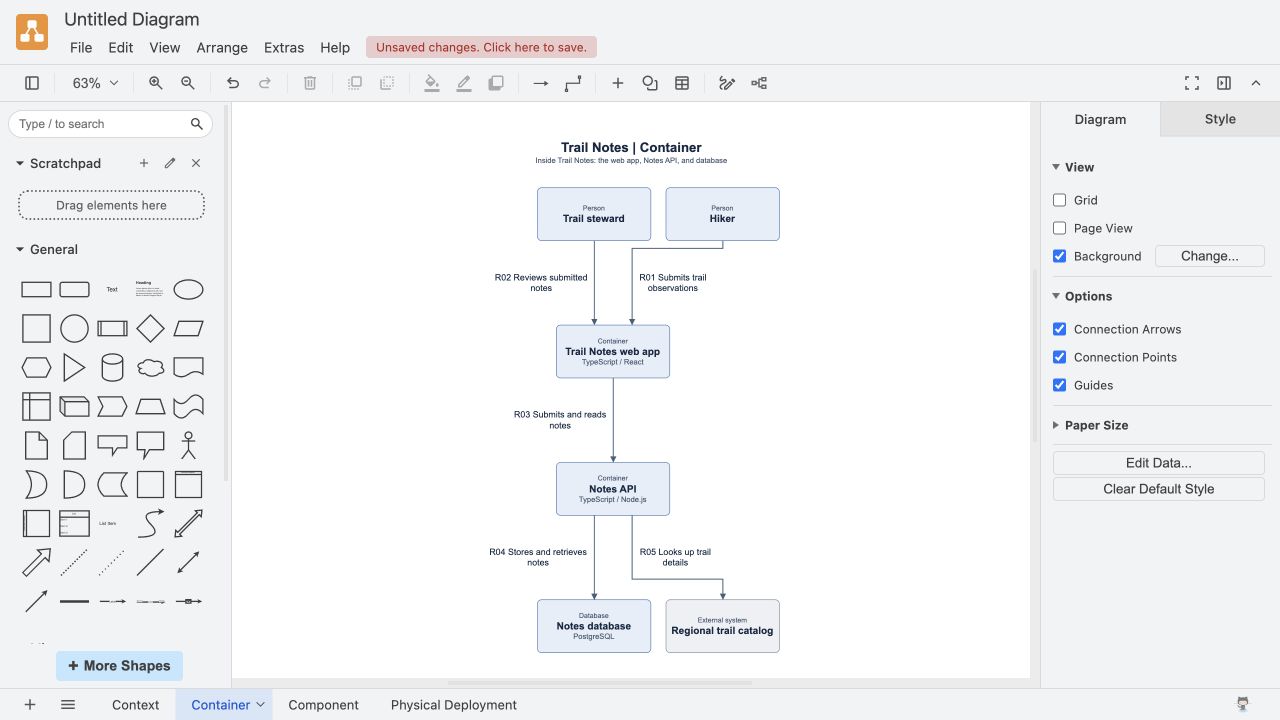](https://raw.githubusercontent.com/zrack/c4-architect-mcp/aa01187fe81847c1155d178c561bf2af6741ba24/docs/reviews/drawio-export/Trail-Notes-Container-in-Drawio.jpg) |
| Component | Physical Deployment |
| --- | --- |
| [](https://raw.githubusercontent.com/zrack/c4-architect-mcp/aa01187fe81847c1155d178c561bf2af6741ba24/docs/reviews/drawio-export/Trail-Notes-Component-in-Drawio.jpg) | [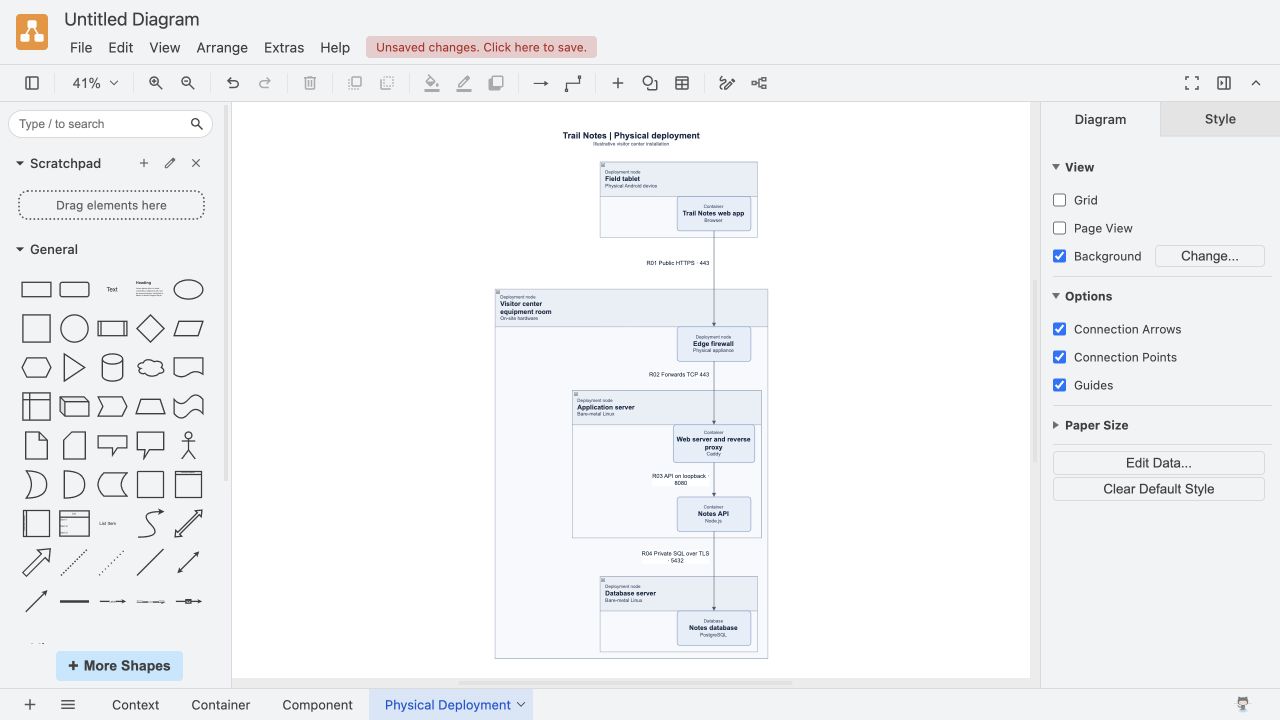](https://raw.githubusercontent.com/zrack/c4-architect-mcp/aa01187fe81847c1155d178c561bf2af6741ba24/docs/reviews/drawio-export/Trail-Notes-Physical-in-Drawio.jpg) |
### Export a Structurizr DSL workspace
The Trail Notes workspace has four views of the same system. The Component view scopes the retry flow to the Notes API. Physical Deployment places instances of the web app, API, and database on the visitor center hardware.
Save the input as `structurizr-workspace.json` and run the export command from the same directory. [Trail Notes workspace input](https://raw.githubusercontent.com/zrack/c4-architect-mcp/941ec79a12f3afd77fcf9ed093b858798ff9c688/examples/trail-notes/diagrams/structurizr-workspace.json)
```sh
npx -y c4-architect-mcp@0.2.0-alpha.10 render-structurizr structurizr-workspace.json --out workspace.dsl
```
Point Structurizr Local at the output directory and use its diagram selector to switch views. Java or Docker is only needed to run the Structurizr viewer or validator. [Structurizr Local quickstart](https://docs.structurizr.com/local/quickstart)
The CLI and MCP tool accept an authored diagram or a workspace bundle with one diagram per level. A bundle uses shared node IDs, `systemId` for the software system, and `componentContainerId` for the Component view's container. Use `deploymentInstanceOf` to map deployment nodes that represent software instances to their logical IDs. The Trail Notes bundle maps `browser` to `web` and `database` to `db`.
#### Trail Notes in Structurizr
Open the editable workspace in Structurizr Local and use the diagram selector to switch views. Select any screenshot to open it at full size. [Download the editable workspace.dsl](https://github.com/zrack/c4-architect-mcp/releases/download/v0.2.0-alpha.7/workspace.dsl)
| Context | Container |
| --- | --- |
| [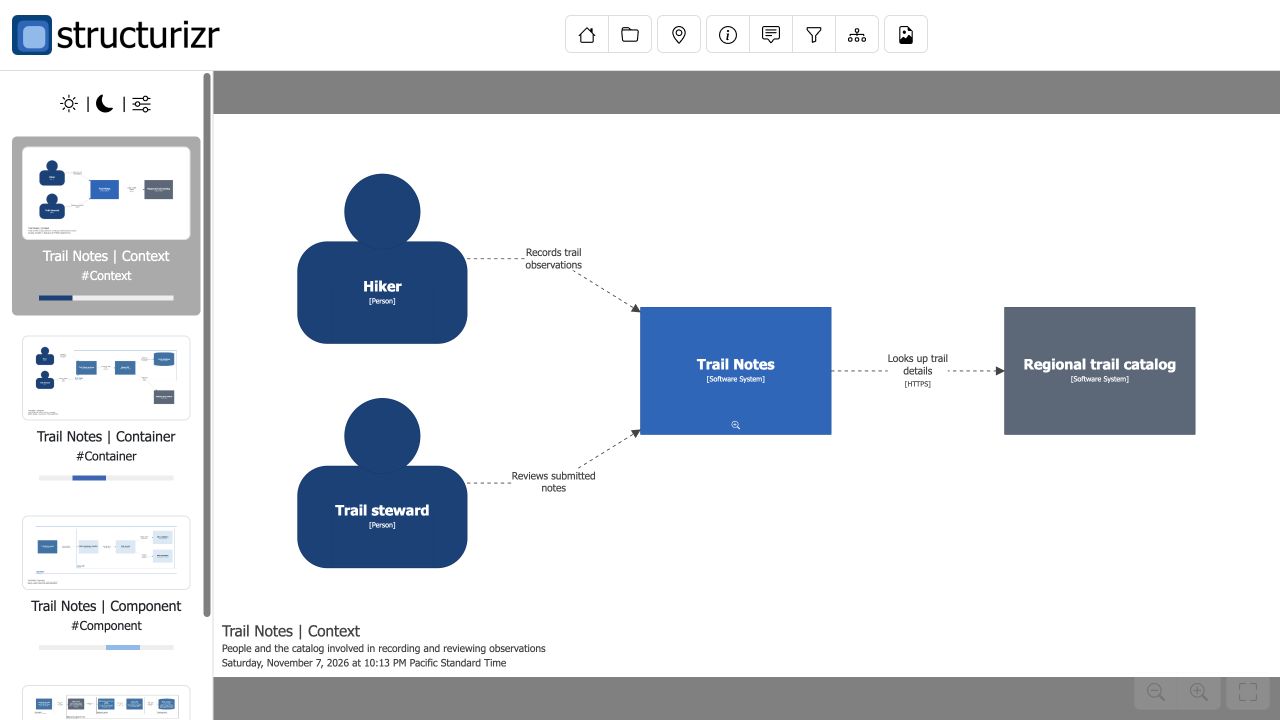](https://raw.githubusercontent.com/zrack/c4-architect-mcp/941ec79a12f3afd77fcf9ed093b858798ff9c688/docs/reviews/structurizr-export/Trail-Notes-Context-in-Structurizr.jpg) | [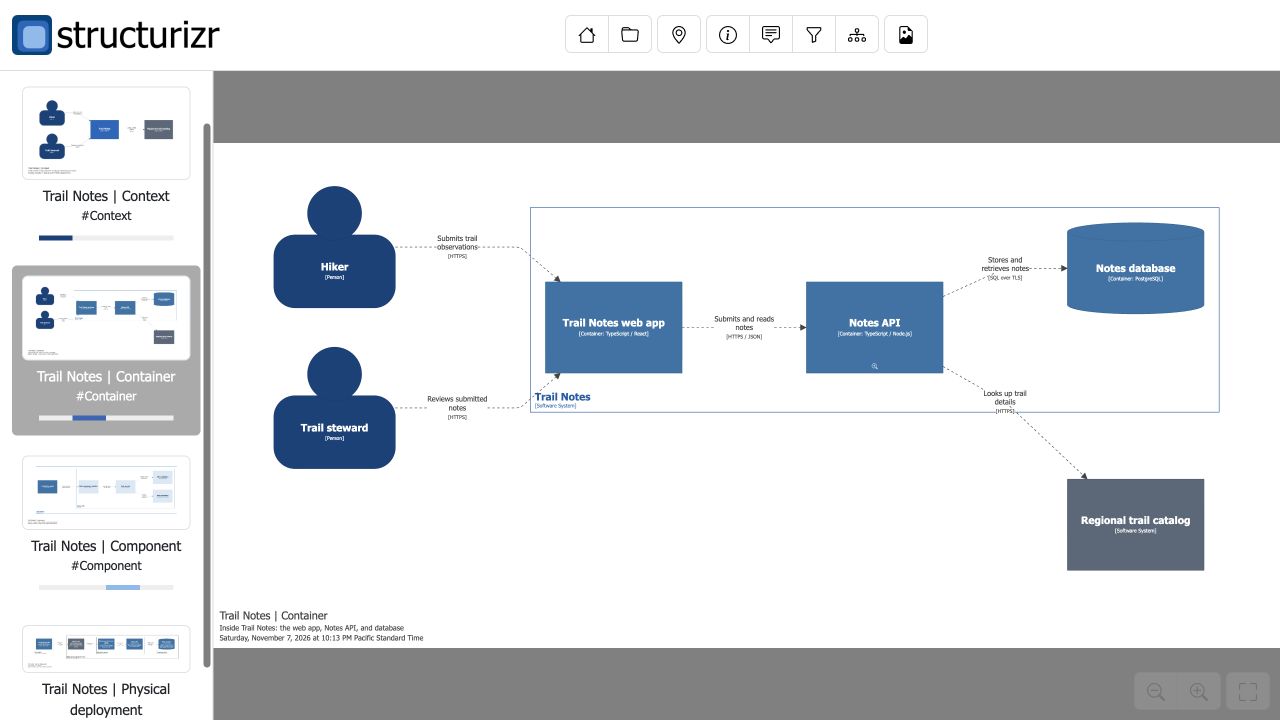](https://raw.githubusercontent.com/zrack/c4-architect-mcp/941ec79a12f3afd77fcf9ed093b858798ff9c688/docs/reviews/structurizr-export/Trail-Notes-Container-in-Structurizr.jpg) |
| Component | Physical Deployment |
| --- | --- |
| [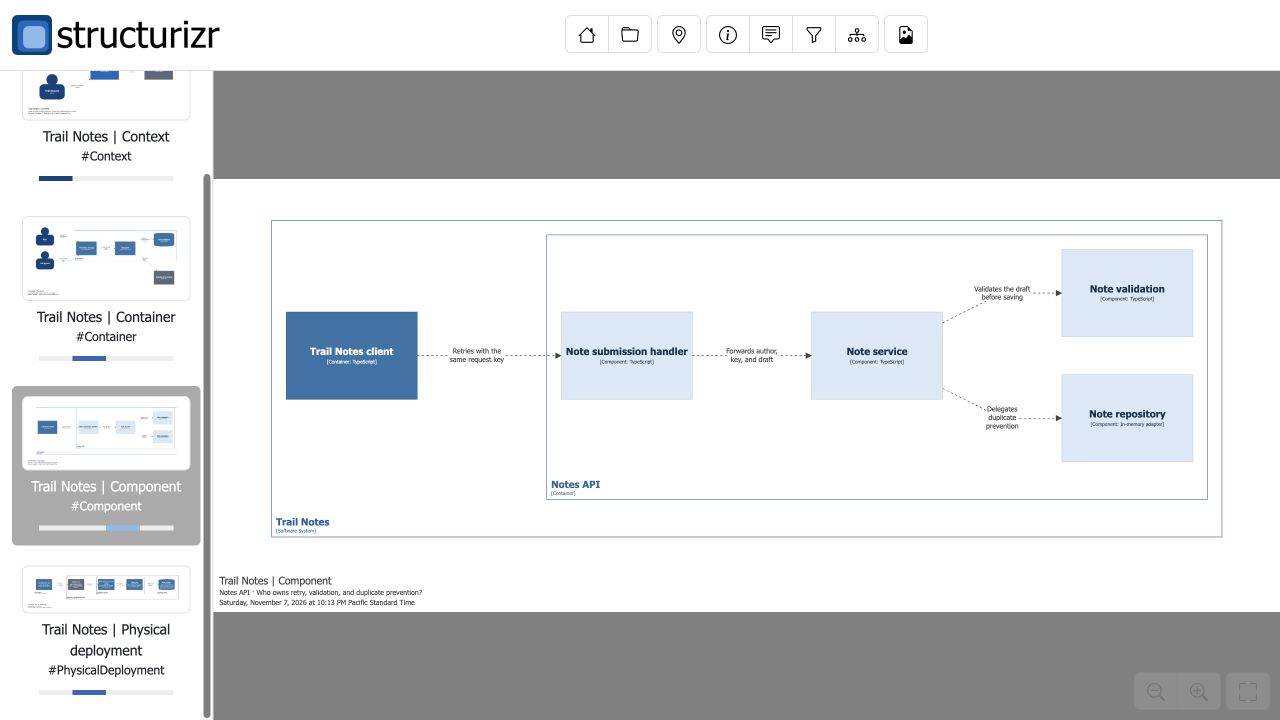](https://raw.githubusercontent.com/zrack/c4-architect-mcp/941ec79a12f3afd77fcf9ed093b858798ff9c688/docs/reviews/structurizr-export/Trail-Notes-Component-in-Structurizr.jpg) | [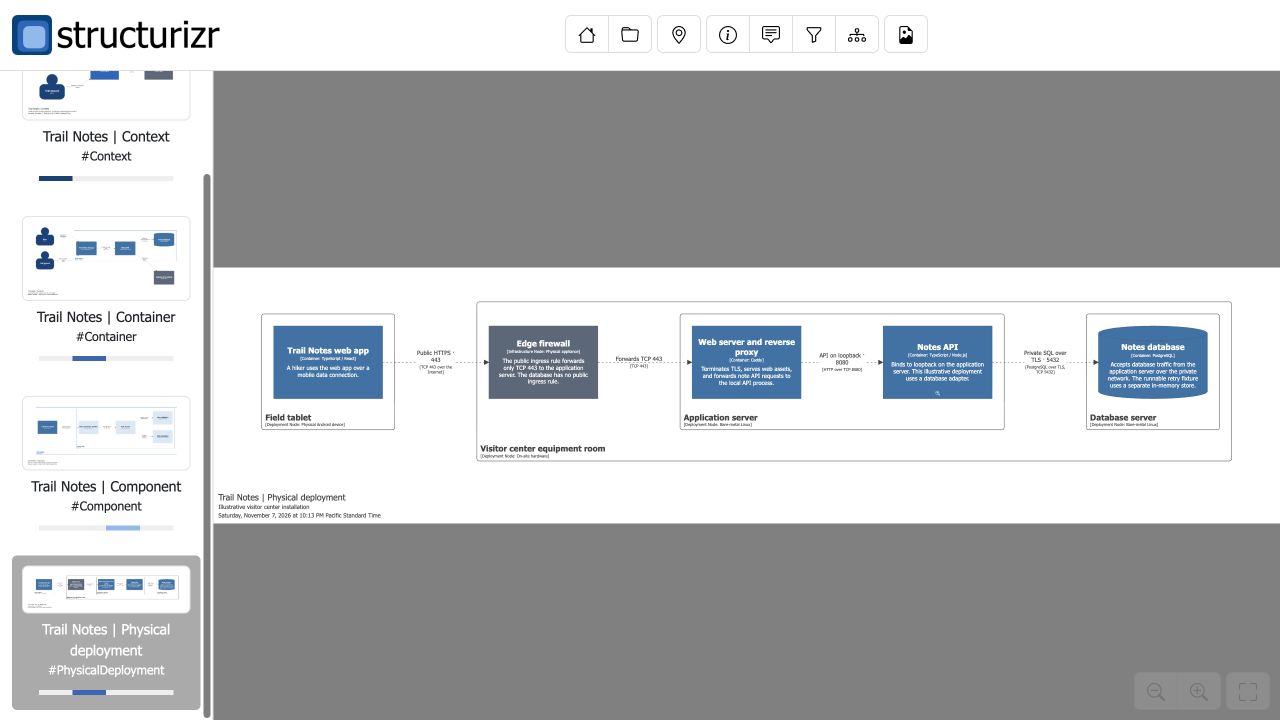](https://raw.githubusercontent.com/zrack/c4-architect-mcp/941ec79a12f3afd77fcf9ed093b858798ff9c688/docs/reviews/structurizr-export/Trail-Notes-Physical-Deployment-in-Structurizr.jpg) |
### Publish to Azure DevOps Wiki
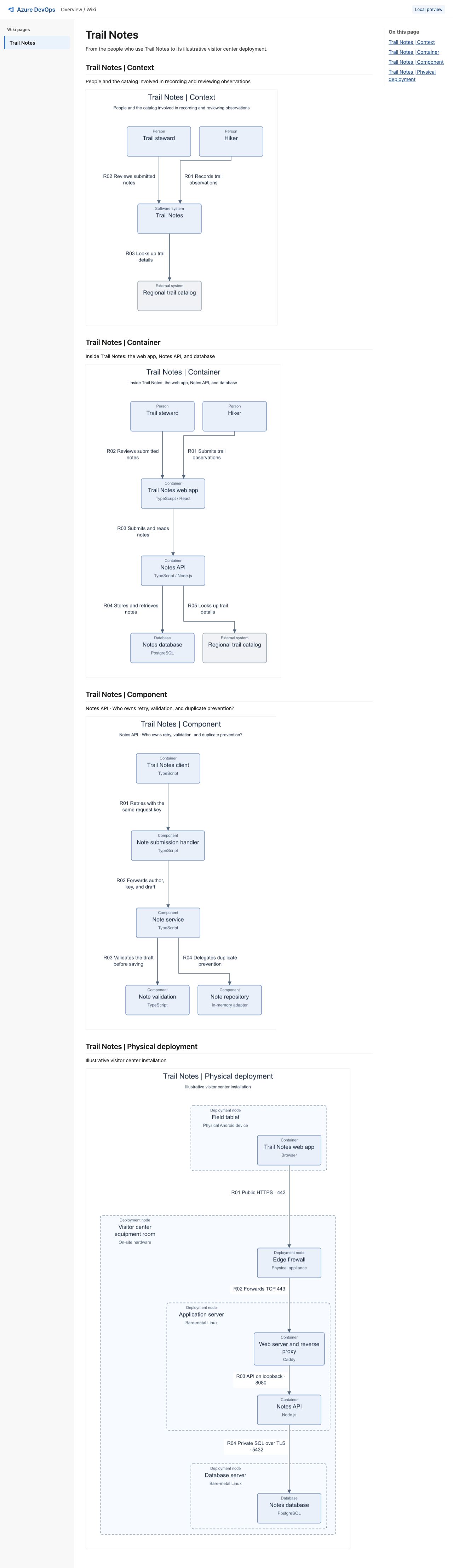
Save the input as `structurizr-workspace.json` and run the command from the same directory to preview the four Trail Notes diagrams. The preview writes `index.html`, `page.md`, and the PNG attachments locally. Open `index.html` in a browser. [Trail Notes input](https://raw.githubusercontent.com/zrack/c4-architect-mcp/d38bdbc7ae49fcce37b0baee6d206f1b066a96f2/examples/trail-notes/diagrams/structurizr-workspace.json)
```sh
npx -y c4-architect-mcp@0.2.0-alpha.10 publish-ado-wiki structurizr-workspace.json --out trail-notes-wiki
```
To publish, supply an existing Azure DevOps Services wiki and a page path. Set either `AZURE_DEVOPS_BEARER_TOKEN` to a Microsoft Entra access token for Azure DevOps or `AZURE_DEVOPS_EXT_PAT` to a PAT with **Wiki (Read & write)** access in the process environment. The preview command works without credentials. [Azure DevOps authentication](https://learn.microsoft.com/en-us/azure/devops/organizations/accounts/use-personal-access-tokens-to-authenticate?view=azure-devops)
```sh
npx -y c4-architect-mcp@0.2.0-alpha.10 publish-ado-wiki structurizr-workspace.json \
--out trail-notes-wiki --publish \
--organization YOUR_ORG --project YOUR_PROJECT --wiki YOUR_WIKI --page /Trail-Notes
```
The MCP tool uses `target: { organization, project, wiki, pagePath }` and `publish: true` for the same operation. The publisher creates a dedicated page or updates an intact page it previously generated. Updates use Azure DevOps page versions to guard against concurrent edits. The Wiki API writes attachments separately before saving the page, so an interrupted attempt can leave uploaded PNGs behind. [Wiki page API](https://learn.microsoft.com/en-us/rest/api/azure/devops/wiki/pages/create-or-update?view=azure-devops-rest-7.1) · [Wiki attachments API](https://learn.microsoft.com/en-us/rest/api/azure/devops/wiki/attachments/create?view=azure-devops-rest-7.1)
#### Trail Notes wiki preview
The local preview shows Context, Container, Component, and Physical Deployment on one page. Select the screenshot to open it at full size. [Download the generated Markdown](https://github.com/zrack/c4-architect-mcp/releases/download/v0.2.0-alpha.8/page.md)
[](https://raw.githubusercontent.com/zrack/c4-architect-mcp/d38bdbc7ae49fcce37b0baee6d206f1b066a96f2/docs/reviews/ado-wiki-publishing/Trail-Notes-Wiki-Full-Page.jpg)
### Publish to Confluence Cloud
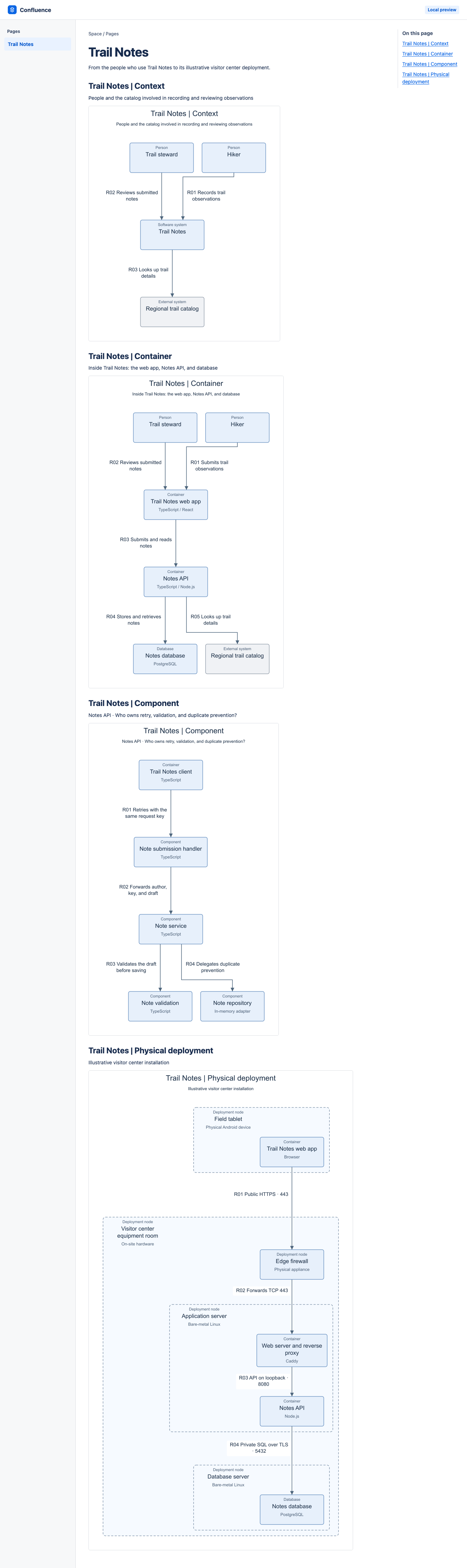
Save the Trail Notes input as `structurizr-workspace.json` and run the preview command from the same directory. Open `trail-notes-confluence/index.html` and select a diagram to see its PNG at full size. The directory also contains `page.storage.xhtml`, the page body sent to Confluence, and four PNG attachments. [Trail Notes input](https://raw.githubusercontent.com/zrack/c4-architect-mcp/7891d5059309302cd746287b6de47eb747b74529/examples/trail-notes/diagrams/structurizr-workspace.json)
```sh
npx -y c4-architect-mcp@0.2.0-alpha.10 publish-confluence structurizr-workspace.json --out trail-notes-confluence
```
To publish, set `CONFLUENCE_EMAIL` and `CONFLUENCE_API_TOKEN` in the CLI or MCP server environment. The Atlassian account needs permission to create or update the page and upload attachments. Supply your Cloud site origin and numeric space ID. Add `--cloud-id` for a scoped API token with `read:page:confluence`, `write:page:confluence`, `read:attachment:confluence`, `read:content-details:confluence`, and `write:attachment:confluence`. [Atlassian API tokens](https://support.atlassian.com/atlassian-account/docs/manage-api-tokens-for-your-atlassian-account/)
```sh
npx -y c4-architect-mcp@0.2.0-alpha.10 publish-confluence structurizr-workspace.json \
--out trail-notes-confluence --publish --site https://YOUR_SITE.atlassian.net --space-id 123456
```
Use `--parent-id` to create a child page, or reuse the returned ID with `--page-id` to update a dedicated page created by C4 Architect. For MCP, call `publish_to_confluence` with `target: { site, spaceId }` and `publish: true`. The target accepts the optional fields `parentId`, `pageId`, and `cloudId`.
The publisher creates a placeholder page so Confluence can accept attachments before the page body is saved. If a publish is interrupted, check the reported page and retry with its ID. The publisher reuses matching attachments and uses the current published page version to reject a conflicting update. Use a separate page for manual editing and collaborative drafts. [Confluence pages API](https://developer.atlassian.com/cloud/confluence/rest/v2/api-group-page/) · [Confluence attachments API](https://developer.atlassian.com/cloud/confluence/rest/v1/api-group-content---attachments/)
#### Trail Notes Confluence preview
The local preview shows Context, Container, Component, and Physical Deployment on one page. Select the screenshot to open it at full size. The preview command above generates the PNGs referenced by the XHTML. [Download page.storage.xhtml](https://github.com/zrack/c4-architect-mcp/releases/download/v0.2.0-alpha.9/page.storage.xhtml)
[](https://raw.githubusercontent.com/zrack/c4-architect-mcp/7891d5059309302cd746287b6de47eb747b74529/docs/reviews/confluence-publishing/Trail-Notes-Confluence-Full-Page.png)
### Publish to Notion
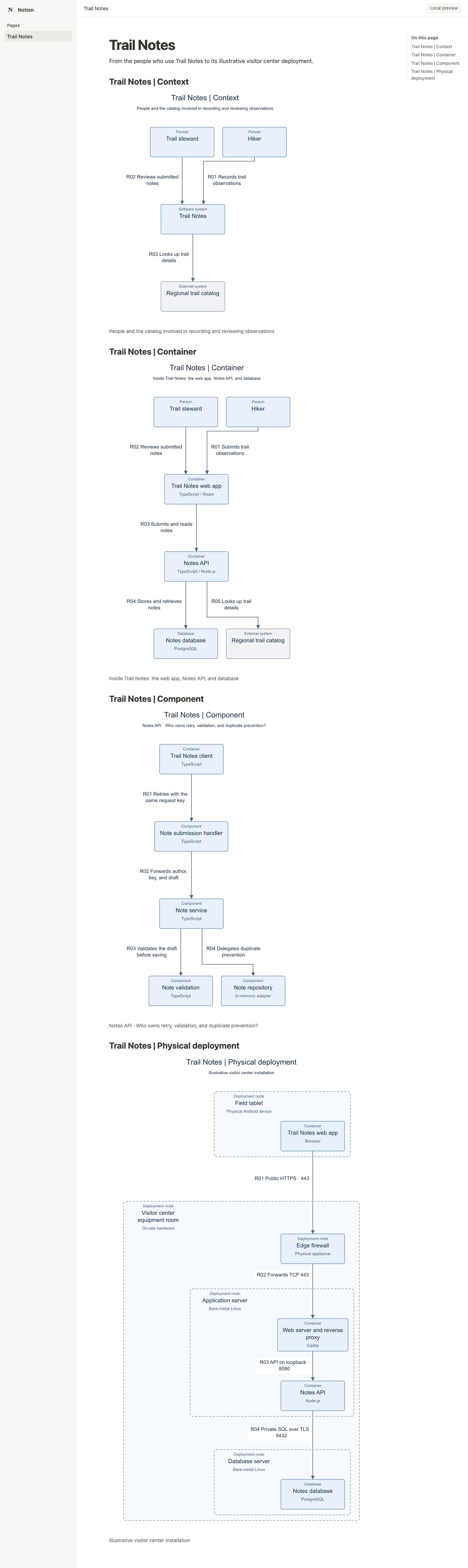
Save the Trail Notes input as `structurizr-workspace.json` and run the preview command from the same directory. Open `trail-notes-notion/index.html` and select a diagram to see its PNG at full size. The output also contains a `page.json` manifest and the four PNGs. [Trail Notes input](https://raw.githubusercontent.com/zrack/c4-architect-mcp/b78cd30162e856f1b4ed3b5531d1850c341b88c6/examples/trail-notes/diagrams/structurizr-workspace.json)
```sh
npx -y c4-architect-mcp@0.2.0-alpha.10 publish-notion structurizr-workspace.json --out trail-notes-notion
```
To publish, share the parent page with a Notion connection that has **Insert content** access. Set `NOTION_API_TOKEN` in the CLI or MCP server environment. Supply the parent page ID as a UUID with or without hyphens. [Notion authorization and page access](https://developers.notion.com/guides/authorization/overview)
```sh
npx -y c4-architect-mcp@0.2.0-alpha.10 publish-notion structurizr-workspace.json \
--out trail-notes-notion --publish --parent-page-id YOUR_PARENT_PAGE_ID
```
For MCP, use `publish_to_notion` with `target: { parentPageId }` and `publish: true`. Each publish creates a new child page in the workspace after all PNGs upload. The publisher uses direct uploads up to 20 MiB per PNG, subject to the workspace's own limit. If Notion cannot confirm page creation, check the parent page before retrying. [Notion file limits](https://developers.notion.com/guides/data-apis/working-with-files-and-media) · [Notion guidance for timed-out writes](https://developers.notion.com/reference/request-limits#retry-a-write-that-returns-503)
#### Trail Notes Notion preview
The local preview shows Context, Container, Component, and Physical Deployment on one page. Select the screenshot to open it at full size. The preview command above generates the PNGs referenced by the manifest. [Download page.json](https://github.com/zrack/c4-architect-mcp/releases/download/v0.2.0-alpha.10/page.json)
[](https://raw.githubusercontent.com/zrack/c4-architect-mcp/b78cd30162e856f1b4ed3b5531d1850c341b88c6/docs/reviews/notion-publishing/Trail-Notes-Notion-Full-Page.png)
### Focus a diagram on one node
Both TakeNote diagrams use the same source snapshot. On the right, focusing on `NoteEditor.tsx` and its direct neighbors reduces the view from **108 nodes and 363 arrows** to **15 nodes and 19 arrows**. Follow `TakeNoteApp.tsx` → `NoteEditor.tsx` → `PreviewEditor.tsx` to see the difference.
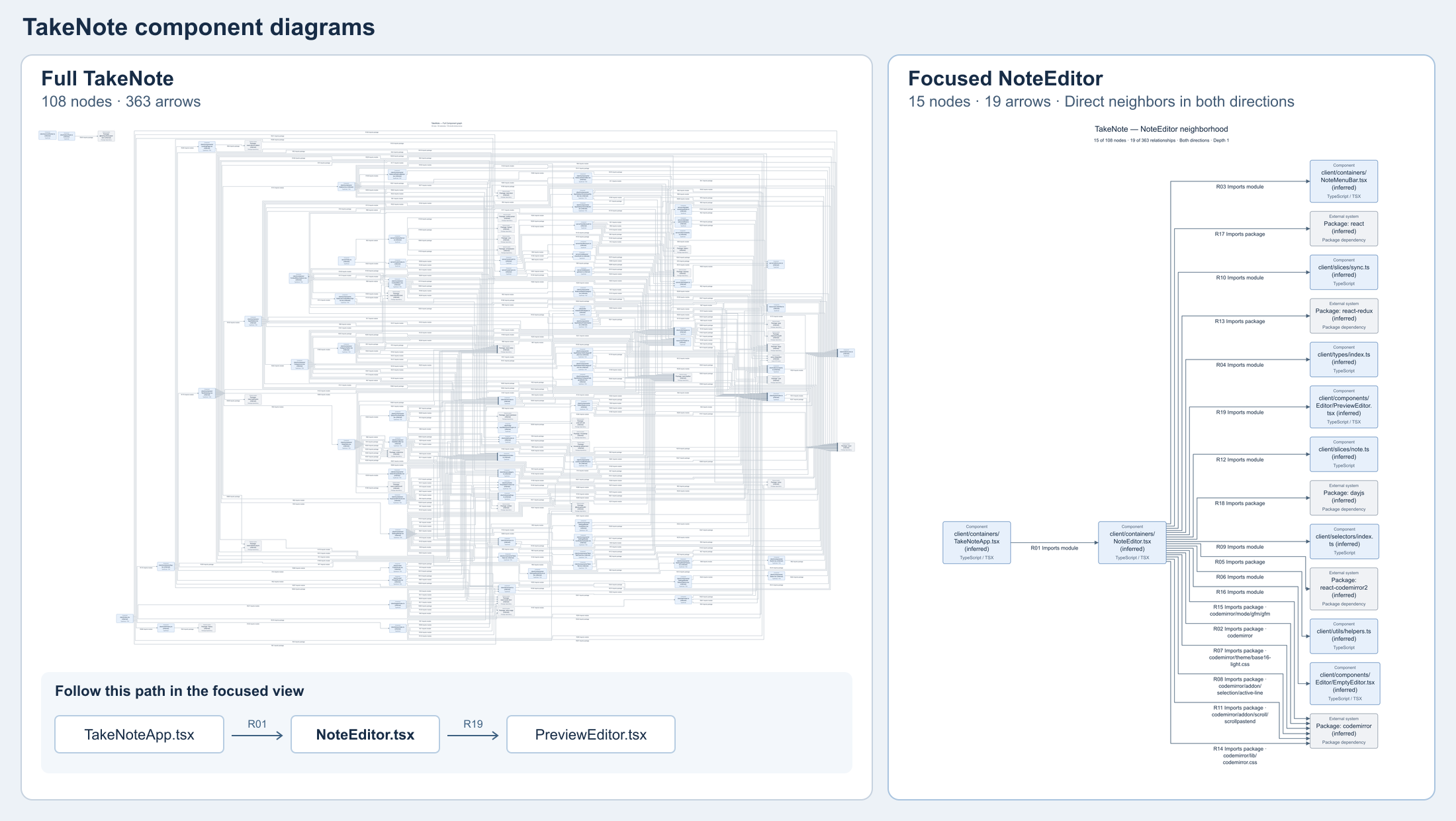
[Full-size TakeNote comparison PNG](https://raw.githubusercontent.com/zrack/c4-architect-mcp/main/docs/images/takenote-side-by-side.png)
Use `query --search` to find the exact node ID for a focused diagram. These commands use the graph from the checkout example and show the outgoing dependencies of Order orchestration.
```sh
npx -y c4-architect-mcp@0.2.0-alpha.10 query output/order-service.graph.json --search "Order orchestration" --depth 0
npx -y c4-architect-mcp@0.2.0-alpha.10 render output/order-service.graph.json --node component:orders --direction outgoing --out output/ORDER-SERVICE.outgoing.md
```
With `--node`, render defaults to both directions, depth 1, 25 nodes, and 50 relationships. Use `--direction incoming` or `--direction outgoing` to trace one direction. Set `--depth`, `--nodes`, and `--edges` to adjust the view. The diagram caption shows how much of the saved graph is included. The render result reports omitted nodes and relationships and whether a node or relationship limit was reached.
The focused Markdown relationship table and interactive HTML details show up to three source locations per relationship. Use the saved graph for the full evidence.
For MCP, pass `focus` to `render_architecture_graph`. Find the ID with `query_architecture_graph` using `search`.
```json
{
"graphPath": "/absolute/path/to/project/architecture.graph.json",
"outputPath": "/absolute/path/to/project/ARCHITECTURE.orders.md",
"focus": {
"nodeId": "component:orders",
"direction": "outgoing",
"maxDepth": 1,
"maxNodes": 25,
"maxEdges": 50
}
}
```
### Review architecture changes for a pull request
Pass `review` two saved graphs at the same C4 level and scan scope. Use each revision's boundary configuration if the pull request changes how files are assigned to components.
```sh
npx -y c4-architect-mcp@0.2.0-alpha.10 review base.graph.json head.graph.json --out PR-ARCHITECTURE.md
```
The report separates dependency changes, declared boundaries, and file reassignments from ordinary source edits. It lists source locations and flags partial scans. The focused diagram uses the head snapshot for an added or changed dependency and the base snapshot when dependencies were only removed. Keep the diagram files beside the Markdown when sharing the report.
For links to exact GitHub source lines, pass each checkout's full commit SHA to `analyze --commit` when saving its graph. Then specify the repository and scan root for the report. Both snapshots must use the same repository-relative source root. The root defaults to `.` for a scan of the entire repository.
```sh
npx -y c4-architect-mcp@0.2.0-alpha.10 review base.graph.json head.graph.json --out PR-ARCHITECTURE.md \
--github-repo OWNER/REPO --source-root src
```
Partial scans list unresolved import locations and specifiers for both revisions. The report shows up to 25 locations per snapshot, with changes to the unresolved imports listed first.
#### Run the review in GitHub Actions
Open **Actions → PR architecture review → Run workflow**, choose the default branch, and enter the pull request number. The manual workflow compares Component snapshots at the PR's base and head commits without running their code. The source directory defaults to `src`.
For each revision, the workflow stages dependencies from its manifest and v3 npm lockfile in a separate directory. It uses the public npm registry with integrity checks and disables scripts. If a lockfile is missing, uses workspaces or other unsupported dependency sources, or the install fails, the workflow scans that revision without staged dependencies and reports any unresolved imports.
Download the `pr-<number>-architecture-review-<attempt>` artifact from the run and extract it before opening `PR-ARCHITECTURE.md`. Keep the focused diagram files beside the report so its links work. If there is no changed neighborhood to render, the artifact contains only the report.
Select **Post an architecture review summary to the pull request** when starting the workflow to share the dependency counts, scan status, and artifact link in a PR comment. The setting defaults to off. Readers with repository access can download the Markdown report and any focused diagram files after signing in to GitHub, while the artifact is available. Re-running the workflow updates that run's comment.
##### Use the workflow in another repository
Save this caller as `.github/workflows/architecture-review.yml` on your repository's default branch. Open **Actions → Architecture review → Run workflow** in that repository. Enter the PR number and a directory tracked in both revisions, or use `.` to scan the repository root. The report and any focused diagram appear in the calling repository's run artifacts.
```yaml
name: Architecture review
on:
workflow_dispatch:
inputs:
pr_number:
description: Pull request number
type: string
required: true
source_root:
description: Repository-relative source directory
type: string
default: src
permissions:
contents: read
pull-requests: read
jobs:
review:
uses: zrack/c4-architect-mcp/.github/workflows/pr-architecture-review-report.yml@bbac6eea276202a284af02267eca5075c7293cda
with:
pr_number: ${{ inputs.pr_number }}
source_root: ${{ inputs.source_root }}
```
If your repository restricts reusable workflows, allow the pinned `uses` reference in its Actions settings. To offer opt-in comments, call `pr-architecture-review.yml` at the same commit instead, grant the calling job `pull-requests: write`, and pass a Boolean `post_comment` input. Its default is `false`, and the scan job still uses read-only permissions.
##### Example output from PR #4
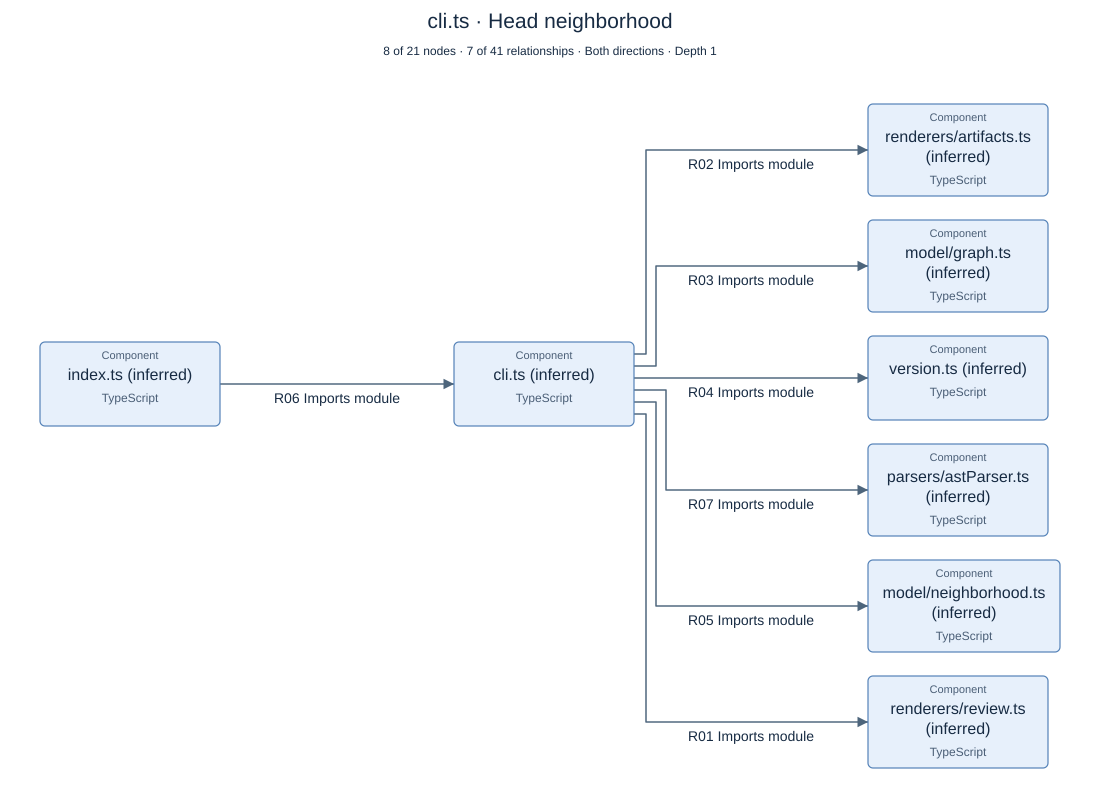
With commenting enabled, the workflow posted this summary on the PR that introduced the `review` command. [View the original comment on PR #4](https://github.com/zrack/c4-architect-mcp/pull/4#issuecomment-6716125585)
> **Component architecture review**
>
> `55419ce` → `4b39e25` · Base scan **complete** · Head scan **complete**
>
> Dependencies · **3 added**, **0 removed**, **0 changed**.
>
> [Download the Markdown report and focused diagram](https://github.com/zrack/c4-architect-mcp/actions/runs/42438222217/artifacts/13600353024)
The focused view shows the immediate neighbors of `cli.ts`. Follow **R01** to trace the new import of `renderers/review.ts`.
[Read the Markdown report](https://github.com/zrack/c4-architect-mcp/blob/main/docs/reviews/pr-4/PR-ARCHITECTURE.md) · [Open the full-size PNG](https://raw.githubusercontent.com/zrack/c4-architect-mcp/main/docs/reviews/pr-4/PR-ARCHITECTURE.focus-e758568899e88d5e.png) · [View the Actions run](https://github.com/zrack/c4-architect-mcp/actions/runs/42435820178)
## Read the diagram
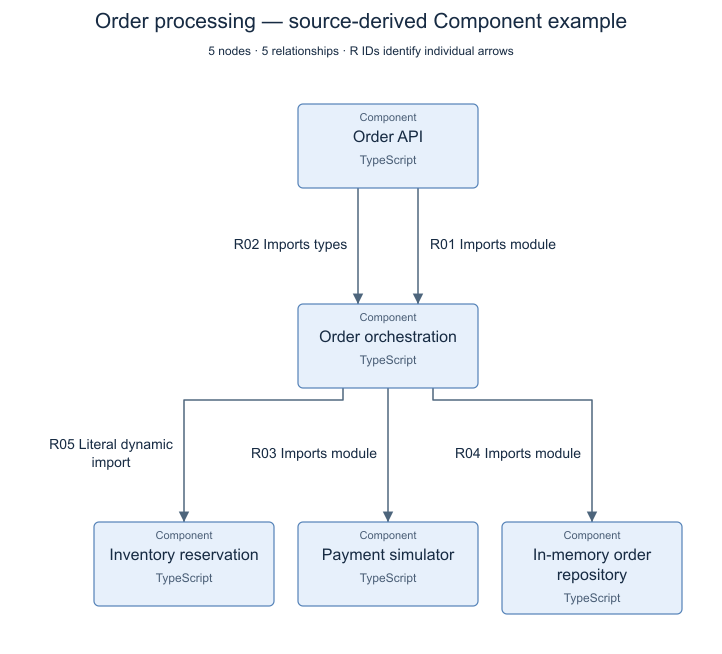
*Five declared components and five source-observed dependencies from the checked-in [order-service example](https://github.com/zrack/c4-architect-mcp/blob/main/examples/README.md). The application is synthetic; the dependencies come from its actual source imports.*
[Full-size PNG](https://raw.githubusercontent.com/zrack/c4-architect-mcp/main/docs/images/component-example.png) · [Scalable SVG](https://raw.githubusercontent.com/zrack/c4-architect-mcp/main/docs/images/component-example.svg)
The server computes the image layout with ELK, compares horizontal and vertical arrangements, and reserves space for the wrapped labels it draws. PNG and SVG rendering do not require a browser at runtime. Mermaid remains a compatible source export; a client's Mermaid layout may differ from the server image.
The saved graph preserves the system/container hierarchy. Context, Container, and Component images show parent-container and inferred-boundary information in node descriptions. Authored Deployment diagrams can show nested hosts. Inspect those descriptions in the interactive view.
Saving `ARCHITECTURE.md` also writes `ARCHITECTURE.svg`, `ARCHITECTURE.png`, and `ARCHITECTURE.html` beside it. The Markdown shows the PNG, links to the interactive view, includes a relationship table, and retains the Mermaid source in a collapsed section.
<details>
<summary><strong>Explore the larger 20-node renderer example</strong></summary>
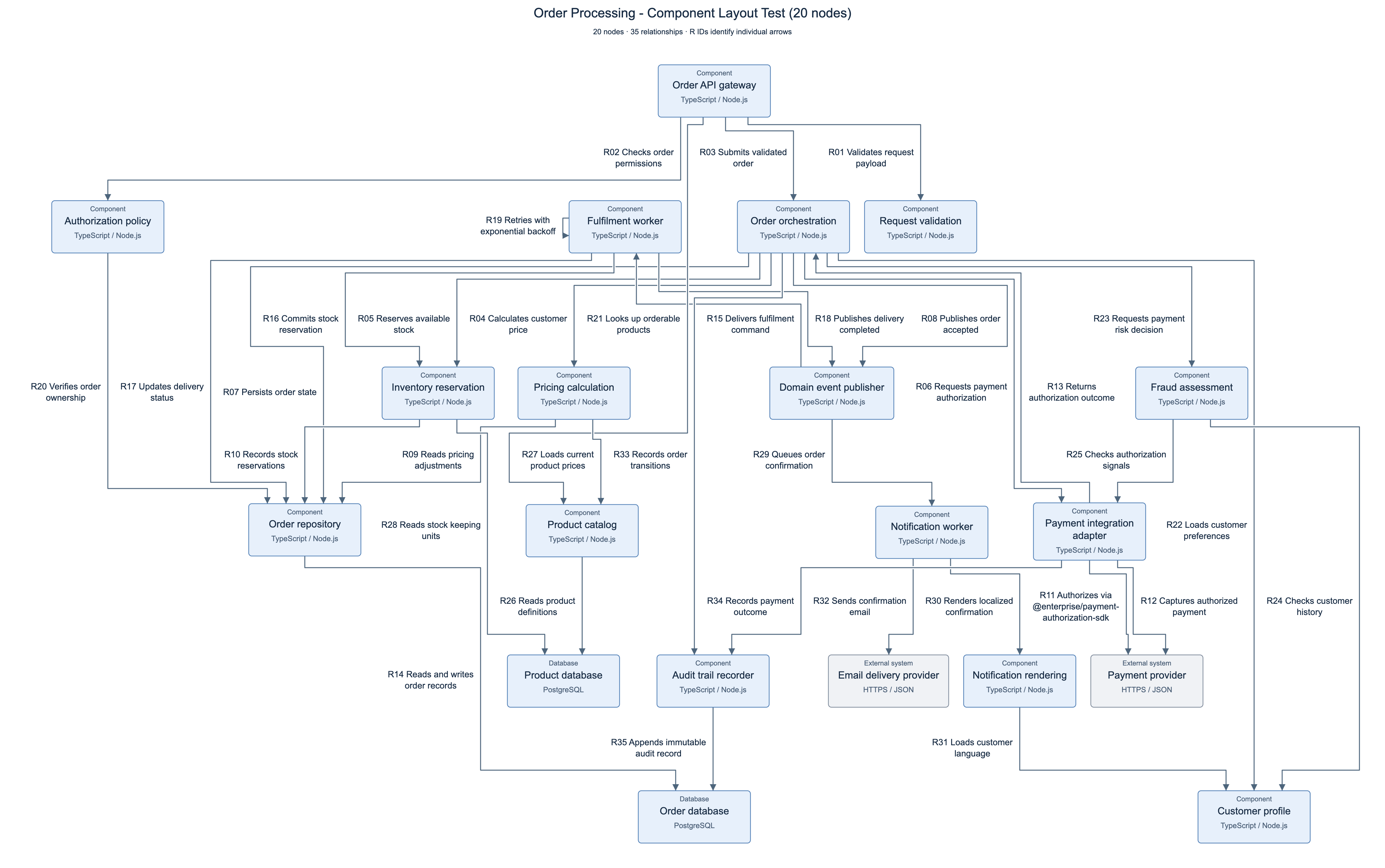
This separate stress fixture has 20 nodes and 35 relationships, including branching, cycles, shared dependencies, and long labels. Its connections are authored test data rather than extracted source dependencies.
[Full-size PNG](https://raw.githubusercontent.com/zrack/c4-architect-mcp/main/docs/images/component-20.png) · [Scalable SVG](https://raw.githubusercontent.com/zrack/c4-architect-mcp/main/docs/images/component-20.svg)
</details>
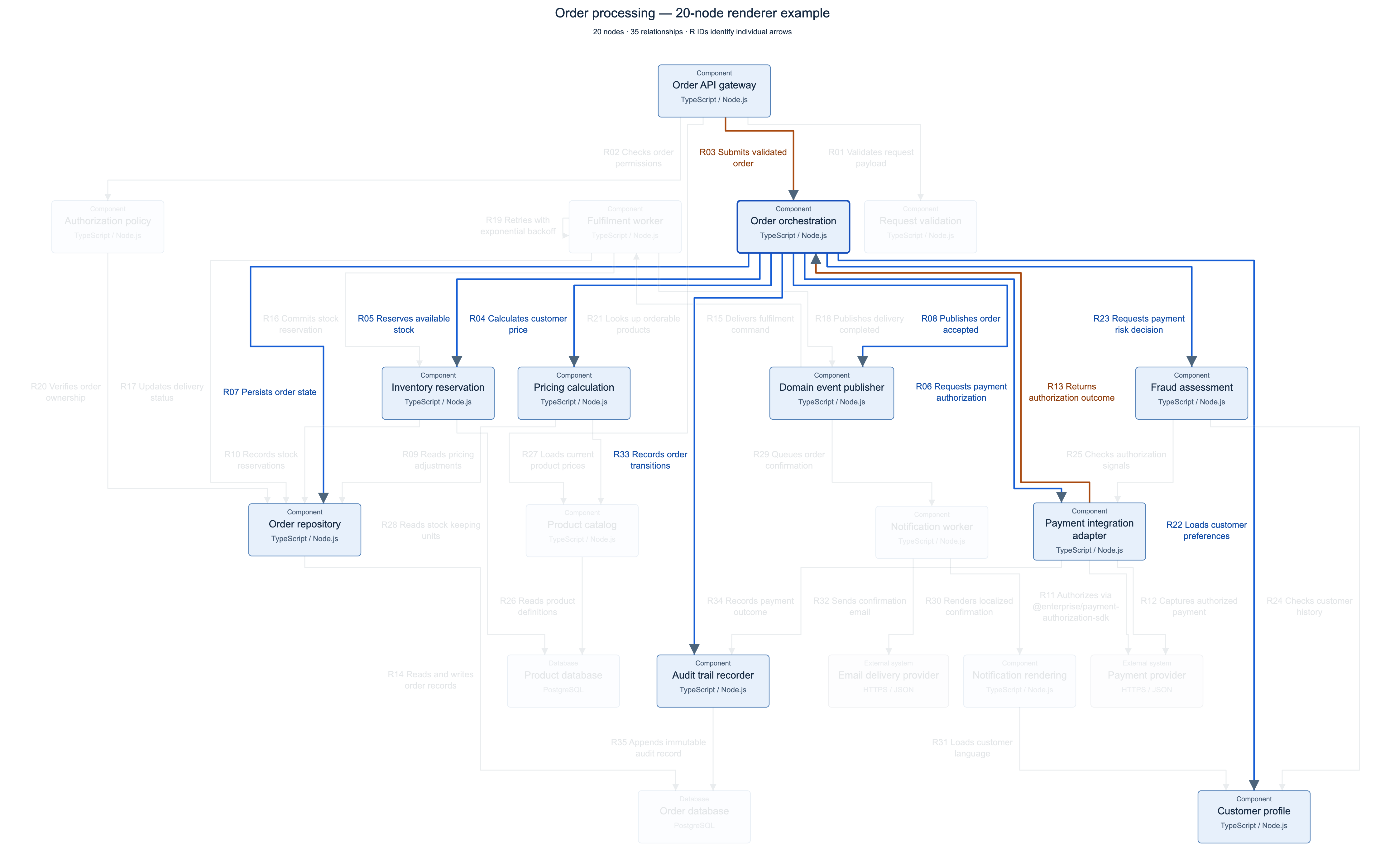
*The 20-node stress fixture with Order orchestration selected, saved through the interactive view's export buttons.*
[Full-size selected PNG](https://raw.githubusercontent.com/zrack/c4-architect-mcp/main/docs/images/selection-example.png) · [Scalable selected SVG](https://raw.githubusercontent.com/zrack/c4-architect-mcp/main/docs/images/selection-example.svg)
Select a component to highlight outgoing connections in blue and incoming connections in brown. Other routes fade. Select a relationship ID to isolate that route and inspect its full label. Zoom, keyboard selection, Escape, and **Show all** help you move between details and the complete picture.

**Export PNG** and **Export SVG** preserve the current selection and connection highlighting across the full diagram, regardless of zoom or scroll position. PNG exports at twice the diagram's natural dimensions; SVG remains scalable. The self-contained HTML works as a local file without contacting the MCP server or an external service.
Automatic layout cannot make every graph readable at every size. Crossings can remain, and a large full-graph image may need zoom. Use selection and bounded graph queries to follow a particular change or dependency.
See [image provenance and regeneration instructions](https://github.com/zrack/c4-architect-mcp/blob/main/docs/images/README.md) to reproduce these examples.
## Local execution and data
The parser reads local source files and does not call an LLM API. Generated diagrams and their interaction code are self-contained. Your MCP client receives the tool results, and its own settings determine whether those results are sent to a model or another service. Review those settings before analyzing private source.
Analysis is static; it does not run the analyzed application's code. Output options write the requested graph and diagram files. See [SECURITY.md](https://github.com/zrack/c4-architect-mcp/blob/main/SECURITY.md) for the security scope and reporting process.
## Develop and verify
From a repository checkout:
```sh
npm ci
npm test
npm run test:package
npm run test:layout
```
The regular tests cover parsing, graph contracts, graph operations, rendering, and MCP behavior. The package check exercises a packed installation. The layout check uses real browser geometry and downloads against synthetic 12-node and 20-node fixtures. It checks labels, routes, arrowheads, compactness, highlighting, keyboard controls, and selection-aware PNG/SVG exports.
The layout check uses installed Google Chrome by default. To use Playwright Chromium:
```sh
npx playwright install chromium
C4_BROWSER_CHANNEL=chromium npm run test:layout
```
For PowerShell, set `$env:C4_BROWSER_CHANNEL = "chromium"` before running the test. Browser reports and generated fixtures are written under `output/playwright/component-scale/`. These checks cover the included cases, not every possible graph topology.
The [CI workflow](https://github.com/zrack/c4-architect-mcp/blob/main/.github/workflows/ci.yml) configures tests on Node.js 22 and 24 across Linux, macOS, and Windows, plus a Chromium layout job. See the [GitHub Actions runs](https://github.com/zrack/c4-architect-mcp/actions) for results.
## Build this with us
Useful contributions start with a concrete case: an import that resolves incorrectly, a boundary that is hard to express, or a diagram whose route is difficult to follow. Small, sanitized fixtures are especially valuable.
- **Report a bug:** include a minimal input, expected result, diagnostics, and a screenshot for rendering problems.
- **Improve analysis:** add source evidence and a regression fixture; keep observed facts separate from inference.
- **Improve diagrams:** test the actual SVG and exported images, including selected views.
- **Design an extension:** discuss its graph contract before adding a new language, renderer, or publisher.
- **Improve documentation:** try the setup on your platform and client, and report the exact versions used.
Read [CONTRIBUTING.md](https://github.com/zrack/c4-architect-mcp/blob/main/CONTRIBUTING.md), the [Code of Conduct](https://github.com/zrack/c4-architect-mcp/blob/main/CODE_OF_CONDUCT.md), and the [roadmap](https://github.com/zrack/c4-architect-mcp/blob/main/ROADMAP.md). Public API details may change during the alpha; preserve a copy of important graph snapshots and boundary configurations.
## License
C4 Architect is available under the [MIT License](https://github.com/zrack/c4-architect-mcp/blob/main/LICENSE). You may use, modify, and redistribute it, including commercially, subject to the license terms. Dependency licenses and attribution requirements remain applicable; see [NOTICE](https://github.com/zrack/c4-architect-mcp/blob/main/NOTICE) and [third-party notices](https://github.com/zrack/c4-architect-mcp/blob/main/THIRD_PARTY_NOTICES.md).
TDQS
Scored across 6 tools
Four tools (analyze, get_summary, query, compare) have clearly distinct verbs on the same graph resource, which is fine. However, render_architecture_graph and render_c4_mermaid both produce a compact C4 image plus Mermaid source plus optional Markdown/SVG/PNG/HTML files, making their boundaries nearly indistinguishable and forcing the agent to guess which to call.
All six tools follow a consistent snake_case verb_noun pattern (analyze_*, get_*, render_*, query_*, compare_*). Minor deviation: two of them use 'architecture' as the noun while render_c4_mermaid uses the 'c4_mermaid' domain phrasing, which also breaks the resource-naming symmetry.
Six tools is well-scoped for an architecture-analysis pipeline: analysis, summary, query, compare, and rendering. Every tool maps to a real stage in the workflow, with only the duplicate renderer arguably removable.
The lifecycle is well covered: parse dependencies, persist a graph, read a summary, explore a bounded neighborhood, diff two graphs, and render. Minor gap: no tool to list, delete, or explicitly re-validate/refresh saved graphs, so agents lack discovery and cleanup operations.