youtube-summarize
MCP-Server, der YouTube-Video-Transkripte abruft und optional zusammenfasst.
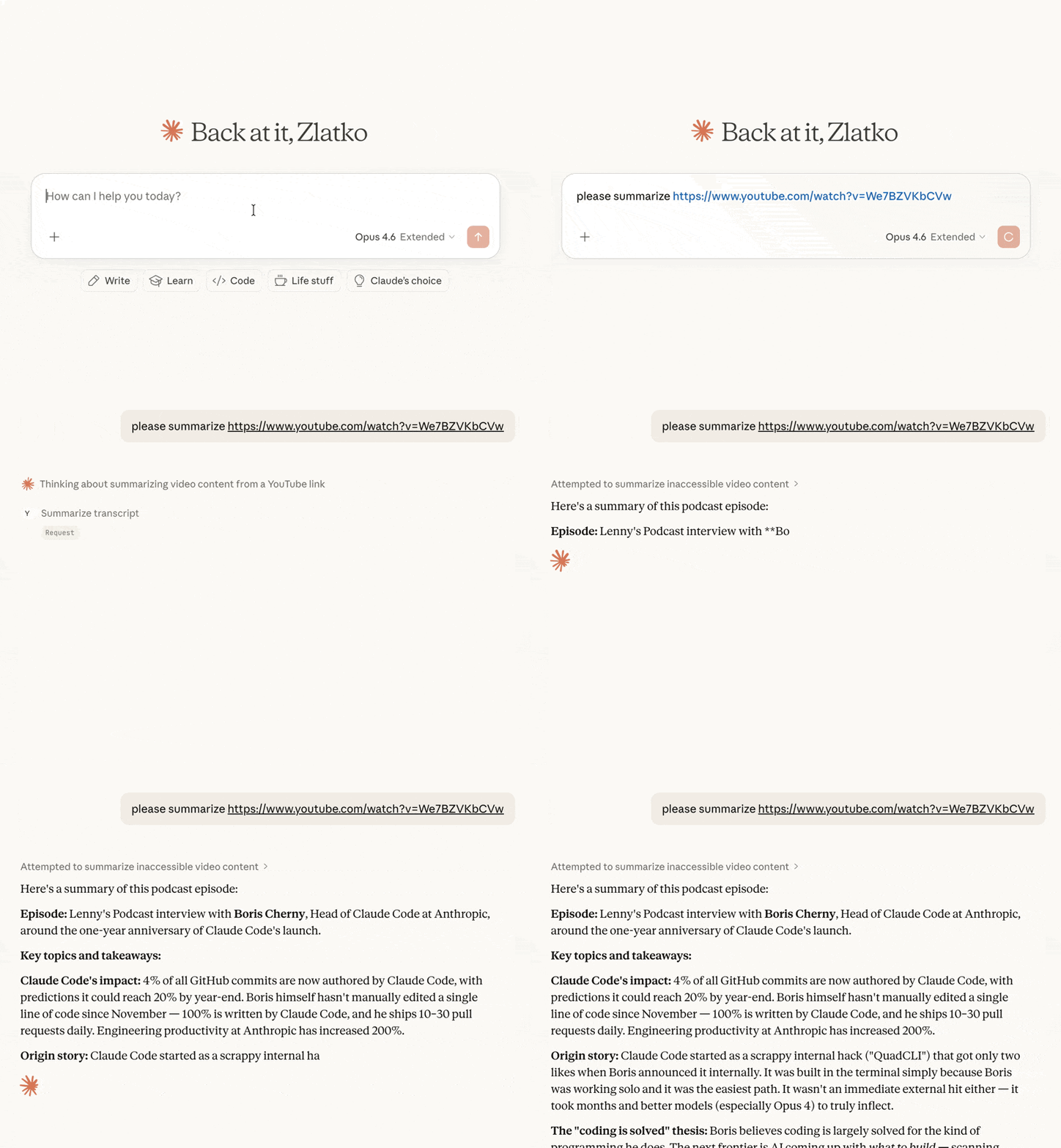
Funktionen
Transkripte abrufen in verschiedenen Formaten (Text, JSON, SRT, WebVTT, Pretty-Print)
Video-Metadaten — Titel, Beschreibung, Kanal, Upload-Datum, Dauer, Aufrufe, Kapitel (via yt-dlp)
Optionale Zeitstempel in Klartext-Transkripten
Videos zusammenfassen — gibt das Transkript mit einer klar abgegrenzten Aufforderung (Prompt) zur menschlichen Überprüfung zurück, bevor das LLM darauf reagiert
Playlist-Videos auflisten — schnelle Auflistung jeder öffentlichen Playlist mit optionaler Sortierung
Verfügbare Sprachen auflisten für die Transkripte eines Videos
Flexibles URL-Parsing — akzeptiert vollständige YouTube-URLs (youtube.com/watch?v=, youtu.be/, youtube.com/embed/, youtube.com/shorts/) oder reine Video-IDs
Mehrsprachige Unterstützung — Transkripte in bestimmten Sprachen mit Fallback-Priorität anfordern
Related MCP server: ytt-mcp
Tools
get_transcript
Ruft das Transkript eines YouTube-Videos ab. Standardmäßig ist der Antwort ein [METADATA]-Block vorangestellt (Titel, Kanal, Veröffentlichungsdatum, Dauer, Aufrufe, Beschreibung); übergeben Sie include_metadata=false für eine reine Transkript-Ausgabe.
Parameter | Typ | Standard | Beschreibung |
url
| string | erforderlich | YouTube-Video-URL oder Video-ID |
languages
| string[] | ["en"]
| Bevorzugte Sprachen in Prioritätsreihenfolge |
format
| string | "text"
| Ausgabeformat: text, json, pretty, webvtt, srt |
preserve_formatting
| boolean | false
| HTML-Formatierungs-Tags im Transkript beibehalten |
include_timestamps
| boolean | false
| Wenn true bei format="text", wird jede Zeile mit [HH:MM:SS] versehen. Wird bei anderen Formaten ignoriert (diese enthalten bereits Zeitstempel). |
include_metadata
| boolean | true
| Stellt dem Transkript einen [METADATA]-Block voran. Übergeben Sie false für eine reine Transkript-Ausgabe. |
summarize_transcript
Ruft ein Transkript ab und gibt es zusammen mit Anweisungen zur Zusammenfassung zurück. Die Antwort ist in klar gekennzeichnete Abschnitte unterteilt ([INSTRUCTIONS], [PROMPT_SOURCE], [VIDEO], [METADATA], [TRANSCRIPT]), sodass ein Mensch den Prompt überprüfen kann, bevor das LLM darauf reagiert.
Parameter | Typ | Standard | Beschreibung |
url
| string | erforderlich | YouTube-Video-URL oder Video-ID |
prompt
| string | (Standard-Prompt) | Benutzerdefinierte Anweisungen zur Zusammenfassung |
languages
| string[] | ["en"]
| Bevorzugte Sprachen in Prioritätsreihenfolge |
include_timestamps
| boolean | false
| Jede Transkriptzeile mit [HH:MM:SS] versehen. |
include_metadata
| boolean | true
| Einen [VIDEO]-Block mit Titel, Kanal, Veröffentlichungsdatum, Dauer, Aufrufen und Beschreibung einfügen. |
get_video_metadata
Ruft Metadaten (Titel, Beschreibung, Kanal, Upload-Datum, Dauer, Aufrufe, Tags, Kapitel usw.) für ein YouTube-Video ab. Basiert auf yt-dlp.
Parameter | Typ | Standard | Beschreibung |
url
| string | erforderlich | YouTube-Video-URL oder Video-ID |
list_playlist_videos
Listet die Videos in einer YouTube-Playlist auf (Titel, ID, Kanal, Dauer, Aufrufe, URL). Die Metadaten pro Video sind bewusst schlank gehalten, damit der Aufruf auch bei großen Playlists schnell bleibt; rufen Sie get_video_metadata mit einer spezifischen Video-ID für vollständige Details auf.
Parameter | Typ | Standard | Beschreibung |
url
| string | erforderlich | YouTube-Playlist-URL (mit ?list=...) oder reine Playlist-ID |
limit
| integer | 500
| Maximale Anzahl der zurückzugebenden Videos |
sort_by
| string | "index"
| Eines von: index (Playlist-Reihenfolge), title, duration, views. upload_date wird nicht unterstützt. |
order
| string | "asc"
| asc oder desc
|
list_transcripts
Listet die verfügbaren Transkriptsprachen für ein Video auf.
Parameter | Typ | Standard | Beschreibung |
url
| string | erforderlich | YouTube-Video-URL oder Video-ID |
Installation
Schnellstart (empfohlen)
Claude Desktop
Fügen Sie dies zu Ihrer claude_desktop_config.json hinzu:
{
  "mcpServers": {
    "youtube-summarize": {
      "command": "uvx",
      "args": ["youtube-summarize"]
    }
  }
}
Claude Code
claude mcp add youtube-summarize -- uvx youtube-summarize
Andere MCP-Clients
Starten Sie den Server über stdio:
Voraussetzungen
Python 3.13+
uv Paketmanager
Entwicklung
# Install dependencies
uv sync

# Launch the MCP inspector (web UI for testing tools)
uv run mcp dev main.py
Lizenz
MIT
mcp-name: io.github.zlatkoc/youtube-summarize

