
A
licenseA
qualityB
maintenanceEnables AI coding agents to retrieve the latest stable versions of packages and tools across multiple ecosystems, preventing outdated dependency versions in generated code.
4
245 PyPI
9
Apache 2.0

This server provides tools to check the latest stable versions and information for various software packages, container images, and AI models across multiple ecosystems:
NPM Packages: Check latest versions with optional constraints
Python Packages: Check versions from requirements.txt and pyproject.toml
Java Packages: Check versions for Maven and Gradle dependencies
Go Packages: Check versions from go.mod, including required and replacement dependencies
Swift Packages: Check latest versions with constraints
GitHub Actions: Check latest versions with optional details
Docker Images: Check available tags from Docker Hub, GitHub Container Registry, or custom registries
AWS Bedrock Models: Search, list, and get information about Amazon Bedrock models, including the latest Claude Sonnet model
Provides tools for checking AWS Bedrock AI models, including searching, listing, and getting information about available models
Provides tools for checking available tags for Docker container images from Docker Hub
Provides tools for checking available tags for container images from GitHub Container Registry (ghcr.io)
Provides tools for checking latest stable package versions from the npm registry for Node.js/JavaScript packages
Provides tools for checking latest stable package versions from the PyPI registry for Python packages
This server does not currently have a deployable release on Glama. Follow the repository's setup instructions to install and configure it for your MCP client, including any required credentials and local dependencies.
An MCP server that provides tools for checking latest stable package versions from multiple package registries:
npm (Node.js/JavaScript)
PyPI (Python)
Maven Central (Java)
Go Proxy (Go)
Swift Packages (Swift)
AWS Bedrock (AI Models)
Docker Hub (Container Images)
GitHub Container Registry (Container Images)
GitHub Actions
This server helps LLMs ensure they're recommending up-to-date package versions when writing code.
IMPORTANT: I'm slowly moving across this tool to a component of my mcp-devtools server
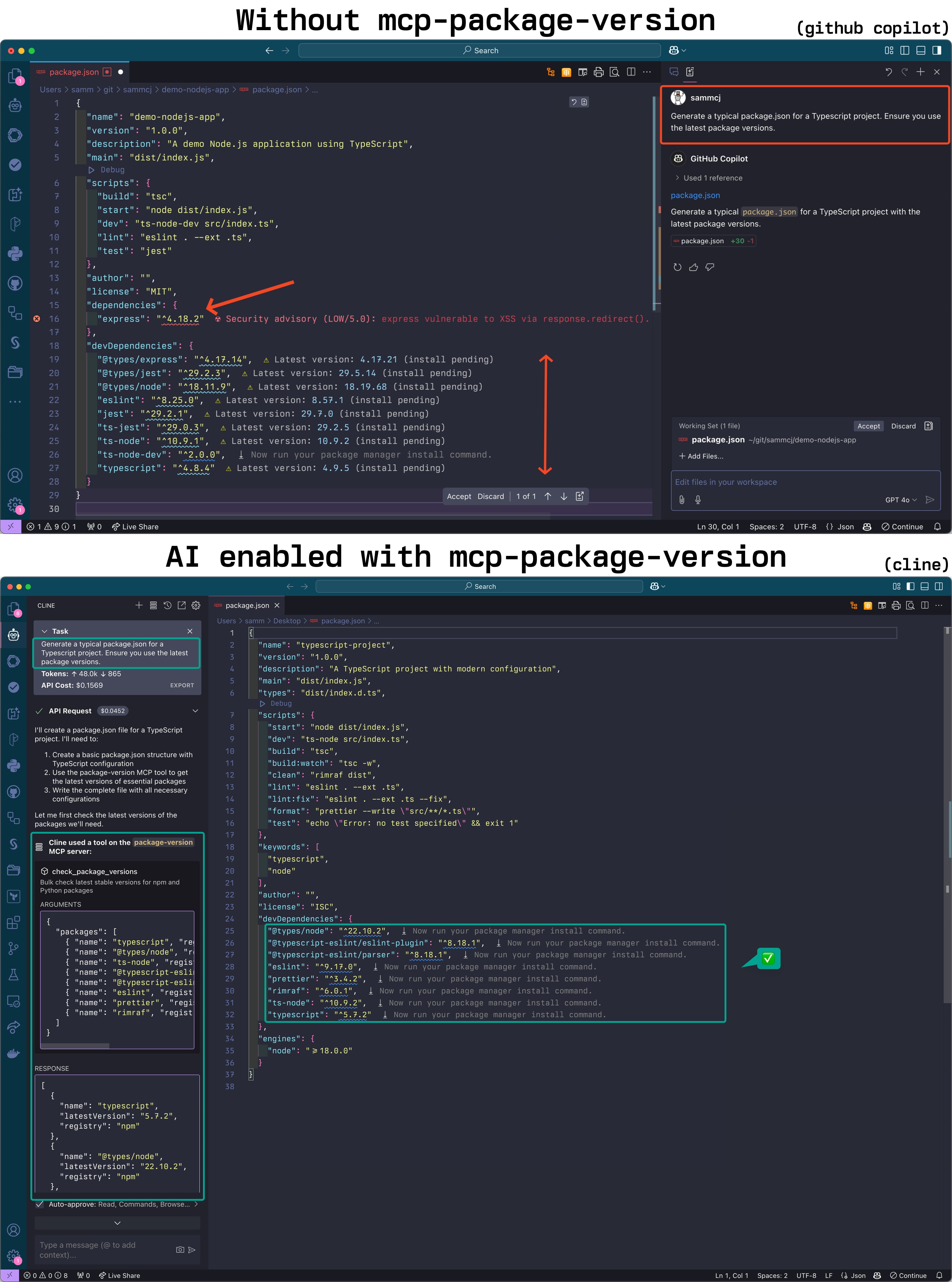
Related MCP server: agent-versions
Requirements:
A modern go version installed (See Go Installation)
Using go install (Recommended for MCP Client Setup):
go install github.com/sammcj/mcp-package-version/v2@HEADThen setup your client to use the MCP server. Assuming you've installed the binary with go install github.com/sammcj/mcp-package-version/v2@HEAD and your $GOPATH is /Users/sammcj/go/bin, you can provide the full path to the binary:
{
  "mcpServers": {
    "package-version": {
      "command": "/Users/sammcj/go/bin/mcp-package-version"
    }
  }
}
For the Cline VSCode Extension this will be ~/Library/Application Support/Code/User/globalStorage/saoudrizwan.claude-dev/settings/cline_mcp_settings.json
For Claude Desktop ~/Library/Application\ Support/Claude/claude_desktop_config.json
For GoMCP ~/.config/gomcp/config.yaml
Or clone the repository and build it:
git clone https://github.com/sammcj/mcp-package-version.git
cd mcp-package-version
make
You can also run the server in a container:
docker run -p 18080:18080 ghcr.io/sammcj/mcp-package-version:mainNote: If running in a container, you'll need to configure the client to use the URL instead of command, e.g.:
{
  "mcpServers": {
    "package-version": {
      "url": "http://localhost:18080",
    }
  }
}If $GOPATH/bin is not in your PATH, you'll need to provide the full path to the binary when configuring your MCP client (e.g. /Users/sammcj/go/bin/mcp-package-version).
If you haven't used go applications before and have only just installed go, you may not have a $GOPATH set up in your environment. This is important for any go install command to work correctly.
Understanding
$GOPATHThe
go installcommand downloads and compiles Go packages, placing the resulting binary executable in thebinsubdirectory of your$GOPATH. By default,$GOPATHis > usually located at$HOME/goon Unix-like systems (including macOS). If you haven't configured$GOPATHexplicitly, Go uses this default.The location
$GOPATH/bin(e.g.,/Users/your_username/go/bin) needs to be included in your system'sPATHenvironment variable if you want to run installed Go binaries directly by name from any terminal location.You can add the following line to your shell configuration file (e.g.,
~/.zshrc,~/.bashrc) to set$GOPATHto the default if it's not already set, and ensure$GOPATH/binis in yourPATH:[ -z "$GOPATH" ] && export GOPATH="$HOME/go"; echo "$PATH" | grep -q ":$GOPATH/bin" || export PATH="$PATH:$GOPATH/bin"After adding this line, restart your terminal or MCP client.
The server supports two transport modes: stdio (default) and SSE (Server-Sent Events).
mcp-package-versionmcp-package-version --transport sse --port 18080 --base-url "http://localhost:18080"This would make the server available to clients at http://localhost:18080/sse (Note the /sse suffix!).
--transport, -t: Transport type (stdio or sse). Default: stdio
--port: Port to use for SSE transport. Default: 18080
--base-url: Base URL for SSE transport. Default: http://localhost
Docker images are available from GitHub Container Registry:
docker pull ghcr.io/sammcj/mcp-package-version:mainYou can also see the example docker-compose.yaml.
Check the latest versions of NPM packages:
{
  "name": "check_npm_versions",
  "arguments": {
    "dependencies": {
      "react": "^17.0.2",
      "react-dom": "^17.0.2",
      "lodash": "4.17.21"
    },
    "constraints": {
      "react": {
        "majorVersion": 17
      }
    }
  }
}Check the latest versions of Python packages from requirements.txt:
{
  "name": "check_python_versions",
  "arguments": {
    "requirements": [
      "requests==2.28.1",
      "flask>=2.0.0",
      "numpy"
    ]
  }
}Check the latest versions of Python packages from pyproject.toml:
{
  "name": "check_pyproject_versions",
  "arguments": {
    "dependencies": {
      "dependencies": {
        "requests": "^2.28.1",
        "flask": ">=2.0.0"
      },
      "optional-dependencies": {
        "dev": {
          "pytest": "^7.0.0"
        }
      },
      "dev-dependencies": {
        "black": "^22.6.0"
      }
    }
  }
}Check the latest versions of Java packages from Maven:
{
  "name": "check_maven_versions",
  "arguments": {
    "dependencies": [
      {
        "groupId": "org.springframework.boot",
        "artifactId": "spring-boot-starter-web",
        "version": "2.7.0"
      },
      {
        "groupId": "com.google.guava",
        "artifactId": "guava",
        "version": "31.1-jre"
      }
    ]
  }
}Check the latest versions of Java packages from Gradle:
{
  "name": "check_gradle_versions",
  "arguments": {
    "dependencies": [
      {
        "configuration": "implementation",
        "group": "org.springframework.boot",
        "name": "spring-boot-starter-web",
        "version": "2.7.0"
      },
      {
        "configuration": "testImplementation",
        "group": "junit",
        "name": "junit",
        "version": "4.13.2"
      }
    ]
  }
}Check the latest versions of Go packages from go.mod:
{
  "name": "check_go_versions",
  "arguments": {
    "dependencies": {
      "module": "github.com/example/mymodule",
      "require": [
        {
          "path": "github.com/gorilla/mux",
          "version": "v1.8.0"
        },
        {
          "path": "github.com/spf13/cobra",
          "version": "v1.5.0"
        }
      ]
    }
  }
}Check available tags for Docker images:
{
  "name": "check_docker_tags",
  "arguments": {
    "image": "nginx",
    "registry": "dockerhub",
    "limit": 5,
    "filterTags": ["^1\\."],
    "includeDigest": true
  }
}List all AWS Bedrock models:
{
  "name": "check_bedrock_models",
  "arguments": {
    "action": "list"
  }
}
Search for specific AWS Bedrock models:
{
  "name": "check_bedrock_models",
  "arguments": {
    "action": "search",
    "query": "claude",
    "provider": "anthropic"
  }
}
Get the latest Claude Sonnet model:
{
  "name": "get_latest_bedrock_model",
  "arguments": {}
}Check the latest versions of Swift packages:
{
  "name": "check_swift_versions",
  "arguments": {
    "dependencies": [
      {
        "url": "https://github.com/apple/swift-argument-parser",
        "version": "1.1.4"
      },
      {
        "url": "https://github.com/vapor/vapor",
        "version": "4.65.1"
      }
    ],
    "constraints": {
      "https://github.com/apple/swift-argument-parser": {
        "majorVersion": 1
      }
    }
  }
}Check the latest versions of GitHub Actions:
{
  "name": "check_github_actions",
  "arguments": {
    "actions": [
      {
        "owner": "actions",
        "repo": "checkout",
        "currentVersion": "v3"
      },
      {
        "owner": "actions",
        "repo": "setup-node",
        "currentVersion": "v3"
      }
    ],
    "includeDetails": true
  }
}This project uses GitHub Actions for continuous integration and deployment. The workflow automatically:
Builds and tests the application on every push to the main branch and pull requests
Creates a release when a tag with the format v* (e.g., v1.0.0) is pushed
Builds and pushes Docker images to GitHub Container Registry
Recent tool additions, removals, and schema changes observed during successful MCP inspections.
Loading tool schema changelog…
This server cannot be deployed
What breaks between versions, vulnerabilities, compatible versions, EOL dates: npm, PyPI, Rust, PHP.
Is a package still maintained, deprecated or archived? npm, PyPI, Cargo, Go, Maven, NuGet, RubyGems.
Package versions, licences and known vulnerabilities for npm, PyPI, crates, Go, Maven, NuGet
Tells your coding agent whether your installed packages need patching, with advice on what to do.