
AutoMobile
AutoMobile is a mobile automation MCP server for UI testing and development workflow automation, primarily supporting Android with iOS planned.
Device Management
List, start, kill, and set active devices; list available device images
Rotate orientation, shake device, configure device modes (exploration/test authoring)
App Management
Launch (with optional cold boot/data clearing), terminate, and install apps
List installed apps, open URLs, query deep links and intent filters
UI Interaction
Observe the current view hierarchy on screen
Tap (single, double, long press), swipe on elements or full screen, scroll within containers
Open system tray, navigate home, open recent apps, press hardware buttons (home, back, menu, power, volume)
Text Input
Input text, clear text, select all text, trigger IME actions (done, next, search, send, etc.)
Intent Handling
Detect and dismiss system intent chooser dialogs (always, just once, or a specific app)
Demo Mode
Enable/disable demo mode with customizable status bar indicators for consistent screenshots
Configuration & Dependencies
Set app source directories for source mapping, retrieve/reset configs
Install and verify platform dependencies for Android/iOS automation
Provides UI testing and automation capabilities for Android applications, allowing for interaction with app elements, view hierarchy analysis, and source mapping to identify rendered code.
Mentioned as a planned future platform for mobile automation, though not currently supported.
The AutoMobile tool is published on npm, allowing users to install and use the mobile automation toolset.
Click on "Install Server".
Wait a few minutes for the server to deploy. Once ready, it will show a "Started" state.
In the chat, type
@followed by the MCP server name and your instructions, e.g., "@AutoMobiletake a screenshot of the current screen and save it as test_failure.png"
That's it! The server will respond to your query, and you can continue using it as needed.
Here is a step-by-step guide with screenshots.
AutoMobile
β οΈ PROJECT ARCHIVED
AutoMobile is no longer maintained or supported by Zillow. Zillow does not provide warranties or support for this project.
This repository has been archived and is read-only. For continued development and support, please see the community-maintained fork by Jason Pearson:

AutoMobile is a set of tools for mobile automation. You can use it for UI testing or as a development workflow assistant.
The first platform supported is Android with plans to extend to iOS.
How it works
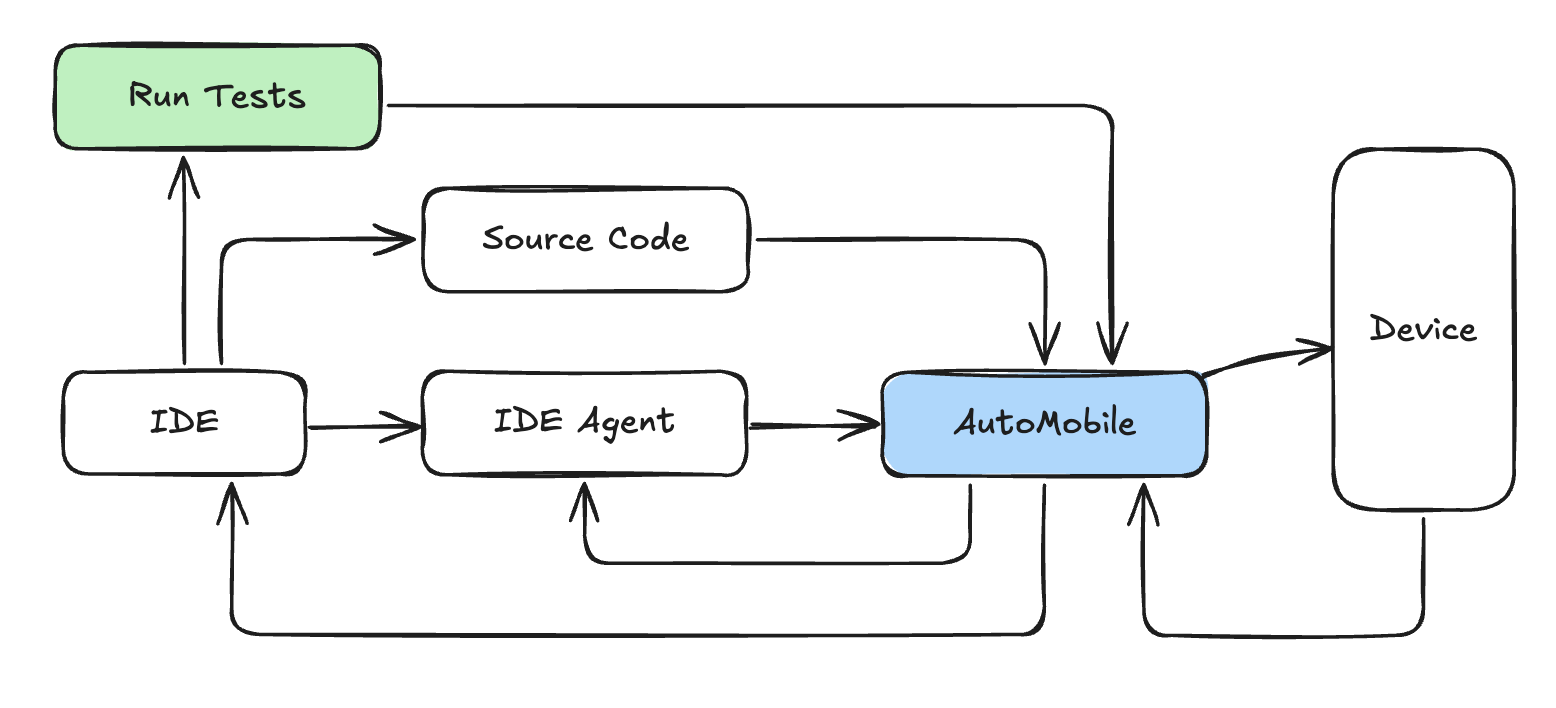
π§ Powerful MCP Server: AutoMobile provides comprehensive actions through MCP tool calls with a fast observations to drive the interaction loop.
πΊοΈ Source Mapping: Combining project path config with deep view hierarchy analysis we know exactly what code is being rendered.
βοΈ Automated Test Authoring: When used in test authoring mode AutoMobile will write tests for you. It is the only way it writes tests.
π§ͺ Test Execution - Run tests locally or on CI without extra infrastructure.
π± Device Management: Multi-device support with emulator control and app lifecycle management.
All together you get a system that looks like this:

Related MCP server: XcodeBuildMCP
Documentation
π» Installation & Getting Started - AutoMobile is published on npm and we have instructions for agents we've tested with.
π Change Log - coming soon
Contributing
Contributing - coming soon
Acknowledgement
By continuing to use AutoMobile, you acknowledge and agree to the warnings and responsible use requirements.
Maintenance
Resources
Unclaimed servers have limited discoverability.
Looking for Admin?
If you are the server author, to access and configure the admin panel.
Related MCP Servers
- AlicenseAqualityAmaintenanceA Model Context Protocol server that enables scalable mobile automation through a platform-agnostic interface for iOS and Android devices, allowing agents and LLMs to interact with mobile applications using accessibility snapshots or coordinate-based interactions.Last updated2315,2605,438Apache 2.0
- MIT
- Flicense-qualityCmaintenanceEnables AI-driven mobile test automation through planning, generation, and self-healing agents for Android and iOS, exposed as callable MCP tools.Last updated8
- Alicense-qualityBmaintenanceLocal MCP server for Android and iOS mobile automation and performance telemetry, enabling device control (screenshot, tap, swipe, input, app launch) and metric collection (CPU, memory, launch time) via ADB, simctl, and WebDriverAgent with SQLite session history.Last updated371MIT
Related MCP Connectors
Remote MCP for Android CLI agent build gate, structured receipts, audit logs, and reviewer-ready evi
MCP server for Appcircle mobile CI/CD platform.
MEOK MCP Test MCP β golden-file + schema-drift + tool-failure tests for any MCP server. Drop-in
Latest Blog Posts
- Who's Calling? MCP Hosts Are an Identity Blind Spot (And the Spec Knows It)By Om-Shree-0709 on .mcpAgent IdentityOAuth 2.1
- Your AI Chatbot Just Exposed Your CEO's Salary to an InternBy Om-Shree-0709 on .Agent IdentityMCP SecurityOAuth Delegation
- Why MCP Servers Need Execution Sandboxing (And Why Your Current Stack Isn't Enough)By Om-Shree-0709 on .Agentic AiPrompt InjectionWebAssembly
MCP directory API
We provide all the information about MCP servers via our MCP API.
curl -X GET 'https://glama.ai/api/mcp/v1/servers/zillow/auto-mobile'
If you have feedback or need assistance with the MCP directory API, please join our Discord server