A
licenseB
qualityB
maintenanceA Model Context Protocol server that provides access to MongoDB databases. This server enables LLMs to inspect collection schemas and execute read-only queries.
8
206 npm
284
MIT

模型上下文协议 (MCP) 是一种开放协议,支持 LLM 应用程序与外部数据源和工具之间的无缝集成。无论您是构建 AI 驱动的 IDE、增强聊天界面,还是创建自定义 AI 工作流,MCP 都提供了一种标准化的方式,将 LLM 与其所需的上下文连接起来。
该存储库包含一个 MCP 服务器,可提供对Milvus矢量数据库功能的访问。
在使用此 MCP 服务器之前,请确保您已:
Related MCP server: MCP Database Server
推荐使用此 MCP 服务器的方式是直接通过uv运行,无需安装。以下示例中,Claude Desktop 和 Cursor 均采用此配置。
如果你想克隆存储库:
git clone https://github.com/zilliztech/mcp-server-milvus.git
cd mcp-server-milvus
然后就可以直接运行服务器了:
uv run src/mcp_server_milvus/server.py --milvus-uri http://localhost:19530或者,您可以更改src/mcp_server_milvus/目录中的 .env 文件来设置环境变量,然后使用以下命令运行服务器:
uv run src/mcp_server_milvus/server.py服务器支持两种运行模式: stdio (默认)和SSE (Server-Sent Events)。
描述:通过标准输入/输出与客户端通信。如果未指定模式,则此模式为默认模式。
用法:
uv run src/mcp_server_milvus/server.py --milvus-uri http://localhost:19530描述:使用 HTTP 服务器发送事件进行通信。此模式允许多个客户端通过 HTTP 连接,适用于基于 Web 的应用程序。
用法:
uv run src/mcp_server_milvus/server.py --sse --milvus-uri http://localhost:19530 --port 8000--sse :启用 SSE 模式。
--port :指定 SSE 服务器的端口(默认值:8000)。
在 SSE 模式下调试:
如果要以SSE模式调试,启动SSE服务后,输入以下命令:
mcp dev src/mcp_server_milvus/server.py输出将类似于:
% mcp dev src/mcp_server_milvus/merged_server.py
Starting MCP inspector...
⚙️ Proxy server listening on port 6277
🔍 MCP Inspector is up and running at http://127.0.0.1:6274 🚀然后您可以访问http://127.0.0.1:6274上的 MCP Inspector 进行测试。
此 MCP 服务器可与支持模型上下文协议的各种 LLM 应用程序一起使用:
Claude Desktop :Anthropic 为 Claude 开发的桌面应用程序
Cursor :支持 MCP 的 AI 代码编辑器
自定义 MCP 客户端:任何实现 MCP 客户端规范的应用程序
按照以下步骤配置 Claude Desktop 的 SSE 模式:
从https://claude.ai/download安装 Claude Desktop。
打开您的 Claude Desktop 配置文件:
macOS : ~/Library/Application Support/Claude/claude_desktop_config.json
为SSE模式添加以下配置:
{
  "mcpServers": {
    "milvus-sse": {
      "url": "http://your_sse_host:port/sse",
      "disabled": false,
      "autoApprove": []
    }
  }
}
重新启动 Claude Desktop 以应用更改。
对于 stdio 模式,请按照以下步骤操作:
从https://claude.ai/download安装 Claude Desktop。
打开您的 Claude Desktop 配置文件:
macOS : ~/Library/Application Support/Claude/claude_desktop_config.json
为 stdio 模式添加以下配置:
{
  "mcpServers": {
    "milvus": {
      "command": "/PATH/TO/uv",
      "args": [
        "--directory",
        "/path/to/mcp-server-milvus/src/mcp_server_milvus",
        "run",
        "server.py",
        "--milvus-uri",
        "http://localhost:19530"
      ]
    }
  }
}
重新启动 Claude Desktop 以应用更改。
Cursor 也支持 MCP工具。您可以按照以下步骤将 Milvus MCP 服务器与 Cursor 集成:
打开Cursor Settings > MCP
点击Add new global MCP server
点击后会自动跳转到mcp.json文件,如果不存在则会创建
mcp.json文件使用以下内容覆盖mcp.json文件:
{
  "mcpServers": {
    "milvus": {
      "command": "/PATH/TO/uv",
      "args": [
        "--directory",
        "/path/to/mcp-server-milvus/src/mcp_server_milvus",
        "run",
        "server.py",
        "--milvus-uri",
        "http://127.0.0.1:19530"
      ]
    }
  }
}通过运行以下命令启动该服务:
uv run src/mcp_server_milvus/server.py --sse --milvus-uri http://your_sse_host --port port注意:将
http://your_sse_host替换为您的实际 SSE 主机地址,port替换为您正在使用的特定端口号。
服务启动并运行后,使用以下内容覆盖mcp.json文件:
{
    "mcpServers": {
      "milvus-sse": {
        "url": "http://your_sse_host:port/sse",
        "disabled": false,
        "autoApprove": []
      }
    }
}完成以上步骤后,重新启动Cursor或者重新加载窗口,以确保配置生效。
要验证 Cursor 是否已成功与您的 Milvus MCP 服务器集成:
打开Cursor Settings > MCP
检查列表中是否出现“milvus”或“milvus-sse”(取决于您选择的模式)
确认列出了相关工具(例如,milvus_list_collections、milvus_vector_search 等)
如果服务器已启用但显示错误,请检查下面的故障排除部分
该服务器提供以下工具:
milvus_text_search :使用全文搜索来搜索文档
参数:
collection_name :要搜索的集合的名称
query_text :要搜索的文本
limit :返回的最大结果数(默认值:5)
output_fields :结果中包含的字段
drop_ratio :忽略的低频词的比例(0.0-1.0)
milvus_vector_search :对集合执行向量相似性搜索
参数:
collection_name :要搜索的集合的名称
vector :查询向量
vector_field :矢量搜索的字段名称(默认值:“矢量”)
limit :返回的最大结果数(默认值:5)
output_fields :结果中包含的字段
filter_expr :过滤表达式
metric_type :距离度量(COSINE,L2,IP)(默认值:“COSINE”)
milvus_hybrid_search :对集合执行混合搜索
参数:
collection_name :要搜索的集合的名称
query_text :用于搜索的文本查询
text_field :文本搜索的字段名称
vector :文本查询的向量
vector_field :向量搜索的字段名称
limit :返回结果的最大数量
output_fields :结果中包含的字段
filter_expr :过滤表达式
milvus_query :使用过滤表达式查询集合
参数:
collection_name :要查询的集合的名称
filter_expr :过滤表达式(例如“年龄> 20”)
output_fields :结果中包含的字段
limit :返回的最大结果数(默认值:10)
milvus_list_collections :列出数据库中的所有集合
milvus_create_collection :使用指定的 schema 创建一个新的集合
参数:
collection_name :新集合的名称
collection_schema :集合模式定义
index_params :可选索引参数
milvus_load_collection :将集合加载到内存中,用于搜索和查询
参数:
collection_name :要加载的集合的名称
replica_number :副本数量(默认值:1)
milvus_release_collection :从内存中释放集合
参数:
collection_name :要发布的集合的名称
milvus_get_collection_info :列出特定集合的详细信息,如架构、属性、集合 ID 和其他元数据。
参数:
collection_name :要获取详细信息的集合的名称
milvus_insert_data :将数据插入集合中
参数:
collection_name :集合的名称
data :将字段名称映射到值列表的字典
milvus_delete_entities :根据过滤表达式从集合中删除实体
参数:
collection_name :集合的名称
filter_expr :过滤表达式以选择要删除的实体
MILVUS_URI :Milvus 服务器 URI(可以设置而不是 --milvus-uri)
MILVUS_TOKEN :可选的身份验证令牌
MILVUS_DB :数据库名称(默认为“default”)
直接运行服务器:
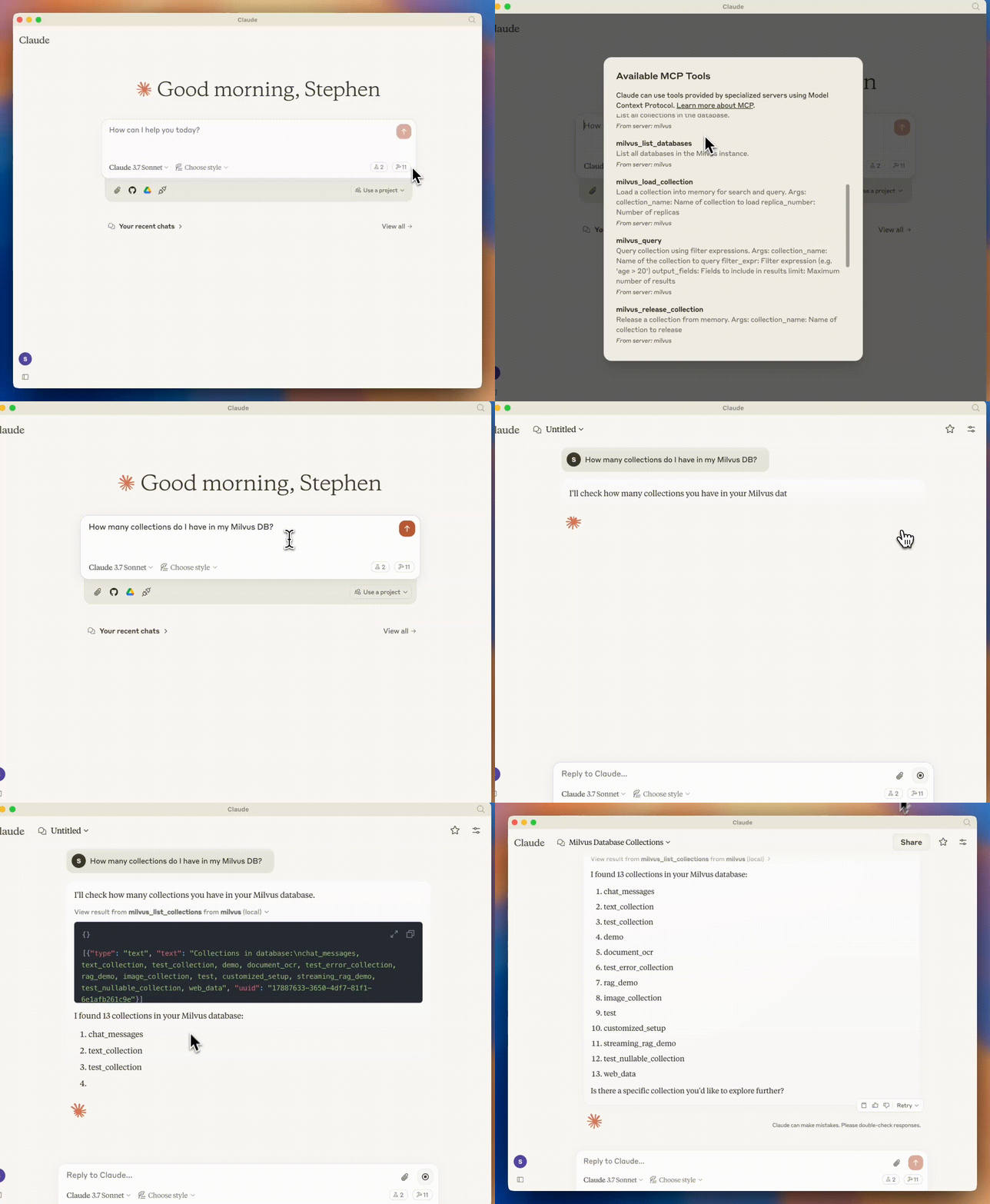
uv run server.py --milvus-uri http://localhost:19530What are the collections I have in my Milvus DB?然后,Claude 将使用 MCP 在您的 Milvus DB 上检查此信息。
I'll check what collections are available in your Milvus database.

Here are the collections in your Milvus database:

1. rag_demo
2. test
3. chat_messages
4. text_collection
5. image_collection
6. customized_setup
7. streaming_rag_demoFind documents in my text_collection that mention "machine learning"Claude 将使用 Milvus 的全文搜索功能来查找相关文档:
I'll search for documents about machine learning in your text_collection.

> View result from milvus-text-search from milvus (local)

Here are the documents I found that mention machine learning:
[Results will appear here based on your actual data]在 Cursor 中,你可以询问:
Create a new collection called 'articles' in Milvus with fields for title (string), content (string), and a vector field (128 dimensions)Cursor 将使用 MCP 服务器执行此操作:
I'll create a new collection called 'articles' with the specified fields.

Collection 'articles' has been created successfully with the following schema:
- title: string
- content: string
- vector: float vector[128]如果您看到类似“无法连接到 Milvus 服务器”的错误:
验证您的 Milvus 实例是否正在运行: docker ps (如果使用 Docker)
检查配置中的 URI 是否正确
确保没有防火墙规则阻止连接
尝试在 URI 中使用127.0.0.1而不是localhost
如果您看到身份验证错误:
验证您的MILVUS_TOKEN是否正确
检查您的 Milvus 实例是否需要身份验证
确保您拥有执行操作的正确权限
如果 MCP 工具没有出现在 Claude Desktop 或 Cursor 中:
重启应用程序
检查服务器日志是否有任何错误
验证 MCP 服务器是否正常运行
按下 MCP 设置中的刷新按钮(用于光标)
如果您仍然遇到问题:
查看GitHub Issues 中是否有类似问题
加入Zilliz 社区 Discord以获得支持
提交新问题并提供有关问题的详细信息
This server cannot be deployed
A Model Context Protocol server for Wix AI tools
A comprehensive Model Context Protocol (MCP) server that enables AI assistants to interact with yo…
The Mercado Pago MCP Server implements the Model Context Protocol to provide AI agents and LLMs with access to Mercado Pago's APIs and tools within compatible development environments. It acts as an intermediary that translates Mercado Pago resources into executable functions (tools) that AI applications can invoke to perform actions and automate flows. The server simplifies integration, enables using documentation to implement or improve code, and optimizes operations through natural language interactions without manual implementations.
Model Context Protocol server for the Apideck Unified API. Connect any MCP-compatible agent framework to 100+ accounting systems, HRIS platforms, file storage providers, and more through one integration. More information https://www.apideck.com/mcp-server