


A
licenseNot graded
qualityD
maintenanceEnables AI assistants to execute commands and transfer files on remote servers over SSH connections.
1
MIT

The SSH MCP Server enables AI assistants to securely connect to and manage remote servers via SSH, supporting command execution, file transfers, and script automation across multiple simultaneous connections.
Connect (ssh_connect): Establish SSH connections using password or key authentication, supporting IPv4/IPv6 and multiple named sessions
Execute commands (ssh_execute): Run individual commands on a remote server with configurable timeouts
Execute scripts (ssh_execute_script): Run multi-line scripts using various interpreters (bash, python, node, etc.) with working directory support
Upload & execute (ssh_upload_and_execute): Upload a script and immediately execute it, with optional automatic cleanup
Upload files (ssh_upload_file): Transfer local files to the remote server via SFTP, with automatic remote directory creation
Download files (ssh_download_file): Retrieve files from the remote server via SFTP, with automatic local directory creation
List remote files (ssh_list_files): Browse remote files and directories, with an option for detailed output (permissions, sizes)
List connections (ssh_list_connections): View all currently active SSH connections
Disconnect (ssh_disconnect): Cleanly close a specific SSH connection by its connection ID
Allows connecting to and executing commands on remote Linux servers, enabling tasks like system monitoring, process management, and file operations via SSH.
Enables secure remote access to macOS systems for command execution and file management through SSH connections.
Facilitates remote database management tasks such as creating and downloading database backups using mysqldump via SSH.
Allows for remote web server administration, including restarting NGINX services and deploying updated configurations.
Provides the ability to execute multi-line Python scripts and code blocks on remote servers to perform tasks like performance analysis.
Supports remote management of Ubuntu servers, including performing system updates and running administrative bash scripts.
Click on "Deploy Server".
Wait a few minutes for the server to deploy. Once ready, it will show a "Started" state.
In the chat, type @ followed by the MCP server name and your instructions, e.g., "@SSH MCP Server connect to my web server at 192.168.1.100 with username admin"
That's it! The server will respond to your query, and you can continue using it as needed.
Here is a step-by-step guide with screenshots.



A cross-platform Model Context Protocol (MCP) server that provides SSH connectivity tools. This server enables AI assistants to securely connect to and execute commands on remote servers via SSH.
Cross-platform compatibility: Works on Windows, macOS, and Linux
Multiple authentication methods: Username/password and SSH key authentication
IPv4 and IPv6 support: Connect to servers using either IP version
Multiple connections: Manage multiple SSH connections simultaneously
Comprehensive file operations: Upload, download, and list files via SFTP
Script execution: Run bash, python, and other scripts remotely
Secure: Uses the robust ssh2 library for secure connections
MCP compatible: Works with Claude CLI, Claude Desktop, and other MCP clients
Related MCP server: SSH MCP Server
Add to Claude CLI with one command (cross-platform):
npx @zibdie/ssh-mcp-server@latest --installThis auto-detects your OS and registers the MCP server with the correct configuration for your platform.
Or manually, if you prefer:
macOS/Linux:
claude mcp add ssh-mcp-server -- npx '@zibdie/ssh-mcp-server@latest'Windows:
claude mcp add ssh-mcp-server -- cmd /c npx @zibdie/ssh-mcp-server@latestWhy the difference? On Windows,
npxis a batch file (npx.cmd). Claude Code launches MCP servers using Node.jschild_process.spawn(), which cannot execute.cmdfiles directly. Thecmd /cwrapper tells Windows to run it through the command interpreter.
Restart Claude CLI
Test the connection:
"Connect to my server at example.com with username myuser"Install globally:
npm install -g @zibdie/ssh-mcp-serverAdd to configuration:
macOS/Linux: Edit ~/.config/claude/claude_desktop_config.json
{
  "mcpServers": {
    "ssh-mcp-server": {
      "command": "ssh-mcp-server"
    }
  }
}Windows: Edit %APPDATA%\Claude\claude_desktop_config.json
{
  "mcpServers": {
    "ssh-mcp-server": {
      "command": "cmd",
      "args": ["/c", "ssh-mcp-server"]
    }
  }
}Install globally:
npm install -g @zibdie/ssh-mcp-serverAdd to configuration:
macOS: Edit ~/Library/Application Support/Claude/claude_desktop_config.json
{
  "mcpServers": {
    "ssh-mcp-server": {
      "command": "ssh-mcp-server"
    }
  }
}Windows: Edit %APPDATA%\Claude\claude_desktop_config.json
{
  "mcpServers": {
    "ssh-mcp-server": {
      "command": "cmd",
      "args": ["/c", "ssh-mcp-server"]
    }
  }
}Here's an example of the SSH MCP server in action, showing file upload capabilities:
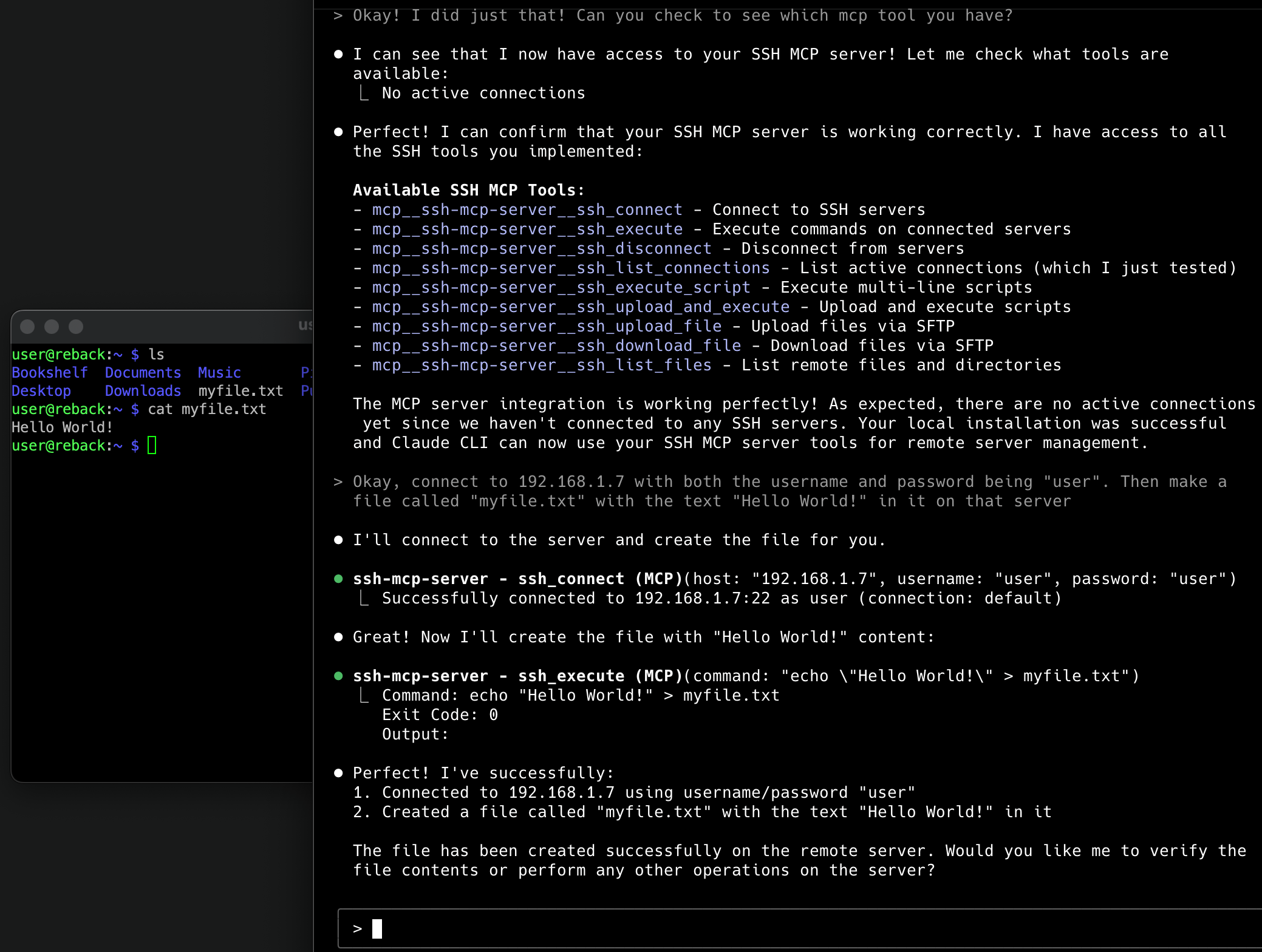
Example: Uploading and managing files on remote servers through Claude using the SSH MCP server
ssh_connectConnect to an SSH server using password or SSH key authentication.
Parameters:
host (required): SSH server hostname or IP address (IPv4 or IPv6)
port (optional): SSH server port (default: 22)
username (required): Username for SSH authentication
password (optional): Password for authentication
privateKey (optional): Path to private SSH key file
passphrase (optional): Passphrase for encrypted private key
connectionId (optional): Unique identifier for this connection (default: "default")
ssh_executeExecute a command on an established SSH connection.
Parameters:
command (required): Command to execute on the remote server
connectionId (optional): Connection ID to use (default: "default")
timeout (optional): Command timeout in milliseconds (default: 30000)
ssh_disconnectDisconnect from an SSH server.
Parameters:
connectionId (optional): Connection ID to disconnect (default: "default")
ssh_list_connectionsList all active SSH connections.
ssh_upload_fileUpload a file to the remote server via SFTP.
Parameters:
localPath (required): Local file path to upload
remotePath (required): Remote destination path
connectionId (optional): Connection ID to use (default: "default")
createDirs (optional): Create remote directories if they don't exist (default: true)
ssh_download_fileDownload a file from the remote server via SFTP.
Parameters:
remotePath (required): Remote file path to download
localPath (required): Local destination path
connectionId (optional): Connection ID to use (default: "default")
createDirs (optional): Create local directories if they don't exist (default: true)
ssh_list_filesList files and directories on the remote server.
Parameters:
remotePath (optional): Remote directory path to list (default: ".")
connectionId (optional): Connection ID to use (default: "default")
detailed (optional): Show detailed file information (default: false)
User prompt: "Connect to my server at 192.168.1.100 with username admin and password mypass123"
ssh_connect with host="192.168.1.100", username="admin", password="mypass123"User prompt: "SSH into my development server using my private key"
ssh_connect with host="dev.example.com", username="developer", privateKey="~/.ssh/id_rsa"User prompt: "Connect to my IPv6 server with SSH key authentication"
ssh_connect with host="2001:db8::1", username="user", privateKey="/home/user/.ssh/dev_key", passphrase="keypassword"User prompt: "Check the disk space on my server"
ssh_execute with command="df -h"User prompt: "Show me what processes are running"
ssh_execute with command="ps aux | head -20"User prompt: "Run a system update on my Ubuntu server"
ssh_execute_script with script="""
sudo apt update
sudo apt upgrade -y
sudo apt autoremove -y
echo "System update completed"
""", interpreter="bash"User prompt: "Copy the hello.zip file from my server's desktop to my desktop"
ssh_download_file with remotePath="/home/user/Desktop/hello.zip", localPath="~/Desktop/hello.zip"User prompt: "Upload my config.json file to the server's /etc/myapp/ directory"
ssh_upload_file with localPath="./config.json", remotePath="/etc/myapp/config.json"User prompt: "Send my backup script to the server and run it"
ssh_upload_and_execute with script="""
#!/bin/bash
mkdir -p /backup/$(date +%Y%m%d)
tar -czf /backup/$(date +%Y%m%d)/data_backup.tar.gz /var/www/html
echo "Backup completed successfully"
""", filename="backup.sh", interpreter="bash"
User prompt: "Show me what's in the /var/log directory with file sizes"
ssh_list_files with remotePath="/var/log", detailed=trueUser prompt: "Connect to both my production and staging servers"
ssh_connect with host="prod.example.com", username="admin", privateKey="~/.ssh/prod_key", connectionId="production"
ssh_connect with host="staging.example.com", username="admin", privateKey="~/.ssh/staging_key", connectionId="staging"
User prompt: "Check uptime on both servers"
ssh_execute with command="uptime", connectionId="production"
ssh_execute with command="uptime", connectionId="staging"
User prompt: "Deploy my app to staging server"
ssh_upload_file with localPath="./myapp.tar.gz", remotePath="/tmp/myapp.tar.gz", connectionId="staging"
ssh_execute_script with script="""
cd /var/www
sudo tar -xzf /tmp/myapp.tar.gz
sudo systemctl restart nginx
sudo systemctl restart myapp
echo "Deployment completed"
""", connectionId="staging", interpreter="bash"User prompt: "Run a Python script to analyze server performance"
ssh_execute_script with script="""
import psutil
import json

# Get system info
cpu_percent = psutil.cpu_percent(interval=1)
memory = psutil.virtual_memory()
disk = psutil.disk_usage('/')

report = {
    'cpu_usage': cpu_percent,
    'memory_usage': memory.percent,
    'disk_usage': (disk.used / disk.total) * 100,
    'available_memory_gb': memory.available / (1024**3)
}

print(json.dumps(report, indent=2))
""", interpreter="python3"
User prompt: "Monitor my application logs in real-time"
ssh_execute with command="tail -f /var/log/myapp/application.log", timeout=60000User prompt: "Backup my database and download it"
ssh_execute_script with script="""
timestamp=$(date +%Y%m%d_%H%M%S)
mysqldump -u dbuser -p'dbpass' mydatabase > /tmp/backup_$timestamp.sql
gzip /tmp/backup_$timestamp.sql
echo "Backup created: /tmp/backup_$timestamp.sql.gz"
""", interpreter="bash"

# Then download the backup
ssh_download_file with remotePath="/tmp/backup_20241203_143022.sql.gz", localPath="./database_backup.sql.gz"This tool provides direct SSH access to remote servers
Always use strong authentication (prefer SSH keys over passwords)
Be cautious when executing commands with elevated privileges
Ensure proper network security and access controls
Private keys and passwords are handled securely in memory
Never commit credentials to version control
Node.js 18 or higher
Network access to target SSH servers
Valid SSH credentials for target servers
MCP server fails to start on Windows
On Windows, npx and globally-installed npm commands are .cmd batch files. Claude Code uses child_process.spawn() to launch MCP servers, which cannot execute .cmd files directly. You must wrap the command with cmd /c:
# Quick setup (Windows)
claude mcp add ssh-mcp-server -- cmd /c npx @zibdie/ssh-mcp-server@latest

# Or for global install (Windows)
claude mcp add ssh-mcp-server -- cmd /c ssh-mcp-server
If editing the config JSON manually, use:
{
  "command": "cmd",
  "args": ["/c", "npx", "@zibdie/ssh-mcp-server@latest"]
}
You can verify your setup by running /doctor in Claude CLI.
"Command not found" after global install
# Ensure npm global bin is in your PATH
npm config get prefix
export PATH="$(npm config get prefix)/bin:$PATH"
MCP server not appearing in Claude
Verify configuration file path and JSON syntax
Restart Claude CLI/Desktop after configuration changes
Check Claude logs for connection errors
SSH connection failures
Verify network connectivity to target server
Ensure SSH service is running on target server
Check firewall settings and port accessibility
Validate SSH credentials and key permissions
Permission errors
Ensure SSH keys have correct permissions (600)
Verify user has necessary privileges on target server
Clone the repository:
git clone https://github.com/zibdie/SSH-MCP-Server.git
cd SSH-MCP-Server
Install dependencies:
npm installRun in development mode:
npm run devTest with MCP Inspector:
npx @modelcontextprotocol/inspector node index.jsFor detailed API documentation of all available tools and their parameters, see the Examples section above.
MIT - see LICENSE file for details
Nour Zibdie (https://nour.zibdie.com)
https://github.com/zibdie/SSH-MCP-Server
Connect to an SSH server using password or SSH key authentication. Supports IPv4 and IPv6.
| Name | Required | Description | Default |
|---|---|---|---|
| host | Yes | SSH server hostname or IP address (IPv4 or IPv6) | |
| port | No | SSH server port | |
| username | Yes | Username for SSH authentication | |
| password | No | Password for authentication (if using password auth) | |
| privateKey | No | Path to private SSH key file (if using key auth) | |
| passphrase | No | Passphrase for encrypted private key (optional) | |
| connectionId | No | Unique identifier for this connection | default |
Does the description disclose side effects, auth requirements, rate limits, or destructive behavior?
With no annotations, the description carries full burden. It mentions authentication methods and IP support, but does not disclose connection behavior (e.g., session management, error conditions, whether it blocks, or effects on server state).
Agents need to know what a tool does to the world before calling it. Descriptions should go beyond structured annotations to explain consequences.
Is the description appropriately sized, front-loaded, and free of redundancy?
The description is a single sentence that efficiently conveys the core purpose and supported authentication/network features. It is front-loaded and avoids redundancy, though it could benefit from a slightly more structured presentation.
Shorter descriptions cost fewer tokens and are easier for agents to parse. Every sentence should earn its place.
Given the tool's complexity, does the description cover enough for an agent to succeed on first attempt?
Given the tool's complexity (7 parameters, no output schema, no annotations), the description is under-specified. It lacks information about return values, connection lifecycle, error handling, and relationship to sibling tools.
Complex tools with many parameters or behaviors need more documentation. Simple tools need less. This dimension scales expectations accordingly.
Does the description clarify parameter syntax, constraints, interactions, or defaults beyond what the schema provides?
Input schema has 100% coverage, providing descriptions for all 7 parameters. The description adds no additional parameter-level semantic context beyond what the schema already provides.
Input schemas describe structure but not intent. Descriptions should explain non-obvious parameter relationships and valid value ranges.
Does the description clearly state what the tool does and how it differs from similar tools?
The description clearly states the tool's action: connecting to an SSH server, specifying authentication methods (password or key), and supporting IPv4/IPv6. This distinguishes it from sibling tools like ssh_execute or ssh_disconnect.
Agents choose between tools based on descriptions. A clear purpose with a specific verb and resource helps agents select the right tool.
Does the description explain when to use this tool, when not to, or what alternatives exist?
The description implies the tool is a prerequisite for other SSH operations, but does not explicitly state when to use it versus alternatives, nor does it provide exclusions or prerequisites for usage.
Agents often have multiple tools that could apply. Explicit usage guidance like "use X instead of Y when Z" prevents misuse.
Disconnect from an SSH server
| Name | Required | Description | Default |
|---|---|---|---|
| connectionId | No | Connection ID to disconnect | default |
Does the description disclose side effects, auth requirements, rate limits, or destructive behavior?
The description does not disclose behavioral traits such as whether disconnection is safe, if it terminates running commands, or if it requires authentication. With no annotations, this is insufficient.
Agents need to know what a tool does to the world before calling it. Descriptions should go beyond structured annotations to explain consequences.
Is the description appropriately sized, front-loaded, and free of redundancy?
A single sentence is appropriately concise for a simple tool. It is front-loaded and wastes no words.
Shorter descriptions cost fewer tokens and are easier for agents to parse. Every sentence should earn its place.
Given the tool's complexity, does the description cover enough for an agent to succeed on first attempt?
Given the low complexity (one optional parameter, no output schema), the description covers the basic purpose. However, it omits context about the default connectionId and error handling.
Complex tools with many parameters or behaviors need more documentation. Simple tools need less. This dimension scales expectations accordingly.
Does the description clarify parameter syntax, constraints, interactions, or defaults beyond what the schema provides?
The input schema has 100% coverage, and the parameter description 'Connection ID to disconnect' is clear. The tool description adds no additional value beyond the schema.
Input schemas describe structure but not intent. Descriptions should explain non-obvious parameter relationships and valid value ranges.
Does the description clearly state what the tool does and how it differs from similar tools?
The description 'Disconnect from an SSH server' clearly indicates the verb and resource, distinguishing it from siblings like ssh_connect and ssh_execute. However, it could be more specific by mentioning the connectionId parameter.
Agents choose between tools based on descriptions. A clear purpose with a specific verb and resource helps agents select the right tool.
Does the description explain when to use this tool, when not to, or what alternatives exist?
No guidance on when to use this tool versus alternatives. For example, it does not state prerequisites (e.g., an active connection) or when not to use it.
Agents often have multiple tools that could apply. Explicit usage guidance like "use X instead of Y when Z" prevents misuse.
Download a file from the remote server via SFTP
| Name | Required | Description | Default |
|---|---|---|---|
| remotePath | Yes | Remote file path to download | |
| localPath | Yes | Local destination path | |
| connectionId | No | Connection ID to use | default |
| createDirs | No | Create local directories if they don't exist |
Does the description disclose side effects, auth requirements, rate limits, or destructive behavior?
No annotations provided, so description must carry burden. Only states basic action; lacks disclosure on error handling, overwrite behavior, directory creation (though schema has default), or requirement for prior connection.
Agents need to know what a tool does to the world before calling it. Descriptions should go beyond structured annotations to explain consequences.
Is the description appropriately sized, front-loaded, and free of redundancy?
Single clear sentence with no extraneous information. Front-loaded with verb and resource.
Shorter descriptions cost fewer tokens and are easier for agents to parse. Every sentence should earn its place.
Given the tool's complexity, does the description cover enough for an agent to succeed on first attempt?
Given 4 parameters and no output schema or annotations, the description is too minimal. It does not explain return type, errors, or connection lifecycle, leaving gaps for effective agent usage.
Complex tools with many parameters or behaviors need more documentation. Simple tools need less. This dimension scales expectations accordingly.
Does the description clarify parameter syntax, constraints, interactions, or defaults beyond what the schema provides?
Schema description coverage is 100%, so baseline 3. Description adds no parameter details beyond schema, but is not required to given full schema coverage.
Input schemas describe structure but not intent. Descriptions should explain non-obvious parameter relationships and valid value ranges.
Does the description clearly state what the tool does and how it differs from similar tools?
Clearly states verb 'download', resource 'file', method 'SFTP', and location 'remote server'. Distinguishes from sibling tools like ssh_upload_file and ssh_execute.
Agents choose between tools based on descriptions. A clear purpose with a specific verb and resource helps agents select the right tool.
Does the description explain when to use this tool, when not to, or what alternatives exist?
No guidance on when to use this tool vs alternatives. Does not mention prerequisites like needing an active SSH connection via ssh_connect or relationship to sibling tools.
Agents often have multiple tools that could apply. Explicit usage guidance like "use X instead of Y when Z" prevents misuse.
Execute a command on an established SSH connection
| Name | Required | Description | Default |
|---|---|---|---|
| command | Yes | Command to execute on the remote server | |
| connectionId | No | Connection ID to use | default |
| timeout | No | Command timeout in milliseconds |
Does the description disclose side effects, auth requirements, rate limits, or destructive behavior?
No annotations provided, so the description must carry the full burden. It fails to disclose what happens on connection failure, output handling, or timeout behavior.
Agents need to know what a tool does to the world before calling it. Descriptions should go beyond structured annotations to explain consequences.
Is the description appropriately sized, front-loaded, and free of redundancy?
Single sentence is concise and front-loaded. However, it could include more context without being verbose.
Shorter descriptions cost fewer tokens and are easier for agents to parse. Every sentence should earn its place.
Given the tool's complexity, does the description cover enough for an agent to succeed on first attempt?
Despite low complexity, the description omits critical information about return values, error handling, and execution details. It is too minimal.
Complex tools with many parameters or behaviors need more documentation. Simple tools need less. This dimension scales expectations accordingly.
Does the description clarify parameter syntax, constraints, interactions, or defaults beyond what the schema provides?
Schema coverage is 100%, with each parameter described. The description adds no extra meaning beyond the schema, which is acceptable per baseline scoring guidelines.
Input schemas describe structure but not intent. Descriptions should explain non-obvious parameter relationships and valid value ranges.
Does the description clearly state what the tool does and how it differs from similar tools?
The description clearly states the action 'Execute' and the resource 'a command on an established SSH connection'. It distinguishes from siblings like ssh_connect and ssh_disconnect, though ssh_execute_script is similar but not identical.
Agents choose between tools based on descriptions. A clear purpose with a specific verb and resource helps agents select the right tool.
Does the description explain when to use this tool, when not to, or what alternatives exist?
No guidance on when to use this tool versus alternatives. Does not mention that a connection must be established first via ssh_connect, nor contrasts with ssh_execute_script.
Agents often have multiple tools that could apply. Explicit usage guidance like "use X instead of Y when Z" prevents misuse.
Execute a multi-line script or code block on an SSH connection. Automatically handles code blocks with triple backticks.
| Name | Required | Description | Default |
|---|---|---|---|
| script | Yes | Script or code block to execute. Can include triple backticks (```bash, ```python, etc.) | |
| interpreter | No | Script interpreter to use (bash, sh, python, python3, node, etc.) | bash |
| connectionId | No | Connection ID to use | default |
| timeout | No | Script timeout in milliseconds | |
| workingDir | No | Working directory to execute script in (optional) |
Does the description disclose side effects, auth requirements, rate limits, or destructive behavior?
With no annotations provided, the description must disclose behavioral traits. It mentions only one key behavior (handling triple backticks) but omits important details: what the tool returns, error handling, whether the connection must be pre-established, or if the script blocks until completion.
Agents need to know what a tool does to the world before calling it. Descriptions should go beyond structured annotations to explain consequences.
Is the description appropriately sized, front-loaded, and free of redundancy?
The description is only two sentences and conveys the core functionality without any filler. Every word adds value, making it concise and front-loaded.
Shorter descriptions cost fewer tokens and are easier for agents to parse. Every sentence should earn its place.
Given the tool's complexity, does the description cover enough for an agent to succeed on first attempt?
The tool lacks an output schema and annotations, so the description should fill gaps. It does not explain output format, error scenarios, or prerequisites like an active SSH connection, leaving the agent underinformed for correct invocation.
Complex tools with many parameters or behaviors need more documentation. Simple tools need less. This dimension scales expectations accordingly.
Does the description clarify parameter syntax, constraints, interactions, or defaults beyond what the schema provides?
The input schema has 100% description coverage, so a baseline of 3 is appropriate. The description does not add extra meaning beyond the schema; it repeats the backtick handling already present in the script parameter description.
Input schemas describe structure but not intent. Descriptions should explain non-obvious parameter relationships and valid value ranges.
Does the description clearly state what the tool does and how it differs from similar tools?
The description clearly states the tool executes multi-line scripts or code blocks on an SSH connection, and highlights automatic handling of triple backticks. This distinguishes it from sibling tools like ssh_execute (likely single-line) and ssh_upload_and_execute, though not explicitly.
Agents choose between tools based on descriptions. A clear purpose with a specific verb and resource helps agents select the right tool.
Does the description explain when to use this tool, when not to, or what alternatives exist?
No guidance is given on when to use this tool versus alternatives such as ssh_execute or ssh_upload_and_execute. There is no mention of prerequisites (e.g., an existing SSH connection) or scenarios where this tool is preferred.
Agents often have multiple tools that could apply. Explicit usage guidance like "use X instead of Y when Z" prevents misuse.
List all active SSH connections
| Name | Required | Description | Default |
|---|---|---|---|
No parameters | |||
Does the description disclose side effects, auth requirements, rate limits, or destructive behavior?
The description conveys a read-only listing behavior and implies no destructive side effects. However, since no annotations are provided, it carries the full burden and does not clarify what counts as 'active', whether output is scoped to the current user, or how connection status is determined.
Agents need to know what a tool does to the world before calling it. Descriptions should go beyond structured annotations to explain consequences.
Is the description appropriately sized, front-loaded, and free of redundancy?
The description is five words and contains no filler. It front-loads the action and resource with maximum efficiency.
Shorter descriptions cost fewer tokens and are easier for agents to parse. Every sentence should earn its place.
Given the tool's complexity, does the description cover enough for an agent to succeed on first attempt?
For a simple parameterless listing tool, the description is mostly complete: an agent knows what the tool does and can invoke it. Minor gaps around output format and the precise scope of 'all active SSH connections' prevent a higher score, but the low complexity makes this acceptable.
Complex tools with many parameters or behaviors need more documentation. Simple tools need less. This dimension scales expectations accordingly.
Does the description clarify parameter syntax, constraints, interactions, or defaults beyond what the schema provides?
This tool takes zero parameters, so the input schema is already complete. The description adds no parameter details, but none are needed; baseline 4 applies for parameterless tools.
Input schemas describe structure but not intent. Descriptions should explain non-obvious parameter relationships and valid value ranges.
Does the description clearly state what the tool does and how it differs from similar tools?
The description states a specific verb and resource: 'List all active SSH connections'. It is clearly distinguishable from sibling tools like ssh_connect, ssh_execute, and ssh_disconnect, though it does not explicitly contrast with get_network_connections.
Agents choose between tools based on descriptions. A clear purpose with a specific verb and resource helps agents select the right tool.
Does the description explain when to use this tool, when not to, or what alternatives exist?
No guidance is given about when to use this tool instead of alternatives such as get_network_connections or scan_network. The intended use is implied but not stated, and there are no exclusions or conditions.
Agents often have multiple tools that could apply. Explicit usage guidance like "use X instead of Y when Z" prevents misuse.
List files and directories on the remote server
| Name | Required | Description | Default |
|---|---|---|---|
| remotePath | No | Remote directory path to list | . |
| connectionId | No | Connection ID to use | default |
| detailed | No | Show detailed file information (permissions, size, etc.) |
Does the description disclose side effects, auth requirements, rate limits, or destructive behavior?
With no annotations, the description is the only source of behavioral info. It does not disclose traits like read-only nature, error handling, or recursion behavior.
Agents need to know what a tool does to the world before calling it. Descriptions should go beyond structured annotations to explain consequences.
Is the description appropriately sized, front-loaded, and free of redundancy?
Single sentence is concise and front-loaded, but could benefit from additional succinct details.
Shorter descriptions cost fewer tokens and are easier for agents to parse. Every sentence should earn its place.
Given the tool's complexity, does the description cover enough for an agent to succeed on first attempt?
No output schema or description of return format. Missing details on output handling and error conditions.
Complex tools with many parameters or behaviors need more documentation. Simple tools need less. This dimension scales expectations accordingly.
Does the description clarify parameter syntax, constraints, interactions, or defaults beyond what the schema provides?
Schema description coverage is 100%, so baseline is 3. The description adds no extra meaning beyond what the schema already provides.
Input schemas describe structure but not intent. Descriptions should explain non-obvious parameter relationships and valid value ranges.
Does the description clearly state what the tool does and how it differs from similar tools?
The description clearly states the action ('List') and resource ('files and directories on the remote server'), distinguishing it from sibling tools like ssh_execute or ssh_upload_file.
Agents choose between tools based on descriptions. A clear purpose with a specific verb and resource helps agents select the right tool.
Does the description explain when to use this tool, when not to, or what alternatives exist?
No explicit guidance on when to use this tool versus alternatives, but the context is clear for a basic listing operation.
Agents often have multiple tools that could apply. Explicit usage guidance like "use X instead of Y when Z" prevents misuse.
Upload a script file and execute it on the remote server
| Name | Required | Description | Default |
|---|---|---|---|
| script | Yes | Script content to upload and execute | |
| filename | No | Filename for the script on remote server | mcp_script.sh |
| interpreter | No | Script interpreter (bash, python, etc.) | bash |
| connectionId | No | Connection ID to use | default |
| cleanup | No | Remove script file after execution | |
| timeout | No | Execution timeout in milliseconds |
Does the description disclose side effects, auth requirements, rate limits, or destructive behavior?
With no annotations, the description carries full burden. It only states the basic action, omitting traits like cleanup behavior (parameter exists but not mentioned), execution output, error handling, or whether multiple simultaneous connections are supported.
Agents need to know what a tool does to the world before calling it. Descriptions should go beyond structured annotations to explain consequences.
Is the description appropriately sized, front-loaded, and free of redundancy?
The description is a single sentence, concise but lacking important context. It could be improved by front-loading key behavioral details without adding significant length.
Shorter descriptions cost fewer tokens and are easier for agents to parse. Every sentence should earn its place.
Given the tool's complexity, does the description cover enough for an agent to succeed on first attempt?
Given the complexity (6 parameters, no output schema, no annotations), the description is insufficient. It fails to mention return format, cleanup behavior, connection requirements, or how it differs from similar tools.
Complex tools with many parameters or behaviors need more documentation. Simple tools need less. This dimension scales expectations accordingly.
Does the description clarify parameter syntax, constraints, interactions, or defaults beyond what the schema provides?
Schema description coverage is 100%, so parameters are already documented. The tool description adds no additional meaning beyond 'upload and execute', resulting in a baseline score of 3.
Input schemas describe structure but not intent. Descriptions should explain non-obvious parameter relationships and valid value ranges.
Does the description clearly state what the tool does and how it differs from similar tools?
The description states the tool uploads and executes a script, which is specific and distinguishes from related tools like ssh_execute (no upload) or ssh_upload_file (no execution). However, it doesn't explicitly contrast with ssh_execute_script, which may overlap.
Agents choose between tools based on descriptions. A clear purpose with a specific verb and resource helps agents select the right tool.
Does the description explain when to use this tool, when not to, or what alternatives exist?
No guidance on when to use this tool versus siblings like ssh_execute or ssh_upload_file. The description does not specify typical use cases or prerequisites, leaving the agent to infer context.
Agents often have multiple tools that could apply. Explicit usage guidance like "use X instead of Y when Z" prevents misuse.
Upload a file to the remote server via SFTP
| Name | Required | Description | Default |
|---|---|---|---|
| localPath | Yes | Local file path to upload | |
| remotePath | Yes | Remote destination path | |
| connectionId | No | Connection ID to use | default |
| createDirs | No | Create remote directories if they don't exist |
Does the description disclose side effects, auth requirements, rate limits, or destructive behavior?
With no annotations, the description is solely responsible for behavioral disclosure. It only states the basic upload action, omitting details such as overwrite behavior, error handling (connection failure), permission requirements, or impact on remote directories. Schema parameters cover createDirs but description adds no behavioral context beyond the action.
Agents need to know what a tool does to the world before calling it. Descriptions should go beyond structured annotations to explain consequences.
Is the description appropriately sized, front-loaded, and free of redundancy?
The description is a single, front-loaded sentence of 9 words with no redundant information. Every word serves to convey the core function.
Shorter descriptions cost fewer tokens and are easier for agents to parse. Every sentence should earn its place.
Given the tool's complexity, does the description cover enough for an agent to succeed on first attempt?
Given the absence of output schema and annotations, the description is insufficient for an agent to fully understand the tool's behavior. Missing details include: behavior on existing file, size limits, success indication, error scenarios, and relationship to connection lifecycle. A more complete description is needed for a 4-parameter tool.
Complex tools with many parameters or behaviors need more documentation. Simple tools need less. This dimension scales expectations accordingly.
Does the description clarify parameter syntax, constraints, interactions, or defaults beyond what the schema provides?
Schema description coverage is 100%, so the schema already documents each parameter (localPath, remotePath, connectionId, createDirs). The description does not add extra meaning or explain parameter relationships (e.g., createDirs prerequisite of remotePath parent existence). Baseline score of 3 is appropriate.
Input schemas describe structure but not intent. Descriptions should explain non-obvious parameter relationships and valid value ranges.
Does the description clearly state what the tool does and how it differs from similar tools?
The description 'Upload a file to the remote server via SFTP' uses a specific verb and resource, clearly stating the action and destination. It distinguishes from sibling tools like ssh_download_file (download) and ssh_execute (execute commands).
Agents choose between tools based on descriptions. A clear purpose with a specific verb and resource helps agents select the right tool.
Does the description explain when to use this tool, when not to, or what alternatives exist?
The description lacks guidance on when to use this tool versus alternatives like ssh_upload_and_execute. It does not mention prerequisites (e.g., requiring an active connection via ssh_connect) or disclaimers about file overwriting, leaving the agent without clear usage context.
Agents often have multiple tools that could apply. Explicit usage guidance like "use X instead of Y when Z" prevents misuse.
Recent tool additions, removals, and schema changes observed during successful MCP inspections.
v1.0.0ssh_connectssh_disconnectssh_download_filessh_executessh_execute_scriptssh_list_connectionsssh_list_filesssh_upload_and_executessh_upload_fileScored across 9 tools
Each tool has a clearly distinct purpose: connection management, file transfers, command execution, and listing operations. No two tools could be confused.
All tools use a consistent 'ssh_verb_noun' pattern (e.g., ssh_connect, ssh_upload_file), making them predictable and easy to navigate.
With 9 tools, the surface is well-scoped for SSH operations, covering connection, execution, file transfer, and listing without unnecessary redundancy.
The set covers core SSH workflows (connect, execute, transfer). Minor gaps like remote file deletion or port forwarding are absent but not critical for most use cases.
Manage servers through SSH.
Scoped, audited SSH exec, sessions, and SFTP on your saved servers without exposing credentials
Let AI operate servers without SSH. Choose actions, approve risky changes, and audit every step.
Connect AI assistants to explicitly paired computers, servers, and VMs for permitted remote actions.