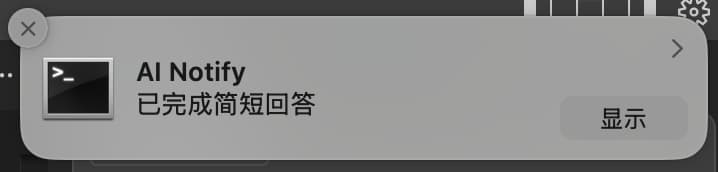
AI Notify MCP
Click on "Deploy Server".
Wait a few minutes for the server to deploy. Once ready, it will show a "Started" state.
In the chat, type
@followed by the MCP server name and your instructions, e.g., "@AI Notify MCPnotify me when you finish answering with a custom sound"
That's it! The server will respond to your query, and you can continue using it as needed.
Here is a step-by-step guide with screenshots.
Ai Notify MCP
🎯 为支持 MCP 协议的 AI 代码编辑器设计的智能通知服务器,当 AI 完成回答时自动发送系统通知,提升编程体验。

📑 目录
Related MCP server: mcp-windows-notify
✨ 功能特性
🔔 跨平台通知支持
平台 | 通知方式 | 图标支持 | 音效支持 |
macOS | 系统通知中心 | ✅ | ✅ |
Windows | Windows 通知系统 | ✅ | ✅ |
Linux | libnotify | ✅ | ✅ |
🎨 高度自定义
智能标题:自动显示当前项目名称
灵活内容:支持自定义通知消息
图标定制:支持自定义通知图标
音效控制:可开启/关闭提示音
🤖 智能触发
自动通知:AI 回答完成时自动触发
手动控制:支持程序化调用通知
📦 安装配置
系统要求
环境 | 要求 |
Node.js | ≥ 14.0.0 |
npm | ≥ 6.0.0 |
Linux 额外要求 | libnotify |
Linux 用户安装 libnotify
# Ubuntu/Debian
sudo apt-get install libnotify-bin
# CentOS/RHEL/Fedora
sudo dnf install libnotify # 或 yum install libnotify
# Arch Linux
sudo pacman -S libnotify
# openSUSE
sudo zypper install libnotify-tools详细安装步骤
1️⃣ 克隆项目
git clone https://github.com/zhiyingzzhou/ai-notify-mcp.git
cd ai-notify-mcp2️⃣ 安装依赖并构建
npm install
npm run build3️⃣ 配置编辑器
编辑你的 MCP 配置文件,添加以下配置:
{
"mcpServers": {
"ai-notify": {
"command": "node",
"args": ["/绝对路径/ai-notify-mcp/dist/index.js"],
"autoRun": true
}
}
}💡 提示:请将路径替换为你的实际安装路径
4️⃣ 配置 AI 助手规则
在 Cursor Settings → Rules → User Rules 中添加:
When responding to user requests, use the ai-notify MCP tool (auto_notify_completion) only as the final step after you have fully completed your answer. Never call this tool during thinking phases, tool calls, or before your answer is complete. The notification should only be triggered when the entire response is ready for the user.5️⃣ 开启 Auto-Run 模式

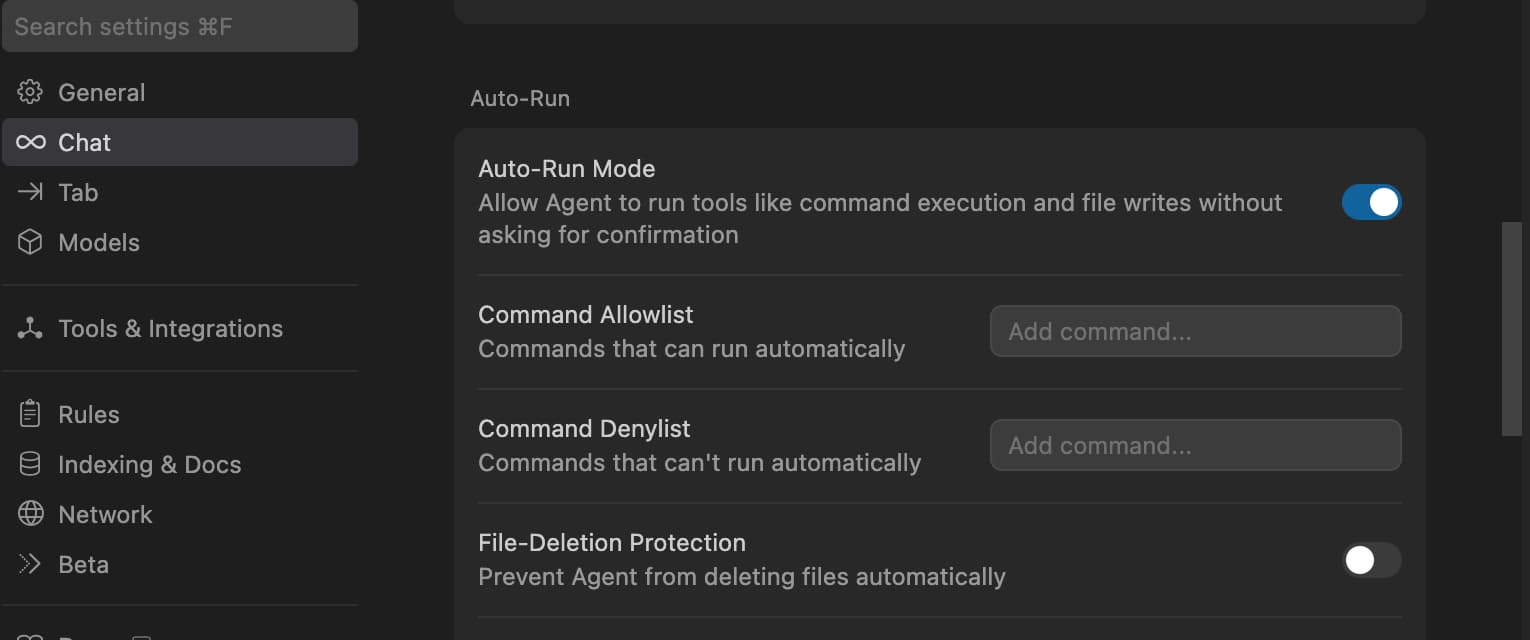
配置步骤:
打开
Cursor Settings→Features→Chat勾选
Enable auto-run mode重启 Cursor
🛠 使用说明
📋 可用工具
该 MCP 服务提供以下两个工具供 AI 调用:
🔧 show_completion_notification
功能:手动触发通知,支持自定义参数
参数 | 类型 | 默认值 | 说明 |
| string | "AI Assistant" | 通知标题 |
| string | "已完成回答" | 通知内容 |
| boolean | true | 是否播放提示音 |
🤖 auto_notify_completion
功能:自动通知工具,在 AI 回答完成后自动调用
参数 | 类型 | 默认值 | 说明 |
| number | 0 | 回答长度(用于内部统计) |
⚙️ 通知配置
你可以通过配置文件自定义通知行为:
{
"notification": {
"sound": true,
"icon": "./assets/icon.png",
"defaultTitle": "Cursor AI",
"defaultMessage": "回答完成"
}
}配置选项说明:
配置项 | 类型 | 默认值 | 说明 |
| boolean | true | 是否播放通知音效 |
| string | - | 自定义通知图标路径 |
| string | "AI Assistant" | 默认通知标题 |
| string | "已完成回答" | 默认通知消息 |
🎨 图标规格建议
平台 | 推荐尺寸 | 支持格式 | 备注 |
macOS | 128×128px | PNG, ICNS | 支持透明背景 |
Windows | 256×256px | PNG, ICO | 建议多尺寸 ICO |
Linux | 128×128px | PNG, SVG | 推荐 SVG 矢量图 |
🔧 开发指南
开发环境
# 开发模式(热重载)
npm run dev
# 构建项目
npm run build
# 启动服务
npm start
# 类型检查
npm run type-check项目结构
ai-notify-mcp/
├── 📁 src/
│ └── 📄 index.ts # 主入口文件
├── 📁 dist/ # 构建输出
├── 📁 assets/ # 资源文件
│ ├── 🖼️ icon.png # 默认图标
│ └── 🖼️ cursor-auto-run.jpg # 配置截图
├── 📄 package.json # 项目配置
├── 📄 tsconfig.json # TypeScript 配置
└── 📄 README.md # 项目文档扩展开发
// 自定义通知处理器示例
import { NotificationHandler } from './types';
const customHandler: NotificationHandler = {
async show(options) {
// 你的自定义逻辑
console.log(`显示通知: ${options.title}`);
}
};🔍 故障排除
🔧 常见问题
🔍 检查清单:
✅ 确认 Auto-Run 模式已开启
✅ 检查 MCP 配置路径是否正确
✅ 确认服务已成功启动
✅ 检查系统通知权限设置
✅ 验证 AI 助手规则是否正确配置
🛠 调试命令:
# 检查进程是否运行
ps aux | grep "ai-notify"
# 手动测试通知
node dist/index.js test
# 查看 MCP 服务状态
curl -X POST http://localhost:3000/test💡 解决方案:
# 1. 安装必要依赖
sudo apt-get install libnotify-bin
# 2. 测试系统通知
notify-send "测试" "通知功能正常"
# 3. 检查 D-Bus 服务
systemctl --user status dbus
# 4. 检查通知守护进程
ps aux | grep notification🔧 常见 Linux 发行版配置:
发行版 | 安装命令 | 备注 |
Ubuntu/Debian |
| 通常预装 |
CentOS/RHEL |
| 可能需要 EPEL 源 |
Arch Linux |
| 轻量化安装 |
🎨 解决步骤:
确认图标文件存在
ls -la ./assets/icon.png检查图标文件格式和尺寸
file ./assets/icon.png identify ./assets/icon.png # 需要 ImageMagick使用绝对路径
{ "notification": { "icon": "/Users/username/ai-notify-mcp/assets/icon.png" } }检查文件权限
chmod 644 ./assets/icon.png
🔍 诊断步骤:
检查 Node.js 版本
node --version # 应该 ≥ 14.0.0验证构建输出
ls -la dist/ cat dist/index.js | head -10手动启动测试
node dist/index.js --test检查端口占用
lsof -i :3000 # 默认端口
📊 调试模式
启用详细日志查看运行状态:
# 启用所有调试信息
DEBUG=* npm start
# 仅查看通知相关日志
DEBUG=mcp:notification npm start
# 保存日志到文件
DEBUG=mcp:notification npm start 2>&1 | tee debug.log🆘 获得帮助
如果以上方法都无法解决问题,请:
收集系统信息
echo "OS: $(uname -a)" echo "Node: $(node --version)" echo "npm: $(npm --version)"创建详细的 Issue,包含:
系统信息
错误日志
配置文件
重现步骤
🤝 贡献指南
我们欢迎各种形式的贡献!让我们一起让这个项目变得更好 🚀
🎯 贡献方式
类型 | 说明 | 链接 |
🐛 Bug 报告 | 发现问题请及时反馈 | |
💡 功能建议 | 提出新功能想法 | |
📝 文档改进 | 完善说明文档 | 编辑 README 或添加示例 |
🔧 代码贡献 | 提交新功能或修复 | Fork → 开发 → Pull Request |
🔄 开发流程
1️⃣ 准备环境
# Fork 并克隆项目
git clone https://github.com/your-username/ai-notify-mcp.git
cd ai-notify-mcp
# 安装依赖
npm install2️⃣ 创建功能分支
git checkout -b feature/amazing-feature
# 或者修复分支
git checkout -b fix/issue-1233️⃣ 开发和测试
npm run dev # 开发模式(热重载)
npm run test # 运行测试
npm run lint # 代码检查
npm run build # 构建验证4️⃣ 提交更改
# 使用约定式提交
git commit -m "feat: add amazing feature"
git commit -m "fix: resolve notification issue"
git commit -m "docs: update installation guide"
git push origin feature/amazing-feature5️⃣ 创建 Pull Request
📋 代码规范
规范 | 要求 | 工具 |
语言 | TypeScript | TSC |
代码风格 | ESLint 规则 | ESLint + Prettier |
提交信息 | 约定式提交 | commitlint |
测试覆盖 | 新功能需要测试 | Jest |
文档 | 重要变更需要文档 | Markdown |
💡 开发建议
🔍 提交前:确保所有测试通过
📚 文档:为复杂功能添加说明
🧪 测试:编写单元测试和集成测试
🎨 代码:保持代码简洁易读
💬 沟通:有疑问及时在 Issue 中讨论
📄 许可证
本项目采用 MIT License 许可证。
🙏 致谢
感谢所有让这个项目成为可能的人和组织:
🏛️ MCP 协议团队 - 提供优秀的协议标准
🌍 开源社区 - 提供宝贵的反馈和贡献
👥 所有贡献者 - 让这个项目变得更好
💻 编辑器开发团队 - 支持 MCP 协议的实现
📞 支持与反馈
遇到问题或有建议?我们很乐意听到你的声音!
渠道 | 链接 | 适用场景 |
🐛 GitHub Issues | Bug 报告和功能请求 | |
📧 邮件联系 | 直接联系项目维护者 |
💌 联系我们
🌟 支持这个项目
如果 AI Notify MCP 对你有帮助,请考虑:
⭐ 给我们一个 Star • 🔀 Fork 并贡献 • 📢 分享给朋友
让 AI 编程体验更加智能和愉悦 ✨
Available Tools
2 toolsauto_notify_completionB
Automatically show completion notification (call this after providing any response)
| Name | Required | Description | Default |
|---|---|---|---|
| responseLength | No | Length of the response (optional) |
TDQS
Does the description disclose side effects, auth requirements, rate limits, or destructive behavior?
No annotations are provided, so the description carries the full burden. It mentions the tool 'shows' a notification, implying a display action, but lacks details on behavioral traits such as what triggers the notification, if it's user-visible, whether it requires specific permissions, or if it has side effects like logging. This leaves significant gaps in understanding how the tool behaves beyond its basic function.
Agents need to know what a tool does to the world before calling it. Descriptions should go beyond structured annotations to explain consequences.
Is the description appropriately sized, front-loaded, and free of redundancy?
The description is brief and to the point, consisting of one clear sentence that states the purpose and usage. It is appropriately sized without unnecessary words, though it could be slightly more structured by separating purpose from guidelines for better readability.
Shorter descriptions cost fewer tokens and are easier for agents to parse. Every sentence should earn its place.
Given the tool's complexity, does the description cover enough for an agent to succeed on first attempt?
Given the tool has no annotations, no output schema, and a simple input schema, the description provides basic purpose and usage but lacks completeness. It doesn't cover what the notification looks like, how it's triggered, or any error conditions, which are important for a tool that interacts with user interfaces. The context is minimal but adequate for a simple tool.
Complex tools with many parameters or behaviors need more documentation. Simple tools need less. This dimension scales expectations accordingly.
Does the description clarify parameter syntax, constraints, interactions, or defaults beyond what the schema provides?
The input schema has 100% description coverage, with the parameter 'responseLength' documented as optional with a default. The description adds no additional meaning about parameters beyond what the schema provides, such as explaining why response length matters or how it affects the notification. Thus, it meets the baseline for high schema coverage but doesn't enhance parameter understanding.
Input schemas describe structure but not intent. Descriptions should explain non-obvious parameter relationships and valid value ranges.
Does the description clearly state what the tool does and how it differs from similar tools?
The description states the action ('Automatically show completion notification') and provides a usage instruction ('call this after providing any response'), which clarifies the purpose. However, it doesn't specifically differentiate from the sibling tool 'show_completion_notification', leaving ambiguity about how they differ (e.g., 'automatically' vs. manual).
Agents choose between tools based on descriptions. A clear purpose with a specific verb and resource helps agents select the right tool.
Does the description explain when to use this tool, when not to, or what alternatives exist?
The description explicitly states when to use the tool ('after providing any response'), which provides clear context for its application. However, it doesn't mention when not to use it or how it differs from the sibling tool 'show_completion_notification', missing explicit alternatives or exclusions.
Agents often have multiple tools that could apply. Explicit usage guidance like "use X instead of Y when Z" prevents misuse.
show_completion_notificationB
Show a system notification when AI completes a response
| Name | Required | Description | Default |
|---|---|---|---|
| title | No | Notification title | AI Assistant |
| message | No | Notification message | 已完成回答 |
| sound | No | Play notification sound |
TDQS
Does the description disclose side effects, auth requirements, rate limits, or destructive behavior?
No annotations are provided, so the description carries the full burden of behavioral disclosure. It mentions the action ('Show a system notification') but lacks details on platform-specific behavior, error handling, user permissions required, or whether it's synchronous/asynchronous. For a tool with no annotations, this leaves significant gaps in understanding its operational traits.
Agents need to know what a tool does to the world before calling it. Descriptions should go beyond structured annotations to explain consequences.
Is the description appropriately sized, front-loaded, and free of redundancy?
The description is a single, clear sentence that efficiently conveys the core functionality without unnecessary words. It is front-loaded with the main action and condition, making it easy to parse and understand quickly.
Shorter descriptions cost fewer tokens and are easier for agents to parse. Every sentence should earn its place.
Given the tool's complexity, does the description cover enough for an agent to succeed on first attempt?
Given the tool's low complexity (3 parameters, no output schema, no annotations), the description is minimally adequate but incomplete. It covers the basic purpose but lacks usage guidelines, behavioral details, and output information, which are needed for a tool that interacts with system notifications. The schema compensates for parameter semantics, but overall completeness is limited.
Complex tools with many parameters or behaviors need more documentation. Simple tools need less. This dimension scales expectations accordingly.
Does the description clarify parameter syntax, constraints, interactions, or defaults beyond what the schema provides?
The input schema has 100% description coverage, documenting all three parameters (title, message, sound) with defaults. The description does not add any meaning beyond the schema, such as explaining parameter interactions or usage examples. With high schema coverage, the baseline score of 3 is appropriate as the schema handles the heavy lifting.
Input schemas describe structure but not intent. Descriptions should explain non-obvious parameter relationships and valid value ranges.
Does the description clearly state what the tool does and how it differs from similar tools?
The description clearly states the tool's purpose with a specific verb ('Show') and resource ('a system notification'), and it specifies the trigger condition ('when AI completes a response'). This distinguishes it from the sibling tool 'auto_notify_completion', which might imply automation rather than manual invocation.
Agents choose between tools based on descriptions. A clear purpose with a specific verb and resource helps agents select the right tool.
Does the description explain when to use this tool, when not to, or what alternatives exist?
The description provides no guidance on when to use this tool versus the sibling 'auto_notify_completion', nor does it mention any prerequisites, exclusions, or alternative scenarios. It merely states what the tool does without contextual usage advice.
Agents often have multiple tools that could apply. Explicit usage guidance like "use X instead of Y when Z" prevents misuse.
Tool Schema Changelog
Recent tool additions, removals, and schema changes observed during successful MCP inspections.
2 tool updates
v1.0.0- First observed
auto_notify_completion - First observed
show_completion_notification
TDQS
Scored across 2 tools
The two tools are essentially identical in purpose. Both 'auto_notify_completion' and 'show_completion_notification' describe showing a notification when AI completes a response, with only minor wording differences. An agent would have no meaningful basis to choose between them, leading to confusion and misselection.
The naming shows mixed conventions. 'auto_notify_completion' uses a verb-object pattern with underscores, while 'show_completion_notification' uses a verb-noun pattern with underscores. Both are readable, but the inconsistency in structure (auto vs. show, notify vs. notification) reduces predictability.
With only 2 tools, the server feels thin for its purpose of AI notifications. Given the tools are redundant, this exacerbates the issue—it's essentially one tool split into two. A more appropriate count would be 1-2 distinct tools, but here the duplication makes it seem artificially inflated.
The server's domain appears to be AI response notifications, but the tool set is severely incomplete. There are no tools for configuring notifications (e.g., setting preferences, disabling), handling different types of notifications, or managing notification history. The redundancy in the two tools does not add meaningful coverage, leaving significant gaps for agent workflows.
Maintenance
Related MCP Connectors
Push notifications for AI agents - send instant iPhone notifications from any MCP client.
- mcp-serverOAuthnet.vybit
Push notifications with personalized sounds - manage and trigger your vybits via MCP
Let your AI agent notify you by email, Slack, Discord, or webhook. One tool: send_notification.
Use AI models for chat, image, and video generation from Claude Code and other MCP hosts.
Related MCP Servers
- AlicenseAqualityDmaintenanceProvides automatic desktop notifications and contextual sounds for Claude Code operations across macOS, Windows, and Linux. It enhances the development experience by intelligently mapping specific event types to native system alerts and sounds.49 npm3MIT
- AlicenseBqualityDmaintenanceEnables AI development tools on Windows to send native system notifications for task completion, errors, and reminders, with customizable icons and sounds.710 npm7MIT
- FlicenseAqualityDmaintenanceEnables AI agents to send cross-platform desktop notifications with priority levels, categories, and configurable duration.1-
- FlicenseNot gradedqualityDmaintenanceMCP server for macOS native notifications with 67 AI brand icons and system sound support, enabling AI agents to send desktop notifications via one-line tool calls.-