

A
licenseB
qualityNot graded
maintenanceEnables secure interaction with MySQL databases through listing tables, reading data, and executing SQL queries with proper error handling and controlled access.
1
MIT

Provides access to MySQL databases with fine-grained access control, supporting read-only queries, write operations, DDL statements, multi-database connections, and table-level permissions with configurable access modes (readonly, readwrite, full).
Click on "Deploy Server".
Wait a few minutes for the server to deploy. Once ready, it will show a "Started" state.
In the chat, type @ followed by the MCP server name and your instructions, e.g., "@MCP Server for MySQL show me the top 10 customers from the prod database"
That's it! The server will respond to your query, and you can continue using it as needed.
Here is a step-by-step guide with screenshots.
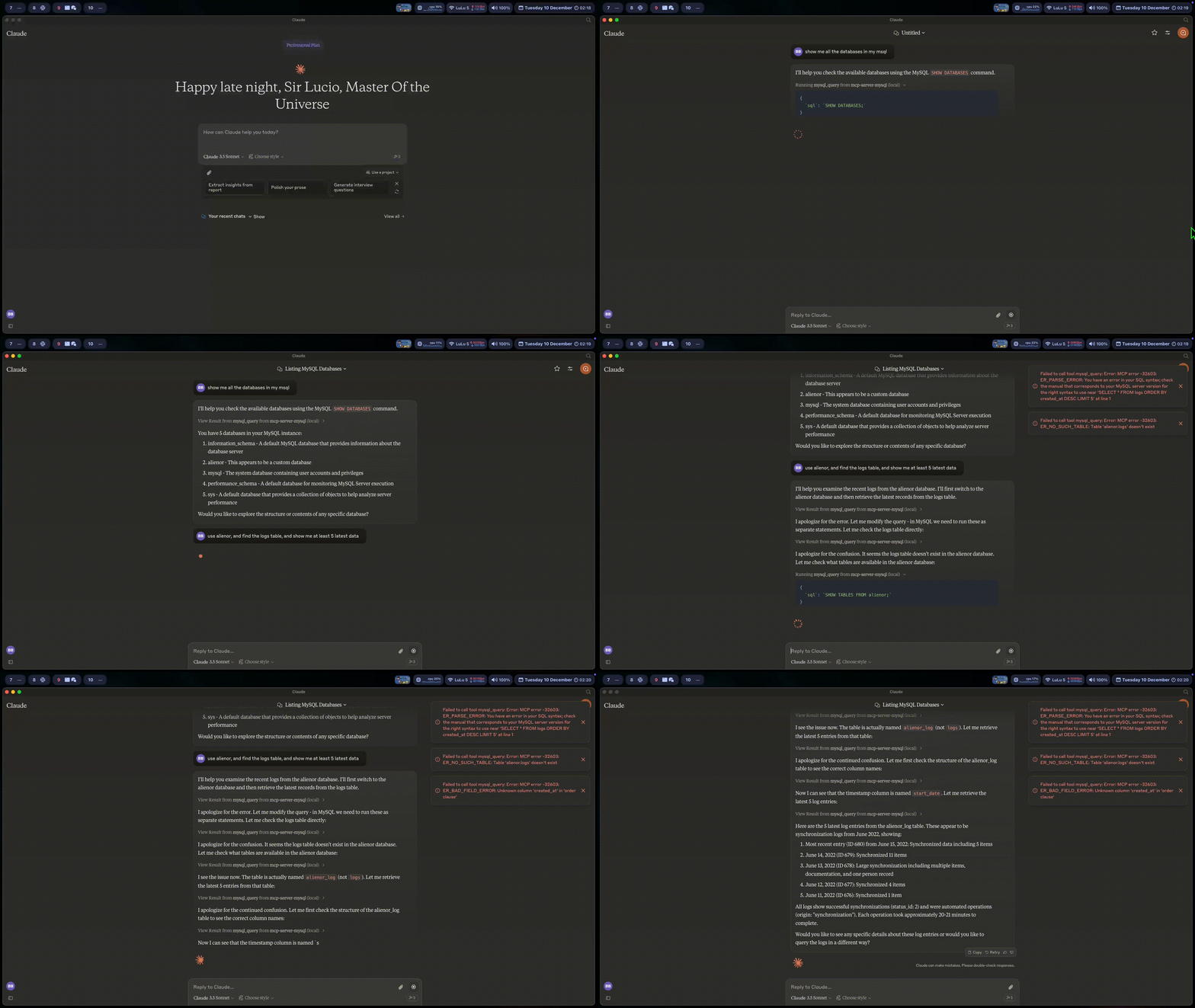
A Model Context Protocol server that provides access to MySQL databases with fine-grained access control. Supports multiple databases, access modes, and table-level permissions.
Multi-database support: Connect to multiple MySQL databases simultaneously
Access control: readonly, readwrite, full modes per database
Table-level permissions: Whitelist/blacklist with wildcards and regex
Read-only transaction protection: Database-level safety for readonly mode
Backward compatible: Works with single database environment variables
Related MCP server: MySQL MCP Server
Tool | Description |
| Read-only SELECT queries (always available) |
| Write operations (only visible when writable databases exist) |
mysql://connections: List of database connections with access modes
mysql://{db}/tables/{table}/schema: Table schema
mysql_usage_guide: Dynamic guide based on configured databases
Create ~/.mcp_mysql/databases.json:
{
  "databases": [
    {
      "name": "prod",
      "host": "prod-db.example.com",
      "port": 3306,
      "user": "readonly_user",
      "password": "***",
      "database": "production",
      "accessMode": "readonly"
    },
    {
      "name": "dev",
      "host": "localhost",
      "port": 3306,
      "user": "dev_user",
      "password": "***",
      "database": "development",
      "accessMode": "readwrite",
      "allowedTables": ["log_*", "tmp_*", "/^test_.*/i"]
    }
  ]
}Mode | SELECT | INSERT/UPDATE/DELETE | DDL |
| ✅ | ❌ | ❌ |
| ✅ | ✅ | ❌ |
| ✅ | ✅ | ✅ |
Format | Example | Matches |
Exact |
| Only |
Wildcard |
|
|
Regex |
|
|
Variable | Description |
| Custom config file path |
| Legacy single-database host |
| Legacy single-database port |
| Legacy single-database user |
| Legacy single-database password |
| Legacy single-database name |
First, create ~/.mcp_mysql/databases.json with your database configurations.
Then add to your claude_desktop_config.json:
{
  "mcpServers": {
    "mcp_server_mysql": {
      "command": "npx",
      "args": [
        "-y",
        "@zhengyun1008/mcp-server-mysql"
      ]
    }
  }
}{
"mcpServers": {
"mcp_server_mysql": {
"command": "npx",
"args": [
"-y",
"@zhengyun1008/mcp-server-mysql"
],
"env": {
"MYSQL_HOST": "127.0.0.1",
"MYSQL_PORT": "3306",
"MYSQL_USER": "root",
"MYSQL_PASS": "",
"MYSQL_DB": "db_name"
}
}
}
}User: "查询 prod 库中的用户表"
→ mysql_query(database="prod", sql="SELECT * FROM users")
User: "在 dev 库的 log_test 表插入一条记录"
→ mysql_execute(database="dev", sql="INSERT INTO log_test ...", confirm=true)readonly mode: Uses SET SESSION TRANSACTION READ ONLY for database-level protection
SQL validation: Validates statement type before execution
Table validation: Checks whitelist/blacklist before write operations
Confirmation required: Write operations require confirm=true
If you encounter an error "Could not connect to MCP server mcp-server-mysql", you may need to explicitly set the path of all required binaries such as the configuration below:
{
  "mcpServers": {
    "mcp_server_mysql": {
      "command": "/path/to/npx/binary/npx",
      "args": [
        "-y",
        "@zhengyun1008/mcp-server-mysql"
      ],
      "env": {
        "MYSQL_HOST": "127.0.0.1",
        "MYSQL_PORT": "3306",
        "MYSQL_USER": "root",
        "MYSQL_PASS": "",
        "MYSQL_DB": "db_name",
        "PATH": "/path/to/node/bin:/usr/bin:/bin"
      }
    }
  }
}This MCP server is licensed under the MIT License. This means you are free to use, modify, and distribute the software, subject to the terms and conditions of the MIT License. For more details, please see the LICENSE file in the project repository.
Run a read-only SELECT query on a MySQL database
| Name | Required | Description | Default |
|---|---|---|---|
| database | No | Database connection name. Available: | |
| sql | Yes | SELECT query to execute (read-only) |
Does the description disclose side effects, auth requirements, rate limits, or destructive behavior?
With no annotations provided, the description carries the full burden of behavioral disclosure. It states the tool is 'read-only', which implies non-destructive behavior and safety for data retrieval. However, it lacks details on authentication needs, rate limits, error handling, or response format, leaving gaps in behavioral context.
Agents need to know what a tool does to the world before calling it. Descriptions should go beyond structured annotations to explain consequences.
Is the description appropriately sized, front-loaded, and free of redundancy?
The description is a single, efficient sentence that front-loads the key information ('Run a read-only SELECT query') without any wasted words. It is appropriately sized for the tool's complexity and structure.
Shorter descriptions cost fewer tokens and are easier for agents to parse. Every sentence should earn its place.
Given the tool's complexity, does the description cover enough for an agent to succeed on first attempt?
Given no annotations and no output schema, the description is incomplete for a database query tool. It covers the basic purpose and read-only nature but lacks details on return values, error conditions, or operational constraints, which are important for effective tool use.
Complex tools with many parameters or behaviors need more documentation. Simple tools need less. This dimension scales expectations accordingly.
Does the description clarify parameter syntax, constraints, interactions, or defaults beyond what the schema provides?
The schema description coverage is 100%, so the schema already documents both parameters ('database' and 'sql') adequately. The description adds minimal value by reinforcing that the 'sql' parameter must be a 'SELECT query (read-only)', but does not provide additional syntax or format details beyond what the schema specifies.
Input schemas describe structure but not intent. Descriptions should explain non-obvious parameter relationships and valid value ranges.
Does the description clearly state what the tool does and how it differs from similar tools?
The description clearly states the specific action ('Run a read-only SELECT query') and the resource ('on a MySQL database'). It distinguishes this as a read-only query execution tool with no siblings to differentiate from, making the purpose explicit and complete.
Agents choose between tools based on descriptions. A clear purpose with a specific verb and resource helps agents select the right tool.
Does the description explain when to use this tool, when not to, or what alternatives exist?
The description implies usage by specifying 'read-only SELECT query', which suggests it should be used for data retrieval rather than modifications. However, it does not provide explicit guidance on when to use this tool versus alternatives (e.g., for write operations or other database types), as there are no sibling tools mentioned.
Agents often have multiple tools that could apply. Explicit usage guidance like "use X instead of Y when Z" prevents misuse.
Recent tool additions, removals, and schema changes observed during successful MCP inspections.
v1.0.0mysql_queryScored across 1 tool
With only one tool, there is no possibility of ambiguity or overlap between tools. The single tool has a clearly defined purpose for running read-only SELECT queries.
Since there is only one tool, naming consistency is inherently perfect. The tool name 'mysql_query' follows a clear and descriptive pattern.
A single tool is too few for a MySQL server, as it severely limits functionality. The scope suggests a database server, but with only read-only queries, it lacks essential operations like INSERT, UPDATE, DELETE, or schema management.
The tool surface is severely incomplete for a MySQL server. It only supports read-only SELECT queries, missing all other CRUD operations, data manipulation, schema changes, and administrative tasks, which will cause significant agent failures.
Safe, read-only Postgres and MySQL access for AI agents. Audit log + column-level controls.
Guard AI agents' PostgreSQL/MySQL access via MCP: SQL audit, auth, masking, write approval
Hosted MySQL MCP server for Claude, ChatGPT and Cursor, with each action switched per account.
MySQL change tracking with instant row-level recovery and forensic attribution for compliance.