Assignment 1.5: MCP on HiPerGator
CIS 6930 Data Engineering - Spring 2026
Overview
This repository contains starter code for the in-class MCP activity on HiPerGator.
You will build an MCP server that processes the dair-ai/emotion dataset from Hugging Face.
Related MCP server: HF Dataset MCP
Setup on HiPerGator
1. Clone this repository
cd /blue/cis6930/YOUR_GATORLINK
git clone https://github.com/YOUR_USERNAME/cis6930sp26-assignment1.5.git
cd cis6930sp26-assignment1.5
2. Create environment file
cp .env.example .env
# Edit .env with your Hugging Face token
3. Install dependencies
module load mamba
uv sync
source .venv/bin/activate
Running the MCP Inspector
Option 1: HiPerGator Desktop (Recommended)
Using HiPerGator Desktop is much easier and avoids SSH tunneling complexity.
Go to https://ondemand.rc.ufl.edu
Navigate to Interactive Apps > HiPerGator Desktop
Request a session (1 hour, 4 GB memory, 2 CPUs)
Once the desktop launches, open a terminal
Run:
cd /blue/cis6930/YOUR_GATORLINK/cis6930sp26-assignment1.5
module load mamba
source .venv/bin/activate
mcp dev server.py
Open Firefox in the virtual desktop and go to http://localhost:6274
Option 2: SSH Tunneling from Your Laptop
If you prefer to use your local browser, you'll need to set up SSH tunneling.
Step 1: Start the MCP Inspector on a Compute Node
Run this command to start an interactive job with the MCP inspector:
ssh hpg "srun --partition=hpg-turin --account=cis6930 --qos=cis6930 \
    --cpus-per-task=4 --ntasks=1 --mem-per-cpu=4gb --time=1:00:00 \
    bash -c 'cd /blue/cis6930/YOUR_GATORLINK/cis6930sp26-assignment1.5 && \
    module load mamba && source .venv/bin/activate && mcp dev server.py'"
Step 2: Find Your Compute Node Name
In another terminal, find which compute node your job is running on:
Look for the node name in the NODELIST column (e.g., c0702a-s2).
Step 3: Set Up the SSH Tunnel
The MCP Inspector runs on two ports:
6274 - Web interface
6277 - Proxy server
Open a new terminal on your laptop and run:
ssh -L 6274:localhost:6274 -L 6277:localhost:6277 \
    -J YOUR_GATORLINK@hpg.rc.ufl.edu YOUR_GATORLINK@COMPUTE_NODE
Example:
ssh -L 6274:localhost:6274 -L 6277:localhost:6277 \
    -J jsmith@hpg.rc.ufl.edu jsmith@c0702a-s2
The -J flag (ProxyJump) connects through the login node directly to the compute node.
Step 4: Open the Inspector
Open your browser and go to the url that was output by the the dev server. Is should look like http://localhost:6274/?MCP_PROXY_AUTH_TOKEN=e2a71ba1e83a76dd0ea24fed08b1d62413d5837fbea81cbc41a9233ae169f989 : http://localhost:6274?MCP_PROXY_AUTH_TOKEN={CODE}
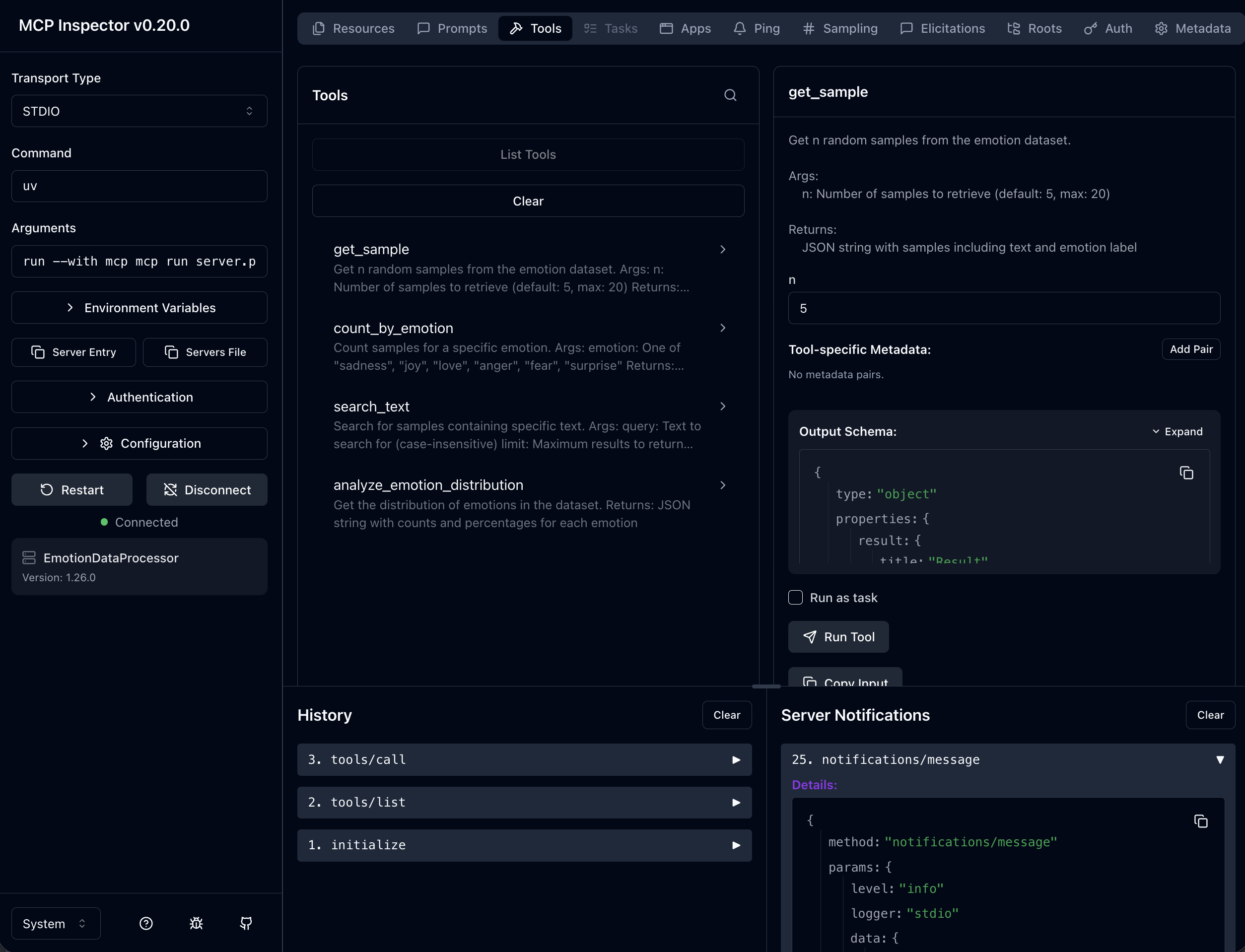
You should see the MCP Inspector interface:
Passwordless SSH Login
To avoid entering your password multiple times, set up SSH keys for HiPerGator:
https://docs.rc.ufl.edu/access/ssh_keys/
Troubleshooting
Problem | Solution |
"Connection refused" | Ensure you're using -J (ProxyJump) and forwarding both ports (6274 and 6277) |
"Address already in use" | Kill processes: `lsof -ti:6274 |
Host key verification failed | Add -o StrictHostKeyChecking=no to the SSH command |
Page won't load | Verify mcp dev is still running on the compute node |
Using the MCP Inspector
Click the Tools tab in the left sidebar
Select a tool from the list (e.g., get_sample)
Fill in the parameter values
Click Run Tool
View the JSON response in the output panel
Tools to Test
Tool | Parameters |
get_sample
| n: 3
|
count_by_emotion
| emotion: "joy"
|
search_text
| query: "happy", limit: 5
|
analyze_emotion_distribution
| (no parameters) |
Dataset
The dair-ai/emotion dataset contains English Twitter messages labeled with six emotions:
Label | Emotion |
0 | sadness |
1 | joy |
2 | love |
3 | anger |
4 | fear |
5 | surprise |
Submission
After completing the activity, submit to Canvas:
Your outputs.txt file with tool outputs
A brief reflection (2-3 sentences)
Resources

