
lu-query
[](https://www.npmjs.com/package/lu-query)
[](https://github.com/zademy/lu-query/blob/master/LICENSE)
[](https://nodejs.org)
[](https://github.com/user-attachments/assets/9740a811-cd16-4a68-967f-7792a60d1b04)
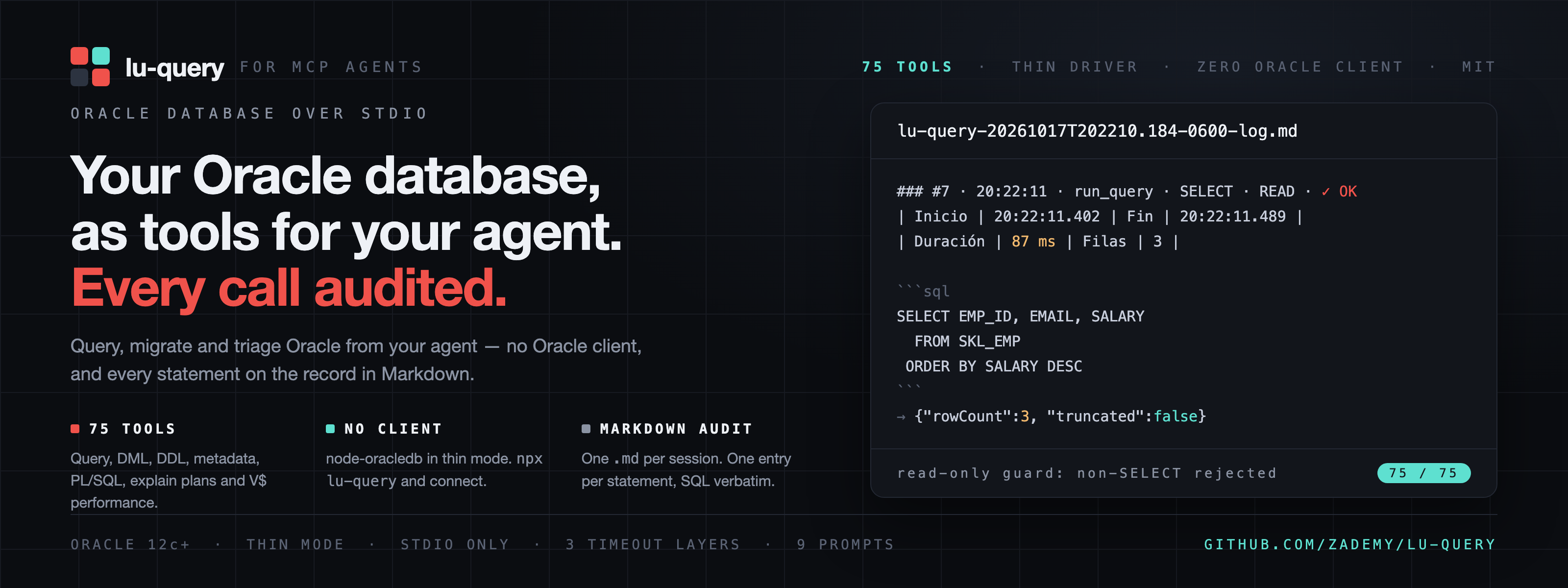
MCP server that exposes an Oracle database to MCP clients over **stdio** - 75 tools for querying, changing, inspecting and triaging it, with zero-install thin mode and a Markdown audit of every statement.
## Requirements
- Node.js >= 22
- Oracle Database 12c+ (developed and tested against Oracle Database 26ai Free)
- No Oracle Client installation: node-oracledb runs in thin mode
## Quick start
```bash
npx lu-query
```
Client configuration (Claude Desktop example; any MCP client works):
```json
{
"mcpServers": {
"lu-query": {
"command": "npx",
"args": ["lu-query"],
"env": {
"ORACLE_DB_URL": "jdbc:oracle:thin:@//db.host:1521/FREEPDB1",
"ORACLE_DB_USERNAME": "app_user",
"ORACLE_DB_PASSWORD": "secret"
}
}
}
}
```
### With OpenCode
**1. Install once.** The package ships the `lu-query` binary, so a single global install gives you the command forever:
```bash
npm i -g lu-query
```
**2. Export the Oracle credentials** in the environment that launches OpenCode (your shell profile is fine). They never need to live in the config file.
**3. Register the server** in `opencode.json` (global, in `~/.config/opencode/`) or in `.opencode/` for a single project:
```json
{
"$schema": "https://opencode.ai/config.json",
"mcp": {
"servers": {
"lu-query": {
"type": "local",
"command": ["lu-query"],
"environment": {
"ORACLE_DB_URL": "{env:ORACLE_DB_URL}",
"ORACLE_DB_USERNAME": "{env:ORACLE_DB_USERNAME}",
"ORACLE_DB_PASSWORD": "{env:ORACLE_DB_PASSWORD}",
"MCP_AUDIT_DIR": "/home/you/.lu-query/audit"
}
}
}
}
}
```
**4. Verify:** `opencode mcp list` → `✓ lu-query connected`. The nine MCP prompts become commands like `/lu-query:review-sql-performance`.
Notes:
- `{env:NAME}` is OpenCode's substitution syntax for reading a variable from the environment; shell forms like `$NAME` are **not** expanded inside JSON. Keep the password in the environment, not in the file.
- Pin `MCP_AUDIT_DIR` to an absolute path like above. Without it the audit Markdown lands in `./mcp-audit-logs` relative to the process working directory, which is your project — audit files would show up in the repo. Set `MCP_AUDIT_ENABLED=false` to turn auditing off.
- npm may warn that install scripts for `oracledb` were blocked. It is harmless: lu-query runs node-oracledb in thin mode and needs no native client.
- No `ORACLE_DB_SCHEMA`? Every tool uses the connected user's schema; set it to pin one.
- The pool is lazy: the server answers `initialize` without a database; the credentials are only needed when a tool actually queries.
Prefer no global install? Use `"command": ["npx", "-y", "lu-query"]` instead: same behavior, npx downloads and caches the package on the first call — and that first call can exceed the 30 s default startup timeout, so add `"timeout": { "startup": 120000 }`.
### From a local clone
While working on the code (or on an unpublished build), point the command at your local build instead of the installed one:
```json
"lu-query": {
"type": "local",
"command": ["node", "/absolute/path/to/lu-query/dist/index.js"],
"cwd": "/absolute/path/to/lu-query",
"environment": {
"ORACLE_DB_URL": "{env:ORACLE_DB_URL}",
"ORACLE_DB_USERNAME": "{env:ORACLE_DB_USERNAME}",
"ORACLE_DB_PASSWORD": "{env:ORACLE_DB_PASSWORD}"
}
}
```
Run `npm run build` first: `dist/` is generated and gitignored.
The pool is lazy: the server starts and answers `initialize` without a database; the first tool call opens the connection.
## Configuration
| Variable | Required | Default | Purpose |
| ----------------------------- | --------- | ------------------ | ------------------------------------------------------------------------------------------------------ |
| `ORACLE_DB_URL` | yes | — | Connect string: JDBC (`jdbc:oracle:thin:@//host:1521/service`) or easy-connect (`host:1521/service`) |
| `ORACLE_DB_USERNAME` | yes | — | Database user |
| `ORACLE_DB_PASSWORD` | yes | — | Database password |
| `ORACLE_DB_SCHEMA` | no | session default | Schema set via `ALTER SESSION SET CURRENT_SCHEMA` on each pooled session |
| `ORACLE_POOL_SIZE` | no | `4` | Connection pool size |
| `MCP_SERVER_VERSION` | no | package version | Version reported by the server |
| `MCP_AUDIT_ENABLED` | no | `true` | Session audit on by default — the only contract change vs the Java server (which defaulted to `false`) |
| `MCP_AUDIT_DIR` | no | `./mcp-audit-logs` | Directory for audit Markdown files |
| `SENTRY_ENABLED` | no | `false` | Error reporting to Sentry |
| `SENTRY_DSN` | if Sentry | — | Sentry DSN |
| `SENTRY_ENV` | no | `local` | Sentry environment |
| `SENTRY_RELEASE` | no | `0.0.1-SNAPSHOT` | Sentry release |
| `SENTRY_SEND_DEFAULT_PII` | no | `false` | PII in Sentry events |
| `SENTRY_AUTH_TOKEN` | no | — | Accepted for config parity; unused at runtime (`@sentry/node` has no such setting) |
| `LOG_LEVEL` / `APP_LOG_LEVEL` | no | `INFO` | Server log level |
All of them in one place, ready to paste. Only the first three are required; drop any other line and its default from the table applies. The same names go in the `environment` block of an MCP client config.
```bash
# required
export ORACLE_DB_URL='jdbc:oracle:thin:@//db.host:1521/FREEPDB1'
export ORACLE_DB_USERNAME='app_user'
export ORACLE_DB_PASSWORD='change-me'
# optional
export ORACLE_DB_SCHEMA='APP' # pin a schema instead of the connected user's
export ORACLE_POOL_SIZE='8' # connections kept open (default 4)
export MCP_AUDIT_ENABLED='true' # session audit Markdown on/off
export MCP_AUDIT_DIR='/var/log/lu-query' # absolute path, or it lands in the client's cwd
export LOG_LEVEL='INFO' # APP_LOG_LEVEL also works
export SENTRY_ENABLED='false' # stays off until SENTRY_DSN is set
# Sentry, only if you report errors (values from your Sentry project)
# export SENTRY_DSN='https://key@sentry.io/1234567'
# export SENTRY_ENV='production'
# export SENTRY_RELEASE='2.16.3'
# export SENTRY_SEND_DEFAULT_PII='false'
# export SENTRY_AUTH_TOKEN=''
# export MCP_SERVER_VERSION='2.16.3' # only to pin the reported version
```
```json
{
"ORACLE_DB_URL": "jdbc:oracle:thin:@//db.host:1521/FREEPDB1",
"ORACLE_DB_USERNAME": "app_user",
"ORACLE_DB_PASSWORD": "change-me",
"ORACLE_DB_SCHEMA": "APP",
"ORACLE_POOL_SIZE": "8",
"MCP_AUDIT_ENABLED": "true",
"MCP_AUDIT_DIR": "/var/log/lu-query",
"LOG_LEVEL": "INFO",
"MCP_SERVER_VERSION": "2.16.3",
"SENTRY_ENABLED": "false",
"SENTRY_DSN": "",
"SENTRY_ENV": "",
"SENTRY_RELEASE": "",
"SENTRY_SEND_DEFAULT_PII": "false",
"SENTRY_AUTH_TOKEN": ""
}
```
The same set as JSON, for the `environment` block of a client config (`mcp.servers.<name>` in opencode.json, `mcpServers.<name>` in claude_desktop_config.json). Empty values are read as unset.
**Sentry**, only if you want error reporting. All six keys ship in the JSON above:
- `SENTRY_ENABLED` - master switch; off means nothing is ever sent.
- `SENTRY_DSN` - client key of your Sentry project. Without it the server stays off and says so on stderr.
- `SENTRY_ENV` - environment tag on every event (`local` by default).
- `SENTRY_RELEASE` - version tag on every event (`0.0.1-SNAPSHOT` by default, inherited from the Java config).
- `SENTRY_SEND_DEFAULT_PII` - let Sentry attach IPs and user agents (`false` by default).
- `SENTRY_AUTH_TOKEN` - build token of the Java setup, accepted for config parity and ignored at runtime.
**Limits.** Result sets are capped at 1000 rows. Three timeout layers: statement 120 s, socket 30 s, MCP request watchdog 150 s. Identifiers are validated against `^[A-Za-z][A-Za-z0-9_$#]{0,127}$`; literals are escaped (`'` -> `''`).
## Architecture reference
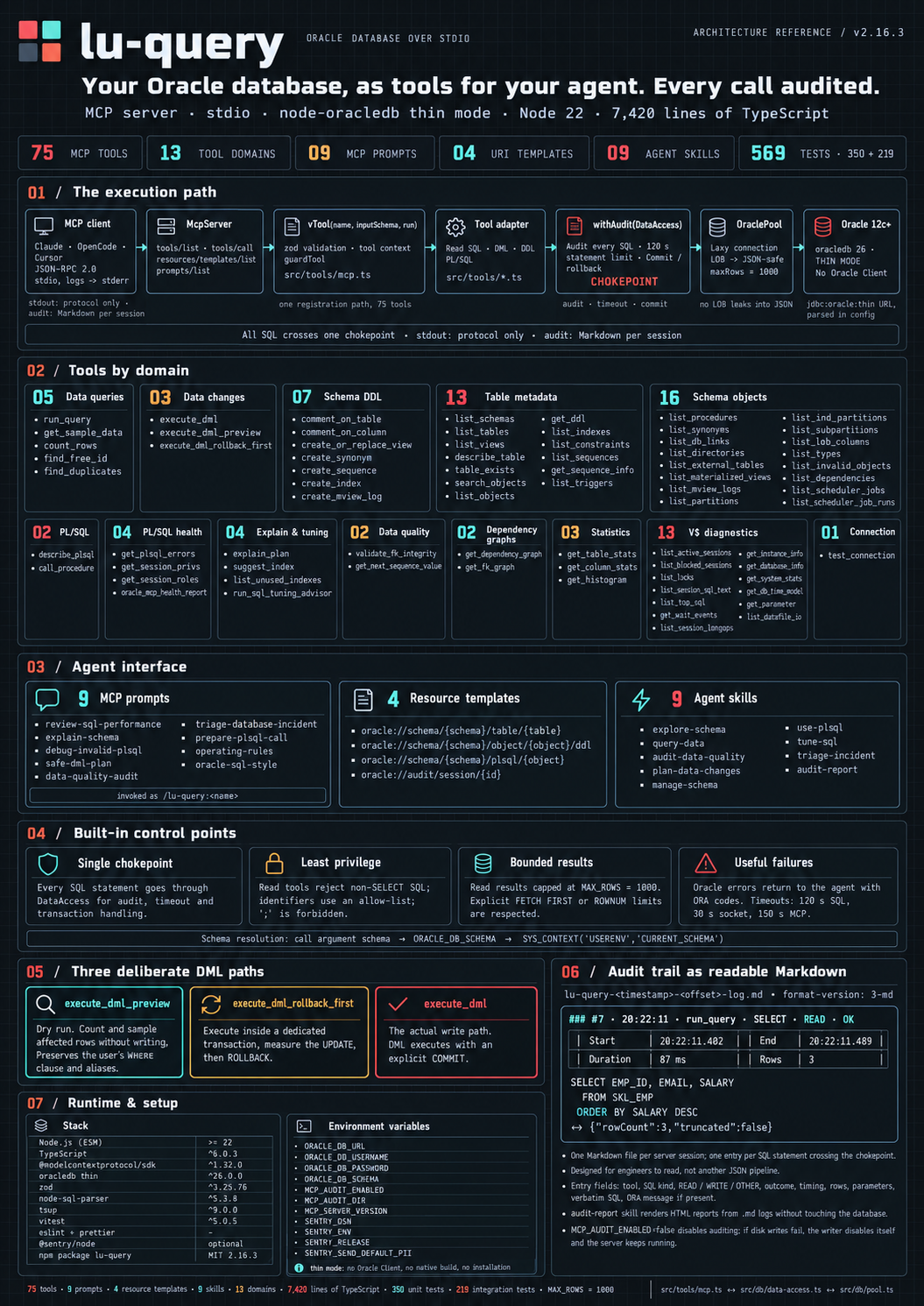
The whole server on one page: the execution path from the MCP client to Oracle, the 75 tools by domain, the agent interface (prompts, resource templates, skills), the built-in control points, the three DML paths and the audit trail.
## Session audit
Every session writes one Markdown file `lu-query-<timestamp>-log.md` in `MCP_AUDIT_DIR`, with one entry per tool execution: tool name, statement kind (SELECT, INSERT, ...) and type (READ/WRITE/OTHER), duration, rows, parameters and the SQL verbatim.
````markdown
### #1 · 11:33:52 · test_connection · SELECT · READ · ✅ OK
| Inicio | 11:33:52.410 | Fin | 11:33:52.492 | Duración | 82 ms | Filas | 1 | Parámetros | |
```sql
SELECT * FROM V$VERSION
```
````
The table labels are Spanish because that is the literal output of the audit writer; the field names are part of the format the `lu-query-audit-report` skill parses.
Read a session back with the resource `oracle://audit/session/{id}` (autocomplete offers `current` and recent ids). Audit disables itself on I/O errors and says so on stderr. Set `MCP_AUDIT_ENABLED=false` to turn it off. Audit files contain every statement executed — protect the directory (see [SECURITY.md](https://github.com/zademy/lu-query/blob/master/SECURITY.md)).
## Tools (75)
### System (1)
| Tool | Purpose |
| ----------------- | ------------------------------------------------------------------------- |
| `test_connection` | Connectivity check: database version, name, current user/schema, instance |
### Query (2)
| Tool | Purpose |
| ----------------- | -------------------------------------------------------------------------------------- |
| `run_query` | Run a single SELECT (verbatim, CTEs allowed) with optional `offset`/`limit` pagination |
| `get_sample_data` | First N rows of a table (default 10, max 1000) with progress notifications |
### DML (3)
| Tool | Purpose |
| ---------------------------- | -------------------------------------------------------------------------------------------- |
| `execute_dml` | Execute one INSERT/UPDATE/DELETE/MERGE and commit |
| `execute_dml_preview` | Dry-run an UPDATE/DELETE: rows that would be affected plus the WHERE breakdown, no execution |
| `execute_dml_rollback_first` | Execute DML inside a transaction that is immediately rolled back — nothing persists |
### DDL (7)
| Tool | Purpose |
| ------------------------ | ------------------------------------------------------------------------------- |
| `comment_on_table` | Add or replace a table comment (own tables only) |
| `comment_on_column` | Add or replace a column comment (own tables only) |
| `create_or_replace_view` | Create or replace a view in the user's own schema |
| `create_synonym` | Create a private or public synonym for another schema's object |
| `create_sequence` | Create a sequence in the user's own schema |
| `create_index` | Create an index on a table (columns array; table ownership or CREATE ANY INDEX) |
| `create_mview_log` | Create a materialized-view log for fast refresh |
### Metadata — core (8)
| Tool | Purpose |
| ---------------- | --------------------------------------------------------------------- |
| `list_schemas` | List schemas (users) visible to the connection |
| `list_tables` | List tables with optional schema and LIKE pattern |
| `list_views` | List views with optional schema and LIKE pattern |
| `describe_table` | Columns of a table: type, nullability, default, comment |
| `table_exists` | true/false via ALL_TABLES (views not considered) |
| `search_objects` | Search objects by case-insensitive LIKE pattern, optional type filter |
| `list_objects` | List objects by schema and type (tables, views, packages, ...) |
| `get_ddl` | DDL of an object via DBMS_METADATA.GET_DDL (as CLOB string) |
### Metadata — catalog (21)
| Tool | Purpose |
| ------------------------- | --------------------------------------------------------------- |
| `list_indexes` | Indexes of a table with columns, uniqueness, status |
| `list_constraints` | PK/FK/unique/check constraints with columns and references |
| `list_sequences` | Sequences with range, increment, last number, cycle, cache |
| `get_sequence_info` | Metadata of a single sequence |
| `list_triggers` | Triggers with type, event, table, status |
| `list_procedures` | Procedures, functions, packages, types |
| `list_synonyms` | Private/public synonyms with resolved target and DB link |
| `list_db_links` | Database links visible to the user |
| `list_directories` | Directory objects and filesystem paths |
| `list_external_tables` | External tables: driver, directory, reject limit, access params |
| `list_materialized_views` | MViews with refresh mode/method, last refresh, staleness |
| `list_mview_logs` | Materialized-view logs on tables |
| `list_partitions` | Table partitions: high value, rows, compression, last analyzed |
| `list_ind_partitions` | Index partitions: status, leaf blocks, distinct keys |
| `list_subpartitions` | Subpartitions of a composite-partitioned table |
| `list_lob_columns` | LOB columns: segment, index, caching, SECUREFILE, retention |
| `list_types` | User-defined types: typecode, attributes, methods, supertype |
| `list_invalid_objects` | Objects with status INVALID (broken code) |
| `list_dependencies` | Objects a given object depends on (impact analysis) |
| `list_scheduler_jobs` | Scheduler jobs: state, run/failure counts, next run |
| `list_scheduler_job_runs` | Recent job run details: duration, error code, output |
### Optimizer statistics & health (7)
| Tool | Purpose |
| -------------------------- | ---------------------------------------------------------------------------------------------------------- |
| `get_table_stats` | Table optimizer stats: rows, blocks, avg row length, last analyzed |
| `get_column_stats` | Column stats: NDV, density, nulls, buckets |
| `get_histogram` | Histogram endpoints of a column |
| `get_session_privs` | Granted and effective system privileges |
| `get_session_roles` | Enabled roles with admin/default flags |
| `get_plsql_errors` | Compilation errors of PL/SQL units |
| `oracle_mcp_health_report` | One-shot readiness check: connectivity, version, catalog role, invalid objects, server config, audit state |
### PL/SQL (2)
| Tool | Purpose |
| ---------------- | --------------------------------------------------------------------------------------------- |
| `describe_plsql` | Arguments and full source of a PL/SQL object |
| `call_procedure` | Execute a procedure/function/package subprogram with IN/OUT/INOUT args and REF CURSOR returns |
### Explain & tuning (4)
| Tool | Purpose |
| ------------------------ | ---------------------------------------------------------------------------------- |
| `explain_plan` | Execution plan via EXPLAIN PLAN + DBMS_XPLAN without executing the statement |
| `suggest_index` | Analyse a statement's plan; propose CREATE INDEX when a table is read by full scan |
| `list_unused_indexes` | Indexes with columns and best-effort usage info |
| `run_sql_tuning_advisor` | DBMS_SQLTUNE report with recommendations |
### Graphs & helpers (7)
| Tool | Purpose |
| ------------------------- | -------------------------------------------------------------------------------- |
| `get_next_sequence_value` | NEXTVAL of a sequence — side-effecting read: it advances the counter |
| `validate_fk_integrity` | Orphan rows per FK of a table (empty list = integrity intact) |
| `find_free_id` | Lowest free id in 1..maxRange (default 1000, cap 10000) not present in the table |
| `find_duplicates` | Duplicate value groups in one or more columns (NULLs excluded) |
| `count_rows` | Exact row count of a table without running SQL |
| `get_dependency_graph` | Object-dependency graph of a schema (Mermaid) |
| `get_fk_graph` | Foreign-key graph of a schema or table (Mermaid) |
### Performance — V$ views (13)
Requires `SELECT ANY DICTIONARY` (or equivalent) on the database user; tools return a grant hint on ORA-00942/01031.
| Tool | Purpose |
| ----------------------- | ---------------------------------------------------------------------------------- |
| `list_active_sessions` | ACTIVE sessions: user, machine, program, last call elapsed |
| `list_blocked_sessions` | Blocked sessions with blocker sid/user and wait event |
| `list_locks` | DML/transaction/user locks held and requested, object and decoded mode |
| `get_session_sql_text` | Full SQL text currently executed by a session (sid + serial#) |
| `list_top_sql` | Top-N SQL by buffer_gets (default), disk_reads, elapsed_time, executions, cpu_time |
| `get_wait_events` | Current waits from V$SESSION_WAIT, optional sid/class filter |
| `get_session_longops` | Long-running operations with progress from V$SESSION_LONGOPS |
| `get_instance_info` | Instance name, host, version, startup time, status, archiver |
| `get_database_info` | Database name, creation, log mode, open mode, role |
| `get_system_stats` | Cumulative V$SYSSTAT stats: parses, DB time, physical IO |
| `get_db_time_model` | V$SYS_TIME_MODEL: DB CPU, DB time, parse times |
| `get_parameter` | Initialization parameters from V$PARAMETER |
| `list_datafile_io` | Datafiles with size, reads/writes and average IO time |
## Resources (4)
| URI template | Purpose |
| ---------------------------------------------- | -------------------------------------------------------------------- |
| `oracle://audit/session/{id}` | Markdown audit log of a session (`current` resolves to the live one) |
| `oracle://schema/{schema}/table/{table}` | Column-level description of a table or view |
| `oracle://schema/{schema}/object/{object}/ddl` | DDL source of any object (type auto-detected) |
| `oracle://schema/{schema}/plsql/{object}` | PL/SQL source (procedure, function, package, type body) |
## Prompts (9)
`review-sql-performance`, `explain-schema`, `debug-invalid-plsql`, `safe-dml-plan`, `data-quality-audit`, `triage-database-incident`, `prepare-plsql-call`, `operating-rules`, `oracle-sql-style` — read-only working guides for common Oracle tasks through these tools.
## Agent skills (optional)
Ten skills. Eight teach an agent how to use these 75 tools well - which tool for which job, in what order, what mutates, how failures look, how to read results. One turns the audit trail into an interactive HTML report. The last one, [below](#sql-benchmark-and-index-recommendations), benchmarks a .sql file and proposes index changes. Install them with the [`skills`](https://www.npmjs.com/package/skills) CLI, which puts each skill where your agent looks for them:
```bash
npx skills@latest add zademy/lu-query # install the ten skills
npx skills@latest add zademy/lu-query --list # just show them
```
Useful flags: `-g` install globally instead of per project, `-a <agent>` pick the target (`claude-code`, `opencode`, `cursor`, `codex`, `gemini-cli`, …), `-s <skill>` install one skill (or `'*'` for all), `--copy` copy instead of symlink.
No CLI? Copy them by hand - each folder is self-contained (`SKILL.md` + `references/`):
```bash
cp -r node_modules/lu-query/skills/lu-query-* ~/.claude/skills/ # Claude Code and OpenCode
```
Skills: `lu-query-explore-schema`, `lu-query-query-data`, `lu-query-audit-data-quality`, `lu-query-plan-data-changes`, `lu-query-manage-schema`, `lu-query-use-plsql`, `lu-query-tune-sql`, `lu-query-triage-incident`, `lu-query-audit-report`, `lu-query-benchmark-sql`. Catalog and examples provenance: [`skills/README.md`](https://github.com/zademy/lu-query/blob/master/skills/README.md). Installing the server never installs skills on its own.
### SQL benchmark and index recommendations
[lu-query-benchmark-sql](skills/lu-query-benchmark-sql/SKILL.md) asks for your .sql file and compares the original and rewritten queries. Its HTML report opens in a light theme with an optional remembered dark theme, and includes a smooth replay of recorded runs, interactive table-access metrics, and plain-language index advice: candidates to test, existing indexes to review, and predicates that can prevent an index lookup. Each recommendation includes evidence, trade-offs and a validation step. An unused index in one plan is not automatically a bad index. Proposed SQL is displayed, not executed.
The report uses the existing MCP tools. Table timings are inclusive plan statistics, not live intra-query telemetry. Result fingerprints are a consistency check, not proof of equivalence. See the [skill catalog](skills/README.md) for installation.
## Security
See [SECURITY.md](https://github.com/zademy/lu-query/blob/master/SECURITY.md). Highlights: stdio only (no ports), identifier allow-list, escaped literals, audit directory must be protected. The database user should be least-privilege: the server relies on Oracle grants, not on its own checks, for anything the tools do not validate.
## Contributing
See [CONTRIBUTING.md](https://github.com/zademy/lu-query/blob/master/CONTRIBUTING.md). Releasing to npm is manual and done by the maintainer. Vocabulary in [GLOSSARY.md](https://github.com/zademy/lu-query/blob/master/GLOSSARY.md); decisions in [docs/adr/](https://github.com/zademy/lu-query/blob/master/docs/adr/).
## License
MIT (c) 2026 Sadot Hernández Moreno
TDQS
Scored across 75 tools
75 tools create many overlapping listing and diagnostic tools (e.g., list_objects vs list_tables vs search_objects; get_table_stats vs get_column_stats). Descriptions help distinguish most, but the sheer volume and multiple entry points for similar tasks make misselection likely.
Nearly all tools use snake_case with a verb_noun pattern (list_*, get_*, create_*). Minor deviations like table_exists and oracle_mcp_health_report break the pattern slightly.
75 tools is far beyond the 3-15 range for a well-scoped server. While the domain is complex, this many tools creates cognitive overload and violates the rubric's extreme mismatch threshold (50+).
Extensive read/metadata coverage and some create/DML, but missing core DDL operations like create/drop/alter table, grant/revoke, and transaction control. Agents will hit dead ends for many administrative tasks.