

A
licenseA
qualityF
maintenanceA bridge server that enables MCP-compatible AI assistants like Claude to seamlessly discover, communicate with, and manage A2A protocol agents.
7
147
Apache 2.0

Bridges the Model Context Protocol (MCP) with Google's Agent-to-Agent (A2A) protocol, enabling MCP clients to discover, register, communicate with, and manage tasks on A2A agents through agent registration, message sending, task tracking, and result retrieval.
Click on "Deploy Server".
Wait a few minutes for the server to deploy. Once ready, it will show a "Started" state.
In the chat, type @ followed by the MCP server name and your instructions, e.g., "@MCP-A2A-Gateway list all registered A2A agents"
That's it! The server will respond to your query, and you can continue using it as needed.
Here is a step-by-step guide with screenshots.

 A gateway server that bridges the Model Context Protocol (MCP) with the Agent-to-Agent (A2A) protocol, enabling MCP-compatible AI assistants (like Claude) to seamlessly interact with A2A agents.
This project serves as an integration layer between two cutting-edge AI agent protocols:
Model Context Protocol (MCP): Developed by Anthropic, MCP allows AI assistants to connect to external tools and data sources. It standardizes how AI applications and large language models connect to external resources in a secure, composable way.
Agent-to-Agent Protocol (A2A): Developed by Google, A2A enables communication and interoperability between different AI agents through a standardized JSON-RPC interface.
By bridging these protocols, this server allows MCP clients (like Claude) to discover, register, communicate with, and manage tasks on A2A agents through a unified interface.
Related MCP server: Agent Hub MCP
🎉 The package is now available on PyPI!
# Run with default settings (stdio transport)
uvx mcp-a2a-gateway

# Run with HTTP transport for web clients
MCP_TRANSPORT=streamable-http MCP_PORT=10000 uvx mcp-a2a-gateway

# Run with custom data directory
MCP_DATA_DIR="/Users/your-username/Desktop/a2a_data" uvx mcp-a2a-gateway

# Run with specific version
uvx mcp-a2a-gateway==0.1.6

# Run with multiple environment variables
MCP_TRANSPORT=stdio MCP_DATA_DIR="/custom/path" LOG_LEVEL=DEBUG uvx mcp-a2a-gateway# Clone and run locally
git clone https://github.com/yw0nam/MCP-A2A-Gateway.git
cd MCP-A2A-Gateway
# Run with uv
uv run mcp-a2a-gateway
# Run with uvx from local directory
uvx --from . mcp-a2a-gateway
# Run with custom environment for development
MCP_TRANSPORT=streamable-http MCP_PORT=8080 uvx --from . mcp-a2a-gateway
also support cloud deployed Agent

Agent Management
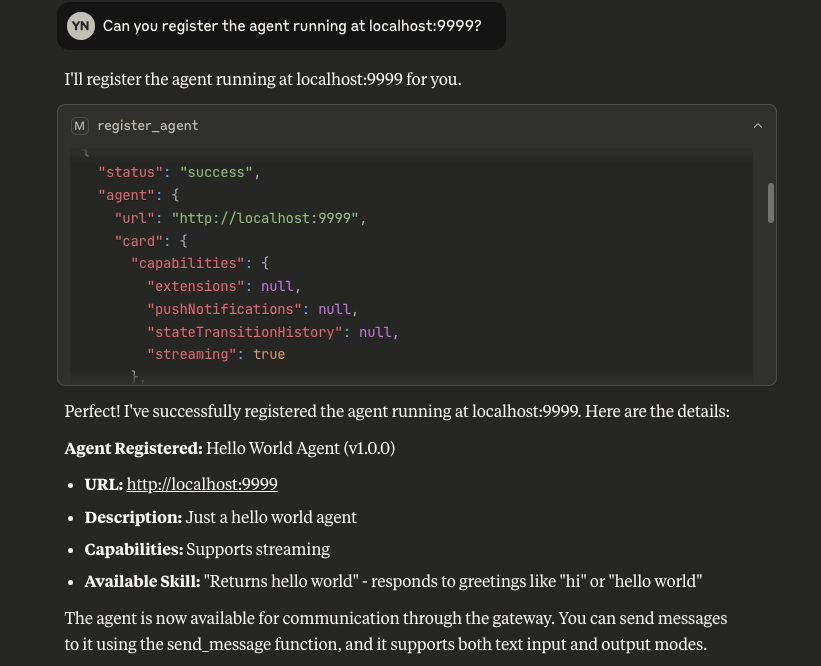
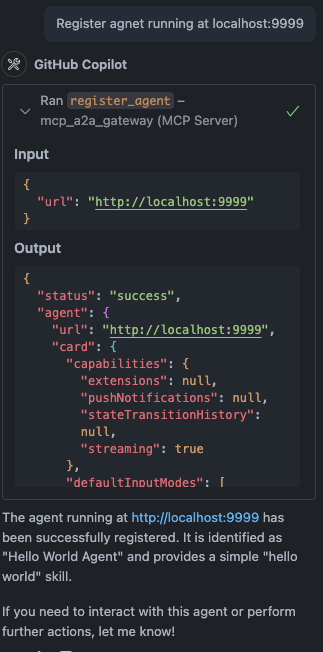
Register A2A agents with the bridge server
List all registered agents
Unregister agents when no longer needed
Communication
Send messages to A2A agents and receive responses
Asynchronous message sending for immediate server response.
Stream responses from A2A agents in real-time
Task Management
Track which A2A agent handles which task
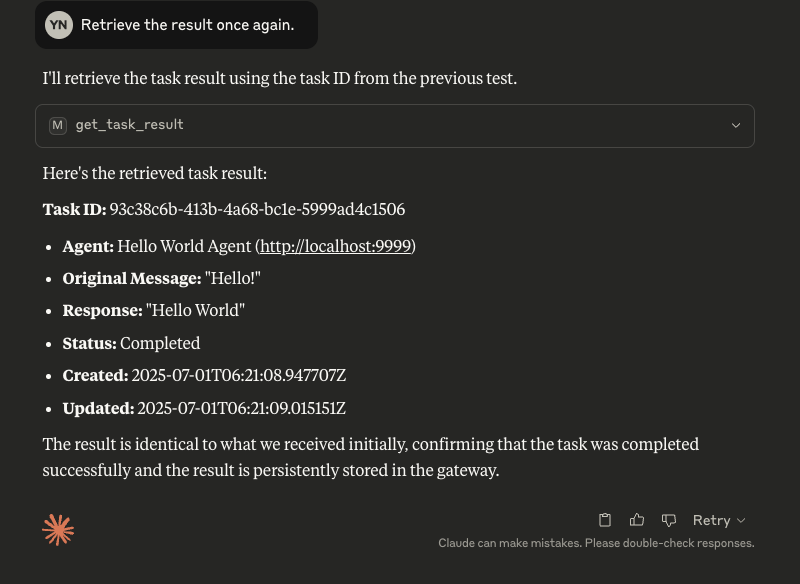
Retrieve task results using task IDs
Get a list of all tasks and their statuses.
Cancel running tasks
Transport Support
Multiple transport types: stdio, streamable-http, SSE
Configure transport type using MCP_TRANSPORT environment variable
Before you begin, ensure you have the following installed:
Python 3.11+
uv (for local development)
Run directly without installation using uvx:
uvx mcp-a2a-gatewayClone the repository:
git clone https://github.com/yw0nam/MCP-A2A-Gateway.git
cd MCP-A2A-GatewayRun using uv:
uv run mcp-a2a-gatewayOr use uvx with local path:
uvx --from . mcp-a2a-gatewayStart the server with HTTP transport:
# Using uvx
MCP_TRANSPORT=streamable-http MCP_HOST=0.0.0.0 MCP_PORT=10000 uvx mcp-a2a-gateway
Start the server with SSE transport:
# Using uvx
MCP_TRANSPORT=sse MCP_HOST=0.0.0.0 MCP_PORT=10000 uvx mcp-a2a-gatewayThe server can be configured using the following environment variables:
Variable | Default | Description |
|
| Transport type: |
|
| Host for HTTP/SSE transports |
|
| Port for HTTP/SSE transports |
|
| HTTP endpoint path |
|
| Directory for persistent data storage |
|
| Request timeout in seconds |
|
| Immediate response timeout in seconds |
|
| Logging level: |
Example .env file:
# Transport configuration
MCP_TRANSPORT=stdio
MCP_HOST=0.0.0.0
MCP_PORT=10000
MCP_PATH=/mcp

# Data storage
MCP_DATA_DIR=/Users/your-username/Desktop/data/a2a_gateway

# Timeouts
MCP_REQUEST_TIMEOUT=30
MCP_REQUEST_IMMEDIATE_TIMEOUT=2

# Logging
LOG_LEVEL=INFOThe A2A MCP Server supports multiple transport types:
stdio (default): Uses standard input/output for communication
Ideal for command-line usage and testing
No HTTP server is started
Required for Claude Desktop
streamable-http (recommended for web clients): HTTP transport with streaming support
Recommended for production deployments
Starts an HTTP server to handle MCP requests
Enables streaming of large responses
sse: Server-Sent Events transport
Provides real-time event streaming
Useful for real-time updates
Add below to VS Code settings.json for sse or http:
"mcpServers": {
  "mcp_a2a_gateway": {
    "url": "http://0.0.0.0:10000/mcp"
  }
}
"mcpServers": {
"mcp_a2a_gateway": {
"type": "stdio",
"command": "uvx",
"args": ["mcp-a2a-gateway"],
"env": {
"MCP_TRANSPORT": "stdio",
"MCP_DATA_DIR": "/Users/your-username/Desktop/data/Copilot/a2a_gateway/"
}
}
}"mcpServers": {
"mcp_a2a_gateway": {
"type": "stdio",
"command": "uvx",
"args": ["--from", "/path/to/MCP-A2A-Gateway", "mcp-a2a-gateway"],
"env": {
"MCP_TRANSPORT": "stdio",
"MCP_DATA_DIR": "/Users/your-username/Desktop/data/Copilot/a2a_gateway/"
}
}
}"mcpServers": {
"mcp_a2a_gateway": {
"type": "stdio",
"command": "uv",
"args": [
"--directory",
"/path/to/MCP-A2A-Gateway",
"run",
"mcp-a2a-gateway"
],
"env": {
"MCP_TRANSPORT": "stdio",
"MCP_DATA_DIR": "/Users/your-username/Desktop/data/Copilot/a2a_gateway/"
}
}
}Add this to claude_config.json
"mcpServers": {
  "mcp_a2a_gateway": {
    "command": "uvx",
    "args": ["mcp-a2a-gateway"],
    "env": {
      "MCP_TRANSPORT": "stdio",
      "MCP_DATA_DIR": "/Users/your-username/Desktop/data/Claude/a2a_gateway/"
    }
  }
}
Add this to claude_config.json
"mcpServers": {
  "mcp_a2a_gateway": {
    "command": "uvx",
    "args": ["--from", "/path/to/MCP-A2A-Gateway", "mcp-a2a-gateway"],
    "env": {
      "MCP_TRANSPORT": "stdio",
      "MCP_DATA_DIR": "/Users/your-username/Desktop/data/Claude/a2a_gateway/"
    }
  }
}
Add this to claude_config.json
"mcpServers": {
  "mcp_a2a_gateway": {
    "command": "uv",
    "args": ["--directory", "/path/to/MCP-A2A-Gateway", "run", "mcp-a2a-gateway"],
    "env": {
      "MCP_TRANSPORT": "stdio",
      "MCP_DATA_DIR": "/Users/your-username/Desktop/data/Claude/a2a_gateway/"
    }
  }
}The server exposes the following MCP tools for integration with LLMs like Claude:
register_agent: Register an A2A agent with the bridge server
{
  "name": "register_agent",
  "arguments": {
    "url": "http://localhost:41242"
  }
}list_agents: Get a list of all registered agents
{
  "name": "list_agents",
  "arguments": {"dummy": "" }
}unregister_agent: Remove an A2A agent from the bridge server
{
  "name": "unregister_agent",
  "arguments": {
    "url": "http://localhost:41242"
  }
}send_message: Send a message to an agent and get a task_id for the response
{
  "name": "send_message",
  "arguments": {
    "agent_url": "http://localhost:41242",
    "message": "What's the exchange rate from USD to EUR?",
    "session_id": "optional-session-id"
  }
}get_task_result: Retrieve a task's result using its ID
{
  "name": "get_task_result",
  "arguments": {
    "task_id": "b30f3297-e7ab-4dd9-8ff1-877bd7cfb6b1",
  }
}get_task_list: Get a list of all tasks and their statuses.
{
    "name": "get_task_list",
    "arguments": {}
}We are actively developing and improving the gateway! We welcome contributions of all kinds. Here is our current development roadmap, focusing on creating a rock-solid foundation first.
This is our current focus. Our goal is to make the gateway as stable and easy to use as possible.
Implement Streaming Responses: Full support for streaming responses from A2A agents.
Enhance Error Handling: Provide clearer error messages and proper HTTP status codes for all scenarios.
Input Validation: Sanitize and validate agent URLs during registration for better security.
Add Health Check Endpoint: A simple /health endpoint to monitor the server's status.
Configuration Validation: Check for necessary environment variables at startup.
Comprehensive Integration Tests: Increase test coverage to ensure reliability.
Cancel Task: Implement task cancellation
Implement Streaming Update: Implement streaming task update. So that user check the progress.
Easy Installation: Add support for uvx
Docker Support: Provide a Docker Compose setup for easy deployment.
Better Documentation: Create a dedicated documentation site or expand the Wiki.
Want to contribute? Check out the issues tab or feel free to open a new one to discuss your ideas!
This project is licensed under the Apache License, Version 2.0 - see the LICENSE file for details.
Anthropic for the Model Context Protocol
Google for the Agent-to-Agent Protocol
Contributors to the FastMCP library
Contributors of A2A-MCP-Server (This project highly inspired from this repo.)
This project uses automated publishing through GitHub Actions for seamless releases.
# Patch release (0.1.6 → 0.1.7)
./release.sh patch

# Minor release (0.1.6 → 0.2.0)
./release.sh minor

# Major release (0.1.6 → 1.0.0)
./release.sh major
The script will:
✅ Check you're on the main branch with clean working directory
📈 Automatically bump the version in pyproject.toml
🔨 Build and test the package locally
📤 Commit the version change and create a git tag
🚀 Push to GitHub, triggering automated PyPI publishing
# Update version in pyproject.toml manually
# Then create and push a tag
git add pyproject.toml
git commit -m "chore: bump version to 0.1.7"
git tag v0.1.7
git push origin main
git push origin v0.1.7Click "Create a new release"
Choose or create a tag (e.g., v0.1.7)
Fill in release notes
Publish the release
To enable automated publishing, add your PyPI API token to GitHub Secrets:
Get PyPI API Token:
Create a new token with "Entire account" scope
Copy the token (starts with pypi-)
Add to GitHub Secrets:
Go to your repository → Settings → Secrets and variables → Actions
Add a new repository secret:
Name: PYPI_API_TOKEN
Value: Your PyPI token
Test the Workflow:
Push a tag or create a release
Check the Actions tab for publishing status
For emergency releases or local testing:
# Build and get manual publish instructions
./publish.sh

# Or publish directly (with credentials configured)
uv build
uv publishRetrieves a list of tasks being managed by the server.
Args: status (Literal["all", "completed", "running", "error", "pending", "streaming", "cancelled"]): Filters tasks by their status. Defaults to "all". sort (Literal["Descending", "Ascending"]): Sorts tasks by their last update time. Defaults to "Descending". number (int): The maximum number of tasks to return. Defaults to 10. ctx (Context): The MCP context for logging.
Returns: List[Dict[str, Any]]: A list of tasks, each represented as a dictionary.
| Name | Required | Description | Default |
|---|---|---|---|
| status | No | all | |
| sort | No | Descending | |
| number | No |
Does the description disclose side effects, auth requirements, rate limits, or destructive behavior?
With no annotations provided, the description carries full burden for behavioral disclosure. It states it 'retrieves' tasks, implying a read-only operation, but doesn't specify whether this requires authentication, has rate limits, or affects server state. The description mentions the return format but lacks details about pagination, error handling, or what happens when no tasks match. For a tool with zero annotation coverage, this is insufficient behavioral context.
Agents need to know what a tool does to the world before calling it. Descriptions should go beyond structured annotations to explain consequences.
Is the description appropriately sized, front-loaded, and free of redundancy?
The description is well-structured with clear sections (purpose, Args, Returns) and uses bullet-like formatting for parameters. The opening sentence efficiently states the core purpose. While the parameter documentation is thorough, it's appropriately detailed given the 0% schema coverage. Some minor verbosity exists in the Returns section, but overall it's front-loaded and efficient.
Shorter descriptions cost fewer tokens and are easier for agents to parse. Every sentence should earn its place.
Given the tool's complexity, does the description cover enough for an agent to succeed on first attempt?
Given the tool's moderate complexity (3 parameters, no annotations, no output schema), the description is partially complete. It thoroughly documents parameters but lacks behavioral context about authentication, rate limits, or error conditions. The return format is described but without schema details. For a read operation with filtering/sorting capabilities, more context about constraints and behavior would be needed for full completeness.
Complex tools with many parameters or behaviors need more documentation. Simple tools need less. This dimension scales expectations accordingly.
Does the description clarify parameter syntax, constraints, interactions, or defaults beyond what the schema provides?
The description provides detailed parameter documentation in the Args section, explaining each parameter's purpose and default values. Since schema description coverage is 0%, this documentation fully compensates by adding meaning beyond the bare schema. It clarifies that 'status' filters tasks, 'sort' orders by last update time, and 'number' limits results. However, it doesn't explain the 'ctx' parameter's purpose, keeping it from a perfect score.
Input schemas describe structure but not intent. Descriptions should explain non-obvious parameter relationships and valid value ranges.
Does the description clearly state what the tool does and how it differs from similar tools?
The description clearly states the verb ('retrieves') and resource ('list of tasks being managed by the server'), making the purpose immediately understandable. It distinguishes itself from siblings like 'get_task_result' (which retrieves specific task results) and 'list_agents' (which deals with agents rather than tasks). However, it doesn't explicitly contrast with all siblings, so it doesn't reach the highest score.
Agents choose between tools based on descriptions. A clear purpose with a specific verb and resource helps agents select the right tool.
Does the description explain when to use this tool, when not to, or what alternatives exist?
The description provides no guidance on when to use this tool versus alternatives. It doesn't mention when to prefer this over 'get_task_result' for task details, or how it relates to other task management operations. The only implicit usage is for listing tasks, but there's no explicit context about prerequisites, timing, or alternatives.
Agents often have multiple tools that could apply. Explicit usage guidance like "use X instead of Y when Z" prevents misuse.
Retrieves the result or status of a previously created task.
Using the task_id returned by send_message, this tool fetches the
current state and any results from the corresponding A2A agent.
Args: task_id (str): The unique identifier of the task to retrieve. ctx (Context): The MCP context for logging.
Returns: Dict[str, Any]: A dictionary containing the task's current status, result message, and any associated data or an error if the task ID is not found.
| Name | Required | Description | Default |
|---|---|---|---|
| task_id | Yes |
Does the description disclose side effects, auth requirements, rate limits, or destructive behavior?
With no annotations provided, the description carries full burden and does well by disclosing key behavioral traits: it fetches 'current state and any results', mentions the return structure (dictionary with status, result message, data), and specifies error behavior ('error if the task ID is not found'). It doesn't cover rate limits or authentication needs, but provides solid operational context.
Agents need to know what a tool does to the world before calling it. Descriptions should go beyond structured annotations to explain consequences.
Is the description appropriately sized, front-loaded, and free of redundancy?
Perfectly structured with a clear purpose statement, usage context, parameter explanations, and return description in four concise paragraphs. Every sentence earns its place by providing essential information without redundancy or fluff.
Shorter descriptions cost fewer tokens and are easier for agents to parse. Every sentence should earn its place.
Given the tool's complexity, does the description cover enough for an agent to succeed on first attempt?
For a single-parameter read operation with no annotations or output schema, the description is nearly complete: it explains purpose, usage, parameters, and return structure. The only minor gap is lack of format details for 'task_id' and explicit mention of whether this is idempotent or has side effects.
Complex tools with many parameters or behaviors need more documentation. Simple tools need less. This dimension scales expectations accordingly.
Does the description clarify parameter syntax, constraints, interactions, or defaults beyond what the schema provides?
With 0% schema description coverage for the single parameter, the description fully compensates by explaining 'task_id' as 'The unique identifier of the task to retrieve' and linking it to 'send_message'. This adds crucial meaning beyond the bare schema, though it doesn't specify format constraints like UUID patterns.
Input schemas describe structure but not intent. Descriptions should explain non-obvious parameter relationships and valid value ranges.
Does the description clearly state what the tool does and how it differs from similar tools?
The description clearly states the specific action ('retrieves the result or status') and resource ('previously created task'), distinguishing it from siblings like 'get_task_list' (which lists tasks) and 'send_message' (which creates tasks). The mention of using 'task_id returned by send_message' further clarifies its relationship to other tools.
Agents choose between tools based on descriptions. A clear purpose with a specific verb and resource helps agents select the right tool.
Does the description explain when to use this tool, when not to, or what alternatives exist?
Explicitly states when to use this tool ('Using the task_id returned by send_message') and provides a clear alternative scenario ('if the task ID is not found'). This gives the agent precise guidance on prerequisites and error conditions compared to other tools like 'list_agents' or 'register_agent'.
Agents often have multiple tools that could apply. Explicit usage guidance like "use X instead of Y when Z" prevents misuse.
Lists all A2A agents currently registered with the bridge server.
This resource returns a list of all agents, including their URL and AgentCard information.
Args: dummy (str): A dummy parameter to satisfy the MCP tool signature. Just for compatibility. Just pass the empty string. Returns: List[Dict[str, Any]]: A list of dictionaries, each containing the URL and AgentCard information of a registered agent. Each dictionary has the keys "url" and "card".
| Name | Required | Description | Default |
|---|---|---|---|
| dummy | No |
Does the description disclose side effects, auth requirements, rate limits, or destructive behavior?
With no annotations provided, the description carries the full burden and does well by disclosing key behavioral traits: it's a read-only operation (implied by 'Lists'), returns structured data (list of dictionaries with URL and AgentCard), and includes a dummy parameter for compatibility. However, it lacks details on potential errors, rate limits, or authentication needs.
Agents need to know what a tool does to the world before calling it. Descriptions should go beyond structured annotations to explain consequences.
Is the description appropriately sized, front-loaded, and free of redundancy?
The description is front-loaded with the core purpose, followed by clear sections for Args and Returns. It avoids unnecessary fluff, but the explanation of the dummy parameter could be slightly more concise without losing clarity.
Shorter descriptions cost fewer tokens and are easier for agents to parse. Every sentence should earn its place.
Given the tool's complexity, does the description cover enough for an agent to succeed on first attempt?
Given the tool's low complexity (1 parameter, no output schema, no annotations), the description is reasonably complete: it explains the purpose, parameter usage, and return format. However, it could improve by addressing potential edge cases or linking to sibling tools for broader context.
Complex tools with many parameters or behaviors need more documentation. Simple tools need less. This dimension scales expectations accordingly.
Does the description clarify parameter syntax, constraints, interactions, or defaults beyond what the schema provides?
The schema description coverage is 0%, but the description compensates by explaining the single parameter 'dummy' as a compatibility requirement to pass an empty string. This adds meaningful context beyond the schema's basic type information, though it doesn't cover all possible parameter nuances.
Input schemas describe structure but not intent. Descriptions should explain non-obvious parameter relationships and valid value ranges.
Does the description clearly state what the tool does and how it differs from similar tools?
The description clearly states the specific action ('Lists all A2A agents') and resource ('currently registered with the bridge server'), distinguishing it from siblings like register_agent (creation) or unregister_agent (deletion). It explicitly mentions what is returned (URL and AgentCard information), making the purpose unambiguous.
Agents choose between tools based on descriptions. A clear purpose with a specific verb and resource helps agents select the right tool.
Does the description explain when to use this tool, when not to, or what alternatives exist?
The description implies usage by stating it returns all registered agents, but does not explicitly guide when to use this tool versus alternatives like get_task_list or send_message. No exclusions or prerequisites are mentioned, leaving usage context somewhat open-ended.
Agents often have multiple tools that could apply. Explicit usage guidance like "use X instead of Y when Z" prevents misuse.
Registers an Agent-to-Agent (A2A) agent with the bridge server.
This tool fetches the agent's information (AgentCard) from the given URL and stores it in the server's list of registered agents, making it available for communication.
Args: url (str): The base URL of the A2A agent to register. This URL should point to where the agent's card can be resolved. ctx (Context): The MCP context, used for logging information back to the client.
Returns: Dict[str, Any]: A dictionary containing the registration status. On success, it includes the status and the registered agent's details. On error, it includes the status and an error message.
| Name | Required | Description | Default |
|---|---|---|---|
| url | Yes |
Does the description disclose side effects, auth requirements, rate limits, or destructive behavior?
With no annotations provided, the description carries the full burden. It discloses that the tool performs a write operation ('stores it in the server's list') and involves fetching from a URL, indicating network activity. However, it doesn't mention potential errors (beyond a vague reference), authentication needs, rate limits, or idempotency. The description adds some behavioral context but leaves gaps for a mutation tool.
Agents need to know what a tool does to the world before calling it. Descriptions should go beyond structured annotations to explain consequences.
Is the description appropriately sized, front-loaded, and free of redundancy?
The description is well-structured with a clear opening sentence, followed by explanatory details and separate sections for Args and Returns. It's appropriately sized for a tool with one parameter and no output schema, though the Returns section could be more concise. Every sentence adds value, with no redundant information.
Shorter descriptions cost fewer tokens and are easier for agents to parse. Every sentence should earn its place.
Given the tool's complexity, does the description cover enough for an agent to succeed on first attempt?
Given the tool's complexity (a mutation with network operations), no annotations, 0% schema coverage, and no output schema, the description is moderately complete. It covers the purpose, parameter meaning, and return value structure, but lacks details on error handling, side effects, or interaction with siblings. For a registration tool in an A2A system, more behavioral context would be beneficial.
Complex tools with many parameters or behaviors need more documentation. Simple tools need less. This dimension scales expectations accordingly.
Does the description clarify parameter syntax, constraints, interactions, or defaults beyond what the schema provides?
The input schema has 0% description coverage (no titles or descriptions for parameters), so the description must compensate. It provides clear semantics for the single parameter 'url', explaining it's 'the base URL of the A2A agent to register' and should point to where the agent's card can be resolved. This adds meaningful context beyond the schema's bare type, though it doesn't cover format examples or validation rules.
Input schemas describe structure but not intent. Descriptions should explain non-obvious parameter relationships and valid value ranges.
Does the description clearly state what the tool does and how it differs from similar tools?
The description clearly states the tool's purpose: 'Registers an Agent-to-Agent (A2A) agent with the bridge server' and explains it fetches and stores agent information. It distinguishes from siblings like 'list_agents' (which likely lists registered agents) and 'unregister_agent' (which removes them), though it doesn't explicitly contrast them. The verb 'registers' is specific and the resource 'agent' is well-defined.
Agents choose between tools based on descriptions. A clear purpose with a specific verb and resource helps agents select the right tool.
Does the description explain when to use this tool, when not to, or what alternatives exist?
The description implies usage by mentioning that it makes the agent 'available for communication,' suggesting it's for setting up A2A interactions. However, it doesn't explicitly state when to use this tool versus alternatives like 'send_message' (which might require a registered agent) or 'unregister_agent,' nor does it mention prerequisites or exclusions. The guidance is contextual but lacks explicit alternatives.
Agents often have multiple tools that could apply. Explicit usage guidance like "use X instead of Y when Z" prevents misuse.
Sends a message to an agent and returns the task status.
This function initiates a task with an agent. It will return quickly.
If the agent responds within 5 seconds, the final result is returned.
Otherwise, a 'pending' status is returned, and the gateway continues to fetch the result in the background. Use the 'get_task_result' tool with the returned 'task_id' to check for completion.
Args: agent_url (str): The URL of the registered A2A agent. message (str): The text message to send. session_id (Optional[str]): An optional identifier for conversation context. ctx (Context): The MCP context for logging.
Returns: Dict[str, Any]: A dictionary representing the task. It will contain the final result if completed quickly, or a pending status if the agent takes longer to respond.
| Name | Required | Description | Default |
|---|---|---|---|
| agent_url | Yes | ||
| message | Yes | ||
| session_id | No |
Does the description disclose side effects, auth requirements, rate limits, or destructive behavior?
With no annotations provided, the description carries the full burden and does so well. It discloses key behavioral traits: the function returns quickly, details timing conditions (5-second threshold for immediate vs. pending results), and explains background fetching and the need to use 'get_task_result' for completion checks. It doesn't cover aspects like error handling or rate limits, but provides substantial operational context.
Agents need to know what a tool does to the world before calling it. Descriptions should go beyond structured annotations to explain consequences.
Is the description appropriately sized, front-loaded, and free of redundancy?
The description is well-structured and appropriately sized, with a clear opening sentence stating the purpose, followed by bullet points for behavioral details and structured sections for Args and Returns. Every sentence adds value without redundancy, making it easy to scan and understand quickly.
Shorter descriptions cost fewer tokens and are easier for agents to parse. Every sentence should earn its place.
Given the tool's complexity, does the description cover enough for an agent to succeed on first attempt?
Given the complexity of initiating tasks with agents, no annotations, and no output schema, the description is largely complete. It covers purpose, usage, parameters, and return behavior comprehensively. However, it lacks details on error cases or authentication needs, which could be relevant for a tool interacting with external agents.
Complex tools with many parameters or behaviors need more documentation. Simple tools need less. This dimension scales expectations accordingly.
Does the description clarify parameter syntax, constraints, interactions, or defaults beyond what the schema provides?
Schema description coverage is 0%, so the description must compensate, which it does effectively. It adds meaning beyond the schema by explaining each parameter: 'agent_url' as the URL of a registered A2A agent, 'message' as the text to send, and 'session_id' as an optional identifier for conversation context. This clarifies the purpose and usage of all parameters, though it doesn't detail format constraints.
Input schemas describe structure but not intent. Descriptions should explain non-obvious parameter relationships and valid value ranges.
Does the description clearly state what the tool does and how it differs from similar tools?
The description clearly states the specific action ('sends a message to an agent') and the outcome ('returns the task status'), distinguishing it from sibling tools like 'get_task_result' or 'list_agents'. It explicitly mentions initiating a task with an agent, which clarifies the operational context beyond just sending a message.
Agents choose between tools based on descriptions. A clear purpose with a specific verb and resource helps agents select the right tool.
Does the description explain when to use this tool, when not to, or what alternatives exist?
The description provides clear context on when to use this tool: to send a message to an agent and initiate a task. It explicitly mentions using 'get_task_result' as an alternative for checking completion if a 'pending' status is returned, which helps differentiate from siblings. However, it doesn't specify when NOT to use it or compare with other tools like 'register_agent'.
Agents often have multiple tools that could apply. Explicit usage guidance like "use X instead of Y when Z" prevents misuse.
Unregisters an A2A agent from the bridge server.
This also removes any tasks associated with the unregistered agent.
Args: url (str): The URL of the agent to unregister. ctx (Context): The MCP context for logging.
Returns: Dict[str, Any]: A dictionary confirming the action, including the name of the unregistered agent and the number of tasks that were removed. Returns an error if the agent was not found.
| Name | Required | Description | Default |
|---|---|---|---|
| url | Yes |
Does the description disclose side effects, auth requirements, rate limits, or destructive behavior?
With no annotations provided, the description carries full burden and does well by disclosing key behavioral traits: it's a destructive operation (removes agent and tasks), requires a specific URL parameter, returns confirmation data including removed task count, and returns errors for non-existent agents. It doesn't mention authentication needs or rate limits, but covers the core mutation behavior adequately.
Agents need to know what a tool does to the world before calling it. Descriptions should go beyond structured annotations to explain consequences.
Is the description appropriately sized, front-loaded, and free of redundancy?
The description is perfectly structured and front-loaded: the first sentence states the core purpose, the second adds critical scope information, then clearly organized Args and Returns sections. Every sentence earns its place with no wasted words.
Shorter descriptions cost fewer tokens and are easier for agents to parse. Every sentence should earn its place.
Given the tool's complexity, does the description cover enough for an agent to succeed on first attempt?
For a destructive mutation tool with no annotations and no output schema, the description does well by explaining parameters, behavior, and return format. It could be more complete by explicitly stating this is irreversible or mentioning prerequisites (like needing the agent to be registered first), but covers the essential context given the complexity.
Complex tools with many parameters or behaviors need more documentation. Simple tools need less. This dimension scales expectations accordingly.
Does the description clarify parameter syntax, constraints, interactions, or defaults beyond what the schema provides?
With 0% schema description coverage and only one parameter, the description fully compensates by explaining the 'url' parameter's purpose ('URL of the agent to unregister') and the 'ctx' parameter's role ('MCP context for logging'). This adds crucial meaning beyond the bare schema that only shows 'url' as a required string.
Input schemas describe structure but not intent. Descriptions should explain non-obvious parameter relationships and valid value ranges.
Does the description clearly state what the tool does and how it differs from similar tools?
The description clearly states the specific action ('unregisters') and resource ('A2A agent from the bridge server'), distinguishing it from siblings like 'register_agent' (opposite action) and 'list_agents' (read-only). The second sentence adds important scope about removing associated tasks, further differentiating it from other tools.
Agents choose between tools based on descriptions. A clear purpose with a specific verb and resource helps agents select the right tool.
Does the description explain when to use this tool, when not to, or what alternatives exist?
The description implies usage context through the mention of removing associated tasks, suggesting this should be used when completely removing an agent and its tasks. However, it doesn't explicitly state when NOT to use it or name specific alternatives like 'list_agents' for checking registration status first.
Agents often have multiple tools that could apply. Explicit usage guidance like "use X instead of Y when Z" prevents misuse.
Recent tool additions, removals, and schema changes observed during successful MCP inspections.
v1.0.0get_task_listget_task_resultlist_agentsregister_agentsend_messageunregister_agentScored across 6 tools
Each tool has a clearly distinct purpose with no ambiguity. get_task_list retrieves task lists, get_task_result fetches specific task results, list_agents shows registered agents, register_agent adds agents, send_message initiates communication, and unregister_agent removes agents. The boundaries between tools are well-defined and non-overlapping.
All tools follow a consistent verb_noun naming pattern throughout: get_task_list, get_task_result, list_agents, register_agent, send_message, and unregister_agent. The naming is perfectly predictable with clear action-object relationships and no deviations in style.
Six tools is an ideal number for this A2A gateway server's purpose. It provides complete coverage for agent management (list/register/unregister) and task handling (send/get/list) without being overwhelming. Each tool earns its place in supporting the core workflow.
The tool set provides complete CRUD/lifecycle coverage for the A2A gateway domain. It covers agent registration (register_agent), management (list_agents, unregister_agent), task initiation (send_message), and task monitoring (get_task_list, get_task_result). There are no obvious gaps or dead ends in the workflow.
One MCP endpoint for Claude, GPT & Gemini: 100+ tools + no-code connectors + agent workers.
Discover and call AI agents via MCP. Supports A2A agents and platform agents with async tasks.
Task management your AI agents can actually run. One line becomes a context-ready task over MCP.
AI agent registry — search, discover, register, and connect agents via MCP.
