Skill Seekers
English | 简体中文 | 日本語 | 한국어 | Español | Français | Deutsch | Português | Türkçe | العربية | हिन्दी | Русский











🧠 The data layer for AI systems. Skill Seekers turns documentation sites, GitHub repos, PDFs, videos, notebooks, wikis, and 10+ more source types into structured knowledge assets—ready to power AI Skills (Claude, Gemini, OpenAI), RAG pipelines (LangChain, LlamaIndex, Pinecone), and AI coding assistants (Cursor, Windsurf, Cline) in minutes, not hours.
🌐 Visit SkillSeekersWeb.com - Browse 24+ preset configs, share your configs, and access complete documentation!
📋 View Development Roadmap & Tasks - 134 tasks across 10 categories, pick any to contribute!
🌐 Ecosystem
Skill Seekers is a multi-repo project. Here's where everything lives:
Want to contribute? The website and configs repos are great starting points for new contributors!
Related MCP server: loreto-mcp
🧠 The Data Layer for AI Systems
Skill Seekers is the universal preprocessing layer that sits between raw documentation and every AI system that consumes it. Whether you are building Claude skills, a LangChain RAG pipeline, or a Cursor .cursorrules file — the data preparation is identical. You do it once, and export to all targets.
# One command → structured knowledge asset
skill-seekers create https://docs.react.dev/
# or: skill-seekers create facebook/react
# or: skill-seekers create ./my-project

# Export to any AI system
skill-seekers package output/react --target claude      # → Claude AI Skill (ZIP)
skill-seekers package output/react --target langchain   # → LangChain Documents
skill-seekers package output/react --target llama-index # → LlamaIndex TextNodes
skill-seekers package output/react --target cursor      # → .cursorrules
What gets built
Output | Target | What it powers |
Claude Skill (ZIP + YAML) | --target claude
| Claude Code, Claude API |
Gemini Skill (tar.gz) | --target gemini
| Google Gemini |
OpenAI / Custom GPT (ZIP) | --target openai
| GPT-4o, custom assistants |
LangChain Documents | --target langchain
| QA chains, agents, retrievers |
LlamaIndex TextNodes | --target llama-index
| Query engines, chat engines |
Haystack Documents | --target haystack
| Enterprise RAG pipelines |
Pinecone-ready (Markdown) | --target markdown
| Vector upsert |
ChromaDB / FAISS / Qdrant | --format chroma/faiss/qdrant
| Local vector DBs |
Cursor .cursorrules | --target claude → copy
| Cursor IDE AI context |
Windsurf / Cline / Continue | --target claude → copy
| VS Code, IntelliJ, Vim |
Why it matters
⚡ 99% faster — Days of manual data prep → 15–45 minutes
🎯 AI Skill quality — 500+ line SKILL.md files with examples, patterns, and guides
📊 RAG-ready chunks — Smart chunking preserves code blocks and maintains context
🎬 Videos — Extract code, transcripts, and structured knowledge from YouTube and local videos
🔄 Multi-source — Combine 18 source types (docs, GitHub, PDFs, videos, notebooks, wikis, and more) into one knowledge asset
🌐 One prep, every target — Export the same asset to 20 platforms (12 LLM + 8 RAG/vector) without re-scraping
✅ Battle-tested — 3,194+ tests, 24+ framework presets, production-ready
🚀 Quick Start (3 Commands)
# 1. Install
pip install skill-seekers

# 2. Create skill from any source
skill-seekers create https://docs.django.com/

# 3. Package for your AI platform
skill-seekers package output/django --target claude
That's it! You now have output/django-claude.zip ready to use.
# Use a different AI agent for enhancement (default: claude)
skill-seekers create https://docs.django.com/ --agent kimi
skill-seekers create https://docs.django.com/ --agent codex
skill-seekers create https://docs.django.com/ --agent-cmd "my-custom-agent run"
Other Sources (18 Supported)
# GitHub repository
skill-seekers create facebook/react

# Local project
skill-seekers create ./my-project

# PDF document
skill-seekers create manual.pdf

# Word document
skill-seekers create report.docx

# EPUB e-book
skill-seekers create book.epub

# Jupyter Notebook
skill-seekers create notebook.ipynb

# OpenAPI spec
skill-seekers create openapi.yaml

# PowerPoint presentation
skill-seekers create presentation.pptx

# AsciiDoc document
skill-seekers create guide.adoc

# Local HTML file
skill-seekers create page.html

# RSS/Atom feed
skill-seekers create feed.rss

# Man page
skill-seekers create curl.1

# Video (YouTube, Vimeo, or local file — requires skill-seekers[video])
skill-seekers video --url https://www.youtube.com/watch?v=... --name mytutorial
# First time? Auto-install GPU-aware visual deps:
skill-seekers video --setup

# Confluence wiki
skill-seekers confluence --space TEAM --name wiki

# Notion pages
skill-seekers notion --database-id ... --name docs

# Slack/Discord chat export
skill-seekers chat --export-dir ./slack-export --name team-chat
Export Everywhere
# Package for multiple platforms
for platform in claude gemini openai langchain; do
  skill-seekers package output/django --target $platform
done
What is Skill Seekers?
Skill Seekers is the data layer for AI systems. It transforms 18 source types—documentation websites, GitHub repositories, PDFs, videos, Jupyter Notebooks, Word/EPUB/AsciiDoc documents, OpenAPI specs, PowerPoint presentations, RSS feeds, man pages, Confluence wikis, Notion pages, Slack/Discord exports, and more—into structured knowledge assets for every AI target:
Use Case | What you get | Examples |
AI Skills | Comprehensive SKILL.md + references | Claude Code, Gemini, GPT |
RAG Pipelines | Chunked documents with rich metadata | LangChain, LlamaIndex, Haystack |
Vector Databases | Pre-formatted data ready for upsert | Pinecone, Chroma, Weaviate, FAISS |
AI Coding Assistants | Context files your IDE AI reads automatically | Cursor, Windsurf, Cline, Continue.dev |
📚 Documentation
Complete documentation: docs/README.md
Instead of spending days on manual preprocessing, Skill Seekers:
Ingests — docs, GitHub repos, local codebases, PDFs, videos, notebooks, wikis, and 10+ more source types
Analyzes — deep AST parsing, pattern detection, API extraction
Structures — categorized reference files with metadata
Enhances — AI-powered SKILL.md generation (Claude, Gemini, or local)
Exports — 16 platform-specific formats from one asset
Why Use This?
For AI Skill Builders (Claude, Gemini, OpenAI)
🎯 Production-grade Skills — 500+ line SKILL.md files with code examples, patterns, and guides
🔄 Enhancement Workflows — Apply security-focus, architecture-comprehensive, or custom YAML presets
🎮 Any Domain — Game engines (Godot, Unity), frameworks (React, Django), internal tools
🔧 Teams — Combine internal docs + code into a single source of truth
📚 Quality — AI-enhanced with examples, quick reference, and navigation guidance
For RAG Builders & AI Engineers
🤖 RAG-ready data — Pre-chunked LangChain Documents, LlamaIndex TextNodes, Haystack Documents
🚀 99% faster — Days of preprocessing → 15–45 minutes
📊 Smart metadata — Categories, sources, types → better retrieval accuracy
🔄 Multi-source — Combine docs + GitHub + PDFs + videos in one pipeline
🌐 Platform-agnostic — Export to any vector DB or framework without re-scraping
For AI Coding Assistant Users
💻 Cursor / Windsurf / Cline — Generate .cursorrules / .windsurfrules / .clinerules automatically
🎯 Persistent context — AI "knows" your frameworks without repeated prompting
📚 Always current — Update context in minutes when docs change
Key Features
🌐 Documentation Scraping
✅ Smart SPA Discovery - Three-layer discovery for JavaScript SPA sites (sitemap.xml → llms.txt → headless browser rendering)
✅ llms.txt Support - Automatically detects and uses LLM-ready documentation files (10x faster)
✅ Universal Scraper - Works with ANY documentation website
✅ Smart Categorization - Automatically organizes content by topic
✅ Code Language Detection - Recognizes Python, JavaScript, C++, GDScript, etc.
✅ 24+ Ready-to-Use Presets - Godot, React, Vue, Django, FastAPI, and more
📄 PDF Support
✅ Basic PDF Extraction - Extract text, code, and images from PDF files
✅ OCR for Scanned PDFs - Extract text from scanned documents
✅ Password-Protected PDFs - Handle encrypted PDFs
✅ Table Extraction - Extract complex tables from PDFs
✅ Parallel Processing - 3x faster for large PDFs
✅ Intelligent Caching - 50% faster on re-runs
✅ YouTube & Local Videos - Extract transcripts, on-screen code, and structured knowledge from videos
✅ Visual Frame Analysis - OCR extraction from code editors, terminals, slides, and diagrams
✅ GPU Auto-Detection - Automatically installs correct PyTorch build (CUDA/ROCm/MPS/CPU)
✅ AI Enhancement - Two-pass: clean OCR artifacts + generate polished SKILL.md
✅ Time Clipping - Extract specific sections with --start-time and --end-time
✅ Playlist Support - Batch process all videos in a YouTube playlist
✅ Vision API Fallback - Use Claude Vision for low-confidence OCR frames
🐙 GitHub Repository Analysis
✅ Deep Code Analysis - AST parsing for Python, JavaScript, TypeScript, Java, C++, Go
✅ API Extraction - Functions, classes, methods with parameters and types
✅ Repository Metadata - README, file tree, language breakdown, stars/forks
✅ GitHub Issues & PRs - Fetch open/closed issues with labels and milestones
✅ CHANGELOG & Releases - Automatically extract version history
✅ Conflict Detection - Compare documented APIs vs actual code implementation
✅ MCP Integration - Natural language: "Scrape GitHub repo facebook/react"
🔄 Unified Multi-Source Scraping
✅ Combine Multiple Sources - Mix documentation + GitHub + PDF in one skill
✅ Conflict Detection - Automatically finds discrepancies between docs and code
✅ Intelligent Merging - Rule-based or AI-powered conflict resolution
✅ Transparent Reporting - Side-by-side comparison with ⚠️ warnings
✅ Documentation Gap Analysis - Identifies outdated docs and undocumented features
✅ Single Source of Truth - One skill showing both intent (docs) and reality (code)
✅ Backward Compatible - Legacy single-source configs still work
🤖 Multi-LLM Platform Support
✅ 12 LLM Platforms - Claude AI, Google Gemini, OpenAI ChatGPT, MiniMax AI, Generic Markdown, OpenCode, Kimi (Moonshot AI), DeepSeek AI, Qwen (Alibaba), OpenRouter, Together AI, Fireworks AI
✅ Universal Scraping - Same documentation works for all platforms
✅ Platform-Specific Packaging - Optimized formats for each LLM
✅ One-Command Export - --target flag selects platform
✅ Optional Dependencies - Install only what you need
✅ 100% Backward Compatible - Existing Claude workflows unchanged
Platform | Format | Upload | Enhancement | API Key | Custom Endpoint |
Claude AI | ZIP + YAML | ✅ Auto | ✅ Yes | ANTHROPIC_API_KEY | ANTHROPIC_BASE_URL |
Google Gemini | tar.gz | ✅ Auto | ✅ Yes | GOOGLE_API_KEY | - |
OpenAI ChatGPT | ZIP + Vector Store | ✅ Auto | ✅ Yes | OPENAI_API_KEY | - |
MiniMax AI | ZIP + Knowledge Files | ✅ Auto | ✅ Yes | MINIMAX_API_KEY | - |
Generic Markdown | ZIP | ❌ Manual | ❌ No | - | - |
# Claude (default - no changes needed!)
skill-seekers package output/react/
skill-seekers upload react.zip

# Google Gemini
pip install skill-seekers[gemini]
skill-seekers package output/react/ --target gemini
skill-seekers upload react-gemini.tar.gz --target gemini

# OpenAI ChatGPT
pip install skill-seekers[openai]
skill-seekers package output/react/ --target openai
skill-seekers upload react-openai.zip --target openai

# MiniMax AI
pip install skill-seekers[minimax]
skill-seekers package output/react/ --target minimax
skill-seekers upload react-minimax.zip --target minimax

# Generic Markdown (universal export)
skill-seekers package output/react/ --target markdown
# Use the markdown files directly in any LLM
Skill Seekers supports any Claude-compatible API endpoint:
# Option 1: Official Anthropic API (default)
export ANTHROPIC_API_KEY=sk-ant-...

# Option 2: GLM-4.7 Claude-compatible API
export ANTHROPIC_API_KEY=your-glm-47-api-key
export ANTHROPIC_BASE_URL=https://glm-4-7-endpoint.com/v1

# All AI enhancement features will use the configured endpoint
skill-seekers enhance output/react/
skill-seekers analyze --directory . --enhance
Note: Setting ANTHROPIC_BASE_URL allows you to use any Claude-compatible API endpoint, such as GLM-4.7 (智谱 AI) or other compatible services.
Installation:
# Install with Gemini support
pip install skill-seekers[gemini]

# Install with OpenAI support
pip install skill-seekers[openai]

# Install with MiniMax support
pip install skill-seekers[minimax]

# Install with all LLM platforms
pip install skill-seekers[all-llms]
🔗 RAG Framework Integrations
✅ LangChain Documents - Direct export to Document format with page_content + metadata
✅ LlamaIndex TextNodes - Export to TextNode format with unique IDs + embeddings
✅ Pinecone-Ready Format - Optimized for vector database upsert
Quick Export:
# LangChain Documents (JSON)
skill-seekers package output/django --target langchain
# → output/django-langchain.json

# LlamaIndex TextNodes (JSON)
skill-seekers package output/django --target llama-index
# → output/django-llama-index.json

# Markdown (Universal)
skill-seekers package output/django --target markdown
# → output/django-markdown/SKILL.md + references/
Complete RAG Pipeline Guide: RAG Pipelines Documentation
🧠 AI Coding Assistant Integrations
Transform any framework documentation into expert coding context for 4+ AI assistants:
✅ Cursor IDE - Generate .cursorrules for AI-powered code suggestions
✅ Windsurf - Customize Windsurf's AI assistant context with .windsurfrules
✅ Cline (VS Code) - System prompts + MCP for VS Code agent
✅ Continue.dev - Context servers for IDE-agnostic AI
Quick Export for AI Coding Tools:
# For any AI coding assistant (Cursor, Windsurf, Cline, Continue.dev)
skill-seekers scrape --config configs/django.json
skill-seekers package output/django --target claude  # or --target markdown

# Copy to your project (example for Cursor)
cp output/django-claude/SKILL.md my-project/.cursorrules

# Or for Windsurf
cp output/django-claude/SKILL.md my-project/.windsurf/rules/django.md

# Or for Cline
cp output/django-claude/SKILL.md my-project/.clinerules

# Or for Continue.dev (HTTP server)
python examples/continue-dev-universal/context_server.py
# Configure in ~/.continue/config.json
Integration Hub: All AI System Integrations
🌊 Three-Stream GitHub Architecture
✅ Triple-Stream Analysis - Split GitHub repos into Code, Docs, and Insights streams
✅ Unified Codebase Analyzer - Works with GitHub URLs AND local paths
✅ C3.x as Analysis Depth - Choose 'basic' (1-2 min) or 'c3x' (20-60 min) analysis
✅ Enhanced Router Generation - GitHub metadata, README quick start, common issues
✅ Issue Integration - Top problems and solutions from GitHub issues
✅ Smart Routing Keywords - GitHub labels weighted 2x for better topic detection
Three Streams Explained:
Stream 1: Code - Deep C3.x analysis (patterns, examples, guides, configs, architecture)
Stream 2: Docs - Repository documentation (README, CONTRIBUTING, docs/*.md)
Stream 3: Insights - Community knowledge (issues, labels, stars, forks)
from skill_seekers.cli.unified_codebase_analyzer import UnifiedCodebaseAnalyzer

# Analyze GitHub repo with all three streams
analyzer = UnifiedCodebaseAnalyzer()
result = analyzer.analyze(
    source="https://github.com/facebook/react",
    depth="c3x",  # or "basic" for fast analysis
    fetch_github_metadata=True
)

# Access code stream (C3.x analysis)
print(f"Design patterns: {len(result.code_analysis['c3_1_patterns'])}")
print(f"Test examples: {result.code_analysis['c3_2_examples_count']}")

# Access docs stream (repository docs)
print(f"README: {result.github_docs['readme'][:100]}")

# Access insights stream (GitHub metadata)
print(f"Stars: {result.github_insights['metadata']['stars']}")
print(f"Common issues: {len(result.github_insights['common_problems'])}")
See complete documentation: Three-Stream Implementation Summary
🔐 Smart Rate Limit Management & Configuration
✅ Multi-Token Configuration System - Manage multiple GitHub accounts (personal, work, OSS)
Secure config storage at ~/.config/skill-seekers/config.json (600 permissions)
Per-profile rate limit strategies: prompt, wait, switch, fail
Configurable timeout per profile (default: 30 min, prevents indefinite waits)
Smart fallback chain: CLI arg → Env var → Config file → Prompt
API key management for Claude, Gemini, OpenAI
✅ Interactive Configuration Wizard - Beautiful terminal UI for easy setup
Browser integration for token creation (auto-opens GitHub, etc.)
Token validation and connection testing
Visual status display with color coding
✅ Intelligent Rate Limit Handler - No more indefinite waits!
Upfront warning about rate limits (60/hour vs 5000/hour)
Real-time detection from GitHub API responses
Live countdown timers with progress
Automatic profile switching when rate limited
Four strategies: prompt (ask), wait (countdown), switch (try another), fail (abort)
✅ Resume Capability - Continue interrupted jobs
Auto-save progress at configurable intervals (default: 60 sec)
List all resumable jobs with progress details
Auto-cleanup of old jobs (default: 7 days)
✅ CI/CD Support - Non-interactive mode for automation
--non-interactive flag fails fast without prompts
--profile flag to select specific GitHub account
Clear error messages for pipeline logs
Quick Setup:
# One-time configuration (5 minutes)
skill-seekers config --github

# Use specific profile for private repos
skill-seekers github --repo mycompany/private-repo --profile work

# CI/CD mode (fail fast, no prompts)
skill-seekers github --repo owner/repo --non-interactive

# Resume interrupted job
skill-seekers resume --list
skill-seekers resume github_react_20260117_143022
Rate Limit Strategies Explained:
prompt (default) - Ask what to do when rate limited (wait, switch, setup token, cancel)
wait - Automatically wait with countdown timer (respects timeout)
switch - Automatically try next available profile (for multi-account setups)
fail - Fail immediately with clear error (perfect for CI/CD)
🎯 Bootstrap Skill - Self-Hosting
Generate skill-seekers as a skill to use within your AI agent (Claude Code, Kimi, Codex, etc.):
# Generate the skill
./scripts/bootstrap_skill.sh

# Install to Claude Code
cp -r output/skill-seekers ~/.claude/skills/
What you get:
✅ Complete skill documentation - All CLI commands and usage patterns
✅ CLI command reference - Every tool and its options documented
✅ Quick start examples - Common workflows and best practices
✅ Auto-generated API docs - Code analysis, patterns, and examples
🔐 Private Config Repositories
✅ Git-Based Config Sources - Fetch configs from private/team git repositories
✅ Multi-Source Management - Register unlimited GitHub, GitLab, Bitbucket repos
✅ Team Collaboration - Share custom configs across 3-5 person teams
✅ Enterprise Support - Scale to 500+ developers with priority-based resolution
✅ Secure Authentication - Environment variable tokens (GITHUB_TOKEN, GITLAB_TOKEN)
✅ Intelligent Caching - Clone once, pull updates automatically
✅ Offline Mode - Work with cached configs when offline
🤖 Codebase Analysis (C3.x)
C3.4: Configuration Pattern Extraction with AI Enhancement
✅ 9 Config Formats - JSON, YAML, TOML, ENV, INI, Python, JavaScript, Dockerfile, Docker Compose
✅ 7 Pattern Types - Database, API, logging, cache, email, auth, server configurations
✅ AI Enhancement - Optional dual-mode AI analysis (API + LOCAL)
Explains what each config does
Suggests best practices and improvements
Security analysis - Finds hardcoded secrets, exposed credentials
✅ Auto-Documentation - Generates JSON + Markdown documentation of all configs
✅ MCP Integration - extract_config_patterns tool with enhancement support
C3.3: AI-Enhanced How-To Guides
✅ Comprehensive AI Enhancement - Transforms basic guides into professional tutorials
✅ 5 Automatic Improvements - Step descriptions, troubleshooting, prerequisites, next steps, use cases
✅ Dual-Mode Support - API mode (Claude API) or LOCAL mode (Claude Code CLI)
✅ No API Costs with LOCAL Mode - FREE enhancement using your Claude Code Max plan
✅ Quality Transformation - 75-line templates → 500+ line comprehensive guides
Usage:
# Quick analysis (1-2 min, basic features only)
skill-seekers analyze --directory tests/ --quick

# Comprehensive analysis with AI (20-60 min, all features)
skill-seekers analyze --directory tests/ --comprehensive

# With AI enhancement
skill-seekers analyze --directory tests/ --enhance
Full Documentation: docs/HOW_TO_GUIDES.md
🔄 Enhancement Workflow Presets
Reusable YAML-defined enhancement pipelines that control how AI transforms your raw documentation into a polished skill.
✅ 5 Bundled Presets — default, minimal, security-focus, architecture-comprehensive, api-documentation
✅ User-Defined Presets — add custom workflows to ~/.config/skill-seekers/workflows/
✅ Multiple Workflows — chain two or more workflows in one command
✅ Fully Managed CLI — list, inspect, copy, add, remove, and validate workflows
# Apply a single workflow
skill-seekers create ./my-project --enhance-workflow security-focus

# Chain multiple workflows (applied in order)
skill-seekers create ./my-project \
  --enhance-workflow security-focus \
  --enhance-workflow minimal

# Manage presets
skill-seekers workflows list                          # List all (bundled + user)
skill-seekers workflows show security-focus           # Print YAML content
skill-seekers workflows copy security-focus           # Copy to user dir for editing
skill-seekers workflows add ./my-workflow.yaml        # Install a custom preset
skill-seekers workflows remove my-workflow            # Remove a user preset
skill-seekers workflows validate security-focus       # Validate preset structure

# Copy multiple at once
skill-seekers workflows copy security-focus minimal api-documentation

# Add multiple files at once
skill-seekers workflows add ./wf-a.yaml ./wf-b.yaml

# Remove multiple at once
skill-seekers workflows remove my-wf-a my-wf-b
YAML preset format:
name: security-focus
description: "Security-focused review: vulnerabilities, auth, data handling"
version: "1.0"
stages:
  - name: vulnerabilities
    type: custom
    prompt: "Review for OWASP top 10 and common security vulnerabilities..."
  - name: auth-review
    type: custom
    prompt: "Examine authentication and authorisation patterns..."
    uses_history: true
⚡ Performance & Scale
✅ Async Mode - 2-3x faster scraping with async/await (use --async flag)
✅ Large Documentation Support - Handle 10K-40K+ page docs with intelligent splitting
✅ Router/Hub Skills - Intelligent routing to specialized sub-skills
✅ Parallel Scraping - Process multiple skills simultaneously
✅ Checkpoint/Resume - Never lose progress on long scrapes
✅ Caching System - Scrape once, rebuild instantly
🤖 Agent-Agnostic Skill Generation
✅ Multi-Agent Support - Generate skills for Claude, Kimi, Codex, Copilot, OpenCode, or any custom agent via --agent flag
✅ Custom Agent Commands - Use --agent-cmd to specify a custom agent CLI command for enhancement
✅ Universal Flags - --agent and --agent-cmd available on all commands (create, scrape, github, pdf, etc.)
📦 Marketplace Pipeline
✅ Quality Assurance
📦 Installation
# Basic install (documentation scraping, GitHub analysis, PDF, packaging)
pip install skill-seekers

# With all LLM platform support
pip install skill-seekers[all-llms]

# With MCP server
pip install skill-seekers[mcp]

# Everything
pip install skill-seekers[all]
Need help choosing? Run the setup wizard:
Installation Options
Install | Features |
pip install skill-seekers
| Scraping, GitHub analysis, PDF, all platforms |
pip install skill-seekers[gemini]
| + Google Gemini support |
pip install skill-seekers[openai]
| + OpenAI ChatGPT support |
pip install skill-seekers[all-llms]
| + All LLM platforms |
pip install skill-seekers[mcp]
| + MCP server for Claude Code, Cursor, etc. |
pip install skill-seekers[video]
| + YouTube/Vimeo transcript & metadata extraction |
pip install skill-seekers[video-full]
| + Whisper transcription & visual frame extraction |
pip install skill-seekers[jupyter]
| + Jupyter Notebook support |
pip install skill-seekers[pptx]
| + PowerPoint support |
pip install skill-seekers[confluence]
| + Confluence wiki support |
pip install skill-seekers[notion]
| + Notion pages support |
pip install skill-seekers[rss]
| + RSS/Atom feed support |
pip install skill-seekers[chat]
| + Slack/Discord chat export support |
pip install skill-seekers[asciidoc]
| + AsciiDoc document support |
pip install skill-seekers[all]
| Everything enabled |
Video visual deps (GPU-aware): After installing skill-seekers[video-full], run
skill-seekers video --setup to auto-detect your GPU and install the correct PyTorch
variant + easyocr. This is the recommended way to install visual extraction dependencies.
🚀 One-Command Install Workflow
The fastest way to go from config to uploaded skill - complete automation:
# Install React skill from official configs (auto-uploads to Claude)
skill-seekers install --config react

# Install from local config file
skill-seekers install --config configs/custom.json

# Install without uploading (package only)
skill-seekers install --config django --no-upload

# Preview workflow without executing
skill-seekers install --config react --dry-run
Time: 20-45 minutes total | Quality: Production-ready (9/10) | Cost: Free
Phases executed:
📥 PHASE 1: Fetch Config (if config name provided)
📖 PHASE 2: Scrape Documentation
✨ PHASE 3: AI Enhancement (MANDATORY - no skip option)
📦 PHASE 4: Package Skill
☁️  PHASE 5: Upload to Claude (optional, requires API key)
Requirements:
ANTHROPIC_API_KEY environment variable (for auto-upload)
Claude Code Max plan (for local AI enhancement), or use --agent to select a different AI agent
📊 Feature Matrix
Skill Seekers supports 12 LLM platforms, 8 RAG/vector targets, 18 source types, and full feature parity across all targets.
Platforms: Claude AI, Google Gemini, OpenAI ChatGPT, MiniMax AI, Generic Markdown, OpenCode, Kimi (Moonshot AI), DeepSeek AI, Qwen (Alibaba), OpenRouter, Together AI, Fireworks AI
Source Types: Documentation websites, GitHub repos, PDFs, Word (.docx), EPUB, Video, Local codebases, Jupyter Notebooks, Local HTML, OpenAPI/Swagger, AsciiDoc, PowerPoint (.pptx), RSS/Atom feeds, Man pages, Confluence wikis, Notion pages, Slack/Discord chat exports
See Complete Feature Matrix for detailed platform and feature support.
Quick Platform Comparison
Feature | Claude | Gemini | OpenAI | MiniMax | Markdown |
Format | ZIP + YAML | tar.gz | ZIP + Vector | ZIP + Knowledge | ZIP |
Upload | ✅ API | ✅ API | ✅ API | ✅ API | ❌ Manual |
Enhancement | ✅ Sonnet 4 | ✅ 2.0 Flash | ✅ GPT-4o | ✅ M2.7 | ❌ None |
All Skill Modes | ✅ | ✅ | ✅ | ✅ | ✅ |
Usage Examples
Documentation Scraping
# Scrape documentation website
skill-seekers scrape --config configs/react.json

# Quick scrape without config
skill-seekers scrape --url https://react.dev --name react

# With async mode (3x faster)
skill-seekers scrape --config configs/godot.json --async --workers 8

# Use a specific AI agent for enhancement
skill-seekers scrape --config configs/react.json --agent kimi
# Basic PDF extraction
skill-seekers pdf --pdf docs/manual.pdf --name myskill

# Advanced features
skill-seekers pdf --pdf docs/manual.pdf --name myskill \
    --extract-tables \        # Extract tables
    --parallel \              # Fast parallel processing
    --workers 8               # Use 8 CPU cores

# Scanned PDFs (requires: pip install pytesseract Pillow)
skill-seekers pdf --pdf docs/scanned.pdf --name myskill --ocr
# Install video support
pip install skill-seekers[video]        # Transcripts + metadata
pip install skill-seekers[video-full]   # + Whisper + visual frame extraction

# Auto-detect GPU and install visual deps (PyTorch + easyocr)
skill-seekers video --setup

# Extract from YouTube video
skill-seekers video --url https://www.youtube.com/watch?v=dQw4w9WgXcQ --name mytutorial

# Extract from a YouTube playlist
skill-seekers video --playlist https://www.youtube.com/playlist?list=... --name myplaylist

# Extract from a local video file
skill-seekers video --video-file recording.mp4 --name myrecording

# Extract with visual frame analysis (requires video-full deps)
skill-seekers video --url https://www.youtube.com/watch?v=... --name mytutorial --visual

# With AI enhancement (cleans OCR + generates polished SKILL.md)
skill-seekers video --url https://www.youtube.com/watch?v=... --visual --enhance-level 2

# Clip a specific section of a video (supports seconds, MM:SS, HH:MM:SS)
skill-seekers video --url https://www.youtube.com/watch?v=... --start-time 1:30 --end-time 5:00

# Use Vision API for low-confidence OCR frames (requires ANTHROPIC_API_KEY)
skill-seekers video --url https://www.youtube.com/watch?v=... --visual --vision-ocr

# Re-build skill from previously extracted data (skip download)
skill-seekers video --from-json output/mytutorial/video_data/extracted_data.json --name mytutorial
Full guide: See docs/VIDEO_GUIDE.md for complete CLI reference,
visual pipeline details, AI enhancement options, and troubleshooting.
GitHub Repository Analysis
# Basic repository scraping
skill-seekers github --repo facebook/react

# With authentication (higher rate limits)
export GITHUB_TOKEN=ghp_your_token_here
skill-seekers github --repo facebook/react

# Customize what to include
skill-seekers github --repo django/django \
    --include-issues \        # Extract GitHub Issues
    --max-issues 100 \        # Limit issue count
    --include-changelog       # Extract CHANGELOG.md
Unified Multi-Source Scraping
Combine documentation + GitHub + PDF into one unified skill with conflict detection:
# Use existing unified configs
skill-seekers unified --config configs/react_unified.json
skill-seekers unified --config configs/django_unified.json

# Or create unified config
cat > configs/myframework_unified.json << 'EOF'
{
  "name": "myframework",
  "merge_mode": "rule-based",
  "sources": [
    {
      "type": "documentation",
      "base_url": "https://docs.myframework.com/",
      "max_pages": 200
    },
    {
      "type": "github",
      "repo": "owner/myframework",
      "code_analysis_depth": "surface"
    }
  ]
}
EOF

skill-seekers unified --config configs/myframework_unified.json
Conflict Detection automatically finds:
🔴 Missing in code (high): Documented but not implemented
🟡 Missing in docs (medium): Implemented but not documented
⚠️ Signature mismatch: Different parameters/types
ℹ️ Description mismatch: Different explanations
Full Guide: See docs/UNIFIED_SCRAPING.md for complete documentation.
Private Config Repositories
Share custom configs across teams using private git repositories:
# Option 1: Using MCP tools (recommended)
# Register your team's private repo
add_config_source(
    name="team",
    git_url="https://github.com/mycompany/skill-configs.git",
    token_env="GITHUB_TOKEN"
)

# Fetch config from team repo
fetch_config(source="team", config_name="internal-api")
Supported Platforms:
Full Guide: See docs/GIT_CONFIG_SOURCES.md for complete documentation.
How It Works
graph LR
    A[Documentation Website] --> B[Skill Seekers]
    B --> C[Scraper]
    B --> D[AI Enhancement]
    B --> E[Packager]
    C --> F[Organized References]
    D --> F
    F --> E
    E --> G[AI Skill .zip]
    G --> H[Upload to AI Platform]
Detect llms.txt - Checks for llms-full.txt, llms.txt, llms-small.txt first (part of Smart SPA Discovery)
Scrape: Extracts all pages from documentation
Categorize: Organizes content into topics (API, guides, tutorials, etc.)
Enhance: AI analyzes docs and creates comprehensive SKILL.md with examples (supports multiple agents via --agent)
Package: Bundles everything into a platform-ready .zip file
Architecture
The system is organized into 8 core modules and 5 utility modules (~200 classes total):
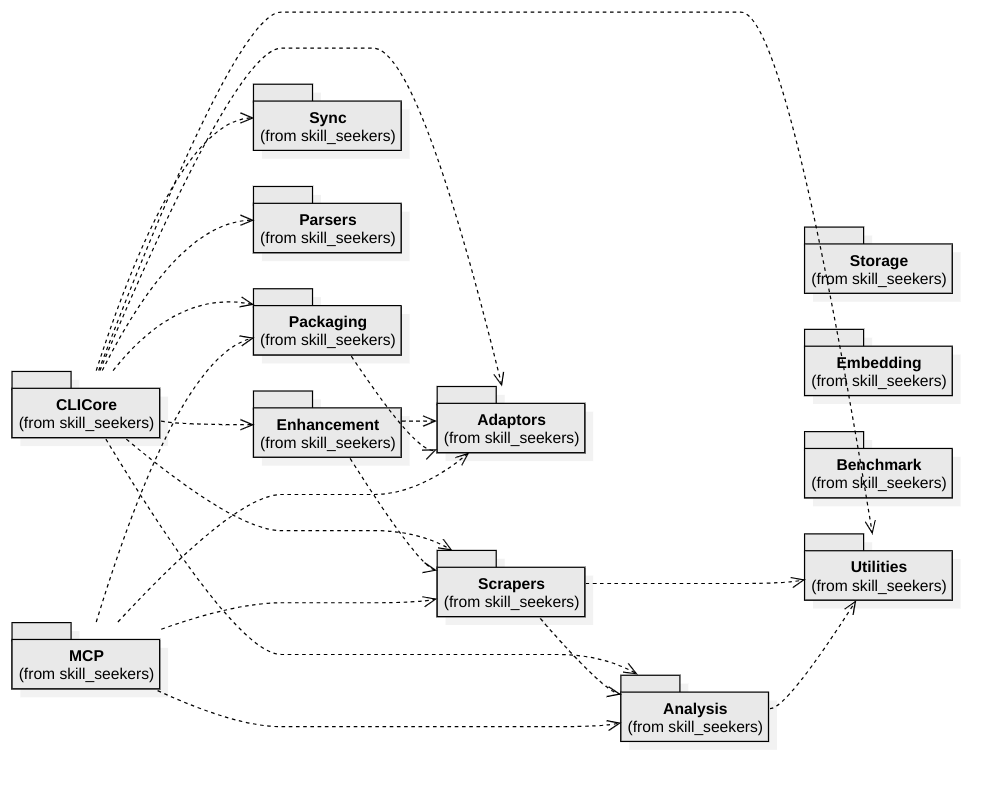
Module | Purpose | Key Classes |
CLICore | Git-style command dispatcher | CLIDispatcher, SourceDetector, CreateCommand
|
Scrapers | 18 source-type extractors | DocToSkillConverter, GitHubScraper, UnifiedScraper
|
Adaptors | 20+ output platform formats | SkillAdaptor (ABC), ClaudeAdaptor, LangChainAdaptor
|
Analysis | C3.x codebase analysis pipeline | UnifiedCodebaseAnalyzer, PatternRecognizer, 10 GoF detectors
|
Enhancement | AI-powered skill improvement via AgentClient | AgentClient, AIEnhancer, UnifiedEnhancer, WorkflowEngine
|
Packaging | Package, upload, install skills | PackageSkill, InstallAgent
|
MCP | FastMCP server (40 tools) | SkillSeekerMCPServer, 10 tool modules
|
Sync | Doc change detection | ChangeDetector, SyncMonitor, Notifier
|
Utility modules: Parsers (28 CLI parsers), Storage (S3/GCS/Azure), Embedding (multi-provider vectors), Benchmark (performance), Utilities (16 shared helpers).
Full UML diagrams: docs/UML_ARCHITECTURE.md | StarUML project: docs/UML/skill_seekers.mdj | HTML API reference: docs/UML/html/
📋 Prerequisites
Before you start, make sure you have:
Python 3.10 or higher - Download | Check: python3 --version
Git - Download | Check: git --version
15-30 minutes for first-time setup
First time user? → Start Here: Bulletproof Quick Start Guide 🎯
📤 Uploading Skills to Claude
Once your skill is packaged, you need to upload it to Claude:
Option 1: Automatic Upload (API-based)
# Set your API key (one-time)
export ANTHROPIC_API_KEY=sk-ant-...

# Package and upload automatically
skill-seekers package output/react/ --upload

# OR upload existing .zip
skill-seekers upload output/react.zip
Option 2: Manual Upload (No API Key)
# Package skill
skill-seekers package output/react/
# → Creates output/react.zip

# Then manually upload:
# - Go to https://claude.ai/skills
# - Click "Upload Skill"
# - Select output/react.zip
Option 3: MCP (Claude Code)
In Claude Code, just ask:
"Package and upload the React skill"
🤖 Installing to AI Agents
Skill Seekers can automatically install skills to 18 AI coding agents.
# Install to specific agent
skill-seekers install-agent output/react/ --agent cursor

# Install to all agents at once
skill-seekers install-agent output/react/ --agent all

# Preview without installing
skill-seekers install-agent output/react/ --agent cursor --dry-run
Supported Agents
Agent | Path | Type |
Claude Code | ~/.claude/skills/
| Global |
Cursor | .cursor/skills/
| Project |
VS Code / Copilot | .github/skills/
| Project |
Amp | ~/.amp/skills/
| Global |
Goose | ~/.config/goose/skills/
| Global |
OpenCode | ~/.opencode/skills/
| Global |
Windsurf | ~/.windsurf/skills/
| Global |
Roo Code | .roo/skills/
| Project |
Cline | .cline/skills/
| Project |
Aider | ~/.aider/skills/
| Global |
Bolt | .bolt/skills/
| Project |
Kilo Code | .kilo/skills/
| Project |
Continue | ~/.continue/skills/
| Global |
Kimi Code | ~/.kimi/skills/
| Global |
🔌 MCP Integration (26 Tools)
Skill Seekers ships an MCP server for use from Claude Code, Cursor, Windsurf, VS Code + Cline, or IntelliJ IDEA.
# stdio mode (Claude Code, VS Code + Cline)
python -m skill_seekers.mcp.server_fastmcp

# HTTP mode (Cursor, Windsurf, IntelliJ)
python -m skill_seekers.mcp.server_fastmcp --transport http --port 8765

# Auto-configure all agents at once
./setup_mcp.sh
All 26 tools available:
Core (9): list_configs, generate_config, validate_config, estimate_pages, scrape_docs, package_skill, upload_skill, enhance_skill, install_skill
Extended (10): scrape_github, scrape_pdf, unified_scrape, merge_sources, detect_conflicts, add_config_source, fetch_config, list_config_sources, remove_config_source, split_config
Vector DB (4): export_to_chroma, export_to_weaviate, export_to_faiss, export_to_qdrant
Cloud (3): cloud_upload, cloud_download, cloud_list
Full Guide: docs/MCP_SETUP.md
⚙️ Configuration
Available Presets (24+)
# List all presets
skill-seekers list-configs
Category | Presets |
Web Frameworks | react, vue, angular, svelte, nextjs
|
Python | django, flask, fastapi, sqlalchemy, pytest
|
Game Development | godot, pygame, unity
|
Tools & DevOps | docker, kubernetes, terraform, ansible
|
Unified (Docs + GitHub) | react-unified, vue-unified, nextjs-unified, and more
|
Creating Your Own Config
# Option 1: Interactive
skill-seekers scrape --interactive

# Option 2: Copy and edit a preset
cp configs/react.json configs/myframework.json
nano configs/myframework.json
skill-seekers scrape --config configs/myframework.json
Config File Structure
{
  "name": "myframework",
  "description": "When to use this skill",
  "base_url": "https://docs.myframework.com/",
  "selectors": {
    "main_content": "article",
    "title": "h1",
    "code_blocks": "pre code"
  },
  "url_patterns": {
    "include": ["/docs", "/guide"],
    "exclude": ["/blog", "/about"]
  },
  "categories": {
    "getting_started": ["intro", "quickstart"],
    "api": ["api", "reference"]
  },
  "rate_limit": 0.5,
  "max_pages": 500
}
Where to Store Configs
The tool searches in this order:
Exact path as provided
./configs/ (current directory)
~/.config/skill-seekers/configs/ (user config directory)
SkillSeekersWeb.com API (preset configs)
📊 What Gets Created
output/
├── godot_data/              # Scraped raw data
│   ├── pages/              # JSON files (one per page)
│   └── summary.json        # Overview
│
└── godot/                   # The skill
    ├── SKILL.md            # Enhanced with real examples
    ├── references/         # Categorized docs
    │   ├── index.md
    │   ├── getting_started.md
    │   ├── scripting.md
    │   └── ...
    ├── scripts/            # Empty (add your own)
    └── assets/             # Empty (add your own)
🐛 Troubleshooting
Check your main_content selector
Try: article, main, div[role="main"]
Data Exists But Won't Use It?
# Force re-scrape
rm -rf output/myframework_data/
skill-seekers scrape --config configs/myframework.json
Categories Not Good?
Edit the config categories section with better keywords.
Want to Update Docs?
# Delete old data and re-scrape
rm -rf output/godot_data/
skill-seekers scrape --config configs/godot.json
Enhancement Not Working?
# Check if API key is set
echo $ANTHROPIC_API_KEY

# Try LOCAL mode instead (uses Claude Code Max, no API key needed)
skill-seekers enhance output/react/ --mode LOCAL

# Monitor background enhancement status
skill-seekers enhance-status output/react/ --watch
GitHub Rate Limit Issues?
# Set a GitHub token (5000 req/hour vs 60/hour anonymous)
export GITHUB_TOKEN=ghp_your_token_here

# Or configure multiple profiles
skill-seekers config --github
📈 Performance
Task | Time | Notes |
Scraping (sync) | 15-45 min | First time only, thread-based |
Scraping (async) | 5-15 min | 2-3x faster with --async flag |
Building | 1-3 min | Fast rebuild from cache |
Re-building | <1 min | With --skip-scrape |
Enhancement (LOCAL) | 30-60 sec | Uses Claude Code Max |
Enhancement (API) | 20-40 sec | Requires API key |
Video (transcript) | 1-3 min | YouTube/local, transcript only |
Video (visual) | 5-15 min | + OCR frame extraction |
Packaging | 5-10 sec | Final .zip creation |
📚 Documentation
Getting Started
Architecture
Guides
Integration Guides
📝 License
MIT License - see LICENSE file for details
Happy skill building! 🚀
🔒 Security

