

F
licenseNot graded
qualityD
maintenanceAn MCP server that provides write access to Figma through the Plugin API, enabling AI agents to create, modify, and manage Figma designs programmatically.
23
-

Enables AI agents to create, modify, and manage Figma designs through natural language, including operations like creating elements, updating properties, managing components, and checking accessibility.
Click on "Deploy Server".
Wait a few minutes for the server to deploy. Once ready, it will show a "Started" state.
In the chat, type @ followed by the MCP server name and your instructions, e.g., "@figma-pilot Create a responsive card component with a header, body text, and a primary button."
That's it! The server will respond to your query, and you can continue using it as needed.
Here is a step-by-step guide with screenshots.

AI agents control Figma through code execution.
English | 中文
Prompt: "Create an OpenAI style landing page introducing the upcoming GPT 5.3 release on Figma"
Prompt: "Generate a Manus design system components based on the screenshot, on Figma"
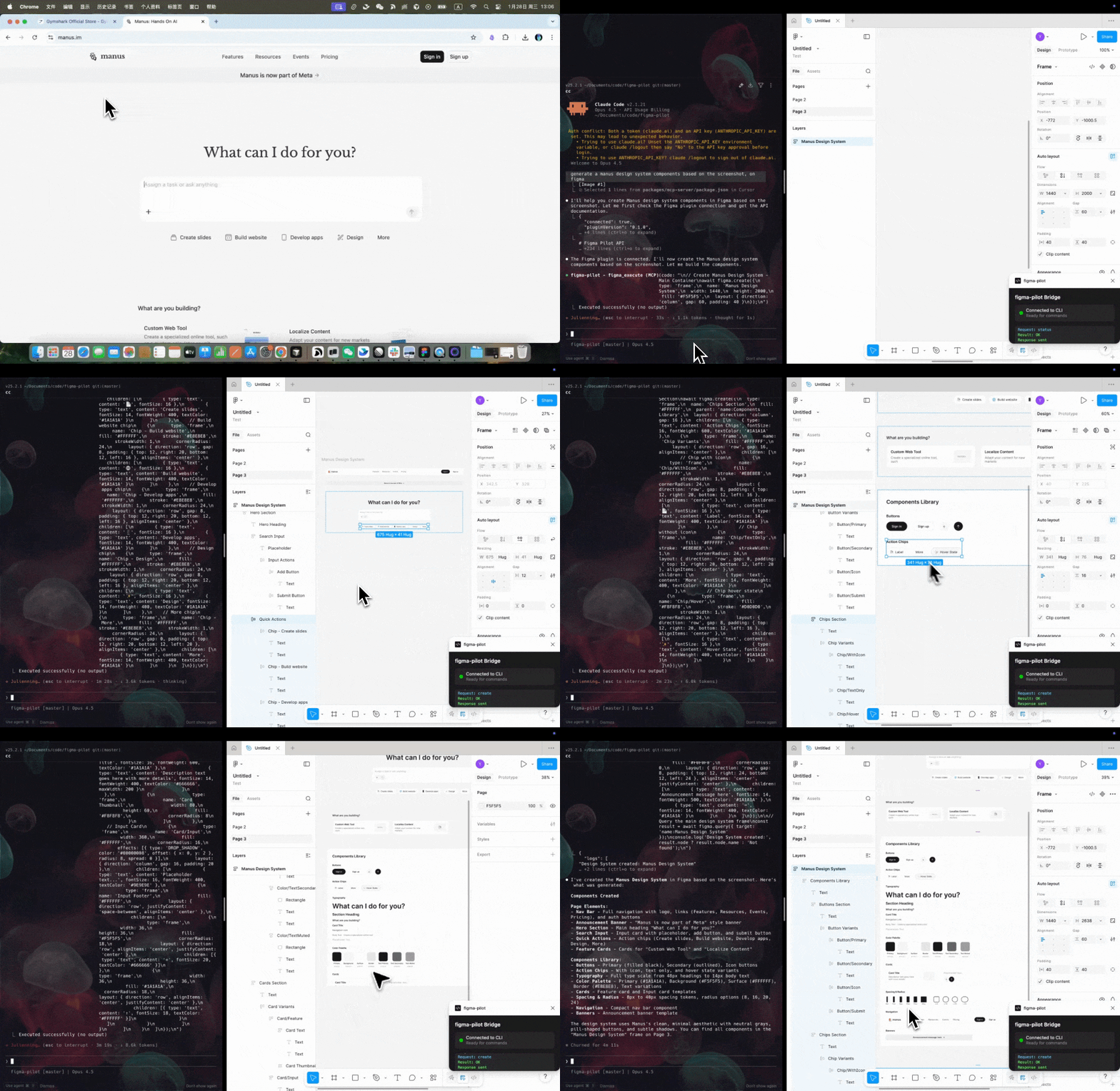
Related MCP server: Talk to Figma MCP
This project is inspired by Anthropic's Code execution with MCP approach.
Instead of exposing dozens of individual MCP tools (which bloat the context window and slow down agents), figma-pilot provides only 3 tools:
Tool | Description |
| Check connection status |
| Execute JavaScript code with full Figma API |
| Get API documentation |
The AI writes code to interact with Figma. This means:
90%+ fewer tokens in tool definitions
Batch operations - modify 100 elements in one call
Data filtering - filter results before returning to context
Complex workflows - loops, conditionals, error handling
Node.js >= 18
Figma Desktop app
An MCP-compatible AI client (Claude Desktop, Claude Code, Cursor, Codex, etc.)
# Claude Code
claude mcp add figma-pilot -- npx @youware-labs/figma-pilot-mcp

# Other MCP clients - add to your MCP config:
{
"mcpServers": {
"figma-pilot": {
"command": "npx",
"args": ["@youware-labs/figma-pilot-mcp"]
}
}
}Config locations:
Claude Desktop: ~/.config/claude/claude_desktop_config.json (macOS/Linux)
Cursor: ~/.cursor/mcp.json
The skills/ folder contains API documentation that helps AI agents use figma_execute correctly. Install it to your AI client's skill directory:
AI Client | Skill Directory |
Claude Code / Codex |
|
Cursor |
|
Claude Desktop |
|
After installation, restart your AI client to pick up the new skill.
Download figma-pilot-plugin-vX.X.X.zip from Releases
Unzip the file
In Figma: Plugins > Development > Import plugin from manifest...
Select manifest.json from the unzipped folder
Run: Plugins > Development > figma-pilot
Ask your AI agent:
Check the Figma connection statusCreate a card with a title and descriptionCreating a Card:
await figma.create({
  type: 'card',
  name: 'User Card',
  children: [
    { type: 'text', content: 'Card Title', fontSize: 18, fontWeight: 600 },
    { type: 'text', content: 'Description here', fontSize: 14, fill: '#666' }
  ]
});
Batch Modifying Elements:
const { nodes } = await figma.query({ target: 'selection' });
const rects = nodes.filter(n => n.type === 'RECTANGLE');
for (const rect of rects) {
  await figma.modify({ target: rect.id, fill: '#0066FF', cornerRadius: 8 });
}
console.log(`Modified ${rects.length} rectangles`);
Accessibility Check:
const result = await figma.accessibility({
  target: 'page',
  level: 'AA',
  autoFix: true
});
console.log(`Fixed ${result.fixedCount} of ${result.totalIssues} issues`);// Query & Modify
figma.query({ target }) // Query elements
figma.create({ type, ... }) // Create elements
figma.modify({ target, ... }) // Modify elements
figma.delete({ target }) // Delete elements
figma.append({ target, parent }) // Move into container
// Components
figma.listComponents() // List components
figma.instantiate({ component }) // Create instance
figma.toComponent({ target }) // Convert to component
figma.createVariants({ ... }) // Create variants
// Accessibility & Tokens
figma.accessibility({ target }) // WCAG checking
figma.createToken({ ... }) // Create design token
figma.bindToken({ ... }) // Bind token to element
// Export
figma.export({ target, format }) // Export as imageFull documentation: skills/SKILL.md
┌─────────────┐     stdio      ┌─────────────────┐     HTTP      ┌──────────────┐
│ MCP Client  │ <------------> │  MCP Server     │ <-----------> │ Figma Plugin │
│             │                │  (with bridge)  │   port 38451  │              │
└─────────────┘ └─────────────────┘ └──────────────┘figma-pilot/
├── packages/
│ ├── cli/ # CLI application
│ ├── plugin/ # Figma plugin
│ ├── mcp-server/ # MCP server (npm package)
│ └── shared/ # Shared TypeScript types
├── scripts/
│ ├── install.sh # Installation script
│ └── package-plugin.sh
└── skills/ # API documentation for AI agentsgit clone https://github.com/youware-labs/figma-pilot.git
cd figma-pilot
bun install && bun run build# Build and package
bun run build
./scripts/package-plugin.sh 0.x.x
# Publish to npm
cd packages/mcp-server && npm publish --access public
# Create GitHub release
gh release create v0.x.x dist/releases/figma-pilot-plugin-v0.x.x.zip \
--title "v0.x.x" \
--notes "Release notes here"Ensure MCP server is running (check your AI client's MCP status)
Plugin should show "Connected" in Figma
Try reopening the plugin
Check that port 38451 is not blocked
lsof -i :38451
kill <PID>For offline use, install globally:
npm install -g @youware-labs/figma-pilot-mcpThis error means the dist folder is missing from the plugin directory. This can happen if:
The downloaded zip file was incomplete
You're using the source code directly without building
Solution:
If you have the source code, build the plugin:
cd packages/plugin
bun install
bun run build
Or build from the project root:
bun run build:pluginAfter building, verify that packages/plugin/dist/main.js and packages/plugin/dist/ui.html exist, then import the plugin again in Figma.
MIT - YouWare Labs
This server cannot be deployed
The Figma MCP server brings Figma design context directly into your AI workflow.
Nifty's MCP server — exposes tasks, projects, messages, and files as tools for AI agents.
OCR, transcription, file extraction, and image generation for AI agents via MCP.
Agent-Native design tool - create and edit visual designs with agent assistance