

A
licenseB
qualityF
maintenanceAn MCP server providing video processing capabilities through FFmpeg, enabling dialog-based local video search, trimming, concatenation, and playback functionalities.
8
38 PyPI
153
MIT

Provides tools for downloading, converting, and processing HLS/m3u8 streaming media using FFmpeg, including stream conversion to various formats and media probing capabilities
Click on "Deploy Server".
Wait a few minutes for the server to deploy. Once ready, it will show a "Started" state.
In the chat, type @ followed by the MCP server name and your instructions, e.g., "@m3u8 MCP Server download this m3u8 stream to my videos folder as mp4"
That's it! The server will respond to your query, and you can continue using it as needed.
Here is a step-by-step guide with screenshots.
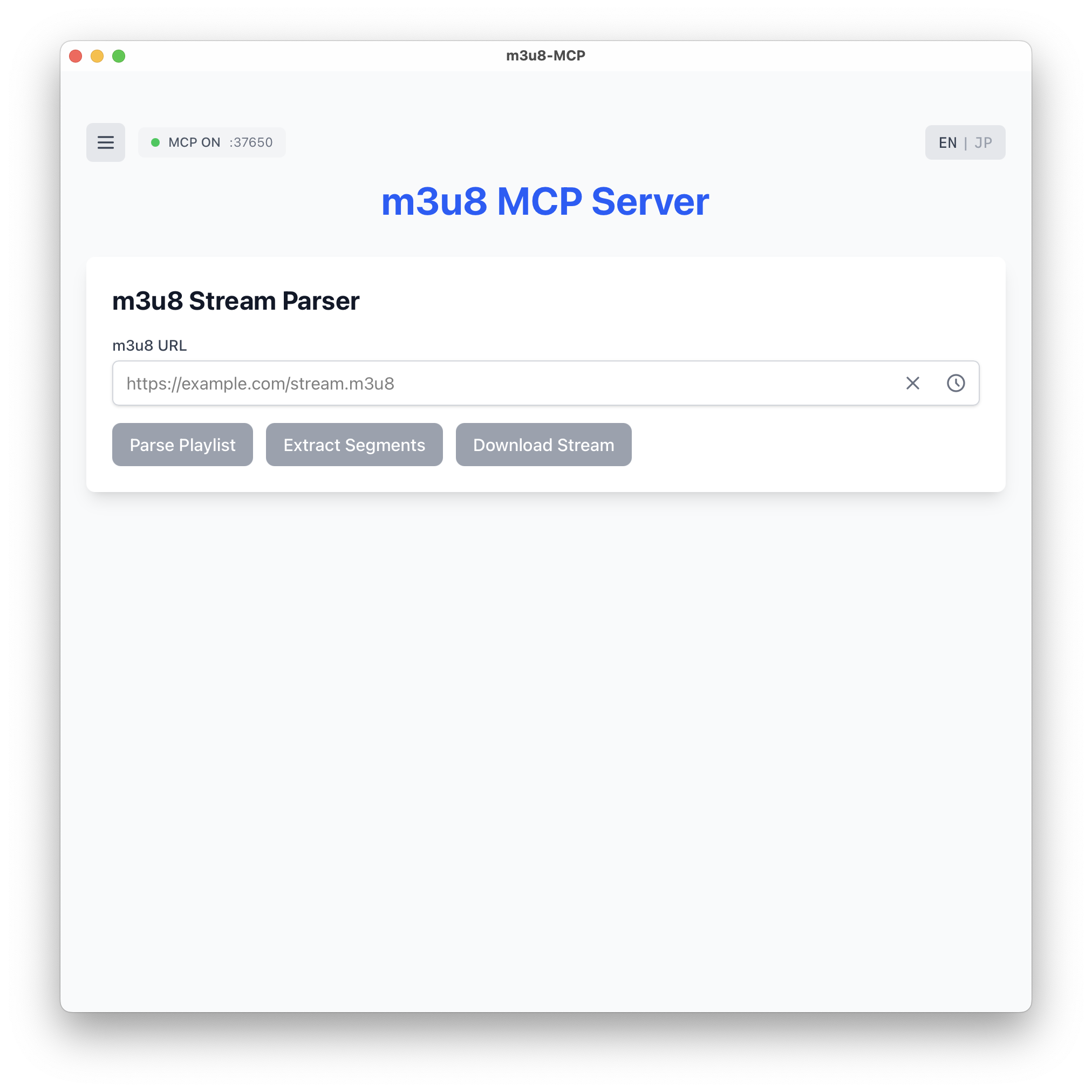
m3u8 MCP Server - A desktop application that provides m3u8/HLS streaming capabilities through the Model Context Protocol (MCP), built with Tauri, React, and Rust.
📝 Related article: Understanding m3u8 files and FFmpeg streaming (Japanese)
MCP Server: Streamable HTTP server using Axum on configurable port (default: 37650)
m3u8 Parsing: Full support for parsing HLS playlists (master and media playlists)
FFmpeg Integration: Download and convert streaming media using FFmpeg
Segment Extraction: Extract and display all segment URLs from playlists
Internationalization: Support for English and Japanese languages
Persistent Configuration: Securely stores settings locally (~/.m3u8-mcp/config.json)
Cross-Platform: Works on macOS, Windows, and Linux
Folder Selection Dialog: Choose download destination with native OS dialog
Download Progress: Real-time download progress tracking with speed and size info
URL History: Automatic tracking of recently used m3u8 URLs
Segment Display: View and copy individual segment URLs with pagination
Content Disclaimer: Built-in disclaimer system for responsible usage
Menu System: Clean hamburger menu for settings organization
MCP Status Indicator: Visual indicator for MCP server connection status
Local SQLite Cache: Store parsed playlists and metadata for offline access
Related MCP server: ffmpeg-mcp
Node.js (v16 or higher)
Rust (latest stable)
npm/pnpm/yarn
FFmpeg installed on your system
Your favorite AI assistant with MCP support (Claude, Cursor, etc.)
Clone the repository:
git clone https://github.com/yourusername/m3u8-mcp.git
cd m3u8-mcp
Install dependencies:
npm installStart the development server:
npm run tauri devConfigure FFmpeg:
Click the menu button (☰) in the top-left corner
Select "FFmpeg Configuration"
Enter the path to your FFmpeg binary (or use system FFmpeg if in PATH)
Start the MCP Server:
Click the menu button (☰) or the MCP status indicator
Select "MCP Server Control"
Choose your port and click "Connect to AI via MCP"
Copy the connection command for your AI assistant
Language Toggle: Switch between English and Japanese (EN/JP button)
URL Management: Clear button and history dropdown for quick access
Three Main Operations:
Parse Playlist: Analyze m3u8 structure and variants
Extract Segments: Get all segment URLs with copy functionality
Download Stream: Save stream with folder selection dialog
Collapsible Results: Each result section has an X button for dismissal
Pagination: "Show More" and "Show Less" buttons for segment lists
The application runs as an MCP Streamable HTTP server using Axum:
cargo run --release --manifest-path src-tauri/Cargo.tomlclaude mcp add --transport http m3u8 http://localhost:37650/mcpAdd to your Claude Desktop configuration:
{
  "m3u8": {
    "command": "npx",
    "args": [
      "-y",
      "mcp-remote",
      "http://localhost:37650/mcp"
    ]
  }
}Set the current m3u8 URL in the UI.
Parameters:
url (string, required): URL to set in the UI
Get the current m3u8 URL from the UI.
Parse an m3u8 playlist and extract information.
Parameters:
url (string): URL of the m3u8 playlist
content (string): Raw m3u8 content (if URL not provided)
Extract all segment URLs from a playlist.
Parameters:
url (string): URL of the m3u8 playlist
base_url (string): Base URL for relative segment URLs
Download a complete stream using FFmpeg.
Parameters:
url (string, required): URL of the m3u8 stream
output_path (string, required): Output file path
format (string): Output format (mp4, mkv, ts, default: mp4)
Convert a video file to HLS format.
Parameters:
input_path (string, required): Path to input video
output_dir (string, required): Output directory for HLS files
segment_duration (number): Duration of each segment in seconds (default: 10)
playlist_type (string): Playlist type (vod or event, default: vod)
Probe m3u8 stream for information using FFmpeg.
Parameters:
url (string, required): URL of the m3u8 stream
List cached playlists and downloads.
Parameters:
query (string): Optional search query
limit (number): Maximum results (default: 100)
Clear all cached data.
React 19 - UI framework
TypeScript - Type safety
Tailwind CSS v4 - Styling
Vite - Build tool
@tauri-apps/api - Tauri integration
video.js - Stream preview
Rust - Core backend language
Tauri v2 - Desktop application framework
Axum - Web framework for MCP Streamable HTTP server
Reqwest - HTTP client for downloading
Rusqlite - SQLite database for caching
Tokio - Async runtime
Tower-http - CORS and middleware support
FFmpeg - Media processing and conversion
m3u8-parser - Playlist parsing library
MCP Streamable HTTP - HTTP/SSE transport with Axum
JSON-RPC 2.0 - Message format
Server-Sent Events (SSE) - Real-time server-to-client streaming
HLS (HTTP Live Streaming) - Adaptive bitrate streaming protocol
m3u8-mcp/
├── src/                      # React frontend
│   ├── App.tsx              # Main UI with menu system
│   ├── components/
│   │   └── M3u8Form.tsx     # m3u8 operations and display
│   └── i18n.ts              # Internationalization (EN/JP)
│   ├── components/
│   │   └── StreamViewer.tsx # Stream preview component
│   ├── i18n.ts              # Language translations (EN/JP)
│   └── main.tsx             # Application entry point
├── src-tauri/               # Rust backend
│   ├── src/
│   │   ├── lib.rs           # Tauri commands & server lifecycle
│   │   ├── mcp_server.rs    # MCP Streamable HTTP server (Axum)
│   │   ├── m3u8_client.rs   # m3u8 parsing and operations
│   │   ├── ffmpeg_wrapper.rs # FFmpeg integration
│   │   └── database.rs      # SQLite cache management
│   ├── Cargo.toml           # Rust dependencies
│   └── tauri.conf.json      # Tauri configuration
├── package.json             # Node.js dependencies
├── vite.config.ts           # Vite configuration
└── README.md # This fileBuild the application for production:
npm run tauri buildThe built application will be available in:
macOS: src-tauri/target/release/bundle/dmg/
Windows: src-tauri/target/release/bundle/msi/
Linux: src-tauri/target/release/bundle/appimage/
Test the MCP server with example m3u8 streams:
# Parse a playlist
curl -X POST http://localhost:37650/mcp \
  -H "Content-Type: application/json" \
  -d '{"method": "m3u8_parse_playlist", "params": {"url": "https://example.com/stream.m3u8"}}'

# Download a stream
curl -X POST http://localhost:37650/mcp \
  -H "Content-Type: application/json" \
-d '{"method": "m3u8_download", "params": {"url": "https://example.com/stream.m3u8", "output_path": "output.mp4"}}'This project leverages Rust for the same reasons as the original Redmine MCP:
Native Speed - Compiled to machine code for maximum performance
Zero-Cost Abstractions - High-level code without runtime overhead
Efficient Memory Usage - Critical for handling large video streams
Memory Safety - Prevents segfaults and memory leaks at compile time
Thread Safety - Concurrent segment downloads without data races
Error Handling - Robust Result types for network and file operations
Axum - Modern async web framework for HTTP/SSE
Tokio - Powerful async runtime for concurrent operations
FFmpeg - Seamless integration with system FFmpeg
MCP Streamable HTTP server with Axum
Basic m3u8 parsing
FFmpeg integration for downloads
Multi-bitrate stream support
Live stream recording
Stream preview in UI
Segment-level operations
Advanced playlist generation
Scheduled recordings
Stream quality analysis
DRM content handling (where legal)
Cloud storage integration
Batch processing
Stream monitoring dashboard
Contributions are welcome! Please feel free to submit a Pull Request.
Fork the repository
Create your feature branch (git checkout -b feature/AmazingFeature)
Commit your changes (git commit -m 'Add some AmazingFeature')
Push to the branch (git push origin feature/AmazingFeature)
Open a Pull Request
This project is licensed under the MIT License - see the LICENSE file for details.
Tauri - For the amazing desktop framework
MCP Specification - For the protocol documentation
FFmpeg - For powerful media processing capabilities
Axum - For the excellent web framework
Original Redmine MCP project for the modular architecture
For issues and questions:
Open an issue on GitHub
Check the related Qiita article for m3u8/FFmpeg details
Note: Ensure FFmpeg is installed and accessible on your system before using this application. Be mindful of copyright and legal considerations when downloading streaming content.
This server cannot be deployed
Hosted MCP tools for FFmpeg-style video and audio processing through FFMPEG API.
MCP server for the FFmpeg Micro video transcoding API — create, monitor, download transcodes.
MCP server for Clipkit — gives AI agents a video toolbox via the Clipkit schema.
FFmpeg Micro - The FFmpeg Api - www.ffmpeg-micro.com Transcode videos from n8n or Make using FFmpeg in the cloud. MCP Server: https://github.com/ffmpeg-micro/ffmpeg-micro-mcp/