Click on "Install Server".
Wait a few minutes for the server to deploy. Once ready, it will show a "Started" state.
In the chat, type
@followed by the MCP server name and your instructions, e.g., "@Spark EventLog MCP Serveranalyze spark logs from s3://my-bucket/jobs/ and generate a performance report"
That's it! The server will respond to your query, and you can continue using it as needed.
Here is a step-by-step guide with screenshots.
Spark EventLog MCP Server
中文版本 | English
A comprehensive Spark event log analysis MCP server built on FastMCP 2.0 and FastAPI, providing in-depth performance analysis, resource monitoring, and optimization recommendations.
Features
🌐 FastMCP & FastAPI Integration: MCP protocol support and analysis report APIs powered by FastAPI & FastMCP
📊 Performance Analysis: Shuffle analysis, resource utilization monitoring, task execution analysis
📈 Visual Reports: Auto-generated interactive HTML reports with direct browser access
☁️ Cloud Data Sources: Support for S3 buckets and HTTP URLs with automatic path detection
💡 Intelligent Optimization: Automated optimization recommendations based on analysis results
🔧 Modular Architecture: Clean separation of concerns with specialized modules for tools, middleware, and configuration
📝 Enhanced Logging: Comprehensive request/response logging with detailed debugging information
Quick Start
MCP Client Integration
uvx Mode (Recommended - Direct from GitHub)
{
"mcpServers": {
"spark-eventlog": {
"type": "stdio",
"command": "uvx",
"args": [
"--from",
"git+https://github.com/yhyyz/spark-eventlog-mcp",
"spark-eventlog-mcp"
],
"env": {
"MCP_TRANSPORT": "stdio"
}
}
}
}stdio Mode (Local Development)
{
"mcpServers": {
"spark-eventlog": {
"command": "uv run python",
"args": ["/path/to/spark-eventlog-mcp/start.py"],
"env": {
"MCP_TRANSPORT": "stdio"
}
}
}
}HTTP Mode
1. Start HTTP Server:
export MCP_TRANSPORT=streamable-http
export MCP_HOST=localhost
export MCP_PORT=7799
uv run python start.py2. Configure Remote MCP:
{
"mcpServers": {
"spark-eventlog": {
"url": "http://localhost:7799/mcp",
"type": "http"
}
}
}3. Access Services:
API Documentation: http://localhost:7799/docs
Health Check: http://localhost:7799/health
Reports List: http://localhost:7799/api/reports
MCP Endpoint: http://localhost:7799/mcp
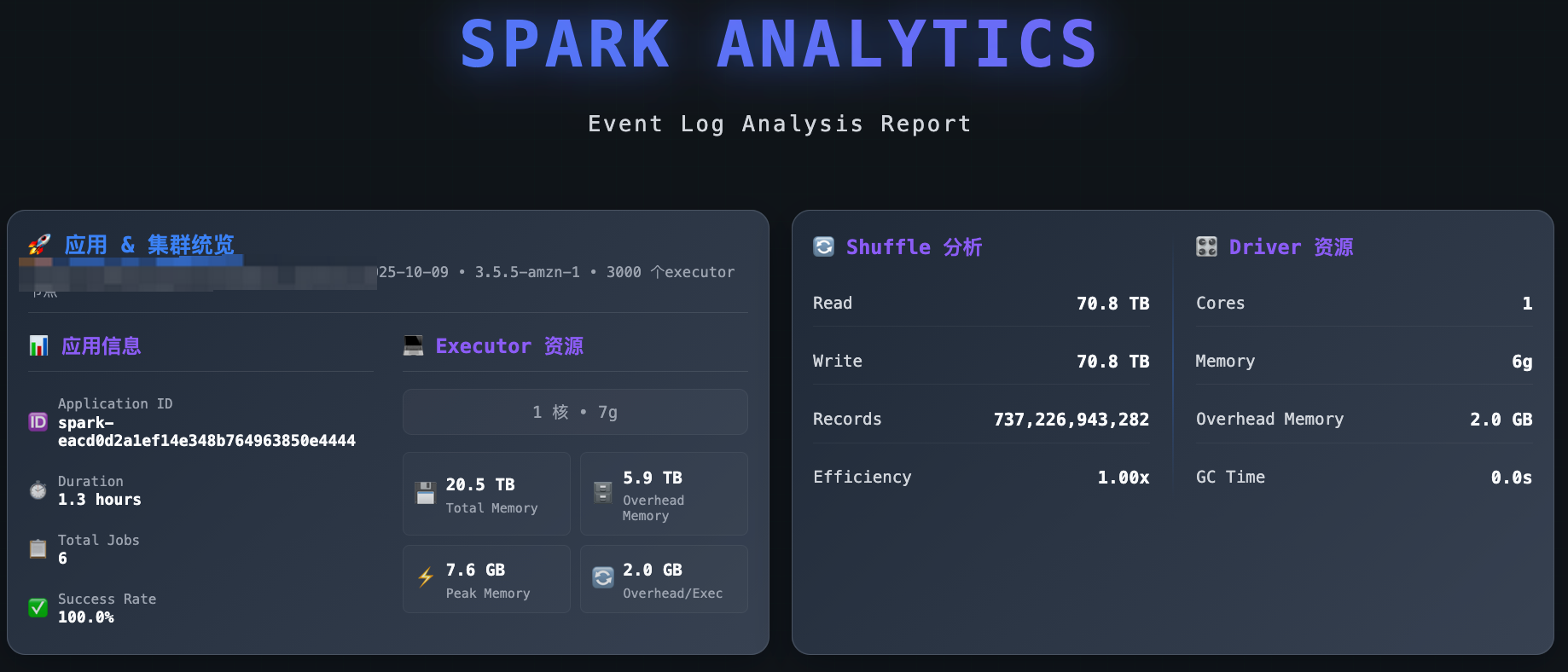
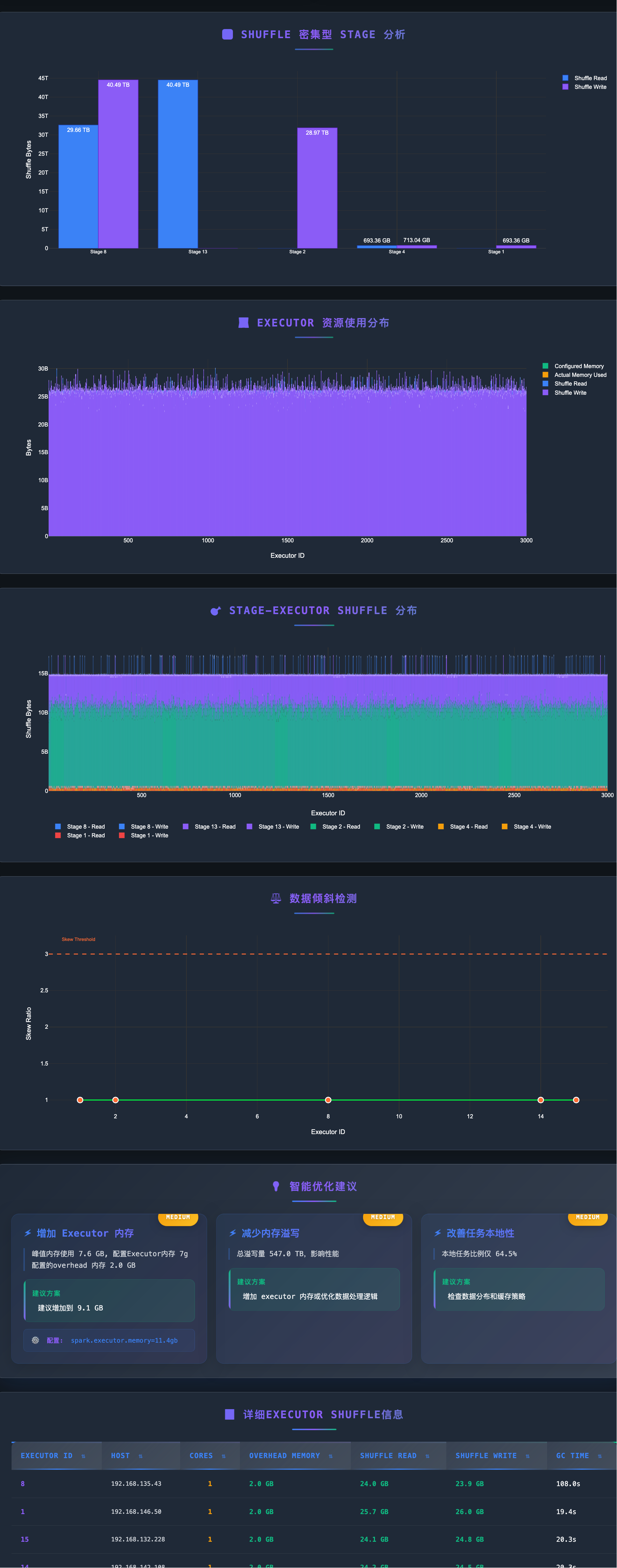
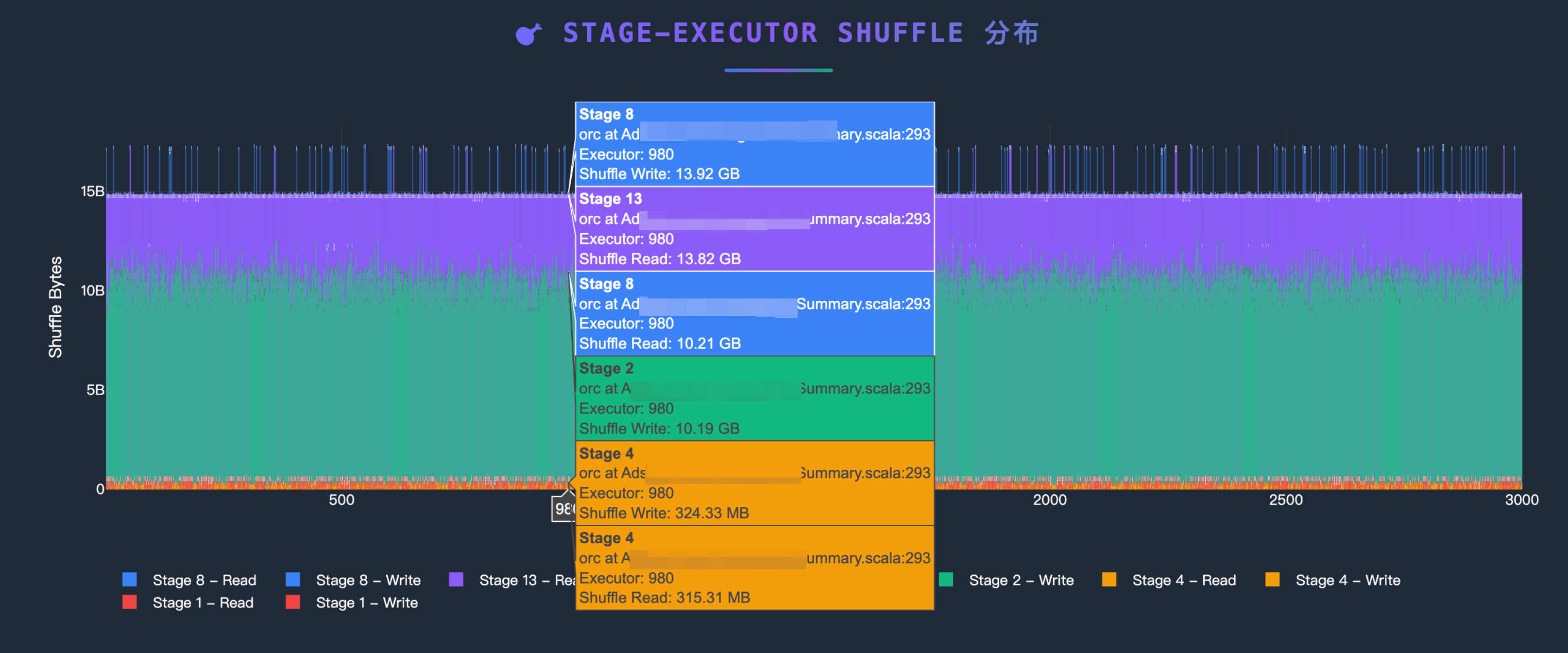
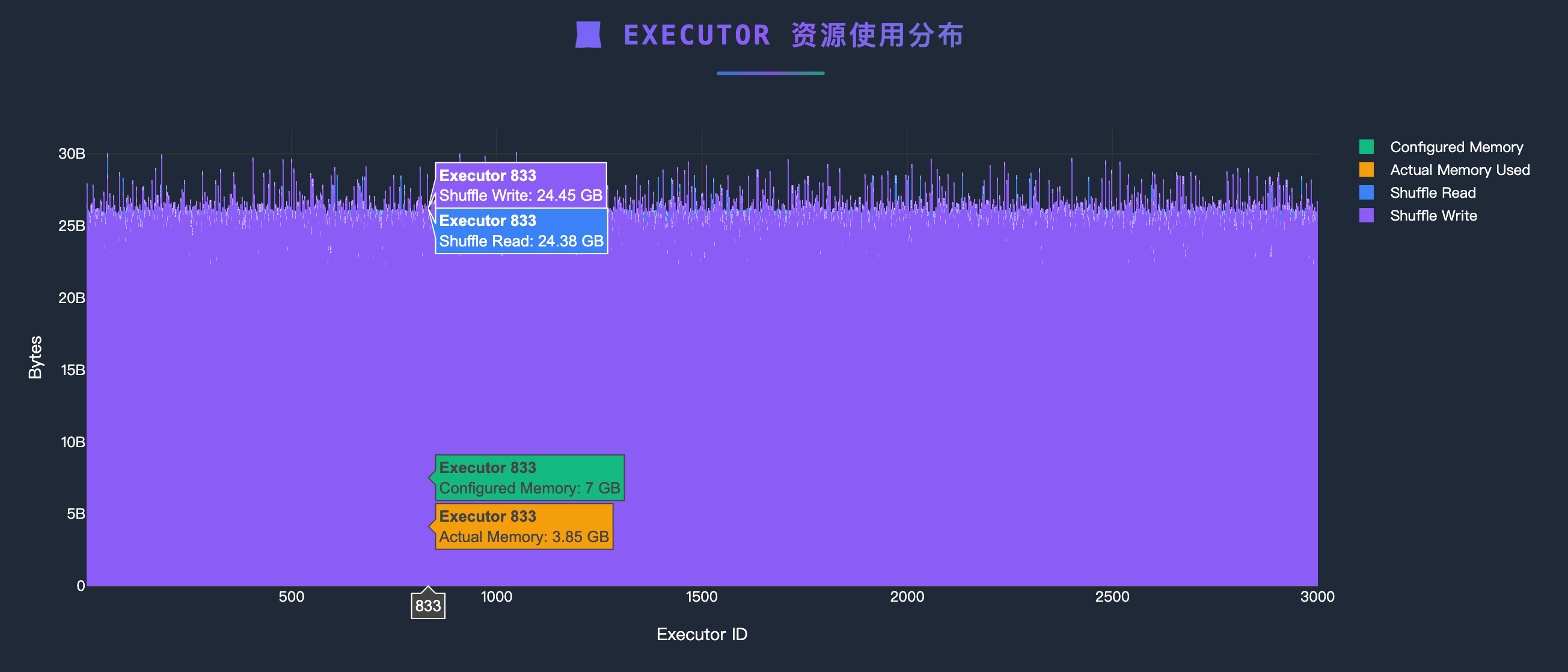
Analysis Examples


Project Structure
spark-eventlog-mcp/
├── src/spark_eventlog_mcp/
│ ├── server.py # Main FastAPI + MCP integrated server (refactored)
│ ├── core/
│ │ └── mature_data_loader.py # Data loader (S3/URL)
│ ├── tools/
│ │ ├── mcp_tools.py # MCP tool implementations (NEW)
│ │ ├── mature_analyzer.py # Event log analyzer
│ │ └── mature_report_generator.py # HTML report generator
│ ├── models/
│ │ ├── schemas.py # Pydantic data models
│ │ └── mature_models.py # Analysis result models
│ └── utils/
│ ├── helpers.py # Utility functions and logging config
│ ├── middleware.py # FastAPI request logging middleware (NEW)
│ └── uvicorn_config.py # Uvicorn logging configuration (NEW)
├── report_data/ # Generated reports storage
├── start.py # Launch script
├── README.md # This file (English)
└── README_zh.md # Chinese versionMCP Tools
Tool Name | Description | Parameters |
| End-to-end report generation - Auto-detects S3/URL, analyzes data, generates HTML reports |
|
| Query current analysis session status and metrics | None |
| Clear session cache and reset server state | None |
Simplified Tool Usage
The refactored MCP tools focus on simplicity and automation:
{
"jsonrpc": "2.0",
"method": "tools/call",
"params": {
"name": "generate_report",
"arguments": {
"path": "s3://my-bucket/spark-logs/"
}
},
"id": 1
}RESTful API Endpoints
Basic Endpoints
GET /- Service informationGET /health- Health checkGET /docs- API documentation (Swagger UI)
Report Management
GET /api/reports- List all reportsGET /api/reports/{filename}- View HTML reportGET /reports/{filename}- Direct access to report filesDELETE /api/reports/{filename}- Delete report
MCP Tool Calls
POST /mcp- MCP protocol endpoint
Configuration
Environment Variables
# Server Configuration
MCP_TRANSPORT=http # stdio or streamable-http
MCP_HOST=0.0.0.0 # HTTP mode listen address
MCP_PORT=7799 # HTTP mode port
LOG_LEVEL=INFO # Log level
# AWS S3 Configuration (Optional)
# Not needed if AWS CLI is configured or running on EC2 with appropriate IAM role
AWS_ACCESS_KEY_ID=xxx
AWS_SECRET_ACCESS_KEY=xxx
AWS_DEFAULT_REGION=us-east-1
# Cache Configuration
CACHE_ENABLED=true
CACHE_TTL=300
# Default Data Source
DEFAULT_SOURCE_TYPE=s3 # s3, url, or localEnhanced Logging Features
The refactored architecture provides comprehensive request/response logging:
FastAPI Request Logging:
2025-12-18 10:30:45 - INFO - Request started - POST /mcp
2025-12-18 10:30:45 - INFO - Client: 192.168.1.100 | User-Agent: Java SDK MCP Client/1.0.0
2025-12-18 10:30:45 - INFO - Content-Type: application/json | Accept: application/json, text/event-stream
2025-12-18 10:30:45 - INFO - Request body: {"jsonrpc":"2.0","method":"tools/call",...}
2025-12-18 10:30:45 - INFO - Request completed - Status: 200 | Duration: 2.156sApplication Logging:
2025-12-18 10:30:45 - INFO - [mcp_tools.py:243:generate_report_tool] - spark-eventlog-mcp - Starting end-to-end report generationFormat: Timestamp - Level - [Filename:Line:Function] - Logger Name - Message
Data Source Support
S3
{
"source_type": "s3",
"path": "s3://bucket-name/path/to/eventlogs/"
}HTTP URL
{
"source_type": "url",
"path": "https://example.com/eventlog.zip"
}Local File
{
"source_type": "local",
"path": "/path/to/local/eventlog.zip"
}Report Features
Generated HTML reports include:
📊 Application Overview (task counts, success rate, duration)
💻 Executor Resource Usage Distribution
🔄 Shuffle Performance Analysis
⚖️ Data Skew Detection
💡 Intelligent Optimization Recommendations
📈 Interactive Visualizations
Troubleshooting
Port Already in Use
# Change port
MCP_PORT=9090 python start.pyMissing Dependencies
# Reinstall dependencies
uv pip install -e .AWS Credentials Issues
# Check AWS configuration
aws configure list
# Or configure in .env
AWS_ACCESS_KEY_ID=xxx
AWS_SECRET_ACCESS_KEY=xxxDebug Logging
# Enable DEBUG logs
LOG_LEVEL=DEBUG uv run python start.pyRecent Improvements (2025-12-18)
Major Code Refactoring
🎯 Simplified MCP Tools:
generate_reportnow requires only a single string parameter (S3 or URL path)📦 Modular Architecture: Extracted MCP tool implementations from main server to dedicated modules
📝 Enhanced Logging: Added comprehensive request/response logging with client info, headers, and request body
🔧 Centralized Configuration: Moved uvicorn and middleware configuration to separate utility modules
📉 Reduced Complexity: Main server.py reduced from ~1150 to ~370 lines (70% reduction)
Architecture Changes
New Module:
tools/mcp_tools.py- Contains all MCP tool implementationsNew Module:
utils/middleware.py- FastAPI request logging middlewareNew Module:
utils/uvicorn_config.py- Centralized uvicorn logging configurationAuto-Detection: Automatic path type detection (S3 vs URL) in
generate_reporttoolSimplified Interface: Single-parameter MCP tools with internal logic handling complexity
HTTP Transport Fixes
MCP Protocol Compatibility: Fixed HTTP 406 errors by ensuring proper Accept headers
Request Tracing: Added detailed request/response logging for better debugging
Error Handling: Improved error messages and status code handling
Tech Stack
FastMCP 2.0: MCP protocol support
FastAPI: RESTful API framework
Pydantic: Data validation and serialization
Plotly: Interactive charts
boto3: AWS S3 integration
aiofiles: Async file operations
Development
# Clone repository
git clone <repository-url>
cd spark-eventlog-mcp
# Install development dependencies
uv pip install -e .
# MCP Inspector - stdio mode
MCP_TRANSPORT="stdio" npx @modelcontextprotocol/inspector uv run python start.py
# MCP Inspector - HTTP mode
MCP_TRANSPORT="streamable-http" uv run python start.py
npx @modelcontextprotocol/inspector --cli http://localhost:7799 --transport http --method tools/listSupport
Documentation: Check
/docsAPI documentationIssues: Submit GitHub Issues
Reference: FastMCP Documentation