
VMware Fusion MCP Server
# VMware Fusion MCP Server
<div align="center" id="top">
<img src="https://github.com/user-attachments/assets/98b273c5-9ba6-4d21-a9b7-3bc7a86e3ea4" width=150 height=150 alt="agentman"></img>
</div>
</p>
<p align="center">
<a href="https://pypi.org/project/vmware-fusion-mcp-server/"><img src="https://img.shields.io/pypi/v/vmware-fusion-mcp-server?color=%2334D058&label=pypi" alt="PyPI version" /></a>
<a href="https://pypi.org/project/vmware-fusion-mcp-server/"><img src="https://img.shields.io/pypi/pyversions/vmware-fusion-mcp-server.svg?color=brightgreen" alt="Python versions" /></a>
<a href="https://github.com/yeahdongcn/vmware-fusion-mcp-server/issues"><img src="https://img.shields.io/github/issues-raw/yeahdongcn/vmware-fusion-mcp-server" alt="GitHub Issues" /></a>
<a href="https://pepy.tech/projects/vmware-fusion-mcp-server"><img alt="Pepy Total Downloads" src="https://img.shields.io/pepy/dt/vmware-fusion-mcp-server?label=pypi%20%7C%20downloads&color=brightgreen"/></a>
<a href="https://github.com/yeahdongcn/vmware-fusion-mcp-server/blob/main/LICENSE"><img src="https://img.shields.io/pypi/l/vmware-fusion-mcp-server?color=brightgreen" alt="License" /></a>
</p>
---
A Model Context Protocol (MCP) server for managing VMware Fusion virtual machines via the Fusion REST API, built with [FastMCP](https://github.com/jlowin/fastmcp).
<p align="center">
<img alt="Repobeats analytics image" src="https://repobeats.axiom.co/api/embed/294cd9e557650e0f6a9fd65777e44490127a5bd3.svg" />
</p>
---
## Features
[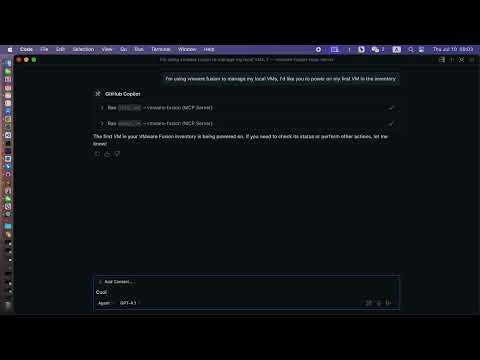](https://www.youtube.com/watch?v=ToiPQwEWK5E)
- **List VMs**: View all VMs registered in VMware Fusion.
- **Get VM Info**: Retrieve detailed information about a specific VM.
- **Power Operations**: Perform power actions (on, off, suspend, pause, unpause, reset) on a VM.
- **Get Power State**: Query the current power state of a VM.
- **Modern MCP/LLM Integration**: Exposes all features as MCP tools for LLMs and agent frameworks.
---
## Prerequisites
- **VMware Fusion Pro** (with REST API enabled)
- **Python 3.10+**
- **[uv](https://github.com/astral-sh/uv)** (recommended) or pip
- **[uvx](https://github.com/modelcontextprotocol/uvx)** (for VS Code/LLM integration)
---
## Installation
1. **Clone the repository:**
```bash
git clone https://github.com/yeahdongcn/vmware-fusion-mcp-server.git
cd vmware-fusion-mcp-server
```
2. **Set up the environment and install dependencies:**
```bash
make env
```
---
## VMware Fusion Setup
1. **Enable the REST API:**
- Open VMware Fusion > Preferences > Advanced
- Check "Enable REST API"
- Note the API port (default: 8697)
2. **Start the REST API service:**
```bash
vmrest
```
The API will be available at `http://localhost:8697` by default.
---
## Configuration
The server connects to VMware Fusion's REST API at `http://localhost:8697` by default. You must configure authentication for the vmrest API using environment variables:
- `VMREST_USER`: Username for the vmrest API (required if authentication is enabled)
- `VMREST_PASS`: Password for the vmrest API (required if authentication is enabled)
These must be set in your shell, in your VS Code MCP config, or in your deployment environment.
### Example: MCP server config for VS Code with credentials
```json
{
"mcpServers": {
"vmware-fusion": {
"command": "uvx",
"args": ["vmware-fusion-mcp-server"],
"env": {
"VMREST_USER": "your-username",
"VMREST_PASS": "your-password"
}
}
}
}
```
- Set `VMREST_USER` and `VMREST_PASS` to your vmrest credentials.
---
## Usage
### Run the MCP Server
#### With Make
```bash
VMREST_USER=your-username VMREST_PASS=your-password make run
```
#### With uvx (recommended for VS Code/LLM)
```bash
VMREST_USER=your-username VMREST_PASS=your-password uvx vmware-fusion-mcp-server
```
---
## VS Code / LLM Integration
To use this server as a tool provider in VS Code (or any MCP-compatible client):
1. **Install [uvx](https://github.com/modelcontextprotocol/uvx):**
```bash
uv pip install uvx
```
2. **Add to your MCP server config (e.g., `.vscode/mcp.json`):**
```json
{
"mcpServers": {
"vmware-fusion": {
"command": "uvx",
"args": ["vmware-fusion-mcp-server"],
"env": {
"VMREST_USER": "your-username",
"VMREST_PASS": "your-password"
}
}
}
}
```
- Set `VMREST_USER` and `VMREST_PASS` to your vmrest credentials.
- You can now use the VMware Fusion tools in any MCP-enabled LLM or agent in VS Code.
---
## MCP Tools
### list_vms
- **Description:** List all VMs in VMware Fusion.
- **Parameters:** None
### get_vm_info
- **Description:** Get detailed information about a specific VM.
- **Parameters:**
- `vm_id` (string): The ID of the VM
### power_vm
- **Description:** Perform a power action on a VM.
- **Parameters:**
- `vm_id` (string): The ID of the VM
- `action` (string): One of: "on", "off", "suspend", "pause", "unpause", "reset"
### get_vm_power_state
- **Description:** Get the power state of a specific VM.
- **Parameters:**
- `vm_id` (string): The ID of the VM
---
## Development
### Run Tests
```bash
make test
```
### Format Code
```bash
make fmt
```
### Lint
```bash
make lint
```
---
## Project Structure
- `vmware_fusion_mcp/server.py` - Main FastMCP server implementation
- `vmware_fusion_mcp/vmware_client.py` - VMware Fusion REST API client
- `tests/` - Unit and integration tests
---
## License
MIT License - see [LICENSE](LICENSE) for details.
---
## Contributing
1. Fork the repository
2. Create a feature branch
3. Make your changes
4. Run tests and linting: `make test && make lint`
5. Submit a pull request
---
## References
- [FastMCP Documentation](https://gofastmcp.com/)
- [Model Context Protocol](https://modelcontextprotocol.io/)
- [uvx](https://github.com/modelcontextprotocol/uvx)
- [fetch server example](https://github.com/modelcontextprotocol/servers/tree/main/src/fetch)
TDQS
Scored across 4 tools
Each tool has a clearly distinct purpose: get_vm_info retrieves detailed VM data, get_vm_power_state focuses only on power status, list_vms enumerates all VMs, and power_vm performs power operations. There is no overlap or ambiguity between these functions.
All tool names follow a consistent verb_noun pattern with snake_case: get_vm_info, get_vm_power_state, list_vms, and power_vm. The naming is predictable and uniform throughout the set.
With 4 tools, the count is reasonable for basic VM management, covering listing, info retrieval, power state checks, and power actions. It might be slightly thin for advanced operations like configuration changes, but it's well-scoped for core functionality.
The tools cover core VM operations (list, info, power state, power actions), but there are notable gaps for a full VM management domain, such as creating/deleting VMs, modifying settings, or handling snapshots. Agents can perform basic tasks but may hit dead ends for more complex workflows.