
A
licenseA
qualityD
maintenanceA Model Context Protocol server that provides API functionality for creating, managing, and exporting Excalidraw drawings in various formats like SVG, PNG, and JSON.
8
3,899 npm
45
MIT

Excalidraw MCP Server gives AI agents a live, editable Excalidraw canvas for creating, inspecting, refining, saving, and sharing diagrams.
Create, update, delete, query, duplicate, and batch-create Excalidraw elements.
Group/ungroup, align, distribute, lock/unlock elements, and retrieve scene/library/theme/elements resources.
Describe the scene and capture headless screenshots or rendered PNG/SVG images for self-verification.
Export/import .excalidraw and Obsidian .excalidraw.md files, render files offline, and export images or shareable URLs.
Convert Mermaid diagrams, manage snapshots, clear the canvas, and control viewport/zoom.
Drive it through the Agent Skill/CLI, MCP stdio server, or REST API, with optional durable canvas state.
Supports containerized deployment of the MCP server for simplified integration and consistent environment.
Enables creation, modification, and manipulation of Excalidraw diagrams, including element control, grouping, alignment, and resource management.
Provides installation and dependency management through npm, allowing users to easily set up and run the MCP server.
Click on "Deploy Server".
Wait a few minutes for the server to deploy. Once ready, it will show a "Started" state.
In the chat, type @ followed by the MCP server name and your instructions, e.g., "@Excalidraw MCP Server create a flowchart showing user login process"
That's it! The server will respond to your query, and you can continue using it as needed.
Here is a step-by-step guide with screenshots.



mcp-excalidraw-server gives AI agents a live Excalidraw canvas they can draw on, look at, refine, and save into your repo. Your agent creates architecture diagrams and flowcharts programmatically, sees its own work via screenshots, fixes layout problems, and exports .excalidraw files you can commit next to your code.
One canvas, three ways to drive it:
Agent Skill + CLI — recommended for coding agents (Claude Code, Codex CLI, Cursor, OpenCode): npx -y mcp-excalidraw-server <command>. Zero config, auto-starts the canvas, composable JSON in/out.
MCP Server — 26 tools over stdio for any Model Context Protocol client (Claude Desktop, Cursor, Codex CLI, Antigravity, ...). Speaks MCP 2026-07-28 (server/discover, per-request _meta envelope, tool calls without a handshake) and stays compatible with 2025-era clients that open with initialize.
REST API — plain HTTP for LangChain and custom frameworks.
Core drawing runs locally (Node ≥ 20, MIT licensed) — no API keys or accounts. Mermaid conversion runs in the local browser canvas; share is optional and uploads an encrypted scene to excalidraw.com. The canvas page loads Excalidraw's fonts from the esm.sh CDN.
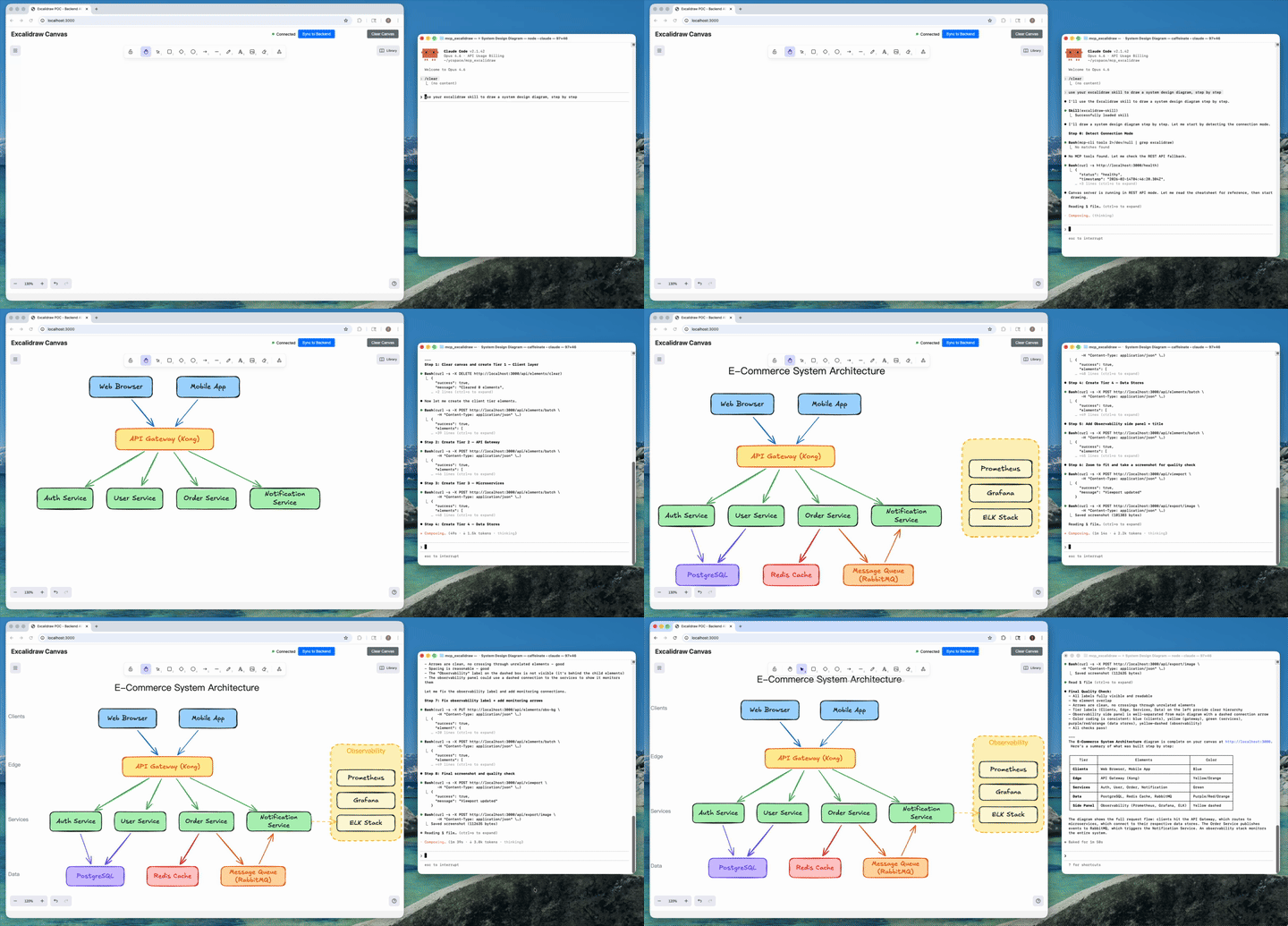
AI agent creates a complete architecture diagram from a single prompt (4x speed). Watch full video on YouTube
Related MCP server: Mermaid MCP Server
Ask your agent to "draw the architecture of this service" and it produces a real, editable Excalidraw diagram — not a one-shot image. Because the agent can query, screenshot, and update individual elements, it iterates until labels fit, nothing overlaps, and arrows route cleanly; then it exports the result as a .excalidraw file that lives in your repo and gets updated when the code changes.
Under the hood there are two processes, one product:
Canvas server: Excalidraw web UI + REST API + WebSocket real-time sync (default http://127.0.0.1:3000)
A thin front-end of your choice: the CLI, the MCP stdio server, or raw HTTP — all drive the same canvas
Since v1.1 the canvas server starts itself: canvas-driving CLI commands (and the MCP server on launch) auto-spawn it if nothing is listening. status only inspects the current server state. Set EXCALIDRAW_NO_AUTOSTART=1 to opt out.
Excalidraw has an official MCP — a chat widget that streams a diagram inline from a single prompt (the model gets two tools: a format reference and create_view). It's great for "draw me a cat" in Claude or ChatGPT. We solve a different problem: giving coding agents a persistent canvas workbench.
Official Excalidraw MCP | This Project | |
Approach | Prompt in, diagram out (one-shot widget) | Programmatic element-level control (CLI + 26 MCP tools) |
State | Checkpoints inside the chat widget | Live canvas with real-time sync and optional restart-safe checkpoints |
Element CRUD | Declarative re-send with delete markers | Full create / read / update / delete per element |
AI sees the canvas | No |
|
Iterative refinement | Regenerate from checkpoint | Draw → look → adjust → look again, element by element |
Layout tools | No | align, distribute, group / ungroup, lock, duplicate |
File I/O | No model-facing export |
|
Snapshot & rollback | Widget-side checkpoints | Named server-side snapshots |
Mermaid conversion | No |
|
Shareable URLs | Widget-only |
|
Viewport control | Camera animations |
|
Works without MCP | No | Yes — CLI + agent skill + REST API |
Multi-agent | Single chat | Multiple agents on the same canvas concurrently |
TL;DR — The official MCP shows Excalidraw diagrams in your chat. This project gives your coding agent a full Excalidraw workbench: a canvas it can draw on, inspect, refine, and commit to your repo.
Current package version: 2.1.2. The current release line is v2.1 — Headless Rendering.
Snapshot restore no longer wipes the canvas; frames restore and import. (#101, thanks @sanjayy0612; #120)
One label per shape, even across updates and renames. (#121, thanks @sdrshn-nmbr)
Dropped images survive reload and show up in exports. (#122, thanks @appdesigngeeks)
Text is no longer clipped when the font loads late. (#123, #124)
Large exports no longer fail with invalid order key. (#115, thanks @fernandovmacedo)
Text and arrows no longer drift on each canvas sync. (#116, thanks @hidinginabunker)
Library installs work and persist; labels re-wrap on resize. (#113, thanks @lukemariano)
Screenshots and image exports no longer need a browser tab. screenshot, export_to_image and get_canvas_screenshot render inside the canvas server: Excalidraw's own SVG exporter runs under Node (jsdom) and resvg rasterizes to PNG with bundled Excalifont/Virgil/Cascadia/Liberation fonts. Same output as the tab, deterministic (byte-identical for an unchanged scene), a few milliseconds per render, works in CI and Docker. See Headless Rendering.
New render options on the CLI, REST and MCP: dark, scale (1–4), padding, elementIds (render a subset), frameId (render one frame), embedFonts. --renderer browser keeps the old tab path.
New render command: npx -y mcp-excalidraw-server render docs/arch.excalidraw --out docs/arch.png renders a committed file offline — no canvas server at all.
Shapes created without width/height now default to 100×100 in exports and renders (matching the canvas) instead of collapsing to 0×0.
Text stored with width: 0, height: 0 (scenes from pre-2.0 servers) is re-measured on export instead of exporting invisible. (#107)
Breaking: Node >= 20 required (was 18) — the MCP TypeScript SDK v2 sets the floor. Everything else is backward compatible, including existing MCP client configs.
MCP protocol revision 2026-07-28: modern clients can call tools statelessly without an initialization handshake (server/discover, per-request _meta envelopes); legacy initialization-based clients keep working unchanged. (#98, thanks @anxkhn)
Exports render everywhere now: .excalidraw / .excalidraw.md files contain real Excalidraw elements — shape and arrow labels as bound text, live arrow bindings — so they open correctly on excalidraw.com and in the Obsidian Excalidraw plugin instead of losing labels (or being re-saved empty by the plugin). (#93, #95)
Byte-stable exports: deterministic ids, seeds, and key order — re-exporting an unchanged scene is byte-identical, so committed diagrams and vault files never produce phantom git diffs, and Obsidian block references survive re-exports.
Obsidian vault fixes: Windows/CRLF .excalidraw.md files import correctly (#94, thanks @cason-miles); ## Text Elements block references now cover shape labels too.
Element fields are never silently dropped: unknown Excalidraw properties (containerId, textAlign, originalText, ...) pass through the server intact — fixes browser-edited text vanishing after sync. (#92, thanks @junuxyz)
Mermaid conversion merges into the existing canvas instead of replacing it, and each browser tab holds exactly one WebSocket connection (no more doubled labels). (#91)
Viewport control: set_viewport gains scrollToElementIds (multi-element zoom-to-fit) and viewportZoomFactor, with strict single-mode validation and real error reporting. (#86, thanks @acercyc)
Dark mode: the canvas page chrome follows the editor theme and persists it across reloads. (#89, thanks @danielsvane)
First-class CLI: every capability is now a composable command — npx -y mcp-excalidraw-server add|query|describe|screenshot|export|import|mermaid|snapshot|arrange|share|... — JSON on stdout, meaningful exit codes. Also installed as the excalidraw-canvas alias.
Zero-setup: canvas-driving CLI commands and the MCP server auto-start the canvas server if it isn't running (closes #66). Opt out with EXCALIDRAW_NO_AUTOSTART=1.
apply: multi-op patches ({"create":[...],"update":[{"id":"a","set":{...}}],"delete":[...]}) in a single invocation.
install-skill: npx -y mcp-excalidraw-server install-skill --dir <skills-root> copies the portable agent skill into the directory your agent chooses (project or global), cleanly replacing older versions.
Skill is now CLI-first and no longer needs a cloned repo or configured MCP server to work.
Typed queries: query --filter locked=true --filter label.text=API — booleans, numbers, and nested keys work.
Internals: shared core library (src/core/) behind both the CLI and MCP server; canvas groupIds are the source of truth for grouping (ungroup now works across restarts); node-fetch dropped; MCP version metadata derived from package.json; canvas server writes a pidfile and shuts down cleanly.
The only prerequisite is Node.js ≥ 20.
Copy this into your coding agent — it installs the portable skill into the project/global skill directory that agent already knows how to use, then verifies it by drawing a test diagram:
Install the Excalidraw canvas toolkit so you can draw diagrams for me:

1. Choose the right skill directory for this agent and scope (project or global).
2. Run: npx -y mcp-excalidraw-server install-skill --dir <that-skills-directory>
3. Read the installed excalidraw-skill/SKILL.md so you know the drawing workflow.
4. Start the canvas with: npx -y mcp-excalidraw-server start
   then tell me I can open http://127.0.0.1:3000 to watch you draw (optional).
5. Draw a small test diagram — two labeled boxes connected by an arrow — take a
screenshot, and show me the result to confirm everything works.You are... | Install with | Then |
Modern coding agent |
| Let the agent choose project/global scope and its skill root |
Claude Code shortcut |
| Installs to |
Codex shortcut |
| Installs to |
MCP client user (Claude Desktop, Cursor, ...) | Add the npx config below | |
CLI user / scripting | Nothing — | See CLI Reference |
Contributor / from source |
|
There is no separate server setup: any drawing command auto-starts the local canvas server on http://127.0.0.1:3000.
No clone, no config:
# start the canvas (drawing commands auto-start it too) and open it
npx -y mcp-excalidraw-server start
open http://127.0.0.1:3000   # optional: watch live (only mermaid needs the tab)

# draw something
echo '[
  {"id":"api","type":"rectangle","x":100,"y":100,"width":160,"height":80,"text":"API Server","backgroundColor":"#a5d8ff"},
  {"id":"db","type":"rectangle","x":400,"y":100,"width":160,"height":80,"text":"Database","backgroundColor":"#99e9f2"},
  {"type":"arrow","x":0,"y":0,"startElementId":"api","endElementId":"db","text":"SQL"}
]' | npx -y mcp-excalidraw-server add

# let your agent see its work
npx -y mcp-excalidraw-server describe
npx -y mcp-excalidraw-server screenshot --out diagram.png

# diagrams as repo artifacts
mkdir -p docs
npx -y mcp-excalidraw-server export --out docs/architecture.excalidraw

# or straight into an Obsidian vault (.md extension → Obsidian Excalidraw plugin format)
npx -y mcp-excalidraw-server export --out ~/vault/diagrams/architecture.excalidraw.md
Give your agent the full playbook:
npx -y mcp-excalidraw-server install-skill --dir <skills-root>
npx -y mcp-excalidraw-server install-skill --print-source  # inspect bundled source path
Security note: The canvas server binds
127.0.0.1only by default. If you expose it on a network interface (HOST=0.0.0.0), put network-level access controls in front — the API has no built-in authentication.
The skill at skills/excalidraw-skill/ teaches agents the full workflow — layout planning, the screenshot-verify-fix quality loop, arrow routing, anti-patterns, snapshots, and file I/O. It works through the CLI (preferred, zero setup), MCP tools (if configured), or raw REST — in that order.
npx -y mcp-excalidraw-server install-skill --dir <skills-root>The command copies the bundled excalidraw-skill/ directory into <skills-root>/excalidraw-skill. Let your agent choose whether that root should be project-level or global. Re-running install-skill upgrades in place — it replaces the target directory, so files removed upstream don't linger.
Where the skill shines:
Diagrams as code artifacts: export .excalidraw files into the repo, commit them, re-import + refine when the architecture changes.
Obsidian vaults: export with a .excalidraw.md extension and the file opens natively in the Obsidian Excalidraw plugin — no compatibility-mode warning, block references and sync work; import reads both plain and lz-string-compressed vault files back.
Self-verifying diagrams: the agent screenshots its own work and fixes truncation/overlap before calling it done.
No-MCP environments: CI jobs, plain shells, and frameworks get the same capabilities through the CLI.
npx -y mcp-excalidraw-server <command> or (after npm i -g mcp-excalidraw-server) excalidraw-canvas <command>.
Conventions: JSON results on stdout — except describe (plain text by design) and raw-content output when --out is omitted (export prints the scene JSON, screenshot --format svg prints SVG). Diagnostics on stderr. Exit codes: 0 ok, 1 error, 2 usage, 3 canvas unreachable, 4 browser tab required (only mermaid and screenshot --renderer browser). Canvas URL from EXPRESS_SERVER_URL or --url. Canvas-driving commands auto-start the server; status only reports current state. Explicit start overrides the EXCALIDRAW_NO_AUTOSTART=1 opt-out (it's user intent, not auto-start).
Command | Description |
| Manage the canvas server (detached; |
| Batch-create elements from a JSON array (file or stdin); |
| One-call multi-op patch: |
| Read / remove elements |
| Update an element |
|
|
| AI-readable scene summary (plain text) |
| Render the canvas headless (no browser tab): |
| Render a |
| Scene file I/O — a |
| Mermaid → canvas (browser tab required) |
| Named snapshots |
| Layout ops ( |
| Encrypted upload → shareable excalidraw.com URL |
| Wipe the canvas |
| Install the portable agent skill |
Labels and arrow bindings use the agent-friendly format everywhere in the CLI: "text" on any shape, "startElementId"/"endElementId" on arrows — normalization is automatic. For a native frame, add a "type":"frame" element with a "name" and set "frameId" on its children.
Since v2.1, screenshot, export_to_image and get_canvas_screenshot render without a browser. Inside the canvas server, the scene is prepared with the canvas tab's own code (label sizing, wrapping and centering, defaults) and Excalidraw's own exportToSvg draws it under Node (a small jsdom shim supplies the DOM it expects, and text is measured with the bundled fonts' real glyph widths); resvg rasterizes the SVG to PNG. The output is what the Excalidraw canvas draws — same SVG structure as a browser export, text within half a pixel — and it is deterministic: an unchanged scene renders to byte-identical SVG and PNG, so committed images stay diff-clean.
Fonts: Excalifont, Virgil, Cascadia Code and Liberation Sans ship as TTFs in assets/fonts (all SIL OFL 1.1; see assets/fonts/LICENSES.md). SVGs embed the faces they use, so they look right in browsers, GitHub and editors. Nunito, Lilita One and Comic Shanns render with the closest bundled face for now. Text in other scripts (CJK, emoji) falls back to the machine's fonts, with a warning.
Options (CLI flags / REST body / MCP params): background, dark, scale 1–4 (PNG), padding, elementIds or frameId to render a subset, embedFonts, embedScene (PNG only, default false). EXCALIDRAW_RENDER_MAX_DIM (default 8192) caps the PNG's largest side.
--renderer browser asks an open canvas tab to render instead (the pre-2.1 path). Useful for a second opinion; it is slower and the tab's unsynced edits are discarded first.
Offline: render docs/arch.excalidraw --out docs/arch.png needs no canvas server at all — a natural fit for CI jobs that keep images next to committed diagrams.
Still browser-bound: Mermaid conversion (mermaid, create_from_mermaid) and set_viewport.
The renderer bundle is built by npm run build:server (dist/render/excalidraw-node.mjs); npm run test:render exercises it without a browser.
The MCP server runs over stdio. Since v1.1 the simplest config is npx — no clone, no absolute paths, and the canvas auto-starts. If your MCP client and canvas are on different machines, start with Remote Canvas and HTTP-Only MCP Clients.
Variable | Description | Default |
| URL of the canvas server |
|
| Enable real-time canvas sync |
|
| Set | (unset) |
| Directory MCP file tools may read and write (symlinks resolved; | current working dir |
| Largest side of a headless PNG, in pixels |
|
| Optional local durable-state directory | (unset; in-memory) |
| Where |
|
| Excalidraw app that share links open in |
|
| Canvas server bind address |
|
| Log verbosity ( |
|
| Log file location |
|
There are two separate connections:
MCP client ↔ MCP process: an MCP client that supports local commands launches the stdio MCP process and owns its stdin/stdout.
MCP process ↔ canvas: EXPRESS_SERVER_URL points to the canvas server's REST API. The browser UI uses a WebSocket on that same server and port.
The canvas HTTP URL is not an MCP HTTP endpoint. This project does not expose MCP at /mcp or /sse; those paths are not part of its transport.
To keep a remote canvas on its default loopback-only binding, run the MCP process on your workstation and tunnel the canvas port to that machine:
# Keep this running. The remote canvas remains bound to remote 127.0.0.1:3000.
ssh -N -L 13000:127.0.0.1:3000 user@canvas-host
Then configure the local MCP process against the local end of the tunnel. The URL port must match the first port in the SSH command:
{
  "mcpServers": {
    "excalidraw": {
      "command": "npx",
      "args": ["-y", "mcp-excalidraw-server"],
      "env": {
        "EXPRESS_SERVER_URL": "http://127.0.0.1:13000",
        "EXCALIDRAW_NO_AUTOSTART": "1"
      }
    }
  }
}
Start the tunnel before the MCP client and leave it open while tools run. In this example the MCP process and browser run on the workstation, so both can use http://127.0.0.1:13000; the WebSocket also follows the page's host and port. 127.0.0.1 always means the machine or container running that process. If the MCP process runs in a container, the workstation's loopback tunnel is not that container's loopback: run the tunnel in the same network namespace as the MCP process, or configure a canvas address that is reachable from the container and protect any listener exposed beyond loopback.
If an Open WebUI, LM Studio, or other MCP client setup accepts only HTTP-based MCP connections, it cannot use the canvas URL in place of MCP. It needs a separately configured stdio-to-HTTP MCP bridge in front of this stdio server; bridge setup and client transport support are outside this project.
As a direct-LAN alternative, run the canvas process with an explicit non-loopback bind, for example from a built source checkout: HOST=0.0.0.0 PORT=3000 node dist/server.js. Then set the MCP process's EXPRESS_SERVER_URL to http://canvas-host:3000. The canvas container already binds HOST=0.0.0.0, and Compose publishes 3000:3000; scope that port mapping or bind it to a trusted interface when possible. The CLI start command only auto-starts a loopback canvas, so it is not the way to create this LAN listener. The source default remains HOST=127.0.0.1.
Direct LAN access exposes the canvas REST and WebSocket APIs, which have no built-in authentication and use permissive CORS middleware. Restrict that port to a trusted network/VPN with firewall or network-level access controls; do not expose it to the public internet.
Set EXCALIDRAW_DATA_DIR to recover elements, server-known image files, and named snapshots after a canvas-server restart. From a source checkout after npm run build:
EXCALIDRAW_DATA_DIR=/absolute/private/canvas-data \
  node dist/bin.js start
When the variable is unset, behavior and API semantics remain in-memory and no durable-state directory is created. When enabled, the directory contains a versioned canvas-state-v1.json checkpoint, a blobs/ directory, and a runtime canvas-state.lock/ ownership directory. Image payloads are stored once as immutable file-id blobs at a path-safe SHA-256 of each file ID; checkpoints record a separate content SHA-256 and contain references only. A new blob is flushed and atomically published before any checkpoint is allowed to reference it. Each accepted mutation flushes a temporary checkpoint and atomically renames it before the server broadcasts or acknowledges the mutation. Serialization recursively sorts object keys, preserves scene stacking order, and stores file and named-snapshot metadata in stable ID/name order. Invalid JSON, unsupported schemas, non-regular checkpoint paths, missing blobs, and blob-integrity failures stop startup rather than replacing recoverable state with an empty scene.
Two REST rules are stricter in durable mode, and both return 409: upload an image's file (POST /api/files) before the element that references it, and never re-upload a file ID with different content. The canvas tab and import already work this way.
If the checkpoint has already been renamed into place but the final directory flush fails, the request fails without a success broadcast and further mutations are refused until restart. The published scene stays in memory so it agrees with the file on disk; the failed request may appear in the recovered scene. On Windows, Node.js does not provide directory fsync, so the store flushes file contents and uses atomic publication without claiming the same directory durability barrier.
The data-directory lock grants one process exclusive ownership of that durable state, including when servers use different ports. It stores one token-specific owner file so stale-lock reclamation cannot delete a newer owner's evidence. The existing pidfile has a separate job: it identifies a listening process for start / stop lifecycle commands. Local filesystems and one writer are supported; network filesystems, shared multi-writer access, automatic blob garbage collection, databases, and cloud persistence are out of scope.
Privacy: durable state contains the diagram and embedded image payloads. Keep the directory outside repositories and shared folders, restrict its permissions, and mount it as a private writable volume when using containers.
Config location:
macOS: ~/Library/Application Support/Claude/claude_desktop_config.json
Windows: %APPDATA%\Claude\claude_desktop_config.json
Linux: ~/.config/Claude/claude_desktop_config.json
npx (recommended)
{
  "mcpServers": {
    "excalidraw": {
      "command": "npx",
      "args": ["-y", "mcp-excalidraw-server"]
    }
  }
}
Local (node)
{
  "mcpServers": {
    "excalidraw": {
      "command": "node",
      "args": ["/absolute/path/to/mcp_excalidraw/dist/index.js"],
      "env": {
        "EXPRESS_SERVER_URL": "http://127.0.0.1:3000",
        "ENABLE_CANVAS_SYNC": "true"
      }
    }
  }
}
Docker
{
  "mcpServers": {
    "excalidraw": {
      "command": "docker",
      "args": [
        "run", "-i", "--rm",
        "-e", "EXPRESS_SERVER_URL=http://host.docker.internal:3000",
        "-e", "ENABLE_CANVAS_SYNC=true",
        "ghcr.io/yctimlin/mcp_excalidraw:latest"
      ]
    }
  }
}npx (recommended)
claude mcp add excalidraw --scope user -- npx -y mcp-excalidraw-serverTip: for coding agents, the skill + CLI often beats MCP config entirely — let the agent pick its skill root, then run
npx -y mcp-excalidraw-server install-skill --dir <skills-root>.
Local (node) - User-level (available across all projects):
claude mcp add excalidraw --scope user \
  -e EXPRESS_SERVER_URL=http://127.0.0.1:3000 \
  -e ENABLE_CANVAS_SYNC=true \
  -- node /absolute/path/to/mcp_excalidraw/dist/index.js
Docker
claude mcp add excalidraw --scope user \
  -- docker run -i --rm \
  -e EXPRESS_SERVER_URL=http://host.docker.internal:3000 \
  -e ENABLE_CANVAS_SYNC=true \
  ghcr.io/yctimlin/mcp_excalidraw:latest
Manage servers:
claude mcp list              # List configured servers
claude mcp remove excalidraw # Remove a serverConfig location: .cursor/mcp.json in your project root (or ~/.cursor/mcp.json for global config)
npx (recommended)
{
  "mcpServers": {
    "excalidraw": {
      "command": "npx",
      "args": ["-y", "mcp-excalidraw-server"]
    }
  }
}
Docker
{
  "mcpServers": {
    "excalidraw": {
      "command": "docker",
      "args": [
        "run", "-i", "--rm",
        "-e", "EXPRESS_SERVER_URL=http://host.docker.internal:3000",
        "-e", "ENABLE_CANVAS_SYNC=true",
        "ghcr.io/yctimlin/mcp_excalidraw:latest"
      ]
    }
  }
}npx (recommended)
codex mcp add excalidraw -- npx -y mcp-excalidraw-serverDocker
codex mcp add excalidraw \
  -- docker run -i --rm \
  -e EXPRESS_SERVER_URL=http://host.docker.internal:3000 \
  -e ENABLE_CANVAS_SYNC=true \
  ghcr.io/yctimlin/mcp_excalidraw:latest
Manage servers:
codex mcp list              # List configured servers
codex mcp remove excalidraw # Remove a serverConfig location: ~/.config/opencode/opencode.json or project-level opencode.json
{
  "$schema": "https://opencode.ai/config.json",
  "mcp": {
    "excalidraw": {
      "type": "local",
      "command": ["npx", "-y", "mcp-excalidraw-server"],
      "enabled": true
    }
  }
}Config location: ~/.gemini/antigravity/mcp_config.json
{
  "mcpServers": {
    "excalidraw": {
      "command": "npx",
      "args": ["-y", "mcp-excalidraw-server"]
    }
  }
}Docker networking: Use host.docker.internal to reach the canvas server running on your host machine. On Linux, you may need --add-host=host.docker.internal:host-gateway or use 172.17.0.1. The Docker MCP image sets EXCALIDRAW_NO_AUTOSTART=1 (it has no frontend build) — run the canvas as its own container.
Canvas persistence: By default, elements and named snapshots are held in memory and are lost on server restart. Set EXCALIDRAW_DATA_DIR for restart recovery of elements, server-known image files, and named snapshots (see Durable canvas state). Use export to save a standalone .excalidraw file; taking a snapshot alone does not provide restart recovery in the default in-memory mode.
Category | Tools |
Element CRUD |
|
Layout |
|
Scene Awareness |
|
File I/O |
|
State Management |
|
Viewport |
|
Design Guide |
|
Resources |
|
Full schemas are discoverable via tools/list or in skills/excalidraw-skill/references/cheatsheet.md.
Viewport group focus can tune framing with viewportZoomFactor:
{
  "scrollToElementIds": ["id1", "id2", "id3"],
  "viewportZoomFactor": 0.85
}
scrollToElementIds zooms to fit every requested element, while scrollToElementId centers one element without changing the current zoom. Specify only one viewport mode per request. viewportZoomFactor accepts values greater than 0 and at most 1.
From source (Node >= 20):
npm ci
npm run build
PORT=3000 npm run canvas          # canvas server (terminal 1)
node dist/index.js                # MCP server over stdio (terminal 2, usually launched by your MCP client)
node dist/bin.js status           # or drive the CLI straight from the build
Docker canvas server:
docker run -d -p 3000:3000 --name mcp-excalidraw-canvas ghcr.io/yctimlin/mcp_excalidraw-canvas:latestMCP server image: ghcr.io/yctimlin/mcp_excalidraw:latest (stdio; point EXPRESS_SERVER_URL at the canvas container).
npx -y mcp-excalidraw-server start
npx -y mcp-excalidraw-server status
npx -y mcp-excalidraw-server add --one '{"type":"rectangle","x":100,"y":100,"width":300,"height":200}'
npx -y mcp-excalidraw-server describecurl http://127.0.0.1:3000/healthnpm test builds the server and runs four suites, each also available on its own:
npm test
npm run test:mcp      # MCP stdio wire protocol (see below)
npm run test:bind     # default loopback bind, duplicate-start refusal
npm run test:render   # headless renderer, export order keys, scene-prep stability
npm run test:state # atomic import and snapshot restore, sync validationThese Chromium tests build the app and start an isolated localhost server. They
cover frame reload/reconnect, mixed scenes, failed-load sync protection, stale
responses, clearing/deletion, Mermaid imports, SVG export, dropped images, and
text measurement after fonts load. They refuse to reuse an existing server; set
CANVAS_TEST_PORT if port 51910 is occupied.
npx playwright install chromium
npm run type-check:frontend
npm run test:canvasDrives dist/index.js with raw JSON-RPC frames and checks both protocol eras:
server/discover, tool calls sent without any handshake, refusal of unsupported
protocol revisions and malformed _meta envelopes, and the legacy initialize
path.
npm run test:mcpList tools:
npx @modelcontextprotocol/inspector --cli \
  -e EXPRESS_SERVER_URL=http://127.0.0.1:3000 \
  -e ENABLE_CANVAS_SYNC=true -- \
  node dist/index.js --method tools/list
Create a rectangle:
npx @modelcontextprotocol/inspector --cli \
  -e EXPRESS_SERVER_URL=http://127.0.0.1:3000 \
  -e ENABLE_CANVAS_SYNC=true -- \
  node dist/index.js --method tools/call --tool-name create_element \
  --tool-arg type=rectangle --tool-arg x=100 --tool-arg y=100 \
--tool-arg width=300 --tool-arg height=200If you use agent-browser for UI checks:
agent-browser install
agent-browser open http://127.0.0.1:3000
agent-browser wait --load networkidle
agent-browser screenshot /tmp/canvas.pngThe official Excalidraw MCP is a chat widget: you prompt, it streams a diagram into the conversation (the model gets two tools). This project is a workbench for coding agents: a persistent local canvas with element-level create/read/update/delete, layout tools, screenshots the model can see, snapshots, and .excalidraw file I/O — driveable via CLI, MCP, or REST. See the full comparison table.
Claude Code, Claude Desktop, Cursor, Codex CLI, OpenCode, and Google Antigravity are documented below — but any agent that can run shell commands can use the CLI, any MCP client can use the MCP server, and anything else (LangChain, custom apps) can use the REST API.
Yes — that's the core feature. describe returns a structured text summary (ids, positions, labels, connections) and screenshot returns a rendered PNG. Agents use both to catch truncated labels, overlaps, and bad arrow routing, then fix them element by element.
No. Screenshots and PNG/SVG exports render headless inside the canvas server (see Headless Rendering), and everything else — creating, querying, updating elements, .excalidraw files — never needed one. Only two things still need an open tab: Mermaid conversion (it lays out in the browser) and viewport control (it moves a camera). The CLI exits with code 4 and tells you when that is the case. Opening the URL is still the way for a human to watch the agent draw.
By default the canvas is in-memory (restart = blank canvas). Set EXCALIDRAW_DATA_DIR for automatic local restart recovery of elements, server-known image files, and named snapshots. Portable, reviewable artifacts should still be exported as .excalidraw files and committed to your repo when appropriate.
share encrypts the scene locally with AES-GCM before uploading; the decryption key is only in the URL fragment, which excalidraw.com's server never sees. Anyone you give the full link to can view the diagram.
Yes. Set EXCALIDRAW_SHARE_UPLOAD_URL to your storage backend's scene endpoint and EXCALIDRAW_SHARE_BASE_URL to your Excalidraw app. Any backend that speaks the excalidraw-json API works, for example alswl/excalidraw-storage-backend, whose endpoint is <storage>/api/v2/scenes/:
EXCALIDRAW_SHARE_UPLOAD_URL=https://draw.example.com/api/v2/scenes/ \
EXCALIDRAW_SHARE_BASE_URL=https://draw.example.com \
  npx -y mcp-excalidraw-server share
Your app must load #json= links from that same backend (for the alswl fork: VITE_APP_BACKEND_V2_GET_URL).
No API key is required. Core drawing runs locally under MIT license. Outbound traffic is limited to the canvas page loading Excalidraw's fonts from the esm.sh CDN and the optional share upload to excalidraw.com (or your own instance, see above). The CLI, MCP server and headless renderer make no other network calls.
Yes — that's the recommended path for coding agents: npx -y mcp-excalidraw-server install-skill --dir <skills-root> and the agent drives everything through the CLI. MCP configuration is only needed for chat clients like Claude Desktop.
Yes, if the MCP process can reach the canvas server. Keep the MCP process on the machine that launches it and set EXPRESS_SERVER_URL to that canvas location. The canvas HTTP/WebSocket URL is not an MCP endpoint; for an HTTP-only MCP client, configure a separate stdio-to-HTTP bridge. See Remote Canvas and HTTP-Only MCP Clients for a loopback-preserving SSH tunnel and matching JSON configuration.
CLI exit code 3 (canvas unreachable): the server is not running for an inspecting command such as status, auto-start is disabled (EXCALIDRAW_NO_AUTOSTART=1), or EXPRESS_SERVER_URL points at a non-loopback host. Run start explicitly or fix the env.
CLI exit code 4 (browser required): only mermaid and screenshot --renderer browser need an open tab — open http://127.0.0.1:3000 in a browser and retry, or drop --renderer browser to render headless.
Headless PNG shows boxes instead of CJK/emoji text: the bundled fonts cover Latin scripts; for other scripts resvg falls back to the machine's fonts (a warning is printed). Install a CJK font on the machine running the canvas server.
Canvas not updating: confirm EXPRESS_SERVER_URL points at the running canvas server (status shows the URL in use).
Canvas page shows plain fonts offline: the page loads Excalidraw's hand-drawn fonts from the esm.sh CDN, so without internet access it falls back to system fonts. Headless screenshots and render use the bundled fonts and are unaffected.
Something else looks wrong: the server log has the details; its location is in Environment Variables (LOG_FILE_PATH).
Optional persistent storage: set EXCALIDRAW_DATA_DIR for atomic local restart recovery; the default remains in-memory.
Mermaid conversion requires a browser: mermaid / create_from_mermaid lay out the diagram in the frontend. Image export and screenshots are headless since v2.1.
Canvas page fonts come from a CDN: serving them from the canvas server would make the page work fully offline.
Contributions welcome!
npm run type-check
npm run build
npm run cli -- status      # run the CLI from the local build
npm run sync:skills        # after editing skills/excalidraw-skill, sync the repo-local agent copy
Bug reports and pull requests are welcome on GitHub issues. If this project helps you, a ⭐ helps others find it.
MIT © yctimlin — not affiliated with the Excalidraw team. Excalidraw is its own MIT-licensed project; this toolkit builds on it with love.
Links: npm package · GitHub · Issues · Demo video
If you're interested in what comes next, follow me on X: @ycalintim.
Align elements to a specific position
| Name | Required | Description | Default |
|---|---|---|---|
| alignment | Yes | ||
| elementIds | Yes |
Does the description disclose side effects, auth requirements, rate limits, or destructive behavior?
With no annotations, the description is the only source of behavioral transparency. It fails to disclose whether alignment is relative to other elements or an absolute canvas position, what values like 'center' vs 'middle' mean, or any side effects. This ambiguity leaves the agent guessing about the tool's actual behavior.
Agents need to know what a tool does to the world before calling it. Descriptions should go beyond structured annotations to explain consequences.
Is the description appropriately sized, front-loaded, and free of redundancy?
The description is a single, efficient sentence with no redundancy or fluff. It is front-loaded with the action and resource. However, it errs on the side of underspecification, which slightly detracts from its effectiveness, though it remains concise.
Shorter descriptions cost fewer tokens and are easier for agents to parse. Every sentence should earn its place.
Given the tool's complexity, does the description cover enough for an agent to succeed on first attempt?
For a tool with no annotations, no output schema, and two parameters, the description is not complete enough. It lacks information on return values, alignment semantics, and how it interacts with the canvas or selection. The sibling tools like distribute_elements and group_elements suggest a broader context that this description fails to address.
Complex tools with many parameters or behaviors need more documentation. Simple tools need less. This dimension scales expectations accordingly.
Does the description clarify parameter syntax, constraints, interactions, or defaults beyond what the schema provides?
Schema description coverage is 0%, so the description must compensate. It does not explain the meaning of the 'alignment' enum values (e.g., 'left', 'center', 'right', 'top', 'middle', 'bottom') or clarify what 'elementIds' refers to. The parameter names are self-evident but their precise semantics remain under-specified.
Input schemas describe structure but not intent. Descriptions should explain non-obvious parameter relationships and valid value ranges.
Does the description clearly state what the tool does and how it differs from similar tools?
The description clearly states a specific action (Align) and target (elements) with an outcome ('to a specific position'). It distinguishes itself from generic tools but does not explicitly differentiate from closely related siblings like distribute_elements, so it misses the top score.
Agents choose between tools based on descriptions. A clear purpose with a specific verb and resource helps agents select the right tool.
Does the description explain when to use this tool, when not to, or what alternatives exist?
No guidance is provided on when to use this tool versus alternatives. There is no mention of prerequisites, scenarios, or exclusions. The description is purely a bare definition without contextual usage advice.
Agents often have multiple tools that could apply. Explicit usage guidance like "use X instead of Y when Z" prevents misuse.
Create a new Excalidraw element
| Name | Required | Description | Default |
|---|---|---|---|
| backgroundColor | No | ||
| fontFamily | No | ||
| fontSize | No | ||
| height | No | ||
| opacity | No | ||
| roughness | No | ||
| strokeColor | No | ||
| strokeWidth | No | ||
| text | No | ||
| type | Yes | ||
| width | No | ||
| x | Yes | ||
| y | Yes |
Does the description disclose side effects, auth requirements, rate limits, or destructive behavior?
With no annotations provided, the description carries full burden for behavioral disclosure. 'Create' implies a write operation, but it doesn't specify permissions needed, whether the element is saved immediately, if there are rate limits, or what happens on failure. This is inadequate for a mutation tool with zero annotation coverage.
Agents need to know what a tool does to the world before calling it. Descriptions should go beyond structured annotations to explain consequences.
Is the description appropriately sized, front-loaded, and free of redundancy?
The description is a single, efficient sentence that gets straight to the point without any wasted words. It's appropriately sized for the tool's basic purpose, though this conciseness comes at the cost of completeness.
Shorter descriptions cost fewer tokens and are easier for agents to parse. Every sentence should earn its place.
Given the tool's complexity, does the description cover enough for an agent to succeed on first attempt?
For a creation tool with 13 parameters, 0% schema coverage, no annotations, and no output schema, the description is severely inadequate. It doesn't explain what an 'Excalidraw element' is, how parameters interact, what values are returned, or error conditions.
Complex tools with many parameters or behaviors need more documentation. Simple tools need less. This dimension scales expectations accordingly.
Does the description clarify parameter syntax, constraints, interactions, or defaults beyond what the schema provides?
The description provides no information about any of the 13 parameters, despite 0% schema description coverage. Parameters like 'type' with an enum or 'roughness' are completely unexplained, leaving the agent to guess their meaning and usage.
Input schemas describe structure but not intent. Descriptions should explain non-obvious parameter relationships and valid value ranges.
Does the description clearly state what the tool does and how it differs from similar tools?
The description clearly states the verb ('Create') and resource ('a new Excalidraw element'), making the purpose immediately understandable. However, it doesn't distinguish this tool from its sibling 'update_element' which might also create elements through updates, leaving room for ambiguity.
Agents choose between tools based on descriptions. A clear purpose with a specific verb and resource helps agents select the right tool.
Does the description explain when to use this tool, when not to, or what alternatives exist?
The description provides no guidance on when to use this tool versus alternatives like 'update_element' or 'query_elements'. There's no mention of prerequisites, context, or exclusions, leaving the agent to infer usage from the tool name alone.
Agents often have multiple tools that could apply. Explicit usage guidance like "use X instead of Y when Z" prevents misuse.
Delete an Excalidraw element
| Name | Required | Description | Default |
|---|---|---|---|
| id | Yes |
Does the description disclose side effects, auth requirements, rate limits, or destructive behavior?
With no annotations provided, the description carries the full burden of behavioral disclosure. It does not mention whether deletion is permanent, whether it cascades to dependent elements, any authorization requirements, or potential side effects. The terse statement leaves critical behavioral aspects undisclosed.
Agents need to know what a tool does to the world before calling it. Descriptions should go beyond structured annotations to explain consequences.
Is the description appropriately sized, front-loaded, and free of redundancy?
The description is one short sentence with no wasted words, making it highly concise and front-loaded. However, it is minimal to the point of missing valuable contextual information, so it earns a 4 rather than a 5.
Shorter descriptions cost fewer tokens and are easier for agents to parse. Every sentence should earn its place.
Given the tool's complexity, does the description cover enough for an agent to succeed on first attempt?
Given the lack of annotations and output schema, the description is the only source of completeness. It fails to explain return values, behavior on non-existent elements, or any other operational details. For a deletion tool, this is a significant gap in completeness.
Complex tools with many parameters or behaviors need more documentation. Simple tools need less. This dimension scales expectations accordingly.
Does the description clarify parameter syntax, constraints, interactions, or defaults beyond what the schema provides?
Schema description coverage is 0%, and the description does not explain the 'id' parameter's format, meaning, or how to obtain it. The description adds no value beyond the raw schema field definition, leaving the agent without context for correctly populating the required parameter.
Input schemas describe structure but not intent. Descriptions should explain non-obvious parameter relationships and valid value ranges.
Does the description clearly state what the tool does and how it differs from similar tools?
The description 'Delete an Excalidraw element' uses a specific verb (delete) and resource (Excalidraw element), clearly distinguishing it from sibling tools like create_element, update_element, and query_elements. It is unambiguous and action-oriented.
Agents choose between tools based on descriptions. A clear purpose with a specific verb and resource helps agents select the right tool.
Does the description explain when to use this tool, when not to, or what alternatives exist?
The description provides no guidance on when to use this tool versus alternatives, nor any exclusions or prerequisites. It simply states the action without contextual cues, leaving the agent to infer usage purely from the tool name.
Agents often have multiple tools that could apply. Explicit usage guidance like "use X instead of Y when Z" prevents misuse.
Distribute elements evenly
| Name | Required | Description | Default |
|---|---|---|---|
| direction | Yes | ||
| elementIds | Yes |
Does the description disclose side effects, auth requirements, rate limits, or destructive behavior?
With no annotations provided, the description carries the full burden of behavioral disclosure. It fails to state whether this tool modifies element positions, requires a selection, or affects layout. No side effects, limitations, or operational details are disclosed.
Agents need to know what a tool does to the world before calling it. Descriptions should go beyond structured annotations to explain consequences.
Is the description appropriately sized, front-loaded, and free of redundancy?
The description is extremely brief, but it is under-specified rather than impactful. It front-loads the core action, but fails to provide context that would be expected for a tool with two parameters and a direction enum.
Shorter descriptions cost fewer tokens and are easier for agents to parse. Every sentence should earn its place.
Given the tool's complexity, does the description cover enough for an agent to succeed on first attempt?
Given the tool has two parameters and appears to be a layout operation, the description is severely incomplete. There is no output schema, no annotations, and the description does not clarify what 'evenly' means spatially or how direction affects the operation.
Complex tools with many parameters or behaviors need more documentation. Simple tools need less. This dimension scales expectations accordingly.
Does the description clarify parameter syntax, constraints, interactions, or defaults beyond what the schema provides?
Schema description coverage is 0%, and the description does not mention either parameter ('elementIds' or 'direction'). It adds no meaning beyond what the schema already shows, leaving the agent to infer the purpose of each parameter.
Input schemas describe structure but not intent. Descriptions should explain non-obvious parameter relationships and valid value ranges.
Does the description clearly state what the tool does and how it differs from similar tools?
The description 'Distribute elements evenly' names a specific verb ('distribute') and resource ('elements'), but it is vague about what 'evenly' means (e.g., spacing, position, alignment). It does not distinguish from siblings like align_elements or group_elements, which could also involve arranging elements.
Agents choose between tools based on descriptions. A clear purpose with a specific verb and resource helps agents select the right tool.
Does the description explain when to use this tool, when not to, or what alternatives exist?
There is no guidance on when to use this tool versus alternatives. No mention of prerequisites, selection requirements, or which distribution scenarios it handles. Sibling tools like align_elements suggest related functionality, but the description does not clarify boundaries.
Agents often have multiple tools that could apply. Explicit usage guidance like "use X instead of Y when Z" prevents misuse.
Get an Excalidraw resource
| Name | Required | Description | Default |
|---|---|---|---|
| resource | Yes |
Does the description disclose side effects, auth requirements, rate limits, or destructive behavior?
Annotations are absent, so the description carries the full burden of disclosing behavior. It only says 'Get' with no mention of read-only semantics, side effects, return format, or other behavioral traits.
Agents need to know what a tool does to the world before calling it. Descriptions should go beyond structured annotations to explain consequences.
Is the description appropriately sized, front-loaded, and free of redundancy?
The description is only a single sentence, but this brevity reflects under-specification rather than conciseness. It contains zero useful information beyond what the tool name already conveys.
Shorter descriptions cost fewer tokens and are easier for agents to parse. Every sentence should earn its place.
Given the tool's complexity, does the description cover enough for an agent to succeed on first attempt?
For a tool with no annotations and no output schema, the description is critically incomplete. It omits resource types, return values, example usage, and any distinguishing context, leaving the agent to guess the tool's function.
Complex tools with many parameters or behaviors need more documentation. Simple tools need less. This dimension scales expectations accordingly.
Does the description clarify parameter syntax, constraints, interactions, or defaults beyond what the schema provides?
Schema description coverage is 0% and the description does not explain the 'resource' parameter. While the schema provides an enum, the description adds no meaning about what each resource type represents or how to use them.
Input schemas describe structure but not intent. Descriptions should explain non-obvious parameter relationships and valid value ranges.
Does the description clearly state what the tool does and how it differs from similar tools?
The description 'Get an Excalidraw resource' essentially restates the tool name without adding specificity. It does not enumerate the supported resource types (scene, library, theme, elements) nor differentiate from similarly named siblings like get_element or get_selection.
Agents choose between tools based on descriptions. A clear purpose with a specific verb and resource helps agents select the right tool.
Does the description explain when to use this tool, when not to, or what alternatives exist?
There is no guidance on when to use this tool versus alternatives. Sibling tools like get_element, get_selection, and export_scene clearly overlap, yet the description offers no context or exclusions.
Agents often have multiple tools that could apply. Explicit usage guidance like "use X instead of Y when Z" prevents misuse.
Group multiple elements together
| Name | Required | Description | Default |
|---|---|---|---|
| elementIds | Yes |
Does the description disclose side effects, auth requirements, rate limits, or destructive behavior?
There are no annotations, and the description only states the action without disclosing behavioral consequences such as whether a group object is created, whether elements are repositioned, or whether the operation is reversible. The description adds no behavioral context.
Agents need to know what a tool does to the world before calling it. Descriptions should go beyond structured annotations to explain consequences.
Is the description appropriately sized, front-loaded, and free of redundancy?
The description is a single, concise, front-loaded sentence with no extraneous words. It is efficient, though it sacrifices substance for brevity.
Shorter descriptions cost fewer tokens and are easier for agents to parse. Every sentence should earn its place.
Given the tool's complexity, does the description cover enough for an agent to succeed on first attempt?
With no annotations, no output schema, and a single undocumented parameter, the description is insufficiently complete. It does not explain the effect on the canvas, expected return value, or any constraints, which is particularly problematic for a mutation-like tool.
Complex tools with many parameters or behaviors need more documentation. Simple tools need less. This dimension scales expectations accordingly.
Does the description clarify parameter syntax, constraints, interactions, or defaults beyond what the schema provides?
Schema description coverage is 0%, and the description does not mention elementIds or explain what the array should contain, any constraints, or the relationship of these IDs. The description provides zero added meaning beyond the parameter name.
Input schemas describe structure but not intent. Descriptions should explain non-obvious parameter relationships and valid value ranges.
Does the description clearly state what the tool does and how it differs from similar tools?
The description uses a specific verb ('Group') and resource ('elements'), clearly distinguishing it from siblings like ungroup_elements. It is minimal but not a bare tautology.
Agents choose between tools based on descriptions. A clear purpose with a specific verb and resource helps agents select the right tool.
Does the description explain when to use this tool, when not to, or what alternatives exist?
No guidance is provided on when to use this tool versus alternatives such as ungroup_elements, align_elements, or distribute_elements. There are no prerequisites or exclusions mentioned.
Agents often have multiple tools that could apply. Explicit usage guidance like "use X instead of Y when Z" prevents misuse.
Lock elements to prevent modification
| Name | Required | Description | Default |
|---|---|---|---|
| elementIds | Yes |
Does the description disclose side effects, auth requirements, rate limits, or destructive behavior?
No annotations exist, so the description carries the full burden. It states the intended effect (prevent modification) but does not disclose side effects, reversibility, permissions, or persistence. This is significantly under-specified for a mutating operation.
Agents need to know what a tool does to the world before calling it. Descriptions should go beyond structured annotations to explain consequences.
Is the description appropriately sized, front-loaded, and free of redundancy?
The description is a single sentence, direct, and front-loaded. Every word earns its place with no waste or redundancy.
Shorter descriptions cost fewer tokens and are easier for agents to parse. Every sentence should earn its place.
Given the tool's complexity, does the description cover enough for an agent to succeed on first attempt?
For a tool that modifies state, the description lacks context on prerequisites, reversibility, and effects. Sibling tools like unlock_elements exist, but the description doesn't reference them, leaving the agent uncertain about the tool's broader usage context.
Complex tools with many parameters or behaviors need more documentation. Simple tools need less. This dimension scales expectations accordingly.
Does the description clarify parameter syntax, constraints, interactions, or defaults beyond what the schema provides?
The input schema has one parameter, elementIds, with 0% description coverage. The description says 'elements' but does not explain that the parameter is an array of element IDs or how to obtain them. The parameter name is self-explanatory, providing minimal additional value.
Input schemas describe structure but not intent. Descriptions should explain non-obvious parameter relationships and valid value ranges.
Does the description clearly state what the tool does and how it differs from similar tools?
The description clearly states 'Lock elements to prevent modification' with a specific verb (lock), resource (elements), and purpose (prevent modification). This distinguishes it from siblings like unlock_elements and other element operations.
Agents choose between tools based on descriptions. A clear purpose with a specific verb and resource helps agents select the right tool.
Does the description explain when to use this tool, when not to, or what alternatives exist?
The description implies usage when modification should be prevented, but provides no explicit when-to-use or alternatives (e.g., no mention of unlock_elements for reversal). It is clear enough for basic use but lacks decision guidance.
Agents often have multiple tools that could apply. Explicit usage guidance like "use X instead of Y when Z" prevents misuse.
Query Excalidraw elements with optional filters
| Name | Required | Description | Default |
|---|---|---|---|
| filter | No | ||
| type | No |
Does the description disclose side effects, auth requirements, rate limits, or destructive behavior?
No annotations are provided, so the description carries the full burden. It mentions 'optional filters' but doesn't disclose behavioral traits like whether this is a read-only operation, if it requires specific permissions, how results are returned (e.g., pagination), or any rate limits. This leaves significant gaps for a query tool.
Agents need to know what a tool does to the world before calling it. Descriptions should go beyond structured annotations to explain consequences.
Is the description appropriately sized, front-loaded, and free of redundancy?
The description is a single, efficient sentence with zero waste. It's appropriately sized and front-loaded, clearly stating the tool's core function without unnecessary details.
Shorter descriptions cost fewer tokens and are easier for agents to parse. Every sentence should earn its place.
Given the tool's complexity, does the description cover enough for an agent to succeed on first attempt?
Given no annotations, 0% schema coverage, no output schema, and 2 parameters (one with an enum but unexplained), the description is incomplete. It doesn't cover key aspects like return values, error handling, or how to interpret the 'filter' object, making it inadequate for effective use.
Complex tools with many parameters or behaviors need more documentation. Simple tools need less. This dimension scales expectations accordingly.
Does the description clarify parameter syntax, constraints, interactions, or defaults beyond what the schema provides?
Schema description coverage is 0%, so the description must compensate. It hints at 'optional filters' but doesn't explain what 'filter' or 'type' parameters mean, their formats, or how they interact. With 2 parameters and no schema descriptions, this adds minimal value beyond the bare schema.
Input schemas describe structure but not intent. Descriptions should explain non-obvious parameter relationships and valid value ranges.
Does the description clearly state what the tool does and how it differs from similar tools?
The description 'Query Excalidraw elements with optional filters' states the verb (query) and resource (Excalidraw elements), which is clear. However, it doesn't distinguish this tool from siblings like 'get_resource' or 'update_element'—it's vague about what makes 'query' different from 'get' or how it relates to other element operations.
Agents choose between tools based on descriptions. A clear purpose with a specific verb and resource helps agents select the right tool.
Does the description explain when to use this tool, when not to, or what alternatives exist?
No guidance is provided on when to use this tool versus alternatives. With siblings like 'get_resource' (which might retrieve elements) and 'create_element'/'update_element' for modifications, the description offers no context for choosing 'query_elements' over them or any exclusions.
Agents often have multiple tools that could apply. Explicit usage guidance like "use X instead of Y when Z" prevents misuse.
Ungroup a group of elements
| Name | Required | Description | Default |
|---|---|---|---|
| groupId | Yes |
Does the description disclose side effects, auth requirements, rate limits, or destructive behavior?
With no annotations provided, the description carries the full burden of behavioral disclosure. It does not mention side effects, whether the operation is reversible, any permissions required, or what happens to the elements after ungrouping. It is a minimal statement of intent without behavioral depth.
Agents need to know what a tool does to the world before calling it. Descriptions should go beyond structured annotations to explain consequences.
Is the description appropriately sized, front-loaded, and free of redundancy?
The description is a single, short sentence that immediately communicates the core action. It is concise, fully front-loaded, and contains no unnecessary words or repetition.
Shorter descriptions cost fewer tokens and are easier for agents to parse. Every sentence should earn its place.
Given the tool's complexity, does the description cover enough for an agent to succeed on first attempt?
For a mutation tool with no annotations and no output schema, the description is too sparse. It does not explain the required parameter, potential errors, or behavioral outcomes, leaving the agent with only a high-level understanding. More context is needed for correct invocation.
Complex tools with many parameters or behaviors need more documentation. Simple tools need less. This dimension scales expectations accordingly.
Does the description clarify parameter syntax, constraints, interactions, or defaults beyond what the schema provides?
The schema has 0% coverage, and the description does not explain the 'groupId' parameter at all. While the parameter name is somewhat self-explanatory, the description adds no meaning beyond what the schema provides, failing to compensate for the lack of schema documentation.
Input schemas describe structure but not intent. Descriptions should explain non-obvious parameter relationships and valid value ranges.
Does the description clearly state what the tool does and how it differs from similar tools?
The description clearly states the action ('Ungroup') and the target ('a group of elements'), making it immediately distinguishable from sibling tools like group_elements. The verb+resource structure is specific and unambiguous.
Agents choose between tools based on descriptions. A clear purpose with a specific verb and resource helps agents select the right tool.
Does the description explain when to use this tool, when not to, or what alternatives exist?
No guidance is provided on when to use this tool versus alternatives, prerequisites (e.g., elements must already be grouped), or context for typical use cases. The description simply states the operation without any additional context.
Agents often have multiple tools that could apply. Explicit usage guidance like "use X instead of Y when Z" prevents misuse.
Unlock elements to allow modification
| Name | Required | Description | Default |
|---|---|---|---|
| elementIds | Yes |
Does the description disclose side effects, auth requirements, rate limits, or destructive behavior?
With no annotations provided, the description carries full burden for behavioral disclosure. It only states the basic action and purpose, but does not mention side effects, whether the operation is reversible, idempotency, or any required permissions. This is a significant gap for a mutation tool.
Agents need to know what a tool does to the world before calling it. Descriptions should go beyond structured annotations to explain consequences.
Is the description appropriately sized, front-loaded, and free of redundancy?
The description is a single sentence, front-loaded with the action and purpose, with no wasted words. Every part contributes to meaning.
Shorter descriptions cost fewer tokens and are easier for agents to parse. Every sentence should earn its place.
Given the tool's complexity, does the description cover enough for an agent to succeed on first attempt?
The tool is simple (one parameter, no output schema), but given the absence of annotations, the description is too minimal. It does not clarify return behavior, effects on element state, or how it relates to lock_elements, leaving significant gaps for an agent.
Complex tools with many parameters or behaviors need more documentation. Simple tools need less. This dimension scales expectations accordingly.
Does the description clarify parameter syntax, constraints, interactions, or defaults beyond what the schema provides?
Schema description coverage is 0%, and the description does not mention the elementIds parameter at all. It neither explains the format, accepts one or multiple IDs, nor the type of elements. The description fails to compensate for the lack of schema documentation.
Input schemas describe structure but not intent. Descriptions should explain non-obvious parameter relationships and valid value ranges.
Does the description clearly state what the tool does and how it differs from similar tools?
The description clearly states the tool's action with a specific verb ('Unlock') and resource ('elements'), and the phrase 'to allow modification' clarifies the purpose. It distinguishes itself from the sibling tool lock_elements by describing the inverse operation.
Agents choose between tools based on descriptions. A clear purpose with a specific verb and resource helps agents select the right tool.
Does the description explain when to use this tool, when not to, or what alternatives exist?
The phrase 'to allow modification' implies the tool is used before modifying elements, giving some context. However, it lacks explicit guidance on when to use it versus alternatives like lock_elements or update_element, and no exclusions are mentioned.
Agents often have multiple tools that could apply. Explicit usage guidance like "use X instead of Y when Z" prevents misuse.
Update an existing Excalidraw element
| Name | Required | Description | Default |
|---|---|---|---|
| backgroundColor | No | ||
| fontFamily | No | ||
| fontSize | No | ||
| height | No | ||
| id | Yes | ||
| opacity | No | ||
| roughness | No | ||
| strokeColor | No | ||
| strokeWidth | No | ||
| text | No | ||
| type | No | ||
| width | No | ||
| x | No | ||
| y | No |
Does the description disclose side effects, auth requirements, rate limits, or destructive behavior?
With no annotations provided, the description carries the full burden of behavioral disclosure. It states the tool updates elements but doesn't describe what happens during the update (e.g., partial vs. full updates, error handling, permissions required, or rate limits). For a mutation tool with zero annotation coverage, this leaves significant behavioral gaps.
Agents need to know what a tool does to the world before calling it. Descriptions should go beyond structured annotations to explain consequences.
Is the description appropriately sized, front-loaded, and free of redundancy?
The description is a single, clear sentence with no wasted words. It's front-loaded with the core purpose and efficiently conveys the essential action and target. Every word earns its place, making it highly concise and well-structured.
Shorter descriptions cost fewer tokens and are easier for agents to parse. Every sentence should earn its place.
Given the tool's complexity, does the description cover enough for an agent to succeed on first attempt?
Given the complexity (14 parameters, mutation tool), lack of annotations, and no output schema, the description is incomplete. It doesn't address behavioral aspects like error conditions, return values, or usage context. While concise, it fails to provide sufficient context for effective tool selection and invocation in this environment.
Complex tools with many parameters or behaviors need more documentation. Simple tools need less. This dimension scales expectations accordingly.
Does the description clarify parameter syntax, constraints, interactions, or defaults beyond what the schema provides?
The description provides no information about parameters beyond what's implied by the tool name. With 14 parameters, 0% schema description coverage, and no output schema, the description fails to add any semantic context (e.g., explaining 'id' is required, what 'type' enum values mean, or how 'opacity' scales). This is inadequate given the high parameter count and low schema coverage.
Input schemas describe structure but not intent. Descriptions should explain non-obvious parameter relationships and valid value ranges.
Does the description clearly state what the tool does and how it differs from similar tools?
The description clearly states the action ('Update') and resource ('an existing Excalidraw element'), making the purpose immediately understandable. It distinguishes itself from siblings like 'create_element' and 'delete_element' by specifying it's for existing elements, though it doesn't explicitly contrast with similar tools like 'query_elements' or 'lock_elements'.
Agents choose between tools based on descriptions. A clear purpose with a specific verb and resource helps agents select the right tool.
Does the description explain when to use this tool, when not to, or what alternatives exist?
The description provides no guidance on when to use this tool versus alternatives. It doesn't mention prerequisites (e.g., needing an element ID), exclusions (e.g., not for new elements), or comparisons to siblings like 'create_element' for new elements or 'query_elements' for retrieval. Usage is implied but not explicitly stated.
Agents often have multiple tools that could apply. Explicit usage guidance like "use X instead of Y when Z" prevents misuse.
Recent tool additions, removals, and schema changes observed during successful MCP inspections.
v1.0.0align_elementscreate_elementdelete_elementdistribute_elementsget_resourcegroup_elementslock_elementsquery_elementsungroup_elementsunlock_elementsupdate_elementScored across 11 tools
Every tool has a clearly distinct purpose focused on specific operations in Excalidraw, such as creation, deletion, alignment, distribution, grouping, locking, querying, and updating. There is no overlap or ambiguity between tools like 'create_element' and 'update_element' or 'lock_elements' and 'unlock_elements', making misselection unlikely.
All tool names follow a consistent verb_noun pattern with snake_case, such as 'create_element', 'delete_element', and 'group_elements'. The naming is predictable and readable throughout, with no deviations in style or convention.
With 11 tools, the server is well-scoped for managing Excalidraw elements, covering essential operations like CRUD, grouping, alignment, and locking. Each tool earns its place without feeling excessive or insufficient for the domain.
The tool set provides complete coverage for Excalidraw element management, including full CRUD (create, query, update, delete), lifecycle operations (lock/unlock, group/ungroup), and layout utilities (align, distribute). There are no obvious gaps that would cause agent failures in this domain.
A comprehensive Model Context Protocol (MCP) server that enables AI assistants to interact with yo…
A Model Context Protocol server for Wix AI tools
Collaborative whiteboard MCP server — create objects, connectors, C4 diagrams, and manage boards
Enable secure connectivity between Sentry issues and debugging data, and LLM clients, using a Model Context Protocol (MCP) server.