
MCP Server Kubernetes

# MCP Server Kubernetes
[](https://github.com/yourusername/mcp-server-kubernetes/actions/workflows/ci.yml)
[](https://github.com/yourusername/mcp-server-kubernetes)
[](https://bun.sh)
[](https://kubernetes.io/)
[](https://www.docker.com/)
[](https://github.com/Flux159/mcp-server-kubernetes/stargazers)
[](https://github.com/Flux159/mcp-server-kubernetes/issues)
[](https://github.com/Flux159/mcp-server-kubernetes/pulls)
[](https://github.com/Flux159/mcp-server-kubernetes/commits/main)
[](https://archestra.ai/mcp-catalog/flux159__mcp-server-kubernetes)
[](https://deepwiki.com/Flux159/mcp-server-kubernetes)
<p align="center">
<img src="https://raw.githubusercontent.com/Flux159/mcp-server-kubernetes/refs/heads/main/icon.png" width="200">
</p>
MCP Server that can connect to a Kubernetes cluster and manage it. Supports loading kubeconfig from multiple sources in priority order.
https://github.com/user-attachments/assets/f25f8f4e-4d04-479b-9ae0-5dac452dd2ed
<a href="https://glama.ai/mcp/servers/w71ieamqrt"><img width="380" height="200" src="https://glama.ai/mcp/servers/w71ieamqrt/badge" /></a>
## Installation & Usage
### Prerequisites
Before using this MCP server with any tool, make sure you have:
1. kubectl installed and in your PATH
2. A valid kubeconfig file with contexts configured
3. Access to a Kubernetes cluster configured for kubectl (e.g. minikube, Rancher Desktop, GKE, etc.)
4. Helm v3 installed and in your PATH (no Tiller required). Optional if you don't plan to use Helm.
You can verify your connection by running `kubectl get pods` in a terminal to ensure you can connect to your cluster without credential issues.
By default, the server loads kubeconfig from `~/.kube/config`. For additional authentication options (environment variables, custom paths, etc.), see [ADVANCED_README.md](ADVANCED_README.md).
### Claude Code
Add the MCP server to Claude Code using the built-in command:
```bash
claude mcp add kubernetes -- npx mcp-server-kubernetes
```
This will automatically configure the server in your Claude Code MCP settings.
### Claude Desktop
Add the following configuration to your Claude Desktop config file:
```json
{
"mcpServers": {
"kubernetes": {
"command": "npx",
"args": ["mcp-server-kubernetes"]
}
}
}
```
### Claude Desktop Connector via mcpb
MCP Server Kubernetes is also available as a [mcpb](https://github.com/anthropics/mcpb) (formerly dxt) extension. In Claude Desktop, go to Settings (`Cmd+,` on Mac) -> Extensions -> Browse Extensions and scroll to find mcp-server-kubernetes in the modal. Install it & it will install & utilize kubectl via command line & your kubeconfig.
To manually install, you can also get the .mcpb by going to the latest [Release](https://github.com/Flux159/mcp-server-kubernetes/releases) and downloading it.
### VS Code
[](vscode:mcp/install?%7B%22name%22%3A%20%22kubernetes%22%2C%20%22type%22%3A%20%22stdio%22%2C%20%22command%22%3A%20%22npx%22%2C%20%22args%22%3A%20%5B%22mcp-server-kubernetes%22%5D%7D)
For VS Code integration, you can use the MCP server with extensions that support the Model Context Protocol:
1. Install a compatible MCP extension (such as Claude Dev or similar MCP clients)
2. Configure the extension to use this server:
```json
{
"mcpServers": {
"kubernetes": {
"command": "npx",
"args": ["mcp-server-kubernetes"],
"description": "Kubernetes cluster management and operations"
}
}
}
```
### Cursor
Cursor supports MCP servers through its AI integration. Add the server to your Cursor MCP configuration:
```json
{
"mcpServers": {
"kubernetes": {
"command": "npx",
"args": ["mcp-server-kubernetes"]
}
}
}
```
The server will automatically connect to your current kubectl context. You can verify the connection by asking the AI assistant to list your pods or create a test deployment.
## Usage with mcp-chat
[mcp-chat](https://github.com/Flux159/mcp-chat) is a CLI chat client for MCP servers. You can use it to interact with the Kubernetes server.
```shell
npx mcp-chat --server "npx mcp-server-kubernetes"
```
Alternatively, pass it your existing Claude Desktop configuration file from above (Linux should pass the correct path to config):
Mac:
```shell
npx mcp-chat --config "~/Library/Application Support/Claude/claude_desktop_config.json"
```
Windows:
```shell
npx mcp-chat --config "%APPDATA%\Claude\claude_desktop_config.json"
```
## Gemini CLI
[Gemini CLI](https://geminicli.com/) allows you to install mcp servers as extensions. From a shell, install the extension by pointing to this repo:
```shell
gemini extensions install https://github.com/Flux159/mcp-server-kubernetes
```
## Features
- [x] Connect to a Kubernetes cluster
- [x] Unified kubectl API for managing resources
- Get or list resources with `kubectl_get`
- Describe resources with `kubectl_describe`
- List resources with `kubectl_get`
- Create resources with `kubectl_create`
- Apply YAML manifests with `kubectl_apply`
- Delete resources with `kubectl_delete`
- Get logs with `kubectl_logs`
- Manage kubectl contexts with `kubectl_context`
- Explain Kubernetes resources with `explain_resource`
- List API resources with `list_api_resources`
- Scale resources with `kubectl_scale`
- Update field(s) of a resource with `kubectl_patch`
- Manage deployment rollouts with `kubectl_rollout`
- Execute any kubectl command with `kubectl_generic`
- Verify connection with `ping`
- [x] Advanced operations
- Scale deployments with `kubectl_scale` (replaces legacy `scale_deployment`)
- Port forward to pods and services with `port_forward`
- Run Helm operations
- Install, upgrade, and uninstall charts
- Support for custom values, repositories, and versions
- Template-based installation (`helm_template_apply`) to bypass authentication issues
- Template-based uninstallation (`helm_template_uninstall`) to bypass authentication issues
- Pod cleanup operations
- Clean up problematic pods (`cleanup_pods`) in states: Evicted, ContainerStatusUnknown, Completed, Error, ImagePullBackOff, CrashLoopBackOff
- Node management operations
- Cordoning, draining, and uncordoning nodes (`node_management`) for maintenance and scaling operations
- [x] Troubleshooting Prompt (`k8s-diagnose`)
- Guides through a systematic Kubernetes troubleshooting flow for pods based on a keyword and optional namespace.
- [x] Non-destructive mode for read and create/update-only access to clusters
- [x] Secrets masking for security (masks sensitive data in `kubectl get secrets` commands, does not affect logs)
## Prompts
The MCP Kubernetes server includes specialized prompts to assist with common diagnostic operations.
### /k8s-diagnose Prompt
This prompt provides a systematic troubleshooting flow for Kubernetes pods. It accepts a `keyword` to identify relevant pods and an optional `namespace` to narrow the search.
The prompt's output will guide you through an autonomous troubleshooting flow, providing instructions for identifying issues, collecting evidence, and suggesting remediation steps.
## Local Development
Make sure that you have [bun installed](https://bun.sh/docs/installation). Clone the repo & install dependencies:
```bash
git clone https://github.com/Flux159/mcp-server-kubernetes.git
cd mcp-server-kubernetes
bun install
```
### Development Workflow
1. Start the server in development mode (watches for file changes):
```bash
bun run dev
```
2. Run unit tests:
```bash
bun run test
```
3. Build the project:
```bash
bun run build
```
4. Local Testing with [Inspector](https://github.com/modelcontextprotocol/inspector)
```bash
npx @modelcontextprotocol/inspector node dist/index.js
# Follow further instructions on terminal for Inspector link
```
5. Local testing with Claude Desktop
```json
{
"mcpServers": {
"mcp-server-kubernetes": {
"command": "node",
"args": ["/path/to/your/mcp-server-kubernetes/dist/index.js"]
}
}
}
```
6. Local testing with [mcp-chat](https://github.com/Flux159/mcp-chat)
```bash
bun run chat
```
## Contributing
See the [CONTRIBUTING.md](CONTRIBUTING.md) file for details.
## Advanced
### Non-Destructive Mode
You can run the server in a non-destructive mode that disables all destructive operations (delete pods, delete deployments, delete namespaces, etc.):
```shell
ALLOW_ONLY_NON_DESTRUCTIVE_TOOLS=true npx mcp-server-kubernetes
```
For Claude Desktop configuration with non-destructive mode:
```json
{
"mcpServers": {
"kubernetes-readonly": {
"command": "npx",
"args": ["mcp-server-kubernetes"],
"env": {
"ALLOW_ONLY_NON_DESTRUCTIVE_TOOLS": "true"
}
}
}
}
```
### Commands Available in Non-Destructive Mode
All read-only and resource creation/update operations remain available:
- Resource Information: `kubectl_get`, `kubectl_describe`, `kubectl_logs`, `explain_resource`, `list_api_resources`
- Resource Creation/Modification: `kubectl_apply`, `kubectl_create`, `kubectl_scale`, `kubectl_patch`, `kubectl_rollout`
- Helm Operations: `install_helm_chart`, `upgrade_helm_chart`, `helm_template_apply`, `helm_template_uninstall`
- Connectivity: `port_forward`, `stop_port_forward`
- Context Management: `kubectl_context`
### Commands Disabled in Non-Destructive Mode
The following destructive operations are disabled:
- `kubectl_delete`: Deleting any Kubernetes resources
- `uninstall_helm_chart`: Uninstalling Helm charts
- `cleanup`: Cleanup of managed resources
- `cleanup_pods`: Cleaning up problematic pods
- `node_management`: Node management operations (can drain nodes)
- `kubectl_generic`: General kubectl command access (may include destructive operations)
For additional advanced features, see the [ADVANCED_README.md](ADVANCED_README.md) and also the [docs](https://github.com/Flux159/mcp-server-kubernetes/tree/main/docs) folder for specific information on `helm_install`, `helm_template_apply`, node management & pod cleanup.
## Architecture
See this [DeepWiki link](https://deepwiki.com/Flux159/mcp-server-kubernetes) for a more indepth architecture overview created by Devin.
This section describes the high-level architecture of the MCP Kubernetes server.
### Request Flow
The sequence diagram below illustrates how requests flow through the system:
```mermaid
sequenceDiagram
participant Client
participant Transport as Transport Layer
participant Server as MCP Server
participant Filter as Tool Filter
participant Handler as Request Handler
participant K8sManager as KubernetesManager
participant K8s as Kubernetes API
Note over Transport: StdioTransport or<br>SSE Transport
Client->>Transport: Send Request
Transport->>Server: Forward Request
alt Tools Request
Server->>Filter: Filter available tools
Note over Filter: Remove destructive tools<br>if in non-destructive mode
Filter->>Handler: Route to tools handler
alt kubectl operations
Handler->>K8sManager: Execute kubectl operation
K8sManager->>K8s: Make API call
else Helm operations
Handler->>K8sManager: Execute Helm operation
K8sManager->>K8s: Make API call
else Port Forward operations
Handler->>K8sManager: Set up port forwarding
K8sManager->>K8s: Make API call
end
K8s-->>K8sManager: Return result
K8sManager-->>Handler: Process response
Handler-->>Server: Return tool result
else Resource Request
Server->>Handler: Route to resource handler
Handler->>K8sManager: Get resource data
K8sManager->>K8s: Query API
K8s-->>K8sManager: Return data
K8sManager-->>Handler: Format response
Handler-->>Server: Return resource data
end
Server-->>Transport: Send Response
Transport-->>Client: Return Final Response
```
See this [DeepWiki link](https://deepwiki.com/Flux159/mcp-server-kubernetes) for a more indepth architecture overview created by Devin.
## Publishing new release
Go to the [releases page](https://github.com/Flux159/mcp-server-kubernetes/releases), click on "Draft New Release", click "Choose a tag" and create a new tag by typing out a new version number using "v{major}.{minor}.{patch}" semver format. Then, write a release title "Release v{major}.{minor}.{patch}" and description / changelog if necessary and click "Publish Release".
This will create a new tag which will trigger a new release build via the cd.yml workflow. Once successful, the new release will be published to [npm](https://www.npmjs.com/package/mcp-server-kubernetes). Note that there is no need to update the package.json version manually, as the workflow will automatically update the version number in the package.json file & push a commit to main.
## Not planned
Adding clusters to kubectx.
## Star History
[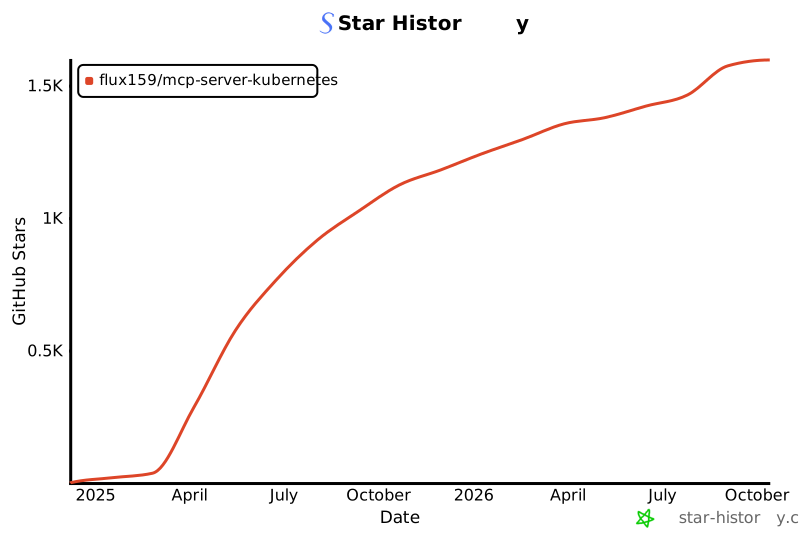](https://www.star-history.com/#Flux159/mcp-server-kubernetes&Date)
## 🖊️ Cite
If you find this repo useful, please cite:
```
@software{Patel_MCP_Server_Kubernetes_2024,
author = {Patel, Paras and Sonwalkar, Suyog},
month = jul,
title = {{MCP Server Kubernetes}},
url = {https://github.com/Flux159/mcp-server-kubernetes},
version = {2.5.0},
year = {2024}
}
```
TDQS
Scored across 22 tools
Most tools target distinct Kubernetes verbs or resources, but kubectl_create, kubectl_apply, and kubectl_patch overlap in resource creation/update, and kubectl_generic acts as a catch-all that duplicates every other kubectl tool. cleanup is also vaguely scoped relative to delete and uninstall operations.
Core tools use a consistent kubectl_ prefix with snake_case, but the set mixes prefixes (helm_* and no prefix), patterns like verb_noun (install_helm_chart), noun phrases (node_management), and bare verbs (cleanup, ping). Readable but not predictable across the whole set.
22 tools is on the heavy side but each covers a meaningful Kubernetes or Helm operation across resource lifecycle, node management, port forwarding, and exec. The existence of kubectl_generic makes some dedicated tools redundant, yet the count remains reasonable for the domain's breadth.
The surface covers core resource lifecycle (get, describe, create, apply, delete, patch, scale, rollout), Helm install/upgrade/uninstall, node management, port forwarding, exec, and context, with kubectl_generic as a fallback. Minor gaps like Helm list/rollback exist, but agents can work around most with generic commands.