
excalix
by yasinmiran
README.md
# excalix
[](https://github.com/yasinmiran/excalix/actions/workflows/ci.yml) [](https://www.npmjs.com/package/excalix) [](https://yasinmiran.github.io/excalix/)
Architecture diagrams from a topology spec, in Excalidraw's hand-drawn style. You write what exists and what talks to what; excalix does the layout, the shapes and colours, the text measurement and the arrow bindings, and the same spec always produces the same bytes.
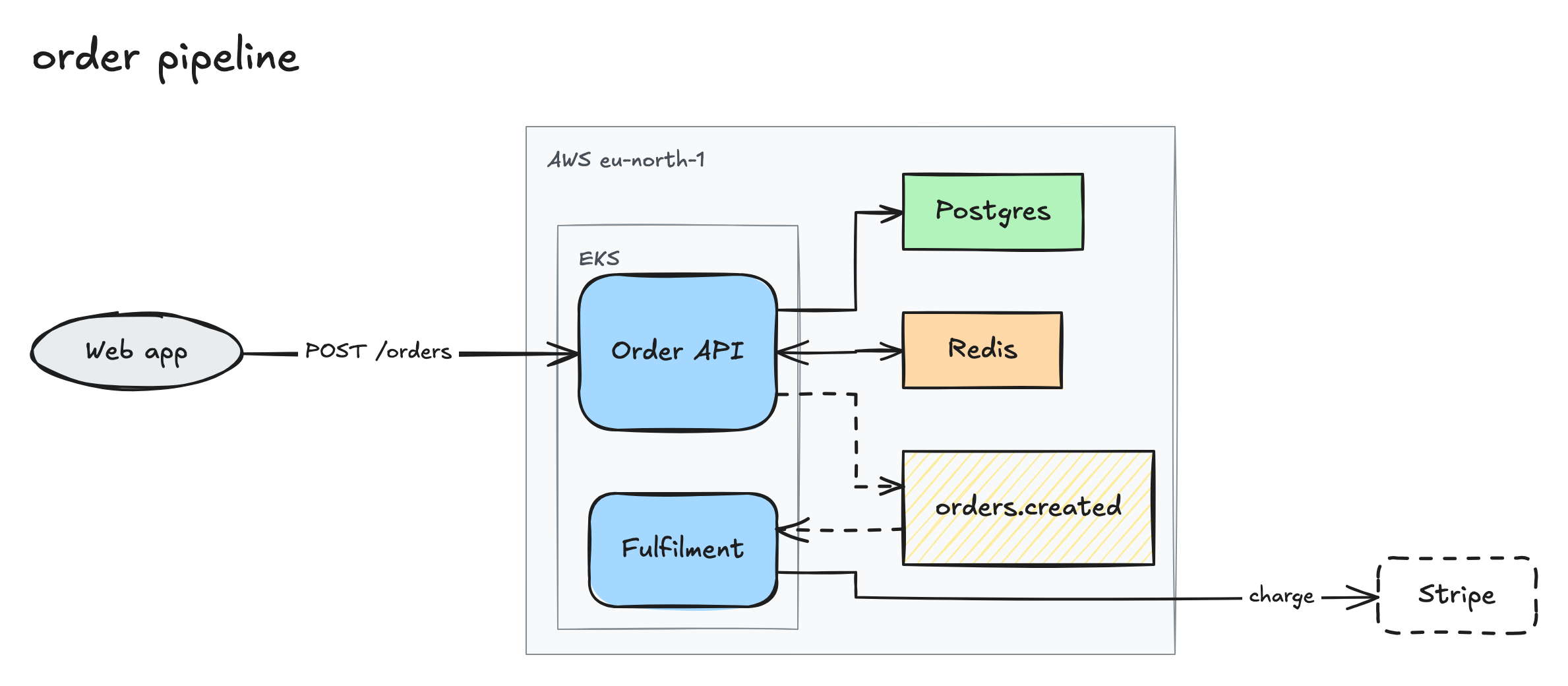
```json
{
"title": "order pipeline",
"direction": "lr",
"groups": [
{ "id": "aws", "label": "AWS eu-north-1" },
{ "id": "k8s", "label": "EKS", "parent": "aws" }
],
"nodes": [
{ "id": "web", "label": "Web app", "kind": "client" },
{ "id": "api", "label": "Order API", "kind": "service", "group": "k8s" },
{ "id": "worker", "label": "Fulfilment", "kind": "service", "group": "k8s" },
{ "id": "q", "label": "orders.created", "kind": "queue", "group": "aws" },
{ "id": "pg", "label": "Postgres", "kind": "datastore", "group": "aws" },
{ "id": "redis", "label": "Redis", "kind": "cache", "group": "aws" },
{ "id": "stripe", "label": "Stripe", "kind": "external" }
],
"edges": [
{ "from": "web", "to": "api", "label": "POST /orders" },
{ "from": "api", "to": "pg" },
{ "from": "api", "to": "redis", "arrows": "both" },
{ "from": "api", "to": "q", "style": "async" },
{ "from": "q", "to": "worker", "style": "async" },
{ "from": "worker", "to": "stripe", "label": "charge" }
]
}
```
Out come an `.excalidraw`, an SVG and a PNG. The `.excalidraw` opens on excalidraw.com with every label and arrow binding intact, so you can keep editing by hand. The SVG and PNG carry the same scene, so either one dropped on excalidraw.com opens as the drawing too. An image optimiser such as SVGO or a PNG crusher strips that scene, so the `.excalidraw` stays the source of truth.
## Install
Node 22 or newer. Export and text measurement run in headless Chromium, which is a separate download:
```
npx -y playwright@1.63.0 install chromium
```
## Use
```
npx -y excalix render spec.json -o out/spec writes out/spec.excalidraw, .svg and .png
--theme dark draws the .svg and .png in Excalidraw's dark mode
--theme both adds out/spec.dark.svg and .dark.png beside the light pair
--animate story adds out/spec.animated.svg, the diagram drawing itself edge by edge
--animate layers the same, one layer of the layout at a time
npx -y excalix validate spec.json every problem at once, or ok: 7 nodes, 6 edges, 2 groups
npx -y excalix schema JSON Schema of the spec
```
With an agent, register the MCP server once. Its `sketch` tool takes the spec, writes the three files and returns the PNG in the same turn, along with a markdown line that shows the SVG in a README:
```
claude mcp add excalix --scope user -- npx -y excalix mcp
```
The skill tells the agent when to reach for it and how to write a spec that lays out well:
```
mkdir -p ~/.claude/skills/excalix
curl -fsSL https://raw.githubusercontent.com/yasinmiran/excalix/main/skills/excalix/SKILL.md -o ~/.claude/skills/excalix/SKILL.md
```
## The spec
`nodes`, `edges`, an optional `title`, `direction` (`lr` or `tb`) and `groups`, which nest through `parent`. A node sits in at most one group.
| kind | draws as |
|---|---|
| `client` | whoever initiates requests: people, browsers, mobile apps |
| `service` | anything you run or configure yourself, an app or a load balancer alike |
| `datastore` | database or durable storage |
| `queue` | queue, topic or stream |
| `cache` | cache or in-memory store |
| `external` | a system another company operates and you only call |
A node can also name an `icon` from a fixed catalog of 32, such as `database`, `gateway`, `lock` or `payment`; `excalix schema` lists them all. Like `kind`, it says what the node is, and excalix draws it, a small line icon left of the label in the label's colour:
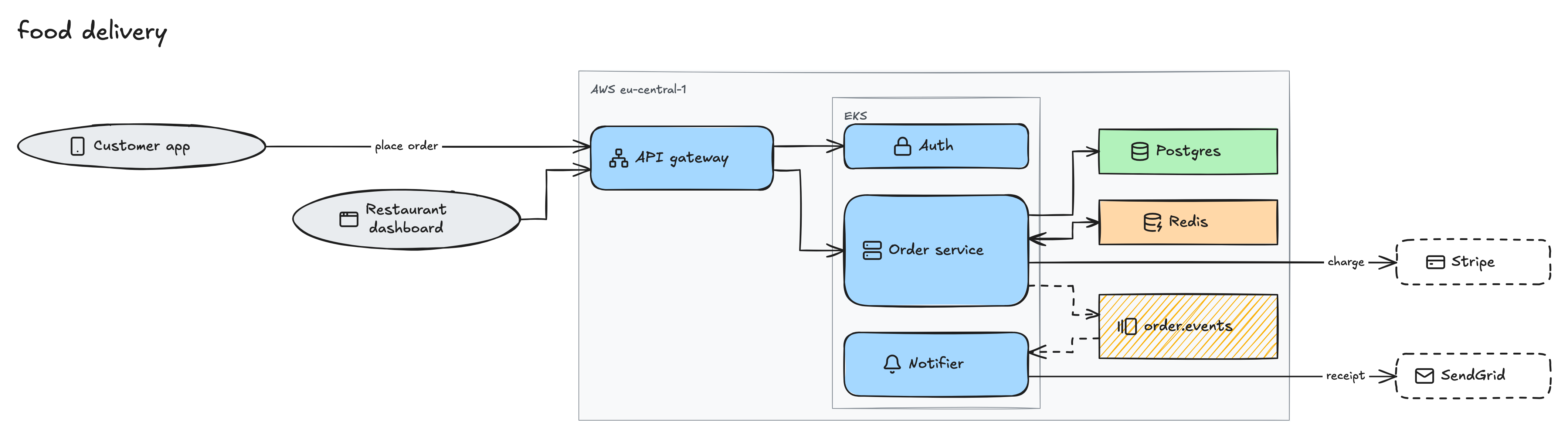
`edge.style` is `sync` (solid, default) or `async` (dashed). `edge.arrows` is `forward` (default), `both` or `none`. A `\n` in any label starts a new line, and an edge label past about twenty characters wraps onto more lines. The breaks are written into the file, so a label keeps its lines when you drag things around in Excalidraw.
List nodes in reading order, keep edge labels to a few words, and split anything past about twenty nodes into an overview and a detail diagram. [skills/excalix/SKILL.md](https://github.com/yasinmiran/excalix/blob/main/skills/excalix/SKILL.md) has the rest. Validation names every problem in one go:
```
edges[0].to: unknown node "apy", did you mean "api"?
nodes[2].kind: got "db", expected one of "client", "service", "datastore", "queue", "cache", "external"
```
## Why
An `.excalidraw` file is nothing but coordinates, and an agent asked to draw one has to invent all of them. excalix takes the geometry away, so two diagrams made a year apart look like one set, and a change to the spec shows up as a reviewable diff.
The [docs](https://yasinmiran.github.io/excalix/) have the full spec reference, the `sketch` tool's contract and more [examples](https://yasinmiran.github.io/excalix/examples.html). `pnpm test` and `pnpm typecheck` run the checks; the tests draw in Chromium and WebKit, so install both once with `npx -y playwright@1.63.0 install chromium webkit`. MIT, and not affiliated with Excalidraw. The fallback fonts in [fonts/](https://github.com/yasinmiran/excalix/tree/main/fonts) keep their own licences: DejaVu Sans the Bitstream Vera and Arev ones, Twemoji the SIL OFL 1.1 for the font and CC BY 4.0 for the art. The icons in [icons/](https://github.com/yasinmiran/excalix/tree/main/icons) are Lucide's, under the ISC licence.
This server cannot be deployed
Maintenance
ActivityActive
ResponsivenessWithin a week