A
licenseA
qualityD
maintenanceAttaches to your existing Chrome browser to allow Claude to see the active tab, interact via accessibility tree, and detect handoff triggers like 2FA and captchas.
10
MIT

Generates stable, accessibility-based test selectors for Cypress test suites by analyzing the computed semantic model of a webpage.
Connects to a live Google Chrome instance via the Chrome DevTools Protocol (CDP) to expose the ARIA accessibility tree and enable automated page navigation.
Enables the generation of reliable test selectors for Selenium based on ARIA roles and accessible names to ensure tests are stable across visual redesigns.
Facilitates the creation of robust, framework-agnostic test selectors for WebdriverIO by leveraging the live accessibility tree of a web application.
Click on "Deploy Server".
Wait a few minutes for the server to deploy. Once ready, it will show a "Started" state.
In the chat, type @ followed by the MCP server name and your instructions, e.g., "@MCP Accessibility Bridge Generate a Playwright selector for the login button on this page"
That's it! The server will respond to your query, and you can continue using it as needed.
Here is a step-by-step guide with screenshots.
Expose any live webpage's accessibility tree to Claude — generate rock-solid, framework-agnostic test selectors in seconds.


No cloning. No building. Paste this into your Claude Desktop config and you're done:
{
  "mcpServers": {
    "accessibility-bridge": {
      "command": "npx",
      "args": ["-y", "mcp-accessibility-bridge"]
    }
  }
}
Related MCP server: Glance
MCP Accessibility Bridge is a stdio MCP server that connects Claude Desktop to a live Chrome browser via the Chrome DevTools Protocol (CDP). It exposes the browser's full ARIA accessibility tree so Claude can:
Read every element's role, name, state, and relationships exactly as a screen reader would
Generate reliable, stable test selectors for Playwright, Selenium, Cypress, and WebdriverIO — without ever opening DevTools
Audit pages for accessibility issues
Write, debug, and migrate test suites using natural language
No bundled Chromium. Uses your existing Chrome installation via
puppeteer-core.
┌─────────────────────────────────────────────────────────────────────┐
│                        Claude Desktop                               │
│                                                                     │
│   ┌─────────────┐    MCP (stdio)    ┌──────────────────────────┐   │
│   │   Claude    │◄─────────────────►│  MCP Accessibility       │   │
│   │   LLM       │   JSON-RPC 2.0    │  Bridge (Node.js)        │   │
│   └─────────────┘                   │                          │   │
│                                     │  ┌────────────────────┐  │   │
│                                     │  │  8 MCP Tools       │  │   │
│                                     │  │  browser_connect   │  │   │
│                                     │  │  browser_navigate  │  │   │
│                                     │  │  get_ax_tree       │  │   │
│                                     │  │  query_ax_tree     │  │   │
│                                     │  │  get_element_props │  │   │
│                                     │  │  get_interactive   │  │   │
│                                     │  │  get_focused       │  │   │
│                                     │  │  browser_disconnect│  │   │
│                                     │  └────────┬───────────┘  │   │
│                                     │           │               │   │
│                                     │  ┌────────▼───────────┐  │   │
│                                     │  │  BrowserManager    │  │   │
│                                     │  │  (Singleton)       │  │   │
│                                     │  │  Browser + Page +  │  │   │
│                                     │  │  CDPSession        │  │   │
│                                     │  └────────┬───────────┘  │   │
│                                     │           │               │   │
│                                     │  ┌────────▼───────────┐  │   │
│                                     │  │  Utilities         │  │   │
│                                     │  │  axTree.ts         │  │   │
│                                     │  │  selectorGen.ts    │  │   │
│                                     │  │  errors.ts         │  │   │
│                                     │  └────────────────────┘  │   │
│                                     └────────────┬─────────────┘   │
└──────────────────────────────────────────────────┼─────────────────┘
                                                   │
                                     CDP WebSocket │
                                     (port 9222)   │
                                                   │
                              ┌────────────────────▼──────────────────┐
                              │          Google Chrome                 │
                              │                                        │
                              │  ┌──────────────────────────────────┐  │
                              │  │  Active Tab                      │  │
                              │  │                                  │  │
                              │  │  DOM Tree ──► AX Tree            │  │
                              │  │                ▲                 │  │
                              │  │  Computed      │                 │  │
                              │  │  Accessibility │                 │  │
                              │  │  Object Model  │                 │  │
                              │  └────────────────┼─────────────────┘  │
                              │                   │                    │
                              │   CDP Domains Used:                    │
                              │   • Accessibility.enable               │
                              │   • Accessibility.getFullAXTree        │
                              │   • Accessibility.getPartialAXTree     │
                              │   • Accessibility.queryAXTree          │
                              │   • DOM.describeNode                   │
                              │   • DOM.getOuterHTML                   │
└────────────────────────────────────────┘User prompt in Claude Desktop
│
▼
Claude decides which tool to call
│
▼
MCP SDK dispatches tool call (stdio JSON-RPC)
│
▼
Tool handler in src/tools/
│
▼
BrowserManager.requireConnection()
returns { browser, page, cdpSession }
│
▼
CDP commands sent over WebSocket to Chrome
│
▼
Chrome computes AX tree from live DOM
│
▼
Raw CDP response parsed + transformed
│
▼
selectorGenerator.ts builds multi-framework selectors
│
▼
toolSuccess({ ... }) → JSON returned to Claude
│
▼
Claude reads selectors, names, roles → responds to userMost test automation targets the DOM — brittle class names, nested div soup, hashed CSS modules. The accessibility tree is different:
Property | DOM Selectors | AX Tree Selectors |
Stability | Break on CSS refactors | Stable across visual redesigns |
Dynamic state | Miss | Reflect real runtime state |
Semantic meaning | Target implementation details | Target user-facing intent |
Framework coupling | Often framework-specific | Framework-agnostic |
Accessibility signal | Silent on a11y problems | Surface a11y bugs automatically |
Screen reader parity | Unknown | Exactly what a screen reader announces |
The AX tree is Chrome's computed semantic model — what the browser exposes to assistive technology. Selectors built from it use role and name attributes that are:
Immune to visual redesigns — renaming a CSS class doesn't change role=button[name='Submit']
Semantically verified — if Claude can select it, a screen reader can reach it
Framework-neutral — the same ARIA semantics translate to any test framework
browser_connectConnect Claude to a running Chrome instance via CDP.
Input:  debugUrl (string, default: "http://localhost:9222")
Output: { connected, debugUrl, currentUrl, pageTitle }
Chrome must be started with --remote-debugging-port=9222. The tool creates a single shared CDPSession that all other tools reuse, enabling Accessibility.* CDP domain calls.
browser_navigateNavigate the connected tab to any URL.
Input:  url (string), waitUntil (load|domcontentloaded|networkidle0|networkidle2), timeout (ms)
Output: { navigated, url, finalUrl, title, status }
Returns the HTTP status code and final URL (after redirects).
browser_disconnectClose the CDP connection cleanly. Does not kill Chrome.
Input:  (none)
Output: { disconnected, message }get_accessibility_treeSnapshot the full accessibility tree of the current page.
Input:  interestingOnly (bool), maxDepth (int), useFullTree (bool)
Output: { url, title, nodeCount, tree }
Two modes:
Default: page.accessibility.snapshot() — fast, filters noise, ideal for most pages
Full CDP: Accessibility.getFullAXTree — raw, complete, slower — use when the default misses nodes
query_accessibility_treeSearch the tree by ARIA role and/or accessible name.
Input:  role (string), accessibleName (string), backendNodeId (int)
Output: { query, count, nodes[] }
Uses CDP Accessibility.queryAXTree — targeted and fast. Example: find all unchecked checkboxes, all level-2 headings, all disabled buttons.
get_element_propertiesGiven a CSS selector, return the element's full AX profile and multi-framework selectors.
Input:  selector (string), includeHtml (bool)
Output: { selector, tagName, domAttributes, backendNodeId, accessibility, suggestedSelectors }
Resolves: CSS selector → backendNodeId → Accessibility.getPartialAXTree → selectorGenerator.
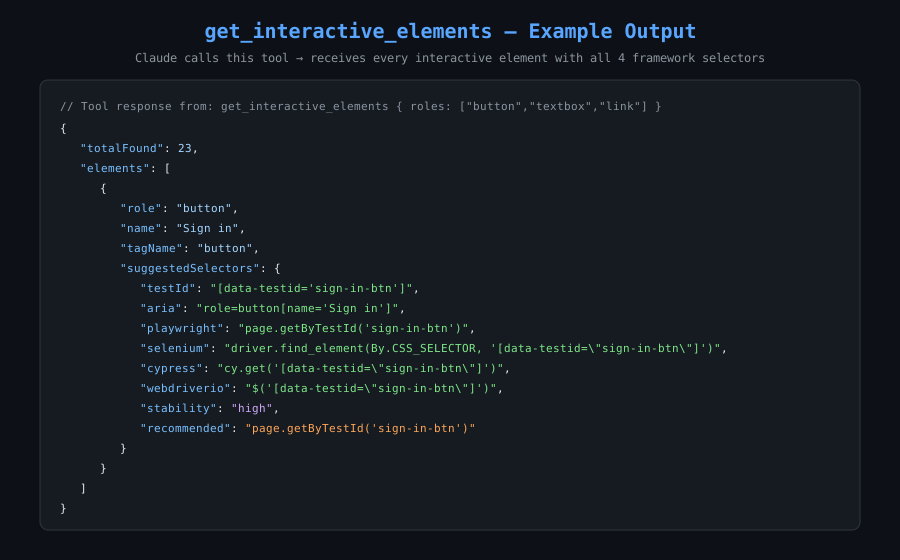
get_interactive_elementsFind every interactive element on the page — buttons, inputs, links, tabs, etc.
Input:  roles (string[]), includeDisabled (bool), maxElements (int)
Output: { totalFound, returned, elements[] }
Filters Accessibility.getFullAXTree by 20 interactive ARIA roles, then calls DOM.describeNode in parallel for each to retrieve DOM attributes for selector generation.
20 covered roles:
button · link · textbox · searchbox · combobox · listbox · option · checkbox · radio · switch · slider · spinbutton · menuitem · tab · treeitem · gridcell · rowheader · columnheader · progressbar · scrollbar
get_focused_elementReturn the currently keyboard-focused element's AX info and selectors.
Input:  (none)
Output: { focused: { role, name, value, tagName, domAttributes, suggestedSelectors } }
Uses document.activeElement + Accessibility.getPartialAXTree to report what a keyboard user is currently on.

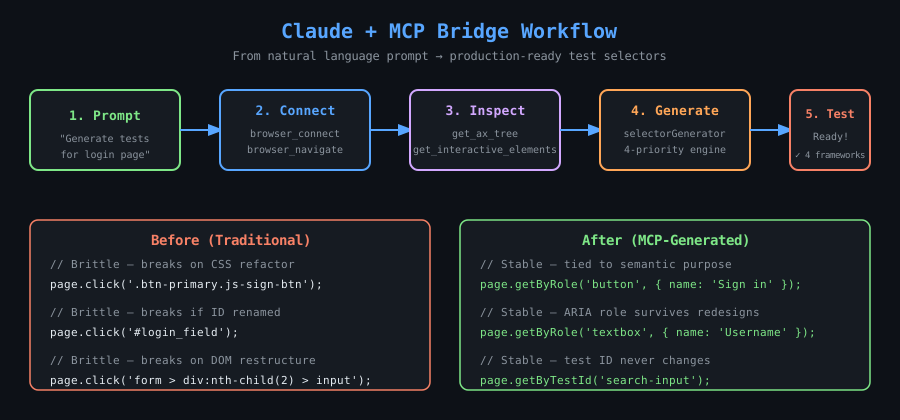
src/utils/selectorGenerator.ts implements a 4-tier priority system:
Priority 1 — Test ID attributes (HIGHEST STABILITY)
──────────────────────────────────────────────────
Checks: data-testid, data-cy, data-test, data-qa
Output: [data-testid="submit-btn"]
Playwright: page.getByTestId('submit-btn')


Priority 2 — Stable element ID
──────────────────────────────────────────────────
Checks: id attribute
Skips:  UUIDs, numeric IDs, mat-* / ng-* prefixes
Output: #email-input
Playwright: page.locator('#email-input')


Priority 3 — ARIA role + accessible name (MEDIUM STABILITY)
──────────────────────────────────────────────────
Uses: role + computed accessible name from AX tree
Output: role=button[name='Submit']
Playwright: page.getByRole('button', { name: 'Submit' })


Priority 4 — Semantic CSS (FALLBACK)
──────────────────────────────────────────────────
Uses: tagName + type/name/role/placeholder attributes
Output: input[type="email"][name="email"]
Playwright: page.locator('input[type="email"][name="email"]')
Every element returns selectors for all four frameworks:
{
  "testId": "[data-testid=\"search-input\"]",
  "aria": "role=searchbox[name='Search']",
  "css": "input[type=\"search\"]",
  "playwright": "page.getByRole('searchbox', { name: 'Search' })",
  "selenium": "driver.find_element(By.CSS_SELECTOR, '[data-testid=\"search-input\"]')",
  "cypress": "cy.get('[data-testid=\"search-input\"]')",
  "webdriverio": "$('[data-testid=\"search-input\"]')",
  "stability": "high",
  "recommended": "page.getByTestId('search-input')"
}
A legacy app with no tests. Navigate to any page and ask:
"Generate a Playwright test that fills the checkout form and submits it."
Claude calls get_interactive_elements, receives all inputs and buttons with selectors, and writes the full test — in minutes, not days.
Moving from Selenium to Playwright? Hundreds of brittle XPath selectors?
"Give me the Playwright equivalent of every interactive element on this page."
Claude maps driver.find_element(By.XPATH, ...) → page.getByRole(...) using the live AX tree as ground truth.
"Get the full accessibility tree for /checkout and identify elements missing accessible names, wrong roles, or bad focus order."
Claude reads the AX tree and reports:
Buttons with name: "" (icon buttons missing aria-label)
<div> acting as buttons (role: generic, no keyboard access)
Form fields missing required or aria-describedby
"The test can't find #submit-btn. Navigate to the page and check if it exists in the AX tree, and if it's enabled."
Claude checks: is the element ignored? Is disabled: true? Is a modal trapping focus? All invisible to raw DOM queries, visible here.
"Open Storybook at localhost:6006 and document the recommended selector for every interactive element in every story."
Claude iterates stories, calls get_interactive_elements, and outputs a complete selector reference.
"Find the selector for the blue submit button at the bottom of the registration form."
No DevTools needed. Claude queries the AX tree, identifies the button by its accessible name, and returns all four framework selectors.
React/Vue/Angular apps with hashed class names (sc-abc123) break CSS selectors on every build. AX tree selectors (page.getByRole('button', { name: 'Subscribe' })) are permanently stable — hashing class names never changes semantic meaning.
"Before merging this PR, verify these 10 selectors still resolve correctly on staging."
Claude calls get_element_properties for each selector and confirms role + name still match expected values. Catches regressions before CI runs.
Chrome must be running with the remote debugging port open before calling browser_connect.
/Applications/Google\ Chrome.app/Contents/MacOS/Google\ Chrome \
  --remote-debugging-port=9222 \
--user-data-dir=/tmp/chrome-debug-profilegoogle-chrome \
--remote-debugging-port=9222 \
--user-data-dir=/tmp/chrome-debug-profile& "C:\Program Files\Google\Chrome\Application\chrome.exe" `
--remote-debugging-port=9222 `
--user-data-dir="$env:TEMP\chrome-debug-profile"curl http://localhost:9222/json/versionExpected response:
{
  "Browser": "Chrome/124.0.0.0",
  "Protocol-Version": "1.3",
  "webSocketDebuggerUrl": "ws://localhost:9222/devtools/browser/..."
}
Why a separate
--user-data-dir? Chrome requires a dedicated profile directory when remote debugging is enabled. Using/tmp/chrome-debug-profilekeeps it isolated from your regular browsing profile.
Edit ~/Library/Application Support/Claude/claude_desktop_config.json (macOS) or %APPDATA%\Claude\claude_desktop_config.json (Windows).
Zero install. Works on any machine. npx downloads the package on first run and caches it.
{
  "mcpServers": {
    "accessibility-bridge": {
      "command": "npx",
      "args": ["-y", "mcp-accessibility-bridge"]
    }
  }
}npm install -g mcp-accessibility-bridgeThen use just the command name — no path, no args:
{
  "mcpServers": {
    "accessibility-bridge": {
      "command": "mcp-accessibility-bridge"
    }
  }
}git clone https://github.com/yashpreetbathla/mcp-accessibility-bridge.git
cd mcp-accessibility-bridge
npm install && npm run build
npm linkConfig becomes identical to Option 2. Any local edits are reflected immediately without reinstalling.
After saving: fully quit Claude Desktop (Cmd+Q on macOS), then relaunch. The accessibility-bridge tools will appear in Claude's tool list.
"Connect to Chrome and navigate to https://github.com"
Claude calls browser_connect then browser_navigate and confirms the page title and HTTP status.
"Show me the accessibility tree for this page, 5 levels deep"
{
  "url": "https://github.com",
  "title": "GitHub",
  "nodeCount": 847,
  "tree": {
    "role": "WebArea",
    "name": "GitHub",
    "children": [
      { "role": "banner", "name": "", "children": ["..."] },
      { "role": "main",   "name": "", "children": ["..."] }
    ]
  }
}"List all buttons on this page with their Playwright selectors"
{
  "totalFound": 12,
  "elements": [
    {
      "role": "button",
      "name": "Sign in",
      "suggestedSelectors": {
        "playwright":  "page.getByRole('button', { name: 'Sign in' })",
        "selenium":    "driver.find_element(By.XPATH, \"//button[@aria-label='Sign in']\")",
        "cypress":     "cy.get('[data-testid=\"sign-in-btn\"]')",
        "webdriverio": "$('[data-testid=\"sign-in-btn\"]')",
        "stability":   "high",
        "recommended": "page.getByRole('button', { name: 'Sign in' })"
      }
    }
  ]
}"What's the best selector for the search input on this page?"
Claude calls get_element_properties with selector: "input[type=search]" and returns the full AX profile + all framework selectors.
"What element is currently focused on the keyboard?"
Claude calls get_focused_element and returns the role, name, and selectors of the active element — useful for testing keyboard navigation and focus management.
The examples/playwright-github-tests/ directory contains a complete Playwright test suite for GitHub built entirely using selectors generated by Claude + this MCP server. Zero time was spent in Chrome DevTools.
examples/playwright-github-tests/
├── selectors/
│   └── github.selectors.ts        ← selector library generated by Claude
└── tests/
    ├── github-home.spec.ts         ← home page landmark + CTA tests
    ├── github-login.spec.ts        ← login form: happy path, tab order, error alerts
    ├── github-search.spec.ts       ← search flow + keyboard shortcut discovery
    └── accessibility-audit.spec.ts ← WCAG 2.1 AA: headings, labels, focus trapping
Every selector has a comment showing which Claude prompt and which MCP tool produced it. See the example README for the full walkthrough.
mcp-accessibility-bridge/
├── package.json                   # ESM module, bin entry, npm metadata
├── tsconfig.json                  # ES2022, NodeNext modules
├── bin/
│   └── mcp-accessibility-bridge.js  # CLI entry point (shebang wrapper)
├── src/
│   ├── index.ts                   # McpServer setup, tool registration, stdio transport
│   ├── browser/
│   │   ├── BrowserManager.ts      # Singleton: Browser + Page + CDPSession lifecycle
│   │   └── types.ts               # CDP response interfaces (CdpAXNode, etc.)
│   ├── tools/
│   │   ├── browserConnect.ts      # browser_connect
│   │   ├── browserNavigate.ts     # browser_navigate
│   │   ├── browserDisconnect.ts   # browser_disconnect
│   │   ├── getAccessibilityTree.ts    # get_accessibility_tree
│   │   ├── queryAccessibilityTree.ts  # query_accessibility_tree
│   │   ├── getElementProperties.ts    # get_element_properties
│   │   ├── getInteractiveElements.ts  # get_interactive_elements
│   │   └── getFocusedElement.ts       # get_focused_element
│   └── utils/
│       ├── axTree.ts              # Tree assembly, traversal, pruning
│       ├── selectorGenerator.ts   # 4-priority selector engine
│       └── errors.ts              # toolSuccess(), toolError(), BrowserNotConnectedError
├── examples/
│   └── playwright-github-tests/   # Full Playwright suite generated with this tool
├── screenshots/                   # Architecture + workflow diagrams
├── README.md
├── POLICY.md                      # Responsible use guidelines
└── LICENSESingleton BrowserManager — One CDPSession is created at browser_connect time and reused across all tool calls. This avoids the overhead of creating a new session per call and ensures Accessibility.enable is called exactly once.
puppeteer-core only — No bundled Chromium download (~300MB). Connects to the user's existing Chrome via browserURL. This is intentional: you want to inspect the same browser you use day-to-day.
browser.disconnect() not browser.close() — The MCP server does not own the Chrome process. disconnect() closes the WebSocket connection without killing Chrome.
Parallel DOM resolution — get_interactive_elements calls DOM.describeNode for all matched AX nodes via Promise.all. For pages with 50+ interactive elements, this is 5–10x faster than sequential calls.
Never throw through MCP — All tool handlers wrap execution in try/catch and return toolError() on failure. MCP errors are surfaced as readable text, not unhandled exceptions.
Chrome DevTools Protocol exposes the Accessibility domain, which provides programmatic access to the browser's internal Accessibility Object Model (AOM). Before any AX calls can be made, the domain must be activated:
await cdpSession.send('Accessibility.enable');This is done once at connection time by BrowserManager.connect().
For get_element_properties:
page.$(cssSelector)                      // Puppeteer: find element
  → remoteObject.objectId                // V8 object reference
  → DOM.describeNode({ objectId })       // CDP: get backendNodeId + attributes
  → Accessibility.getPartialAXTree       // CDP: get AX nodes for this DOM node
    ({ backendNodeId, fetchRelatives: false })
  → cdpAXNodeToSummary()                 // Parse role, name, properties
→ buildSelectorFromRawNode() // Generate selectorsAccessibility.getFullAXTree returns a flat array of CdpAXNode objects with nodeId, parentId, and childIds references. The axTree.ts utilities:
buildTreeIndex — builds a Map<nodeId, CdpAXNode> for O(1) lookup
assembleTree — recursively walks childIds, skipping ignored nodes, building a nested AXNodeSummary tree
pruneToDepth — trims the tree to the requested maxDepth
The UNSTABLE_ID_RE regex in selectorGenerator.ts skips IDs that are likely auto-generated:
const UNSTABLE_ID_RE = /^(mat-|ng-|[0-9]|[a-f0-9]{8}-)/i;This prevents Claude from recommending #mat-input-3 (Angular Material auto-ID) or #a3f2b1c4-... (UUID) as stable selectors, falling back to ARIA role selectors instead.
Contributions are welcome. Please read POLICY.md before contributing.
# Clone and set up
git clone https://github.com/yashpreetbathla/mcp-accessibility-bridge.git
cd mcp-accessibility-bridge
npm install

# Development mode (watch + recompile on save)
npm run dev

# One-off build
npm run build

# Link globally for local testing
npm link
Areas to contribute:
Additional CDP domain support (e.g., Page, Runtime for JS state)
Firefox DevTools Protocol support
Shadow DOM / web component traversal
Selector quality scoring improvements
Unit tests for selectorGenerator.ts and axTree.ts
MIT — see LICENSE.
npm · GitHub · Issues · Author
Built to make test automation accessible to everyone — not just those fluent in CSS selectors and XPath.
Connect to a running Chrome browser via the Chrome DevTools Protocol (CDP). Chrome must be started with --remote-debugging-port=9222. Command: /Applications/Google\ Chrome.app/Contents/MacOS/Google\ Chrome --remote-debugging-port=9222 --user-data-dir=/tmp/chrome-debug-profile
| Name | Required | Description | Default |
|---|---|---|---|
| debugUrl | No | Chrome remote debugging URL. Default: http://localhost:9222. Start Chrome with --remote-debugging-port=9222. | http://localhost:9222 |
Does the description disclose side effects, auth requirements, rate limits, or destructive behavior?
No annotations are provided, so the description carries the full burden. It discloses key behavioral traits such as the requirement for Chrome to be running with specific flags and the use of CDP, but it lacks details on error handling, connection persistence, or what happens after connection (e.g., does it return a session ID?). This is adequate but has gaps for a tool with no annotations.
Agents need to know what a tool does to the world before calling it. Descriptions should go beyond structured annotations to explain consequences.
Is the description appropriately sized, front-loaded, and free of redundancy?
The description is front-loaded with the core purpose in the first sentence, followed by essential prerequisites and a concrete example. Every sentence earns its place by providing critical information without redundancy, making it highly efficient and well-structured.
Shorter descriptions cost fewer tokens and are easier for agents to parse. Every sentence should earn its place.
Given the tool's complexity, does the description cover enough for an agent to succeed on first attempt?
Given the tool's complexity (connecting to a browser via CDP), no annotations, and no output schema, the description does a good job covering prerequisites and usage. However, it lacks details on what the tool returns (e.g., connection status or session handle) and potential failure modes, which would enhance completeness for a tool with no structured output information.
Complex tools with many parameters or behaviors need more documentation. Simple tools need less. This dimension scales expectations accordingly.
Does the description clarify parameter syntax, constraints, interactions, or defaults beyond what the schema provides?
Schema description coverage is 100%, so the schema already fully documents the single parameter 'debugUrl' with its type, format, default, and description. The description does not add any meaningful parameter semantics beyond what the schema provides, such as explaining why the default is used or edge cases for the URL. Baseline 3 is appropriate when schema does the heavy lifting.
Input schemas describe structure but not intent. Descriptions should explain non-obvious parameter relationships and valid value ranges.
Does the description clearly state what the tool does and how it differs from similar tools?
The description clearly states the specific action ('Connect to a running Chrome browser') and the mechanism ('via the Chrome DevTools Protocol'), distinguishing it from siblings like browser_disconnect or browser_navigate. It provides a precise verb+resource combination that leaves no ambiguity about what the tool does.
Agents choose between tools based on descriptions. A clear purpose with a specific verb and resource helps agents select the right tool.
Does the description explain when to use this tool, when not to, or what alternatives exist?
The description explicitly states when to use this tool by specifying the prerequisite condition ('Chrome must be started with --remote-debugging-port=9222') and provides a concrete command example. However, it does not explicitly contrast when to use this versus alternatives like browser_disconnect or other browser-related tools, which prevents a perfect score.
Agents often have multiple tools that could apply. Explicit usage guidance like "use X instead of Y when Z" prevents misuse.
Close the CDP connection to Chrome. Does NOT kill the Chrome process. Call this when you are done to release the connection.
| Name | Required | Description | Default |
|---|---|---|---|
No parameters | |||
Does the description disclose side effects, auth requirements, rate limits, or destructive behavior?
With no annotations provided, the description carries the full burden of behavioral disclosure. It clearly describes the tool's effect ('Close the CDP connection', 'release the connection') and explicitly states what it does NOT do ('Does NOT kill the Chrome process'), which is crucial behavioral context. However, it doesn't mention potential side effects like whether other tools become unusable after disconnection or if reconnection is possible.
Agents need to know what a tool does to the world before calling it. Descriptions should go beyond structured annotations to explain consequences.
Is the description appropriately sized, front-loaded, and free of redundancy?
The description is perfectly concise with three sentences that each earn their place: the first states the core action, the second clarifies what it doesn't do (preventing a common misconception), and the third provides clear usage timing. It's front-loaded with the main purpose and wastes no words while covering all essential information.
Shorter descriptions cost fewer tokens and are easier for agents to parse. Every sentence should earn its place.
Given the tool's complexity, does the description cover enough for an agent to succeed on first attempt?
Given the tool's simplicity (0 parameters, no output schema, no annotations), the description is nearly complete. It explains what the tool does, what it doesn't do, and when to use it. The only minor gap is not explicitly stating that other browser tools may become unusable after disconnection, but this is somewhat implied by the 'release the connection' language and the sibling tool context.
Complex tools with many parameters or behaviors need more documentation. Simple tools need less. This dimension scales expectations accordingly.
Does the description clarify parameter syntax, constraints, interactions, or defaults beyond what the schema provides?
The tool has 0 parameters with 100% schema description coverage, so the baseline is 4. The description appropriately doesn't discuss parameters since none exist, focusing instead on the tool's purpose and usage context. No parameter information is needed or expected given the empty input schema.
Input schemas describe structure but not intent. Descriptions should explain non-obvious parameter relationships and valid value ranges.
Does the description clearly state what the tool does and how it differs from similar tools?
The description clearly states the specific action ('Close the CDP connection to Chrome') and resource ('Chrome'), distinguishing it from siblings like browser_connect (which establishes connection) and browser_navigate (which navigates within an active connection). It explicitly clarifies what it does NOT do ('Does NOT kill the Chrome process'), preventing confusion with potential destructive alternatives.
Agents choose between tools based on descriptions. A clear purpose with a specific verb and resource helps agents select the right tool.
Does the description explain when to use this tool, when not to, or what alternatives exist?
The description provides explicit guidance on when to use this tool ('Call this when you are done to release the connection'), establishing a clear lifecycle context. It also specifies when NOT to use it ('Does NOT kill the Chrome process'), preventing misuse for process termination. The context implies this should be called after using other browser tools to clean up resources.
Agents often have multiple tools that could apply. Explicit usage guidance like "use X instead of Y when Z" prevents misuse.
Capture a snapshot of the current page's accessibility tree. Returns a hierarchical tree of ARIA roles, names, and properties. Use interestingOnly=false for the complete raw tree. Use useFullTree=true for the CDP-level complete tree (slower but more accurate). Use maxDepth to control how deep the tree goes.
| Name | Required | Description | Default |
|---|---|---|---|
| interestingOnly | No | If true, prunes nodes that are not interesting (hidden, presentational). Set false to get the raw full tree. Default: true | |
| maxDepth | No | Maximum tree depth to return. Default: 10 | |
| useFullTree | No | If true, uses CDP Accessibility.getFullAXTree (more complete but slower). If false, uses page.accessibility.snapshot(). Default: false |
Does the description disclose side effects, auth requirements, rate limits, or destructive behavior?
With no annotations provided, the description carries the full burden and does well by disclosing key behavioral traits: it returns a hierarchical tree structure, mentions performance implications ('slower but more accurate' for useFullTree), and describes the effect of parameters on output. It doesn't cover error conditions or permissions, but provides substantial operational context.
Agents need to know what a tool does to the world before calling it. Descriptions should go beyond structured annotations to explain consequences.
Is the description appropriately sized, front-loaded, and free of redundancy?
The description is efficiently structured with three focused sentences: first states the core purpose, second describes the return format, and third provides parameter usage tips. Every sentence adds value with zero waste, and it's front-loaded with the main action.
Shorter descriptions cost fewer tokens and are easier for agents to parse. Every sentence should earn its place.
Given the tool's complexity, does the description cover enough for an agent to succeed on first attempt?
Given 3 parameters with full schema coverage and no output schema, the description provides good context about what the tool returns and how parameters affect behavior. It could be more complete by mentioning typical use cases or limitations, but covers the essential operational aspects adequately for this complexity level.
Complex tools with many parameters or behaviors need more documentation. Simple tools need less. This dimension scales expectations accordingly.
Does the description clarify parameter syntax, constraints, interactions, or defaults beyond what the schema provides?
Schema description coverage is 100%, so the schema already fully documents all three parameters. The description adds minimal value by restating parameter purposes in a more conversational tone (e.g., 'Use interestingOnly=false for the complete raw tree'), but doesn't provide additional semantics beyond what's in the schema. Baseline 3 is appropriate.
Input schemas describe structure but not intent. Descriptions should explain non-obvious parameter relationships and valid value ranges.
Does the description clearly state what the tool does and how it differs from similar tools?
The description clearly states the specific action ('Capture a snapshot') and resource ('current page's accessibility tree'), and distinguishes it from sibling 'query_accessibility_tree' by focusing on snapshot capture rather than querying. It explicitly mentions the hierarchical structure and key attributes returned.
Agents choose between tools based on descriptions. A clear purpose with a specific verb and resource helps agents select the right tool.
Does the description explain when to use this tool, when not to, or what alternatives exist?
The description provides clear context on when to use specific parameter settings (e.g., 'use interestingOnly=false for the complete raw tree'), but does not explicitly state when to choose this tool over alternatives like 'query_accessibility_tree' or other sibling tools. It offers practical guidance without naming exclusions.
Agents often have multiple tools that could apply. Explicit usage guidance like "use X instead of Y when Z" prevents misuse.
Given a CSS selector, returns the element's full accessibility properties and multi-framework test selectors (Playwright, Selenium, Cypress, WebdriverIO). Selectors are prioritized: data-testid > stable id > ARIA role > semantic CSS.
| Name | Required | Description | Default |
|---|---|---|---|
| selector | Yes | CSS selector to identify the element (e.g. "input[type=search]", "#submit-btn"). | |
| includeHtml | No | Include the outer HTML of the element. Default: false |
Does the description disclose side effects, auth requirements, rate limits, or destructive behavior?
With no annotations provided, the description carries the full burden. It discloses the return content (accessibility properties and test selectors) and selector prioritization behavior, which is valuable. However, it doesn't mention potential errors (e.g., if selector finds no element), performance characteristics, or authentication needs, leaving gaps for a tool with no annotation coverage.
Agents need to know what a tool does to the world before calling it. Descriptions should go beyond structured annotations to explain consequences.
Is the description appropriately sized, front-loaded, and free of redundancy?
The description is a single, well-structured sentence that efficiently conveys the tool's purpose, output, and key behavioral detail (selector prioritization). Every part earns its place with no wasted words, making it easy to parse and front-loaded with essential information.
Shorter descriptions cost fewer tokens and are easier for agents to parse. Every sentence should earn its place.
Given the tool's complexity, does the description cover enough for an agent to succeed on first attempt?
Given no annotations and no output schema, the description provides good coverage of what the tool returns and its selector behavior. However, for a tool that interacts with a browser (implied by sibling tools), it lacks context on dependencies (e.g., requires an active browser session), error handling, or output format details, which could hinder an agent's ability to use it correctly.
Complex tools with many parameters or behaviors need more documentation. Simple tools need less. This dimension scales expectations accordingly.
Does the description clarify parameter syntax, constraints, interactions, or defaults beyond what the schema provides?
Schema description coverage is 100%, so the schema fully documents both parameters. The description doesn't add any parameter-specific information beyond what's in the schema (e.g., it doesn't explain selector syntax further or clarify 'includeHtml' implications). Baseline 3 is appropriate when the schema does the heavy lifting.
Input schemas describe structure but not intent. Descriptions should explain non-obvious parameter relationships and valid value ranges.
Does the description clearly state what the tool does and how it differs from similar tools?
The description clearly states the specific action ('returns') and the exact resources ('element's full accessibility properties and multi-framework test selectors'), naming four specific frameworks. It distinguishes from siblings like 'get_accessibility_tree' by focusing on a single element's properties rather than the entire tree.
Agents choose between tools based on descriptions. A clear purpose with a specific verb and resource helps agents select the right tool.
Does the description explain when to use this tool, when not to, or what alternatives exist?
The description implies usage by specifying 'Given a CSS selector' and mentions selector prioritization, which provides some context. However, it lacks explicit guidance on when to use this tool versus alternatives like 'get_focused_element' or 'get_interactive_elements', and doesn't state any exclusions or prerequisites.
Agents often have multiple tools that could apply. Explicit usage guidance like "use X instead of Y when Z" prevents misuse.
Returns the currently keyboard-focused element's accessibility info and suggested selectors. Useful for checking focus management in accessible UIs.
| Name | Required | Description | Default |
|---|---|---|---|
No parameters | |||
Does the description disclose side effects, auth requirements, rate limits, or destructive behavior?
No annotations are provided, so the description carries the full burden of behavioral disclosure. It states what the tool returns but doesn't describe behavioral traits such as whether it requires a browser connection (implied by sibling tools), potential errors if no element is focused, performance characteristics, or output format details. The description adds minimal context beyond the basic purpose.
Agents need to know what a tool does to the world before calling it. Descriptions should go beyond structured annotations to explain consequences.
Is the description appropriately sized, front-loaded, and free of redundancy?
The description is concise and well-structured with two sentences. The first sentence states the core functionality, and the second provides usage context. Every sentence earns its place without redundancy or unnecessary details.
Shorter descriptions cost fewer tokens and are easier for agents to parse. Every sentence should earn its place.
Given the tool's complexity, does the description cover enough for an agent to succeed on first attempt?
Given the tool's moderate complexity (retrieving focused element data) and lack of annotations or output schema, the description is adequate but has gaps. It explains the purpose and usage context but doesn't cover behavioral aspects like dependencies on browser state or output structure. For a tool with no structured metadata, more completeness would be beneficial.
Complex tools with many parameters or behaviors need more documentation. Simple tools need less. This dimension scales expectations accordingly.
Does the description clarify parameter syntax, constraints, interactions, or defaults beyond what the schema provides?
The input schema has 0 parameters with 100% coverage, so no parameter documentation is needed. The description doesn't add parameter information, which is appropriate here. A baseline of 4 is applied for tools with no parameters, as there's nothing to compensate for.
Input schemas describe structure but not intent. Descriptions should explain non-obvious parameter relationships and valid value ranges.
Does the description clearly state what the tool does and how it differs from similar tools?
The description clearly states the tool's purpose: 'Returns the currently keyboard-focused element's accessibility info and suggested selectors.' It specifies the verb ('returns'), resource ('currently keyboard-focused element'), and output type ('accessibility info and suggested selectors'). However, it doesn't explicitly differentiate from sibling tools like 'get_element_properties' or 'get_accessibility_tree', which also retrieve accessibility-related information.
Agents choose between tools based on descriptions. A clear purpose with a specific verb and resource helps agents select the right tool.
Does the description explain when to use this tool, when not to, or what alternatives exist?
The description provides implied usage guidance: 'Useful for checking focus management in accessible UIs.' This suggests a context (accessibility testing) but doesn't explicitly state when to use this tool versus alternatives like 'get_interactive_elements' or 'query_accessibility_tree'. No exclusions or prerequisites are mentioned.
Agents often have multiple tools that could apply. Explicit usage guidance like "use X instead of Y when Z" prevents misuse.
Find all interactive elements on the page (buttons, inputs, links, etc.) and return their accessibility info plus multi-framework test selectors. Covers 20 interactive ARIA roles. Use roles[] to filter to specific roles.
| Name | Required | Description | Default |
|---|---|---|---|
| roles | No | Specific ARIA roles to include. Defaults to all 20 interactive roles: button, link, textbox, searchbox, combobox, listbox, option, checkbox, radio, switch, slider, spinbutton, menuitem, tab, treeitem, gridcell, rowheader, columnheader, progressbar, scrollbar | |
| includeDisabled | No | Include disabled elements. Default: false | |
| maxElements | No | Maximum number of elements to return. Default: 100 |
Does the description disclose side effects, auth requirements, rate limits, or destructive behavior?
With no annotations provided, the description carries the full burden of behavioral disclosure. It effectively describes what the tool does (finds interactive elements and returns accessibility info with test selectors), covers 20 ARIA roles, and mentions filtering capability. However, it doesn't disclose performance characteristics, rate limits, or error handling, which would be helpful for a tool that might return up to 100 elements.
Agents need to know what a tool does to the world before calling it. Descriptions should go beyond structured annotations to explain consequences.
Is the description appropriately sized, front-loaded, and free of redundancy?
The description is two sentences that are front-loaded with the core purpose and efficiently convey key details (coverage of 20 roles, filtering capability). Every sentence earns its place with no wasted words or redundancy.
Shorter descriptions cost fewer tokens and are easier for agents to parse. Every sentence should earn its place.
Given the tool's complexity, does the description cover enough for an agent to succeed on first attempt?
Given the tool's moderate complexity (3 parameters, no output schema, no annotations), the description is fairly complete. It explains what the tool does, what it returns, and how to filter results. However, without an output schema, it could benefit from more detail on the return format (e.g., structure of accessibility info and test selectors) to fully guide the agent.
Complex tools with many parameters or behaviors need more documentation. Simple tools need less. This dimension scales expectations accordingly.
Does the description clarify parameter syntax, constraints, interactions, or defaults beyond what the schema provides?
Schema description coverage is 100%, so the schema already documents all three parameters thoroughly. The description adds value by mentioning 'Use roles[] to filter to specific roles', which clarifies the purpose of the roles parameter beyond the schema's list of default roles. However, it doesn't provide additional context for includeDisabled or maxElements beyond what the schema states.
Input schemas describe structure but not intent. Descriptions should explain non-obvious parameter relationships and valid value ranges.
Does the description clearly state what the tool does and how it differs from similar tools?
The description clearly states the verb 'find' and resource 'interactive elements on the page', specifying the types (buttons, inputs, links, etc.) and what information is returned (accessibility info plus multi-framework test selectors). It distinguishes from sibling tools like get_accessibility_tree by focusing specifically on interactive elements rather than the full accessibility tree.
Agents choose between tools based on descriptions. A clear purpose with a specific verb and resource helps agents select the right tool.
Does the description explain when to use this tool, when not to, or what alternatives exist?
The description implies usage by mentioning 'Covers 20 interactive ARIA roles' and 'Use roles[] to filter to specific roles', which suggests when to use this tool for interactive element analysis. However, it doesn't explicitly state when to choose this over alternatives like get_accessibility_tree or query_accessibility_tree, nor does it provide exclusion criteria or prerequisites.
Agents often have multiple tools that could apply. Explicit usage guidance like "use X instead of Y when Z" prevents misuse.
Search the accessibility tree by ARIA role and/or accessible name. Returns matching nodes with their properties. Example: role="button", accessibleName="Submit" finds all Submit buttons.
| Name | Required | Description | Default |
|---|---|---|---|
| role | No | ARIA role to filter by (e.g. "button", "textbox", "link", "heading"). Case-insensitive. | |
| accessibleName | No | Accessible name to match (partial or exact). Case-insensitive. | |
| backendNodeId | No | DOM backend node ID to start search from (narrows scope). |
Does the description disclose side effects, auth requirements, rate limits, or destructive behavior?
With no annotations provided, the description carries full burden for behavioral disclosure. It describes what the tool does (search by criteria, return matching nodes with properties) and includes useful behavioral details like case-insensitive matching and partial name matching. However, it doesn't mention important aspects like whether all parameters are optional, search scope limitations, performance characteristics, or what specific properties are returned.
Agents need to know what a tool does to the world before calling it. Descriptions should go beyond structured annotations to explain consequences.
Is the description appropriately sized, front-loaded, and free of redundancy?
The description is perfectly concise - two sentences that each earn their place. The first sentence states the core functionality, the second provides a concrete example that reinforces understanding. No wasted words, well-structured, and front-loaded with the essential information.
Shorter descriptions cost fewer tokens and are easier for agents to parse. Every sentence should earn its place.
Given the tool's complexity, does the description cover enough for an agent to succeed on first attempt?
Given the tool's moderate complexity (3 parameters, no output schema, no annotations), the description is adequate but has gaps. It explains the search purpose well but doesn't describe the return format (what 'properties' includes), doesn't mention that all parameters are optional (though schema shows this), and doesn't provide context about search scope or limitations. For a search tool with no output schema, more detail about return values would be helpful.
Complex tools with many parameters or behaviors need more documentation. Simple tools need less. This dimension scales expectations accordingly.
Does the description clarify parameter syntax, constraints, interactions, or defaults beyond what the schema provides?
Schema description coverage is 100%, so the schema already documents all three parameters thoroughly. The description adds minimal value beyond the schema - it mentions the same two parameters (role and accessibleName) in the example but doesn't explain the backendNodeId parameter or provide additional semantic context. This meets the baseline expectation when schema coverage is complete.
Input schemas describe structure but not intent. Descriptions should explain non-obvious parameter relationships and valid value ranges.
Does the description clearly state what the tool does and how it differs from similar tools?
The description clearly states the tool's purpose with specific verbs ('Search', 'Returns') and resources ('accessibility tree', 'matching nodes with their properties'). It distinguishes from siblings like 'get_accessibility_tree' (which presumably retrieves the entire tree) by emphasizing search/filtering capabilities. The example further clarifies the specific use case.
Agents choose between tools based on descriptions. A clear purpose with a specific verb and resource helps agents select the right tool.
Does the description explain when to use this tool, when not to, or what alternatives exist?
The description provides clear context for when to use this tool: to search/filter the accessibility tree by ARIA role and/or accessible name. It doesn't explicitly state when NOT to use it or name specific alternatives, but the context implies it's for filtered searches rather than retrieving the full tree (which 'get_accessibility_tree' likely does). No misleading guidance is present.
Agents often have multiple tools that could apply. Explicit usage guidance like "use X instead of Y when Z" prevents misuse.
Recent tool additions, removals, and schema changes observed during successful MCP inspections.
v1.0.0browser_connectbrowser_disconnectbrowser_navigateget_accessibility_treeget_element_propertiesget_focused_elementget_interactive_elementsquery_accessibility_treeScored across 8 tools
Each tool has a clearly distinct purpose with no overlap: browser connection management, navigation, accessibility tree capture, element property retrieval, focus detection, interactive element listing, and tree querying. The descriptions clearly differentiate their functions, preventing misselection.
All tools follow a consistent verb_noun or verb_adjective_noun pattern using snake_case (e.g., browser_connect, get_accessibility_tree, query_accessibility_tree). The naming is predictable and readable throughout the set.
With 8 tools, the server is well-scoped for its accessibility testing domain. Each tool earns its place by covering essential operations like connection, navigation, tree analysis, and element inspection without being overly sparse or bloated.
The toolset provides complete coverage for accessibility testing workflows: browser setup, navigation, tree capture, element inspection, focus management, interactive element listing, and search capabilities. There are no obvious gaps, enabling agents to perform comprehensive accessibility analysis.
Write, run and check natural-language browser tests of your web app from your AI assistant.
Run WCAG accessibility scans on websites, list each issue with its element, and triage from chat.
Compare Figma designs against live websites and get visual + content QA reports, from inside Claude.
Give AI agents a real cloud Chrome: open sessions, navigate, read pages, click, type and screenshot.