
digital-twin-mcp
# digital-twin-mcp
把数字孪生场景中的**设备数据能力**打包成 MCP 工具——任何 MCP 客户端(WorkBuddy、Claude Desktop、Cursor 等)都能直接查询设备状态、读取实时指标、拉取时序数据、检查告警。
> 数字管道的建筑师 · 第二块积木:设备监控管道
> 第一块积木:https://github.com/xici001/workflow-templates(AI 自动化工作流模板)
## 效果预览
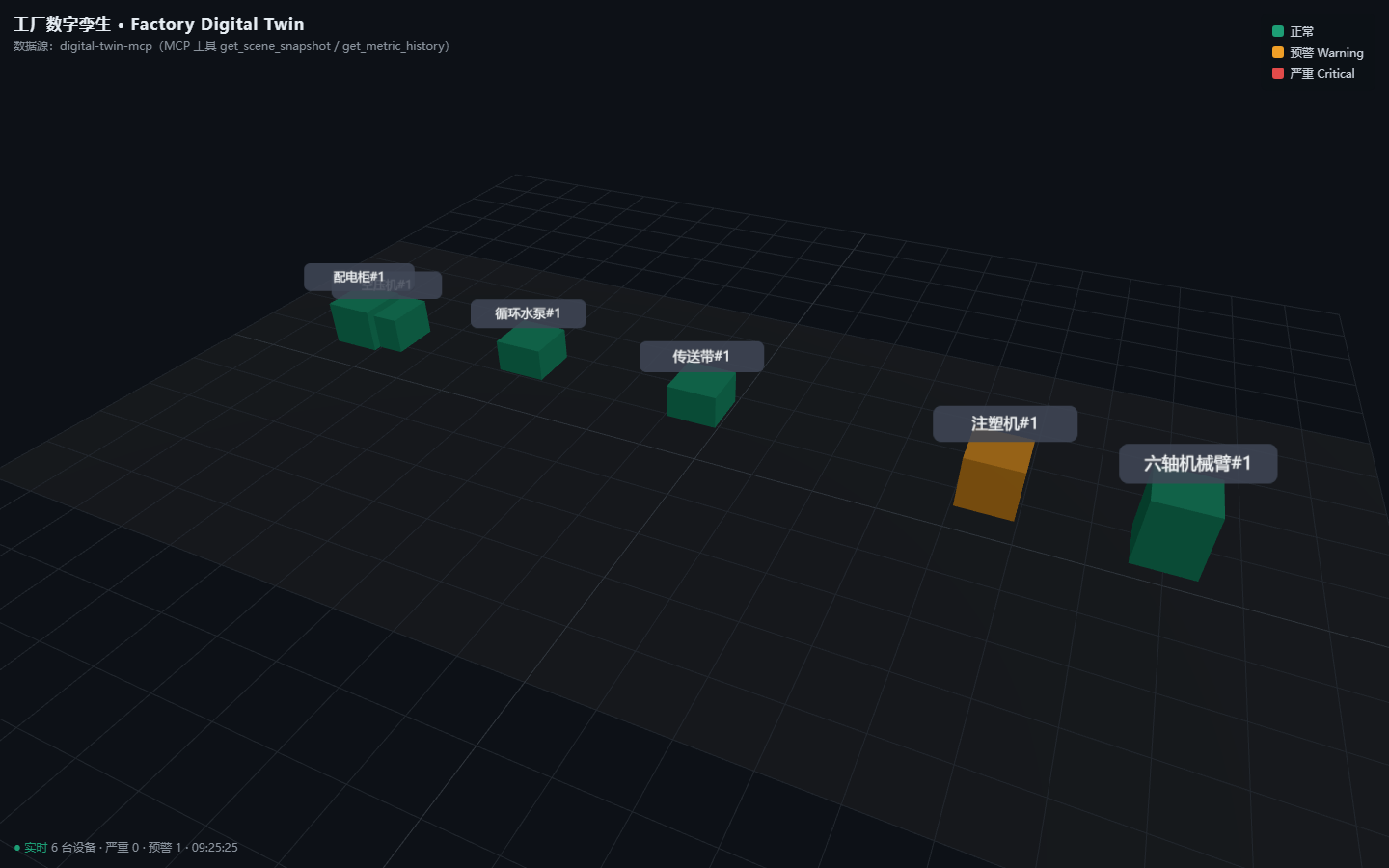
3D 工厂渲染([factory-twin-viz](https://github.com/xici001/factory-twin-viz) 消费本服务的 `get_scene_snapshot`):
## 它能做什么
| 工具 | 说明 |
|------|------|
| `list_devices` | 列出场景内所有设备(类型 / 位置) |
| `get_device_metrics` | 读取设备实时指标(模拟 PLC 轮询) |
| `get_metric_history` | 读取某指标最近时序数据(供趋势图 / 3D 可视化) |
| `set_device_value` | 写入设备参数(模拟 PLC 写值 / 故障注入测试) |
| `check_alerts` | 阈值告警检查(warning / critical 分级) |
| 资源 | 说明 |
|------|------|
| `device://{id}/profile` | 设备台账:元数据 + 指标量程与告警阈值 |
| `scene://layout` | 3D 场景布局:设备世界坐标(Three.js / Unity 直接叠加) |
| 提示词 | 说明 |
|------|------|
| `device_health_report` | 生成指定设备的健康报告 |
## 架构
```
MCP 客户端(WorkBuddy / Claude Desktop / ...)
│ stdio 或 streamable-http
┌───────▼───────────────┐
│ server.py (FastMCP) │ ← 工具 / 资源 / 提示词定义
└───────┬───────────────┘
│
┌───────▼───────────────┐
│ alerts.py │ 告警规则引擎(阈值分级)
│ device_registry.py │ 设备台账 + 指标配置 + 3D 坐标
│ simulator.py │ PLC 数据驱动(BasePLCDriver 接口)
└───────────────────────┘
```
- v0 数据源为**模拟 PLC 驱动**(固定随机种子、可复现;注塑机温度故意贴近阈值上漂,方便演示告警升级)。
- 接真实设备时继承 `BasePLCDriver` 实现 `read_metrics` / `write_value`(OPC-UA / Modbus / 网关 API 皆可),Server 层零改动。
## 快速开始
```bash
pip install -e .
# 方式一:stdio 传输(MCP 客户端默认)
python -m digital_twin_mcp.server
# 方式二:streamable-http 传输
python -m digital_twin_mcp.server --transport streamable-http
```
端到端测试(启动 server 子进程并通过 stdio 协议调用):
```bash
python examples/client_test.py
```
## 接入 WorkBuddy
把 `examples/workbuddy_mcp.json` 的内容合并到 `C:\Users\33033\.workbuddy\mcp.json` 的 `mcpServers` 中,然后在连接器管理页右上角的自定义连接器入口对 `digital-twin-mcp` 点击「信任」启用。
## 与 workflow-templates 的关系
同一个"数字管道"品牌下的两块积木:
- `workflow-templates`:把**脑力劳动**(财报分析等)打包成工作流
- `digital-twin-mcp`:把**设备数据能力**(数字孪生 / PLC)打包成 MCP 工具
两者未来可组合:工作流模板的「设备健康报告」等模板,可直接调用本 MCP 的工具获取真实数据。
## 路线图
- v0.1:模拟 PLC + 5 个工具 + 2 个资源 + 1 个提示词(当前)
- v0.2:OPC-UA 真实接入、时序数据落库(SQLite/InfluxDB)、WebSocket 推送
- v0.3:3D 场景联动(场景布局资源对接 Three.js 渲染)、多工厂实例
## 许可
MIT License
TDQS
Scored across 6 tools
Each tool addresses a distinct concern: device enumeration, live metric read, historical metric retrieval, parameter write, alert checking, and a full scene snapshot. No two tools overlap in purpose, and the descriptions reinforce their boundaries.
All tool names follow the verb_noun pattern in snake_case (list_devices, get_device_metrics, get_metric_history, set_device_value, check_alerts, get_scene_snapshot). The pattern is predictable and consistent.
Six tools form a well-scoped set for a digital twin server, covering read, write, history, alerts, and snapshot use cases without bloat. The count is ideal for the domain and avoids both thin and heavy footprints.
The tool surface covers the full lifecycle of interacting with a simulated twin: listing devices, reading live metrics and history, writing values for control or fault injection, checking alerts, and obtaining a complete scene snapshot. No obvious gaps exist for the stated purpose.