Glama
Spotify MCP Server

Spotify MCP Server

by mfteloglu

Spotify MCP Server

A simple MCP server to control Spotify playback and manage your liked songs via LLM's.

Features

  • Play and pause Spotify playback

  • Get info about the current track

  • Add the current track to your Liked Songs

Related MCP server: MCP Spotify Server

Setup

  1. Clone the repository:

    git clone https://github.com/yourusername/spotify-mcp-server.git
    cd spotify-mcp-server
  2. Create and activate a virtual environment:

    python3 -m venv .venv
    source .venv/bin/activate
  3. Install dependencies:

    pip install uv
    pip install -r requirements.txt
  4. Create a .env file:

    SPOTIPY_CLIENT_ID=your_spotify_client_id
    SPOTIPY_CLIENT_SECRET=your_spotify_client_secret
    SPOTIPY_REDIRECT_URI=http://localhost:8888/callback
  5. Run the server:

    python main.py

Integration with Claude Desktop (MCP Server)

To use this server as an MCP server with Claude, add the following entry to your Claude config file (usually located at ~/Library/Application Support/Claude/claude_desktop_config.json on macOS):

{
  "mcpServers": {
    "spotify-mcp-server": {
      "command": "uv",
      "args": [
        "--directory",
        "/ABSOLUTE/PATH/TO/PROJECT/spotify-mcp-server",
        "run",
        "main.py"
      ]
    }
  }
}
  • Replace /ABSOLUTE/PATH/TO/PROJECT/spotify-mcp-server with the actual path to your project

  • If command uv is not recognized, give the absolute path for uv executable (can be found with which uv on MacOS)

  • Make sure your environment variables are set either in the config or via a .env file.

  • Restart Claude after editing the config file.

Notes

Example Session

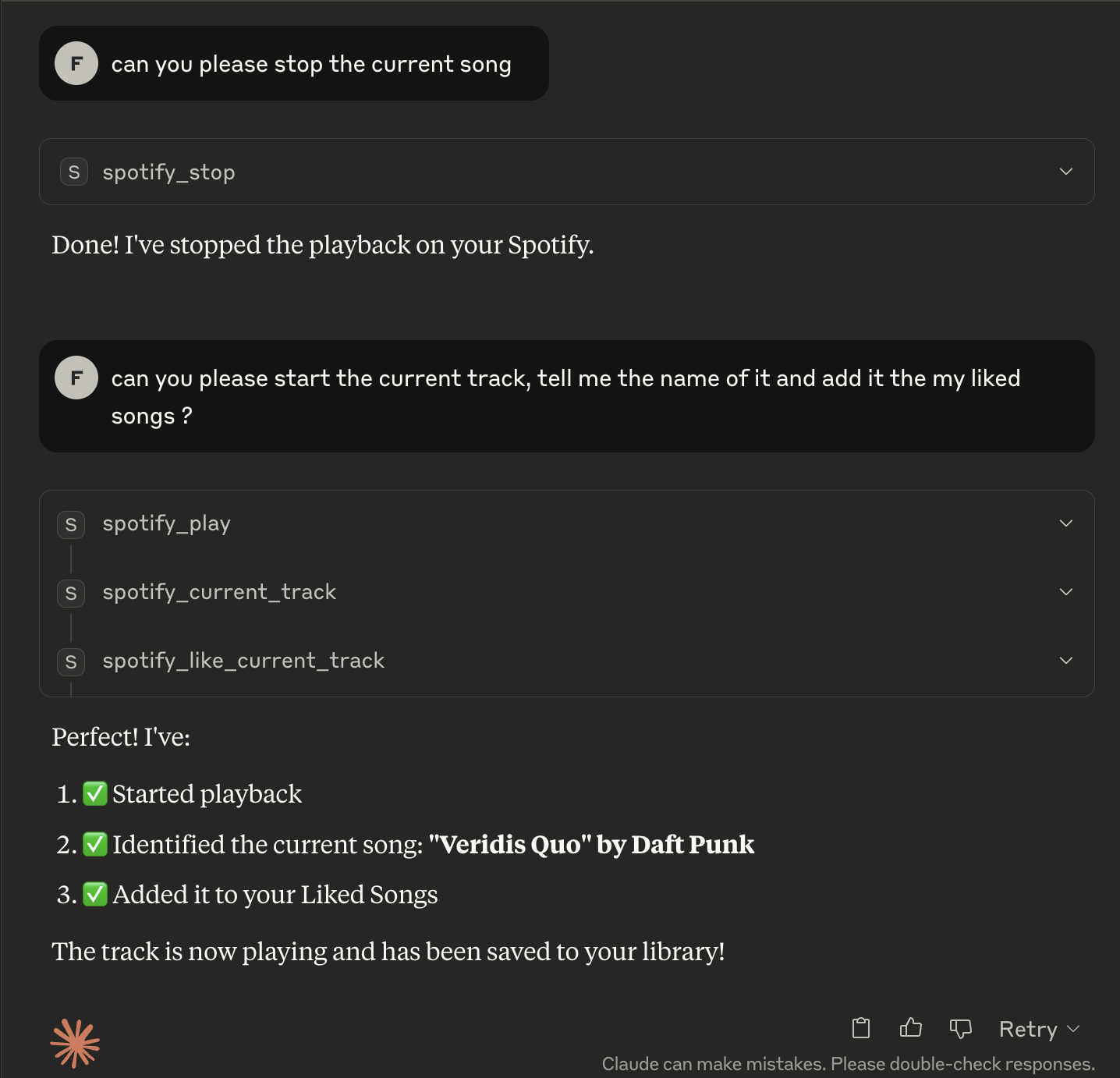
Below is an example session using Claude with the Spotify MCP server:

Example Conversation

Sample interaction:

User: Play the current track using Spotify MCP server
Claude: Playback started successfully

User: What song is playing?
Claude: Currently playing: Shape of You by Ed Sheeran

User: Like this song
Claude: Added 'Shape of You' to your Liked Songs.

Available Tools

4 tools
spotify_current_trackB

Get information about the currently playing track.

Inputs: no named parameters.

spotify_like_current_trackA

Add the currently playing track to your Liked Songs.

Inputs: no named parameters.

spotify_playB

Start playback on the user's active device.

Inputs: no named parameters.

spotify_stopB

Stop playback on the user's active device.

Inputs: no named parameters.

Tool Schema Changelog

Recent tool additions, removals, and schema changes observed during successful MCP inspections.

Loading tool schema changelog…

    TDQS

    A3.5/5.0

    Scored across 4 tools

    Disambiguation5/5

    Each tool has a clearly distinct purpose: getting track info, liking a track, starting playback, and stopping playback. There is no overlap in functionality, making it easy for an agent to select the correct tool without confusion.

    Naming Consistency5/5

    All tool names follow a consistent 'spotify_' prefix with descriptive verb_noun patterns (e.g., current_track, like_current_track, play, stop). This uniformity enhances readability and predictability across the toolset.

    Tool Count4/5

    With 4 tools, the count is reasonable for a basic Spotify control server, covering core playback and interaction functions. However, it feels slightly thin as it lacks tools for searching, playlists, or volume control, which are common in music APIs.

    Completeness3/5

    The toolset covers basic playback control and track interaction, but there are notable gaps for a Spotify domain, such as no search, playlist management, or device selection tools. Agents can perform simple tasks but may struggle with more complex music-related workflows.

    Maintenance

    ActivityInactive
    ResponsivenessNo recent community issues

    Related MCP Connectors

    Related MCP Servers

    • A
      license
      Not graded
      quality
      D
      maintenance
      Enables interaction with Spotify through natural language for music discovery, playback control, library management, and playlist creation. Supports searching for music, controlling playback, managing saved tracks, and getting personalized recommendations based on mood and preferences.
      127 npm
      5
      MIT
    • A
      license
      A
      quality
      D
      maintenance
      Enables interaction with Spotify through LLMs using OAuth2 authentication. Supports music search, playback control, playlist management, and device management through natural language commands.
      14
      2
      MIT
    • F
      license
      A
      quality
      D
      maintenance
      Enables AI assistants to control Spotify playback, search for music, manage playlists, and access library information through the Spotify API. Requires Spotify Premium for playback control features.
      4
      -