A
licenseB
qualityA
maintenanceA Model Context Protocol (MCP) server that converts Mermaid diagrams to PNG images.
1
1,119 npm
235
MIT

This MCP server converts Mermaid diagram code into image files, validates diagram syntax, and reports supported conversion options.
Convert Mermaid diagrams to PNG, JPG, SVG, or PDF.
Customize outputs with themes (default, dark, neutral, forest), background color, width, and height.
Validate Mermaid syntax before conversion.
Retrieve supported themes and output formats.
Work with flowchart, sequence, gantt, pie, git graph, mind map, and class diagrams.
Access built-in Mermaid examples via mermaid://examples/... resource URIs.
Supports generating Git graphs to visualize repository history and branch structures through Mermaid diagrams
Converts Mermaid diagram code into various image formats (PNG, JPG, SVG, PDF) with support for multiple themes and customization options
Supports rendering Mermaid diagrams as SVG format, which can be used for vector-based graphics representation
Click on "Deploy Server".
Wait a few minutes for the server to deploy. Once ready, it will show a "Started" state.
In the chat, type @ followed by the MCP server name and your instructions, e.g., "@Mermaid MCP Server convert this flowchart to PNG with dark theme: flowchart TD A[Start] --> B[Process] --> C[End]"
That's it! The server will respond to your query, and you can continue using it as needed.
Here is a step-by-step guide with screenshots.
A Mermaid diagram conversion server based on the Model Context Protocol (MCP), providing powerful diagram generation capabilities for AI clients


Mermaid MCP Server is a professional Mermaid diagram conversion server based on the Model Context Protocol (MCP), providing powerful diagram generation capabilities for AI clients. This project converts Mermaid diagram code into image files in multiple formats (PNG, JPG, SVG, PDF), allowing users to easily generate high-quality diagrams in various AI clients that support the MCP protocol.
Multi-format Output: Supports multiple image formats including PNG, JPG, SVG, and PDF
Theme Customization: Built-in four beautiful themes: default, dark, neutral, and forest
Custom Options: Supports customization of parameters such as background color and image dimensions
Syntax Validation: Provides real-time Mermaid syntax validation
Example Resources: Built-in rich diagram type example code
Error Handling: Comprehensive error handling mechanism with friendly error messages
STDIO/SSE Dual Mode: Supports both STDIO and SSE communication modes
uv Package Management: Uses the ultra-fast uv package manager
Related MCP server: mcp-mermaid-validator
Feature Name | Description | Tech Stack | Status |
Diagram Conversion | Mermaid code to image | mermaid.ink API | ✅ Stable |
Multi-format Output | PNG/JPG/SVG/PDF | requests + base64 | ✅ Stable |
Theme Customization | 4 built-in themes | mermaid.ink | ✅ Stable |
Syntax Validation | Real-time syntax checking | mermaid-cli | ✅ Stable |
Example Resources | Rich diagram examples | Static resources | ✅ Stable |
Error Handling | Comprehensive error messages | Python exception handling | ✅ Stable |
MCP Protocol | Model Context Protocol | mcp[cli] | ✅ Stable |
SSE Mode | Server-Sent Events | FastAPI + Uvicorn | ✅ Stable |
Technology | Version | Purpose |
Python | 3.12+ | Primary development language |
MCP | 1.9+ | Model Context Protocol |
FastAPI | 0.104+ | Web framework (SSE mode) |
Uvicorn | 0.24+ | ASGI server |
requests | 2.31+ | HTTP client |
uv | latest | Python package manager |
┌─────────────────────────────────────────────────────────────────────────────────┐
│                            通信架构图                                            │
├─────────────────────────────────────────────────────────────────────────────────┤
│                                                                                 │
│   ┌──────────────────┐       ┌─────────────────────────┐       ┌─────────────┐ │
│   │  AI 客户端         │ ◄────► │   Mermaid MCP Server    │ ◄────► │ Mermaid API │ │
│   │ (Cursor/Claude)   │       │   STDIO/SSE             │       │  mermaid.ink│ │
│   └──────────────────┘       └─────────────────────────┘       └─────────────┘ │
│           │                            │                              │        │
│           ▼                            ▼                              ▼        │
│   AI 对话界面                MCP 协议通信              图表渲染转换      │
│   生成图表请求                双向数据传输              返回图像数据     │
│                                                                                 │
└─────────────────────────────────────────────────────────────────────────────────┘Python 3.12+
uv package manager (recommended)
Method 1: Install with uv (recommended)
# 克隆仓库
git clone https://github.com/wwwzhouhui/mermaid_mcp_server.git
cd mermaid_mcp_server

# 安装依赖
uv sync
Method 2: Install with pip
pip install -r requirements.txtAdd the following configuration to the ~/.cursor/mcp.json file:
STDIO mode (recommended):
{
  "mcpServers": {
    "mermaid-mcp-server-png-pdf-jpg-svg": {
      "command": "uvx",
      "args": [
        "mermaid-mcp-server-png-pdf-jpg-svg"
      ]
    }
  }
}
SSE mode:
{
  "mcpServers": {
    "mermaid-mcp-server-png-pdf-jpg-svg": {
      "url": "http://127.0.0.1:8003/sse"
    }
  }
}Open Cherry Studio
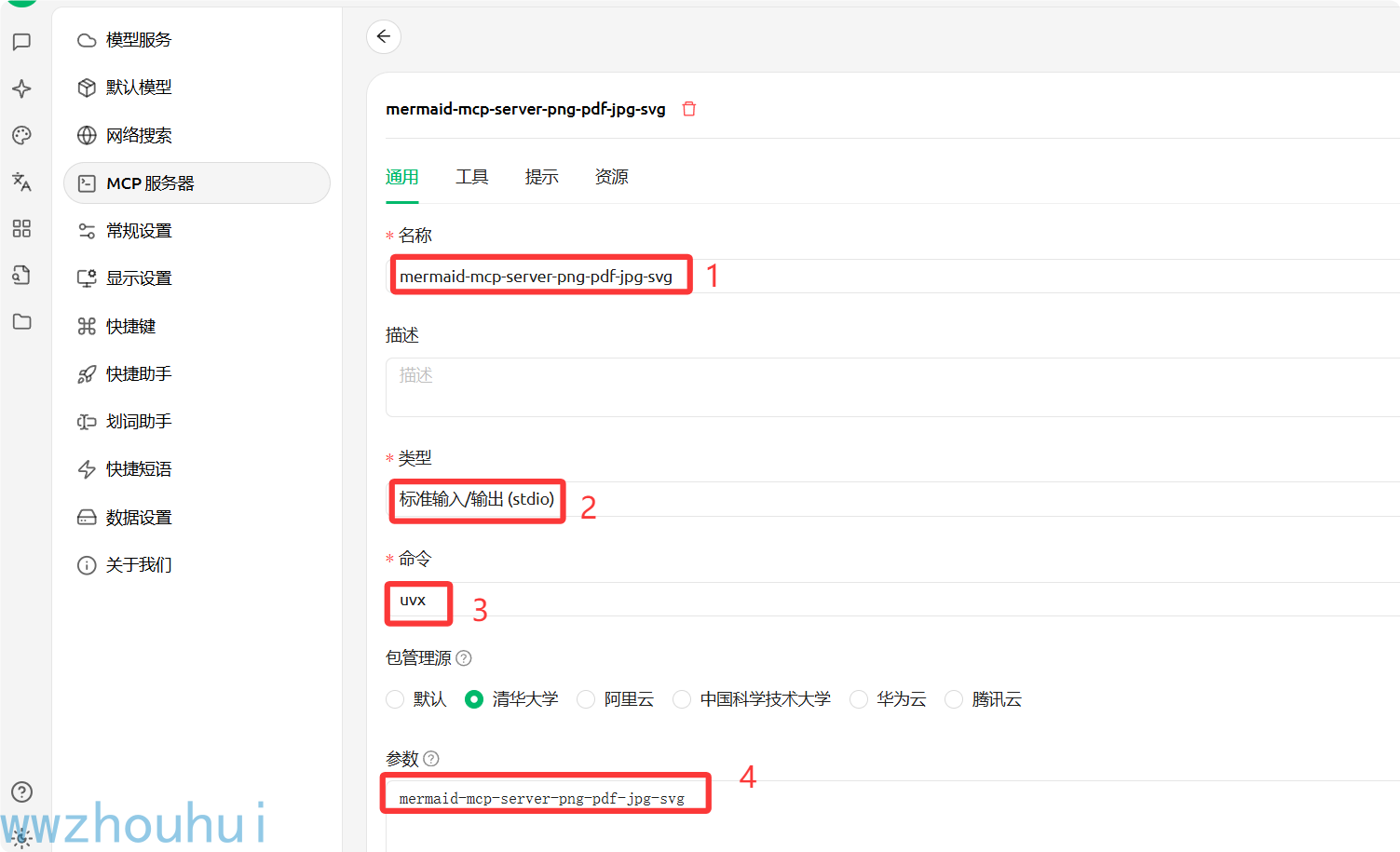
Go to Settings → MCP Servers → Add Server
Configure the parameters:
Name: mermaid-mcp-server-png-pdf-jpg-svg
Description: Mermaid diagram generation service
Type: STDIO
Command: uvx
Arguments: mermaid-mcp-server-png-pdf-jpg-svg
Click Save and enable
Add the following to the claude_desktop_config.json file:
{
  "mcpServers": {
    "mermaid-mcp-server-png-pdf-jpg-svg": {
      "command": "uvx",
      "args": [
        "mermaid-mcp-server-png-pdf-jpg-svg"
      ]
    }
  }
}Add the following to the config.json file:
{
  "mcpServers": {
    "mermaid-mcp-server-png-pdf-jpg-svg": {
      "command": "uvx",
      "args": [
        "mermaid-mcp-server-png-pdf-jpg-svg"
      ]
    }
  }
}uv run python main.pyuv run python main.py --sseVariable Name | Description | Default Value |
| Server address |
|
| Server port |
|
| Log level |
|
| Mermaid API address |
|
| Request timeout (seconds) |
|
| Debug mode |
|
| Development mode |
|
Converts Mermaid diagram code into image files in multiple formats
Parameters:
mermaid_code (string): Mermaid diagram code
output_format (string, optional): Output format, supports png, jpg, svg, pdf; default "png"
theme (string, optional): Theme style, supports default, dark, neutral, forest; default "default"
background_color (string, optional): Background color, hexadecimal code
width (number, optional): Image width (pixels)
height (number, optional): Image height (pixels)
Supported output formats: PNG, JPG, SVG, PDF
Validates the syntax correctness of Mermaid diagram code
Parameters:
mermaid_code (string): Mermaid diagram code to validate
Return results:
valid (boolean): Whether validation passed
error_message (string): Error message (if validation fails)
Gets the options supported by the converter
Return results:
themes (array): List of supported themes
formats (array): List of supported formats
Flowchart: Used to represent processes and algorithms
Sequence Diagram: Used to represent interactions between objects
Gantt Chart: Used for project schedule management
Pie Chart: Used to represent data proportions
Git Graph: Used to represent Git commit history
Mind Map: Used to represent knowledge structures
Class Diagram: Used to represent class structures
请使用 convert_mermaid_to_image 工具生成一个流程图:
flowchart TD
    A[开始] --> B{判断条件}
    B -->|是 | C[执行动作 1]
    B -->|否 | D[执行动作 2]
    C --> E[结束]
D --> E请使用 convert_mermaid_to_image 工具生成一个时序图,使用深色主题:
sequenceDiagram
participant 用户
participant 系统
participant 数据库
用户->>系统:登录请求
系统->>数据库:验证用户
数据库-->>系统:返回结果
系统-->>用户:登录成功首先使用 validate_mermaid_syntax 验证语法,然后使用 convert_mermaid_to_image 生成图表You can retrieve different types of diagram examples through the following resource URIs:
mermaid://examples/flowchart - Flowchart example
mermaid://examples/sequence - Sequence diagram example
mermaid://examples/gantt - Gantt chart example
mermaid://examples/pie - Pie chart example
mermaid://examples/gitgraph - Git graph example
mermaid://examples/mindmap - Mind map example
mermaid://examples/class - Class diagram example
mermaid_mcp_server/
├── mermaid_mcp_server/       # 核心模块
│   ├── __init__.py
│   └── main.py             # 主程序入口
├── requirements.txt          # 依赖列表(pip)
├── pyproject.toml           # 项目配置(uv)
├── .env.example            # 环境变量示例
├── README.md               # 项目文档
└── .vscode/                # VSCode 配置
└── settings.json# 克隆仓库
git clone https://github.com/wwwzhouhui/mermaid_mcp_server.git
cd mermaid_mcp_server
# 安装依赖
uv sync
# 配置环境变量
cp .env.example .env
# 启动服务(STDIO 模式)
uv run python main.py
# 启动服务(SSE 模式)
uv run python main.py --sseEnable verbose logging output:
export LOG_LEVEL=DEBUG
uv run python main.pyA:
Check network connection and firewall settings
Confirm the mermaid.ink API is accessible
Check proxy settings
A:
Use the validate_mermaid_syntax tool to check syntax
Refer to the official Mermaid documentation
Use the code from the example resources
A:
Simplify the diagram content
Split it into multiple smaller diagrams
Adjust the image dimension parameters
A:
Install the uv package manager: curl -LsSf https://astral.sh/uv/install.sh | sh
Or install the package globally with pip
Check the PATH environment variable
A:
Confirm the service has been started in SSE mode
Check whether port 8003 is occupied
Confirm the URL configuration is correct
A:
Increase the image dimension parameters
Choose an appropriate theme
Optimize the Mermaid code structure
A:
Check the network connection speed
Increase the REQUEST_TIMEOUT environment variable
Simplify the diagram complexity
A:
Confirm the theme name is spelled correctly
Check whether the theme is supported
Try using a different theme name
A:
Use the background_color parameter
The format is a hexadecimal color code (e.g., #FFFFFF)
Only supported for some output formats
Welcome to join the technical community group to share your usage experience and feedback:

WeChat: laohaibao2025
Email: 75271002@qq.com

If this project has been helpful to you, feel free to buy me a coffee ☕
WeChat Pay

If you like the project, feel free to give it a Star ⭐
MIT License
✅ Initial version released
✅ Supports multi-format output for PNG, JPG, SVG, PDF
✅ Integrates four theme styles (default, dark, neutral, forest)
✅ Provides syntax validation and example resource features
✅ Supports STDIO and SSE dual-mode communication
✅ Initial version released
✅ Supports multi-format diagram conversion
✅ Syntax validation feature
✅ Example resource feature
Welcome to submit Issues and Pull Requests to improve this project!
Fork this repository
Create a feature branch: git checkout -b feature/amazing-feature
Commit your changes: git commit -m 'Add amazing feature'
Push to the branch: git push origin feature/amazing-feature
Submit a Pull Request
Diagram generation may take a few seconds, please be patient
Ensure the network connection is normal; the service depends on the mermaid.ink online API
Generated image data is returned in base64 format
Complex diagrams may require longer generation time
Enjoy creating beautiful diagrams with Mermaid! 🎨✨
将 Mermaid 图表代码转换为多种格式的图像(PNG、JPG、PDF、SVG)。

参数:
    mermaid_code: 要转换的 Mermaid 图表语法代码
    output_format: 输出格式 - png、jpg、svg 或 pdf(默认:png)
    theme: 视觉主题 - default、dark、neutral 或 forest(默认:default)
    background_color: 背景颜色,十六进制代码(如 FF0000)或带 ! 前缀的命名颜色(如 !white)
    width: 图像宽度(像素,可选)
    height: 图像高度(像素,可选)

返回:
    包含转换后图像数据和元数据的字典
| Name | Required | Description | Default |
|---|---|---|---|
| mermaid_code | Yes | ||
| output_format | No | png | |
| theme | No | default | |
| background_color | No | ||
| width | No | ||
| height | No |
| Name | Required | Description |
|---|---|---|
| result | Yes |
Does the description disclose side effects, auth requirements, rate limits, or destructive behavior?
With no annotations provided, the description carries full burden. It mentions the tool converts code to images and returns a dictionary with data and metadata, but lacks details on error handling, performance (e.g., rate limits), authentication needs, or side effects. This is inadequate for a mutation tool with zero annotation coverage.
Agents need to know what a tool does to the world before calling it. Descriptions should go beyond structured annotations to explain consequences.
Is the description appropriately sized, front-loaded, and free of redundancy?
The description is appropriately sized and front-loaded: the first sentence states the core purpose, followed by a structured list of parameters and return value. Every sentence earns its place with no redundant information, making it efficient and well-organized.
Shorter descriptions cost fewer tokens and are easier for agents to parse. Every sentence should earn its place.
Given the tool's complexity, does the description cover enough for an agent to succeed on first attempt?
Given the tool's complexity (6 parameters, mutation operation) and no annotations, the description does well by detailing all parameters and noting the return structure. However, it lacks behavioral context like error cases or limitations. The presence of an output schema mitigates some gaps, but more completeness is needed for a mutation tool.
Complex tools with many parameters or behaviors need more documentation. Simple tools need less. This dimension scales expectations accordingly.
Does the description clarify parameter syntax, constraints, interactions, or defaults beyond what the schema provides?
Schema description coverage is 0%, so the description must compensate. It provides detailed semantics for all 6 parameters beyond the schema, including explanations of mermaid_code, output_format options, theme options, background_color syntax, and optional width/height. This adds significant value over the bare schema.
Input schemas describe structure but not intent. Descriptions should explain non-obvious parameter relationships and valid value ranges.
Does the description clearly state what the tool does and how it differs from similar tools?
The description clearly states the specific action ('将 Mermaid 图表代码转换为多种格式的图像') with the resource (Mermaid chart code) and distinguishes from siblings by focusing on conversion rather than validation or option retrieval. It explicitly lists the output formats, making the purpose unambiguous.
Agents choose between tools based on descriptions. A clear purpose with a specific verb and resource helps agents select the right tool.
Does the description explain when to use this tool, when not to, or what alternatives exist?
The description implies usage by specifying what the tool does, but does not explicitly state when to use it versus alternatives like validate_mermaid_syntax or get_supported_options. No guidance on prerequisites or exclusions is provided, leaving usage context partially inferred.
Agents often have multiple tools that could apply. Explicit usage guidance like "use X instead of Y when Z" prevents misuse.
获取转换器支持的选项,如图表主题和输出格式。

返回:
    一个包含支持的主题和格式列表的字典。
| Name | Required | Description | Default |
|---|---|---|---|
No parameters | |||
| Name | Required | Description |
|---|---|---|
| result | Yes |
Does the description disclose side effects, auth requirements, rate limits, or destructive behavior?
No annotations are provided, so the description carries the full burden. It discloses that the tool returns a dictionary with lists of supported themes and formats, which adds behavioral context beyond the input schema (which has no parameters). However, it doesn't cover other traits like performance, error handling, or authentication needs, leaving gaps in transparency for a tool with no annotation support.
Agents need to know what a tool does to the world before calling it. Descriptions should go beyond structured annotations to explain consequences.
Is the description appropriately sized, front-loaded, and free of redundancy?
The description is highly concise and well-structured: two sentences that directly state the purpose and return value, with no wasted words. It's front-loaded with the core function, and every sentence adds essential information, making it efficient for an agent to parse.
Shorter descriptions cost fewer tokens and are easier for agents to parse. Every sentence should earn its place.
Given the tool's complexity, does the description cover enough for an agent to succeed on first attempt?
Given the tool's low complexity (0 parameters, no annotations, but with an output schema), the description is reasonably complete. It explains what the tool does and the return format, which complements the output schema. However, it lacks usage context and some behavioral details, preventing a perfect score despite the structured support.
Complex tools with many parameters or behaviors need more documentation. Simple tools need less. This dimension scales expectations accordingly.
Does the description clarify parameter syntax, constraints, interactions, or defaults beyond what the schema provides?
The tool has 0 parameters, and the input schema description coverage is 100% (with an empty schema). The description doesn't need to add parameter semantics, so it appropriately focuses on the return value. Since there are no parameters to document, a baseline score of 4 is justified, as the description doesn't introduce confusion or redundancy.
Input schemas describe structure but not intent. Descriptions should explain non-obvious parameter relationships and valid value ranges.
Does the description clearly state what the tool does and how it differs from similar tools?
The description clearly states the tool's purpose: '获取转换器支持的选项,如图表主题和输出格式' (Get converter-supported options, such as chart themes and output formats). It specifies both the action ('获取' - get) and the resource ('支持的选项' - supported options), with concrete examples. However, it doesn't explicitly differentiate from sibling tools like 'convert_mermaid_to_image' or 'validate_mermaid_syntax', which prevents a score of 5.
Agents choose between tools based on descriptions. A clear purpose with a specific verb and resource helps agents select the right tool.
Does the description explain when to use this tool, when not to, or what alternatives exist?
The description provides no guidance on when to use this tool versus alternatives. It doesn't mention sibling tools or suggest scenarios where this tool is appropriate (e.g., before conversion to check available options). Without any usage context or exclusions, it relies on implicit understanding, which is insufficient for clear agent decision-making.
Agents often have multiple tools that could apply. Explicit usage guidance like "use X instead of Y when Z" prevents misuse.
通过尝试简单转换来验证 Mermaid 图表语法。

参数:
    mermaid_code: 要验证的 Mermaid 图表语法代码

返回:
    包含验证结果的字典
| Name | Required | Description | Default |
|---|---|---|---|
| mermaid_code | Yes |
| Name | Required | Description |
|---|---|---|
| result | Yes |
Does the description disclose side effects, auth requirements, rate limits, or destructive behavior?
With no annotations provided, the description carries the full burden of behavioral disclosure. It mentions '尝试简单转换' (attempting simple conversion) as the validation method, which implies a read-only, non-destructive operation, but doesn't clarify error handling, performance implications, or what '简单转换' entails. For a tool with zero annotation coverage, this leaves significant gaps in understanding its behavior.
Agents need to know what a tool does to the world before calling it. Descriptions should go beyond structured annotations to explain consequences.
Is the description appropriately sized, front-loaded, and free of redundancy?
The description is extremely concise and well-structured: a purpose statement followed by clear parameter and return sections in bullet-like format. Every sentence earns its place without redundancy, and it's front-loaded with the core functionality. The bilingual presentation (Chinese purpose, English labels) is efficient for clarity.
Shorter descriptions cost fewer tokens and are easier for agents to parse. Every sentence should earn its place.
Given the tool's complexity, does the description cover enough for an agent to succeed on first attempt?
Given the tool's low complexity (single parameter, no nested objects) and the presence of an output schema (which handles return values), the description is reasonably complete. It covers purpose, parameter semantics, and return type at a high level. However, it lacks usage guidelines and detailed behavioral context, which are minor gaps in this simple validation context.
Complex tools with many parameters or behaviors need more documentation. Simple tools need less. This dimension scales expectations accordingly.
Does the description clarify parameter syntax, constraints, interactions, or defaults beyond what the schema provides?
The description explicitly documents the single parameter 'mermaid_code' as '要验证的 Mermaid 图表语法代码' (Mermaid diagram syntax code to validate), adding meaning beyond the schema's basic title 'Mermaid Code'. However, with schema description coverage at 0%, it doesn't provide format details, constraints, or examples. The baseline is 3 since it compensates somewhat but not fully for the schema's lack of descriptions.
Input schemas describe structure but not intent. Descriptions should explain non-obvious parameter relationships and valid value ranges.
Does the description clearly state what the tool does and how it differs from similar tools?
The description clearly states the tool's purpose as '验证 Mermaid 图表语法' (validate Mermaid diagram syntax) and specifies the method '通过尝试简单转换' (by attempting simple conversion). It distinguishes from sibling tools like 'convert_mermaid_to_image' by focusing on validation rather than conversion to image format. However, it doesn't explicitly differentiate from 'get_supported_options' which might relate to syntax options.
Agents choose between tools based on descriptions. A clear purpose with a specific verb and resource helps agents select the right tool.
Does the description explain when to use this tool, when not to, or what alternatives exist?
The description provides no guidance on when to use this tool versus alternatives. It doesn't mention sibling tools 'convert_mermaid_to_image' or 'get_supported_options', nor does it specify scenarios where validation is preferred over direct conversion or option checking. There's no indication of prerequisites or exclusions for usage.
Agents often have multiple tools that could apply. Explicit usage guidance like "use X instead of Y when Z" prevents misuse.
Recent tool additions, removals, and schema changes observed during successful MCP inspections.
convert_mermaid_to_imageget_supported_optionsvalidate_mermaid_syntaxScored across 3 tools
Each tool has a clearly distinct purpose: convert_mermaid_to_image handles the core conversion functionality, get_supported_options provides metadata about available options, and validate_mermaid_syntax performs syntax validation. There is no overlap or ambiguity between these three functions.
All tools follow a consistent snake_case naming pattern with clear verb-action structure: convert_mermaid_to_image, get_supported_options, and validate_mermaid_syntax. The naming is predictable and follows the same convention throughout.
Three tools is a reasonable number for a Mermaid diagram conversion server, though it feels slightly minimal. The tools cover the essential operations (convert, validate, get options), but additional utilities like listing available themes or handling diagram editing might enhance completeness.
The tool set covers the core Mermaid conversion workflow well: conversion, syntax validation, and option discovery. Minor gaps include operations like batch conversion, diagram editing utilities, or theme management, but agents can work effectively with the provided tools for most use cases.
A Model Context Protocol server for Wix AI tools
A comprehensive Model Context Protocol (MCP) server that enables AI assistants to interact with yo…
Generate dynamic Mermaid diagrams and charts with AI assistance. Customize styles and export diagr…
Render, verify, describe, and safely edit Mermaid diagrams through MCP.