
COMSOL MCP Server
# COMSOL MCP Server
MCP Server for COMSOL Multiphysics simulation automation via AI agents.
English | [中文](README_CN.md)
## Star History
[](https://github.com/wjc9011/COMSOL_Multiphysics_MCP/stargazers)
[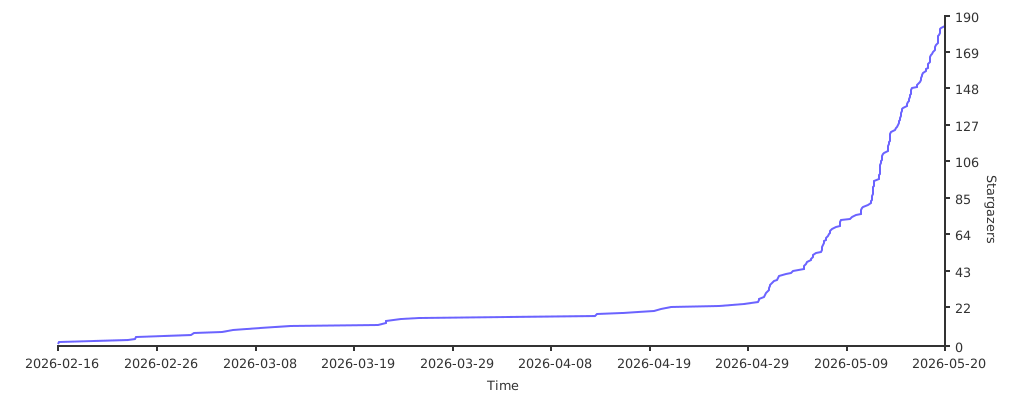](https://starchart.cc/wjc9011/COMSOL_Multiphysics_MCP)
## Publication and Citation
The research paper describing COMSOL-MCP is available in *Neurocomputing*:
> Naiyin Zhang and Junchao Wang, “[COMSOL-MCP: An open-source model context protocol interface for AI-assisted multiphysics simulation](https://doi.org/10.1016/j.neucom.2026.134481),” *Neurocomputing*, vol. 703, article 134481, 2026.
Publisher page: [ScienceDirect](https://linkinghub.elsevier.com/retrieve/pii/S0925231226018795)
If COMSOL-MCP contributes to your research, please cite the paper:
```bibtex
@article{Zhang2026COMSOLMCP,
title = {COMSOL-MCP: An Open-Source Model Context Protocol Interface for AI-Assisted Multiphysics Simulation},
author = {Zhang, Naiyin and Wang, Junchao},
journal = {Neurocomputing},
volume = {703},
pages = {134481},
year = {2026},
doi = {10.1016/j.neucom.2026.134481},
url = {https://doi.org/10.1016/j.neucom.2026.134481}
}
```
### Citation guidance
- Cite the paper when referring to the COMSOL-MCP method, architecture, capabilities, or evaluation.
- If you use or modify the software, cite both the paper and the repository. Use GitHub’s **Cite this repository** menu, which is backed by [`CITATION.cff`](CITATION.cff).
- For reproducibility, identify the exact release tag or commit used and include the repository URL and access date in your data/code availability statement.
## Project Goal
Build a complete COMSOL MCP Server enabling AI agents (like Claude, opencode) to perform multiphysics simulations through the MCP protocol:
1. **Model Management** - Create, load, save, version control
2. **Geometry Building** - Blocks, cylinders, spheres, boolean operations
3. **Physics Configuration** - Heat transfer, fluid flow, electrostatics, solid mechanics
4. **Meshing & Solving** - Auto mesh, stationary/time-dependent studies
5. **Results Visualization** - Evaluate expressions, export plots
6. **Knowledge Integration** - Embedded guides + PDF semantic search
## Requirements
- **COMSOL Multiphysics** (version 5.x or 6.x)
- **Python 3.10+** (NOT Windows Store version)
- **Java runtime** (required by MPh/COMSOL)
## Installation
```bash
# Clone repository
git clone https://github.com/wjc9011/COMSOL_Multiphysics_MCP.git
cd COMSOL_Multiphysics_MCP
# Install dependencies
python -m pip install -e .
# Test server
python -m src.server
```
## Building PDF Knowledge Base
```bash
# Install additional dependencies
pip install pymupdf chromadb sentence-transformers
# Build knowledge base
python scripts/build_knowledge_base.py
# Check status
python scripts/build_knowledge_base.py --status
```
## Usage
### Option 1: With opencode
Create `opencode.json` in project root:
```json
{
"$schema": "https://opencode.ai/config.json",
"mcp": {
"comsol": {
"type": "local",
"command": ["python", "-m", "src.server"],
"enabled": true,
"environment": {
"HF_ENDPOINT": "https://hf-mirror.com"
},
"timeout": 30000
}
}
}
```
### Option 2: With Claude Desktop
```json
{
"mcpServers": {
"comsol": {
"command": "python",
"args": ["-m", "src.server"],
"cwd": "/path/to/COMSOL_Multiphysics_MCP"
}
}
}
```
## Code Structure
```
comsol_mcp/
├── opencode.json # MCP server config for opencode
├── pyproject.toml # Python project config
├── README.md # This file
│
├── src/
│ ├── server.py # MCP Server entry point
│ ├── tools/
│ │ ├── session.py # COMSOL session management (start/stop/status)
│ │ ├── model.py # Model CRUD + versioning
│ │ ├── parameters.py # Parameter management + sweeps
│ │ ├── geometry.py # Geometry creation (block/cylinder/sphere)
│ │ ├── physics.py # Physics interfaces + boundary conditions
│ │ ├── mesh.py # Mesh generation
│ │ ├── study.py # Study creation + solving (sync/async)
│ │ └── results.py # Results evaluation + export
│ ├── resources/
│ │ └── model_resources.py # MCP resources (model tree, parameters)
│ ├── knowledge/
│ │ ├── embedded.py # Embedded physics guides + troubleshooting
│ │ ├── retriever.py # PDF vector search retriever
│ │ └── pdf_processor.py # PDF chunking + embedding
│ ├── async_handler/
│ │ └── solver.py # Async solving with progress tracking
│ └── utils/
│ └── versioning.py # Model version path management
│
├── scripts/
│ └── build_knowledge_base.py # Build PDF vector database
│
├── client_script/ # Standalone modeling scripts (examples)
│ ├── create_chip_tsv_final.py # Example: Chip thermal model
│ ├── create_micromixer_auto.py # Example: Fluid flow simulation
│ ├── create_chip_thermal*.py # Various chip thermal variants
│ ├── create_micromixer*.py # Various micromixer variants
│ ├── visualize_*.py # Result visualization scripts
│ ├── add_visualization.py # Add plot groups to model
│ └── test_*.py # Integration tests
│
├── comsol_models/ # Saved models (structured)
│ ├── chip_tsv_thermal/
│ │ ├── chip_tsv_thermal_20260216_*.mph
│ │ └── chip_tsv_thermal_latest.mph
│ └── micromixer/
│ └── micromixer_*.mph
│
└── tests/
└── test_basic.py # Unit tests
```
## Available Tools (100+ total)
### Session (4)
| Tool | Description |
|------|-------------|
| `comsol_start` | Start local COMSOL client |
| `comsol_connect` | Connect to remote server |
| `comsol_disconnect` | Clear session |
| `comsol_status` | Get session info |
### Model (9)
| Tool | Description |
|------|-------------|
| `model_load` | Load .mph file |
| `model_create` | Create empty model |
| `model_save` | Save to file |
| `model_save_version` | Save with timestamp |
| `model_list` | List loaded models |
| `model_set_current` | Set active model |
| `model_clone` | Clone model |
| `model_remove` | Remove from memory |
| `model_inspect` | Get model structure |
### Parameters (5)
| Tool | Description |
|------|-------------|
| `param_get` | Get parameter value |
| `param_set` | Set parameter |
| `param_list` | List all parameters |
| `param_sweep_setup` | Setup parametric sweep |
| `param_description` | Get/set description |
### Geometry (16)
| Tool | Description |
|------|-------------|
| `geometry_list` | List geometry sequences |
| `geometry_create` | Create geometry sequence |
| `geometry_add_feature` | Add generic feature |
| `geometry_add_block` | Add rectangular block |
| `geometry_add_cylinder` | Add cylinder |
| `geometry_add_sphere` | Add sphere |
| `geometry_add_rectangle` | Add 2D rectangle |
| `geometry_add_circle` | Add 2D circle |
| `geometry_boolean_union` | Union objects |
| `geometry_boolean_difference` | Subtract objects |
| `geometry_import` | Import CAD file |
| `geometry_build` | Build geometry |
| `geometry_list_features` | List features |
| `geometry_get_boundaries` | Get boundary numbers |
| `geometry_create_box_selection` | Create a named selection by position |
| `geometry_create_side_selections` | Create left/right/top/bottom selections |
### Physics (28)
| Tool | Description |
|------|-------------|
| `physics_list` | List physics interfaces |
| `physics_get_available` | Available physics types |
| `physics_add` | Add generic physics |
| `physics_add_electrostatics` | Add Electrostatics |
| `physics_add_solid_mechanics` | Add Solid Mechanics |
| `physics_add_heat_transfer` | Add Heat Transfer |
| `physics_add_laminar_flow` | Add Laminar Flow |
| `physics_add_acoustics` | Add a geometry-based acoustic interface by COMSOL type |
| `physics_add_pressure_acoustics` | Add Pressure Acoustics |
| `physics_add_coefficient_form_pde` | Add Coefficient Form PDE |
| `physics_add_general_form_pde` | Add General Form PDE |
| `physics_add_weak_form_pde` | Add Weak Form PDE |
| `physics_configure_boundary` | Configure boundary condition |
| `physics_configure_acoustic_boundary` | Configure one acoustic boundary condition |
| `physics_setup_acoustic_boundaries` | Configure multiple acoustic boundary conditions |
| `physics_configure_pde_boundary` | Configure one PDE boundary condition |
| `physics_setup_pde_boundaries` | Configure multiple PDE boundary conditions |
| `physics_get_acoustic_boundary_conditions` | List common acoustic boundary feature types |
| `physics_get_pde_boundary_conditions` | List common PDE boundary feature types |
| `physics_set_material` | Assign material |
| `physics_list_features` | List physics features |
| `physics_remove` | Remove physics |
| `multiphysics_add` | Add coupling |
| `physics_interactive_setup_heat` | Interactive heat BC setup |
| `physics_setup_heat_boundaries` | Configure heat boundaries |
| `physics_interactive_setup_flow` | Interactive flow BC setup |
| `physics_boundary_selection` | Generic boundary setup |
### Electrochemistry (10)
Battery, fuel cell, electrodeposition, and corrosion support backed by a type
registry **verified against a live COMSOL 6.3 session** (26 interfaces, 600+
feature/subfeature types). A complete worked example — an 18650 cell 1C
constant-current discharge — is included in
`src/knowledge/prompts/electrochemistry.md`; call `docs_get("electrochemistry")`
to retrieve it at runtime.
| Tool | Description |
|------|-------------|
| `electrochemistry_get_interfaces` | List verified interface types (battery, current distribution, corrosion, ...) |
| `electrochemistry_get_feature_types` | List verified feature types of an interface with dimensions |
| `electrochemistry_add_interface` | Add a verified interface (e.g. `LithiumIonBatteryMPH`, `LumpedBattery`) |
| `electrochemistry_list_features` | Inspect features with actual COMSOL types (`getType()`) |
| `electrochemistry_add_feature` | Create a feature, incl. subfeatures via `parent_feature` |
| `electrochemistry_set_feature_selection` | Assign domains/boundaries to an existing feature |
| `electrochemistry_set_feature_properties` | Set feature properties (rejected names reported) |
| `electrochemistry_list_feature_properties` | Ask COMSOL for a feature's valid property names |
| `electrochemistry_list_interface_properties` | Read interface-level property groups (e.g. `BatterySettings`) |
| `electrochemistry_set_interface_properties` | Configure interface-level settings (capacity, SOC, current, ...) |
### Mesh (4)
| Tool | Description |
|------|-------------|
| `mesh_list` | List mesh sequences |
| `mesh_create_sequence` | Create a mesh sequence |
| `mesh_create` | Generate mesh |
| `mesh_info` | Get mesh statistics |
### Study & Solving (8)
| Tool | Description |
|------|-------------|
| `study_list` | List studies |
| `study_solve` | Solve synchronously |
| `study_solve_async` | Solve in background |
| `study_get_progress` | Get progress |
| `study_cancel` | Cancel solving |
| `study_wait` | Wait for completion |
| `solutions_list` | List solutions |
| `datasets_list` | List datasets |
### Results (9)
| Tool | Description |
|------|-------------|
| `results_evaluate` | Evaluate expression |
| `results_global_evaluate` | Evaluate scalar |
| `results_inner_values` | Get time steps |
| `results_outer_values` | Get sweep values |
| `results_export_data` | Export data |
| `results_export_image` | Export plot image |
| `results_exports_list` | List export nodes |
| `results_plots_list` | List plot nodes |
### Knowledge (8)
| Tool | Description |
|------|-------------|
| `docs_get` | Get documentation |
| `docs_list` | List available docs |
| `physics_get_guide` | Physics quick guide |
| `troubleshoot` | Troubleshooting help |
| `modeling_best_practices` | Best practices |
| `pdf_search` | Search PDF docs |
| `pdf_search_status` | PDF search status |
| `pdf_list_modules` | List PDF modules |
## Example Cases
### Case 1: Chip Thermal Model with TSV
3D thermal analysis of a silicon chip with Through-Silicon Via (TSV).
**Geometry**: 60×60×5 µm chip, 5 µm diameter TSV hole, 10×10 µm heat source
```python
# Key steps:
# 1. Create chip block and TSV cylinder
# 2. Boolean difference (subtract TSV from chip)
# 3. Add Silicon material (k=130 W/m·K)
# 4. Add Heat Transfer physics
# 5. Set heat flux on top, temperature on bottom
# 6. Solve and evaluate temperature distribution
```
**Script**: `client_script/create_chip_tsv_final.py`
**Run**:
```bash
cd /path/to/COMSOL_Multiphysics_MCP
python client_script/create_chip_tsv_final.py
```
**Results**: Temperature rise from ambient with heat flux of 1 MW/m²
### Case 2: Micromixer Fluid Flow
3D laminar flow simulation in a microfluidic channel.
**Geometry**: 600×100×50 µm rectangular channel
```python
# Key steps:
# 1. Create rectangular channel block
# 2. Add water material (ρ=1000 kg/m³, μ=0.001 Pa·s)
# 3. Add Laminar Flow physics
# 4. Set inlet velocity (1 mm/s), outlet pressure
# 5. Add Transport of Diluted Species for mixing
# 6. Solve and evaluate velocity profile
```
**Script**: `client_script/create_micromixer_auto.py`
**Run**:
```bash
cd /path/to/COMSOL_Multiphysics_MCP
python client_script/create_micromixer_auto.py
```
**Results**: Velocity distribution, concentration mixing profile
## Model Versioning
Models are saved with structured paths:
```
./comsol_models/{model_name}/{model_name}_{timestamp}.mph
./comsol_models/{model_name}/{model_name}_latest.mph
```
Example:
```
./comsol_models/chip_tsv_thermal/chip_tsv_thermal_20260216_140514.mph
./comsol_models/chip_tsv_thermal/chip_tsv_thermal_latest.mph
```
## Key Technical Discoveries
### 1. mph Library API Patterns
```python
# Access Java model via property (not callable)
jm = model.java # NOT model.java()
# Create component with True flag
comp = jm.component().create('comp1', True)
# Create 3D geometry
geom = comp.geom().create('geom1', 3)
# Create physics with geometry reference
physics = comp.physics().create('spf', 'LaminarFlow', 'geom1')
# Boundary condition with selection
bc = physics.create('inl1', 'InletBoundary')
bc.selection().set([1, 2, 3])
bc.set('U0', '1[mm/s]')
```
### 2. Boundary Condition Property Names
| Physics | Condition | Property |
|---------|-----------|----------|
| Heat Transfer | HeatFluxBoundary | `q0` |
| Heat Transfer | TemperatureBoundary | `T0` |
| Heat Transfer | ConvectiveHeatFlux | `h`, `Text` |
| Laminar Flow | InletBoundary | `U0`, `NormalInflowVelocity` |
| Laminar Flow | OutletBoundary | `p0` |
| Pressure Acoustics | SoundHard | No additional property |
| Pressure Acoustics | SoundSoft | No additional property |
| Pressure Acoustics | Pressure | `p0` |
| Pressure Acoustics | Impedance | `Zn` |
| Pressure Acoustics | NormalAcceleration | `nacc` |
| Pressure Acoustics | NormalVelocity | `nvel` |
| Pressure Acoustics | PlaneWaveRadiation | No additional property |
| Pressure Acoustics | SphericalWaveRadiation | No additional property |
| PDE | DirichletBoundary | `r` |
| PDE | FluxBoundary | `g`, `q` |
| PDE | ZeroFluxBoundary | No additional property |
| PDE | WeakContribution | `weak` |
| PDE | PeriodicCondition | No additional property |
### 3. Client Session Limitation
The mph library creates a singleton COMSOL client. Only one Client can exist per Python process:
```python
# This is handled in session.py - client is kept alive and models are cleared
client.clear() # Clear models instead of full disconnect
```
### 4. Offline Embedding Model
PDF search supports offline operation with local HuggingFace cache:
```bash
# Set mirror for China
export HF_ENDPOINT=https://hf-mirror.com
```
## Development Status
| Phase | Description | Status |
|-------|-------------|--------|
| 1 | Basic framework + Session + Model | Done |
| 2 | Parameters + Solving + Results | Done |
| 3 | Geometry + Physics + Mesh | Done |
| 4 | Embedded knowledge + Tool docs | Done |
| 5 | PDF vector retrieval | Done |
| 6 | Integration tests | In Progress |
## Next Steps
1. **Complete Phase 6** - Full integration test with proper boundary conditions
2. **Visualization Export** - Generate PNG images from plot groups
3. **LSP Warnings** - Fix type hints in physics.py
4. **More Examples** - Add electrostatics, solid mechanics cases
5. **Error Handling** - Improve error messages and recovery
## Resources
| URI | Description |
|-----|-------------|
| `comsol://session/info` | Session information |
| `comsol://model/{name}/tree` | Model tree structure |
| `comsol://model/{name}/parameters` | Model parameters |
| `comsol://model/{name}/physics` | Physics interfaces |
## License
MIT
TDQS
Scored across 93 tools
The server has clear high-level groups, but many tools overlap heavily: generic physics_add coexists with specific adders for laminar flow, heat transfer, acoustics, etc., and generic boundary tools coexist with multiple specialized boundary setup tools. Descriptions help distinguish some cases, but an agent can still easily misselect between generic and specialized tools for the same task.
Most tools follow a predictable domain_action or domain_object_action pattern, such as model_save, geometry_add_block, physics_configure_boundary, and study_solve_async. A few names like troubleshoot and modeling_best_practices break the convention, but the overall pattern is readable and mostly consistent.
With 93 tools, this is far beyond a well-scoped MCP surface and includes many redundant generic/specialized wrappers. The count is extreme even for a complex domain, making the toolset unwieldy for an agent to navigate.
Coverage is broad: session management, model lifecycle, parameters, geometry, physics, multiphysics, mesh, studies, solutions, datasets, results, exports, docs, and troubleshooting are all represented. Minor gaps remain, such as richer mesh feature customization and results plot creation/management, but core workflows are covered.