

A
licenseNot graded
qualityF
maintenanceEnables language-model agents to create, modify, analyze, and persist process-engineering diagrams (P\&IDs and flowsheets) in machine-readable formats via the Model Context Protocol.
5
MIT

Uses Mermaid markup to generate Whimsical diagrams through the Whimsical API
Click on "Deploy Server".
Wait a few minutes for the server to deploy. Once ready, it will show a "Started" state.
In the chat, type @ followed by the MCP server name and your instructions, e.g., "@Whimsical MCP Server create a flowchart showing our user authentication process"
That's it! The server will respond to your query, and you can continue using it as needed.
Here is a step-by-step guide with screenshots.
Whimsical now has an official MCP server available here
A third-party Model Context Protocol (MCP) server that enables the creation of Whimsical diagrams agentically. This server integrates with Whimsical's API to generate diagrams from Mermaid markup.
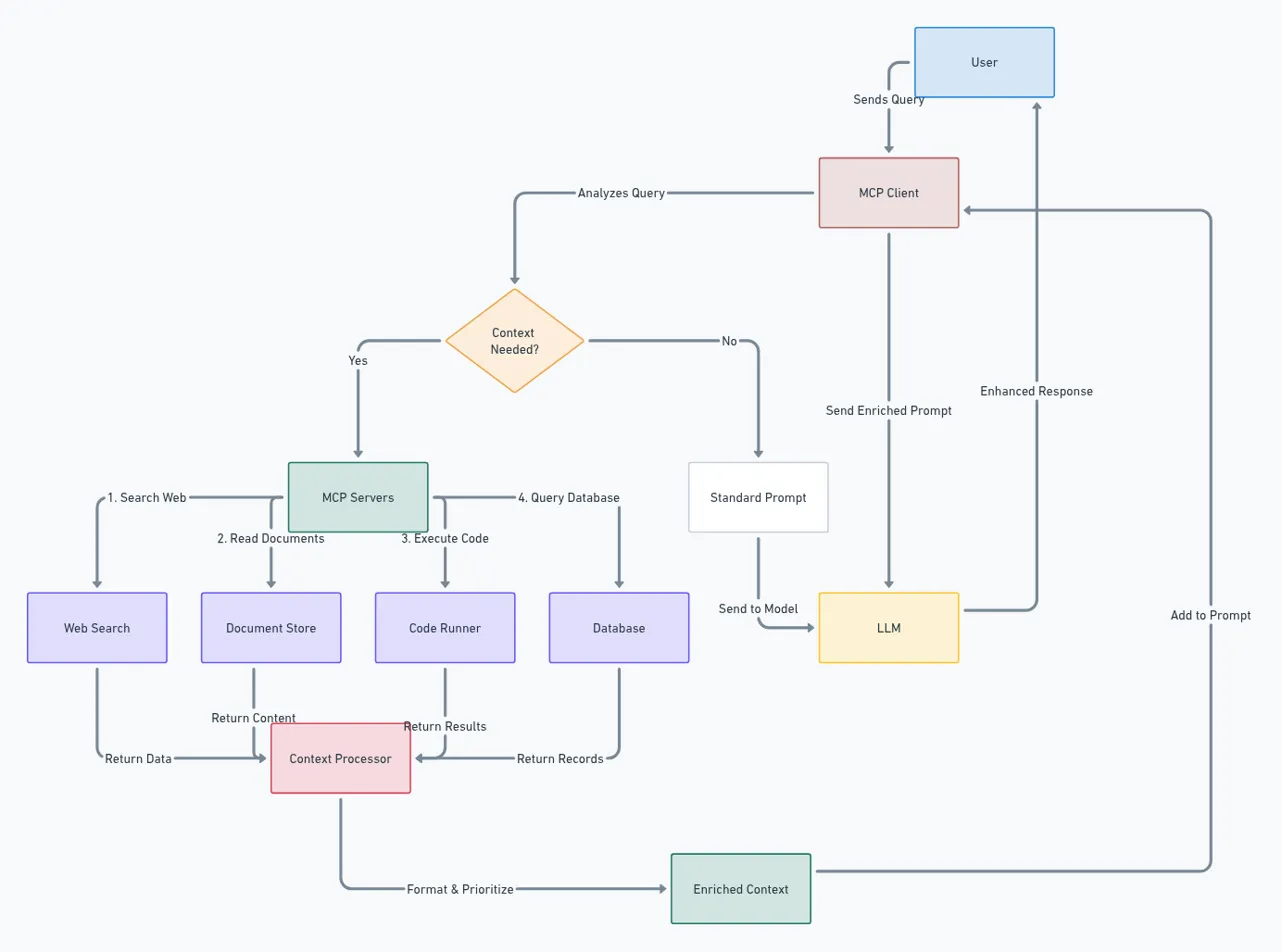
Here's an example of a complex system architecture diagram created using this MCP server and Claude - it shows the Model Context Protocol (MCP) architecture itself:
Related MCP server: Schemdraw MCP Server
Create Whimsical diagrams using Mermaid markup generated by the MCP Client (Claude, Windsurf, etc.)
Returns both the Whimsical diagram URL and a base64 encoded image to allow the Client to iterate on it's original markup
To install Whimsical MCP Server for Claude Desktop automatically via Smithery:
npx -y @smithery/cli install BrockReece/whimsical-mcp-server --client claude# Clone the repository
git clone https://github.com/BrockReece/whimsical-mcp-server.git
# Install dependencies
yarn install
# Build the project
yarn buildUpdate the MCP Client's config to point to this repository's dist folder eg:
    {
        "mcpServers": {
            "whimsical": {
                "command": "node",
                "args": [
                    "/path/to/this/repo/whimsical-mcp-server/dist/index.js"
                ]
            }
        }
}This project is licensed under the MIT License.
This server cannot be deployed
Let Claude, Cursor, or ChatGPT author Mermaid diagrams your team can read and share.
Create and manage Mermaid.js flowcharts and diagrams with AI agents via MCP.
Generate dynamic Mermaid diagrams and charts with AI assistance. Customize styles and export diagr…
Flowcharts that people and agents edit together on one live canvas, exported as Mermaid.