
TakeSix MCP Server
# takesix-agent
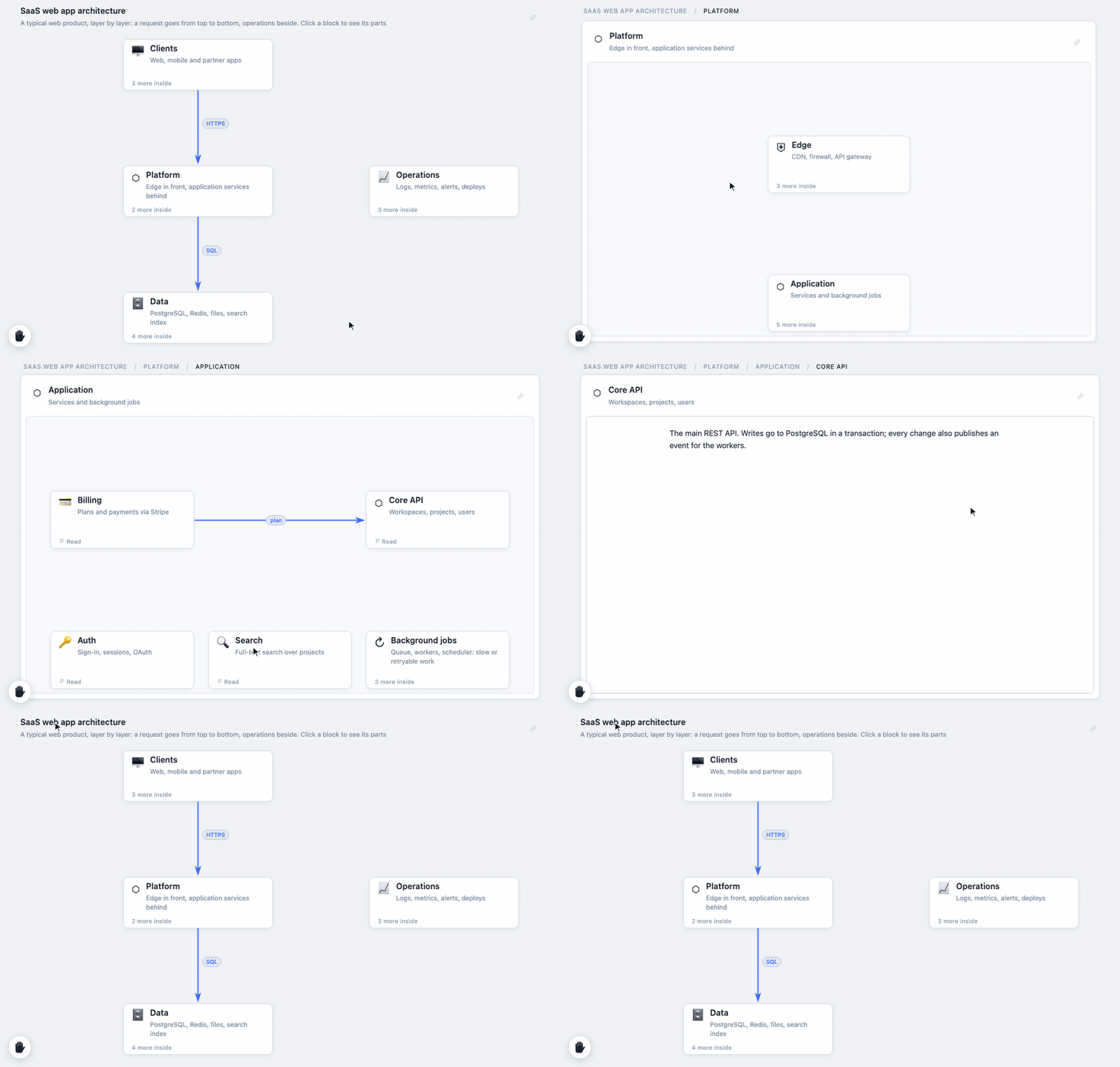
> TakeSix is an open format and libraries that let an AI agent answer with a diagram you can click into instead of a wall of text: at most six blocks per screen, and any block opens into up to six more.
> **[takesix.vapnik.de](https://takesix.vapnik.de/)** · [FAQ](https://takesix.vapnik.de/faq/)
[](https://takesix.vapnik.de/examples/architecture/)
Lets AI agents answer with a [takesix](https://github.com/vvapnik/takesix-core)
diagram instead of a long wall of text: the gist on one screen, at most six
blocks, and the depth one click away.
This repository holds:
- **`skill/takesix/`** — an Agent Skill for Claude. It teaches the agent how to
design a readable takesix document, then checks and renders it with the
bundled script. Nothing to install besides Node.js 18+.
- **`@takesix/mcp`** — an MCP server with the same rules and checks, for any
MCP client. In apps that support [MCP Apps](https://modelcontextprotocol.io/extensions/apps/overview)
the diagram opens right in the conversation.
- **`src/`** — the sources of the bundled script, the viewer and the server.
## Examples
Live on the site, each with its `.takesix.json` and the prompt that gets one
like it from an agent:
| Example | What it shows |
|---|---|
| [Architecture](https://takesix.vapnik.de/examples/architecture/) | A SaaS web app layer by layer, from the clients down to the data |
| [Data model](https://takesix.vapnik.de/examples/data-model/) | A shop database: the tables and their relations, the columns inside |
| [Presentation](https://takesix.vapnik.de/examples/presentation/) | A team talk: the parts in order, slides and speaker notes inside |
| [To-do list](https://takesix.vapnik.de/examples/todo/) | A website launch in stages, a status on every task |
## Claude Code plugin
The skill and the MCP server in one step:
```
/plugin install takesix --marketplace vvapnik/takesix-agent
```
On Claude Code before 2.1.275, add the marketplace first:
`/plugin marketplace add vvapnik/takesix-agent`, then `/plugin install takesix@takesix`.
The manifests are in `.claude-plugin/`.
## MCP server
```bash
claude mcp add takesix -- npx -y @takesix/mcp
```
For Claude Desktop and other clients, add to their MCP configuration:
```json
{ "mcpServers": { "takesix": { "command": "npx", "args": ["-y", "@takesix/mcp"] } } }
```
What it offers:
- **`guide`** tool: the format and the rules that make a diagram readable (the
text of the skill). The server's instructions tell the agent to read it first.
With a `type` (`basic`, `architecture`, `plan`, `flowchart`) it returns the
blueprint for that kind of diagram; `epic` returns an example that combines
them.
- **`validate`** tool: checks a document (as JSON or a `.takesix.json` path),
lists problems with their JSON paths, or sums up the diagram's shape. A
valid document can still get layout hints: arrows with a block in their way,
arrows that cross.
- **`show`** tool: validates, writes one self-contained HTML file and returns
its path. Where MCP Apps are supported, the diagram opens in the
conversation, with a full screen button.
- `diagram` prompt: "explain X as a TakeSix diagram", with the guide attached.
- Resources: `takesix://format` (specification), `takesix://schema` (JSON Schema).
Where the diagram shows up:
| Client | In the conversation | HTML file |
|---|---|---|
| Claude Desktop | yes (MCP App) | yes |
| Claude Code | no, text result only | yes |
| claude.ai in the browser | needs a remote server (not yet) | — |
The server runs locally over stdio: no hosting, nothing leaves the machine.
For the official [MCP Registry](https://registry.modelcontextprotocol.io/) the
server is described as `io.github.vvapnik/takesix` (`server.json`, `mcpName` in
`package.json`). `publish.yml` publishes it there on stable releases from 1.0.0
on.
## Install the skill
Copy (or symlink) `skill/takesix` into your skills folder, for example for
Claude Code:
```bash
cp -R skill/takesix ~/.claude/skills/takesix
```
Then ask for an overview of something structured — a codebase, a spec, a plan
— or ask for a takesix diagram directly.
## What the skill runs
```bash
node skill/takesix/scripts/takesix.mjs validate answer.takesix.json
node skill/takesix/scripts/takesix.mjs sketch answer.takesix.json
node skill/takesix/scripts/takesix.mjs render answer.takesix.json -o answer.html
```
- `validate` lists problems with JSON paths, so the agent can fix them, and on
success prints a one-line summary of the diagram's shape, plus layout hints
when an arrow has a block in its way, arrows cross, or a title or
description is longer than its block shows (budgets measured on a
MacBook Pro 13" screen).
- `sketch` prints every level as a text grid, so the agent can check where its
blocks sit on the 6×6 grid before rendering.
- `render` validates, then writes **one self-contained HTML file**: the
document and the viewer (React and `@takesix/react`) are inlined, so it opens
from disk, without a network, and works as an artifact.
The HTML files from `render` and `show` carry a small "Made with TakeSix" link
in the bottom right corner. To leave it out: `render --no-credit`,
`credit: false` in `show`, or `TAKESIX_NO_CREDIT=1` in the environment (for
the MCP server: in the `env` of its configuration).
## Development
Node 24 LTS (`.nvmrc`). See [CONTRIBUTING.md](CONTRIBUTING.md).
```bash
npm install
npm run build # skill script and viewer, MCP view (dist/app), MCP server (dist/mcp.js)
npm test
```
To try the server before it is published, point a client at the build:
`claude mcp add takesix -- node /path/to/takesix-agent/dist/mcp.js`.
The built files under `skill/takesix/` are committed, so the skill folder works
on its own. `skill/takesix/references/format.md` is a copy of
`takesix-core/FORMAT.md`: update it when the format changes.
Test prompts for the skill live in `skill/takesix/evals/`, in the layout
`claude plugin eval` reads.
## AI-assisted development
This project is developed with the help of [Claude Code](https://claude.com/claude-code)
(Anthropic). Commits are authored and reviewed by the maintainer.
## License
MIT
TDQS
Scored across 3 tools
Each tool has a distinct role: guide retrieves format rules, validate checks a document, show renders it. The only soft overlap is that show also validates, so an agent might wonder whether to call validate before show, but the descriptions make the intended pipeline clear.
All three names are single, lowercase verbs (guide, validate, show) with no mixed styles or redundant prefixes. The convention is uniform and easy to predict.
Three tools map exactly to the three-stage workflow of reading rules, checking, and rendering. Nothing is padded and nothing feels missing for such a narrow, DSL-driven purpose.
The lifecycle of authoring a diagram (learn format, validate, output) is fully covered, including an HTML artifact. Minor gap: no way to list or re-open previously generated diagrams, though the returned file path partially mitigates this.