A
licenseNot graded
qualityD
maintenanceEnables AI agents to edit files in VS Code with an interactive diff review panel, allowing users to accept or reject changes.
1
MIT

Integrates with Windsurf (by Codeium) to provide AI-powered diff explanations with inline annotations for code changes made by the AI.
This server does not currently have a deployable release on Glama. Follow the repository's setup instructions to install and configure it for your MCP client, including any required credentials and local dependencies.
AI peer review for your code changes.
Just like humans review each other's PRs, your AI reviews its own changes — with inline annotations that appear directly in a VS Code/Cursor panel.
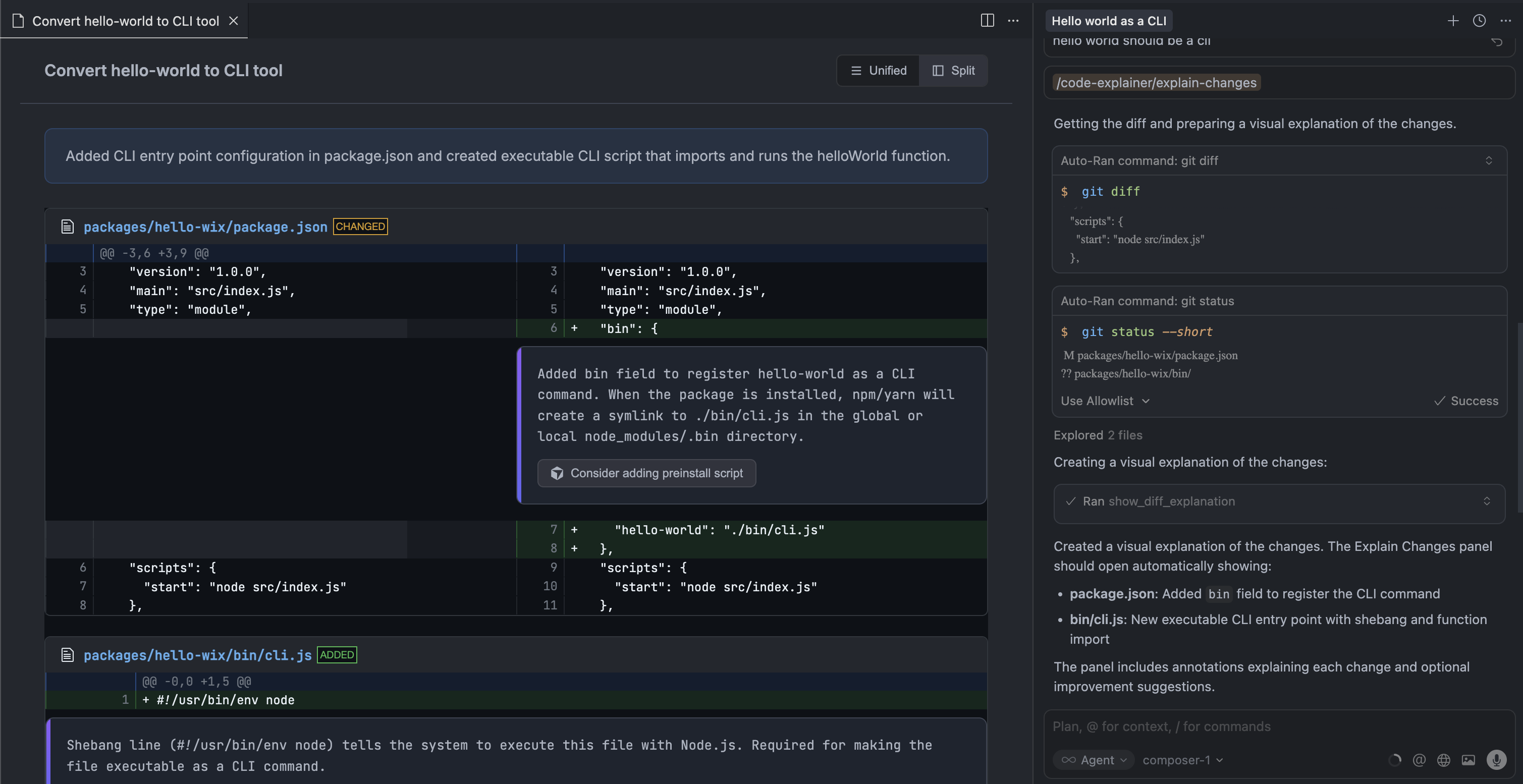
When humans write code, we do peer review. When AI writes code, we... scroll through chat hoping we understood what it did?
The asymmetry is broken. AI generates multi-file changes in seconds, but understanding those changes still requires you to:
Read the chat explanation
Open the diff
Mentally map one to the other
This extension gives AI the same workflow humans use: review the diff, annotate the changes, explain the reasoning.
Related MCP server: CodePeel MCP Server
AI makes changes → AI reviews its own diff → Panel opens with annotated diffThe AI calls show_diff_explanation after completing a task. You get a visual diff with inline annotations — exactly where a human reviewer would leave comments.
Action buttons let you send improvement suggestions directly to Cursor chat.
Visual diff — Side-by-side or unified view powered by diff2html
Inline annotations — Review comments appear directly after relevant code lines
Action buttons — Click to send prompts to Cursor chat ("Refactor this", "Add tests")
Click to open — File names link directly to the source
Workspace-aware — Only shows in the window matching your project
Auto-install MCP — Extension configures the MCP server automatically
Download the .vsix from releases and install:
VS Code / Cursor:
Extensions → ... → "Install from VSIX..."
The extension automatically configures the MCP server in Cursor and Windsurf on first activation.
In Cursor chat, use the slash command:
/explain-changesThis triggers the MCP prompt which guides the AI to analyze your changes and call the tool automatically.
If auto-install doesn't work, configure manually:
Add to ~/.cursor/mcp.json:
{
  "mcpServers": {
    "explain-changes": {
      "command": "npx",
      "args": ["-y", "explain-changes-mcp"]
    }
  }
}
Add to claude_desktop_config.json:
{
  "mcpServers": {
    "explain-changes": {
      "command": "npx",
      "args": ["-y", "explain-changes-mcp"]
    }
  }
}
Add to ~/.codeium/windsurf/mcp_config.json:
{
  "mcpServers": {
    "explain-changes": {
      "command": "npx",
      "args": ["-y", "explain-changes-mcp"]
    }
  }
}Package | Description |
VS Code/Cursor extension that displays diff explanations | |
MCP server with the |
┌─────────────────┐     writes JSON      ┌─────────────────┐
│   MCP Server    │ ──────────────────▶  │ ~/.explain-     │
│                 │                      │ changes/        │
│ show_diff_      │                      │ pending.json    │
│ explanation     │                      └────────┬────────┘
└─────────────────┘                               │
                                                  │ watches
                                                  ▼
                                         ┌─────────────────┐
                                         │  VS Code/Cursor │
                                         │   Extension     │
                                         │                 │
                                         │  Webview Panel  │
└─────────────────┘# Install dependencies
npm install
# Build all packages
npm run build
# Build extension only
npm run build:extension
# Build MCP only
npm run build:mcp
# Package extension as .vsix
cd packages/extension && npm run packageMIT
This server cannot be deployed
Code review by AI models from different companies, usually two. Shows where they agree and disagree.
Versioned artifact review for people and AI agents, with contextual comments and human control.
AI code review for GitHub PRs with an MCP autofix loop for Claude Code and Cursor
Guardian agent for AI coding: four frontier models review risky diffs and commits before they ship.