A
licenseB
qualityD
maintenanceA Model Context Protocol server that enables AI agents to join and interact with online meetings (Zoom and Google Meet), capturing transcripts and recordings to generate meeting summaries.
3
10
MIT

Uses OpenAI's API for AI-powered analysis of meeting transcripts, including summarization, key point extraction, and task identification
Integrates with Prettier for consistent formatting of HTML and Markdown files in development workflows
Identifies and extracts actionable tasks from meeting transcripts, displaying them as numbered items for easy tracking
Click on "Deploy Server".
Wait a few minutes for the server to deploy. Once ready, it will show a "Started" state.
In the chat, type @ followed by the MCP server name and your instructions, e.g., "@Meeting Transcript Analyzer summarize the transcript from our team meeting this morning"
That's it! The server will respond to your query, and you can continue using it as needed.
Here is a step-by-step guide with screenshots.
A multi-agent system that analyzes meeting transcripts using AI-powered summarization, key point extraction, and task identification. Fully compliant with the Model Context Protocol (MCP) standard.
Modern Web UI: Clean, responsive horizontal layout interface for easy interaction (see screenshot)
Summarize: Generate concise summaries of meeting transcripts (see screenshot)
Key Highlights: Extract and display key points as bullet points (•) (see screenshot)
Grab Tasks: Identify actionable tasks from meeting discussions (see screenshot)
MCP Compliant: Full adherence to Model Context Protocol standards
Related MCP server: Roundtable
This application is fully compliant with the Model Context Protocol (MCP) standard as defined in the official MCP specification:
Discovery Endpoint: /.well-known/mcp.json (MCP compliant)
Tool Schema: JSON Schema format with inputSchema property
Response Format: MCP-compliant content array with structured content
Request Format: Standard MCP invoke endpoint with name and arguments
Capabilities: Proper capabilities object in discovery response
Each agent exposes MCP-compliant endpoints:
GET  /.well-known/mcp.json     # Tool discovery (MCP standard)
POST /invoke                   # Tool invocation (MCP standard)
GET /health # Health checkSummarizer Agent Tools:
summarize_transcript: Generates concise meeting summaries
highlight_key_points: Extracts 3-5 key insights as bullet points
Task Extractor Agent Tools:
extract_tasks: Identifies actionable tasks from transcripts
All tools return MCP-compliant responses:
{
  "content": [
    {
      "type": "text",
      "text": "Tool output content here..."
    }
  ]
}Python 3.9+
OpenAI API key
Install dependencies:
pip install -r requirements.txtConfigure OpenAI API Key:
Create a file named openai_key.txt in the project root and add your OpenAI API key:
sk-your-openai-api-key-hereImportant: All commands must be run from the project root directory.
Note: Start the sub-agents first, then the super agent to ensure proper tool registration.
python3 -m uvicorn agents.summarizer_agent:summarizer_app --reload --port 8001python3 -m uvicorn agents.task_extractor_agent:task_app --reload --port 8002python3 -m uvicorn agents.super_agent:super_app --reload --port 8000Access the Web Interface: Open your browser and go to: http://localhost:8000
Analyze a Transcript:
Paste your meeting transcript in the left textarea
Enter a prompt like "Summarize this meeting" or "Extract key points" in the second textarea
Click "Analyze Transcript"
View Results:
Results appear in the right panel with structured formatting
Summaries appear as formatted paragraphs
Key points display as clean bullet points (•)
Tasks show as numbered actionable items
Metadata shows transcript length, tool used, and point/task counts
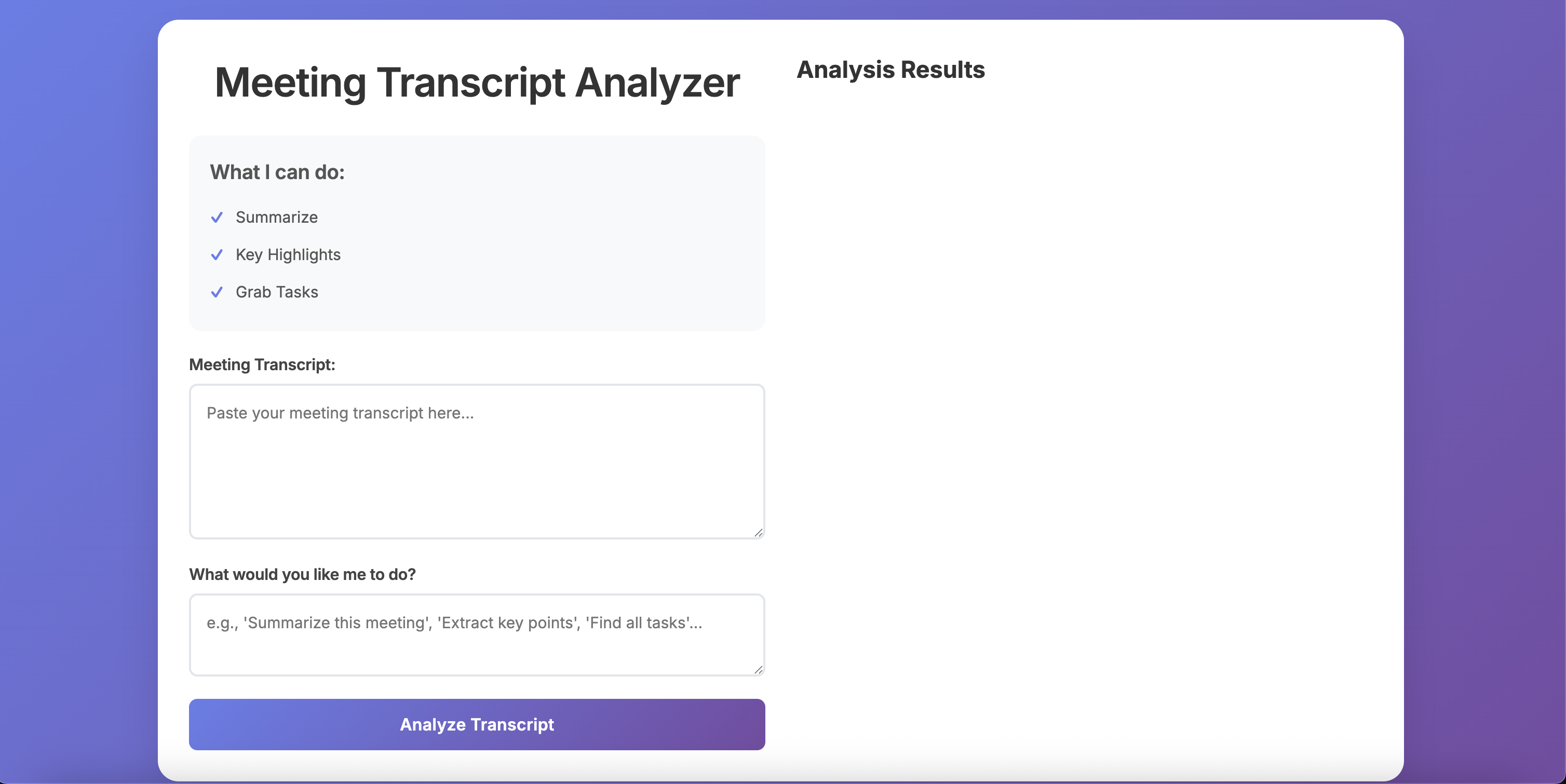 The clean, modern interface users see when first opening the application.
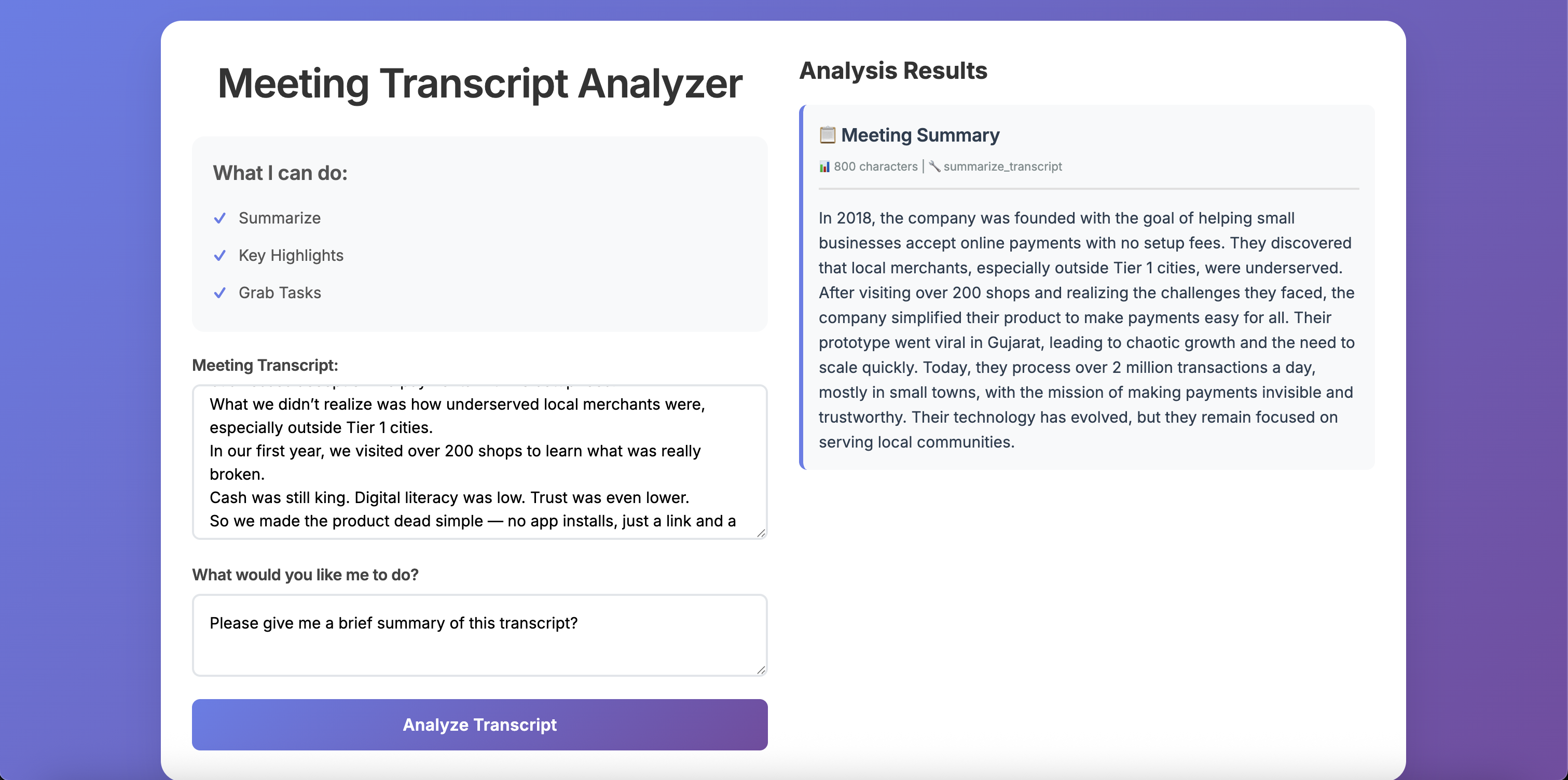 The application summarizing a meeting transcript with a brief, concise style.
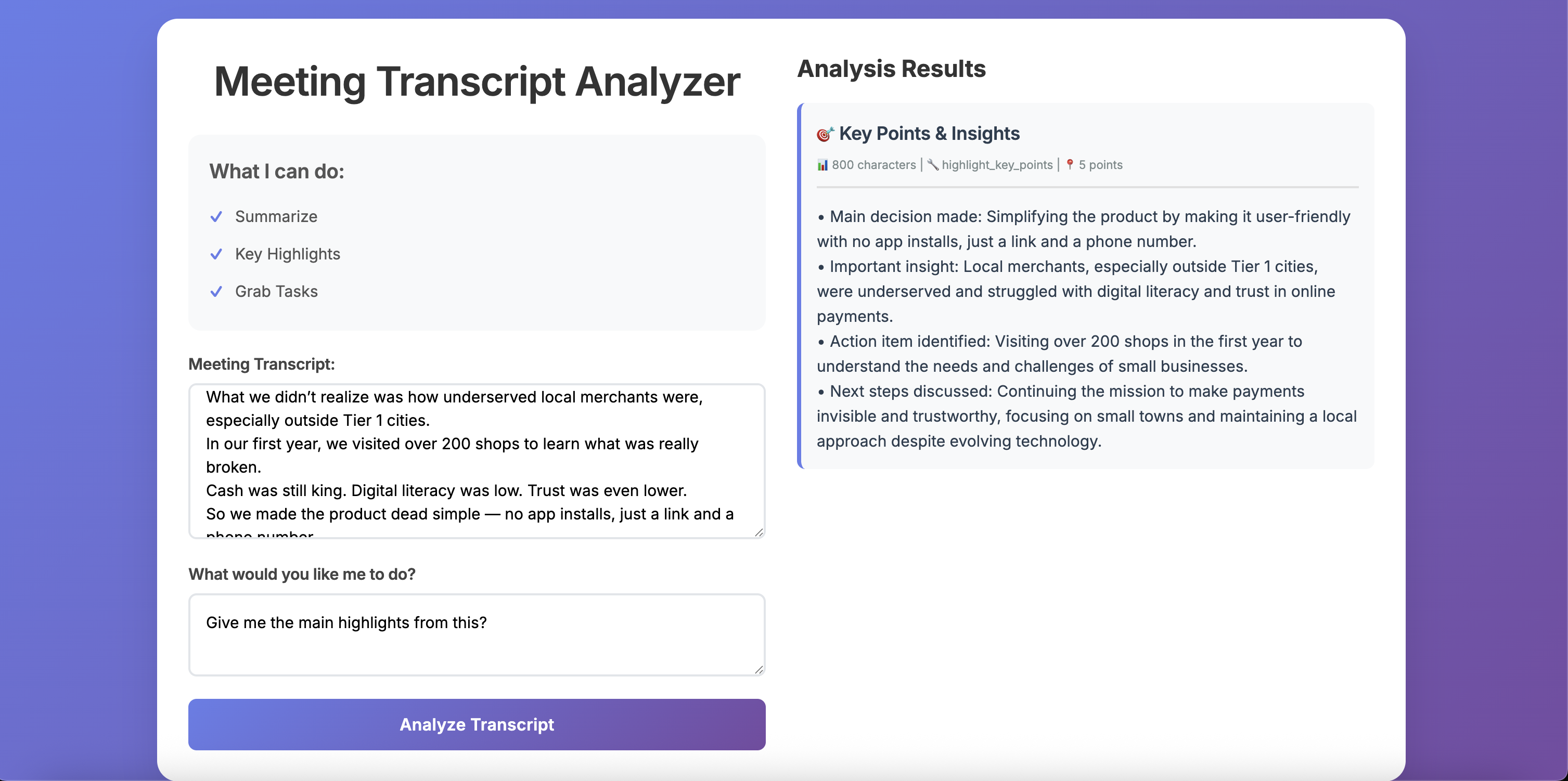 Extracting key insights and main points from a meeting transcript as bullet points.
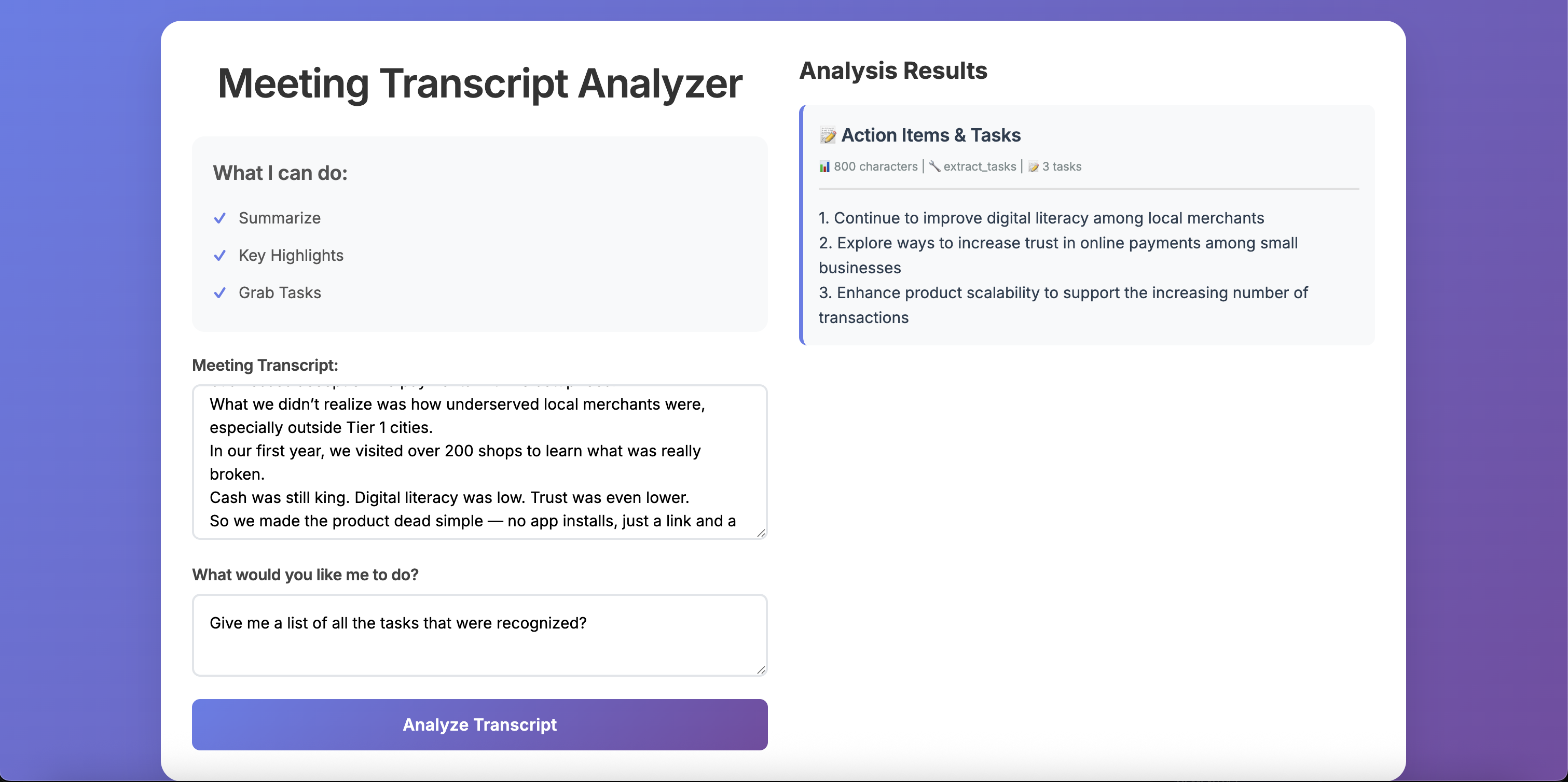 Identifying and extracting actionable tasks from meeting discussions.
Super Agent (Port 8000): Main entry point that serves the web UI and orchestrates sub-agents
Summarizer Agent (Port 8001): Handles transcript summarization and key point extraction
Task Extractor Agent (Port 8002): Identifies and extracts actionable tasks from transcripts
Backend Formatting: All response formatting is handled by the super agent for consistent UI presentation
Structured Responses: Responses include type, title, content, and metadata fields
MCP Protocol: Uses Model Context Protocol for agent communication
Responsive Design: UI adapts to mobile devices with vertical stacking
To integrate with MCP-compliant clients:
Discover Tools:
curl http://localhost:8001/.well-known/mcp.json
curl http://localhost:8002/.well-known/mcp.json
Invoke Tools:
curl -X POST http://localhost:8001/invoke \
  -H "Content-Type: application/json" \
-d '{"name": "summarize_transcript", "arguments": {"transcript": "Your transcript here..."}}'This application works with any MCP-compliant client library:
For more information about the MCP standard, visit the official MCP specification and GitHub repository.
"ModuleNotFoundError: No module named 'agents'": Make sure you're running commands from the project root directory
"uvicorn: command not found": Use python3 -m uvicorn instead of just uvicorn
API Key Issues: Ensure openai_key.txt exists and contains a valid OpenAI API key
Port Conflicts: Make sure ports 8000, 8001, and 8002 are available
MCP Discovery Issues: Verify agents are running and accessible at their respective ports
To maintain consistent code style, use the provided formatting script:
python3 format_code.pyThis will format all Python files with Black and HTML/Markdown files with Prettier.
You can also format files individually:
# Format Python files
python3 -m black agents/ --line-length=88

# Format HTML and Markdown files
prettier --write index.html README.mdmcps/
├── agents/
│ ├── __init__.py
│ ├── summarizer_agent.py # MCP-compliant summarizer
│ ├── task_extractor_agent.py # MCP-compliant task extractor
│ ├── super_agent.py # Web UI coordinator & orchestrator
│ ├── models.py
│ ├── config.py
│ └── utils.py
├── docs/
│ └── images/
│ ├── welcome-page.png
│ ├── summarize-flow.png
│ ├── key-highlights-flow.png
│ └── task-extraction-flow.png
├── index.html
├── requirements.txt
├── README.md
├── format_code.py
└── openai_key.txt (create this file)This server cannot be deployed
Meeting transcripts for AI agents: search calls, read who said what, transcribe files and links.
Meeting bots for Zoom, Google Meet and Teams: record, transcribe, summarize, run voice agents.
Shared memory for teams that work with AI agents: meetings, email and calendar in one brain.
Meeting bot and transcripts for Google Meet, Teams and Zoom. Live or after, speakers labelled.