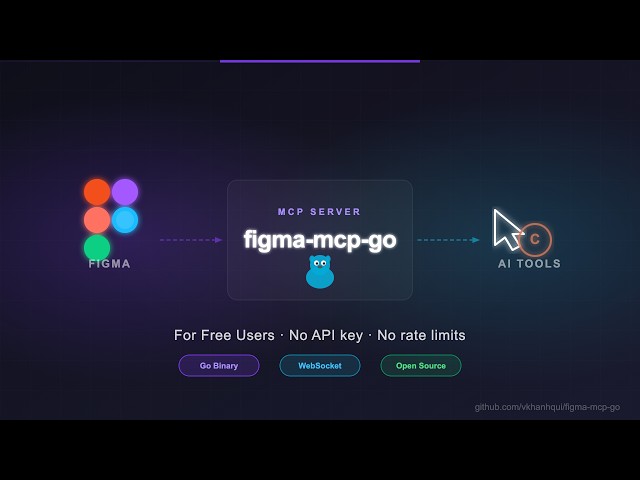
figma-mcp-go
figma-mcp-go
Figma MCP — Free, No Rate Limits
Open-source Figma MCP server with full read/write access via plugin — no REST API, no rate limits. Turn text into designs and designs into real code. Works with Cursor, Claude, GitHub Copilot, and any MCP-compatible AI tool.
Highlights
No Figma API token required
No rate limits — free plan friendly
Read and Write live Figma data via plugin bridge — 73 tools total
Full design automation — styles, variables, components, prototypes, and content
Design strategies included — read_design_strategy, design_strategy, and more prompts built in
Styles, Variables, Components, Prototypes, and Content
https://github.com/user-attachments/assets/eae41471-fc72-4574-8261-4f42c38b8c99
Text to Design, Design to Code
https://github.com/user-attachments/assets/17bda971-0e83-4f18-8758-8ac2b8dcba62
Why this exists
Most Figma MCP servers rely on the Figma REST API.
That sounds fine… until you hit this:
Plan | Limit |
Starter / View / Collab | 6 tool calls/month |
Pro / Org (Dev seat) | 200 tool calls/day |
Enterprise | 600 tool calls/day |
If you're experimenting with AI tools, you'll burn through that in minutes.
I didn't have enough money to pay for higher limits. So I built something that doesn't use the API at all.
Related MCP server: genable-mcp
Installation & Setup
Install via npx — no build step required. Watch the setup video or follow the steps below.

1. Configure your AI tool
Claude Code CLI
claude mcp add -s project figma-mcp-go -- npx -y @vkhanhqui/figma-mcp-go@latestCodex CLI
codex mcp add figma-mcp-go -- npx -y @vkhanhqui/figma-mcp-go@latest.mcp.json (Claude and other MCP-compatible tools)
{
"mcpServers": {
"figma-mcp-go": {
"command": "npx",
"args": ["-y", "@vkhanhqui/figma-mcp-go"]
}
}
}.vscode/mcp.json (Cursor / VS Code / GitHub Copilot)
{
"servers": {
"figma-mcp-go": {
"type": "stdio",
"command": "npx",
"args": [
"-y",
"@vkhanhqui/figma-mcp-go"
]
}
}
}2. Install the Figma plugin
In Figma Desktop: Plugins → Development → Import plugin from manifest
Select
manifest.jsonfrom the plugin.zipRun the plugin inside any Figma file
Available Tools
Write — Create
Tool | Description |
| Create a frame with optional auto-layout, fill, and parent |
| Create a rectangle with optional fill and corner radius |
| Create an ellipse or circle |
| Create a text node (font loaded automatically) |
| Decode base64 image and place it as a rectangle fill |
| Convert an existing FRAME node into a reusable component |
| Create a Figma Section node to organise frames on a page |
Write — Modify
Tool | Description |
| Update text content of an existing TEXT node |
| Set solid fill color (hex) on a node |
| Set solid stroke color and weight on a node |
| Set opacity of one or more nodes (0 = transparent, 1 = opaque) |
| Set corner radius — uniform or per-corner |
| Set or update auto-layout (flex) properties on a frame |
| Show or hide one or more nodes |
| Lock one or more nodes to prevent accidental edits |
| Unlock one or more nodes |
| Set absolute rotation in degrees on one or more nodes |
| Change z-order: |
| Set blend mode (MULTIPLY, SCREEN, OVERLAY, …) on one or more nodes |
| Set responsive constraints |
| Move nodes to an absolute x/y position |
| Resize nodes by width and/or height |
| Rename a node |
| Clone a node, optionally repositioning or reparenting |
| Move nodes to a different parent frame, group, or section |
| Bulk rename nodes via find/replace, regex, or prefix/suffix |
| Find and replace text across all TEXT nodes in a subtree or page; supports regex |
Write — Delete
Tool | Description |
| Delete one or more nodes permanently |
Write — Prototype
Tool | Description |
| Set prototype reactions (triggers + actions) on a node; mode |
| Remove all or specific reactions by zero-based index from a node |
Write — Styles
Tool | Description |
| Apply drop shadow / blur effects directly on a node (no style required) |
| Create a named paint style with a solid color |
| Create a named text style with font, size, and spacing |
| Create a named effect style (drop shadow, inner shadow, blur) |
| Create a named layout grid style (columns, rows, or grid) |
| Rename or recolor an existing paint style |
| Apply an existing local style to a node, linking it to that style |
| Delete any style (paint, text, effect, or grid) by ID |
Write — Variables
Tool | Description |
| Create a new local variable collection with an optional initial mode |
| Add a new mode to an existing collection (e.g. Light/Dark) |
| Create a variable (COLOR/FLOAT/STRING/BOOLEAN) in a collection |
| Set a variable's value for a specific mode |
| Bind a variable to a node property — supports |
| Delete a variable or an entire collection |
Write — Pages
Tool | Description |
| Add a new page to the document (optional name and index) |
| Delete a page by ID or name (cannot delete the only page) |
| Rename a page by ID or current name |
Write — Components & Navigation
Tool | Description |
| Switch the active Figma page by ID or name |
| Group two or more nodes into a GROUP |
| Ungroup GROUP nodes, moving children to the parent |
| Swap the main component of an INSTANCE node |
| Detach component instances, converting them to plain frames |
Read — Document & Selection
Tool | Description |
| Full current page tree |
| File name, pages, current page |
| All pages (IDs + names) — lightweight, no tree loading |
| Currently selected nodes |
| Single node by ID |
| Multiple nodes by ID |
| Depth-limited tree with |
| Find nodes by name substring and/or type within a subtree |
| All text nodes in a subtree |
| Nodes matching given type list |
| Current viewport center, zoom, and visible bounds |
Read — Styles & Variables
Tool | Description |
| Paint, text, effect, and grid styles |
| Variable collections and values |
| All components + component sets with variant properties |
| Dev-mode annotations |
| All fonts used on the current page, sorted by frequency |
| Prototype/interaction reactions on a node |
Export
Tool | Description |
| Base64 image export of any node |
| Export images to disk (server-side, no API call) |
| Export multiple frames as a single multi-page PDF file saved to disk |
| Export design tokens (variables + paint styles) as JSON or CSS |
MCP Prompts
Prompt | Description |
| Best practices for reading Figma designs |
| Best practices for creating and modifying designs |
| Chunked approach for replacing text across a design |
| Convert manual annotations to native Figma annotations |
| Transfer overrides between component instances |
| Map prototype reactions into interaction flow diagrams |
Related Projects
Contributing
Issues and PRs are welcome.
Star History
Available Tools
73 toolsadd_pageBDestructive
Add a new page to the Figma document.
Inputs: name, index.
add_variable_modeADestructive
Add a new mode to an existing variable collection (e.g. Light/Dark, Desktop/Mobile). IMPORTANT — Figma free plan only allows 1 mode per collection; calling this tool on a free-plan account will return the error 'Limited to 1 modes only'. If that error occurs, stop retrying and switch to the name-prefix workaround: keep the single default mode and create variables prefixed by mode, e.g. 'light/color-bg' and 'dark/color-bg' in the same collection. Tell the user that native multi-mode variables require a paid Figma plan (Professional or above).
Inputs: modeName (required), collectionId (required).
apply_style_to_nodeADestructive
Apply an existing local style (paint, text, effect, or grid) to a node, linking the node to that style.
Inputs: nodeId (required), styleId (required), target.
batch_rename_nodesADestructive
Rename multiple nodes using find/replace, regex substitution, or prefix/suffix addition.
Inputs: nodeIds (required), find, prefix, suffix, +3 more.
bind_variable_to_nodeADestructive
Bind a local variable to a node property so the property is driven by the variable's value. COLOR variables: use fillColor or strokeColor. BOOLEAN variables: use visible. FLOAT variables: use opacity, rotation, width, height, cornerRadius, topLeftRadius, topRightRadius, bottomLeftRadius, bottomRightRadius, strokeWeight, itemSpacing, paddingTop, paddingRight, paddingBottom, paddingLeft.
Inputs: field (required), nodeId (required), variableId (required).
clone_nodeBDestructive
Clone an existing node, optionally repositioning it or placing it in a new parent.
Inputs: nodeId (required), x, y, parentId.
create_componentADestructive
Convert an existing FRAME node into a reusable COMPONENT. The frame is replaced in place by the new component.
Inputs: nodeId (required), name.
create_effect_styleBDestructive
Create a new local effect style (drop shadow, inner shadow, or blur).
Inputs: name (required), type, color, radius, +5 more.
create_ellipseADestructive
Create a new ellipse (circle/oval) on the current page or inside a parent node.
Inputs: x, y, name, width, +3 more.
create_frameBDestructive
Create a new frame on the current page or inside a parent node.
Inputs: x, y, name, width, +15 more.
create_grid_styleADestructive
Create a new local layout grid style.
Inputs: name (required), color, count, offset, +6 more.
create_paint_styleBDestructive
Create a new local paint style with a solid fill color.
Inputs: name (required), color (required), description.
create_rectangleADestructive
Create a new rectangle on the current page or inside a parent node.
Inputs: x, y, name, width, +4 more.
create_sectionCDestructive
Create a Figma Section node on the current page. Sections are the modern way to organize frames and groups on a page.
Inputs: x, y, name, width, +1 more.
create_textADestructive
Create a new text node on the current page or inside a parent node. The font is loaded automatically before insertion. Returns the created node ID and bounds. Use set_text to update the content of an existing text node.
Inputs: text (required), x, y, name, +5 more.
create_text_styleADestructive
Create a new local text style (typography preset). Returns the new style's ID. Apply it to nodes with apply_style_to_node. Use get_styles to list existing text styles.
Inputs: name (required), fontSize, fontStyle, fontFamily, +6 more.
create_variableADestructive
Create a new variable (design token) inside an existing collection. Returns the new variable's ID. Use get_variable_defs to find collection IDs, set_variable_value to set values per mode, and bind_variable_to_node to apply the variable to a node property.
Inputs: name (required), type (required), collectionId (required), value.
create_variable_collectionADestructive
Create a new local variable collection with an optional initial mode name. NOTE — Figma free plan limits each collection to 1 mode. If you need Light/Dark (or any multi-mode) theming and the user is on the free plan, do NOT try to call add_variable_mode; instead use the name-prefix workaround: create all variables in a single collection and prefix each variable name with its mode, e.g. 'light/color-bg' and 'dark/color-bg'. Inform the user of this limitation.
Inputs: name (required), initialModeName.
delete_nodesADestructive
Delete one or more nodes. This cannot be undone via MCP — use with care.
Inputs: nodeIds (required).
delete_pageADestructive
Delete a page from the Figma document. Cannot delete the only remaining page.
Inputs: pageId, pageName.
delete_styleADestructive
Delete a style (paint, text, effect, or grid) by its ID.
Inputs: styleId (required).
delete_variableADestructive
Delete a single variable (provide variableId) or an entire collection and all its variables (provide collectionId). Provide exactly one of the two — not both.
Inputs: variableId, collectionId.
detach_instanceADestructive
Detach one or more component instances, converting them to plain frames. The link to the main component is broken; all visual properties are preserved.
Inputs: nodeIds (required).
export_frames_to_pdfADestructive
Export multiple frames as a single multi-page PDF file. Each frame becomes one page in order. Ideal for pitch decks, proposals, and slide exports.
Inputs: nodeIds (required), outputPath (required).
export_tokensADestructive
Export all design tokens (variables and paint styles) as JSON or CSS custom properties. Ideal for bridging Figma variables into your codebase.
Inputs: format.
find_replace_textADestructive
Find and replace text content across all TEXT nodes in a subtree. Searches the entire current page if no nodeId is given.
Inputs: find (required), replace (required), nodeId, useRegex, +1 more.
get_annotationsADestructive
Get dev-mode annotations in the current document or scoped to a specific node. Returns annotation objects with label text, measurement type, and the ID of the annotated node. Omit nodeId to retrieve all annotations on the current page.
Inputs: nodeId.
get_design_contextADestructive
Get a depth-limited, token-efficient tree of the current selection or page. Use this instead of get_document when exploring large files. Supports detail levels (minimal/compact/full) and dedupe_components for pages heavy with repeated component instances.
Inputs: depth, detail, dedupe_components.
get_documentADestructive
Get the full node tree of the current page (not the whole file — only the active page). Returns all nodes recursively and can be very large. Prefer get_design_context for exploration or when token efficiency matters.
Inputs: no named parameters.
get_fontsADestructive
List all fonts used in the current page, sorted by usage frequency. Useful for understanding typography without scanning all text nodes.
Inputs: no named parameters.
get_local_componentsCDestructive
Get all components defined in the current Figma file.
Inputs: no named parameters.
get_metadataBDestructive
Get metadata about the current Figma document: file name, pages, current page
Inputs: no named parameters.
get_nodeADestructive
Get a single node by ID with full detail. Use get_nodes_info to fetch multiple nodes in one round-trip instead of calling this repeatedly. Node ID must be colon format e.g. '4029:12345', never hyphens.
Inputs: nodeId (required).
get_nodes_infoADestructive
Get full details for multiple nodes by ID in one round-trip. Prefer this over calling get_node repeatedly when you need several nodes.
Inputs: nodeIds (required).
get_pagesADestructive
List all pages in the document with their IDs and names. Lightweight alternative to get_document.
Inputs: no named parameters.
get_reactionsADestructive
Get the prototype reactions defined on a node. Returns an array of reaction objects — each has a trigger (e.g. ON_CLICK, ON_HOVER, AFTER_TIMEOUT) and an actions array (navigate to node, open URL, go back, etc.). Use set_reactions to add or replace reactions, remove_reactions to delete them.
Inputs: nodeId (required).
get_screenshotADestructive
Export a screenshot of one or more nodes as base64-encoded image data (held in memory). Use save_screenshots instead when you want to write images directly to disk without base64 in the response.
Inputs: scale, format, nodeIds.
get_selectionADestructive
Get the nodes currently selected in Figma. Returns an empty array if nothing is selected. Use get_design_context or get_node to retrieve deeper detail about a specific node by ID.
Inputs: no named parameters.
get_stylesADestructive
Get all local styles in the document (paint, text, effect, and grid). Returns each style's ID, name, type, and properties. Use the style ID with apply_style_to_node or update_paint_style. For design tokens (variables), use get_variable_defs instead.
Inputs: no named parameters.
get_variable_defsADestructive
Get all local variable definitions: collections, modes, and values. Variables are Figma's design token system.
Inputs: no named parameters.
get_viewportBDestructive
Get the current Figma viewport: scroll center, zoom level, and visible bounds.
Inputs: no named parameters.
group_nodesADestructive
Group two or more nodes into a GROUP. All nodes must share the same parent.
Inputs: nodeIds (required), name.
import_imageADestructive
Import a base64-encoded image into Figma as a rectangle with an image fill. Use get_screenshot to capture images or provide your own base64 PNG/JPG.
Inputs: imageData (required), x, y, name, +4 more.
lock_nodesADestructive
Lock one or more nodes to prevent accidental edits in Figma.
Inputs: nodeIds (required).
move_nodesADestructive
Move one or more nodes to an absolute canvas position. The same x/y is applied to every node independently (not a relative offset from current position).
Inputs: nodeIds (required), x, y.
remove_reactionsADestructive
Remove prototype reactions from a node. Omit indices to remove all reactions. Provide a zero-based indices array to remove specific reactions (use get_reactions first to see current indices).
Inputs: nodeId (required), indices.
rename_nodeADestructive
Rename a single node by ID. Returns the updated node with its new name. Use batch_rename_nodes to rename multiple nodes at once or to apply find/replace patterns across many nodes.
Inputs: name (required), nodeId (required).
rename_pageBDestructive
Rename an existing page in the Figma document.
Inputs: newName (required), pageId, pageName.
reorder_nodesBDestructive
Change the z-order (layer stack position) of one or more nodes.
Inputs: order (required), nodeIds (required).
reparent_nodesBDestructive
Move one or more nodes to a different parent frame, group, or section.
Inputs: nodeIds (required), parentId (required).
resize_nodesADestructive
Resize one or more nodes. The same width/height is applied to every node in the list independently. Provide width, height, or both.
Inputs: nodeIds (required), width, height.
rotate_nodesADestructive
Rotate one or more nodes to an absolute angle in degrees.
Inputs: nodeIds (required), rotation (required).
save_screenshotsADestructive
Export screenshots for multiple nodes and write them to the local filesystem. Returns file metadata (path, size, dimensions) — no base64 in the response. Use get_screenshot instead when you need the image data in memory.
Inputs: items (required), scale, format.
scan_nodes_by_typesADestructive
Find all nodes of specific types in a subtree, regardless of name. Use search_nodes instead when you need to filter by name.
Inputs: types (required), nodeId (required).
scan_text_nodesADestructive
Scan all TEXT nodes in a subtree and return their content. Shorthand for scan_nodes_by_types with ['TEXT'] — use when you only need text copy from a component or frame.
Inputs: nodeId (required).
search_nodesBDestructive
Search for nodes by name substring and/or type within a subtree. Use this when you know (part of) the node name. Use scan_nodes_by_types when you want all nodes of a type regardless of name.
Inputs: query (required), limit, types, nodeId.
set_auto_layoutBDestructive
Set or update auto-layout (flex) properties on an existing frame.
Inputs: nodeId (required), layoutMode, layoutWrap, paddingTop, +9 more.
set_blend_modeADestructive
Set the blend mode of one or more nodes (e.g. MULTIPLY, SCREEN, OVERLAY).
Inputs: nodeIds (required), blendMode (required).
set_constraintsBDestructive
Set layout constraints (pinning behaviour) on one or more nodes relative to their parent.
Inputs: nodeIds (required), vertical, horizontal.
set_corner_radiusADestructive
Set corner radius on one or more nodes. Provide a uniform cornerRadius or individual per-corner values.
Inputs: nodeIds (required), cornerRadius, topLeftRadius, topRightRadius, +2 more.
set_effectsADestructive
Apply one or more effects (drop shadow, inner shadow, layer blur, background blur) directly to a node. Replaces all existing effects. Pass an empty array to clear all effects.
Inputs: nodeId (required), effects (required).
set_fillsADestructive
Set the fill color on a single node (takes one nodeId, not an array). Use mode='append' to stack a new fill on top of existing fills instead of replacing them.
Inputs: color (required), nodeId (required), mode, opacity.
set_opacityADestructive
Set the opacity of one or more nodes (0 = fully transparent, 1 = fully opaque).
Inputs: nodeIds (required), opacity (required).
set_reactionsADestructive
Set prototype reactions on a node. Use mode "replace" (default) to overwrite all reactions, or "append" to add to existing ones.
Supported triggers: ON_CLICK, ON_HOVER, ON_PRESS, ON_DRAG, AFTER_TIMEOUT, MOUSE_ENTER, MOUSE_LEAVE, MOUSE_UP, MOUSE_DOWN Supported action types: NODE (navigation), BACK, CLOSE, URL NODE navigation values: NAVIGATE, OVERLAY, SCROLL_TO, SWAP, CHANGE_TO Transition types: DISSOLVE, SMART_ANIMATE, MOVE_IN, MOVE_OUT, PUSH, SLIDE_IN, SLIDE_OUT DISSOLVE / SMART_ANIMATE: {"type":"DISSOLVE","duration":0.3,"easing":{"type":"EASE_OUT"}} Directional (PUSH, MOVE_IN, MOVE_OUT, SLIDE_IN, SLIDE_OUT): also require "direction" (LEFT|RIGHT|TOP|BOTTOM) and "matchLayers" (bool): {"type":"PUSH","direction":"LEFT","matchLayers":false,"duration":0.3,"easing":{"type":"EASE_OUT"}}
Each reaction has a "trigger" and an "actions" array (plural). Each action in the array is an Action object.
Example — on-click navigate with dissolve: {"nodeId":"1:2","reactions":[{"trigger":{"type":"ON_CLICK"},"actions":[{"type":"NODE","destinationId":"1:3","navigation":"NAVIGATE","transition":{"type":"DISSOLVE","duration":0.3,"easing":{"type":"EASE_OUT"}},"preserveScrollPosition":false}]}]}
Example — on-click navigate with push (directional transition): {"nodeId":"1:2","reactions":[{"trigger":{"type":"ON_CLICK"},"actions":[{"type":"NODE","destinationId":"1:3","navigation":"NAVIGATE","transition":{"type":"PUSH","direction":"LEFT","matchLayers":false,"duration":0.3,"easing":{"type":"EASE_OUT"}},"preserveScrollPosition":false}]}]}
Example — open URL on hover: {"nodeId":"1:2","reactions":[{"trigger":{"type":"ON_HOVER"},"actions":[{"type":"URL","url":"https://example.com"}]}]}
Example — auto-advance after 3 seconds: {"nodeId":"1:2","reactions":[{"trigger":{"type":"AFTER_TIMEOUT","timeout":3000},"actions":[{"type":"NODE","destinationId":"1:4","navigation":"NAVIGATE","transition":{"type":"DISSOLVE","duration":0.3,"easing":{"type":"EASE_OUT"}},"preserveScrollPosition":false}]}]}
Example — go back on click: {"nodeId":"1:2","reactions":[{"trigger":{"type":"ON_CLICK"},"actions":[{"type":"BACK"}]}]}
Inputs: nodeId (required), reactions (required), mode.
set_strokesADestructive
Set the stroke color and weight on a single node (takes one nodeId, not an array). Use mode='append' to stack a new stroke on top of existing strokes instead of replacing them.
Inputs: color (required), nodeId (required), mode, strokeWeight.
set_textBDestructive
Update the text content of an existing TEXT node.
Inputs: text (required), nodeId (required).
set_variable_valueCDestructive
Set a variable's value for a specific mode.
Inputs: value (required), modeId (required), variableId (required).
set_visibleADestructive
Show or hide one or more nodes by setting their visibility.
Inputs: nodeIds (required), visible (required).
swap_componentADestructive
Swap the main component of an existing INSTANCE node, replacing it with a different component while keeping position and size.
Inputs: nodeId (required), componentId (required).
ungroup_nodesADestructive
Ungroup one or more GROUP nodes, moving their children to the parent and removing the group.
Inputs: nodeIds (required).
unlock_nodesADestructive
Unlock one or more nodes, allowing them to be edited again.
Inputs: nodeIds (required).
update_paint_styleADestructive
Update an existing paint style's name, color, or description. Only paint styles support in-place updates — to modify text, effect, or grid styles, use delete_style and recreate them.
Inputs: styleId (required), name, color, description.
Tool Schema Changelog
Recent tool additions, removals, and schema changes observed during successful MCP inspections.
Loading tool schema changelog…
TDQS
Scored across 73 tools
Most tools have clearly distinct purposes, but there is some overlap between get_node, get_nodes_info, get_document, get_design_context, get_selection, and get_pages, which could cause confusion for an agent. Similarly, batch_rename_nodes and rename_node, or scan_nodes_by_types and search_nodes, are closely related.
All tool names follow a consistent verb_noun pattern using snake_case (e.g., create_frame, set_fills, get_pages). The naming is predictable and clear, with no mixing of conventions or ambiguous verbs.
With 73 tools, the server is on the heavier side. While this may be justified given the complexity of Figma (covering design, variables, styles, prototyping), many tools are highly specific (e.g., export_frames_to_pdf, get_fonts) and could potentially be consolidated or omitted.
The tool set covers a broad range of Figma operations: creation, manipulation, styles, variables, prototyping, and exports. However, there are minor gaps, such as lacking a dedicated update_variable tool (though set_variable_value exists) and no support for shared styles or library components.
Maintenance
Related MCP Connectors
The Figma MCP server brings Figma design context directly into your AI workflow.
MCP server for secureFlows: token-free URL builders and integration-linting tools for AI agents.
Marketo MCP server for AI. 130 tools to operate Marketo from Claude, Cursor, or ChatGPT.
Official Fibery MCP server: query and update your workspace from any AI client via OAuth.
Related MCP Servers
- AlicenseNot gradedqualityAmaintenanceFigma MCP Bridge is a combined Figma plugin and MCP server that bypasses Figma's free API rate limits by streaming live document data directly to AI tools via a local WebSocket connection instead of the standard cloud API.919MIT
- AlicenseAqualityDmaintenanceWrite-side MCP server for Figma — build, edit, and search Figma designs from Claude Code, Cursor, Cline, or any MCP client. Complements Figma's official read-only MCP with 41 tools for tree creation, variables, components, and visual verification.413MIT
- AlicenseAqualityCmaintenanceRead, create, and modify Figma designs programmatically via MCP, empowering AI to execute Figma changes safer, cleaner, and faster.4592 npm16MIT
- AlicenseNot gradedqualityDmaintenanceAn MCP server that provides write access to Figma through the Plugin API, enabling AI agents to create, modify, and manage Figma designs programmatically.23MIT