cloud-pilot started as a two-tool API wrapper — search and execute. It evolved into a full infrastructure lifecycle platform with three tools covering 1,289+ services, 51,900+ API operations, and stateful infrastructure management through OpenTofu. Agents don't just call APIs — they deploy, observe, validate, roll back, and detect drift.
Three tools, complete lifecycle:
Tool | Purpose | Backed by |
search | Discover any cloud API across all providers at runtime | Dynamic spec index (botocore, Swagger, Discovery API) |
execute | Fast reads, ad-hoc scripts, multi-step queries against live state | Native SDKs (@aws-sdk/client-*, @azure/core-rest-pipeline, google-auth-library) |
tofu | Stateful infrastructure: plan, apply, destroy, import, drift detection, rollback | OpenTofu with provider registry integration and Vault state backend |
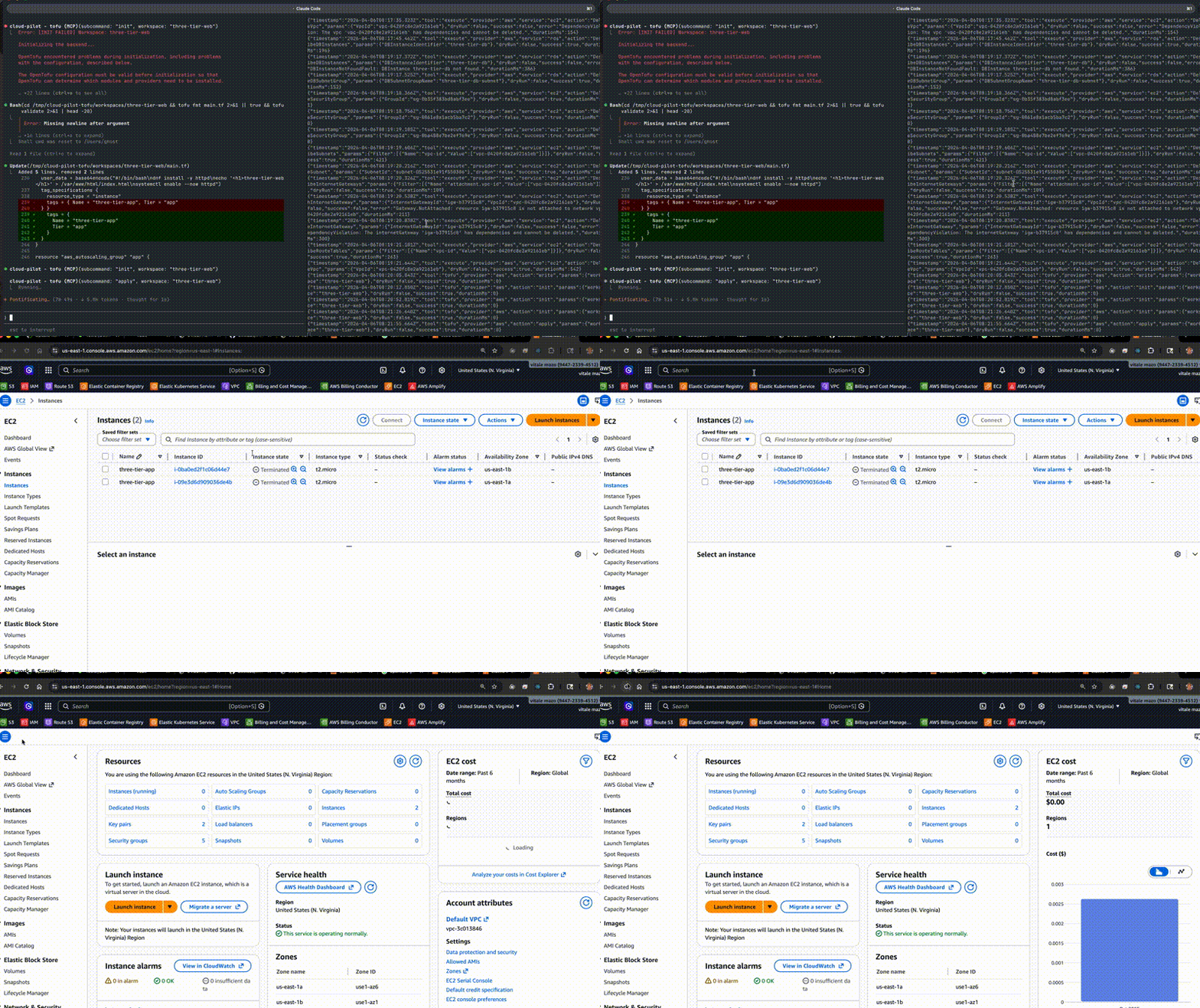
Demo: Three-tier AWS deployment — 29 resources (VPC, ALB, ASG, RDS) deployed and destroyed via the tofu tool.
How it evolved:
v0.1 | v0.2 |
Custom HTTP calls with homegrown SigV4 + XML parser | Native AWS SDK clients, Azure REST pipeline |
Two tools (search + execute) | Three tools (+ OpenTofu lifecycle) |
Stateless — no record of what was created | State-tracked with plan/apply/destroy/rollback |
"Here's what I would call" dry-run | 4-level dry-run: native cloud validation, session gate, impact summaries, rollback plans |
Hardcoded provider versions | Dynamic registry lookup from registry.opentofu.org |
No state persistence | Configurable backends: local, S3, Vault, Consul, PostgreSQL |
When an agent connects, the server delivers a Senior Cloud Platform Engineer persona — complete with engineering principles, provider-specific expertise, safety awareness, and structured workflow prompts — so the agent automatically operates with production-grade cloud architecture and security standards.
Table of Contents
Section | Description |
The Problem | Discovery, execution, and lifecycle — the three gaps in AI cloud management |
How It Works | End-to-end example: three-tier AWS deployment in one conversation |
Cloud Provider Coverage | 4 providers, 1,289 services, 51,900+ operations |
Architecture | System design and component overview |
Built-In Cloud Engineering Persona | Instructions, resources, prompts, configuration |
Why cloud-pilot? | What makes it different — comparison table and use cases |
Agents That Act, Not Advise | How cloud-pilot turns AI from advisor to actor — real deployment example |
Enterprise Integration | ServiceNow, Teams/Slack, and how MCP enables one integration for all clouds |
Infrastructure Lifecycle with OpenTofu | Stateful deployments: plan, apply, destroy, import, drift detection, rollback |
Real-World Use Cases | Landing zones, global WAN, K8s, incident response, cost analysis |
Getting Started | |
Quick Start | Prerequisites, install, and run |
Configure Credentials | Auto-discovery, env vars, Vault, Azure AD |
Run with Docker | Container deployment |
Connect to Your MCP Client | stdio, HTTP, API key auth |
Platform Integration Examples | OpenAI SDK, Cursor, LangChain, custom agents |
Reference | |
Configuration Reference | Full config.yaml schema and env var overrides |
Dynamic API Discovery | Three-tier spec system: catalog, index, full specs |
Safety Model | Sandbox isolation levels, modes, allowlists, audit trail |
HTTP Transport Security | Auth, CORS, rate limiting |
Operations | |
CI/CD Pipeline | Build, test, Docker, catalog refresh |
Project Structure | Source tree walkthrough |
Extending | Add providers, auth backends, deployment targets |
Troubleshooting | Common issues and diagnostic steps |
Related MCP server: mcp-devops-server
The Problem
AI agents managing cloud infrastructure face three compounding problems:
Discovery — Cloud providers expose 51,900+ API operations. Hard-coding tools for each one doesn't scale. Generating hundreds of MCP tools overwhelms the agent's context window.
Execution — Most AI tools generate Terraform files or CLI commands for a human to run. The AI advises but can't act. When something fails at step 12 of 20, the human debugs.
Lifecycle — Creating resources is easy. Tracking what was created, detecting drift, rolling back failures, and tearing down in dependency order — that requires state management the AI doesn't have.
cloud-pilot solves all three with three tools: search (discover APIs at runtime), execute (act on live infrastructure via native SDKs), and tofu (manage stateful lifecycle through OpenTofu with plan/apply/destroy).
How It Works
Quick read: deploy a three-tier architecture in one conversation.
User: "Build a three-tier web app in AWS"

Agent:
  → search("VPC subnets ALB RDS")           # Discover the APIs
  → execute(DescribeVpcs)                    # Check current state
  → tofu registry("aws")                    # Resolve latest provider (v6.39.0)
  → tofu write(hcl: VPC + subnets + ALB     # Write the infrastructure code
      + ASG + RDS — 29 resources)
  → tofu plan                               # Preview: "29 to add, 0 to change"
  → tofu apply                              # Deploy — state tracked
      ✓ VPC created
      ✓ 6 subnets, IGW, NAT GW
      ✓ ALB + target group + listener
      ✓ ASG with 2 instances
      ✓ RDS MySQL — all in dependency order

  → "Done. ALB DNS: three-tier-alb-xxx.elb.amazonaws.com"

--- Later ---

User: "Tear it all down"

  → tofu destroy                             # 29 resources destroyed
      NAT GW → subnets → IGW → VPC          # Correct dependency order
      RDS → DB subnet group → SGs            # State clean
What happened under the hood:
search found the APIs without hardcoded tool definitions
execute queried live state via native AWS SDK (not custom HTTP)
tofu managed the full lifecycle — the agent wrote HCL, OpenTofu handled dependency ordering, state tracking, and teardown
The 4-level dry-run system validated permissions before any mutation
Credentials flowed from Vault → cloud-pilot → OpenTofu, never exposed to the agent
Cloud Provider Coverage
  +-------------------------------------------+
  |          51,900+ API Operations            |
  |                                            |
  |   +----------+  +---------+  +--------+   |
  |   |   AWS    |  |  Azure  |  |  GCP   |   |
  |   | 421 svcs |  | 240+    |  | 305    |   |
  |   | 18,109   |  | 3,157   |  | 12,599 |   |
  |   |   ops    |  |   ops   |  |  ops   |   |
  |   +----------+  +---------+  +--------+   |
  |                                            |
  |              +-----------+                 |
  |              |  Alibaba  |                 |
  |              |  323 svcs |                 |
  |              |  18,058   |                 |
  |              |    ops    |                 |
  |              +-----------+                 |
  +-------------------------------------------+
Provider | Services | Operations | Spec Source | Auth |
AWS | 421 | 18,109 | boto/botocore via jsDelivr CDN | AWS CLI / SDK credential chain -> Native @aws-sdk/client-* |
Azure | 240+ | 3,157 | azure-rest-api-specs via GitHub CDN | Azure CLI / DefaultAzureCredential -> @azure/core-rest-pipeline |
GCP | 305 | 12,599 | Google Discovery API (live) | gcloud CLI / GoogleAuth -> Bearer token |
Alibaba | 323 | 18,058 | Alibaba Cloud API + api-docs.json | aliyun CLI / credential chain -> ACS3-HMAC-SHA256 |
Total | 1,289+ | 51,923 | | |
All services are discovered dynamically — no pre-configuration needed. When a cloud provider launches a new service, it becomes available automatically on the next catalog refresh.
Architecture
                         MCP Protocol (stdio or Streamable HTTP)
                                       |
                         +-------------v--------------+
                         |      cloud-pilot-mcp       |
                         |                            |
    +--------------------+----------------------------+--------------------+
    |                    |                            |                    |
    |  +--------------+  |  +--------------+          |  +--------------+  |
    |  |   Persona    |  |  |    search    |          |  |   Safety     |  |
    |  +--------------+  |  +--------------+          |  |   + Audit    |  |
    |  | Sr. Cloud    |  |  | 51,900+ ops  |          |  +--------------+  |
    |  | Platform     |  |  |              |          |  | read-only    |  |
    |  | Engineer     |  |  | Tier 1:      |          |  | allowlists   |  |
    |  |              |  |  |  Catalog     |          |  | blocklists   |  |
    |  | 8 principles |  |  |  (1,289 svc) |          |  | 4-level      |  |
    |  | 6 prompts    |  |  | Tier 2:      |          |  |  dry-run     |  |
    |  | 4 provider   |  |  |  Op Index    |          |  | audit trail  |  |
    |  |   guides     |  |  | Tier 3:      |          |  | dryRunPolicy |  |
    |  |              |  |  |  Full Spec   |          |  | rate limit   |  |
    |  +--------------+  |  +--------------+          |  +--------------+  |
    |                    |                            |                    |
    |  +--------------+  |  +--------------+          |                    |
    |  |   execute    |  |  |    tofu      |          |                    |
    |  +--------------+  |  +--------------+          |                    |
    |  | VM sandbox   |  |  | OpenTofu     |          |                    |
    |  | Native SDK   |  |  | plan/apply   |          |                    |
    |  | calls        |  |  | destroy      |          |                    |
    |  |              |  |  | import       |          |                    |
    |  | Fast reads,  |  |  | State mgmt   |          |                    |
    |  | ad-hoc       |  |  | Drift detect |          |                    |
    |  | scripts      |  |  | Rollback     |          |                    |
    |  +--------------+  |  +--------------+          |                    |
    +--------------------+----------------------------+--------------------+
                         |    |         |         |
                +--------+    +---+     +---+     +--------+
                |                 |         |              |
           +----v-----+    +-----v---+  +--v-----+  +-----v------+
           |   AWS    |    |  Azure  |  |  GCP   |  |  Alibaba   |
           | Native   |    | ARM     |  | REST   |  | ACS3-HMAC  |
           | SDK v3   |    | Pipeline|  | + Auth |  | + fetch    |
           | 421 svcs |    | 240+    |  | 305    |  | 323 svcs   |
           +----------+    +---------+  +--------+  +------------+
Built-In Cloud Engineering Persona
When any AI agent connects to cloud-pilot-mcp, the server automatically shapes the agent's behavior through four layers:
Server Instructions (always delivered)
On every connection, the server sends MCP instructions that establish the agent as a Senior Cloud Platform Engineer, Security Architect, and DevOps Specialist with:
8 core principles: security-first, Infrastructure as Code, blast radius minimization, defense in depth, cost awareness, operational excellence, Well-Architected Framework, high availability by default
Behavioral standards: search before executing, verify state before modifying, dry-run first for mutating operations, explain reasoning, warn about cost/risk, include monitoring alongside changes
Safety awareness: understand and communicate the current mode (read-only/read-write/full), respect audit trail, use dry-run
The instructions are dynamically tailored to include only the configured providers, their modes, regions, and allowed services.
Provider Expertise (on demand via MCP Resources)
Deep, provider-specific engineering guides (~1,500 words each) are available as MCP resources:
Resource URI | Content |
cloud-pilot://persona/overview
| Full persona document with all principles and provider summary |
cloud-pilot://persona/aws
| VPC/TGW design, IAM roles, GuardDuty/SecurityHub, S3 lifecycle, Graviton, anti-patterns |
cloud-pilot://persona/azure
| Landing Zones, Entra ID/Managed Identity, Virtual WAN, Defender, Policy, PIM |
cloud-pilot://persona/gcp
| Shared VPC, Workload Identity Federation, GKE Autopilot, VPC Service Controls |
cloud-pilot://persona/alibaba
| CEN, RAM/STS, ACK, Security Center, China-specific (ICP, data residency) |
cloud-pilot://safety/{provider}
| Current safety mode, allowed services, blocked actions, audit config |
Agents pull these on demand — they add zero overhead to connections where they aren't needed.
Workflow Prompts (structured multi-step procedures)
Six MCP prompts provide opinionated, multi-step workflows that agents can invoke:
Prompt | What It Does |
landing-zone
| Deploy a complete cloud landing zone: org structure, identity, networking, security baseline, monitoring |
incident-response
| Security incident lifecycle: contain, investigate, eradicate, recover, post-mortem |
cost-optimization
| Full cost audit: idle resources, rightsizing, reserved capacity, storage tiering, network costs |
security-audit
| Comprehensive security review: IAM, network, encryption, logging, compliance, vulnerability management |
migration-assessment
| Workload migration planning: discovery, 6R strategy, target architecture, migration waves, cutover |
well-architected-review
| Well-Architected Framework review across all 6 pillars with provider-native recommendations |
Each prompt accepts a provider argument (dynamically scoped to configured providers) and returns structured guidance that the agent follows step by step using search and execute.
Persona Configuration
The persona is enabled by default. Customize or disable it in config.yaml:
persona:
  enabled: true                 # Set false to disable all persona features
  # instructionsOverride: "..." # Replace default instructions with your own
  # additionalGuidance: "..."   # Append custom policies (e.g., "All resources must be tagged with CostCenter")
  enablePrompts: true           # Set false to disable workflow prompts
  enableResources: true         # Set false to disable persona resources
Or via environment variable: CLOUD_PILOT_PERSONA_ENABLED=false
Why cloud-pilot?
cloud-pilot is a multi-cloud infrastructure lifecycle platform for AI agents. It gives any MCP-compatible AI — Claude, ChatGPT, Cursor, custom bots — the ability to discover, deploy, manage, and roll back cloud infrastructure across AWS, Azure, and GCP with production-grade safety controls.
What makes it different
Capability | Without cloud-pilot | With cloud-pilot |
Deploy infrastructure | AI generates Terraform files for you to run | AI deploys directly via OpenTofu with plan/apply/destroy |
Rollback a failed deploy | Manual cleanup, hope you remember what was created | tofu destroy — state-tracked, dependency-ordered
|
Query live state | Copy-paste CLI commands | execute — scripted multi-step reads in one call
|
Discover APIs | Read documentation | search — 51,900+ operations, discoverable at runtime
|
Find the right provider | Browse registry.opentofu.org manually | tofu registry — latest versions, HCL snippets
|
Safety controls | IAM policies only | Read-only mode + allowlists + 4-level dry-run + audit trail |
Drift detection | Manual terraform plan | Agent runs tofu plan, flags unauthorized changes |
Multi-cloud | Different tools per cloud | One server, one conversation, all clouds |
Credentials | In the AI's config or environment | Isolated — Vault, IAM roles, managed identity. Agent never sees them. |
Who it's for
Platform teams building AI-powered infrastructure management:
You're building a product or internal tool where AI agents manage cloud infrastructure on behalf of users. You need controlled access (not raw admin), an audit trail, and the ability to roll back. cloud-pilot is the control plane between the AI and your cloud accounts.
DevOps teams replacing manual workflows:
Your team manages AWS, Azure, and GCP. Instead of everyone having console access with broad IAM policies, you deploy cloud-pilot behind a chat interface (Teams, Slack, ServiceNow). Engineers ask questions and request changes in natural language. cloud-pilot enforces who can read vs write, validates every mutation with dry-run, and logs every action.
Consulting firms managing client infrastructure:
One MCP server per client, each with Vault-sourced credentials, allowlists scoped to their environment, and separate audit logs. Consultants use whatever AI tool they prefer — all go through cloud-pilot. Client switches providers? Reconfigure, the workflow doesn't change.
Incident response automation:
A PagerDuty alert fires at 3am. An agent connects via cloud-pilot in read-only mode, pulls CloudWatch metrics, checks instance status, grabs CloudTrail events, and posts a triage summary to Slack — with a full audit log. No human needed for initial triage. No risk of the bot making things worse.
CI/CD pipeline intelligence:
An agent in your deployment pipeline uses cloud-pilot to deploy infrastructure via OpenTofu, verify state after deployment, and roll back if something looks wrong. State is tracked in Vault, audit trail feeds into your compliance system.
Agents That Act, Not Advise
Most AI cloud tools generate plans for a human to run. cloud-pilot is the only path where the agent can actually execute, observe results, and react — detecting that a NAT Gateway is still pending, polling until available, then adding the route. Without it, that's a "run this, wait, then run this" conversation with you in the middle.
What this looks like in practice
In a real deployment of a three-tier AWS architecture (VPC, ALB, ASG, RDS), cloud-pilot enabled the agent to:
Live state awareness — discovered the account only had a default VPC, adjusted the entire plan before writing a line of infrastructure
Error recovery — hit a Buffer not defined error in the sandbox, immediately rewrote with a manual base64 encoder, no interruption to the user
Sequential dependencies — NAT Gateway ready → route added → ASG healthy → RDS status check, all chained autonomously in a single execute call
Guardrail enforcement — cloud-pilot blocked bad API calls (wrong parameter casing, out-of-scope services) before they reached the cloud provider
The core value: the AI becomes an actor, not an advisor. cloud-pilot turns "here's a Terraform file, go run it" into an agent that deploys, observes, fixes, and confirms — all in one session.
Enterprise Integration
cloud-pilot speaks MCP (Model Context Protocol), which means any AI platform that supports MCP can leverage it as a cloud control plane. Here's how this works in real enterprise environments:
ServiceNow + cloud-pilot
A ServiceNow Virtual Agent receives an infrastructure request ("provision a staging environment for the payments team"). Instead of routing to a human, the workflow:
ServiceNow creates a change request with approval gates
Once approved, triggers an MCP-connected agent with cloud-pilot
The agent executes the full provisioning — VPC, subnets, security groups, compute, database — using cloud-pilot's execute tool in read-write mode scoped to the staging account
cloud-pilot's audit log feeds back into ServiceNow as the change implementation record
If anything fails, the agent rolls back and updates the ticket with diagnostics
The ServiceNow agent never needs cloud credentials in its config. cloud-pilot handles auth (via Vault, IAM roles, or managed identity), enforces allowlists so the agent can't touch production, and logs every API call for compliance.
Microsoft Teams / Slack + cloud-pilot
An infrastructure bot in Teams receives: "what's the status of our EKS clusters?" The bot connects to cloud-pilot in read-only mode:
User (Teams):  "Why is the staging API slow?"
Bot:           → search("describe EKS cluster")
               → execute(eks:DescribeCluster, ec2:DescribeInstances, cloudwatch:GetMetricData)
               "The staging EKS cluster has 2/3 nodes in NotReady state.
                CPU across the healthy node is at 94%. Recommending a
                node group scale-up. Want me to submit a change request?"
User (Teams):  "Yes"
Bot:           → Creates ServiceNow CR → on approval → execute(eks:UpdateNodegroupConfig)
The same bot works across AWS, Azure, and GCP — one cloud-pilot server, one conversation model. Engineering teams don't need console access, CLI tools, or cloud-specific training. They ask questions in natural language and get answers grounded in live infrastructure state.
Why MCP makes this possible
Traditional integrations require per-cloud, per-service API wrappers. A ServiceNow integration for AWS EC2 is different from one for Azure VMs is different from one for GCP Compute Engine. Each needs custom code, custom auth, custom error handling.
With cloud-pilot as the MCP layer:
One integration point — connect your AI platform to cloud-pilot once, get all clouds
One security model — read-only for chat bots, read-write for approved workflows, full audit trail
One conversation — the agent discovers APIs at runtime, so new cloud services are available without integration updates
One audit log — every action across every cloud, in one place, mapped to the user/ticket/workflow that triggered it
Infrastructure Lifecycle with OpenTofu
cloud-pilot integrates OpenTofu (open-source Terraform) as a third tool, giving AI agents full infrastructure lifecycle management with state tracking, dependency resolution, and rollback.
Why not just use the execute tool?
The execute tool is fast and flexible — perfect for reads, ad-hoc queries, and scripted multi-step operations. But it's stateless. If an agent creates 14 resources across a VPC and something fails on resource #12, there's no record of what was created and no way to roll back.
OpenTofu solves this:
Capability | execute (SDK) | tofu (OpenTofu) |
Speed | Fast (direct API calls) | Slower (plan + apply cycle) |
State tracking | None | Full state file with every resource attribute |
Dependency graph | Manual | Automatic (knows subnets depend on VPC) |
Drift detection | Manual describe calls | tofu plan shows any drift
|
Rollback | Manual (delete in reverse order) | tofu destroy handles dependency order
|
Import existing | N/A | tofu import adopts resources into state
|
Multi-resource changes | Script it yourself | Declarative — describe desired state |
The three-tool workflow
1. search   → "What APIs exist for VPC, subnets, ALB?"
2. execute  → Read current state: "What VPCs exist? What's running?"
3. tofu     → registry (discover providers) → write HCL → init → plan → apply
             → Later: plan (drift check) → destroy (clean rollback)
Example: Deploy and rollback
Agent: "Deploy a three-tier architecture in us-east-1"

→ tofu write (workspace: "prod-web", hcl: VPC + subnets + ALB + ASG + RDS)
→ tofu init
→ tofu plan
    Plan: 14 to add, 0 to change, 0 to destroy.
    + aws_vpc.main
    + aws_subnet.public_1, public_2
    + aws_subnet.private_1, private_2
    + aws_internet_gateway.main
    + aws_nat_gateway.main
    + aws_lb.main
    + aws_autoscaling_group.app
    + aws_db_instance.main
    ...
→ tofu apply
    Apply complete! Resources: 14 added.

--- One week later ---

Agent: "Tear down the prod-web environment"

→ tofu destroy (workspace: "prod-web")
    Destroy complete! Resources: 14 destroyed.
    (NAT Gateway before route tables, subnets before VPC — dependency order)
Example: Import existing resources
Already have infrastructure that wasn't created through cloud-pilot? Import it:
→ tofu write (hcl: resource "aws_vpc" "legacy" { cidr_block = "10.0.0.0/16" })
→ tofu import (resource: "aws_vpc.legacy", id: "vpc-0abc123")
    Import successful!
→ tofu state
    aws_vpc.legacy
→ tofu plan
    No changes. Your infrastructure matches the configuration.
Now that VPC is state-tracked. Future changes go through plan/apply, and destroy handles cleanup.
Example: Drift detection
Agent: "Has anything changed in prod-web since last apply?"

→ tofu plan (workspace: "prod-web")
    Note: Objects have changed outside of OpenTofu
    ~ aws_security_group.web: ingress rules changed
        + ingress rule: 0.0.0.0/0 → port 22 (SSH)

    Someone opened SSH to the world. This was not in the HCL config.
The agent detects unauthorized changes and can either fix them (tofu apply to revert) or update the HCL to match.
Provider Registry Integration
The tofu tool integrates with the OpenTofu Registry to automatically discover providers and their latest versions. No hardcoded version constraints — the agent queries the registry at runtime.
Search for a provider:
→ tofu registry (resource: "aws")
    [REGISTRY] Provider: hashicorp/aws
    Latest version: 6.39.0
    Source: registry.opentofu.org/hashicorp/aws
    Recent versions: 6.39.0, 6.38.0, 6.37.0, ...

    Usage in HCL:
      terraform {
        required_providers {
          aws = {
            source  = "hashicorp/aws"
            version = "~> 6.0"
          }
        }
      }

→ tofu registry (resource: "cloudflare")
    [REGISTRY] Provider: cloudflare/cloudflare
    Latest version: 5.18.0

→ tofu registry (resource: "kubernetes")
    [REGISTRY] Provider: hashicorp/kubernetes
    Latest version: 3.0.1
Automatic version resolution: When the agent writes HCL and runs init, cloud-pilot fetches the latest stable version from the registry for each provider instead of using hardcoded version constraints. This means:
New provider releases are picked up automatically
The agent can work with any provider in the registry, not just a preconfigured set
Common aliases are understood: aws → hashicorp/aws, azure → hashicorp/azurerm, gcp → hashicorp/google, cloudflare → cloudflare/cloudflare, kubernetes → hashicorp/kubernetes
The full workflow becomes: registry (discover provider) → write (HCL) → init (downloads provider) → plan → apply.
Configuration
All OpenTofu settings are configurable via config.yaml or environment variables, so developers can adjust state storage based on where and how their MCP server runs.
tofu:
  enabled: true
  workspacesDir: ~/.cloud-pilot/tofu-workspaces  # Where workspaces and local state live
  binary: tofu                                    # Path to OpenTofu binary
  stateBackend: local                             # local | s3 | vault | http | consul | pg
  timeoutMs: 300000                               # 5 min timeout for long operations
State backends
Choose a backend based on your deployment model:
Local (default) — state files on disk. Simple, no dependencies. Good for single-user or development.
tofu:
  stateBackend: local
  workspacesDir: /persistent/volume/tofu-workspaces  # Must be persistent storage
S3 — state in S3 with optional DynamoDB locking. Best for multi-agent AWS environments.
tofu:
  stateBackend: s3
  stateConfig:
    bucket: my-company-tofu-state
    region: us-east-1
    dynamodbTable: tofu-locks     # Optional: enables state locking
    encrypt: true                 # Optional: encrypt state at rest
Vault — state stored directly in HashiCorp Vault KV v2. cloud-pilot runs an internal proxy that translates between OpenTofu's HTTP backend protocol and Vault's API. No external proxy service needed. State locking is implemented via Vault secrets.
tofu:
  stateBackend: vault
  stateConfig:
    address: https://vault.internal:8200          # Vault server address
    path: secret/data/tofu-state                  # KV v2 path for state storage
Authentication uses cloud-pilot's existing Vault credentials — if you have auth.type: vault configured with AppRole, the same token is reused for state storage. Or set VAULT_TOKEN and VAULT_ADDR environment variables.
How it works internally:
OpenTofu ──HTTP──> cloud-pilot vault proxy (127.0.0.1) ──Vault API──> Vault KV v2
  GET /state/ws    →  GET  /v1/secret/data/tofu-state/ws     (unwrap response)
  POST /state/ws   →  POST /v1/secret/data/tofu-state/ws     (wrap in {data:{}})
  POST /lock/ws    →  POST /v1/secret/data/tofu-state-locks/ws
  DELETE /lock/ws   →  DELETE /v1/secret/data/tofu-state-locks/ws
HTTP — state via any HTTP API. For custom backends that speak the OpenTofu HTTP state protocol.
tofu:
  stateBackend: http
  stateConfig:
    address: https://state-api.internal/v1/state
    username: agent                # Optional: basic auth
    password: secret
Consul — state in Consul KV store with built-in locking.
tofu:
  stateBackend: consul
  stateConfig:
    address: consul.internal:8500
    path: cloud-pilot/tofu-state  # KV path prefix
PostgreSQL — state in a PostgreSQL database. Good for teams with existing Postgres infrastructure.
tofu:
  stateBackend: pg
  stateConfig:
    connStr: postgres://user:pass@db.internal/tofu_state
    schemaName: cloud_pilot       # Optional: schema isolation
Environment variable overrides
All tofu settings can be overridden via environment variables, useful for Docker deployments and CI/CD:
Variable | Overrides | Example |
CLOUD_PILOT_TOFU_ENABLED
| tofu.enabled
| true
|
CLOUD_PILOT_TOFU_WORKSPACES_DIR
| tofu.workspacesDir
| /data/tofu-workspaces
|
CLOUD_PILOT_TOFU_BINARY
| tofu.binary
| /usr/local/bin/tofu
|
CLOUD_PILOT_TOFU_STATE_BACKEND
| tofu.stateBackend
| s3
|
Example Docker deployment with S3 state:
docker run -d \
  -e CLOUD_PILOT_TOFU_ENABLED=true \
  -e CLOUD_PILOT_TOFU_STATE_BACKEND=s3 \
  -e CLOUD_PILOT_TOFU_WORKSPACES_DIR=/data/workspaces \
  -v tofu-workspaces:/data/workspaces \
  ghcr.io/vitalemazo/cloud-pilot-mcp:latest
Credentials are automatically injected from cloud-pilot's auth provider (Vault, env, Azure AD) into the OpenTofu process. No separate credential configuration needed.
When to use which tool
Scenario | Tool | Why |
"What instances are running?" | execute
| Fast read, no state needed |
"What APIs does EKS have?" | search
| API discovery |
"What's the latest Cloudflare provider?" | tofu registry
| Provider discovery from OpenTofu registry |
"Create a VPC with 6 subnets" | tofu
| Stateful, rollbackable |
"Check CloudWatch metrics" | execute
| Read-only, ad-hoc |
"Deploy a full environment" | tofu
| Complex, needs dependency ordering |
"Emergency: scale up ASG" | execute
| Fast, single API call |
"Tear down staging" | tofu
| Clean destroy in dependency order |
"What changed since last deploy?" | tofu plan
| Drift detection |
Real-World Use Cases
The following examples show what agents can accomplish through cloud-pilot's three-tool pattern — discovering APIs, executing against live state, and managing stateful infrastructure lifecycle in a single conversation.
Deploy an Azure Landing Zone
An agent can discover and orchestrate calls across 15+ Azure resource providers in a single conversation:
Microsoft.Management — create management group hierarchy
Microsoft.Authorization — assign RBAC roles and Azure Policies
Microsoft.Network — deploy hub VNet, Azure Firewall, VPN Gateway
Microsoft.Security — enable Defender for Cloud
Microsoft.Insights — configure diagnostic settings and alerts
Microsoft.KeyVault — provision Key Vault with access policies
Build a Global WAN on AWS
Create a multi-region Transit Gateway mesh with Direct Connect:
ec2:CreateTransitGateway — hub in each region
ec2:CreateTransitGatewayPeeringAttachment — cross-region peering
directconnect:CreateConnection — on-premises connectivity
networkmanager:CreateGlobalNetwork — unified management
All 84 Transit Gateway operations and all Direct Connect operations are discoverable without pre-configuration.
Multi-Cloud Kubernetes Management
Manage clusters across all four providers in one conversation:
AWS: eks:CreateCluster, eks:CreateNodegroup
Azure: ContainerService:ManagedClusters_CreateOrUpdate
GCP: container.projects.zones.clusters.create
Alibaba: CS:CreateCluster, CS:DescribeClusterDetail
Incident Response Automation
guardduty:ListFindings — pull active threats (AWS)
cloudtrail:LookupEvents — trace the activity (AWS)
Microsoft.Security:Alerts_List — Defender alerts (Azure)
securitycenter.organizations.sources.findings.list — Security Command Center (GCP)
Cost Analysis Across Clouds
ce:GetCostAndUsage — AWS spend
Microsoft.CostManagement:Query_Usage — Azure spend
cloudbilling.billingAccounts.projects.list — GCP billing
BssOpenApi:QueryBill — Alibaba billing
Quick Start
Prerequisites
Install and Run
git clone https://github.com/vitalemazo/cloud-pilot-mcp.git
cd cloud-pilot-mcp
npm install
npm run build
Optionally pre-download common specs for faster first searches:
Configure Credentials
Credentials are discovered automatically using each cloud provider's native SDK credential chain. If you have a CLI installed and authenticated, it just works — no .env file needed.
Provider | Auto-Discovery Sources (checked in order) |
AWS | Environment vars -> ~/.aws/credentials -> ~/.aws/config (profiles/SSO) -> IMDS/ECS container role |
Azure | Environment vars -> az login session -> Managed Identity -> VS Code / PowerShell |
GCP | Environment vars -> gcloud auth session (~/.config/gcloud) -> GOOGLE_APPLICATION_CREDENTIALS -> metadata server |
Alibaba | Environment vars -> ~/.alibabacloud/credentials -> ~/.aliyun/config.json -> ECS RAM role |
The fastest way to get started:
# Pick the providers you need:
aws configure          # or: aws sso login --profile my-profile
az login               # interactive browser login
gcloud auth application-default login
aliyun configure       # access key mode
If you prefer not to use CLI-based auth, copy .env.example to .env and set credentials directly:
# AWS
AWS_ACCESS_KEY_ID=AKIA...
AWS_SECRET_ACCESS_KEY=...
AWS_REGION=us-east-1

# Azure
AZURE_TENANT_ID=...
AZURE_CLIENT_ID=...
AZURE_CLIENT_SECRET=...
AZURE_SUBSCRIPTION_ID=...

# GCP
GOOGLE_APPLICATION_CREDENTIALS=/path/to/service-account.json
GCP_PROJECT_ID=...

# Alibaba
ALIBABA_CLOUD_ACCESS_KEY_ID=...
ALIBABA_CLOUD_ACCESS_KEY_SECRET=...
ALIBABA_CLOUD_REGION=cn-hangzhou
Vault Integration
For production deployments, credentials can be sourced from HashiCorp Vault via AppRole auth. This keeps secrets out of config files and environment variables.
Create a secret for each cloud provider at secret/cloud-pilot/{provider}. The server reads from {secretPath}/{provider} and maps fields automatically.
AWS example:
vault kv put secret/cloud-pilot/aws \
  access_key_id="AKIA..." \
  secret_access_key="..." \
  region="us-east-1"
Expected key names per provider:
Provider | Required Keys | Optional Keys |
AWS | access_key_id, secret_access_key
| session_token, region (default: us-east-1)
|
Azure | tenant_id, client_id, client_secret
| subscription_id
|
GCP | access_token, project_id
| |
Alibaba | access_key_id, access_key_secret
| security_token, region (default: cn-hangzhou)
|
Create a Vault AppRole with read access to the secret path:
# Enable AppRole auth (if not already)
vault auth enable approle

# Create a policy
vault policy write cloud-pilot - <<EOF
path "secret/data/cloud-pilot/*" {
  capabilities = ["read"]
}
EOF

# Create the AppRole
vault write auth/approle/role/cloud-pilot \
  token_policies="cloud-pilot" \
  token_ttl=1h \
  token_max_ttl=4h

# Get the role ID and secret ID
vault read auth/approle/role/cloud-pilot/role-id
vault write -f auth/approle/role/cloud-pilot/secret-id
Set auth.type: vault in config.yaml:
auth:
  type: vault
  vault:
    address: https://vault.example.com
    roleId: "905670cc-..."       # or VAULT_ROLE_ID env var
    secretId: "6e84df5b-..."     # or VAULT_SECRET_ID env var
    secretPath: secret/data/cloud-pilot   # KV v2 API path (includes data/)
Important: For KV v2 secret engines (the default), secretPath must include data/ in the path. The server reads via the HTTP API directly, which requires the full KV v2 path: secret/data/cloud-pilot, not secret/cloud-pilot. The vault kv CLI handles this prefix automatically, but the HTTP API does not.
Or configure via environment variables:
export VAULT_ADDR="https://vault.example.com"
export VAULT_ROLE_ID="905670cc-..."
export VAULT_SECRET_ID="6e84df5b-..."
Test the connection before starting the server:
# Verify AppRole login works
vault write auth/approle/login \
  role_id="$VAULT_ROLE_ID" \
  secret_id="$VAULT_SECRET_ID"

# Verify secret is readable
vault kv get secret/cloud-pilot/aws
Resilient Provider Initialization
Each provider initializes independently. If one provider's credentials are unavailable (e.g., no AWS CLI configured), the server starts with the remaining providers instead of failing entirely. Check the startup logs to see which providers loaded:
[cloud-pilot] Provider "aws" initialized (read-only, region: us-east-1)
[cloud-pilot] WARNING: Failed to initialize provider "azure": Azure credentials not found...
[cloud-pilot] Providers: aws
Run with Docker
docker pull ghcr.io/vitalemazo/cloud-pilot-mcp:latest
docker run -p 8400:8400 --env-file .env ghcr.io/vitalemazo/cloud-pilot-mcp:latest
Or with docker-compose:
Connect to Your MCP Client
The server speaks standard MCP protocol and works with any compatible client.
stdio (local development)
{
  "mcpServers": {
    "cloud-pilot": {
      "command": "node",
      "args": ["dist/index.js"],
      "cwd": "/path/to/cloud-pilot-mcp"
    }
  }
}
Streamable HTTP (remote server)
{
  "mcpServers": {
    "cloud-pilot": {
      "type": "http",
      "url": "http://your-server:8400/mcp"
    }
  }
}
With API key auth
{
  "mcpServers": {
    "cloud-pilot": {
      "type": "http",
      "url": "http://your-server:8400/mcp",
      "headers": {
        "Authorization": "Bearer your-api-key"
      }
    }
  }
}
Platform Integration Examples
from agents import Agent
from agents.mcp import MCPServerStdio, MCPServerStreamableHttp

cloud_pilot = MCPServerStreamableHttp(url="http://your-server:8400/mcp")

agent = Agent(
    name="cloud-ops",
    instructions="You manage cloud infrastructure using cloud-pilot tools.",
    mcp_servers=[cloud_pilot]
)
All use the same mcpServers JSON format. Config locations:
Cursor: ~/.cursor/mcp.json
Windsurf: ~/.codeium/windsurf/mcp_config.json
Cline: VS Code settings or cline_mcp_settings.json
from langchain_mcp_adapters.client import MultiServerMCPClient
from langgraph.prebuilt import create_react_agent

async with MultiServerMCPClient({
    "cloud-pilot": {"transport": "streamable_http", "url": "http://your-server:8400/mcp"}
}) as client:
    tools = client.get_tools()
    agent = create_react_agent(llm, tools)
import { Client } from "@modelcontextprotocol/sdk/client/index.js";
import { StreamableHTTPClientTransport } from "@modelcontextprotocol/sdk/client/streamableHttp.js";

const client = new Client({ name: "my-agent", version: "1.0.0" });
await client.connect(new StreamableHTTPClientTransport(new URL("http://your-server:8400/mcp")));

const { tools } = await client.listTools();
const result = await client.callTool({ name: "search", arguments: { provider: "aws", query: "create vpc" } });
from mcp.client.streamable_http import streamablehttp_client
from mcp import ClientSession

async with streamablehttp_client(url="http://your-server:8400/mcp") as (r, w, _):
    async with ClientSession(r, w) as session:
        await session.initialize()
        tools = await session.list_tools()
        result = await session.call_tool("search", {"provider": "gcp", "query": "compute instances list"})
Configuration Reference
config.yaml
transport: stdio             # stdio | http

http:
  port: 8400
  host: "127.0.0.1"
  apiKey: ""                 # Optional: require Bearer/x-api-key auth
  corsOrigins: ["*"]         # Allowed CORS origins
  rateLimitPerMinute: 60     # Max requests per IP per minute

auth:
  type: env                  # env (auto-discovers from CLIs/SDK chains) | vault | azure-ad

providers:
  - type: aws
    region: us-east-1
    mode: read-only          # read-only | read-write | full
    dryRunPolicy: optional   # enforced | optional | disabled
    allowedServices: []      # Empty = all services
    blockedActions: []

  - type: azure
    region: eastus
    mode: read-only
    dryRunPolicy: optional
    subscriptionId: "..."

  - type: gcp
    region: us-central1
    mode: read-only
    dryRunPolicy: optional

  - type: alibaba
    region: cn-hangzhou
    mode: read-only
    dryRunPolicy: optional

specs:
  dynamic: true              # Enable runtime API discovery
  cacheDir: "~/.cloud-pilot/cache"
  catalogTtlDays: 7
  specTtlDays: 30
  maxMemorySpecs: 10
  offline: false

sandbox:
  memoryLimitMB: 128
  timeoutMs: 30000

audit:
  type: file                 # file | console
  path: ./audit.json

persona:
  enabled: true              # Enable Sr. Cloud Platform Engineer persona
  # instructionsOverride: "" # Replace default instructions entirely
  # additionalGuidance: ""   # Append custom policies to default instructions
  enablePrompts: true        # Expose workflow prompts (landing-zone, security-audit, etc.)
  enableResources: true      # Expose persona resources (cloud-pilot://persona/*)

tofu:
  enabled: false             # Enable OpenTofu infrastructure lifecycle tool
  workspacesDir: /data/tofu-workspaces  # Persistent workspace storage
  binary: tofu               # Path to OpenTofu binary
  stateBackend: local        # local | s3 | vault | http | consul | pg
  # stateConfig:             # Backend-specific config
  #   bucket: my-state-bucket  # For s3 backend
  #   region: us-east-1
  timeoutMs: 300000          # 5 minute timeout for plan/apply
Environment Variable Overrides
Variable | Overrides |
TRANSPORT
| transport
|
HTTP_PORT / HTTP_HOST / HTTP_API_KEY
| http.*
|
AUTH_TYPE
| auth.type
|
AWS_ACCESS_KEY_ID / AWS_SECRET_ACCESS_KEY / AWS_REGION
| AWS credentials |
AZURE_TENANT_ID / AZURE_CLIENT_ID / AZURE_CLIENT_SECRET / AZURE_SUBSCRIPTION_ID
| Azure credentials |
GOOGLE_APPLICATION_CREDENTIALS / GCP_PROJECT_ID
| GCP credentials |
ALIBABA_CLOUD_ACCESS_KEY_ID / ALIBABA_CLOUD_ACCESS_KEY_SECRET / ALIBABA_CLOUD_REGION
| Alibaba credentials |
CLOUD_PILOT_SPECS_DYNAMIC / CLOUD_PILOT_SPECS_OFFLINE
| specs.*
|
CLOUD_PILOT_TOFU_ENABLED
| tofu.enabled
|
CLOUD_PILOT_TOFU_WORKSPACES_DIR
| tofu.workspacesDir
|
CLOUD_PILOT_TOFU_BINARY
| tofu.binary
|
CLOUD_PILOT_TOFU_STATE_BACKEND
| tofu.stateBackend
|
CLOUD_PILOT_PERSONA_ENABLED
| persona.enabled (set false to disable persona)
|
GITHUB_TOKEN
| Increases GitHub API rate limit (60/hr -> 5,000/hr) |
Dynamic API Discovery
The server discovers APIs at runtime using a three-tier system:
  Request: "create transit gateway"
       |
       v
  +------------------+     +--------------------+     +------------------+
  |  Tier 1: Catalog |---->|  Tier 2: Op Index  |---->|  Tier 3: Spec   |
  +------------------+     +--------------------+     +------------------+
  | 1,289 services   |     | 51,900+ operations |     | Full params,    |
  | Names + metadata |     | Keyword-searchable |     | response types, |
  | Cached 7 days    |     | Built progressively|     | documentation   |
  | 1 API call/init  |     | Cached to disk     |     | Fetched on-demand|
  +------------------+     +--------------------+     | Cached 30 days  |
                                                      | LRU mem (10)    |
                                                      +------------------+
Tier 1: Service Catalog
On startup (or when the 7-day cache expires), the server fetches the complete service list:
AWS: GitHub Git Trees API on boto/botocore — 1 API call
Azure: GitHub Git Trees API on azure-rest-api-specs — 2 API calls
GCP: Google Discovery API at googleapis.com/discovery/v1/apis — 1 API call
Alibaba: Product metadata at api.aliyun.com/meta/v1/products — 1 API call
Catalogs are cached to disk and ship as bundled fallbacks for offline use.
Tier 2: Operation Index
A keyword-searchable index of every operation across all services (51,900+ total). Built progressively on first search — pre-downloaded specs indexed immediately, remaining services fetched from CDN in the background (~2-5 minutes). Once built, the index is cached to disk and loads instantly on subsequent startups.
Tier 3: Full Specs
Complete API specifications with parameter schemas, response types, and documentation. Fetched on demand from CDN when a search match needs hydration. Cached to disk (30-day TTL) and held in an LRU memory cache (max 10 specs).
Self-Updating
When cloud providers launch new services, specs appear in their repositories within days. The server picks them up automatically on the next catalog refresh. A monthly GitHub Action also refreshes the bundled fallback catalogs.
Safety Model
Safety in cloud-pilot operates at multiple layers — from credential isolation and execution sandboxing, through dry-run validation and state management, to audit trails and policy enforcement. Every layer is configurable per provider and per deployment.
  +----------------------------------------------------------------------+
  |                        Safety Layers                                  |
  |                                                                       |
  |   Credentials         Execute Sandbox        OpenTofu                 |
  |  +---------------+   +------------------+   +-------------------+     |
  |  | Vault AppRole |   | sdk.request()    |   | tofu plan         |     |
  |  | Env vars      |   | bridge only      |   |   (preview first) |     |
  |  | Azure AD      |   |                  |   | tofu apply        |     |
  |  | IAM roles     |   | No fs / no net   |   |   (state tracked) |     |
  |  |               |   | No process access|   | tofu destroy      |     |
  |  | Never exposed |   | Dry-run gate     |   |   (dependency     |     |
  |  | to agent      |   | Impact warnings  |   |    order)         |     |
  |  +---------------+   +------------------+   +-------------------+     |
  |                                                                       |
  |   Policy                 Audit                  State                  |
  |  +---------------+   +------------------+   +-------------------+     |
  |  | read-only     |   | Every API call   |   | Vault backend     |     |
  |  | allowlists    |   | logged with      |   | S3 + DynamoDB     |     |
  |  | blocklists    |   | timestamp, params|   | Consul / PG       |     |
  |  | dryRunPolicy  |   | success/failure  |   | Drift detection   |     |
  |  +---------------+   +------------------+   +-------------------+     |
  +----------------------------------------------------------------------+
Control | How It Works |
Credential isolation | Credentials live in the host process (Vault, env, Azure AD). The sandbox and agent never see them. OpenTofu gets credentials injected per-execution. |
Read-only mode | Blocks mutating operations at the provider level. Default for all providers. |
Service allowlist | Only configured services can be called. Empty = all allowed. |
Action blocklist | Specific dangerous operations permanently blocked. |
4-level dry-run | Native cloud validation (AWS DryRun), session-enforced gate, impact summaries with cost warnings, rollback plans. Configurable per provider via dryRunPolicy. |
OpenTofu state | All infrastructure changes tracked in state files. Enables rollback, drift detection, and dependency-ordered teardown. State stored in Vault, S3, or other persistent backends. |
Audit trail | Every search, execute, and tofu operation logged with timestamp, service, action, params, success/failure, duration. Persisted to file or external systems. |
Sandbox isolation | Execute tool runs in a VM sandbox with no filesystem, network, or process access. Upgradable to container or MicroVM isolation for untrusted agents. |
Safety Modes
providers:
  - type: aws
    mode: read-only      # Default. Only Describe/Get/List operations allowed.
    # mode: read-write   # Allows Create/Update/Put. Still respects blocklist.
    # mode: full         # No restrictions. Use with caution.
Dry-Run System
cloud-pilot includes a 4-level dry-run system that validates infrastructure changes before they happen. The behavior is configurable per provider via the dryRunPolicy setting.
Configuration
providers:
  - type: aws
    mode: read-write
    dryRunPolicy: enforced    # enforced | optional | disabled
Policy | Behavior | Use Case |
enforced
| Mutating calls are rejected unless a matching dryRun: true call was made first in the same session. The server enforces this — the agent cannot skip it. | Interactive sessions (Claude Code, Cursor, Teams bots with human in the loop) |
optional (default)
| Dry-run is available and produces full validation/impact output, but the agent can execute without it. | Approved automation (ServiceNow post-approval workflows, CI/CD pipelines where the approval gate IS the safety check) |
disabled
| Dry-run returns basic call info with no cloud-side validation, no impact summary, and no session tracking. Zero overhead. | Read-only monitoring bots, fully trusted automation |
The 4 Levels
Level 1 — Native cloud provider validation
For AWS EC2 operations, cloud-pilot sends the actual API call with DryRun=true to AWS. AWS validates IAM permissions, resource quotas, CIDR conflicts, and other constraints — returning success or a specific failure reason — without creating any resources. Non-EC2 services get client-side validation (command exists, service is allowed).
DRY RUN: CreateVpc
  validation: { validated: true, validationSource: "aws-native" }
Level 2 — Session-enforced gate (requires dryRunPolicy: enforced)
Every mutating operation (Create, Delete, Update, Attach, etc.) must be dry-run'd before the real call. The server tracks a hash of each (service, action, params) tuple that has been dry-run'd in the session. If a real call doesn't have a matching dry-run, it's rejected:
ERROR: Mutating action "CreateVpc" requires a dry-run first (dryRunPolicy: enforced).
       Call execute with dryRun: true before executing this operation.
Level 3 — Impact summary
Every dry-run response includes a human-readable impact analysis:
impact: {
  description: "Create Vpc on ec2",
  actionType: "create",
  reversible: true,
  reverseAction: "DeleteVpc",
  warnings: []
}
For cost-incurring resources, warnings are included:
"NAT Gateway incurs charges (~$32/mo + data processing)"
"Application Load Balancer incurs charges (~$16/mo + LCU)"
"This action may not be reversible" (for deletes)
Level 4 — Session changeset and rollback plan
cloud-pilot tracks every resource created or modified during the session, extracts resource IDs from responses, and maintains a reverse-order rollback plan:
Session resources:
  + ec2:CreateVpc vpc-0abc123 (Vpc)
  + ec2:CreateSubnet subnet-0def456 (Subnet)
  + ec2:CreateInternetGateway igw-0ghi789 (InternetGateway)

Rollback plan:
  1. ec2:DeleteInternetGateway (igw-0ghi789)
  2. ec2:DeleteSubnet (subnet-0def456)
  3. ec2:DeleteVpc (vpc-0abc123)
If a deployment fails mid-way, the rollback plan shows exactly what to clean up, in the correct dependency order.
Example: ServiceNow vs Claude Code
A ServiceNow workflow that's already been through change management approval:
# ServiceNow integration config
providers:
  - type: aws
    mode: read-write
    dryRunPolicy: optional    # Approval gate is the safety check
An interactive Claude Code session where a human reviews each step:
# Developer config
providers:
  - type: aws
    mode: read-write
    dryRunPolicy: enforced    # Force dry-run before every mutation
A read-only monitoring bot in Slack:
# Monitoring bot config
providers:
  - type: aws
    mode: read-only
    dryRunPolicy: disabled    # Read-only, no mutations possible
Sandbox Isolation Levels
cloud-pilot ships with a Node.js vm sandbox — a V8 context with no access to Node.js APIs. This provides credential isolation and is suitable for development, internal tools, and trusted AI agent workloads.
For production deployments where untrusted users or third-party agents submit code, the sandbox should be upgraded to a hardened isolation layer. The executeInSandbox interface is designed for this — swap the implementation, everything else stays the same.
Isolation Level | Technology | Platform | Use Case |
Soft sandbox (default) | Node.js vm.createContext() | Any (macOS, Linux, Windows) | Development, internal tools, trusted AI agents |
Container isolation | Docker / Podman | Any | Multi-tenant SaaS, customer-submitted code |
MicroVM isolation | Firecracker | Linux (KVM) | High-security, per-execution throwaway VMs (what AWS Lambda uses) |
Permission-based | Deno | Any (macOS, Linux, Windows) | Fine-grained permission control (--allow-net, --allow-read) |
To upgrade, replace src/sandbox/runtime.ts with an implementation that spins up a container or microVM, injects the code and bridge, and returns the result. The interface is a single function:
executeInSandbox(code: string, bridge: RequestBridge, options: SandboxOptions): Promise<SandboxResult>
HTTP Transport Security
When running as a Streamable HTTP service, the server includes:
Feature | Details |
API key auth | Bearer token or x-api-key header. Optional — set HTTP_API_KEY to enable. |
CORS | Configurable allowed origins. Preflight handling. MCP session headers exposed. |
Rate limiting | Sliding window per client IP. Default 60 req/min, configurable. |
Request logging | Every request logged: status code, method, URL, duration, client IP. |
Health endpoint | GET /health returns provider status and uptime. Bypasses auth for monitoring.
|
CI/CD Pipeline
Every push to main triggers an automated pipeline:
  Push to main
       |
       +---> CI --------> Docker ---------> Registry
       |     |             |                  |
       |     typecheck     tests pass?        ghcr.io/vitalemazo/
       |     build         |                  cloud-pilot-mcp
       |     unit tests    build image        :latest :main :sha
       |     smoke test    push to GHCR
       |                   verify container
       |
       +---> Monthly: refresh bundled API catalogs (GitHub Action)
CI gate: Docker image is only built after all tests pass
Image: ghcr.io/vitalemazo/cloud-pilot-mcp:latest
Tags: :latest, :main, :sha (short commit hash)
Cache: GitHub Actions layer cache for fast rebuilds
Verify: Post-push pulls and runs the container to confirm it starts
Project Structure
src/
+-- index.ts                     # Entrypoint: config, wiring, HTTP server with auth/CORS/rate limiting
+-- server.ts                    # MCP server: tools, persona, resources, prompts
+-- config.ts                    # YAML + env config loader with Zod validation
|
+-- interfaces/                  # Pluggable contracts
|   +-- auth.ts                  #   AuthProvider: getCredentials(), isExpired()
|   +-- cloud-provider.ts        #   CloudProvider: searchSpec(), call(), listServices()
|   +-- audit.ts                 #   AuditLogger: log(), query()
|
+-- tools/
|   +-- search.ts                # search tool: spec discovery, formatted results
|   +-- execute.ts               # execute tool: sandbox orchestration, dry-run
|
+-- specs/                       # Dynamic API discovery system
|   +-- types.ts                 #   CatalogEntry, OperationIndexEntry, SpecsConfig
|   +-- dynamic-spec-index.ts    #   Three-tier lazy-loading spec index (all providers)
|   +-- spec-fetcher.ts          #   GitHub Trees API + CDN + Google Discovery + Alibaba API
|   +-- spec-cache.ts            #   Disk cache with TTL-based expiration
|   +-- operation-index.ts       #   Cross-service keyword search (all provider extractors)
|   +-- lru-cache.ts             #   In-memory LRU eviction for full specs
|
+-- providers/
|   +-- aws/
|   |   +-- provider.ts          #   SigV4 calls, mutating-prefix safety
|   |   +-- specs.ts             #   Botocore JSON parser
|   |   +-- signer.ts            #   AWS Signature Version 4
|   +-- azure/
|   |   +-- provider.ts          #   ARM REST calls, HTTP-method safety
|   |   +-- specs.ts             #   Swagger/OpenAPI parser
|   +-- gcp/
|   |   +-- provider.ts          #   Google REST calls, HTTP-method safety
|   |   +-- specs.ts             #   Google Discovery Document parser
|   +-- alibaba/
|       +-- provider.ts          #   Alibaba RPC calls, mutating-prefix safety
|       +-- signer.ts            #   ACS3-HMAC-SHA256
|
+-- persona/                     # Cloud engineering persona system
|   +-- index.ts                 #   Barrel export
|   +-- instructions.ts          #   Dynamic MCP instructions builder (provider-aware)
|   +-- provider-profiles.ts     #   Deep expertise docs: AWS, Azure, GCP, Alibaba
|   +-- resources.ts             #   MCP resources: cloud-pilot://persona/*, cloud-pilot://safety/*
|   +-- prompts.ts               #   6 workflow prompts: landing-zone, incident-response, etc.
|
+-- auth/
|   +-- env.ts                   #   Auto-discovery credential chain (all CLIs/SDKs)
|   +-- vault.ts                 #   HashiCorp Vault AppRole (all 4 providers)
|   +-- azure-ad.ts              #   Azure AD OAuth2 client credentials
|
+-- audit/
|   +-- file.ts                  #   Append-only JSON audit log
|
+-- sandbox/
    +-- runtime.ts               #   QuickJS WASM sandbox with timeout + memory limits
    +-- api-bridge.ts            #   sdk.request() bridge: connects sandbox to providers

scripts/
+-- download-specs.sh            # Pre-download common specs for faster cold start
+-- build-catalogs.ts            # Generate bundled fallback catalogs

data/
+-- aws-catalog.json             # Bundled: 421 AWS services
+-- azure-catalog.json           # Bundled: 240+ Azure providers
+-- gcp-catalog.json             # Bundled: 305 GCP services

test/
+-- lru-cache.test.ts            # LRU cache unit tests
+-- operation-index.test.ts      # Operation index unit tests

.github/workflows/
+-- ci.yml                       # Typecheck, build, tests, smoke test
+-- docker.yml                   # Tests gate -> Docker build -> GHCR push -> verify
+-- update-catalogs.yml          # Monthly catalog refresh
Extending
Adding a New Cloud Provider
Create src/providers/{name}/provider.ts implementing CloudProvider
Create src/providers/{name}/specs.ts for the provider's spec format (optional)
If the provider has a custom signing algorithm, add src/providers/{name}/signer.ts
Add catalog fetching to src/specs/spec-fetcher.ts
Add operation extraction to src/specs/operation-index.ts
Add the provider type to src/config.ts and wire in src/index.ts
Adding a New Auth Backend
Create src/auth/{name}.ts implementing AuthProvider
Add the type to the config schema
Wire it in buildAuth() in src/index.ts
Deployment Targets
Environment | Transport | Auth | Notes |
Local dev | stdio | env | MCP client spawns as subprocess |
Docker on a server | Streamable HTTP | Vault / env | Persistent service, multi-client |
Azure Foundry | Streamable HTTP | Azure AD / Managed Identity | Native Azure auth |
AWS ECS/Lambda | Streamable HTTP | IAM Role | Native AWS auth |
Kubernetes | Streamable HTTP | Vault / Workload Identity | Sidecar or standalone pod |
Troubleshooting
"No providers are currently configured"
This is the most common issue. The server started but no cloud providers initialized successfully. Provider failures are non-fatal — the server logs a warning to stderr and continues without the failed provider.
Check the logs. The server logs to stderr. Look for lines like:
[cloud-pilot] WARNING: Failed to initialize provider "aws": <reason>
Common causes:
1. Credentials not found or invalid
env auth: Verify your CLI is authenticated (aws sts get-caller-identity, az account show, etc.)
vault auth: Verify AppRole login works and the secret path is correct (see Vault Integration)
Expired tokens: Vault tokens and cloud provider sessions expire. Re-authenticate and restart the server.
2. Config file not found
The server looks for config in this order: $CLOUD_PILOT_CONFIG env var, config.local.yaml, config.yaml — all relative to the working directory. When an MCP client spawns the server as a subprocess, the working directory may not be the project root.
Fix: The server automatically resolves its project root from the script location, but if you've moved dist/index.js or are running from a symlink, set the config path explicitly:
export CLOUD_PILOT_CONFIG=/absolute/path/to/config.yaml
Or in your MCP client config:
{
  "mcpServers": {
    "cloud-pilot": {
      "command": "node",
      "args": ["/path/to/cloud-pilot-mcp/dist/index.js"],
      "env": {
        "CLOUD_PILOT_CONFIG": "/path/to/cloud-pilot-mcp/config.yaml"
      }
    }
  }
}
3. Vault secretPath missing data/ prefix
If using Vault KV v2 (the default since Vault 1.1), the HTTP API path must include /data/:
Vault CLI command | HTTP API path (for secretPath) |
vault kv get secret/cloud-pilot/aws
| secret/data/cloud-pilot
|
vault kv get kv/myapp/aws
| kv/data/myapp
|
The vault kv CLI adds the /data/ prefix automatically. The server's Vault client uses the HTTP API directly, so you must include it.
4. Vault secret key naming mismatch
The server expects specific key names in each Vault secret. If your existing secrets use different names (e.g., access_key instead of access_key_id), the credentials will be undefined and the provider will fail.
See the expected key names table and verify your secrets match:
vault kv get -format=json secret/cloud-pilot/aws | jq '.data.data | keys'
# Should output: ["access_key_id", "region", "secret_access_key"]
Provider initialized but search returns no results
The operation index builds progressively in the background after first startup. If you search immediately after a cold start, results may be limited. Watch stderr for:
[cloud-pilot] Starting background operation index build for aws...
[cloud-pilot] Background index build complete for aws
Pre-download specs for faster cold starts:
Testing provider connectivity
Verify credentials work end-to-end before debugging the MCP layer:
# Direct test (from the project directory)
node -e "
  const { loadConfig } = await import('./dist/config.js');
  const { VaultAuthProvider } = await import('./dist/auth/vault.js');
  const config = loadConfig();
  const auth = new VaultAuthProvider(config.auth.vault);
  const creds = await auth.getCredentials('aws');
  console.log('Keys:', Object.keys(creds.aws));
  console.log('Has accessKeyId:', !!creds.aws.accessKeyId);
  console.log('Region:', creds.aws.region);
"
For env auth, verify the CLI works:
aws sts get-caller-identity   # AWS
az account show               # Azure
gcloud auth print-access-token # GCP
Author
Vitale Mazo — github.com/vitalemazo
Sole author and copyright holder. All intellectual property rights, including the search-and-execute pattern for dynamic cloud API discovery via sandboxed execution, are retained by the author.
License
MIT License. Copyright (c) 2026 Vitale Mazo. All rights reserved.
See LICENSE for full terms. The MIT license grants permission to use, modify, and distribute this software, but does not transfer copyright or patent rights.