A
licenseNot graded
qualityD
maintenanceA Model Context Protocol server that integrates with Linear's issue tracking system, allowing LLMs to create, update, search, and comment on Linear issues through natural language interactions.
348
MIT

問題追跡とプロジェクト管理のためのツールを提供する、Linear 用の Model Context Protocol (MCP) サーバー。
リニアセキュリティ設定に移動して、API キーを作成します。
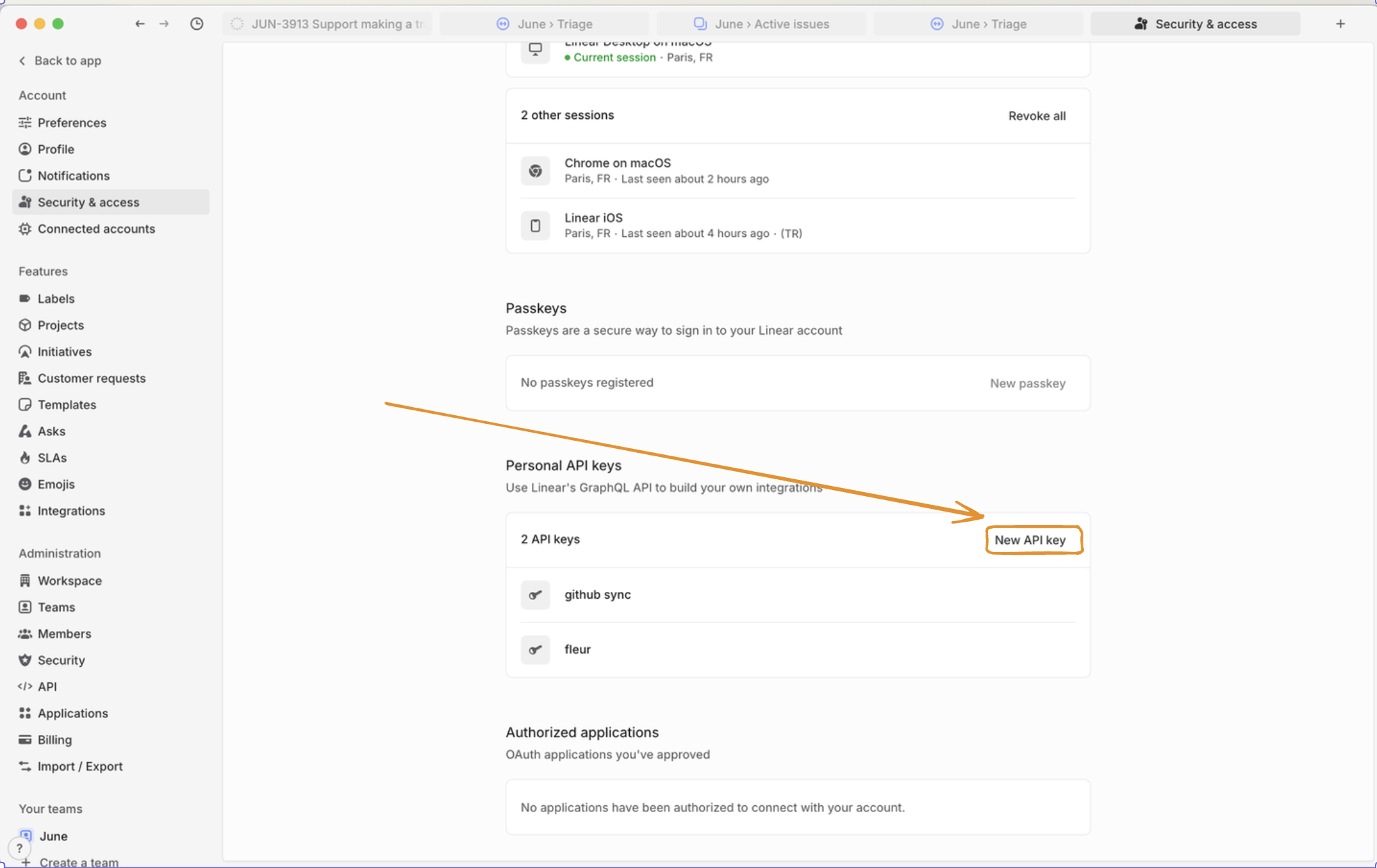
次に、 LINEAR_API_KEY環境変数を使用して設定します。
# Add to your .env file
LINEAR_API_KEY=lin_api_xxxxxxxxxxxx

# Or export as environment variable
export LINEAR_API_KEY=lin_api_xxxxxxxxxxxx
Related MCP server: MCP Linear App
uvx --from git+https://github.com/vinayak-mehta/linear-mcp linear-mcpdocker build -t linear-mcp:latest .
docker run -it --rm -e LINEAR_API=lin_api_xxxxxx linear-mcp:latestこれを Claude Desktop で使用すると、次のようになります。
    "linear-mcp-server": {
      "command": "docker",
      "args": [
        "run",
        "-it",
        "--rm",
        "-e",
        "LINEAR_API_KEY=lin_api_xxxxxx",
        "linear-mcp-server:latest"
      ]
}リニア MCP は、次のリソース タイプへのアクセスを提供します。
リソース | 説明 | URIの例 |
問題 | 特定のリニア問題の詳細 |
|
チームの問題 | 特定のチームのすべての問題 |
|
ユーザーの問題 | ユーザーに割り当てられた問題 |
|
組織 | リニア組織の詳細 |
|
視聴者 | 認証されたユーザーに関する情報 |
|
道具 | 説明 |
| タイトル、説明、その他の属性を指定して新しい Linear Issue を作成します |
| 既存の問題のプロパティを更新する |
| 柔軟なフィルタリング基準を使用して問題を検索する |
| 特定のユーザーに割り当てられた問題を取得する |
| 既存の問題にコメントを追加する |
Create a bug ticket: "Login screen disappears like magic tricks at a birthday party!" Priority: HIGH, Team: EngineeringUpgrade ENG-123 to "shooting star" priority! Users are excited! Change status to "Racing to the finish line!"Find all Frontend tasks with "authentication" that are patiently waiting for their moment to shineWhat exciting challenges await me today in Linear?Add to DEV-456: "Temporarily paused while the API does its beauty routine. Back on it next sprint with fresh energy!"Show me our amazing team structure so I can appreciate all the talented people making this happenアパッチ 2.0
Add a comment to an issue.
Args:
    issue_id: Issue ID to comment on
    body: Comment text (markdown supported)
    create_as_user: Custom username
    display_icon_url: Custom avatar URL
Inputs: issue_id (required), body (required), create_as_user, display_icon_url. Returns: result
Create a new Linear issue.
Args:
    title: Issue title
    team_id: Team ID to create issue in
    description: Issue description (markdown supported)
    priority: Priority level (1=urgent, 4=low)
    status: Initial status name
Inputs: title (required), team_id (required), description, priority, +1 more. Returns: result
Get issues assigned to a user.
Args:
    user_id: User ID (omit for authenticated user)
    include_archived: Include archived issues
    limit: Max results (default: 50)
Inputs: user_id, include_archived, limit. Returns: result
Search issues with flexible filtering.
Args:
    query: Text to search in title/description
    team_id: Filter by team
    status: Filter by status
    assignee_id: Filter by assignee
    labels: Filter by labels
    priority: Filter by priority
    estimate: Filter by estimate points
    include_archived: Include archived issues
    limit: Max results (default: 10)
Inputs: query, team_id, status, assignee_id, +5 more. Returns: result
Update an existing Linear issue.
Args:
    id: Issue ID to update
    title: New title
    description: New description
    priority: New priority (1=urgent, 4=low)
    status: New status name
Inputs: id (required), title, description, priority, +1 more. Returns: result
Recent tool additions, removals, and schema changes observed during successful MCP inspections.
Loading tool schema changelog…
Scored across 5 tools
Each tool has a clearly distinct purpose: add_comment, create_issue, get_user_issues, search_issues, and update_issue target specific operations with no overlap. The descriptions reinforce these distinctions, making misselection unlikely.
All tools follow a consistent 'linear_verb_noun' pattern (e.g., linear_add_comment, linear_create_issue). This predictable naming scheme enhances readability and agent usability without any deviations.
With 5 tools, the count is reasonable for a Linear issue management server, covering core operations. It feels slightly thin but not inadequate, as key functions like create, read, update, and search are present.
The toolset covers essential CRUD operations for Linear issues (create, get, update, comment) and includes search functionality. Minor gaps exist, such as no delete_issue or list_teams tools, but agents can manage core workflows effectively.
A comprehensive Model Context Protocol (MCP) server that enables AI assistants to interact with yo…
Issues, projects, cycles, and roadmaps via the official Linear hosted MCP server.
A Model Context Protocol server for Wix AI tools
Search, read and create Linear issues, projects, teams and cycles.