
MCP Local Memory Service
by vheins
README.md
# @vheins/local-memory-mcp
[](https://www.npmjs.com/package/@vheins/local-memory-mcp)
[](https://www.npmjs.com/package/@vheins/local-memory-mcp)
[](https://www.npmjs.com/package/@vheins/local-memory-mcp)
[](https://opensource.org/licenses/MIT)
**MCP Local Memory Service** is a high-performance [Model Context Protocol (MCP)](https://modelcontextprotocol.io) server that provides long-term, high-signal memory for AI Agents (such as Claude Desktop, Cursor, or Windsurf).
Built with a **Local-First** philosophy, this service stores architectural decisions, code patterns, and critical facts locally on your machine using SQLite and AI-powered Semantic Search.
## 🚀 Key Features
- 🧠 **Semantic Search (V2):** Find memories based on meaning, not just keywords, using the `all-MiniLM-L6-v2` model locally with hybrid TF-IDF + vector ranking.
- 🔄 **Tech-Stack Affinity:** Share knowledge across repositories intelligently based on technology tags.
- 🛡️ **Anti-Hallucination Guard:** Strict similarity thresholds and decision conflict detection.
- 🧩 **Knowledge Graph:** Structured entities, relations, and observations with auto-extraction via offline NLP.
- 🕰️ **Time Tunnel:** Query memories with natural language dates ("yesterday", "last week").
- 📉 **Soul Maintenance:** Biological-style memory decay with tag immunization — automatically archives obsolete memories.
- 🤖 **Agentic Tools:** One-call session context (`agent-context`), structured decision logging via `memory-write` (`type: "decision"`), LLM-driven knowledge synthesis (`synthesize`), and per-repo project summaries (`repo-summarize`).
- 📊 **Glassy Dashboard:** Visualize memories, tasks, handoffs, knowledge graph, and interaction logs through a modern Svelte 5 interface.
- 🔍 **Codebase Index:** Index and query source code structure — search for functions, classes, interfaces, types, and enums across your projects. Uses tree-sitter WASM for fast parsing with incremental updates.
- 🧭 **Codebase Search & Trace:** A single unified tool (`codebase-read`) with auto-detected modes — search ranked symbols (`query`), trace a symbol's definition and call sites (`name`), list the symbols declared in a file (`filePath`), or explore the architecture overview (`depth`). `codebase-index` builds and refreshes the tree-sitter index.
## 🔌 MCP Usage & Configuration
Add this service to your AI Agent (Claude Desktop, Cursor, Windsurf, etc.) using one of the methods below.
> 💡 **Recommendation:** If your MCP runs frequently (agents, CI, automation), avoid `npx` and use a global or local install instead. It reduces unnecessary NPM downloads and speeds up Agent startup.
### 🚀 Quick Start (Zero Setup)
Best for **first-time users** or **quick testing**. This uses `npx` to run the server without any permanent setup.
```json
"local-memory": {
"command": "npx",
"args": ["-y", "@vheins/local-memory-mcp"],
"type": "stdio"
}
```
- **Uses `npx`**: Automatically handles the execution.
- **Tradeoff**: May re-download the package in some environments and is not optimal for frequent execution.
### ⚡ Recommended for Production / Frequent Usage
This method ensures the fastest startup times and maximum reliability for daily use.
1. **Install globally:**
```bash
npm install -g @vheins/local-memory-mcp
```
2. **Add to your configuration:**
```json
"local-memory": {
"command": "local-memory-mcp",
"type": "stdio"
}
```
- **Faster startup**: No network checks required on every start.
- **No repeated downloads**: Saves bandwidth and avoids NPM registry dependency.
- **Better for automation**: More stable for heavy-duty Agent workflows.
### 🌐 Daemon Mode (Shared Transport — Recommended)
By default, every MCP client window spawns its own `local-memory-mcp` process. If you open many editor windows or run several agents at once, you end up with N × M processes all competing for the same SQLite database — causing CPU spikes and `SQLITE_BUSY` errors.
**Daemon mode** solves this: run **one** background process that serves both the MCP HTTP endpoint and the dashboard on a single port, then point all clients at it.
#### Quick start
```bash
# Install globally first (recommended)
npm install -g @vheins/local-memory-mcp
# Start the daemon in the background
local-memory-mcp daemon
# Check it is running
local-memory-mcp daemon status
# → Daemon is running (pid 12345) on http://127.0.0.1:3456
# Stop it
local-memory-mcp daemon stop
```
Or without a global install:
```bash
npx -y @vheins/local-memory-mcp@latest daemon
```
#### Auto-start on system boot
```bash
# Install as a system service (picks the right mechanism per platform)
local-memory-mcp daemon install
# Remove the service
local-memory-mcp daemon uninstall
```
| Platform | Mechanism | Service file location |
| :------- | :----------------------- | :--------------------------------------------------------------- |
| Linux | systemd user service | `~/.config/systemd/user/local-memory-mcp.service` |
| macOS | launchd LaunchAgent | `~/Library/LaunchAgents/io.github.vheins.local-memory-mcp.plist` |
| Windows | Task Scheduler (ONLOGON) | Task name: `local-memory-mcp-daemon` |
#### Point your MCP clients at the daemon
Replace the `stdio` entry in your client config with an HTTP entry (no token needed — loopback only):
**OpenCode (`~/.config/opencode/opencode.json`)**
```json
"local-memory": {
"url": "http://127.0.0.1:3456/mcp",
"type": "http"
}
```
**Claude Desktop (`claude_desktop_config.json`)**
```json
{
"mcpServers": {
"local-memory": {
"url": "http://127.0.0.1:3456/mcp"
}
}
}
```
The dashboard is available at `http://127.0.0.1:3456` — same port, no extra process.
> Clients that don't support HTTP MCP (older versions) can keep using the `stdio` entry alongside the daemon — both modes share the same SQLite database.
#### Daemon subcommands
| Command | Description |
| :----------------- | :---------------------------------------------------- |
| `daemon` | Start the daemon (fork to background, write PID file) |
| `daemon stop` | Stop the running daemon |
| `daemon status` | Show whether the daemon is running and on which port |
| `daemon install` | Register as a system service for auto-start on boot |
| `daemon uninstall` | Remove the system service |
#### Persisted configuration (survives reboot)
`daemon install` snapshots your tuning into the service definition so the daemon
boots with the configured knobs after a reboot:
- **systemd (Linux):** the unit imports `<configDir>/.env` via
`EnvironmentFile=-…` and writes non-secret perf knobs as `Environment=…` lines.
- **launchd (macOS):** non-secret perf knobs are written into the
`EnvironmentVariables` dict (launchd has no `EnvironmentFile` equivalent).
Values are read from the **same** config files the daemon itself loads at boot —
`<configDir>/config.jsonc` then `<configDir>/.env` (JSONC/dotenv; `config.jsonc`
wins). `configDir` defaults to `~/.config/local-memory-mcp`.
> **Secrets are never copied into the service file in plaintext.** On systemd the
> secret-bearing `.env` is referenced (not inlined); on all platforms the daemon
> re-reads `<configDir>/.env` itself at boot, so keep secrets there and
> mode-restrict it (`chmod 600`).
> **Regeneration:** the service file is a snapshot. After editing
> `config.jsonc`/`.env`, re-run `local-memory-mcp daemon install --force` (or
> restart the installed service) for the changes to take effect.
#### Environment variables
| Variable | Default | Description |
| :-------------------------- | :------ | :--------------------------------------------------------------------------------------------------------------------------------------------------------------------- |
| `PORT` | `3456` | Port for the combined daemon (MCP + dashboard) |
| `MEMORY_DB_BUSY_TIMEOUT_MS` | `30000` | SQLite busy timeout in ms |
| `LOCAL_MEMORY_DISPLAY_TZ` | — | IANA zone (e.g. `Asia/Jakarta`) for timestamps in tool text output, rendered as `YYYY-MM-DD HH:mm:ss ±HH:MM`. Unset/invalid keeps raw ISO-8601 UTC. Storage stays UTC. |
#### Notes
- The daemon binds to `127.0.0.1` (loopback) only — not accessible from other machines.
- All sessions share one SQLite database; concurrent writes use bounded jittered retry so `SQLITE_BUSY` errors no longer surface under multi-client load.
- Logs are written to `~/.config/local-memory-mcp/daemon.log`.
### ⌨️ Command line
Every MCP tool is also a shell command, so you can query and maintain the database
without wiring up an MCP client:
```bash
local-memory-mcp --help # every command, grouped by category
local-memory-mcp help memory-read # one tool's generated flag table
local-memory-mcp about --json # version, build stamp, DB path, daemon status
# Tool parameters are named flags derived from the tool's input schema
local-memory-mcp memory-read --code MEM-024
local-memory-mcp memory-read --query auth --limit 5 --json
local-memory-mcp task-write --title "Wire the parser" --phase Implementation --description "Split the lexer out of the parser."
local-memory-mcp codebase-read --content "callLocalTool" --repo local-memory-mcp --repoPath . # disk-reading mode needs its root
```
Whole arguments can also come from one place — `--args '<json>'` or
`--input <file|->` — and `--arg key=value` reaches a key the schema does not
declare. Named flags win over the payload key by key, and the CLI says so on
stderr unless you pass `--quiet`.
```bash
cat args.json | local-memory-mcp task-read --input -
local-memory-mcp tools call task-read --args '{"status":"pending","limit":3}'
```
The `tools` group is the generic form of the same command (`tools list`,
`tools describe <name>`, `tools call <name>`), handy for scripts that build
argument payloads dynamically. `--json` prints the tool's `structuredContent`;
where a tool declares its own `json` field, the CLI sets it for you.
| Exit | Meaning |
| :--- | :------------------------------------------------------- |
| `0` | success |
| `1` | runtime error (tool error, unreachable daemon) |
| `2` | usage error (unknown command/flag, missing required arg) |
Data goes to stdout and diagnostics to stderr. If the daemon is running the
command talks to its MCP endpoint (`http://127.0.0.1:$PORT/mcp`, with
`DASHBOARD_TOKEN` when set) instead of opening the database: a second writer over
the same SQLite file stalls every client, so a failed connection is an error, not
a fallback. With no daemon the command runs in-process against the same dispatcher.
### 🧠 How It Works (Important Insight)
- **npx usage**: When you use `npx`, it often performs a network request to check for the latest version or re-downloads the package if it's not in the cache. Since MCP clients start and stop tools frequently, this can lead to hundreds of unnecessary downloads.
- **Installed binary**: By installing the package, you keep a permanent copy on your disk. The Agent reuses this local version instantly, providing a much smoother experience.
### Database Maintenance: Reclaim Disk Space
After pruning or large data cleanups, SQLite can retain freed pages in its **freelist** for reuse instead of shrinking the database file. `VACUUM_ON_STARTUP` (default: `false`) opts into a one-time conversion to `auto_vacuum=INCREMENTAL`, followed by a full `VACUUM` that reclaims those pages before the MCP server accepts requests.
#### One-off CLI startup
Close other MCP clients and dashboard processes using the same database first: a full `VACUUM` needs a write lock and can delay startup. Use the same `MEMORY_DB_PATH` setting as your normal server if you have overridden the database location.
Run **one** of these commands in a POSIX shell (macOS/Linux):
```bash
# With the globally installed package
VACUUM_ON_STARTUP=true local-memory-mcp
# Alternatively, without a global install
VACUUM_ON_STARTUP=true npx @vheins/local-memory-mcp
```
The variable applies only to that invocation. This is **not a maintenance-and-exit command**: after the pass, the normal stdio MCP server continues running. Check the `[Server] VACUUM_ON_STARTUP ran` log and its `changed`, `skipped`, and `reason` fields; stop the standalone server with Ctrl+C after the pass finishes, then restart your normal client.
#### Claude Desktop / Cursor configuration
For Claude Desktop, open **Settings → Developer → Edit Config** (`claude_desktop_config.json`). Merge this entry into your existing `mcpServers` object; preserve other servers and any existing `env` values such as `MEMORY_DB_PATH`:
```json
{
"mcpServers": {
"local-memory": {
"command": "npx",
"args": ["-y", "@vheins/local-memory-mcp"],
"env": {
"VACUUM_ON_STARTUP": "true"
}
}
}
}
```
For Cursor, use the same configuration in `.cursor/mcp.json` (project) or `~/.cursor/mcp.json` (global), adding `"type": "stdio"` inside the `local-memory` entry. For a global package install in either client, use `"command": "local-memory-mcp"` and remove `args`.
Restart the client to apply the setting. **Enable it for one planned reclamation startup, then remove/unset `VACUUM_ON_STARTUP` (or set it to `"false"`)** so ordinary startups stay fast and do not retry an expensive conversion or encounter unnecessary write-lock contention.
#### Safety and limitations
- **Disk headroom:** with the default guard, available space on the database filesystem must be at least **2 × database size + 16 MiB**. Database size is `page_count × page_size`; the temporary rewrite and WAL need extra room. Insufficient space produces `skipped: true`, `reason: "insufficient_disk"`. If the filesystem free-space probe is unavailable, the implementation proceeds rather than blocking, so verify headroom yourself.
- **Idempotent:** an already-INCREMENTAL database returns `changed: false`, `reason: "already_incremental"`; it does **not** run another full `VACUUM` or reclaim newly freed pages through this flag. Subsequent bounded incremental reclamation is part of the startup maintenance sweep in the `full` runtime profile.
- **Never-throw startup pass:** conversion errors are logged and returned as `skipped: true`, `reason: "error"`, rather than aborting startup. In-memory databases are skipped with `reason: "in_memory"`. This is not a guarantee that unrelated server startup operations cannot fail.
- **Scope:** the flag applies to normal MCP server startup in every runtime profile, not the standalone dashboard. It does not impose a maintenance timeout or remove the cost of a full database rewrite.
## 📊 Glassy Dashboard
Visualize and manage your Agent's memory through a modern web interface.
| Dashboard Overview | Memories Management |
| :-------------------------------------------------------------------------------------------------------------: | :-------------------------------------------------------------------------------------------------------------: |
| 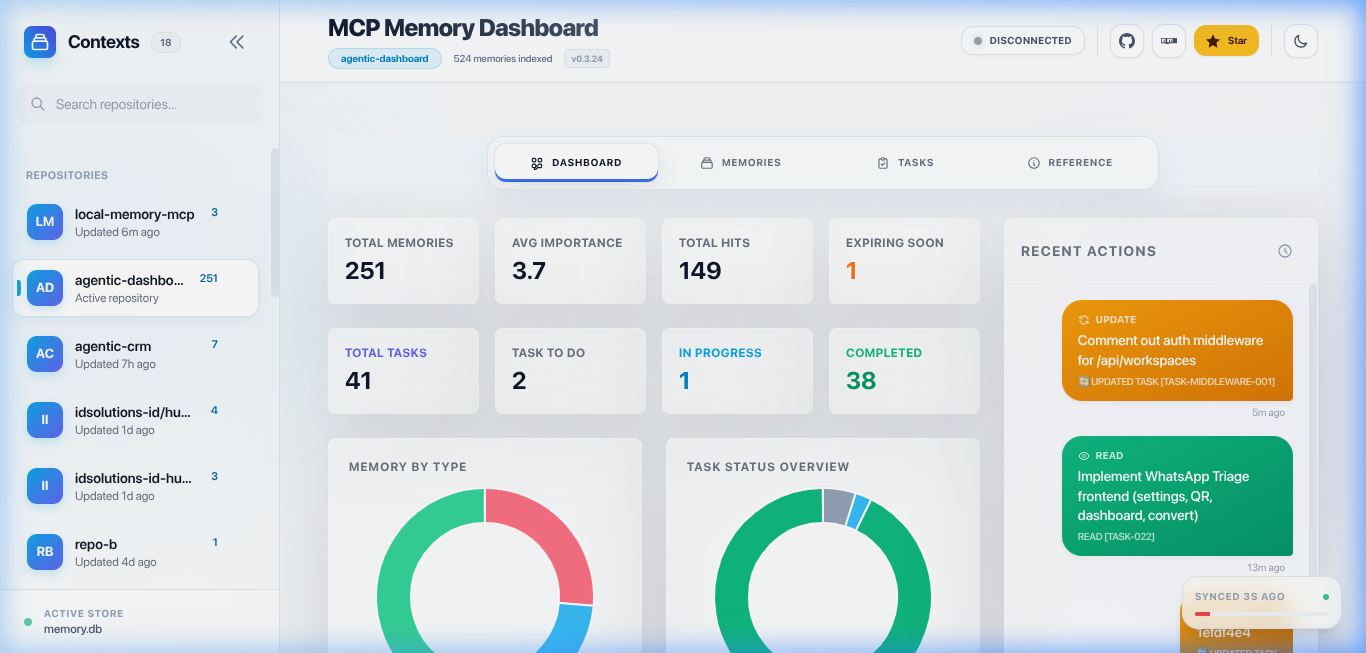 | 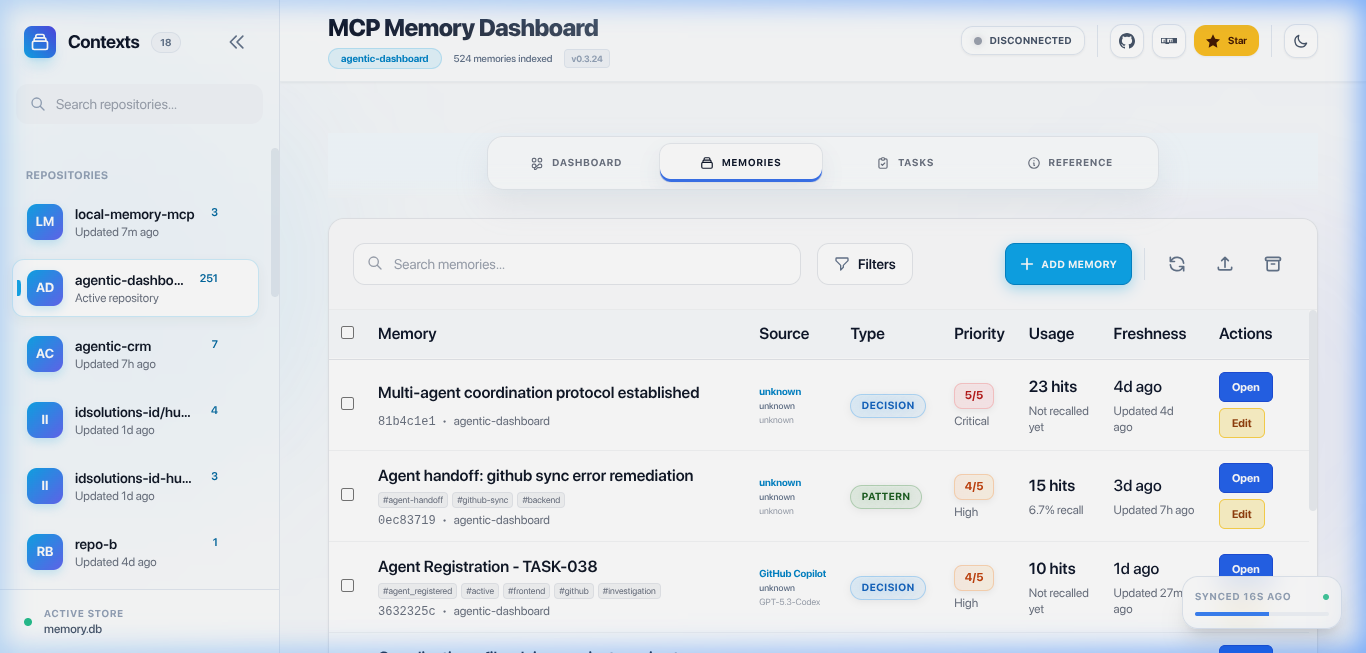 |
| Task Tracking | Available Tools & Reference |
| :----------------------------------------------------------------------------------------------------: | :----------------------------------------------------------------------------------------------------------------------: |
| 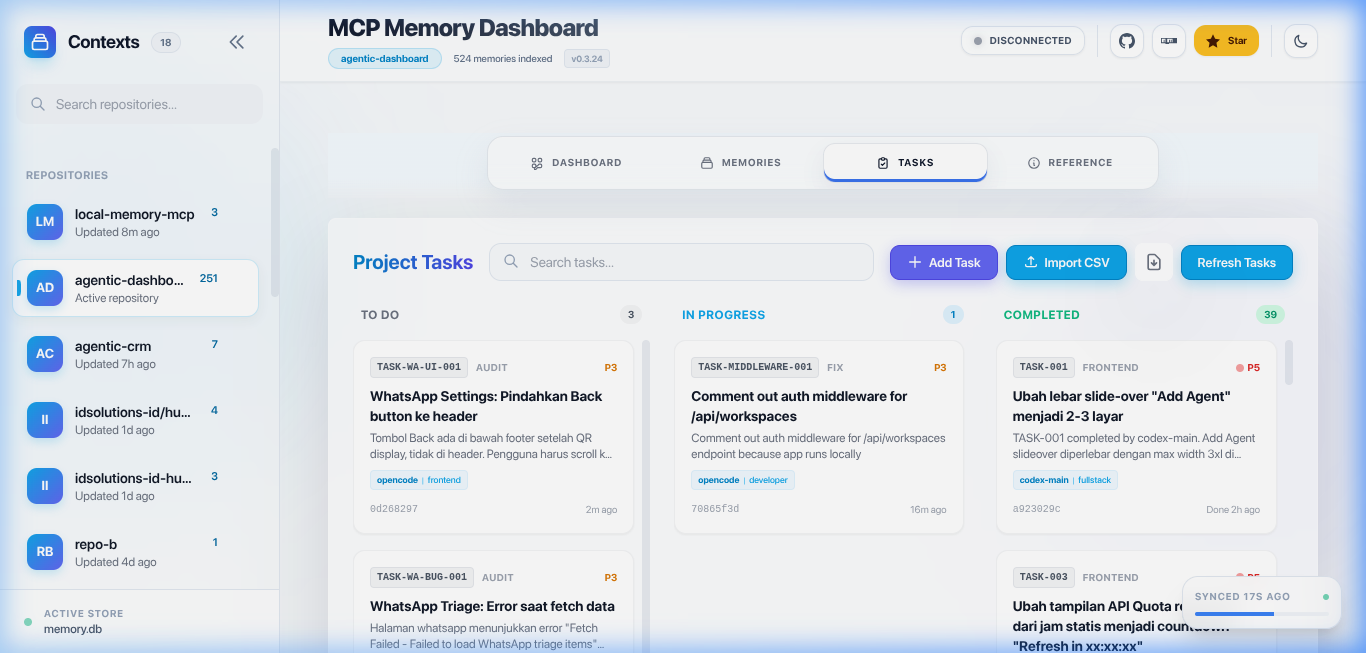 | 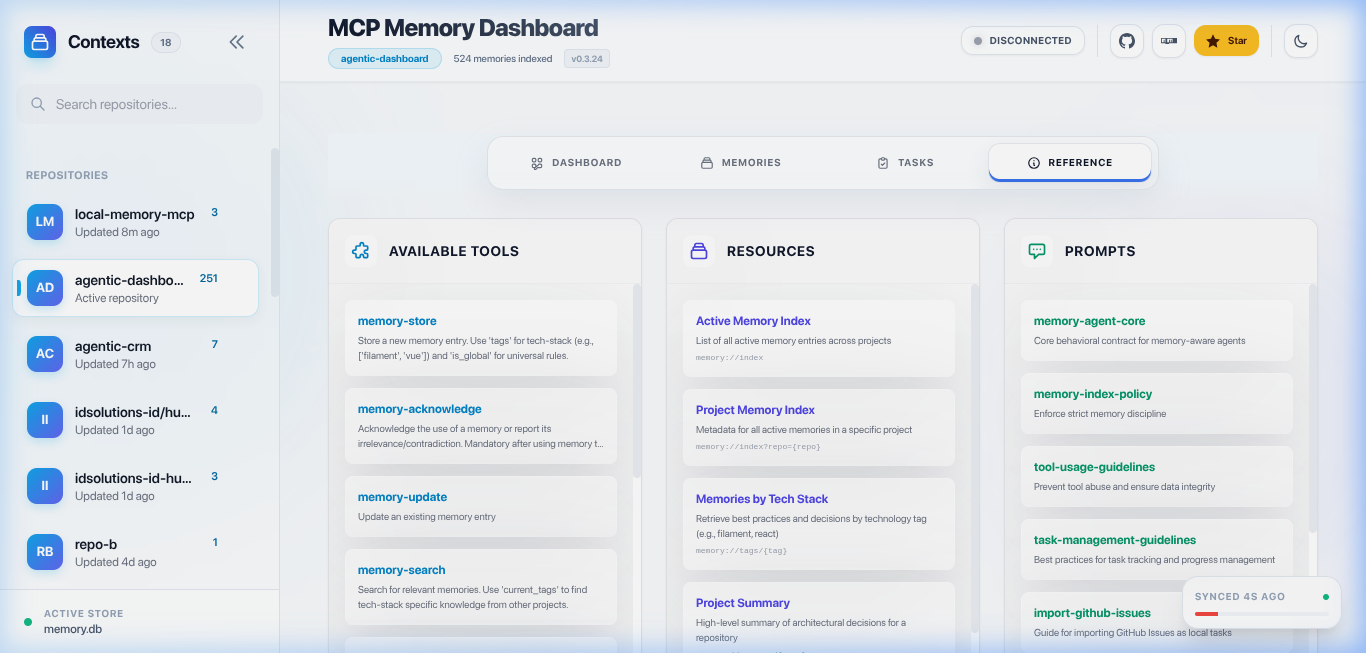 |
### How to Run
```bash
local-memory-mcp dashboard
```
_If not installed globally, use:_ `npx @vheins/local-memory-mcp dashboard`
### Developer Workflow (Dashboard UI)
The dashboard UI is built with **Svelte 5 + Vite**. Source files live in `src/dashboard/ui/`.
```bash
# Start the API server (port 3456)
# Note: `npm run dashboard` serves the compiled bundle — run `npm run build` once first (`dist/dashboard/public/`)
npm run dashboard
# In a separate terminal, start the Svelte dev server (port 5173)
npm run dashboard:dev
# → Open http://localhost:5173 (proxies /api to :3456)
# Build Svelte UI for production (output → dist/dashboard/public/)
npm run dashboard:build
# Full production build (Svelte + TypeScript)
npm run build
```
> The server serves the compiled Svelte build from `dist/dashboard/public/` in production.
### Auto-launch Dashboard in IDEs
The dashboard can auto-start when you open a project in VS Code, Cursor, Windsurf, Zed, or JetBrains IDEs.
📖 **[See the auto-start guide →](https://github.com/vheins/local-memory-mcp/wiki/en/Auto-Start-Dashboard)**
## 📖 Documentation
- [Getting Started & Setup](https://github.com/vheins/local-memory-mcp/wiki/en/Getting-Started) — Installation & client configuration
- [Tool Reference & Usage Guide](https://github.com/vheins/local-memory-mcp/wiki/en/Tools-Reference) — Complete tool docs with examples and workflows
- [Troubleshooting Guide](https://github.com/vheins/local-memory-mcp/wiki/en/Troubleshooting) — Fix common issues
- [Features & How It Works](https://github.com/vheins/local-memory-mcp/wiki/en/Features) — Semantic search, anti-hallucination, memory decay
- [Hybrid Search Logic](https://github.com/vheins/local-memory-mcp/wiki/en/Hybrid-Search) — How search scoring works
- [Dashboard Guide](https://github.com/vheins/local-memory-mcp/wiki/en/Dashboard-Guide) — Web UI for memory & task management
- [Codebase Index — Feature Overview](https://github.com/vheins/local-memory-mcp/wiki/features/Codebase-Index) — Index, search, and trace source code symbols
- [Feature Deep-Dives](https://github.com/vheins/local-memory-mcp/wiki/Home) — memory, task, standard, handoff, agentic, knowledge graph, codebase index
- [Codebase Index — API Reference](.agents/documents/application/api/codebase-index/api-codebase.md) — Complete MCP tool documentation for the 2 unified Codebase Index tools (`codebase-index` + `codebase-read`)
- [MCP Protocol Reference](https://github.com/vheins/local-memory-mcp/wiki/en/MCP-Concepts) — Technical protocol details
- [Claude Code Integration](https://github.com/vheins/local-memory-mcp/wiki/en/Claude-Code-Integration) — Setup for Claude Code CLI
- [Codex (OpenAI) Integration](https://github.com/vheins/local-memory-mcp/wiki/en/Codex-Integration) — Setup for Codex CLI
- [Kiro Integration](https://github.com/vheins/local-memory-mcp/wiki/en/Kiro-Integration) — Setup for Kiro IDE
- [Auto-Start Dashboard in IDEs](https://github.com/vheins/local-memory-mcp/wiki/en/Auto-Start-Dashboard) — tasks.json for VS Code, Cursor, Windsurf, Zed, JetBrains
- [Changelog](CHANGELOG.md) — Release history and version notes
> User documentation lives on the **GitHub Wiki** (`https://github.com/vheins/local-memory-mcp/wiki/Home`). Contributor & developer docs (testing standard, API references, ops runbooks, design/optimization, audits) live in `.agents/documents/`.
> 🇮🇩 **Indonesian version available:** [`README.id.md`](README.id.md) & docs on the Wiki under [`id/`](https://github.com/vheins/local-memory-mcp/wiki/id/Getting-Started)
### 🤝 Community & Support
- [Contribution Guidelines](CONTRIBUTING.md) — How to report issues and contribute code
- [Code of Conduct](CODE_OF_CONDUCT.md) — Community standards for all contributors
- [Security Policy](SECURITY.md) — How to report a security vulnerability
- [Support](SUPPORT.md) — Where to get help (docs, issues, integrations)
## 🌱 Related Projects
- [opencode-9router](https://github.com/vheins/opencode-9router) — OpenCode plugin that registers 9Router as a provider with automatic model discovery and caching.
- [RustaSea framework](https://github.com/rustasea/framework) — An expressive, Laravel-inspired web framework for Rust, with Rust-native safety, performance, and concurrency.
- [RustaSea skeleton](https://github.com/rustasea/rustasea) — The RustaSea application skeleton (Blade variant), scaffolded with `cargo rustasea new`.
## ⚠️ Disclaimer
**THE SOFTWARE IS PROVIDED "AS IS", WITHOUT WARRANTY OF ANY KIND**, express or implied, including but not limited to the warranties of merchantability, fitness for a particular purpose and noninfringement. In no event shall the authors or copyright holders be liable for any claim, damages or other liability, whether in an action of contract, tort or otherwise, arising from, out of or in connection with the software or the use or other dealings in the software.
## ⚖️ License
MIT © Muhammad Rheza Alfin — see the full text in [LICENSE](LICENSE).
## 🙏 Acknowledgements
- **Knowledge Graph** inspired by [Beledarian/mcp-local-memory](https://github.com/Beledarian/mcp-local-memory) — the structured entity/relation graph concept builds on this project, reimplemented with its own schema and offline NLP extraction.
- **Codebase Index** inspired by [DeusData/codebase-memory-mcp](https://github.com/DeusData/codebase-memory-mcp) — the codebase indexing/search/trace capabilities build on this concept, reimplemented with tree-sitter WASM and unified tools.
This server cannot be deployed
Maintenance
ActivityActive
ResponsivenessLimited data