
A
licenseA
qualityD
maintenanceA Model Context Protocol server that enables users to manage translations for their applications through SimpleLocalize's localization platform via natural language prompts in Cursor.
7
3
MIT

Click on "Deploy Server".
Wait a few minutes for the server to deploy. Once ready, it will show a "Started" state.
In the chat, type @ followed by the MCP server name and your instructions, e.g., "@Lokalise MCP Tool Add key 'welcome_text' with value 'Welcome' to project 'SaaS-App' for web"
That's it! The server will respond to your query, and you can continue using it as needed.
Here is a step-by-step guide with screenshots.
A Minimal Command-line Program (MCP) server for adding translation keys to your Lokalise projects, designed for integration with Cursor or standalone use.
# For MCP usage (global installation)
npm install -g lokalise-mcp-server

# For library usage (project dependency)
npm install lokalise-mcp-server
NPM Package: https://www.npmjs.com/package/lokalise-mcp-server
Related MCP server: tolgee-mcp
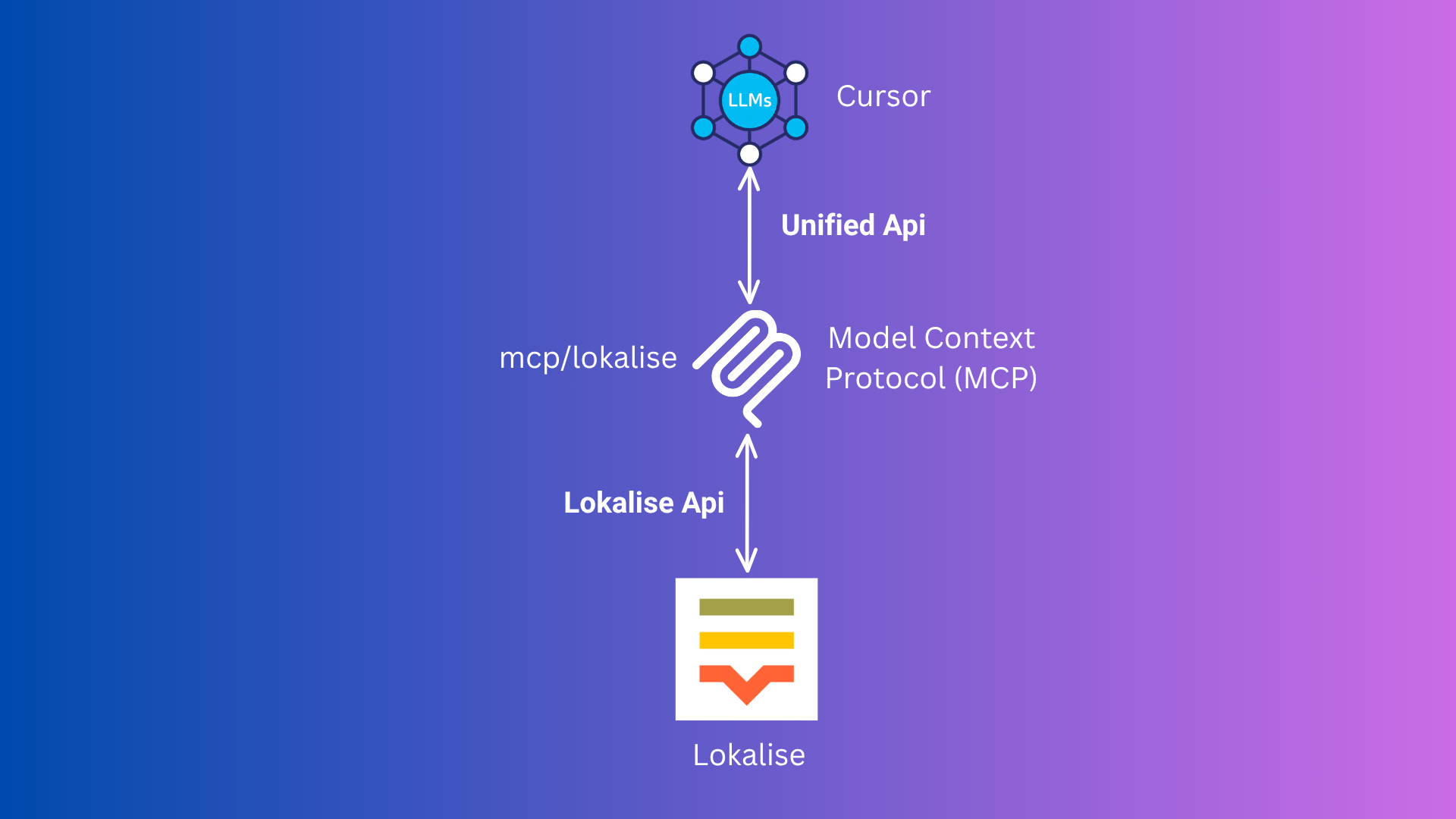
This diagram illustrates the Model Context Protocol (MCP) flow between Cursor, your MCP server, and Lokalise.
🛠️ Add this to your mcp.json (or configure via Cursor UI):
{
  "mcpServers": {
    "lokalise": {
      "command": "npx",
      "args": ["-y", "lokalise-mcp-server"],
      "env": {
        "LOKALISE_API_KEY": "your_actual_api_key"
      }
    }
  }
}
🔄 Reload Window. It will automatically use the npm package.
No need to run Docker or Podman manually!
🐳 Make sure Docker or Podman is installed and running.
🛠️ Add this to your mcp.json (or configure via Cursor UI):
{
  "mcpServers": {
    "lokalise": {
      "command": "docker", // podman
      "args": [
        "run",
        "--rm",
        "-i",
        "-e", "LOKALISE_API_KEY",
        "rafee03/mcp-lokalise:latest"
      ],
      "env": {
        "LOKALISE_API_KEY": "your_actual_api_key"
      }
    }
  }
}
You can use podman instead of docker if you prefer.
Cursor will automatically pull and run the image as needed.
🔄 Restart Cursor. It will handle everything for you.
This tool takes these inputs:
projectName (required): The name of your Lokalise project (e.g., SpaceX).
keys (required): An array of objects, each with:
keyName (required): The translation key (e.g., hello)
defaultValue (optional): The default translation value (e.g., Hello)
platforms (optional): The platforms this key applies to (e.g., web, ios)
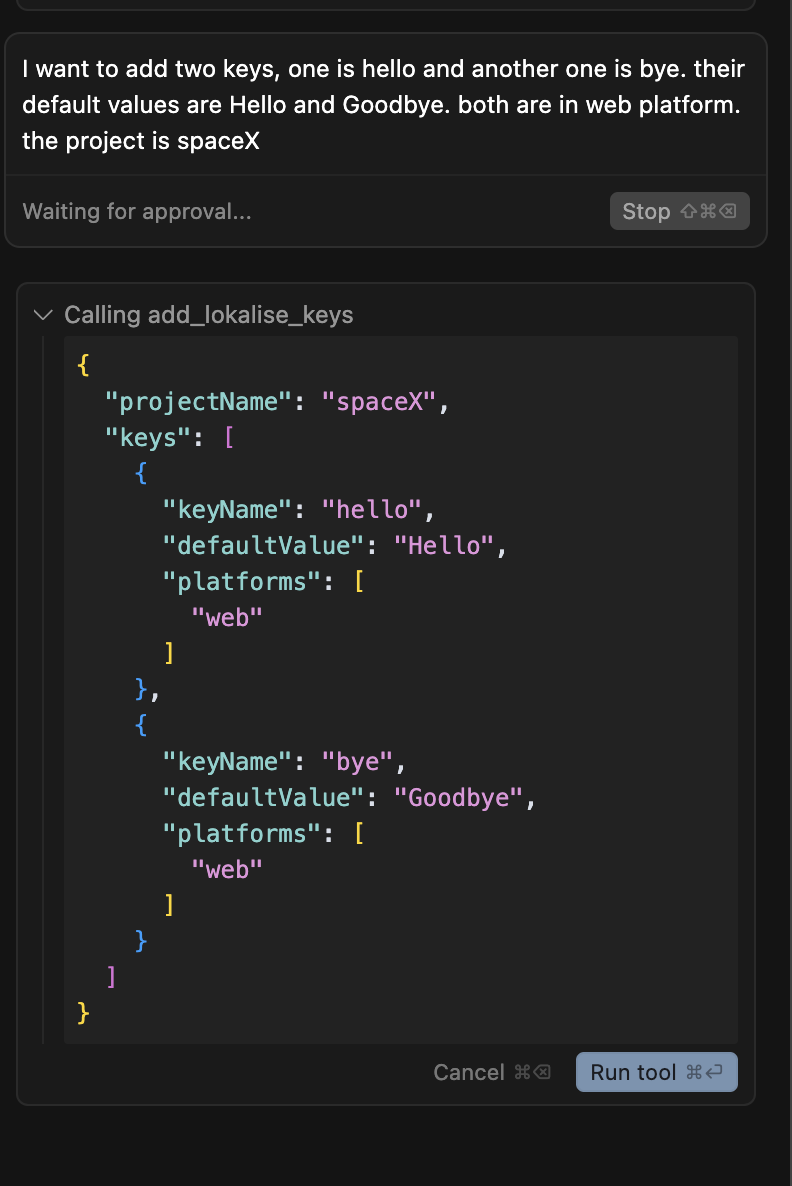
Example:
I want to add two keys, one is hello and another one is bye. their default values are Hello and Goodbye. both are in web platform. the project is spaceX
Cursor will automatically convert this to the correct input for the MCP tool.
TypeScript Source Files (src/):
src/mcp-server.ts: The main MCP server entry point for Cursor integration.
src/mcp.ts: Shared logic for interacting with the Lokalise API (used by the server).
src/server.ts: (Optional) HTTP server version (not required for Cursor).
src/add-key.ts: (Optional) CLI tool for adding a key interactively (not required for Cursor).
Compiled JavaScript Files (dist/):
dist/mcp-server.js: Compiled MCP server.
dist/mcp.js: Compiled API logic.
dist/server.js: Compiled HTTP server.
dist/add-key.js: Compiled CLI tool.
Other Files:
tsconfig.json: TypeScript configuration.
Dockerfile: For building the Docker image of the MCP server.
package.json: Project dependencies and scripts.
README.md: This documentation file.
git clone https://github.com/mdrafee03/mcp-lokalise.git
cd mcp-lokalisenpm installnpm run buildIn your MCP config (recommended for Cursor)
{
  "mcpServers": {
    "lokalise": {
      "command": "node",
      "args": ["{directory-of-the-project}/dist/mcp-server.js"],
      "env": {
        "LOKALISE_API_KEY": "your_actual_api_key"
      }
    }
  }
}npm run build - Compile TypeScript to JavaScript
npm run dev - Run the MCP server in development mode with tsx
npm run server - Run the HTTP server in development mode with tsx
npm run add-key - Run the CLI tool in development mode with tsx
npm start - Run the compiled MCP server from dist/
Node.js 22+ recommended
TypeScript 5.8+
MCP protocol via @modelcontextprotocol/sdk
MIT
Add multiple translation keys to a Lokalise project using structured input
| Name | Required | Description | Default |
|---|---|---|---|
| projectName | Yes | Lokalise project name | |
| keys | Yes | Array of keys to add |
Does the description disclose side effects, auth requirements, rate limits, or destructive behavior?
With no annotations provided, the description carries full burden but only states the action without disclosing behavioral traits like permissions needed, whether it's idempotent, error handling, or response format. It mentions 'structured input' but doesn't elaborate on what that entails beyond the schema.
Agents need to know what a tool does to the world before calling it. Descriptions should go beyond structured annotations to explain consequences.
Is the description appropriately sized, front-loaded, and free of redundancy?
The description is a single, efficient sentence that front-loads the core purpose without unnecessary words. Every part earns its place by specifying the action, resource, and input method concisely.
Shorter descriptions cost fewer tokens and are easier for agents to parse. Every sentence should earn its place.
Given the tool's complexity, does the description cover enough for an agent to succeed on first attempt?
For a mutation tool with no annotations and no output schema, the description is incomplete. It lacks critical context like what happens on success/failure, whether keys are overwritten, or any behavioral details, leaving significant gaps for an agent to understand the tool's full implications.
Complex tools with many parameters or behaviors need more documentation. Simple tools need less. This dimension scales expectations accordingly.
Does the description clarify parameter syntax, constraints, interactions, or defaults beyond what the schema provides?
Schema description coverage is 100%, so the schema fully documents the parameters. The description adds no additional meaning beyond implying the 'keys' parameter is an array ('multiple translation keys'), which is already clear from the schema. Baseline 3 is appropriate as the schema does the heavy lifting.
Input schemas describe structure but not intent. Descriptions should explain non-obvious parameter relationships and valid value ranges.
Does the description clearly state what the tool does and how it differs from similar tools?
The description clearly states the action ('Add multiple translation keys') and target resource ('to a Lokalise project'), with the qualifier 'using structured input' hinting at the array format. However, without sibling tools to differentiate from, it cannot achieve a perfect 5 despite being specific.
Agents choose between tools based on descriptions. A clear purpose with a specific verb and resource helps agents select the right tool.
Does the description explain when to use this tool, when not to, or what alternatives exist?
The description provides no guidance on when to use this tool versus alternatives, prerequisites, or constraints. It lacks context such as whether this is for bulk operations or if there are rate limits, leaving the agent with no usage cues beyond the basic purpose.
Agents often have multiple tools that could apply. Explicit usage guidance like "use X instead of Y when Z" prevents misuse.
Recent tool additions, removals, and schema changes observed during successful MCP inspections.
v1.0.3add_lokalise_keysScored across 1 tool
With only one tool, there is no possibility of confusion or overlap between tools. The tool's purpose is clearly defined as adding translation keys to a Lokalise project.
A single tool inherently has perfect naming consistency. The tool name 'add_lokalise_keys' follows a clear verb_noun pattern and is descriptive of its function.
A single tool for a Lokalise MCP server is too few for typical translation management workflows. Lokalise involves operations like creating, updating, deleting, and fetching keys or translations, so one tool feels incomplete and thin for the domain.
The tool set is severely incomplete for Lokalise translation management. It only supports adding keys, missing essential operations like retrieving, updating, or deleting keys, managing translations, or handling projects, which will cause significant agent failures.
MCP server for Crowdin — projects, files, strings, translation progress, tasks, and members.
Lingo.dev MCP Server - World-class i18n implementation with ICU MessageFormat.
MCP server for Translation Services
Phrase MCP server: language intelligence platform for translation, terminology, and quality.