
UU跑腿 MCP Server
Official# UU跑腿 MCP Server
一个轻量级的MCP Server,用于通过MCP协议在uupt.com开放平台创建订单
https://open.uupt.com/
## 产品介绍
UU跑腿核心API现已全面兼容MCP协议,是国内首家兼容MCP协议的配送服务商。UU跑腿已经完成核心API接口和MCP协议的对接,涵盖询价、发单、订单详情、配送员实时位置等功能。作为国内首家支持MCP协议的配送服务商,UU跑腿MCP Server发布后,智能体开发者仅需简单配置,就可以在大模型中快速接入配送服务,实现一句话发单的能力,大幅降低了智能体应用开发过程中调用配送服务相关能力的门槛,显著提升了智能体应用的开发效率。
## 功能介绍
### 地址询价
获取订单价格。
#### 输入参数
- `fromAddress`:发货地址
- `toAddress`:收货人地址
- `adCode`:订单区域编码
- `sendType`:订单类型
#### 输出参数
- `priceToken`:金额令牌(提交订单使用)
- `needPayMoney`:实际支付金额
### 地址发单
#### 输入参数
- `priceToken`:金额令牌(计算订单价格接口返回的`price_token`)
- `receiverPhone`:收件人电话(手机号码)
#### 输出参数
- `orderCode`:UU订单号
### 取消订单
#### 输入参数
- `orderCode`:UU订单号
- `reason`:取消原因
#### 输出参数
- `deductFee`:扣除费用(单位:分)
### 查询订单
#### 输入参数
- `orderCode`:UU订单号
#### 输出参数
- `fromAddress`:发货地址
- `toAddress`:收货人地址
- `distance`:配送距离
- `state`:当前状态
## 创建应用和秘钥
### 注册开放平台
1. 注册UU跑腿开放平台账号。
2. 注册成功后登录,进入“我的首页”。
### 添加应用
1. 点击左侧菜单栏“我的应用”。
2. 创建应用并获得秘钥。
### 查看应用秘钥
1. 系统已集成UU跑腿配送,应用秘钥配置至发单系统即可使用。
2. 未集成开发者进行接口对接。
## 快速开始
### 配置Python本地环境
建议使用Python 3.11版本。
### 安装命令
```bash
pip3 install -i https://mirrors.aliyun.com/pypi/simple/ uupt-mcp-server
```
### 更新命令
```bash
pip3 install -U -i https://mirrors.aliyun.com/pypi/simple/ uupt-mcp-server
```
### 查看安装是否成功
```bash
pip3 list
```
### 配置`mcpService`
```json
{
"mcpServers": {
"uupt-mcp-server": {
"disabled": false,
"timeout": 60,
"command": "uvx",
"args": [
"uupt_mcp_server"
],
"env": {
"APP_ID": "您的APP_ID",
"APP_SECRET": "您的APP_SECRET",
"OPEN_ID": "您的OPEN_ID",
"ORDER_CITY": "郑州市(您的发单城市,格式:郑州市,‘市’字请不要省略,必须要有)"
}
}
}
}
```
### 示例
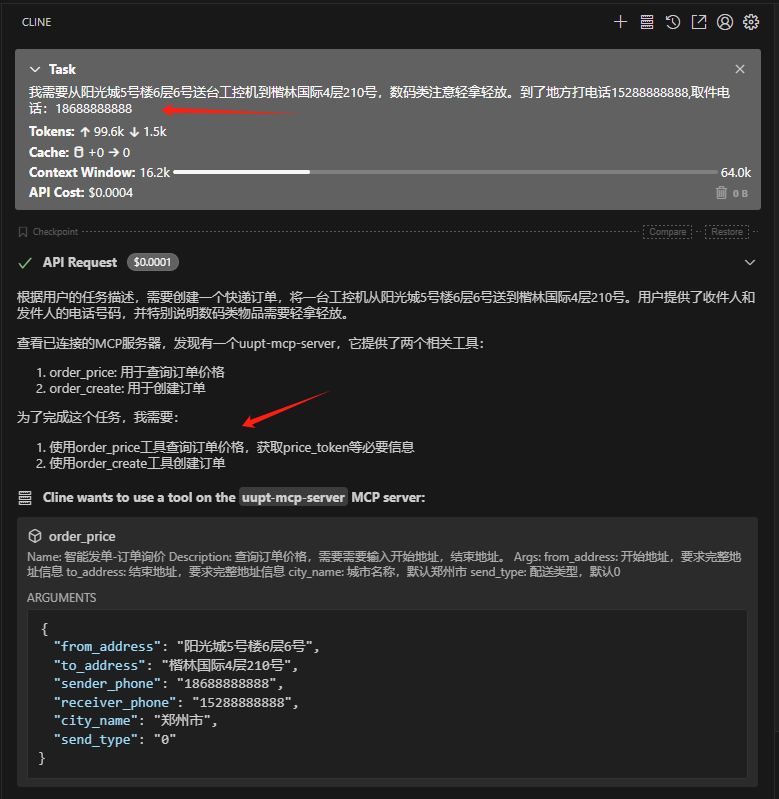
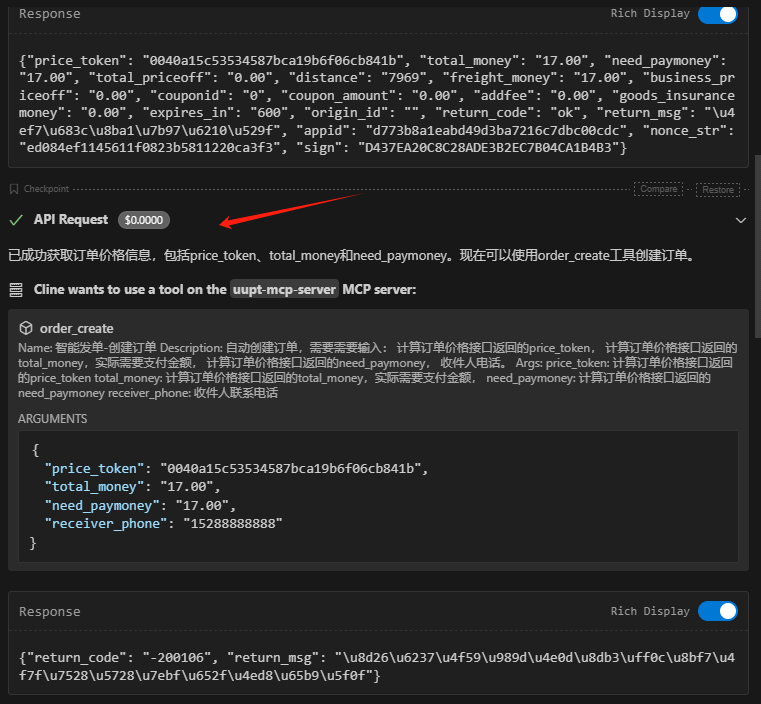TDQS
Scored across 5 tools
The tools are mostly distinct with clear purposes: create, cancel, get details, price inquiry, and courier info query. However, '获取订单详情' (get order details) and '跑男信息查询' (courier info query) both require an order number as input, which could cause minor confusion about which tool to use for retrieving different types of order-related information. The descriptions help clarify their distinct focuses.
The naming is inconsistent and lacks a clear pattern. All tools start with '智能发单-' (smart order dispatch), but the suffixes vary: '创建订单' (create order), '取消订单' (cancel order), '获取订单详情' (get order details), '订单询价' (order price inquiry), and '跑男信息查询,查询跑腿实时信息' (courier info query, query real-time delivery info). The last tool has a comma-separated dual name, and there's no consistent verb-noun structure or style across the set.
With 5 tools, the count is well-scoped and appropriate for an order dispatch server. It covers core operations like creating, canceling, pricing, and tracking orders, plus courier information, which aligns well with the domain of delivery services. Each tool earns its place without feeling excessive or insufficient.
The tool set is largely complete for basic order management, covering create, cancel, get details, price inquiry, and courier tracking. A minor gap is the lack of an update order tool (e.g., to modify details after creation), but agents can work around this by canceling and recreating orders. The core lifecycle is well-covered, supporting essential workflows without dead ends.