


A
licenseNot graded
qualityB
maintenanceEnables AI assistants to trade stocks directly through natural language by creating and managing bots, executing trades, accessing market data, and backtesting strategies.
4
MIT

Sends trade approval notifications via webhooks when manual confirmation is required for stock orders in approve_each execution mode.
Provides real-time sentiment analysis from Reddit social media discussions with a focus on financial topics and market sentiment.
Click on "Deploy Server".
Wait a few minutes for the server to deploy. Once ready, it will show a "Started" state.
In the chat, type @ followed by the MCP server name and your instructions, e.g., "@ReadyTrader-Stocks buy $500 of NVDA shares with a stop loss at $120"
That's it! The server will respond to your query, and you can continue using it as needed.
Here is a step-by-step guide with screenshots.


ReadyTrader-Stocks is provided for informational and educational purposes only and does not constitute financial, investment, legal, or tax advice. Trading stocks and equities involves substantial risk and may result in partial or total loss of funds. Past performance is not indicative of future results. You are solely responsible for any decisions, trades, configurations, supervision, and the security of your credentials/API keys. ReadyTrader-Stocks is provided “AS IS”, without warranties of any kind, and we make no guarantees regarding profitability, performance, availability, or outcomes. By using ReadyTrader-Stocks, you acknowledge and accept these risks.
See also: DISCLAIMER.md.
Related MCP server: trading-mcp-server
ReadyTrader-Stocks is a specialized bridge that turns your AI Agent (like Gemini or Claude) into a professional stock trading operator.
Think of it this way: Your AI agent provides the Intelligence (analyzing charts, earnings reports, and news sentiment), while ReadyTrader-Stocks provides the Hands (connecting to brokerages and data providers) and the Safety Brakes (enforcing your risk rules). It allows you to delegate complex trading tasks to an AI without giving it unchecked access to your capital.
The core philosophy of this project is a strict separation of powers:
The AI Agent (The Brain): Decides what and when to trade. It can research historical data, scan social media, and simulate strategies, but it has no direct power to move money.
The MCP Server (The Guardrail): Owns the API keys and enforces your safety policies. It filters every AI request through a "Risk Guardian" that rejects any trade that is too large, too risky, or violates your personal limits.
ReadyTrader-Stocks operates on a User-Custodied basis. This means:
You keep your funds: Your capital remains in your own brokerage account (e.g., Alpaca, Tradier, Interactive Brokers).
You control the keys: You provide API keys that allow the agent to trade but (recommended) not withdraw.
Agent as Operator: The agent acts as a remote operator. It sends order instructions to your broker using your keys, and the broker handles actual execution and settlement.
Note: In Paper Mode (default), we simulate a virtual wallet with fake funds so you can practice without linking a real brokerage.
Research: You ask your agent, "Find a good entry for AAPL." The agent calls get_stock_price, fetch_ohlcv, get_market_regime and get_social_sentiment.
Proposal: The agent concludes, "AAPL is oversold; I want to buy 3 shares." It calls place_market_order.
Governance: The Risk Guardian checks the order against your account: no more than 5% of the account per trade (valued at the latest market price, never at a price the order carries; selling out of a position is an exit and is never sized as new exposure), on the paper account nothing that adds exposure after a 5% daily loss or a 10% drawdown (a live brokerage account has no loss history here, so live orders list those two rules in inactive_rules), and no BUY into a collapse (docs/FALLING_KNIFE.md). Live orders also pass your MAX_ORDER_AMOUNT / ALLOW_TICKERS policy and need LIVE_TRADING_ENABLED=true.
Consent: With EXECUTION_APPROVAL_MODE=approve_each, the order comes back as a pending proposal. You approve it through the API or the dashboard; the Risk Guardian checks it again with fresh prices, and only then does the trade execute.
ReadyTrader-Stocks includes a small Next.js dashboard backed by the API server (app/api_server.py).
How to Enable:
Start the API server from the repository root: python app/api_server.py (serves 127.0.0.1:8000; set API_HOST / API_PORT to change it).
In another terminal: cd frontend && npm install && npm run dev
Open http://localhost:3000. If the API runs elsewhere, set NEXT_PUBLIC_API_URL (and NEXT_PUBLIC_WS_URL) before starting the dashboard; if the dashboard is served from another address, add it to the API's API_CORS_ORIGINS.
What it shows:
Portfolio: the paper account's balances, equity, today's P&L and drawdown, from /api/portfolio (the live view is not implemented yet).
Mode: Paper Mode or LIVE TRADING, read from /api/health.
Guard Rail: pending approve_each proposals with the order each would place (symbol, side, shares, type, venue, paper or live); Approve and Reject ask for the proposal's confirm_token and call /api/approve-trade.
Live Markets: tickers pushed over the API's WebSocket (/ws). No tool starts a market-data stream in this release, so this panel stays empty.
📉 Paper Trading Simulator: a zero-risk practice account with persistent balances; market orders fill at the latest price and limit orders only when marketable.
🧠 Strategy Research: a backtesting engine for agent-written strategies, synthetic black-swan stress tests and a market-regime detector.
📰 News & Social Feeds: NewsAPI, Alpha Vantage and free RSS headlines, plus recent Reddit/X posts for the agent to judge. No invented sentiment scores (see docs/SENTIMENT.md).
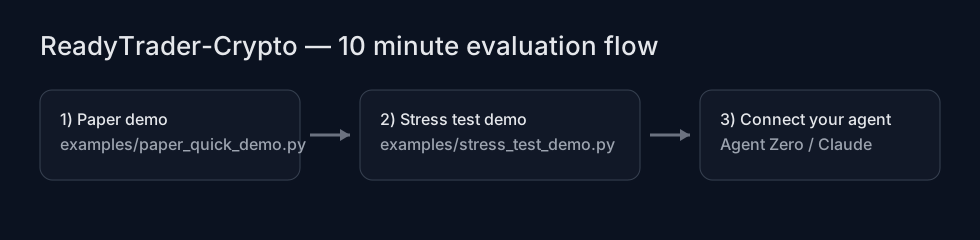
Run both demos locally (no brokerage keys needed; Python 3.12+, dependencies installed as below):
python examples/paper_quick_demo.py
python examples/simulation_demo.py
You’ll get exportable artifacts under artifacts/demo_stress/ (gitignored).
Prompt pack (copy/paste): prompts/READYTRADER_PROMPT_PACK.md.
Docker, or Python 3.12+ for a local install (below)
Run the server in a container. It exposes stdio for MCP clients.
cd ReadyTrader-Stocks
docker build -t readytrader-stocks .
# Run interactively (to test); the named volume keeps the paper ledger between runs
docker run --rm -i -v readytrader-stocks-data:/app/data readytrader-stocksIf you want to run or test ReadyTrader-Stocks locally. Requires Python 3.12 or newer (pandas_ta has no release for older versions).
python3.12 -m venv .venv && source .venv/bin/activate
pip install -r requirements-dev.txt
python app/main.py # MCP server on stdio; an MCP client launches it the same way.env)Create a .env file or pass environment variables. Start from env.example (copy to .env).
Variable | Default | Description |
|
|
|
|
| Must be exactly |
|
| Kill switch: any value other than empty, |
|
|
|
|
| Port for the FastAPI/WebSocket server ( |
|
| Browser origins allowed to call the API; set it if the dashboard runs elsewhere. |
| unset | Operator secret for the API server only: when set, every |
| unset | Give both processes the same values so the API can approve the MCP server's proposals. |
| unset | Largest live order (shares) the policy allows. A value that is not a number refuses every live order ( |
| unset (all) | Comma-separated allowlists for live orders, checked when an order is proposed and again when it executes. |
|
| Optional webhook for trade approval notifications. |
|
| Price-based Falling Knife check on every BUY (trade check and order). See |
| unset | What a BUY does when the daily bars cannot be read: |
Variable | Description |
| API Key for Alpaca brokerage. |
| API Secret for Alpaca brokerage. |
|
|
| Access Token for Tradier. |
Variable | Default | Description |
|
| How long to cache price data. |
|
| How long to cache daily bars (the Falling Knife check reads them). |
Variable | Default | Description |
|
| Log level for the JSON logs the API server writes. |
|
| The paper ledger (SQLite). |
RISK_PROFILE, EXECUTION_MODE and RATE_LIMIT_DEFAULT_PER_MIN are read but not applied yet: the Risk Guardian's limits are fixed (5% per trade, 5% daily loss, 10% drawdown) and no rate limit is enforced.
Every variable the server reads is listed, with its default, in env.example.
To place live orders or fetch balances, configure brokerage credentials via env.
ALPACA_API_KEY=...
ALPACA_API_SECRET=...
TRADIER_ACCESS_TOKEN=...
Live orders go out only with PAPER_MODE=false and LIVE_TRADING_ENABLED=true; TRADING_HALTED=true refuses them all, closing orders included (flatten at the brokerage while halted). Each is sized against the brokerage account's equity. Alpaca orders fill now or not at all: they are sent only while the market is open (else market_closed), as IOC orders (filled now, a limit at its limit or better, the rest cancelled; a fractional market order goes out DAY, a fractional limit is refused), so none waits at the broker past the Risk Guardian's checks and the kill switch; the answer reports what filled. Alpaca orders go to your Alpaca paper account until you also set ALPACA_PAPER=false (Tradier likewise stays in its sandbox until TRADIER_SANDBOX=false), so you can test the whole live path without real money. Capabilities per brokerage: docs/EXCHANGES.md.
Tools:
place_stock_order(symbol, side, amount, price=0.0, order_type='market', exchange='alpaca', rationale='') (exchange: alpaca, tradier, ibkr, schwab, etrade, robinhood)
reset_paper_wallet() - Reset all simulated data
deposit_paper_funds(asset, amount) - Add virtual cash
With EXECUTION_APPROVAL_MODE=approve_each, every order that passes the Risk Guardian comes back as {"status": "pending_approval", "request_id", "confirm_token"} instead of executing. To approve it through the API (or the dashboard), run the MCP server and python app/api_server.py with the same EXECUTION_DB_PATH and EXECUTION_SESSION_ID; then:
GET /api/pending-approvals lists the proposals with their orders, never their tokens (they expire after 120 s).
POST /api/approve-trade {"request_id", "confirm_token", "approve": true} re-runs the Risk Guardian with fresh prices and executes; "approve": false cancels. A refusal answers 409 with the reason; an unknown proposal 404; a wrong token 403. A proposal executes only in the mode it was made in: a paper proposal approved by an API running live is refused (mode_mismatch).
The confirm_token goes to the agent with the proposal, so on its own it does not prove that a person approved. Set API_OPERATOR_TOKEN for the API server (never for the MCP server): every /api/ call except /api/health then needs Authorization: Bearer <it> (the dashboard asks for it once per tab), and a live proposal is approved only when it is set (operator_token_required).
With the Agent Zero plugin: install a0-readytrader-stocks-plugin (2.0.0 or later) from Agent Zero's Plugins page (Git URL or ZIP). It installs this server into the plugin's folder, registers it with Agent Zero's MCP client in paper mode, and adds a paper-trading skill.
By hand: in Agent Zero, open Settings → MCP/A2A → External MCP Servers and add the server to
the JSON there. Copy/paste file: configs/agent_zero.mcp.json.
{
  "mcpServers": {
    "readytrader_stocks": {
      "type": "stdio",
      "command": "docker",
      "args": [
        "run",
        "-i",
        "--rm",
        "-v",
        "readytrader-stocks-data:/app/data",
        "-e",
        "PAPER_MODE=true",
        "readytrader-stocks"
      ]
    }
  }
}
The agent sees the tools as readytrader_stocks.<tool> (Agent Zero lowercases the server name and turns
other characters into _). Saving the settings reloads Agent Zero's MCP servers.
Agent Zero starts the server afresh for every call, so the -v volume is what keeps the paper
account between calls. Agent Zero must be able to run docker where it runs.
Without Docker: set "command" to the Python 3.12 interpreter of a ReadyTrader-Stocks checkout
with its requirements installed (e.g. /path/to/ReadyTrader-Stocks/.venv/bin/python) and "args" to
["/path/to/ReadyTrader-Stocks/app/main.py"], paths Agent Zero can reach. Agent Zero passes the server
only a minimal environment, so put settings in the entry's "env" (for example
{"PAPER_MODE": "true"}) or in the checkout's .env.
Add this to your mcp-server-config.json:
Quick copy/paste file: configs/claude_desktop.mcp-server-config.json.
{
  "mcpServers": {
    "readytrader_stocks": {
      "command": "docker",
      "args": [
        "run",
        "-i",
        "--rm",
        "-v", "readytrader-stocks-data:/app/data",
        "-e", "PAPER_MODE=true",
        "readytrader-stocks"
      ]
    }
  }
}
Prebuilt config: configs/claude_desktop.mcp-server-config.json.
Example Prompt:
"Create a mean-reversion strategy for AAPL. Write a Python function
on_candlethat uses RSI. Backtest it on daily bars and tell me the PnL and the trades."
What happens:
Agent calls fetch_ohlcv("AAPL") to see data structure.
Agent writes code for on_candle(close, rsi, state) returning 'buy', 'sell' or 'hold'.
Agent calls run_backtest_simulation(code, "AAPL", "1d"): the last 500 bars, from $10,000.
The server runs the code with dangerous imports (such as os) refused and returns {"pnl_percent": 11.91, "total_trades": 2, "trades_log": [...], ...}; a strategy that fails returns backtest_error.
Perfect for "interning" your agent without any paid API keys.
Fund your account: deposit_paper_funds("USD", 100000)
Researching Stocks: Use fetch_ohlcv and get_stock_price (powered by public yfinance data).
Read the News: fetch_rss_news (free MarketWatch/Yahoo Finance headlines, optionally filtered by ticker).
Place Orders: place_market_order("AAPL", "buy", 10) fills at the latest price; a limit order fills only if it is marketable (resting orders are not simulated).
Reset Everything: reset_paper_wallet()
The agent can query the "weather" before flying.
Tool: get_market_regime("AAPL")
Output: {"regime": "VOLATILE_RANGING", "direction": "SIDEWAYS", "adx": 19.45, "atr_pct": 2.12, "summary": "..."}
Agent Logic: "The market is Trending Up (ADX > 25). I will switch to my Trend-Following Strategy and disable Mean-Reversion."
The Guardian (Passive Safety):
You don't need to do anything. If the agent tries to bet 50% of the portfolio on a whim, validate_trade_risk will BLOCK the trade automatically.
It also refuses a BUY into a collapse: a stock down 15%+ from its highest close of the last four sessions and still at its lowest close. The rule, the data it reads and the evidence behind the threshold (tested on 64 stocks it had never seen) are in docs/FALLING_KNIFE.md.
For the complete (generated) tool catalog with signatures and docstrings, see: docs/TOOLS.md.
Category | Tool | Description |
Market Data |
| Latest price (yfinance). |
| Latest prices for several tickers. | |
| Historical candles for research. | |
Intelligence |
| CNN Fear & Greed (market-wide); |
| Recent X/Reddit posts for you to judge (no score). | |
| NewsAPI headlines ( | |
| Alpha Vantage headlines ( | |
| Free MarketWatch/Yahoo Finance headlines. | |
Trading |
| Market order through the Risk Guardian. |
| Limit order (paper: fills only if marketable). | |
| Either, with a brokerage choice for live orders. | |
| Check a trade without placing it. | |
Account |
| Add virtual cash (Paper Mode). |
| Clear the paper account. | |
Research |
| Run Strategy Backtest. |
| Run synthetic black-swan stress test with deterministic replay + recommendations. | |
| Trend/Chop Detection. | |
| Share signals between agents. |
Built for the Agentic Future.
This MCP includes a 100% randomized (but deterministic-by-seed) synthetic market simulator. It can generate trending, ranging, and volatile regimes and inject black swan crashes and parabolic blow-off tops.
run_synthetic_stress_test(strategy_code, config_json='{}')Returns JSON containing:
metrics summary across scenarios
replay seeds (master + per-scenario)
artifacts: CSV scenario metrics, plus worst-case equity curve CSV + trades JSON
recommendations: suggested parameter changes (and applies to PARAMS keys if present)
Example config_json:
{
  "master_seed": 123,
  "scenarios": 200,
  "length": 500,
  "timeframe": "1h",
  "initial_capital": 10000,
  "start_price": 100,
  "base_vol": 0.01,
  "black_swan_prob": 0.02,
  "parabolic_prob": 0.02
}README.md: Project overview and configuration
docs/TOOLS.md: complete tool catalog (generated from app/tools)
docs/ERRORS.md: common error codes and operator troubleshooting
docs/EXCHANGES.md: brokerage capability matrix (what is wired, what is not)
docs/MARKETDATA.md: where market data comes from
docs/THREAT_MODEL.md: operator-focused threat model (live trading)
docs/FALLING_KNIFE.md: the price-based Falling Knife rule, and the study behind the thresholds
docs/SENTIMENT.md: why this server does not score sentiment, and how to supply your own reading
docs/CUSTODY.md: key custody + rotation guidance
docs/POSITIONING.md: credibility-safe marketing + messaging
CHANGELOG.md: version-to-version change summary
This server cannot be deployed
Unified financial infrastructure connecting AI agents directly to trade live/demo brokerage accounts, Web3 non-custodial wallets, real-time market data across equities, ETFs, crypto, forex, options, DeFi swaps, and prediction markets, institutional research feeds, and algorithmic strategy backtesters.
Connect brokerage accounts to AI assistants: holdings, orders, asset lookup, and approved trading.
Build, backtest, and deploy quantitative trading strategies from your AI agent.
Automate trading on your own Alpaca account - build, backtest and run strategies via your AI.