Glama
uk0
by uk0

Web Search MCP

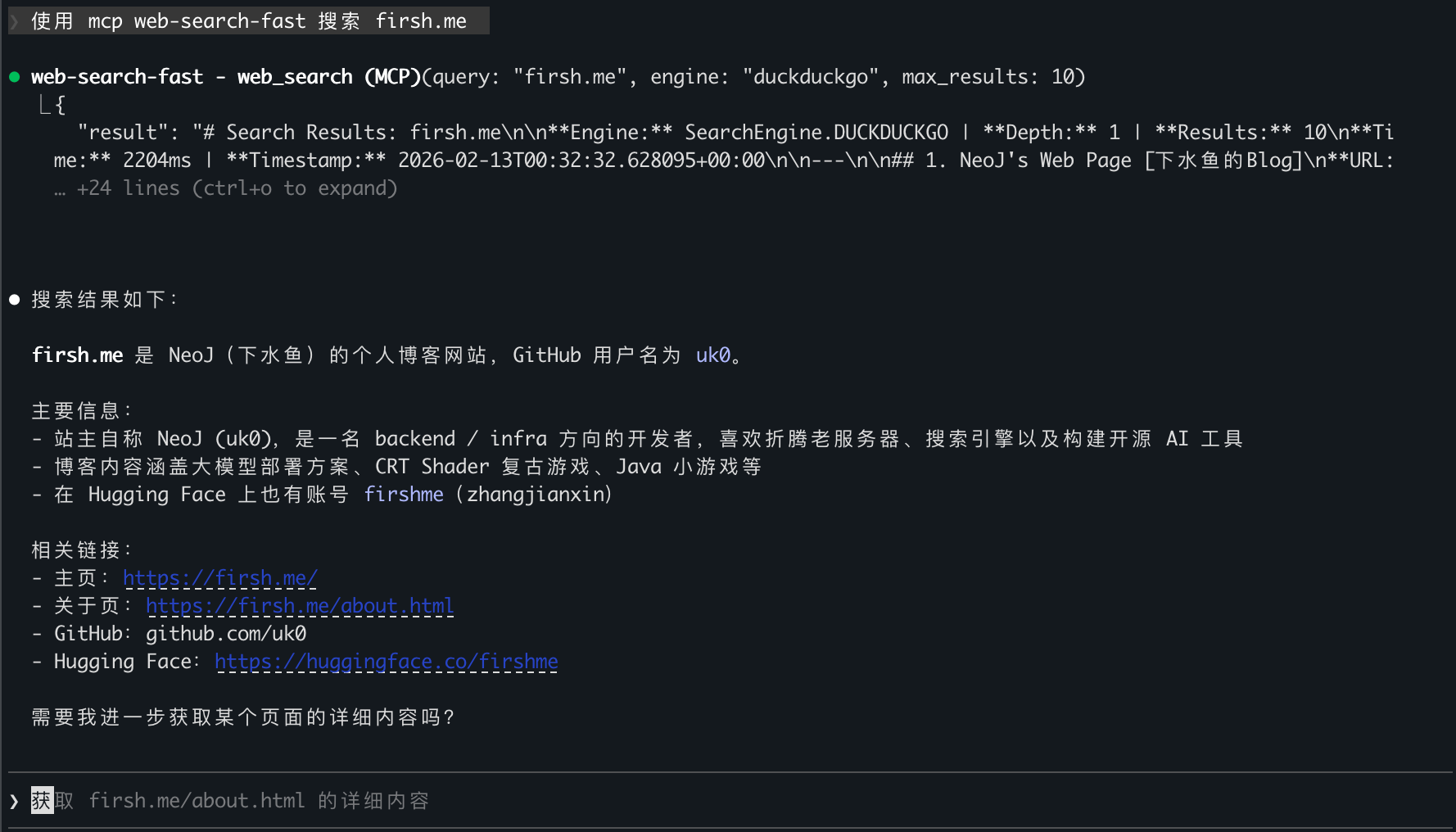
High-performance web search service for LLM clients via Model Context Protocol. Powered by Camoufox stealth browser.

English | 中文


img_2.png


img.png

Features

  • 3 Search Engines — Google, Bing, DuckDuckGo with automatic fallback

  • Multi-depth Scraping — SERP parsing → full-text extraction → outbound link crawling

  • Stealth BrowserCamoufox anti-detection Firefox (GeoIP, Humanize, Locale)

  • Auto-scaling Pool — Browser pool auto-scales at 80% utilization, configurable upper limit

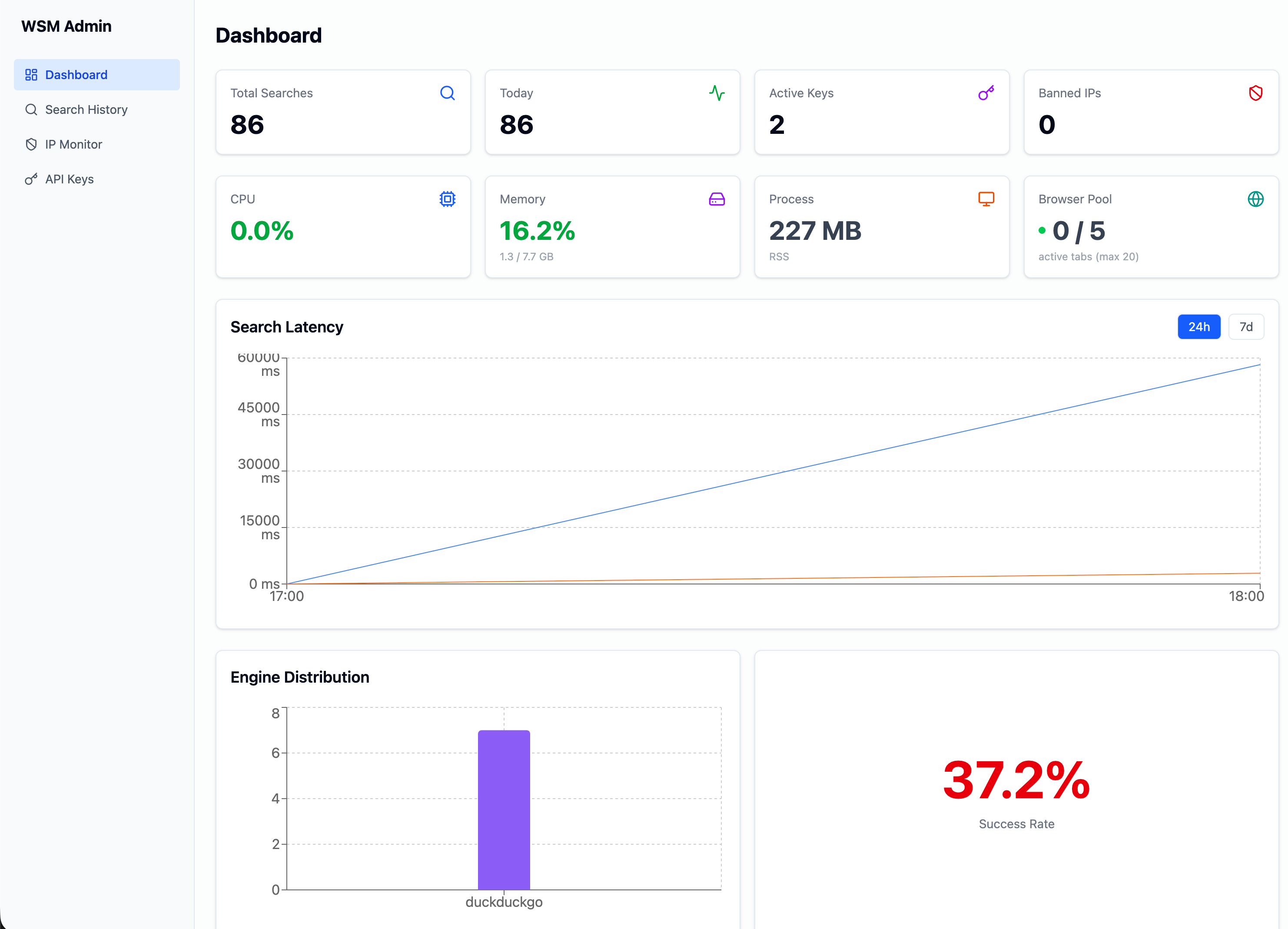
  • Admin Dashboard — Search analytics, system monitoring, API key management, IP banning

  • API Key Auth — Built-in key generation (wsm_ prefix) with call limits and revocation

  • Dual Output — JSON and Markdown formats

  • REST API — Standard HTTP API alongside MCP protocol

Quick Start

git clone https://github.com/nicepkg/web-search-mcp.git
cd web-search-mcp

# Configure
cp .env.example .env
# Edit .env — set ADMIN_TOKEN

# Launch
docker compose up -d

# Verify
curl http://127.0.0.1:8897/health

Create API Key & Register to Claude Code

# 1. Create an API key via Admin API
curl -X POST http://127.0.0.1:8897/admin/api/keys \
  -H "Authorization: Bearer $ADMIN_TOKEN" \
  -H "Content-Type: application/json" \
  -d '{"name": "claude-code", "call_limit": 10000}'
# Save the returned wsm_xxx key (only shown once)

# 2. Register MCP to Claude Code
claude mcp add-json -s user web-search-fast '{
  "type": "http",
  "url": "http://127.0.0.1:8897/mcp",
  "headers": {"Authorization": "Bearer wsm_your-api-key-here"}
}'

# 3. Restart Claude Code session

Or use the Admin Dashboard at http://127.0.0.1:8897/admin to create keys visually.

MCP Tools

Tool

Description

Timeout

web_search

Search the web, returns Markdown results

25s

get_page_content

Fetch and extract content from a URL

20s

list_search_engines

List available engines and pool status

web_search Parameters

Parameter

Type

Default

Description

query

string

required

Search keywords

engine

string

duckduckgo

google / bing / duckduckgo

depth

int

1

1=SERP only, 2=SERP+content, 3=SERP+content+outlinks

max_results

int

5

Max results (1-20)

Search Depth

Depth

Behavior

Description

1

SERP parsing

Default. Extracts titles, links, snippets

2

SERP + content

Navigates to each result, extracts page content

3

SERP + content + outlinks

Also crawls outbound links from content

Authentication Model

Token Type

Source

Access

ADMIN_TOKEN

Environment variable

Admin panel API (superuser)

wsm_ API Key

Created via Admin panel

MCP / Search API

  • ADMIN_TOKEN has superuser access to all endpoints

  • wsm_ keys can only access MCP and search endpoints (not admin API)

  • If no ADMIN_TOKEN is set and no API keys exist, all endpoints are open

REST API

Standard HTTP API available alongside MCP.

# GET
curl 'http://127.0.0.1:8897/search?q=python+asyncio&engine=duckduckgo&max_results=5' \
  -H 'Authorization: Bearer wsm_your-key'

# POST
curl -X POST http://127.0.0.1:8897/search \
  -H 'Content-Type: application/json' \
  -H 'Authorization: Bearer wsm_your-key' \
  -d '{"query": "python asyncio", "engine": "duckduckgo", "depth": 2, "max_results": 5}'

Parameter

Type

Default

Description

q / query

string

required

Search keywords (1-500 chars)

engine

string

duckduckgo

google / bing / duckduckgo

depth

int

1

Scraping depth: 1-3

format

string

json

json / markdown

max_results

int

10

Max results (1-50)

timeout

int

30

Timeout in seconds (5-120)

Admin Dashboard

Access http://127.0.0.1:8897/admin and login with ADMIN_TOKEN.

  • Dashboard — Search stats, CPU/memory monitoring, browser pool status, latency charts, engine distribution, success rate

  • API Keys — Create/revoke keys with call limits

  • IP Bans — Ban/unban IP addresses

  • Search Logs — Search history with IP filtering

Engine Status

Engine

Status

Notes

DuckDuckGo

Stable

Recommended default, HTML-lite mode

Google

Limited

May trigger captcha on some IPs, auto-fallback

Bing

Available

Uses global.bing.com to avoid geo-redirect

When Google is blocked, automatically falls back: DuckDuckGo → Bing.

Deployment

Endpoints

URL

Description

http://127.0.0.1:8897/mcp

MCP endpoint (Streamable HTTP)

http://127.0.0.1:8897/health

Health check

http://127.0.0.1:8897/admin

Admin dashboard

http://127.0.0.1:8897/search

REST API

Reverse Proxy (Nginx)

If deploying behind Nginx with HTTPS:

location / {
    proxy_pass http://127.0.0.1:8897;
    proxy_set_header Host $host;
    proxy_set_header X-Real-IP $remote_addr;
    proxy_set_header X-Forwarded-For $proxy_add_x_forwarded_for;
    proxy_set_header X-Forwarded-Proto $scheme;
    proxy_set_header Authorization $http_authorization;

    # Required for MCP Streamable HTTP (SSE)
    proxy_buffering off;
    proxy_cache off;
    proxy_http_version 1.1;
    proxy_set_header Connection '';
    proxy_read_timeout 120s;
    proxy_send_timeout 120s;
}

Cloudflare users: Add a WAF exception rule for /mcp path, or use DNS-only mode (grey cloud).

Environment Variables

Variable

Default

Description

ADMIN_TOKEN

Admin panel auth token (superuser)

BROWSER_POOL_SIZE

5

Initial browser tab count

BROWSER_MAX_POOL_SIZE

20

Auto-scaling upper limit

BROWSER_PROXY

Proxy server (socks5/http)

BROWSER_OS

Target OS fingerprint (windows/macos/linux)

BROWSER_FONTS

Custom font list

BROWSER_BLOCK_WEBGL

false

Block WebGL fingerprinting

BROWSER_ADDONS

Firefox addon paths

MCP_PORT

8897

Server port

WSM_DB_PATH

wsm.db

SQLite database path

REDIS_URL

Redis connection URL (optional)

Development

# Install dependencies
pip install -e ".[dev]"

# Install Camoufox browser
python -m camoufox fetch

# Start server
python -m src.mcp_server --transport http --host 127.0.0.1 --port 8897

# Run tests (96 tests)
pytest tests/ -v

# Type check
mypy src/

# Lint & format
ruff check src/ --fix && ruff format src/

Architecture

web-search-mcp/
├── src/
│   ├── mcp_server.py           # MCP server entry (FastMCP + middleware + Admin)
│   ├── config.py               # Configuration management
│   ├── api/
│   │   ├── routes.py           # HTTP API routes
│   │   └── schemas.py          # Pydantic request/response models
│   ├── core/
│   │   └── search.py           # Search logic (shared by MCP + HTTP)
│   ├── engine/
│   │   ├── base.py             # Search engine abstract base class
│   │   ├── google.py           # Google (JS DOM + captcha detection)
│   │   ├── bing.py             # Bing (global.bing.com)
│   │   └── duckduckgo.py       # DuckDuckGo (HTML-lite)
│   ├── scraper/
│   │   ├── browser.py          # BrowserPool (auto-scaling + health monitoring)
│   │   ├── parser.py           # HTML content parser
│   │   └── depth.py            # Multi-depth scraping
│   ├── formatter/
│   │   ├── json_fmt.py         # JSON formatter
│   │   └── markdown_fmt.py     # Markdown formatter
│   ├── admin/
│   │   ├── database.py         # SQLite init + migrations
│   │   ├── repository.py       # Data access layer
│   │   ├── routes.py           # Admin REST API
│   │   └── static/             # Admin SPA build output
│   └── middleware/
│       ├── api_key_auth.py     # Bearer token auth (ADMIN_TOKEN + DB keys)
│       ├── ip_ban.py           # IP ban middleware
│       └── search_log.py       # Search logging middleware
├── admin-ui/                   # Admin frontend (React + Vite + Tailwind)
├── tests/                      # Test suite (96 tests)
├── docker-compose.yml
├── Dockerfile
└── pyproject.toml

Tech Stack

Component

Technology

Web Framework

FastAPI + Uvicorn + Starlette

MCP Framework

FastMCP (mcp >= 1.25.0)

Browser Engine

Camoufox (anti-detection Firefox, Playwright)

Async Runtime

asyncio + Semaphore concurrency control

HTML Parsing

BeautifulSoup4 + lxml

Content Conversion

markdownify (HTML → Markdown)

Database

SQLite (aiosqlite)

Cache

Redis (optional)

Admin Frontend

React + Vite + Tailwind CSS + recharts

Validation

Pydantic v2


功能特性

  • 三大搜索引擎 — Google、Bing、DuckDuckGo,自动回退

  • 多层深度抓取 — SERP 解析 → 正文提取 → 外链抓取

  • 反检测浏览器 — Camoufox 真实浏览器指纹(GeoIP、Humanize、Locale)

  • 自动扩容 — 浏览器池并发达 80% 时自动扩容,上限可配

  • Admin 管理面板 — 搜索统计、系统监控、API Key 管理、IP 封禁

  • API Key 认证 — 内置密钥生成(wsm_ 前缀),支持调用限额和吊销

  • 双格式输出 — JSON / Markdown

  • REST API — 标准 HTTP API,与 MCP 协议并行提供

快速开始

Docker 部署(推荐)

git clone https://github.com/nicepkg/web-search-mcp.git
cd web-search-mcp

# 配置环境变量
cp .env.example .env
# 编辑 .env,设置 ADMIN_TOKEN

# 启动服务
docker compose up -d

# 验证
curl http://127.0.0.1:8897/health

创建 API Key 并注册到 Claude Code

# 1. 通过 Admin API 创建 API Key
curl -X POST http://127.0.0.1:8897/admin/api/keys \
  -H "Authorization: Bearer $ADMIN_TOKEN" \
  -H "Content-Type: application/json" \
  -d '{"name": "claude-code", "call_limit": 10000}'
# 保存返回的 wsm_xxx 密钥(仅创建时可见)

# 2. 注册 MCP 到 Claude Code
claude mcp add-json -s user web-search-fast '{
  "type": "http",
  "url": "http://127.0.0.1:8897/mcp",
  "headers": {"Authorization": "Bearer wsm_your-api-key-here"}
}'

# 3. 重启 Claude Code 会话

也可以访问 http://127.0.0.1:8897/admin 通过 Admin 面板可视化创建密钥。

本地 stdio 模式

无需 Docker,Claude Code 直接通过 stdin/stdout 通信:

pip install -e .
python -m camoufox fetch

claude mcp add-json -s user web-search-fast '{
  "type": "stdio",
  "command": "python",
  "args": ["-m", "src.mcp_server", "--transport", "stdio"],
  "env": {"PYTHONUNBUFFERED": "1"},
  "cwd": "'$(pwd)'"
}'

认证模型

Token 类型

来源

访问范围

ADMIN_TOKEN

环境变量

Admin 面板 API(超级权限)

wsm_ API Key

Admin 面板创建

MCP / 搜索 API

  • ADMIN_TOKEN 拥有所有端点的超级权限

  • wsm_ 密钥只能访问 MCP 和搜索端点(不能访问 Admin API)

  • 如果未配置 ADMIN_TOKEN 且无 API Key,所有端点开放访问

反向代理注意事项

使用 Nginx 反向代理时,MCP Streamable HTTP 需要关闭缓冲:

proxy_buffering off;
proxy_http_version 1.1;
proxy_set_header Connection '';
proxy_read_timeout 120s;

Claude Code 如何默认使用这个工具进行搜索

编辑 ~/.claude/CLAUDE.md 添加下面的内容


## Web Search

* 优先使用 `web-search-fast`

Cloudflare 用户:需要为 /mcp 路径添加 WAF 例外规则,或使用 DNS-only 模式(灰色云朵)。

License

MIT

-
security - not tested
A
license - permissive license
-
quality - not tested

Latest Blog Posts

MCP directory API

We provide all the information about MCP servers via our MCP API.

curl -X GET 'https://glama.ai/api/mcp/v1/servers/uk0/web-search-fast'

If you have feedback or need assistance with the MCP directory API, please join our Discord server