F
licenseB
qualityD
maintenanceEnables checking npm packages for known security vulnerabilities using the OSV API before installation. Supports both single package checks and bulk vulnerability scanning for multiple packages at once.
2
-

The osv-ui-mcp server enables AI agents to scan projects for CVE vulnerabilities, visualize findings, and apply fixes with a human-in-the-loop workflow. All analysis runs 100% locally, ensuring your code never leaves your environment.
Scan projects for CVEs (scan_project): Automatically detect and scan manifest files (e.g., package-lock.json, requirements.txt, go.sum, Cargo.lock, pom.xml) across npm, Python, Go, Rust, Java, PHP, and Ruby ecosystems. Queries live CVE data from OSV.dev and returns structured reports with severity counts, risk scores, and fix recommendations. Supports filtering by severity (critical, high, moderate, low).
Launch a visual dashboard (open_dashboard): Opens a zero-config, privacy-first browser-based dashboard for human review of CVE details, severity charts, and upgrade guides — the recommended step before applying any fixes.
Preview fix commands (get_fix_commands): Retrieves safe upgrade commands (e.g., npm install, pip install) for vulnerable packages without executing them, allowing users to review proposed changes before action.
Apply security fixes (apply_fixes): Executes package upgrade commands to remediate CVEs. Supports dry-run mode for final confirmation; requires explicit package selection to prevent unintended modifications.
Utilizes the GitHub Advisory Database as a core source for vulnerability data to provide accurate security assessments.
Enables security auditing within GitLab CI/CD pipelines to monitor for vulnerabilities and block deployments containing critical security risks.
Scans npm projects by parsing package-lock.json files to identify security vulnerabilities, calculate risk scores, and provide clear upgrade guides.
Provides specific support for auditing Python dependencies defined in poetry.lock manifest files.
Integrates with the PyPI Advisory Database to identify known vulnerabilities in Python package dependencies.
Audits Python projects for CVEs by scanning manifest files such as requirements.txt, Pipfile.lock, and poetry.lock.
Identifies and reports known security vulnerabilities in Rust projects by analyzing Cargo.lock files.
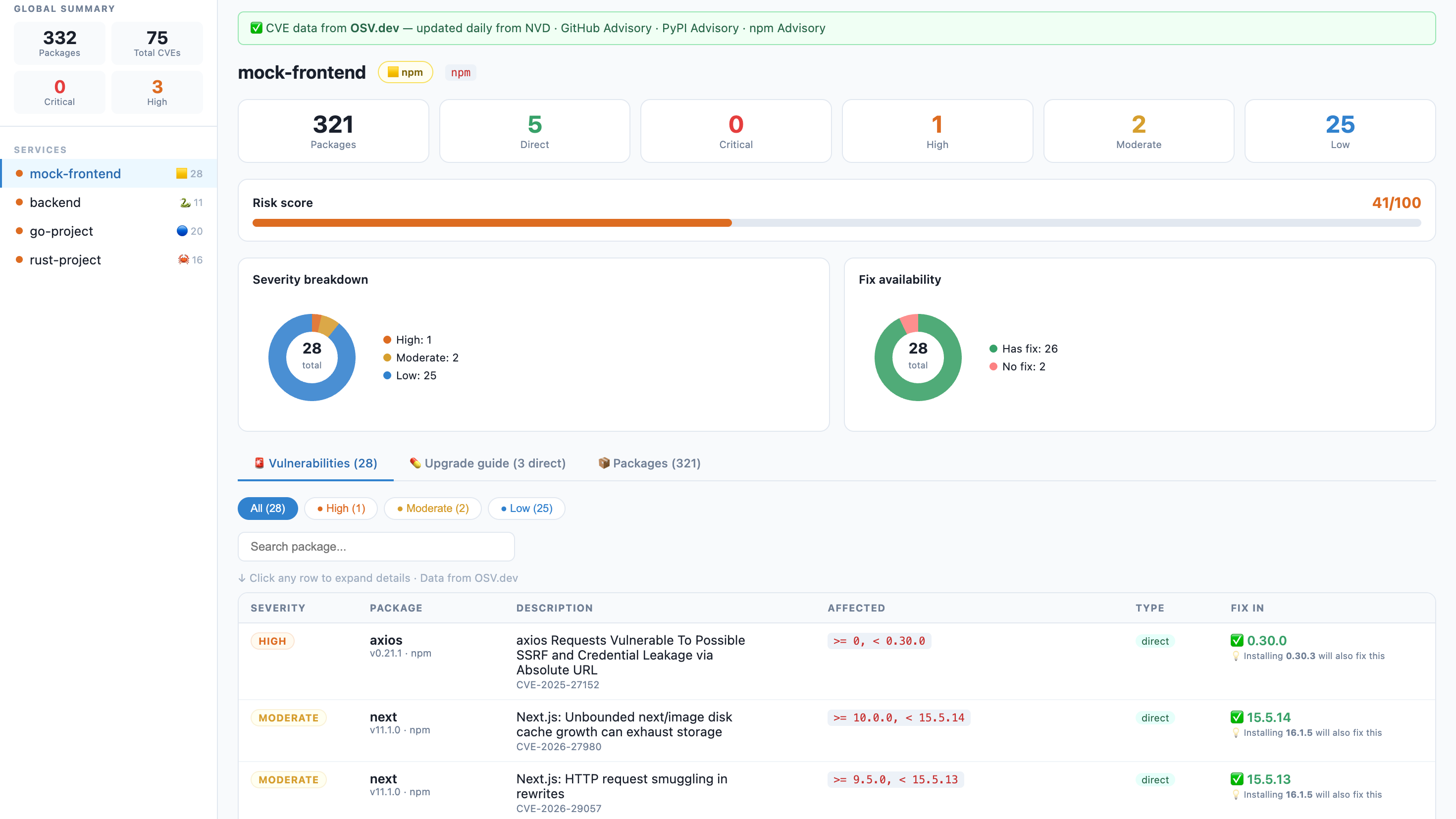
A beautiful, zero-config visual CVE dashboard for npm, Python, Go, Rust, Java, PHP, and Ruby projects.
One command. No signup. No API key. Runs 100% locally — your code never leaves your machine.


🇻🇳 Tiếng Việt · 🇺🇸 English · 🇨🇳 中文 · 🇯🇵 日本語
$ npm audit

# ... 300 lines of this ...
# moderate  Regular Expression Denial of Service in semver
# package   semver
# patched in >=7.5.2
# ...
# 12 vulnerabilities (3 moderate, 6 high, 3 critical)
Nobody reads that. Security gets ignored. Dependencies stay vulnerable.
Related MCP server: GuardianMCP
npx osv-ui→ Opens a dashboard. Every CVE, every fix, all your services. Done.
Zero-config: No complex setup, no signup, no API key required.
Privacy First: Analysis is done 100% on your machine.
Fast & Visual: Real-time Risk Scores, vulnerability charts, and clear upgrade guides in seconds.
Multi-platform: Native support for Node.js (npm), Python, Go, Rust, Java, PHP, and Ruby.
🌐 Multi-Ecosystem | Scans |
📡 Live CVE data | Powered by OSV.dev — updated daily from NVD, GitHub Advisory, PyPI Advisory. No API key. |
🏢 Multi-service | Scan your entire monorepo in one command — frontend, backend, workers, ML services |
💊 Fix guide | Dependabot-style upgrade table: current version → safe version + one-click copy command |
🔌 Built-in REST API | Power your own security dashboards with |
🎯 Risk score | 0–100 per service so you know where to focus first |
🔍 CVE drill-down | Click any row — CVSS score, description, NVD link, GitHub Advisory link |
🌙 Dark Mode | Eye-friendly security audits, day or night |
Scan current directory:
npx osv-uiScan a monorepo (multiple services at once):
npx osv-ui ./frontend ./api ./worker ./ml-serviceAuto-discover all services under the current directory:
npx osv-ui -dAdd to your package.json scripts:
{
  "scripts": {
    "audit:ui":  "npx osv-ui",
    "audit:all": "npx osv-ui ./frontend ./api ./worker"
  }
}
--discover, -d Auto-find service dirs that contain a supported manifest
--port=2003 Use a custom port (default: 2003)
--json[=file] Save report as JSON without opening browser (defaults to osv-report.json)
--html[=file] Save report as HTML without opening browser (defaults to osv-report.html)
--cyclonedx[=file] Save CycloneDX SBOM JSON (defaults to osv-sbom.cdx.json)
--spdx[=file] Save SPDX SBOM JSON (defaults to osv-sbom.spdx.json)
--baseline=file Compare with a previous --json report
--markdown[=file] Save a Markdown PR/comment report (defaults to osv-report.md)
--fail-on=level Exit non-zero for critical/high/moderate/low findings
--webhook-url=url POST matching findings to a webhook
--webhook-severity=level Webhook threshold (default: critical)
--watch Keep dashboard running and re-scan when manifests change
--no-open Don't auto-open the browser
--offline Skip OSV.dev lookup — parse manifests only
-h, --help Show help messageosv-ui is now a Model Context Protocol (MCP) server. This allows AI agents like Claude Desktop, Cursor, and Claude Code to:
Scan your project for CVEs automatically.
Open the visual dashboard for you to review findings (Human-in-the-loop).
Apply fixes after your explicit confirmation.
Quick setup (npx):
{
  "mcpServers": {
    "osv-ui": {
      "command": "npx",
      "args": ["-y", "osv-ui-mcp"]
    }
  }
}
See the MCP Package README for detailed setup instructions.
osv-ui isn't just a dashboard; it's a security data engine.
Once the dashboard is running, you can pull the raw security data for your whole project:
# Get full JSON payload for all services
curl http://localhost:2003/api/data

# Use it in your custom scripts
curl -s http://localhost:2003/api/data | jq '.[0].vulns'Generate machine-readable reports without opening the browser:
npx osv-ui -d --json=osv-report.json --markdown=osv-report.md --cyclonedx=sbom.cdx.json --spdx=sbom.spdx.json --no-openCompare a PR scan against a baseline report and fail on newly introduced high+ findings:
npx osv-ui -d --json=current.json --baseline=main-osv-report.json --markdown=osv-pr.md --fail-on=high --no-openMinimal GitHub Actions flow:
name: osv-ui
on: [pull_request]
jobs:
  scan:
    runs-on: ubuntu-latest
    steps:
      - uses: actions/checkout@v4
      - uses: actions/setup-node@v4
        with:
          node-version: 24
      - run: npx osv-ui -d --json=current.json --markdown=osv-pr.md --cyclonedx=sbom.cdx.json --fail-on=high --no-open
      - uses: actions/upload-artifact@v4
        if: always()
        with:
          name: osv-ui-report
          path: |
            current.json
            osv-pr.md
            sbom.cdx.json
Send new critical findings to a webhook:
npx osv-ui -d --baseline=main-osv-report.json --webhook-url="$SECURITY_WEBHOOK_URL" --webhook-severity=critical --json=current.jsonEcosystem | Files |
npm / JS |
|
Python |
|
Go |
|
Rust |
|
Java |
|
PHP |
|
Ruby |
|
More ecosystems coming — see Roadmap.
Your project files
    │
    ├─ package-lock.json   ──┐
    ├─ Pipfile / poetry    ──┤──► parser ──► package list
    ├─ go.sum / Cargo.lock ──┘
                                    │
                                    ▼
                             OSV.dev batch API  (free, no key)
                                    │
                                    ▼
                             CVE matches + fix versions
                                    │
                                    ▼
                         Express server → browser dashboard
                              http://localhost:2003
CVE data comes from OSV.dev — a free, open database maintained by Google that aggregates:
🇺🇸 NVD — NIST National Vulnerability Database
🐙 GitHub Advisory Database (GHSA)
📦 npm Advisory Database
🦀 RustSec · Go Vuln DB · OSS-Fuzz · and more
Updated daily. No account. No rate limit. No vendor lock-in.
osv-ui and osv-scanner use the same OSV.dev data source. osv-ui adds the visual layer that osv-scanner lacks:
Browser dashboard instead of terminal output
Multi-service sidebar
Dependabot-style upgrade guide with copy commands
osv-ui |
| Snyk | Dependabot | |
Visual dashboard | ✅ | ❌ terminal only | ✅ | ✅ |
npm support | ✅ | ✅ | ✅ | ✅ |
Python support | ✅ | ❌ | ✅ | ✅ |
Multi-service in one view | ✅ | ❌ | ✅ paid | ✅ |
No signup required | ✅ | ✅ | ❌ | ❌ |
Works on GitLab Free | ✅ | ✅ | ❌ | ❌ |
Self-hosted / local | ✅ | ✅ | ❌ | ❌ |
Fix commands | ✅ | partial | ✅ | ✅ |
Open source | ✅ | ✅ | ❌ | ❌ |
No Dependabot on GitLab Free? Add this to .gitlab-ci.yml:
audit:
  stage: test
  image: node:24-alpine
  script:
    - npm audit --json > /tmp/audit.json || true
    - |
      node -e "
        const r = require('/tmp/audit.json');
        const crit = Object.values(r.vulnerabilities || {})
          .filter(v => v.severity === 'critical').length;
        if (crit > 0) {
          console.error('BLOCKED: ' + crit + ' critical CVE(s). Run: npx osv-ui');
          process.exit(1);
        }
        console.log('OK: no critical vulnerabilities');
      "
  artifacts:
    paths: [/tmp/audit.json]
when: alwaysNode.js >= 22
Internet access for OSV.dev queries — or use --offline
npm projects: run npm install first so package-lock.json exists
Python projects: any of the supported manifest files listed above
All contributions are welcome. If you want to work on something, open an issue first so we can coordinate.
Go support — parse go.sum / go.mod
Rust support — parse Cargo.lock
Java / Maven — parse pom.xml
PHP / Composer — parse composer.lock
Ruby / Bundler — parse Gemfile.lock
Export report — save as HTML / JSON
Dark mode — eye-friendly dashboard UI
GitHub Actions / CI diff — generate Markdown PR comments and fail on new CVEs
SBOM export — CycloneDX / SPDX format
Watch mode — re-scan on manifest file changes
Slack / webhook — notify on new critical CVEs
Parser hardening — Maven property inheritance, lockfile edge cases, workspace layouts
Live dashboard refresh — push watch-mode updates to an open browser tab without reload
This project is built by the community. All skill levels welcome.
Good first issues:
Write unit tests for the parsers
Improve Python parser edge cases
Improve Maven/Gradle and workspace parser edge cases
# Clone and run locally
git clone https://github.com/toan203/osv-ui
cd osv-ui
npm install

# Run against your own project
node bin/cli.js /path/to/your/project

# Run against multiple services
node bin/cli.js ./frontend ./backend
Please read CONTRIBUTING.md for code style and PR process.
MIT — use it, fork it, embed it, build on it. Attribution appreciated but not required.
Did osv-ui catch a real CVE in your project?
A ⭐ helps other developers find this tool.
Execute package upgrade commands to fix CVEs. IMPORTANT: This is a DESTRUCTIVE action that modifies package files. ALWAYS call get_fix_commands first and confirm with the user before calling this. Returns the command output for each fix applied.
| Name | Required | Description | Default |
|---|---|---|---|
| path | Yes | Path to the project directory. | |
| dry_run | No | If true, print commands without executing. Useful for final confirmation step. | |
| packages | Yes | Package names to fix. Must be explicit — never fix all without user confirmation. |
Does the description disclose side effects, auth requirements, rate limits, or destructive behavior?
With no annotations provided, the description carries the full burden of behavioral disclosure. It explicitly states this is a 'DESTRUCTIVE action that modifies package files,' which is crucial for a mutation tool. It also describes the return behavior ('Returns the command output for each fix applied') and includes a safety note about user confirmation.
Agents need to know what a tool does to the world before calling it. Descriptions should go beyond structured annotations to explain consequences.
Is the description appropriately sized, front-loaded, and free of redundancy?
The description is front-loaded with the core purpose, followed by critical warnings and usage guidelines. Every sentence adds value: the first states the action, the second highlights destructiveness and prerequisites, and the third explains the return. There is no wasted text.
Shorter descriptions cost fewer tokens and are easier for agents to parse. Every sentence should earn its place.
Given the tool's complexity, does the description cover enough for an agent to succeed on first attempt?
For a destructive tool with no annotations and no output schema, the description is largely complete: it covers purpose, behavioral risks, usage workflow, and return format. However, it could slightly enhance completeness by mentioning potential side effects (e.g., system downtime) or error handling, though the current level is adequate given the schema coverage.
Complex tools with many parameters or behaviors need more documentation. Simple tools need less. This dimension scales expectations accordingly.
Does the description clarify parameter syntax, constraints, interactions, or defaults beyond what the schema provides?
Schema description coverage is 100%, so the schema already documents all parameters. The description does not add specific meaning beyond the schema (e.g., it doesn't elaborate on 'path' or 'packages' formats). However, it reinforces the importance of explicit packages ('Must be explicit — never fix all without user confirmation'), which aligns with but doesn't exceed schema guidance.
Input schemas describe structure but not intent. Descriptions should explain non-obvious parameter relationships and valid value ranges.
Does the description clearly state what the tool does and how it differs from similar tools?
The description clearly states the specific action ('Execute package upgrade commands') and resource ('to fix CVEs'), distinguishing it from siblings like 'get_fix_commands' (which only retrieves commands) and 'scan_project' (which only identifies issues). It goes beyond the tool name 'apply_fixes' by specifying the exact mechanism.
Agents choose between tools based on descriptions. A clear purpose with a specific verb and resource helps agents select the right tool.
Does the description explain when to use this tool, when not to, or what alternatives exist?
Explicit guidance is provided: 'ALWAYS call get_fix_commands first and confirm with the user before calling this.' This directly addresses when to use this tool versus the sibling 'get_fix_commands' and includes a prerequisite workflow. The description also implies when not to use it (e.g., without confirmation).
Agents often have multiple tools that could apply. Explicit usage guidance like "use X instead of Y when Z" prevents misuse.
Get the safe upgrade commands for vulnerable packages WITHOUT executing them. Use this to show the user what will be changed before calling apply_fixes. Returns a list of commands grouped by ecosystem (npm, pip, go, cargo, Maven, Composer, Bundler).
| Name | Required | Description | Default |
|---|---|---|---|
| path | Yes | Path to the project directory. | |
| packages | No | Optional: only return fix commands for these package names. If omitted, returns all fixable packages. | |
| severity_filter | No | Only return fixes for this severity or above. Default: all. |
Does the description disclose side effects, auth requirements, rate limits, or destructive behavior?
With no annotations provided, the description carries the full burden. It discloses the critical non-execution behavior upfront ('WITHOUT executing them') and clarifies that the output is a list of commands, implying no side effects. It could add more context (e.g., whether network access or dependency installation is needed), but the key safety-relevant trait is well covered.
Agents need to know what a tool does to the world before calling it. Descriptions should go beyond structured annotations to explain consequences.
Is the description appropriately sized, front-loaded, and free of redundancy?
The description is two sentences with no filler. The key differentiator ('WITHOUT executing them') is front-loaded, followed by the usage context and the return-summary grouping. Every clause earns its place.
Shorter descriptions cost fewer tokens and are easier for agents to parse. Every sentence should earn its place.
Given the tool's complexity, does the description cover enough for an agent to succeed on first attempt?
Given the moderate complexity (3 params, no output schema), the description adequately covers what the tool returns (grouped commands), when to use it (before apply_fixes), and the critical no-execution guarantee. It could mention edge cases like empty results or required project discovery details, but for a preview/list tool this is sufficient.
Complex tools with many parameters or behaviors need more documentation. Simple tools need less. This dimension scales expectations accordingly.
Does the description clarify parameter syntax, constraints, interactions, or defaults beyond what the schema provides?
The input schema has 100% description coverage for all three parameters, so the description need not restate them. The schema already explains path, packages (optional filter), and severity_filter (default all). The description adds no parameter-level meaning beyond what the schema provides, which matches the baseline of 3 for complete schema coverage.
Input schemas describe structure but not intent. Descriptions should explain non-obvious parameter relationships and valid value ranges.
Does the description clearly state what the tool does and how it differs from similar tools?
The description uses a specific verb ('Get') and a precise resource ('safe upgrade commands for vulnerable packages'), then immediately distinguishes the tool from its likely sibling apply_fixes by stating 'WITHOUT executing them'. It also names the grouped-by-ecosystem output, so an agent can clearly identify the tool's role in the workflow.
Agents choose between tools based on descriptions. A clear purpose with a specific verb and resource helps agents select the right tool.
Does the description explain when to use this tool, when not to, or what alternatives exist?
The description explicitly tells the agent when to use this tool ('Use this to show the user what will be changed before calling apply_fixes'), naming the alternative and the sequencing. It does not address scan_project or open_dashboard, but the main decision point between preview and execution is clearly covered.
Agents often have multiple tools that could apply. Explicit usage guidance like "use X instead of Y when Z" prevents misuse.
Launch the osv-ui visual dashboard in the browser for human review. This is the HUMAN-IN-THE-LOOP step — always offer this before applying fixes. The dashboard shows full CVE details, severity charts, and the upgrade guide. Returns the dashboard URL. If already running for this path, returns existing URL.
| Name | Required | Description | Default |
|---|---|---|---|
| path | No | Path to the project directory to display in the dashboard. | |
| port | No | Port to run the dashboard on. Default: auto-assigned starting from 2003. |
Does the description disclose side effects, auth requirements, rate limits, or destructive behavior?
With no annotations provided, the description carries the full burden and adds valuable behavioral context: it discloses that this launches a browser dashboard for human review, returns a URL, and handles existing instances by returning the existing URL if already running. However, it doesn't mention potential side effects like opening browser tabs or resource usage.
Agents need to know what a tool does to the world before calling it. Descriptions should go beyond structured annotations to explain consequences.
Is the description appropriately sized, front-loaded, and free of redundancy?
The description is front-loaded with the core purpose, followed by workflow guidance and behavioral details, all in three efficient sentences with zero wasted words, making it easy for an agent to parse quickly.
Shorter descriptions cost fewer tokens and are easier for agents to parse. Every sentence should earn its place.
Given the tool's complexity, does the description cover enough for an agent to succeed on first attempt?
Given no annotations and no output schema, the description does well by explaining the tool's purpose, usage context, and return value (URL). However, it lacks details on error handling or what happens if the path is invalid, leaving minor gaps in completeness for a tool with two parameters.
Complex tools with many parameters or behaviors need more documentation. Simple tools need less. This dimension scales expectations accordingly.
Does the description clarify parameter syntax, constraints, interactions, or defaults beyond what the schema provides?
Schema description coverage is 100%, so the schema already documents both parameters (path and port). The description adds no additional parameter semantics beyond what's in the schema, such as format examples or constraints, meeting the baseline score of 3.
Input schemas describe structure but not intent. Descriptions should explain non-obvious parameter relationships and valid value ranges.
Does the description clearly state what the tool does and how it differs from similar tools?
The description clearly states the specific action ('Launch the osv-ui visual dashboard in the browser') and resource ('for human review'), distinguishing it from siblings like apply_fixes, get_fix_commands, and scan_project by emphasizing it's the 'HUMAN-IN-THE-LOOP step' for review before applying fixes.
Agents choose between tools based on descriptions. A clear purpose with a specific verb and resource helps agents select the right tool.
Does the description explain when to use this tool, when not to, or what alternatives exist?
It provides explicit guidance on when to use this tool ('always offer this before applying fixes') and distinguishes it from alternatives by positioning it as a prerequisite step to apply_fixes, with clear context about its role in the workflow.
Agents often have multiple tools that could apply. Explicit usage guidance like "use X instead of Y when Z" prevents misuse.
Scan a project directory for CVE vulnerabilities. Automatically detects npm, Python, Go, Rust, Java/Maven, PHP/Composer, and Ruby/Bundler manifests. Queries live CVE data from OSV.dev. Returns structured vulnerability report with severity counts, risk score, and fix recommendations. Use this as the first step before open_dashboard or apply_fixes.
| Name | Required | Description | Default |
|---|---|---|---|
| path | No | Absolute or relative path to the project directory. Defaults to current working directory. | |
| offline | No | If true, skip OSV.dev query and only parse manifests. Default: false. | |
| severity_filter | No | Only return vulnerabilities at this severity or above. Default: all. |
Does the description disclose side effects, auth requirements, rate limits, or destructive behavior?
With no annotations provided, the description carries the full burden of behavioral disclosure. It clearly states the tool scans the project, auto-detects multiple manifest formats, queries live OSV.dev data, and returns a structured vulnerability report with severity counts, risk score, and fix recommendations. It does not explicitly state whether the scan modifies files, which would be useful for a tool that may be followed by apply_fixes.
Agents need to know what a tool does to the world before calling it. Descriptions should go beyond structured annotations to explain consequences.
Is the description appropriately sized, front-loaded, and free of redundancy?
The description is three focused sentences. The first states the core action, the second lists capabilities and data source, and the third gives usage ordering. Every sentence earns its place with no repetition or filler.
Shorter descriptions cost fewer tokens and are easier for agents to parse. Every sentence should earn its place.
Given the tool's complexity, does the description cover enough for an agent to succeed on first attempt?
For a tool with no output schema and no annotations, the description provides a solid high-level picture: input is a project directory, it detects manifests, queries OSV.dev, and returns a structured report with specific components. It lacks an explicit statement about side effects or network requirements, but the visible detail is sufficient for an agent to call it correctly as a first step.
Complex tools with many parameters or behaviors need more documentation. Simple tools need less. This dimension scales expectations accordingly.
Does the description clarify parameter syntax, constraints, interactions, or defaults beyond what the schema provides?
The input schema already provides 100% coverage of the three parameters, so the baseline for value-add is 3. The description reinforces that path refers to a project directory and mentions OSV.dev, which relates to the offline parameter, but it adds no parameter-level detail beyond the schema.
Input schemas describe structure but not intent. Descriptions should explain non-obvious parameter relationships and valid value ranges.
Does the description clearly state what the tool does and how it differs from similar tools?
The description has a specific verb and resource: 'Scan a project directory for CVE vulnerabilities.' It also differentiates itself from siblings by stating this is the first step before open_dashboard or apply_fixes. The tool's role as a scanner that produces a report is unmistakable.
Agents choose between tools based on descriptions. A clear purpose with a specific verb and resource helps agents select the right tool.
Does the description explain when to use this tool, when not to, or what alternatives exist?
The description explicitly tells the agent when to use this tool: 'Use this as the first step before open_dashboard or apply_fixes.' This names alternatives and establishes context. However, it does not mention when not to use it or describe any exclusions for the sibling get_fix_commands, so it falls just short of a 5.
Agents often have multiple tools that could apply. Explicit usage guidance like "use X instead of Y when Z" prevents misuse.
Recent tool additions, removals, and schema changes observed during successful MCP inspections.
v0.1.0apply_fixesget_fix_commandsopen_dashboardscan_projectScored across 4 tools
Each tool targets a distinct phase in the workflow: scanning, dashboard review, previewing fix commands, and executing fixes. There is no meaningful overlap between the tools.
All tool names follow the same snake_case verb_noun pattern: scan_project, open_dashboard, get_fix_commands, apply_fixes. The naming is predictable and clearly signals the action being performed.
Four tools is well-scoped for a focused vulnerability scanning and remediation workflow. Each tool serves a necessary step with no redundant or extraneous tools.
The tools cover the full lifecycle from scanning a project, reviewing results in the dashboard, previewing safe fix commands, and applying fixes. No obvious gaps exist for the stated purpose.
Scan packages and lockfiles (npm, PyPI, Go, Maven, Cargo, NuGet) for vulnerabilities and malware.
CVE lookups (NVD) and dependency-manifest audits (OSV) for AI agents. No API keys.
CVE lookups (NVD) and dependency-manifest audits (OSV) for AI agents. No API keys.
Detect malicious or vulnerable npm packages: registry search, OSV.dev and GitHub advisory lookups