
io.github.tlq5l/agentic-video
by tlq5l
README.md
# agentic-video
<!-- mcp-name: io.github.tlq5l/agentic-video -->
agentic-video lets an AI agent that reads text and images, but not video, work with video files on your own machine. It is a Python library plus a stdio MCP server. The agent asks small, targeted questions ("show me 12 frames from 0:40 to 1:10", "when is 'launch' spoken?") and gets back measurements, transcripts and contact sheets: grids of frames, each with its timestamp burned into the pixels. Everything runs locally with FFmpeg, Whisper and optional local models, except two optional cloud tools (`watch_for`, `label_sounds`), which send frames or audio to Cloudflare Workers AI only when you set credentials and call them. An opt-in shadow transcription trial (off by default, owner machines only) also sends audio to Cloudflare when its switch and credentials are set.
**See it work:** https://agentic-video-gallery.infra-1b7.workers.dev (the gallery: real tasks, including the misses).
## Try it in 2 minutes
Pick one route and follow its steps.
- **Claude Code:** `brew install ffmpeg uv`, then `claude mcp add -s user agentic-video -- uvx agentic-video`.
- **Claude Desktop:** download the `.mcpb` from the [latest release](https://github.com/tlq5l/agentic-video/releases/latest) and double-click it (macOS; run `brew install ffmpeg` first).
- **Claude Code plugin:** `brew install ffmpeg uv` first (the plugin's server runs `uvx`), then `claude plugin marketplace add tlq5l/agentic-video`, then `claude plugin install agentic-video@agentic-video` ([docs/claude-code-plugin.md](docs/claude-code-plugin.md)).
- **Other clients:** [Run the MCP server](#run-the-mcp-server) has the JSON block.
Then paste this first prompt: "Use agentic-video: make a contact sheet of `/path/to/video.mp4` and list its cuts"
- [Six task recipes with real output](docs/recipes/): each has a prompt and the tool result.
- Used it for something? Tell us in [Discussions](https://github.com/tlq5l/agentic-video/discussions).
- Found a miss? [Open an issue](https://github.com/tlq5l/agentic-video/issues/new?template=report-a-miss.yml).
**Install:** `brew install ffmpeg` on macOS, or `sudo apt-get install -y ffmpeg` on Debian or Ubuntu (see [Install](#install-macos-or-linux) for the uv line). Then add it to Claude Code with `claude mcp add -s user agentic-video -- uvx agentic-video` (or `pipx install agentic-video`). Other clients: [Run the MCP server](#run-the-mcp-server).
**Claude Desktop (one click):** download `agentic-video-<version>.mcpb` from the latest [GitHub release](https://github.com/tlq5l/agentic-video/releases/latest) and double-click it. It still needs `brew install ffmpeg`. The first start takes about a minute while Claude Desktop installs the Python packages. macOS only. The bundle does not include local visual search or on-screen text counting; for those, use the git install in the "Optional: visual search (CLIP) and on-screen text" section below. Details: [docs/features/desktop-bundle.md](docs/features/desktop-bundle.md).
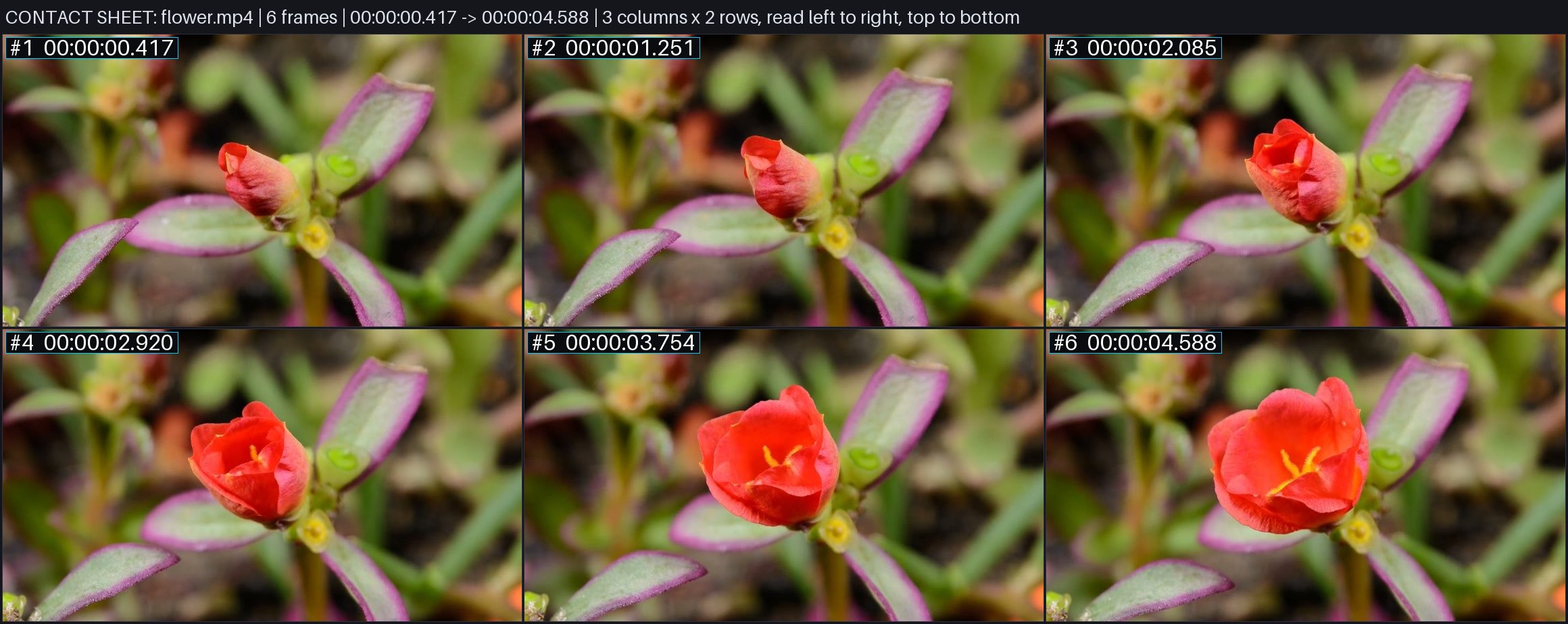
*One `contact_sheet` call on a 5-second clip: six frames, each stamped with its time, as a single image the agent can read.*
In 2 minutes (macOS) your agent can answer "what happens in this video?" and "when is X said?" for a local video file. You get the length and size, a contact sheet image with timestamps, the cuts, a loudness summary and searchable speech. Nothing leaves your machine unless you use the optional cloud tools below or set the shadow transcription trial switch (off by default, owner machines only). Setup for Claude Code:
```sh
brew install ffmpeg uv
git clone https://github.com/tlq5l/agentic-video.git && cd agentic-video
uv venv --python 3.12 .venv && uv pip install --python .venv/bin/python -r requirements.txt
claude mcp add -s user agentic-video -e PYTHONPATH="$PWD" -- "$PWD/.venv/bin/python" -m src.executor.mcp_server
```
On Debian or Ubuntu, run `sudo apt-get install -y ffmpeg git` and `curl -LsSf https://astral.sh/uv/install.sh | sh` in place of the first line, then open a new shell so `uv` is on your PATH.
Then ask: "Use agentic-video to review `/path/to/video.mp4`." Other clients and details: [Run the MCP server](#run-the-mcp-server).
**Status:** experimental. The author uses it every day; support is best-effort. Issues and pull requests are welcome, but expect slow replies.
## What it gives an agent
The MCP server exposes 25 tools (full schemas in `src/adapters/mcp_schemas.json`):
- **Look:** `review_video` (first look in one call: metadata, contact sheet, cuts, near-black stretches and a loudness summary), `probe_video` (duration, fps, size, codecs, audio), `contact_sheet`, `overview_chunks` (consecutive sheets across a long video), `inspect_window` / `inspect_windows` (dense frames for short ranges; `read_text` on `inspect_window` adds each frame's on-screen text), `frame_at` (one exact frame at full size, optionally cropped and enlarged to read small text; `read_text: true` also returns the on-screen text it reads, Apple Vision on macOS), `inspect_moments` (frames around given instants), `refine_temporal_beam` (zoom into candidate windows).
- **Listen:** `transcribe` (timestamped speech, cached; a video with no cached transcript starts a background job, so the first call returns `status: in_progress` and `retry_after_seconds`: call the same tool again after that many seconds), `search_transcript` (find when words are spoken: exact words first, then passages that match by meaning when the optional on-device EmbeddingGemma 2 model is set up; keyword-only without it).
- **Find:** `detect_cuts` (hard cuts and animated scene changes), `check_frame_cadence` (stretches where frames repeat so the picture updates less often than the frame rate, such as 30 fps padded to 60), `build_visual_index` + `search_visual` (local CLIP search for things that are visible, optional; the interval holding the top hit grows from its best frames only over neighbouring frames that score close to the best, up to 8 seconds, so it can be shorter; a span already longer than 8 seconds, such as a held frame or hits merged together, is kept whole, so it can be longer and can include lower-scoring hits). `watch_for` (cloud: wakes when yes/no questions about the picture start to hold, from sampled frames).
- **Count and track:** `count_occurrences` (separate appearances of an object or on-screen text; `direction` counts those moving one way across the frame, plus spans too brief to show motion), `count_repetitions` (cycles of a repeated action), `track_region_changes` / `track_region_events` (changes inside one fixed rectangle).
- **Audio and sync:** `audio_onsets` (merges hits closer than `min_gap_sec`, default 0.035 s), `loudness_timeline`, `spectrogram_window`, `sync_check` (cuts and sound cues against measured audio; each cue gives `candidate_onsets_count`; `verbose: true` gives each cue its full `candidate_onsets` list instead of the count). `label_sounds` (cloud: names the sounds in a stretch of audio).
Which tools need a Mac, Apple Vision, torch with the CLIP model or Cloudflare credentials, and where each one ran: [docs/capabilities.md](docs/capabilities.md). Agents may pass `inspect_moments` moments as bare numbers or `{"time": 12.5}`, and `region` as `[x, y, width, height]`; both are read as the documented form. See [docs/features/argument-shapes.md](docs/features/argument-shapes.md).
There is also a command-line checker for rendered videos: `python -m src.loop check <video>` measures sync, loudness, onsets, cuts and some picture faults, then writes `report.md` plus evidence images. `python -m src.loop cadence <video>` prints the `check_frame_cadence` result as JSON.
`AGENTS.md` is a guide for agents on which tool to use when. `FEATURES.md` maps each feature to its code and tests.
## Install (macOS or Linux)
You need FFmpeg, Git and [uv](https://docs.astral.sh/uv/). Tested with Python 3.12 on Apple silicon (macOS) and on Debian 12 (x86_64).
macOS (Homebrew):
```sh
brew install ffmpeg uv
git clone https://github.com/tlq5l/agentic-video.git
cd agentic-video
uv venv --python 3.12 .venv
uv pip install --python .venv/bin/python -r requirements.txt pytest jsonschema
.venv/bin/python -m pytest -q # optional: about 3 minutes
```
Debian or Ubuntu (apt and the uv installer; open a new shell after the uv line so `uv` is on your PATH):
```sh
sudo apt-get install -y ffmpeg git
curl -LsSf https://astral.sh/uv/install.sh | sh
git clone https://github.com/tlq5l/agentic-video.git
cd agentic-video
uv venv --python 3.12 .venv
uv pip install --python .venv/bin/python -r requirements.txt pytest jsonschema
.venv/bin/python -m pytest -q # optional: about 3 minutes
```
The test run is optional for users.
To lint before every commit (`uvx ruff check .`, the core rules in `ruff.toml`), turn the hook on once per clone: `git config core.hooksPath .githooks`.
What is macOS-only:
- On-screen text matching in `count_occurrences` (`text=`) uses Apple Vision through pyobjc.
- The bench-v1 harness uses `sandbox-exec`; some tests and generators use `say`. Tests that need a missing tool skip themselves.
The core tools run on Linux. A fresh install of 0.3.1 on Debian 12 (x86_64, ffmpeg 5.1) passed the probe, frame and speech-to-text checks; other distributions and CPUs are untested.
### Optional: faster, more accurate speech (whisper.cpp turbo)
By default `transcribe` uses faster-whisper on the CPU (`tiny`, `base` or `small`; weights are downloaded on first use). On Apple silicon, whisper.cpp with the large-v3-turbo model is much faster and more accurate:
```sh
brew install whisper-cpp
mkdir -p ~/.cache/whisper.cpp
curl -L -o ~/.cache/whisper.cpp/ggml-large-v3-turbo-q5_0.bin \
https://huggingface.co/ggerganov/whisper.cpp/resolve/main/ggml-large-v3-turbo-q5_0.bin
```
Set `AGENTIC_VIDEO_WHISPER_CPP_MODEL` if you keep the model somewhere else. When it is installed, `turbo` becomes the default model.
### Optional: visual search (CLIP) and on-screen text
```sh
uv pip install --python .venv/bin/python -r requirements-visual.txt
.venv/bin/python -c 'from huggingface_hub import snapshot_download; snapshot_download(repo_id="openai/clip-vit-base-patch32", revision="3d74acf9a28c67741b2f4f2ea7635f0aaf6f0268", allow_patterns=["*.json", "*.txt", "pytorch_model.bin"])'
```
This installs PyTorch, Transformers and (on macOS) the Apple Vision bindings, and downloads about 605 MB of CLIP weights. The visual search only loads local files and never calls a paid API. Without these, `search_visual` and `build_visual_index` return an error that explains the setup.
### Optional: cloud tools (`watch_for`, `label_sounds`)
`watch_for` and `label_sounds` send video frames or audio to Cloudflare Workers AI (the Clef models). They are optional: the other tools never call Cloudflare, except the off-by-default shadow transcription trial (see the trial switch below). Do not use them on recordings you need to keep private. Set these in the server's environment:
- `CLOUDFLARE_ACCOUNT_ID`: your account id.
- `CLOUDFLARE_API_TOKEN`: a token with Workers AI access. Or set `AGENTIC_VIDEO_CF_TOKEN_COMMAND` to a command whose last printed line is the token (for example, `wrangler auth token`); the command runs at most once every 50 minutes per process, and each detached shadow child keeps its own token cache.
Without them the two tools fail with a message naming what is missing, and nothing is sent.
Trial switch (maintainer only): `AGENTIC_VIDEO_SHADOW_CF_ASR` set to this machine's hostname **SENDS AUDIO TO CLOUDFLARE** after every fresh local transcription, to compare it with the local result in a log. The user's transcript never changes. It is off unless that variable names the machine, and it stops by itself after 14 days or 200 uses. Details: [docs/features/shadow-cf-asr.md](docs/features/shadow-cf-asr.md).
### Optional: hybrid transcript search (macOS, EmbeddingGemma 2)
`search_transcript` answers with exact keyword hits first, then passages that match by meaning. The meaning part needs the EmbeddingGemma 2 Core ML model folder and an interpreter with `coremltools`, `tokenizers` and `numpy`. Set `AGENTIC_VIDEO_EG2_DIR` to the model folder and `AGENTIC_VIDEO_EG2_PYTHON` to that interpreter, then restart the server. Without them the tool answers with keyword hits only and a `note` says why. Details: `docs/features/transcribe.md`.
## Run the MCP server
The server speaks MCP over stdio, one JSON message per line:
```sh
.venv/bin/python -m src.executor.mcp_server
```
To add it to an MCP client (Claude Code, Claude Desktop, Cursor and others), use the venv's Python and put the repository on `PYTHONPATH`, so the server starts from any folder:
```json
{
"mcpServers": {
"agentic-video": {
"command": "/absolute/path/to/agentic-video/.venv/bin/python",
"args": ["-m", "src.executor.mcp_server"],
"env": { "PYTHONPATH": "/absolute/path/to/agentic-video" }
}
}
}
```
Give tools absolute video paths. Results are cached under `~/.cache/agentic-video` (change it with `AGENTIC_VIDEO_CACHE_DIR`).
### Add it to Claude Code (one command)
Run this from the cloned folder (it uses the current folder's path). `-s user` makes the tool available in every project, not only this folder:
```sh
claude mcp add -s user agentic-video -e PYTHONPATH="$PWD" -- "$PWD/.venv/bin/python" -m src.executor.mcp_server
```
By default results stay small enough for Claude Code: images are saved as files and the result gives their `file_path` (the agent opens the file). `frame_at` and `spectrogram_window` write PNG; contact sheets and frame grids (`contact_sheet`, `review_video`, `overview_chunks`, `inspect_window`, `inspect_windows`, `inspect_moments`) write JPEG; and a long `transcribe` result lists the first part of the transcript plus a `transcript_path` file for the rest. A client that renders images from the result itself can add `-e AGENTIC_VIDEO_INLINE_IMAGES=1`; results then carry base64 images and can pass 1 MB. Changed: earlier versions included base64 images by default; if you relied on that, set `AGENTIC_VIDEO_INLINE_IMAGES=1` to restore it.
### Tell your agent to use it (paste into your AGENTS.md or CLAUDE.md)
An always-loaded note works better than hoping the agent finds the tool:
```md
## Video files (agentic-video MCP)
You cannot watch video. For any .mp4/.mov/.webm question, use the agentic-video MCP tools; never guess from the filename.
- First look: `review_video` with an absolute path. It returns metadata, a contact sheet, cuts, near-black stretches and loudness. Open the JPEG at `file_path` to see the frames.
- Spoken words: `search_transcript` (when is X said) or `transcribe`. Do this before looking at frames.
- A short range: `inspect_window` (start_sec, end_sec). Counting: `count_occurrences`. Sync and audio faults: `sync_check`, `loudness_timeline`.
- Sampling can miss brief events and a missing hit is not proof. Quote the burned-in timestamps. Full guide: AGENTS.md in the agentic-video repo.
```
### Five-line example
From the repository folder: a handshake, the video's metadata, and a 6-frame contact sheet (its JPEG path is in `file_path`):
```sh
printf '%s\n' \
'{"jsonrpc":"2.0","id":1,"method":"initialize","params":{}}' \
'{"jsonrpc":"2.0","id":2,"method":"tools/call","params":{"name":"probe_video","arguments":{"source":"fixtures/reference_videos/flower.mp4"}}}' \
'{"jsonrpc":"2.0","id":3,"method":"tools/call","params":{"name":"contact_sheet","arguments":{"source":"fixtures/reference_videos/flower.mp4","samples":6,"cols":3}}}' \
| .venv/bin/python -m src.executor.mcp_server
```
The same from Python:
```python
from src.retrieval.engine import AgenticVideoEngine
engine = AgenticVideoEngine("fixtures/reference_videos/flower.mp4")
print(engine.metadata.duration_sec) # 5.005
print(engine.overview(samples=6, cols=3).file_path) # contact sheet JPEG
```
## Results so far
These are the author's own small tests, not independent benchmarks. The raw runs are not part of this repository.
- **Planted faults:** in promo videos with 20 deliberately planted faults, the checker (`python -m src.loop check`) found 14 of 20, with 2 false alarms. Gemini in agentic video mode found 4 of 20.
- **bench-v1 (`benchmarks/bench_v1`):** on the author's small benchmark, Claude using these tools beat Gemini's agentic video mode at counting, finding moments and long-video search.
- **LVBench (public long-video benchmark):** it scored about 86%. Gemini's published score is 88.6%, so it does not beat Gemini there.
It does not beat Gemini's video understanding in general.
## Limits
- **Images come back as files.** Image tools return `file_path`, not an MCP image content block; the base64 copy in `structuredContent` is off by default (set `AGENTIC_VIDEO_INLINE_IMAGES=1` to include it). Many clients show the agent only the JSON text, so the agent has to open the image at `file_path` itself (for example with its file-reading tool).
- **Sampling can miss things.** Contact sheets and visual search look at sampled frames; something brief between samples can be missed, and a missing hit does not prove absence. Visual search runs CLIP on the CPU and is slow on long videos.
- **Transcripts can invent lines.** Whisper (especially turbo) can invent lines over music or silence. A line repeated 3 or more times in a row is flagged `suspect`; a single invented line is not.
- **Cuts can be missed.** A hard cut between two similar pictures that scores under the 0.25 threshold can be missed.
- **Counting and sync use heuristics** tuned on the author's videos. Treat their output as evidence to check, not as ground truth.
- **The fix loop needs extra tools.** `python -m src.loop run` calls the Codex CLI as its fixer (default model ladder in `src/loop.py`). The optional `--judge jev` needs `TYPESAFE_API_KEY` or `OPENROUTER_API_KEY` in the environment.
- **bench-v1 needs accounts.** Running it needs the Codex CLI, `GEMINI_API_KEY` in the environment, Node.js and macOS `sandbox-exec`; see `benchmarks/bench_v1/README.md`.
- **No stable API.** Tool names and outputs may change between commits.
## Repository layout
- `src/`: the library (`media/`, `transcript/`, `retrieval/`, `core/`), the MCP server (`executor/mcp_server.py`), the checker (`loop.py`) and tool schemas (`adapters/`).
- `tests/`: the pytest suite. `evals/adversarial_runner.py` holds the failure-injection checks that `tests/test_adversarial_failures.py` runs.
- `benchmarks/bench_v1/`: the blind three-contestant benchmark harness. Its data and answer key live outside the repo.
- `benchmarks/dev/count_dev/`: a small development set for the counting tools.
- `scripts/generate_synthetic_benchmark.py`: regenerates the synthetic fixture video.
- `fixtures/`: small test videos (see Media credits).
- `docs/`: architecture notes and per-feature pages.
## Media credits
- `fixtures/reference_videos/sample_10s.mp4`: a 10-second excerpt, with no audio, of *Big Buck Bunny* (Sunflower version). (c) 2008 Blender Foundation, www.bigbuckbunny.org / peach.blender.org; Sunflower version by Janus Bager Kristensen, 2013 (bbb3d.renderfarming.net). Licensed under [Creative Commons Attribution 3.0](https://creativecommons.org/licenses/by/3.0/).
- `fixtures/reference_videos/flower.mp4`: a sample video from MDN Web Docs, released under CC0 (public domain).
- `fixtures/synthetic_bench_60s.mp4` with `.srt`, `.vtt` and `fixtures/synthetic_ground_truth.json`: generated by this repository's `scripts/generate_synthetic_benchmark.py`. Same license as the code.
## License
MIT. See `LICENSE`.
This server cannot be deployed
Maintenance
ActivityMaintained
ResponsivenessNo issues