A
licenseNot graded
qualityD
maintenanceA Model Context Protocol server that enables LLMs to interact directly with MongoDB databases, allowing users to query collections, inspect schemas, and manage data through natural language.
28 npm
2
MIT

The Astra DB MCP Server lets LLMs manage Astra DB collections and records, perform bulk operations, and assist with setup.
Collections: list, create, update (rename), and delete collections.
Records: list, get by ID, create, update, delete, and find by exact field value.
Bulk operations: bulk create, update, and delete records.
Document count: estimate the number of documents in a collection.
Utilities: open a browser to a URL and get help adding the server to an MCP client.
(Note: The README lists additional vector search, table, keyspace, and administration tools, but these are not present in the provided server schema.)
Allows to interact with Astra DB, a database service by DataStax. Provides tools for collection management (creating, updating, deleting, listing) and record operations (creating, retrieving, updating, deleting).
Click on "Deploy Server".
Wait a few minutes for the server to deploy. Once ready, it will show a "Started" state.
In the chat, type @ followed by the MCP server name and your instructions, e.g., "@Astra DB MCP Server show me the first 10 records from the users collection"
That's it! The server will respond to your query, and you can continue using it as needed.
Here is a step-by-step guide with screenshots.
A Model Context Protocol (MCP) server for interacting with Astra DB. MCP extends the capabilities of Large Language Models (LLMs) by allowing them to interact with external systems as agents.
You need to have a running Astra DB database. If you don't have one, you can create a free database here. From there, you can get two things you need:
An Astra DB Application Token
The Astra DB API Endpoint
To learn how to get these, please read the getting started docs.
Related MCP server: MongoDB MCP Server for LLMs
Here's how you can add this server to your MCP client.
For IBM Bob IDE, follow the procedure at this documentation.

For IBM Bob Shell, follow the procedure at this documentation.
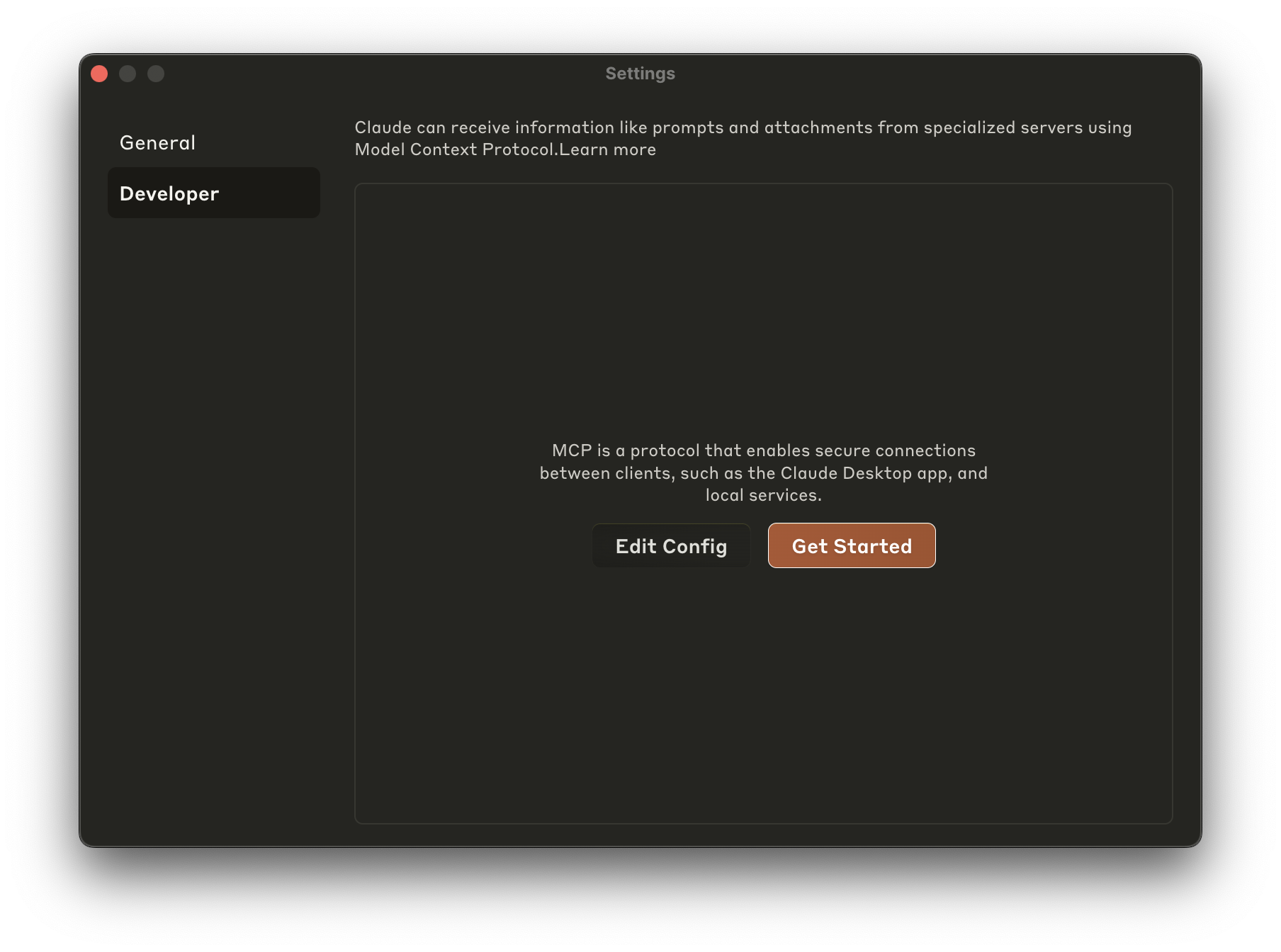
To add this to Claude Desktop, go to Preferences -> Developer -> Edit Config and add this JSON blob to claude_desktop_config.json:
{
  "mcpServers": {
    "astra-db-mcp": {
      "command": "npx",
      "args": ["-y", "@datastax/astra-db-mcp"],
      "env": {
        "ASTRA_DB_APPLICATION_TOKEN": "your_astra_db_token",
        "ASTRA_DB_API_ENDPOINT": "your_astra_db_endpoint"
      }
    }
  }
}
Optional Keyspace Configuration:
By default, this server uses the keyspace configured in the underlying Astra DB library (typically default_keyspace). If you need to connect to a specific keyspace, you can add the ASTRA_DB_KEYSPACE variable to the env object above, like so:
"env": {
  "ASTRA_DB_APPLICATION_TOKEN": "your_astra_db_token",
  "ASTRA_DB_API_ENDPOINT": "your_astra_db_endpoint",
  "ASTRA_DB_KEYSPACE": "your_desired_keyspace"
}
Windows PowerShell Users:
npx is a batch command so modify the JSON as follows:
  "command": "cmd",
  "args": ["/k", "npx", "-y", "@datastax/astra-db-mcp"],
To add this to Cursor, go to Settings -> Cursor Settings -> MCP
From there, you can add the server by clicking the "+ Add New MCP Server" button, where you should be brought to an mcp.json file.
Tip: there is a
~/.cursor/mcp.jsonthat represents your Global MCP settings, and a project-specific.cursor/mcp.jsonfile that is specific to the project. You probably want to install this MCP server into the project-specific file.
Add the same JSON as indiciated in the Claude Desktop instructions.
Alternatively you may be presented with a wizard, where you can enter the following values (for Unix-based systems):
Name: Whatever you want
Type: Command
Command:
env ASTRA_DB_APPLICATION_TOKEN=your_astra_db_token ASTRA_DB_API_ENDPOINT=your_astra_db_endpoint npx -y @datastax/astra-db-mcpNote: ASTRA_DB_KEYSPACE is optional. If omitted, the default keyspace configured in the Astra DB library will be used.
Once added, your editor will be fully connected to your Astra DB database.
The server provides a comprehensive suite of tools spanning Collections, Vector Search, Tables, Keyspaces, and Administration:
GetCollections: Get all collections in the active keyspace
GetCollectionInfo: Inspect collection options, vector settings, and default ID configuration
CreateCollection: Create a collection with vector options, distance metrics (cosine, euclidean, dot_product), and auto-vectorize configurations
UpdateCollection: Update or rename a collection
DeleteCollection: Delete a collection
EstimateDocumentCount: Get an approximate count of documents in a collection
ListRecords: List records with optional sorting, pagination (skip), and projection
GetRecord: Get a specific record by ID
CreateRecord: Insert a single document
UpdateRecord: Update a record
DeleteRecord: Delete a record by ID
FindRecord: Find records by exact field value match
FindWithFilter: Rich querying with MongoDB-style filter operators ($and, $or, $gt, $in, $exists, etc.)
FindDistinctValues: Find distinct values for a specific field in a collection
BulkCreateRecords: Insert multiple documents in batch
BulkUpdateRecords: Update multiple documents in batch
BulkDeleteRecords: Delete multiple documents in batch
FindWithVector: Dense vector similarity search with optional metadata filters, similarity scores, and projection
FindWithVectorize: Natural language search query using Astra DB Vectorize serverless embeddings
FindAndRerank: Hybrid search (lexical + dense vector / auto-vectorize) with server-side reranking scores
VectorSearch: Vector similarity search with minScore threshold and projection
HybridSearch: Combine dense vector similarity and text search with weighted scoring
ListTables: List all structured tables in the keyspace
CreateTable: Create a typed table with column definitions and primary keys
AlterTable: Add or drop columns (including vector columns)
DropTable: Drop a table
QueryTable: Query table rows with filters, sorting, projection, and pagination
InsertTableRow: Insert a single row or batch of rows into a table
UpdateTableRow: Update matching rows in a table
DeleteTableRow: Delete matching rows from a table
CreateTableIndex: Create a secondary index on a table column
CreateTableVectorIndex: Create a vector index on a table column with similarity metrics
ListKeyspaces: List all keyspaces in the database
CreateKeyspace: Create a new keyspace with optional automatic switching
DropKeyspace: Drop a keyspace
UseKeyspace: Switch the active working keyspace for subsequent operations
GetCurrentKeyspace: Inspect the active keyspace name
ListEmbeddingProviders: Discover supported embedding models and providers
ListRerankingProviders: Discover supported reranking models
GetDatabaseInfo: Retrieve environment metadata (ID, region, status, keyspaces)
OpenBrowser: Open a browser for authentication/setup
HelpAddToClient: Assistance with MCP client installation
All notable changes to this project will be documented in this file. The format is based on Keep a Changelog, and this project adheres to Semantic Versioning.
The evals package loads an mcp client that then runs the index.ts file, so there is no need to rebuild between tests. You can load environment variables by prefixing the npx command. Full documentation can be found here.
OPENAI_API_KEY=your-key npx mcp-eval evals.ts tools.tsCreate multiple records in a collection at once
| Name | Required | Description | Default |
|---|---|---|---|
| collectionName | Yes | Name of the collection to create the records in | |
| records | Yes | Array of records to insert |
Does the description disclose side effects, auth requirements, rate limits, or destructive behavior?
With no annotations provided, the description carries full burden for behavioral disclosure. While 'Create' implies a write/mutation operation, it doesn't specify permissions required, whether the operation is atomic/all-or-nothing, how duplicates or conflicts are handled, or what happens on partial failure. For a bulk mutation tool with zero annotation coverage, this is inadequate.
Agents need to know what a tool does to the world before calling it. Descriptions should go beyond structured annotations to explain consequences.
Is the description appropriately sized, front-loaded, and free of redundancy?
The description is a single, efficient sentence that directly states the tool's purpose without unnecessary words. It's appropriately sized for a tool with clear parameters documented elsewhere.
Shorter descriptions cost fewer tokens and are easier for agents to parse. Every sentence should earn its place.
Given the tool's complexity, does the description cover enough for an agent to succeed on first attempt?
For a bulk mutation tool with no annotations and no output schema, the description is insufficient. It doesn't address critical context like transaction behavior, error handling, performance implications, or return values. Given the complexity of bulk operations and lack of structured metadata, more guidance is needed.
Complex tools with many parameters or behaviors need more documentation. Simple tools need less. This dimension scales expectations accordingly.
Does the description clarify parameter syntax, constraints, interactions, or defaults beyond what the schema provides?
Schema description coverage is 100%, so the schema already fully documents both parameters (collectionName and records). The description adds no additional semantic context about parameter usage, constraints, or examples beyond what's in the schema. This meets the baseline for high schema coverage.
Input schemas describe structure but not intent. Descriptions should explain non-obvious parameter relationships and valid value ranges.
Does the description clearly state what the tool does and how it differs from similar tools?
The description clearly states the action ('Create multiple records') and target ('in a collection at once'), providing a specific verb+resource combination. However, it doesn't explicitly differentiate from its sibling 'CreateRecord' which handles single record creation, leaving some ambiguity about when to choose one over the other.
Agents choose between tools based on descriptions. A clear purpose with a specific verb and resource helps agents select the right tool.
Does the description explain when to use this tool, when not to, or what alternatives exist?
The description provides no guidance on when to use this tool versus alternatives like 'CreateRecord' (for single records) or other bulk operations ('BulkDeleteRecords', 'BulkUpdateRecords'). There's no mention of prerequisites, performance considerations, or error handling for batch operations.
Agents often have multiple tools that could apply. Explicit usage guidance like "use X instead of Y when Z" prevents misuse.
Delete multiple records from a collection at once
| Name | Required | Description | Default |
|---|---|---|---|
| collectionName | Yes | Name of the collection containing the records | |
| recordIds | Yes | Array of record IDs to delete |
Does the description disclose side effects, auth requirements, rate limits, or destructive behavior?
With no annotations provided, the description carries full burden but offers minimal behavioral insight. It states this is a destructive delete operation but doesn't mention permissions required, whether deletions are permanent/reversible, error handling for invalid IDs, or any rate limits. For a destructive bulk operation, this is inadequate disclosure.
Agents need to know what a tool does to the world before calling it. Descriptions should go beyond structured annotations to explain consequences.
Is the description appropriately sized, front-loaded, and free of redundancy?
Extremely concise single sentence with zero wasted words. Every element ('Delete multiple records', 'from a collection', 'at once') contributes essential information. The structure is front-loaded with the core action.
Shorter descriptions cost fewer tokens and are easier for agents to parse. Every sentence should earn its place.
Given the tool's complexity, does the description cover enough for an agent to succeed on first attempt?
For a destructive bulk operation with no annotations and no output schema, the description is insufficient. It doesn't address critical context like what happens on partial failures, whether deletions are atomic, what confirmation (if any) is required, or what the response contains. The 100% schema coverage helps but doesn't compensate for missing behavioral transparency.
Complex tools with many parameters or behaviors need more documentation. Simple tools need less. This dimension scales expectations accordingly.
Does the description clarify parameter syntax, constraints, interactions, or defaults beyond what the schema provides?
Schema description coverage is 100%, so the schema already fully documents both parameters (collectionName and recordIds). The description adds no additional parameter context beyond what's in the schema, maintaining the baseline score for high schema coverage.
Input schemas describe structure but not intent. Descriptions should explain non-obvious parameter relationships and valid value ranges.
Does the description clearly state what the tool does and how it differs from similar tools?
The description clearly states the action ('Delete multiple records') and resource ('from a collection'), making the purpose immediately understandable. It distinguishes from sibling DeleteRecord by specifying bulk operation, though it doesn't explicitly contrast with DeleteCollection which deletes entire collections rather than records.
Agents choose between tools based on descriptions. A clear purpose with a specific verb and resource helps agents select the right tool.
Does the description explain when to use this tool, when not to, or what alternatives exist?
No guidance is provided about when to use this tool versus alternatives like DeleteRecord (for single deletions) or DeleteCollection (for entire collection removal). The description mentions 'at once' which implies efficiency for multiple deletions, but lacks explicit comparison or prerequisites.
Agents often have multiple tools that could apply. Explicit usage guidance like "use X instead of Y when Z" prevents misuse.
Update multiple records in a collection at once
| Name | Required | Description | Default |
|---|---|---|---|
| collectionName | Yes | Name of the collection containing the records | |
| records | Yes | Array of records to update with their IDs |
Does the description disclose side effects, auth requirements, rate limits, or destructive behavior?
With no annotations provided, the description carries full burden for behavioral disclosure. It states the action ('Update multiple records') but lacks critical details: whether this is atomic/transactional, what happens on partial failures, permission requirements, rate limits, or return format. For a mutation tool with zero annotation coverage, this leaves significant behavioral unknowns.
Agents need to know what a tool does to the world before calling it. Descriptions should go beyond structured annotations to explain consequences.
Is the description appropriately sized, front-loaded, and free of redundancy?
The description is a single, efficient sentence with zero wasted words. It's front-loaded with the core action and immediately communicates the bulk nature. Every word earns its place, making it easy to parse quickly.
Shorter descriptions cost fewer tokens and are easier for agents to parse. Every sentence should earn its place.
Given the tool's complexity, does the description cover enough for an agent to succeed on first attempt?
For a mutation tool with no annotations and no output schema, the description is insufficiently complete. It doesn't address critical context: success/failure behavior, error handling, authentication needs, or what the tool returns. Given the complexity of bulk operations and lack of structured safety information, more behavioral disclosure is needed.
Complex tools with many parameters or behaviors need more documentation. Simple tools need less. This dimension scales expectations accordingly.
Does the description clarify parameter syntax, constraints, interactions, or defaults beyond what the schema provides?
Schema description coverage is 100%, so the schema fully documents both parameters (collectionName, records). The description adds no additional parameter semantics beyond what's in the schema - it doesn't explain format expectations, constraints, or examples. The baseline of 3 is appropriate when the schema does all the parameter documentation work.
Input schemas describe structure but not intent. Descriptions should explain non-obvious parameter relationships and valid value ranges.
Does the description clearly state what the tool does and how it differs from similar tools?
The description clearly states the verb ('Update') and resource ('multiple records in a collection'), making the purpose immediately understandable. It distinguishes from single-record updates (UpdateRecord) by specifying 'multiple records at once', but doesn't explicitly differentiate from other bulk operations like BulkCreateRecords or BulkDeleteRecords beyond the action verb.
Agents choose between tools based on descriptions. A clear purpose with a specific verb and resource helps agents select the right tool.
Does the description explain when to use this tool, when not to, or what alternatives exist?
The description provides no guidance on when to use this tool versus alternatives. It doesn't mention prerequisites (e.g., existing records/collections), compare to UpdateRecord for single updates, or explain when bulk updates are appropriate versus individual operations. The agent must infer usage from the name and context alone.
Agents often have multiple tools that could apply. Explicit usage guidance like "use X instead of Y when Z" prevents misuse.
Create a new collection in the database
| Name | Required | Description | Default |
|---|---|---|---|
| collectionName | Yes | Name of the collection to create | |
| dimension | No | The dimensions of the vector collection, if vector is true | |
| vector | No | Whether to create a vector collection |
Does the description disclose side effects, auth requirements, rate limits, or destructive behavior?
With no annotations provided, the description carries full burden but only states the action without disclosing behavioral traits like permissions needed, whether it's idempotent, error conditions, or what happens on success (e.g., returns a collection ID). For a mutation tool, this is a significant gap in transparency.
Agents need to know what a tool does to the world before calling it. Descriptions should go beyond structured annotations to explain consequences.
Is the description appropriately sized, front-loaded, and free of redundancy?
The description is a single, efficient sentence with zero waste—it directly states the tool's purpose without unnecessary words. It's appropriately sized and front-loaded, earning full marks for conciseness.
Shorter descriptions cost fewer tokens and are easier for agents to parse. Every sentence should earn its place.
Given the tool's complexity, does the description cover enough for an agent to succeed on first attempt?
Given this is a mutation tool with no annotations and no output schema, the description is incomplete. It doesn't cover behavioral aspects, return values, or error handling, leaving gaps that could hinder an AI agent's correct invocation in a database context.
Complex tools with many parameters or behaviors need more documentation. Simple tools need less. This dimension scales expectations accordingly.
Does the description clarify parameter syntax, constraints, interactions, or defaults beyond what the schema provides?
Schema description coverage is 100%, so the schema fully documents all parameters. The description adds no additional meaning beyond implying a 'collection' resource, which is already clear from the tool name and schema. Baseline 3 is appropriate as the schema does the heavy lifting.
Input schemas describe structure but not intent. Descriptions should explain non-obvious parameter relationships and valid value ranges.
Does the description clearly state what the tool does and how it differs from similar tools?
The description clearly states the action ('Create') and resource ('a new collection in the database'), making the purpose unambiguous. However, it doesn't differentiate from siblings like 'UpdateCollection' or 'DeleteCollection' beyond the verb, missing specific scope details that would warrant a 5.
Agents choose between tools based on descriptions. A clear purpose with a specific verb and resource helps agents select the right tool.
Does the description explain when to use this tool, when not to, or what alternatives exist?
No guidance is provided on when to use this tool versus alternatives such as 'UpdateCollection' or 'GetCollections', nor does it mention prerequisites or exclusions. The description only states what it does, leaving usage context implied at best.
Agents often have multiple tools that could apply. Explicit usage guidance like "use X instead of Y when Z" prevents misuse.
Create a new record in a collection
| Name | Required | Description | Default |
|---|---|---|---|
| collectionName | Yes | Name of the collection to create the record in | |
| record | Yes | The record data to insert |
Does the description disclose side effects, auth requirements, rate limits, or destructive behavior?
With no annotations provided, the description carries the full burden of behavioral disclosure. It states the tool creates a record but doesn't mention potential side effects (e.g., if it overwrites existing records), authentication needs, error conditions, or what happens on success (e.g., returns an ID). This leaves significant gaps for a mutation tool.
Agents need to know what a tool does to the world before calling it. Descriptions should go beyond structured annotations to explain consequences.
Is the description appropriately sized, front-loaded, and free of redundancy?
The description is a single, clear sentence with zero wasted words. It's front-loaded with the core action and resource, making it highly efficient and easy to parse without unnecessary elaboration.
Shorter descriptions cost fewer tokens and are easier for agents to parse. Every sentence should earn its place.
Given the tool's complexity, does the description cover enough for an agent to succeed on first attempt?
Given this is a mutation tool with no annotations and no output schema, the description is incomplete. It doesn't explain what the tool returns (e.g., the created record's ID), error handling, or behavioral nuances, which are critical for safe and effective use in an AI agent context.
Complex tools with many parameters or behaviors need more documentation. Simple tools need less. This dimension scales expectations accordingly.
Does the description clarify parameter syntax, constraints, interactions, or defaults beyond what the schema provides?
Schema description coverage is 100%, so the input schema already documents both parameters ('collectionName' and 'record') adequately. The description adds no additional semantic context beyond implying the tool uses these parameters, which aligns with the baseline score when schema does the heavy lifting.
Input schemas describe structure but not intent. Descriptions should explain non-obvious parameter relationships and valid value ranges.
Does the description clearly state what the tool does and how it differs from similar tools?
The description clearly states the action ('Create') and resource ('new record in a collection'), making the purpose immediately understandable. It distinguishes from siblings like 'BulkCreateRecords' by specifying singular creation, though it doesn't explicitly contrast with 'CreateCollection' which creates collections rather than records.
Agents choose between tools based on descriptions. A clear purpose with a specific verb and resource helps agents select the right tool.
Does the description explain when to use this tool, when not to, or what alternatives exist?
No guidance is provided on when to use this tool versus alternatives like 'BulkCreateRecords' for multiple records or 'CreateCollection' for creating collections. The description lacks context about prerequisites, such as whether the collection must exist first, or when to choose this over bulk operations.
Agents often have multiple tools that could apply. Explicit usage guidance like "use X instead of Y when Z" prevents misuse.
Delete a collection from the database
| Name | Required | Description | Default |
|---|---|---|---|
| collectionName | Yes | Name of the collection to delete |
Does the description disclose side effects, auth requirements, rate limits, or destructive behavior?
With no annotations provided, the description carries the full burden of behavioral disclosure. While 'Delete' implies a destructive mutation, the description doesn't specify whether this action is reversible, what permissions are required, what happens to dependent data, or if there are confirmation prompts. This leaves critical behavioral aspects undocumented for a destructive operation.
Agents need to know what a tool does to the world before calling it. Descriptions should go beyond structured annotations to explain consequences.
Is the description appropriately sized, front-loaded, and free of redundancy?
The description is a single, direct sentence that efficiently communicates the core action without unnecessary words. It's appropriately sized for a simple tool and front-loads the essential information.
Shorter descriptions cost fewer tokens and are easier for agents to parse. Every sentence should earn its place.
Given the tool's complexity, does the description cover enough for an agent to succeed on first attempt?
For a destructive tool with no annotations and no output schema, the description is insufficient. It doesn't explain what happens upon deletion (e.g., success/failure responses, error conditions), doesn't address safety considerations, and provides minimal context beyond the basic action. Given the complexity and risk of deletion operations, more completeness is needed.
Complex tools with many parameters or behaviors need more documentation. Simple tools need less. This dimension scales expectations accordingly.
Does the description clarify parameter syntax, constraints, interactions, or defaults beyond what the schema provides?
The input schema has 100% description coverage, with the single parameter 'collectionName' clearly documented. The description doesn't add any additional semantic context beyond what the schema provides (e.g., format requirements, naming conventions, or validation rules), so it meets the baseline for high schema coverage.
Input schemas describe structure but not intent. Descriptions should explain non-obvious parameter relationships and valid value ranges.
Does the description clearly state what the tool does and how it differs from similar tools?
The description clearly states the action ('Delete') and target resource ('a collection from the database'), making the purpose immediately understandable. However, it doesn't distinguish this tool from sibling tools like DeleteRecord or BulkDeleteRecords, which also perform deletion operations on different resources.
Agents choose between tools based on descriptions. A clear purpose with a specific verb and resource helps agents select the right tool.
Does the description explain when to use this tool, when not to, or what alternatives exist?
The description provides no guidance on when to use this tool versus alternatives. It doesn't mention prerequisites (e.g., whether the collection must be empty), compare it to sibling deletion tools (DeleteRecord, BulkDeleteRecords), or specify when deletion is appropriate versus other operations like UpdateCollection.
Agents often have multiple tools that could apply. Explicit usage guidance like "use X instead of Y when Z" prevents misuse.
Delete a record from a collection
| Name | Required | Description | Default |
|---|---|---|---|
| collectionName | Yes | Name of the collection containing the record | |
| recordId | Yes | ID of the record to delete |
Does the description disclose side effects, auth requirements, rate limits, or destructive behavior?
With no annotations provided, the description carries the full burden of behavioral disclosure. It states the destructive action ('Delete') but fails to mention critical details like whether deletion is permanent or reversible, what permissions are required, if there are rate limits, or what happens on success/failure. This leaves significant gaps for a mutation tool.
Agents need to know what a tool does to the world before calling it. Descriptions should go beyond structured annotations to explain consequences.
Is the description appropriately sized, front-loaded, and free of redundancy?
The description is a single, efficient sentence that directly states the tool's purpose without unnecessary words. It is appropriately sized and front-loaded, making it easy to parse quickly, though its brevity contributes to gaps in other dimensions.
Shorter descriptions cost fewer tokens and are easier for agents to parse. Every sentence should earn its place.
Given the tool's complexity, does the description cover enough for an agent to succeed on first attempt?
Given the complexity of a destructive operation with no annotations and no output schema, the description is insufficient. It lacks details on behavioral traits (e.g., permanence, error handling), usage context compared to siblings, and expected outcomes, making it incomplete for safe and effective tool invocation.
Complex tools with many parameters or behaviors need more documentation. Simple tools need less. This dimension scales expectations accordingly.
Does the description clarify parameter syntax, constraints, interactions, or defaults beyond what the schema provides?
Schema description coverage is 100%, with clear documentation for both parameters ('collectionName' and 'recordId'). The description adds no additional semantic context beyond what the schema provides, such as format examples or constraints, so it meets the baseline for high schema coverage without compensating value.
Input schemas describe structure but not intent. Descriptions should explain non-obvious parameter relationships and valid value ranges.
Does the description clearly state what the tool does and how it differs from similar tools?
The description clearly states the action ('Delete') and target ('a record from a collection'), making the purpose immediately understandable. However, it doesn't distinguish this tool from its sibling 'BulkDeleteRecords', which handles multiple records, leaving room for improvement in sibling differentiation.
Agents choose between tools based on descriptions. A clear purpose with a specific verb and resource helps agents select the right tool.
Does the description explain when to use this tool, when not to, or what alternatives exist?
The description provides no guidance on when to use this tool versus alternatives like 'BulkDeleteRecords' for multiple records or 'DeleteCollection' for entire collections. It lacks context about prerequisites, such as needing an existing collection and record ID, or any exclusions for its use.
Agents often have multiple tools that could apply. Explicit usage guidance like "use X instead of Y when Z" prevents misuse.
Estimate the number of documents in a collection using a fast, approximate count method
| Name | Required | Description | Default |
|---|---|---|---|
| collectionName | Yes | Name of the collection to estimate document count for |
Does the description disclose side effects, auth requirements, rate limits, or destructive behavior?
No annotations are provided, so the description carries the full burden. It discloses key behavioral traits: the method is 'fast' and 'approximate,' which helps set expectations about performance and accuracy. However, it lacks details on potential limitations (e.g., error margins, refresh rates, or permissions required), leaving gaps in behavioral context.
Agents need to know what a tool does to the world before calling it. Descriptions should go beyond structured annotations to explain consequences.
Is the description appropriately sized, front-loaded, and free of redundancy?
The description is a single, well-structured sentence that efficiently conveys the tool's purpose and key behavioral traits ('fast, approximate'). It's front-loaded with essential information and has no wasted words, making it highly concise and effective.
Shorter descriptions cost fewer tokens and are easier for agents to parse. Every sentence should earn its place.
Given the tool's complexity, does the description cover enough for an agent to succeed on first attempt?
Given the tool's moderate complexity (estimation with one parameter), no annotations, and no output schema, the description provides a basic but incomplete picture. It covers purpose and method but lacks details on output format, error handling, or integration with siblings. It's adequate as a minimum viable description but has clear gaps in context.
Complex tools with many parameters or behaviors need more documentation. Simple tools need less. This dimension scales expectations accordingly.
Does the description clarify parameter syntax, constraints, interactions, or defaults beyond what the schema provides?
The input schema has 100% description coverage, with the parameter 'collectionName' clearly documented. The description doesn't add any meaning beyond what the schema provides, as it doesn't mention parameters at all. With high schema coverage, the baseline score is 3, as the description doesn't compensate but also doesn't need to given the schema's clarity.
Input schemas describe structure but not intent. Descriptions should explain non-obvious parameter relationships and valid value ranges.
Does the description clearly state what the tool does and how it differs from similar tools?
The description clearly states the tool's purpose: 'Estimate the number of documents in a collection using a fast, approximate count method.' It specifies the verb ('estimate'), resource ('number of documents in a collection'), and method ('fast, approximate count'). However, it doesn't explicitly differentiate from potential siblings like 'ListRecords' or 'GetCollections' that might provide exact counts or different functionality.
Agents choose between tools based on descriptions. A clear purpose with a specific verb and resource helps agents select the right tool.
Does the description explain when to use this tool, when not to, or what alternatives exist?
The description implies usage context by mentioning 'fast, approximate count method,' suggesting this tool is for quick estimates rather than precise counts. However, it doesn't provide explicit guidance on when to use this versus alternatives (e.g., 'ListRecords' for exact counts) or any exclusions. The usage is implied but not clearly articulated.
Agents often have multiple tools that could apply. Explicit usage guidance like "use X instead of Y when Z" prevents misuse.
Find records in a collection by field value
| Name | Required | Description | Default |
|---|---|---|---|
| collectionName | Yes | Name of the collection to search in | |
| field | Yes | Field name to search by (e.g., 'title', '_id', or any property) | |
| limit | No | Maximum number of records to return | |
| value | Yes | Value to search for in the specified field |
Does the description disclose side effects, auth requirements, rate limits, or destructive behavior?
With no annotations provided, the description carries the full burden of behavioral disclosure. It mentions searching by field value but doesn't cover important aspects like whether it's case-sensitive, supports partial matches, returns errors for invalid collections, or has pagination/rate limits. This leaves significant gaps for a search tool.
Agents need to know what a tool does to the world before calling it. Descriptions should go beyond structured annotations to explain consequences.
Is the description appropriately sized, front-loaded, and free of redundancy?
The description is a single, efficient sentence that directly states the tool's purpose without any fluff or redundancy. It's appropriately sized and front-loaded, making it easy to understand quickly.
Shorter descriptions cost fewer tokens and are easier for agents to parse. Every sentence should earn its place.
Given the tool's complexity, does the description cover enough for an agent to succeed on first attempt?
Given the complexity of a search tool with 4 parameters, no annotations, and no output schema, the description is incomplete. It doesn't explain return values, error conditions, or behavioral nuances, leaving the agent with insufficient context to use the tool effectively beyond basic parameter passing.
Complex tools with many parameters or behaviors need more documentation. Simple tools need less. This dimension scales expectations accordingly.
Does the description clarify parameter syntax, constraints, interactions, or defaults beyond what the schema provides?
Schema description coverage is 100%, so the schema already documents all 4 parameters thoroughly. The description adds no additional meaning beyond what's in the schema (e.g., it doesn't explain search semantics or provide examples beyond the basic concept), meeting the baseline for high schema coverage.
Input schemas describe structure but not intent. Descriptions should explain non-obvious parameter relationships and valid value ranges.
Does the description clearly state what the tool does and how it differs from similar tools?
The description clearly states the action ('Find records') and target ('in a collection by field value'), providing specific verb+resource. However, it doesn't differentiate from sibling tools like 'ListRecords' or 'GetRecord', which might offer similar search/list functionality, so it misses full sibling distinction.
Agents choose between tools based on descriptions. A clear purpose with a specific verb and resource helps agents select the right tool.
Does the description explain when to use this tool, when not to, or what alternatives exist?
The description provides no guidance on when to use this tool versus alternatives like 'ListRecords' or 'GetRecord', nor does it mention prerequisites or exclusions. It only states what the tool does, not when it's appropriate.
Agents often have multiple tools that could apply. Explicit usage guidance like "use X instead of Y when Z" prevents misuse.
Get all collections in the Astra DB database
| Name | Required | Description | Default |
|---|---|---|---|
No parameters | |||
Does the description disclose side effects, auth requirements, rate limits, or destructive behavior?
With no annotations provided, the description carries the full burden of behavioral disclosure. It states the tool retrieves collections but doesn't specify whether this is a read-only operation, if it requires authentication, what format the results are in, or any rate limits. This leaves significant gaps for an agent to understand how to use it effectively.
Agents need to know what a tool does to the world before calling it. Descriptions should go beyond structured annotations to explain consequences.
Is the description appropriately sized, front-loaded, and free of redundancy?
The description is a single, efficient sentence that directly states the tool's purpose without any unnecessary words or fluff. It is perfectly front-loaded and wastes no space.
Shorter descriptions cost fewer tokens and are easier for agents to parse. Every sentence should earn its place.
Given the tool's complexity, does the description cover enough for an agent to succeed on first attempt?
Given the complexity of a database query tool with no annotations and no output schema, the description is insufficient. It doesn't explain what 'collections' are in this context, the return format, or any behavioral aspects like pagination or error handling, leaving the agent with incomplete information.
Complex tools with many parameters or behaviors need more documentation. Simple tools need less. This dimension scales expectations accordingly.
Does the description clarify parameter syntax, constraints, interactions, or defaults beyond what the schema provides?
The input schema has 0 parameters with 100% coverage, so no parameter documentation is needed. The description appropriately doesn't discuss parameters, which is correct for this case, earning a high baseline score.
Input schemas describe structure but not intent. Descriptions should explain non-obvious parameter relationships and valid value ranges.
Does the description clearly state what the tool does and how it differs from similar tools?
The description clearly states the action ('Get all collections') and resource ('in the Astra DB database'), making the purpose immediately understandable. However, it doesn't differentiate from potential sibling tools like 'ListRecords' or 'EstimateDocumentCount' that might also retrieve collection-related information, so it falls short of a perfect score.
Agents choose between tools based on descriptions. A clear purpose with a specific verb and resource helps agents select the right tool.
Does the description explain when to use this tool, when not to, or what alternatives exist?
The description provides no guidance on when to use this tool versus alternatives like 'ListRecords' or 'EstimateDocumentCount', nor does it mention prerequisites or exclusions. It merely states what the tool does without contextual usage information.
Agents often have multiple tools that could apply. Explicit usage guidance like "use X instead of Y when Z" prevents misuse.
Get a specific record from a collection by ID
| Name | Required | Description | Default |
|---|---|---|---|
| collectionName | Yes | Name of the collection to get the record from | |
| recordId | Yes | ID of the record to retrieve |
Does the description disclose side effects, auth requirements, rate limits, or destructive behavior?
With no annotations provided, the description carries full burden but only states the basic operation without behavioral details. It doesn't disclose whether this is a read-only operation, error handling (e.g., for invalid IDs), authentication needs, rate limits, or return format, leaving significant gaps for a tool that retrieves data.
Agents need to know what a tool does to the world before calling it. Descriptions should go beyond structured annotations to explain consequences.
Is the description appropriately sized, front-loaded, and free of redundancy?
The description is a single, clear sentence with zero waste—it directly states the tool's function without unnecessary words. It's appropriately sized and front-loaded, making it efficient for quick understanding.
Shorter descriptions cost fewer tokens and are easier for agents to parse. Every sentence should earn its place.
Given the tool's complexity, does the description cover enough for an agent to succeed on first attempt?
Given the complexity of a retrieval tool with no annotations and no output schema, the description is incomplete. It lacks details on behavioral traits, error cases, and output format, which are crucial for proper usage. The schema covers parameters, but overall context is insufficient for safe and effective tool invocation.
Complex tools with many parameters or behaviors need more documentation. Simple tools need less. This dimension scales expectations accordingly.
Does the description clarify parameter syntax, constraints, interactions, or defaults beyond what the schema provides?
Schema description coverage is 100%, so the schema already documents both parameters ('collectionName' and 'recordId') adequately. The description adds no additional meaning beyond implying ID-based retrieval, aligning with the baseline score when schema does the heavy lifting.
Input schemas describe structure but not intent. Descriptions should explain non-obvious parameter relationships and valid value ranges.
Does the description clearly state what the tool does and how it differs from similar tools?
The description clearly states the action ('Get') and resource ('specific record from a collection by ID'), making the purpose immediately understandable. However, it doesn't distinguish this tool from sibling 'FindRecord' or 'ListRecords', which likely serve similar retrieval functions, missing explicit differentiation.
Agents choose between tools based on descriptions. A clear purpose with a specific verb and resource helps agents select the right tool.
Does the description explain when to use this tool, when not to, or what alternatives exist?
No guidance is provided on when to use this tool versus alternatives like 'FindRecord' or 'ListRecords'. The description implies usage for retrieving a single record by ID, but it doesn't specify prerequisites, exclusions, or comparative contexts with sibling tools.
Agents often have multiple tools that could apply. Explicit usage guidance like "use X instead of Y when Z" prevents misuse.
Help the user add the Astra DB client to their MCP client
| Name | Required | Description | Default |
|---|---|---|---|
No parameters | |||
Does the description disclose side effects, auth requirements, rate limits, or destructive behavior?
No annotations are provided, so the description carries full burden. It mentions 'add' but doesn't disclose behavioral traits such as whether this requires user interaction, modifies system files, needs authentication, or has side effects. For a setup tool with zero annotation coverage, this is a significant gap in transparency.
Agents need to know what a tool does to the world before calling it. Descriptions should go beyond structured annotations to explain consequences.
Is the description appropriately sized, front-loaded, and free of redundancy?
The description is a single, clear sentence that efficiently states the tool's purpose without fluff. It's front-loaded and easy to parse, though it could be slightly more specific (e.g., 'configure' vs. 'add') to improve precision without losing conciseness.
Shorter descriptions cost fewer tokens and are easier for agents to parse. Every sentence should earn its place.
Given the tool's complexity, does the description cover enough for an agent to succeed on first attempt?
Given the tool's complexity (setup-related, no params, no output schema), the description is minimally adequate. It states what the tool does but lacks details on behavior, prerequisites, or outcomes. Without annotations or output schema, it should provide more context (e.g., what 'add' entails, expected result) to be fully complete.
Complex tools with many parameters or behaviors need more documentation. Simple tools need less. This dimension scales expectations accordingly.
Does the description clarify parameter syntax, constraints, interactions, or defaults beyond what the schema provides?
The input schema has 0 parameters with 100% coverage, so no parameter documentation is needed. The description doesn't add param info, which is appropriate, but it could hint at implicit inputs (e.g., user context). Baseline is 4 for zero params, as it avoids unnecessary detail.
Input schemas describe structure but not intent. Descriptions should explain non-obvious parameter relationships and valid value ranges.
Does the description clearly state what the tool does and how it differs from similar tools?
The description clearly states the action ('add') and resource ('Astra DB client to their MCP client'), making the purpose understandable. It distinguishes from siblings like BulkCreateRecords or OpenBrowser by focusing on client setup rather than data operations. However, it doesn't specify what 'add' entails (e.g., installation, configuration, authentication), keeping it from a perfect score.
Agents choose between tools based on descriptions. A clear purpose with a specific verb and resource helps agents select the right tool.
Does the description explain when to use this tool, when not to, or what alternatives exist?
The description implies usage when the user needs to set up the Astra DB client, but provides no explicit guidance on when to use this tool versus alternatives or prerequisites. With siblings like OpenBrowser that might handle web-based setup, there's no comparison or exclusion criteria mentioned.
Agents often have multiple tools that could apply. Explicit usage guidance like "use X instead of Y when Z" prevents misuse.
List records from a collection in the database
| Name | Required | Description | Default |
|---|---|---|---|
| collectionName | Yes | Name of the collection to list records from | |
| limit | No | Maximum number of records to return |
Does the description disclose side effects, auth requirements, rate limits, or destructive behavior?
No annotations are provided, so the description carries the full burden of behavioral disclosure. It states the action but doesn't cover critical behaviors like whether this is a read-only operation, if it requires authentication, how it handles pagination beyond the 'limit' parameter, or what the output format looks like. This is inadequate for a tool with no annotation coverage.
Agents need to know what a tool does to the world before calling it. Descriptions should go beyond structured annotations to explain consequences.
Is the description appropriately sized, front-loaded, and free of redundancy?
The description is a single, efficient sentence with zero waste. It's appropriately sized and front-loaded, clearly stating the tool's purpose without unnecessary elaboration, earning a perfect score for conciseness.
Shorter descriptions cost fewer tokens and are easier for agents to parse. Every sentence should earn its place.
Given the tool's complexity, does the description cover enough for an agent to succeed on first attempt?
Given the complexity of listing database records, the lack of annotations, and no output schema, the description is incomplete. It doesn't explain return values, error handling, or behavioral constraints, making it insufficient for an agent to fully understand the tool's operation in context.
Complex tools with many parameters or behaviors need more documentation. Simple tools need less. This dimension scales expectations accordingly.
Does the description clarify parameter syntax, constraints, interactions, or defaults beyond what the schema provides?
The schema description coverage is 100%, with clear descriptions for both parameters ('collectionName' and 'limit'), so the schema does the heavy lifting. The description adds no additional parameter semantics beyond what's in the schema, resulting in a baseline score of 3.
Input schemas describe structure but not intent. Descriptions should explain non-obvious parameter relationships and valid value ranges.
Does the description clearly state what the tool does and how it differs from similar tools?
The description clearly states the verb ('List') and resource ('records from a collection in the database'), making the purpose understandable. However, it doesn't explicitly differentiate from sibling tools like 'GetCollections' (which lists collections, not records) or 'FindRecord' (which searches for specific records), missing full sibling distinction.
Agents choose between tools based on descriptions. A clear purpose with a specific verb and resource helps agents select the right tool.
Does the description explain when to use this tool, when not to, or what alternatives exist?
The description provides no guidance on when to use this tool versus alternatives. It doesn't mention when to choose 'ListRecords' over 'FindRecord' for searching, 'GetRecord' for single records, or 'GetCollections' for listing collections, leaving usage context unclear.
Agents often have multiple tools that could apply. Explicit usage guidance like "use X instead of Y when Z" prevents misuse.
Open a web browser to a specific URL
| Name | Required | Description | Default |
|---|---|---|---|
| url | Yes | The URL to open in the browser |
Does the description disclose side effects, auth requirements, rate limits, or destructive behavior?
With no annotations provided, the description carries the full burden of behavioral disclosure. It states the tool opens a browser to a URL but doesn't describe what happens next (e.g., whether it blocks until the page loads, handles errors, requires specific browser availability, or has any side effects). For a tool that likely interacts with external systems, this is a significant gap in transparency.
Agents need to know what a tool does to the world before calling it. Descriptions should go beyond structured annotations to explain consequences.
Is the description appropriately sized, front-loaded, and free of redundancy?
The description is a single, clear sentence with zero waste—it directly states the tool's purpose without unnecessary words. It's appropriately sized and front-loaded, making it efficient for an agent to parse.
Shorter descriptions cost fewer tokens and are easier for agents to parse. Every sentence should earn its place.
Given the tool's complexity, does the description cover enough for an agent to succeed on first attempt?
Given the tool's potential complexity (interacting with external browsers) and the lack of annotations and output schema, the description is incomplete. It doesn't address behavioral aspects like error handling, return values, or system dependencies, which are crucial for an agent to use this tool effectively in varied contexts.
Complex tools with many parameters or behaviors need more documentation. Simple tools need less. This dimension scales expectations accordingly.
Does the description clarify parameter syntax, constraints, interactions, or defaults beyond what the schema provides?
The input schema has 100% description coverage, with the 'url' parameter fully documented in the schema. The description adds no additional meaning beyond what the schema provides (e.g., no details on URL validation, supported protocols, or default behaviors), so it meets the baseline of 3 where the schema does the heavy lifting.
Input schemas describe structure but not intent. Descriptions should explain non-obvious parameter relationships and valid value ranges.
Does the description clearly state what the tool does and how it differs from similar tools?
The description clearly states the action ('Open a web browser') and the target resource ('to a specific URL'), providing a specific verb+resource combination. However, it doesn't distinguish this tool from potential sibling tools since all listed siblings are database operations, making differentiation less relevant but still not explicitly addressed.
Agents choose between tools based on descriptions. A clear purpose with a specific verb and resource helps agents select the right tool.
Does the description explain when to use this tool, when not to, or what alternatives exist?
The description provides no guidance on when to use this tool versus alternatives. It doesn't mention any prerequisites, contexts where it's appropriate, or exclusions, leaving the agent without usage direction beyond the basic purpose stated.
Agents often have multiple tools that could apply. Explicit usage guidance like "use X instead of Y when Z" prevents misuse.
Update an existing collection in the database
| Name | Required | Description | Default |
|---|---|---|---|
| collectionName | Yes | Name of the collection to update | |
| newName | Yes | New name for the collection |
Does the description disclose side effects, auth requirements, rate limits, or destructive behavior?
No annotations are provided, so the description carries the full burden of behavioral disclosure. While 'Update' implies a mutation, it doesn't specify required permissions, whether the operation is idempotent, error conditions (e.g., if the collection doesn't exist), or side effects. This is inadequate for a mutation tool with zero annotation coverage.
Agents need to know what a tool does to the world before calling it. Descriptions should go beyond structured annotations to explain consequences.
Is the description appropriately sized, front-loaded, and free of redundancy?
The description is a single, efficient sentence with no wasted words. It's front-loaded with the core action and resource, making it easy to scan and understand quickly.
Shorter descriptions cost fewer tokens and are easier for agents to parse. Every sentence should earn its place.
Given the tool's complexity, does the description cover enough for an agent to succeed on first attempt?
Given that this is a mutation tool with no annotations and no output schema, the description is incomplete. It lacks details on behavioral traits (e.g., permissions, errors), usage context, and return values, which are critical for an AI agent to invoke it correctly.
Complex tools with many parameters or behaviors need more documentation. Simple tools need less. This dimension scales expectations accordingly.
Does the description clarify parameter syntax, constraints, interactions, or defaults beyond what the schema provides?
The schema description coverage is 100%, with both parameters (collectionName and newName) clearly documented in the schema. The description doesn't add any additional meaning beyond what the schema provides, such as format constraints or examples, so it meets the baseline for high schema coverage.
Input schemas describe structure but not intent. Descriptions should explain non-obvious parameter relationships and valid value ranges.
Does the description clearly state what the tool does and how it differs from similar tools?
The description clearly states the action ('Update') and resource ('an existing collection in the database'), which is specific and unambiguous. However, it doesn't distinguish this tool from sibling tools like UpdateRecord or BulkUpdateRecords, which also perform updates on different resources.
Agents choose between tools based on descriptions. A clear purpose with a specific verb and resource helps agents select the right tool.
Does the description explain when to use this tool, when not to, or what alternatives exist?
The description provides no guidance on when to use this tool versus alternatives. It doesn't mention prerequisites (e.g., that the collection must exist), exclusions, or comparisons to siblings like UpdateRecord (for individual records) or BulkUpdateRecords (for batch operations).
Agents often have multiple tools that could apply. Explicit usage guidance like "use X instead of Y when Z" prevents misuse.
Update an existing record in a collection
| Name | Required | Description | Default |
|---|---|---|---|
| collectionName | Yes | Name of the collection containing the record | |
| record | Yes | The updated record data | |
| recordId | Yes | ID of the record to update |
Does the description disclose side effects, auth requirements, rate limits, or destructive behavior?
No annotations are provided, so the description carries the full burden of behavioral disclosure. It states the action ('Update an existing record') but doesn't describe traits like permission requirements, whether updates are partial or full, error handling (e.g., if record doesn't exist), or side effects. For a mutation tool with zero annotation coverage, this is a significant gap.
Agents need to know what a tool does to the world before calling it. Descriptions should go beyond structured annotations to explain consequences.
Is the description appropriately sized, front-loaded, and free of redundancy?
The description is a single, efficient sentence with zero waste. It's front-loaded with the core action and resource, making it easy to parse. Every word earns its place without redundancy or fluff.
Shorter descriptions cost fewer tokens and are easier for agents to parse. Every sentence should earn its place.
Given the tool's complexity, does the description cover enough for an agent to succeed on first attempt?
Given the complexity of a mutation tool with no annotations and no output schema, the description is incomplete. It lacks details on behavioral traits (e.g., auth needs, error cases), return values, or usage context. The schema covers parameters well, but overall completeness is inadequate for safe and effective tool invocation.
Complex tools with many parameters or behaviors need more documentation. Simple tools need less. This dimension scales expectations accordingly.
Does the description clarify parameter syntax, constraints, interactions, or defaults beyond what the schema provides?
Schema description coverage is 100%, so the schema already documents all three parameters ('collectionName', 'recordId', 'record') with clear descriptions. The description adds no additional meaning beyond what the schema provides, such as format examples or constraints. Baseline 3 is appropriate when the schema does the heavy lifting.
Input schemas describe structure but not intent. Descriptions should explain non-obvious parameter relationships and valid value ranges.
Does the description clearly state what the tool does and how it differs from similar tools?
The description clearly states the verb ('Update') and resource ('an existing record in a collection'), making the purpose unambiguous. It distinguishes from siblings like 'CreateRecord' (for new records) and 'BulkUpdateRecords' (for multiple updates), though it doesn't explicitly name these alternatives. The specificity is good but lacks explicit sibling differentiation.
Agents choose between tools based on descriptions. A clear purpose with a specific verb and resource helps agents select the right tool.
Does the description explain when to use this tool, when not to, or what alternatives exist?
The description provides no guidance on when to use this tool versus alternatives. It doesn't mention prerequisites (e.g., record must exist), exclusions (e.g., not for bulk operations), or compare with siblings like 'BulkUpdateRecords' or 'UpdateCollection'. Usage is implied by the verb 'Update' but lacks explicit context.
Agents often have multiple tools that could apply. Explicit usage guidance like "use X instead of Y when Z" prevents misuse.
Recent tool additions, removals, and schema changes observed during successful MCP inspections.
v1.0.0BulkCreateRecordsBulkDeleteRecordsBulkUpdateRecordsCreateCollectionCreateRecordDeleteCollectionDeleteRecordEstimateDocumentCountFindRecordGetCollectionsGetRecordHelpAddToClientListRecordsOpenBrowserUpdateCollectionUpdateRecordScored across 16 tools
Every tool has a clearly distinct purpose with no ambiguity. Tools are well-organized around specific resources (collections, records) and actions (create, get, update, delete, list, find, estimate), and even bulk operations are clearly separated from single operations. There is no overlap that would cause misselection.
Tool names follow a highly consistent verb_noun pattern throughout, using PascalCase for readability. All tools start with an action verb (e.g., Create, Delete, Get, Update) followed by a noun (e.g., Record, Collection), with only minor variations like 'HelpAddToClient' and 'OpenBrowser' still fitting the pattern. There are no mixed conventions or chaotic naming.
With 16 tools, this is well-scoped for a database server covering collections and records. Each tool earns its place by providing comprehensive CRUD operations, bulk handling, and utility functions, without being excessive or thin for the domain. The count supports a complete workflow without overwhelming an agent.
The tool surface offers complete CRUD/lifecycle coverage for both collections and records, including bulk operations, listing, finding, and estimation. There are no obvious gaps; agents can perform all essential database tasks from creation to deletion, with added utilities like HelpAddToClient and OpenBrowser for setup and navigation.
The Mercado Pago MCP Server implements the Model Context Protocol to provide AI agents and LLMs with access to Mercado Pago's APIs and tools within compatible development environments. It acts as an intermediary that translates Mercado Pago resources into executable functions (tools) that AI applications can invoke to perform actions and automate flows. The server simplifies integration, enables using documentation to implement or improve code, and optimizes operations through natural language interactions without manual implementations.
A comprehensive Model Context Protocol (MCP) server that enables AI assistants to interact with yo…
A Model Context Protocol server for Wix AI tools
GibsonAI MCP server: manage your databases with natural language