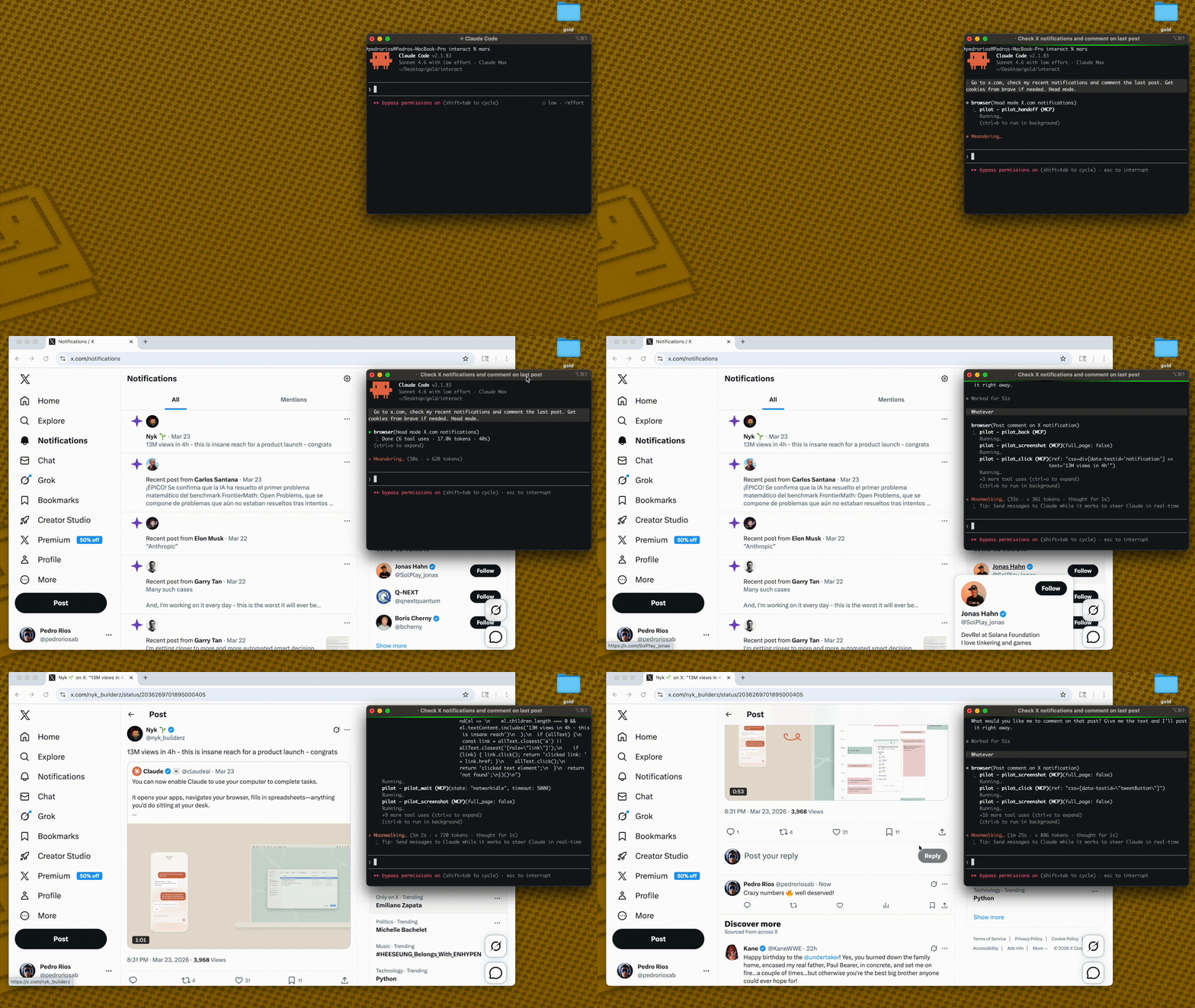
Pilot
Pilot allows AI agents to control a real Chrome browser tab (or visible Chromium instance) with authenticated sessions, bypassing bot detection and Cloudflare blocks.
Navigation
Navigate to URLs, go back/forward, reload pages, and compare text content between two URLs
Page Inspection & Snapshots
Capture accessibility tree snapshots with element refs for precise targeting, snapshot diffs, and focused interactive elements
Extract clean text, full HTML, links, form fields, element attributes, computed CSS values, and element states
Element Interaction
Click, double-click, right-click, hover, fill, select dropdowns, type, press keys, drag, scroll, wait, and upload files
Target elements by ref, CSS selector, visible text, label, or role
Visual & Output
Screenshots (full page, element, clipped, annotated, or responsive across device sizes)
Save pages as PDFs
Tab Management
List, open, close, and switch between browser tabs
Iframe Support
List iframes, switch context into a specific iframe, and return to the main frame
Debugging & Monitoring
Access console messages, network requests, dialog captures, cookies, localStorage, sessionStorage, and performance timings
Run arbitrary JavaScript expressions
Session & Authentication
Import cookies from Chrome, Arc, Brave, Edge, and Comet via Keychain decryption
Save/load/clear full session state, set cookies, custom headers, user agents, viewport size, geolocation, and block requests by URL pattern
Manual Handoff
Pause automation for human intervention (e.g., CAPTCHAs) then resume automated control
Tool Profiles
Choose from core (9 tools), standard (30 tools), or full (61 tools) profiles based on needs
Click on "Install Server".
Wait a few minutes for the server to deploy. Once ready, it will show a "Started" state.
In the chat, type
@followed by the MCP server name and your instructions, e.g., "@PilotGo to Amazon and find the current price for a PlayStation 5."
That's it! The server will respond to your query, and you can continue using it as needed.
Here is a step-by-step guide with screenshots.
pilot — Your AI Agent, Inside Your Real Browser
Your AI agent controls a tab in your real Chrome — already logged in, no bots blocked, no CAPTCHAs.

Other browser tools launch a separate headless browser. Your agent starts anonymous, gets blocked by Cloudflare, can't access anything behind login.
pilot takes a different approach: it controls a tab in the browser you're already using. Your agent sees what you see — logged into GitHub, Linear, Notion, your internal tools. No cookie hacks. No re-authentication. No bot detection.
Quick Start
1. Install pilot
npx pilot-mcp
npx playwright install chromiumAdd to .mcp.json (Claude Code) or MCP settings (Cursor):
{
"mcpServers": {
"pilot": {
"command": "npx",
"args": ["-y", "pilot-mcp"]
}
}
}2. Install the Chrome extension
npx pilot-mcp --install-extensionThis opens Chrome's extensions page and shows the folder path. Click Load unpacked → paste the path. You'll see the ✈️ Pilot icon — badge shows ON when connected.
3. Use it
Tell your agent:
"Go to my GitHub notifications and summarize them"
The agent navigates in a real Chrome tab — already logged in as you. No setup. No cookies. No Cloudflare blocks.
Two Modes
Extension Mode — your real browser
The Pilot Chrome extension connects to the MCP server via WebSocket. Your agent gets its own tab in your real browser — with all your sessions, cookies, and logged-in state already there.
AI Agent → MCP (stdio) → pilot → WebSocket → Chrome Extension → Your Browser TabNo Cloudflare blocks (real browser fingerprint)
Already authenticated everywhere
Multiple agents get separate tabs (multiplexed)
You can watch the agent work in real-time
This is how pilot is meant to be used.
Headed Mode — visible Chromium
When the extension isn't connected, pilot opens a visible Chromium window. You can see everything the agent does and intervene when needed.
Import cookies from your real browser to authenticate:
pilot_import_cookies({ browser: "chrome", domains: [".github.com", ".linear.app"] })Supports Chrome, Arc, Brave, Edge, Comet via macOS Keychain / Linux libsecret.
When the agent hits a CAPTCHA or bot wall, it hands control to you:
pilot_handoff— pauses automation, you solve the challengepilot_resume— agent continues where it left off
Lean Snapshots
Large page snapshots eat context windows. pilot is opinionated about keeping things small:
Navigate returns a ~2K char preview, not a 50K+ page dump
Snapshot supports
max_elements,interactive_only,lean,structure_onlySnapshot diff shows only what changed — no redundant re-reads
Other tools: navigate(58K) → navigate(58K) → answer = 116K chars
pilot: navigate(2K) → navigate(2K) → snapshot(9K) = 13K charsLess context = faster inference, cheaper API calls, fewer failures.
pilot vs @playwright/mcp
Both are solid tools. Here's what's actually different:
pilot | @playwright/mcp | |
Real browser control | Extension controls a tab in your Chrome | Extension for session reuse (no DOM control) |
Bot detection | Not an issue (real browser) + handoff/resume | ❌ blocked by Cloudflare |
Cookie import | Decrypt from Chrome, Arc, Brave, Edge, Comet | ❌ (manual |
Default snapshot size | ~2K on navigate, ~9K full snapshot | ~50-60K on navigate |
Snapshot diffing |
| ❌ |
Token control |
|
|
Iframe support |
| ❌ |
Ad blocking |
|
|
Tool profiles |
| Capability groups via |
Transport | stdio | stdio, HTTP, SSE |
Persistent sessions |
|
|
Network interception |
|
|
Assertions |
| Verify tools via |
Use pilot when: You need your agent to work on authenticated sites, you want lean context, or you're tired of Cloudflare blocks.
Use @playwright/mcp when: You need HTTP/SSE transport, Windows auth support, or you prefer Microsoft's ecosystem.
Tool Profiles
61 tools is too many for most LLMs — research shows degradation past ~30. Load only what you need:
Profile | Tools | Use case |
| 9 | Simple automation — navigate, snapshot, click, fill, type, press_key, wait, screenshot |
| 30 | Common workflows — core + tabs, scroll, hover, drag, iframes, auth, block, find |
| 61 | Everything, including network mocking, assertions, clipboard, geolocation |
{
"mcpServers": {
"pilot": {
"command": "npx",
"args": ["-y", "pilot-mcp"],
"env": { "PILOT_PROFILE": "standard" }
}
}
}Default is standard (30 tools).
All Tools (61)
Navigation
Tool | Description |
| Navigate and return full readable content + interactive elements in one call |
| Navigate to a URL. Returns content preview + interactive elements (~2K chars) |
| Go back in browser history |
| Go forward in browser history |
| Reload the current page |
Snapshots
Tool | Description |
| Accessibility tree with |
| Unified diff showing what changed since last snapshot |
| Find element by visible text, label, or role — returns a ref without a full snapshot |
| Screenshot with red boxes at each |
Interaction
Tool | Description |
| Click by |
| Hover over an element |
| Clear and fill an input/textarea |
| Select a dropdown option |
| Type text character by character |
| Press keyboard keys |
| Drag from one element to another |
| Scroll element or page |
| Wait for element, network idle, or page load |
| Upload files to a file input |
Iframes
Tool | Description |
| List all iframes |
| Switch context into an iframe |
| Switch back to main frame |
Page Inspection
Tool | Description |
| Clean text extraction |
| Get innerHTML of element or full page |
| All links as text + href pairs |
| All form fields as structured JSON |
| All attributes of an element |
| Computed CSS property value |
| Check visible/hidden/enabled/disabled/checked/focused |
| Text diff between two URLs |
Debugging
Tool | Description |
| Console messages from circular buffer |
| Network requests from circular buffer |
| Captured alert/confirm/prompt messages |
| Run JavaScript on the page |
| Get all cookies as JSON |
| Get localStorage/sessionStorage |
| Page load performance timings |
Visual
Tool | Description |
| Screenshot of page or element |
| Save page as PDF |
| Screenshots at mobile, tablet, desktop |
Tabs
Tool | Description |
| List open tabs |
| Open a new tab |
| Close a tab |
| Switch to a tab |
Session & Auth
Tool | Description |
| Import cookies from Chrome, Arc, Brave, Edge, Comet via Keychain decryption |
| Save/load/clear full session state (cookies + localStorage + sessionStorage) |
| Set a cookie manually |
| Set custom request headers |
| Set user agent string |
| Configure dialog auto-accept/dismiss |
| Set viewport size |
| Block requests by URL pattern or |
| Set fake GPS coordinates |
| Connect to a real Chrome instance via CDP |
| Check Chrome extension connection status |
| Open headed Chrome for manual interaction (CAPTCHA, auth) |
| Resume automation after handoff |
| Close browser and clean up |
Automation (full profile)
Tool | Description |
| Intercept requests and return custom responses |
| Assert URL, text, element state, or value |
| Read or write clipboard content |
Extension Architecture
The Pilot extension uses a broker/client model — multiple AI sessions share one extension, each getting its own tab:
Claude Code Session A ──┐
├→ pilot broker (ws://127.0.0.1:3131) → Chrome Extension → Tab 1
Claude Code Session B ──┘ → Tab 2Each session's tab is color-grouped in Chrome so you can see which tab belongs to which agent.
Requirements
Node.js >= 18
Chrome + Pilot extension (recommended)
macOS or Linux (for cookie import in headed mode)
Chromium:
npx playwright install chromium(for headed mode)
Security
Variable | Default | Description |
|
| Tool set: |
| System temp | Restricts where screenshots/PDFs can be written |
Extension communicates over localhost WebSocket only (127.0.0.1)
Output path validation prevents writing outside
PILOT_OUTPUT_DIRPath traversal protection on all file operations
Expression size limit (50KB) on
pilot_evaluate
Development
npm test # unit tests via vitestCredits
The core browser automation architecture — ref-based element selection, snapshot diffing, cursor-interactive scanning, annotated screenshots, circular buffers, and AI-friendly error translation — is ported from gstack by Garry Tan.
Built on Playwright by Microsoft and the Model Context Protocol SDK by Anthropic.
If pilot is useful to you, star the repo — it helps others find it.
Resources
Unclaimed servers have limited discoverability.
Looking for Admin?
If you are the server author, to access and configure the admin panel.
Latest Blog Posts
MCP directory API
We provide all the information about MCP servers via our MCP API.
curl -X GET 'https://glama.ai/api/mcp/v1/servers/TacosyHorchata/Pilot'
If you have feedback or need assistance with the MCP directory API, please join our Discord server