pilot — KI-Agenten in deinem echten Chrome


Installiere eine Chrome-Erweiterung. Dein KI-Agent erhält einen Tab in dem Browser, den du bereits verwendest.
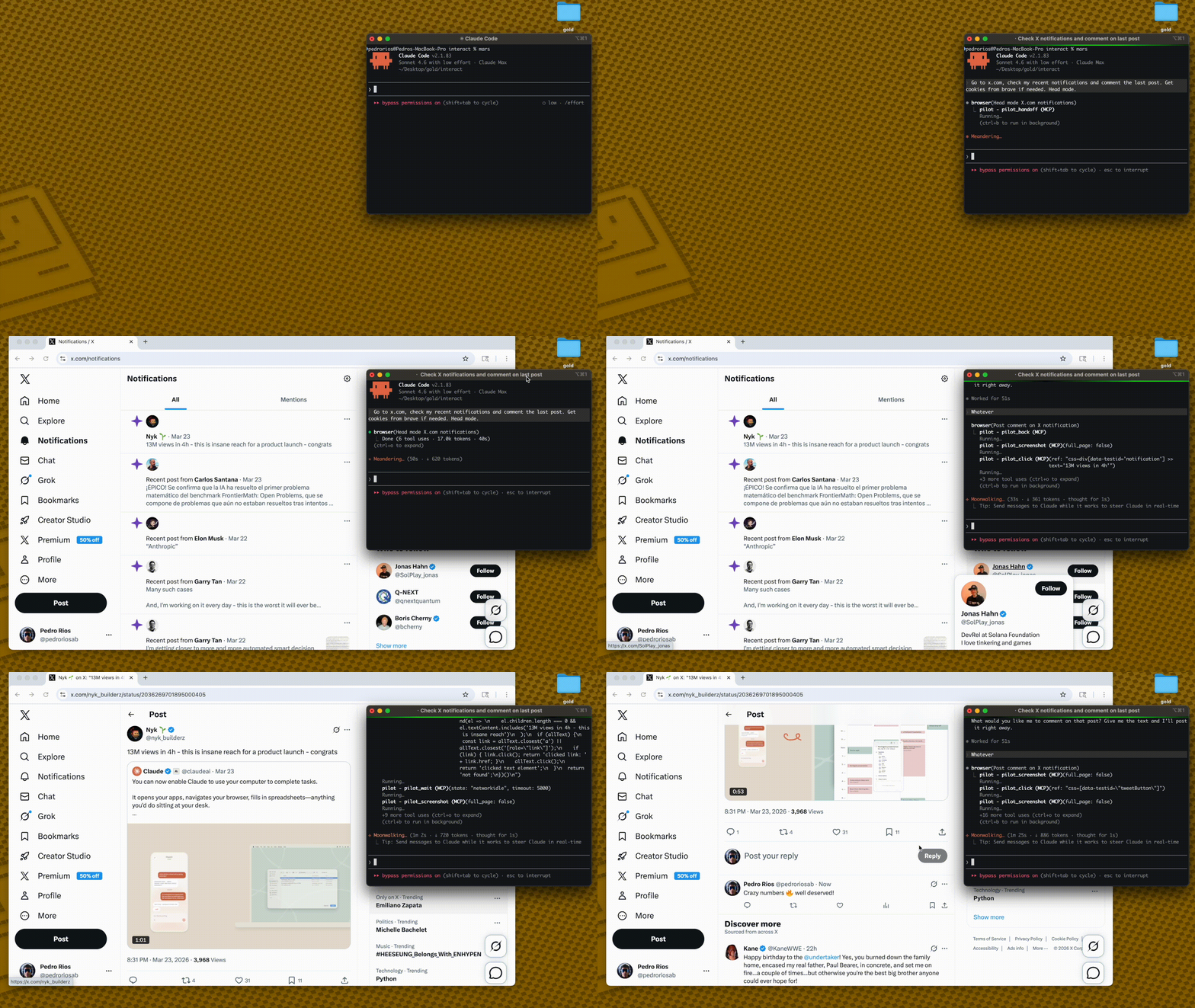
Jedes andere Browser-Tool startet einen neuen, anonymen Browser. Dein Agent startet ausgeloggt, wird von Cloudflare blockiert und kann nichts hinter einer Authentifizierung erreichen.
Pilot ist eine Chrome-Erweiterung + MCP-Server. Er verbindet deinen KI-Agenten mit deinem echten Browser — dieselben Sitzungen, dieselben Cookies, dieselben Logins. Dein Agent sieht, was du siehst.
You: "Summarize my GitHub notifications"

→ New tab opens in YOUR Chrome
→ Already logged into GitHub
→ Agent reads, summarizes, done
Kein Headless-Browser. Kein Cookie-Hacking. Keine erneute Authentifizierung. Keine Bot-Erkennung.
Funktionsweise
AI Agent → MCP Server → WebSocket → Chrome Extension → Tab in your browser
         (stdio)       (localhost)
Pilot läuft als MCP-Server — Claude Code, Cursor oder jeder andere MCP-Client verbindet sich via stdio
Die Chrome-Erweiterung verbindet sich via WebSocket auf localhost
Dein Agent erhält seinen eigenen Tab in deinem echten Chrome — alle deine Sitzungen bleiben erhalten
Mehrere Agenten erhalten separate Tabs — farblich gruppiert, damit du sie unterscheiden kannst
Related MCP server: MCP Master Puppeteer
Schnellstart
1. MCP-Server hinzufügen
{
  "mcpServers": {
    "pilot": {
      "command": "npx",
      "args": ["-y", "pilot-mcp"]
    }
  }
}
2. Chrome-Erweiterung installieren
npx pilot-mcp --install-extension
Öffnet die Erweiterungsseite von Chrome. Klicke auf Entpackte Erweiterung laden → wähle den im Terminal angezeigten Pfad aus.
3. Verwendung
"Gehe zu meinen GitHub-Benachrichtigungen und fasse sie zusammen"
Ein Tab öffnet sich in deinem Chrome — bereits als du eingeloggt.
Schlanke Snapshots
Andere Tools laden über 50.000 Zeichen pro Seite in dein Kontextfenster. Pilot hält die Dinge klein:
Other tools:   navigate(58K) → navigate(58K) → answer        = 116K chars
Pilot:         navigate(2K)  → navigate(2K)  → snapshot(9K)  =  13K chars
snapshot_diff zeigt nur das an, was sich zwischen den Aktionen geändert hat — kein redundantes erneutes Lesen.
Weniger Kontext = schnellere Antworten, günstigere API-Aufrufe, weniger Halluzinationen.
Pilot vs @playwright/mcp
| Pilot | @playwright/mcp |
Browser | Dein echter Chrome (Erweiterung) | Neue Chromium-Instanz |
Auth-Status | Überall bereits eingeloggt | Anonym — manuelle Einrichtung |
Bot-Erkennung | Echter Fingerabdruck — nicht blockiert | Von Cloudflare blockiert |
Snapshot-Größe | ~2K Navigation, ~9K voll | ~50-60K |
Snapshot-Diff | pilot_snapshot_diff
| ❌ |
Cookie-Import | Chrome, Arc, Brave, Edge, Comet | Manuelles JSON |
Iframes | ✅ | ❌ |
Tool-Profile | core (9) / standard (30) / full (61)
| --caps Gruppen
|
Transport | stdio | stdio, HTTP, SSE |
61 Tools in 3 Profilen
Die meisten LLMs bauen bei mehr als ~30 Tools ab. Lade nur das, was du brauchst:
Profil | Tools | Was ist enthalten |
core
| 9 | navigate, snapshot, click, fill, type, press_key, wait, screenshot, snapshot_diff |
standard
| 30 | Core + tabs, scroll, hover, drag, iframes, forms, links, auth, block, find, element_state |
full
| 61 | Standard + network intercept, assertions, clipboard, geolocation, CDP, evaluate, PDF, responsive |
{
  "mcpServers": {
    "pilot": {
      "command": "npx",
      "args": ["-y", "pilot-mcp"],
      "env": { "PILOT_PROFILE": "standard" }
    }
  }
}
Standard: standard. Vollständige Tool-Referenz →
Headed-Fallback
Wenn die Erweiterung nicht verbunden ist, öffnet Pilot automatisch ein sichtbares Chromium-Fenster.
Importiere Cookies aus deinem echten Browser: pilot_import_cookies({ browser: "chrome", domains: [".github.com"] })
Unterstützt Chrome, Arc, Brave, Edge, Comet via macOS Keychain / Linux libsecret. Für CAPTCHAs: pilot_handoff → du greifst ein → pilot_resume.
Erfordert: npx playwright install chromium
Anforderungen
Sicherheit
Erweiterung kommuniziert nur über localhost (127.0.0.1)
Validierung des Ausgabepfads verhindert Schreibzugriffe außerhalb von PILOT_OUTPUT_DIR
Pfad-Traversal-Schutz bei allen Dateioperationen
PILOT_PROFILE steuert, welche Tools verfügbar sind (core / standard / full)
Credits
Kernarchitektur — referenzbasierte Elementauswahl, Snapshot-Diffing, annotierte Screenshots — portiert von gstack durch Garry Tan. Aufgebaut auf Playwright und dem MCP SDK.
Wenn Pilot nützlich ist, gib dem Repo einen Stern — es hilft anderen, es zu finden.