
supplier-statement-check
README.md
# Supplier statement reconciliation MCP server
<!-- mirror-seo:start -->
**MCP server for supplier statement and vendor statement open-item reconciliation checks against a supplied accounts payable ledger, with exact reference evidence.** Compare supplied supplier statement and AP ledger open items, with complete exact-key evidence.
Works with Claude Desktop, Claude Code, Cursor and any Model Context Protocol client. Runs on your own machine: this one has no hosted endpoint, so install it from the bundle or from source.
Product page: <https://mcp.zovo.one/s/supplier-statement-check> - capabilities, free limits and supported installation paths.
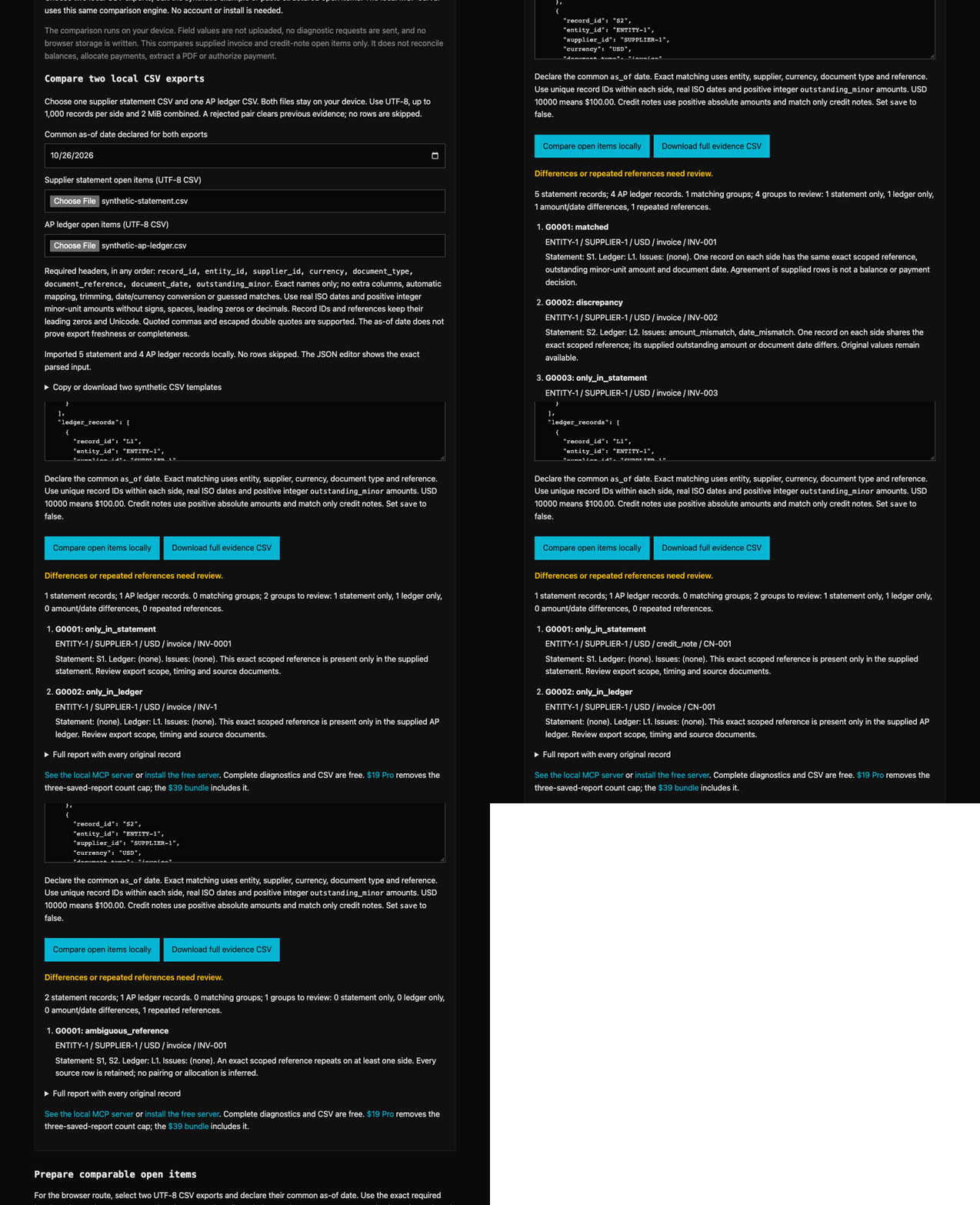
[Try the supplier statement open-item comparison in your browser](https://mcp.zovo.one/guides/compare-supplier-statement-ap-open-items-in-claude#supplier-demo) before installing. Field values stay in the browser. It compares supplied open-item exports, not balances or payments, and makes no approval decision.
## Install
**Claude Desktop, one click.** Download `supplier-statement-check.mcpb` from the [bundle catalog](https://mcp.zovo.one/downloads#supplier-statement-check) and double-click it.
**From source.** The mirror is self-contained: every `@theluckystrike/*` dependency is vendored, so a fresh clone builds with no extra setup.
```sh
git clone https://github.com/theluckystrike/mcp-supplier-statement-check.git
cd mcp-supplier-statement-check
npm install && npm run build
```
Then point your client at the built entry point:
```json
{
"mcpServers": {
"supplier-statement-check": {
"command": "node",
"args": ["/absolute/path/to/mcp-supplier-statement-check/dist/index.js"]
}
}
}
```
> `@theluckystrike/mcp-supplier-statement-check` is **not published on npm yet**, so an `npx -y @theluckystrike/mcp-supplier-statement-check` command will fail. The three paths above are the working ones and each is exercised by CI.
Read-only mirror of [mcp-servers/servers/supplier-statement-check](https://github.com/theluckystrike/mcp-servers/tree/main/servers/supplier-statement-check). See [MIRROR.md](MIRROR.md).
<!-- mirror-seo:end -->
Compare a supplied supplier statement with an accounts-payable open-item export.
Find invoices or credit notes present on only one side, conflicting outstanding
amounts or dates, and repeated references that cannot be paired safely. This local
MCP server preserves every original row and explains each finding. It checks two
supplied open-item lists; it does not reconcile opening/closing balances, match
payments, connect to an ERP, read PDFs, or approve payment.
Built by [theluckystrike](https://github.com/theluckystrike). MIT. Support: support@zovo.one.
## Try it before installing
[Run the free supplier statement example in your browser](https://mcp.zovo.one/guides/compare-supplier-statement-ap-open-items-in-claude#supplier-demo).
Use the synthetic example to inspect missing items and amount/date discrepancies.
The browser proof and this server use the same comparison core. No account or API
key is needed for the local server's free tier.
[Product and installation options](https://mcp.zovo.one/s/supplier-statement-check).
| Your task | Start here |
| --- | --- |
| Compare supplier/vendor statement open items with an AP open-item export | This server: `supplier_statement_check`. |
| Find repeated invoice references across supplied invoice history | [Duplicate supplier invoice review](https://github.com/theluckystrike/mcp-duplicate-invoice-check). |
| Check invoice lines against a purchase order and accepted receipts | [Three-way invoice matching](https://github.com/theluckystrike/mcp-three-way-match). |
These comparisons require the relevant source data. They do not retrieve missing
documents or authorize a payment. Full diagnostics and CSV remain free; the paid
upgrade removes only the limit on saved report count.
## Install
Requires Node.js 18 or newer and an MCP client. Claude Desktop can open the
[supplier-statement-check.mcpb v0.25.0 package](https://github.com/theluckystrike/mcp-servers/releases/download/v0.25.0/supplier-statement-check.mcpb).
Other clients can build the source below. The npm package is not published;
`npx @theluckystrike/mcp-supplier-statement-check` is not an installation route.
```sh
git clone https://github.com/theluckystrike/mcp-servers.git
cd mcp-servers
npm install
node scripts/bootstrap-timezone.mjs
npm run build --workspace @theluckystrike/mcp-license
npm run build --workspace @theluckystrike/mcp-supplier-statement-check
```
These commands build only the shared license dependency and this server. Replace
`/absolute/path` below with the source checkout location. If your MCP client cannot
find `node`, use its full executable path.
Claude Desktop: merge into `mcpServers` in
`~/Library/Application Support/Claude/claude_desktop_config.json` on macOS, or
`%APPDATA%\Claude\claude_desktop_config.json` on Windows:
```json
{"mcpServers":{"supplier-statement-check":{"command":"node","args":["/absolute/path/mcp-servers/servers/supplier-statement-check/dist/index.js"]}}}
```
Claude Code:
```sh
claude mcp add supplier-statement-check -- node /absolute/path/mcp-servers/servers/supplier-statement-check/dist/index.js
```
Cursor: merge into `.cursor/mcp.json` in the project or `~/.cursor/mcp.json`:
```json
{"mcpServers":{"supplier-statement-check":{"type":"stdio","command":"node","args":["/absolute/path/mcp-servers/servers/supplier-statement-check/dist/index.js"]}}}
```
VS Code: put the entry under `servers` in `.vscode/mcp.json`:
```json
{"servers":{"supplier-statement-check":{"type":"stdio","command":"node","args":["/absolute/path/mcp-servers/servers/supplier-statement-check/dist/index.js"]}}}
```
Windsurf's legacy Cascade agent: use the Claude Desktop `mcpServers` entry in
`~/.codeium/windsurf/mcp_config.json`. That file applies to Cascade; a different
agent can use a different configuration route.
Cline: open MCP Servers, Configure, Configure MCP Servers, and add:
```json
{"mcpServers":{"supplier-statement-check":{"type":"stdio","command":"node","args":["/absolute/path/mcp-servers/servers/supplier-statement-check/dist/index.js"],"disabled":false,"autoApprove":[]}}}
```
These are local stdio configurations. This server has no hosted endpoint or browser
chat connector. Reconnect your client, call `license_status`, then run the example
below. Tool discovery alone does not verify a comparison.
## Tools
| Tool | Input and result |
| --- | --- |
| `supplier_statement_check` | `as_of`, `statement_records`, `ledger_records`, optional `save:false`; complete evidence or a paginated overview with a free preview ID. |
| `report_list` | Optional `offset:0`, `limit:20` (max 100); saved UUIDs and count summaries. |
| `report_get` | Saved `id`; validated source rows and recomputed comparison. |
| `report_page` | Saved/preview `id`, `section`, optional `offset`, `limit` (max 100) and `group_id`; all source evidence. |
| `report_delete` | Saved `id`; delete one local report and free a saved slot. |
| `report_export_csv` | Saved/preview `id`, optional `offset`, `limit` (max 2000); CSV with one row per original source item. |
| `license_status` | No arguments; current offline tier and upgrade link. |
| `license_activate` | `key`; verify and save an offline Pro license. |
## A missing item and a conflicting amount
Call `supplier_statement_check` with these synthetic inputs:
```json
{
"as_of": "2026-10-26",
"statement_records": [
{"record_id":"S1","entity_id":"UK-1","supplier_id":"V-9","currency":"USD","document_type":"invoice","document_reference":"INV-001","document_date":"2026-10-01","outstanding_minor":12500},
{"record_id":"S2","entity_id":"UK-1","supplier_id":"V-9","currency":"USD","document_type":"invoice","document_reference":"INV-002","document_date":"2026-10-02","outstanding_minor":20000},
{"record_id":"S3","entity_id":"UK-1","supplier_id":"V-9","currency":"USD","document_type":"credit_note","document_reference":"CR-003","document_date":"2026-10-03","outstanding_minor":5000}
],
"ledger_records": [
{"record_id":"L1","entity_id":"UK-1","supplier_id":"V-9","currency":"USD","document_type":"invoice","document_reference":"INV-001","document_date":"2026-10-01","outstanding_minor":12500},
{"record_id":"L2","entity_id":"UK-1","supplier_id":"V-9","currency":"USD","document_type":"invoice","document_reference":"INV-002","document_date":"2026-10-04","outstanding_minor":19000},
{"record_id":"L4","entity_id":"UK-1","supplier_id":"V-9","currency":"USD","document_type":"invoice","document_reference":"INV-004","document_date":"2026-10-05","outstanding_minor":7000}
],
"save": false
}
```
The result has four groups: one match, one discrepancy with both `amount_mismatch`
and `date_mismatch`, one item only in the statement, and one only in the ledger.
Every supplied row remains available. The credit note's amount is positive and is
not netted against invoices. No balance, loss or recoverable amount is calculated.
If you add another `INV-001` within either side's exact scope, its entire group
becomes `ambiguous_reference`; the tool does not choose the convenient amount pair.
## Exact input contract and comparison rules
Supply a real `YYYY-MM-DD` `as_of` date and two arrays, each with 0–1000 records.
At least one side must contain a record. The date declares the intended common
snapshot; the tool cannot verify export freshness and does not filter rows by date.
Prepare both lists with consistent open-item scope before comparing them.
Each record requires `record_id`, `entity_id`, `supplier_id`, uppercase three-letter
`currency`, `document_type` (`invoice` or `credit_note`), `document_reference`, real
ISO `document_date`, and positive safe-integer `outstanding_minor`. IDs/references
are 1–160 characters without surrounding whitespace or control characters. IDs
must be unique within a side; the two sides may use the same ID. Unknown fields,
impossible dates, year 0000, zero/negative/decimal/unsafe amounts and over-limit
arrays are rejected. Currency syntax is checked without an external currency list.
Amounts are currency minor units: USD 12500 means $125.00. Credit notes use positive
absolute outstanding amounts and compare only with credit notes. Neither side is
required to use a common supplier name, but its exact `supplier_id` must agree.
Different entities, suppliers, currencies and document types remain separate.
The join key is exact `(entity_id, supplier_id, currency, document_type,
document_reference)`. Leading zeros, punctuation, case, accents, Unicode forms and
lookalike characters remain significant. No supplier inference, reference cleanup,
greedy amount matching, payment allocation or currency conversion occurs.
| Group status | Meaning |
| --- | --- |
| `matched` | Exactly one row on each side; key, outstanding amount and document date agree. |
| `only_in_statement` | One statement row has no exact-key ledger row. |
| `only_in_ledger` | One ledger row has no exact-key statement row. |
| `discrepancy` | Exactly one row on each side shares a key, but amount and/or date differs; `issues` preserves both reasons. |
| `ambiguous_reference` | A key repeats on either side; all rows are retained without selecting pairs. |
Missing rows and disagreements can result from export timing or scope. Repeated
references can be legitimate. Even complete agreement between supplied lists is not
proof that the supplier balance is correct: two incomplete exports can agree. The
status `no_discrepancies_in_supplied_open_items` makes only that limited observation.
Saved reports never become hidden cross-call history; include both lists every time.
Groups and rows are deterministically sorted. Each source row belongs to exactly
one group; the engine does not expand every possible record pair. A group refers to
source IDs qualified by their statement/ledger side, so identical IDs across sides
cannot overwrite evidence. No network or telemetry requests are made.
## Free evidence, previews and CSV
Every check returns `retrieval.report_id`. Unsaved previews use `preview:<UUID>` and
remain in memory for 30 minutes for the last two checks in this process. A third
check, restart or expiry may evict a preview; resubmit the free check. Saved UUIDs
persist on disk. Preview data is not written to a browser or filesystem.
`report_page` supports `statement_records`, `ledger_records`, `groups`, and
`group_members`. Group pages contain summary metadata and side-specific member
counts. Read complete source members with `section:"group_members"` and the exact
`group_id`. Follow `next_offset` until null. Pages and CSV remain free even after
the saved-report cap is reached.
Responses use a 512 KiB escaped MCP text-envelope budget. Larger reports return a
paginated overview; pages can contain fewer rows than requested to fit that budget.
CSV uses one row per original source record with its side, original fields, group
and reasons. Formula-like text is escaped; JSON source values are unchanged. Export
returns CSV text, never writes to a supplied filename, and repeats the header on
each page. Retain one header when joining pages. Follow actual `returned` and
`next_offset` values rather than assuming the requested count was returned.
## Free and Pro
| Capability | Free | Pro |
| --- | --- | --- |
| Complete checks, discrepancy reasons and original source rows | Included, 1000 records per side | Same |
| Preview pages and CSV | Included | Same |
| Saved report count | 3 | No report-count cap |
| Aggregate saved storage | 64 MiB | 64 MiB |
| Per-file integrity bound | 8 MiB | 8 MiB |
| Input, response, text and preview limits | Same documented bounds | Same |
`save:true` at the free cap returns the diagnostic and free preview with
`saved:false`, `save_error:"free_saved_report_cap"`, and an upgrade link. Delete a
saved report to reuse a slot. Storage failures also preserve the diagnostic.
[Get Pro: $19 one time](https://mcp.zovo.one/buy/supplier-statement-check).
[All servers: $39 bundle](https://mcp.zovo.one/buy/bundle). Set `MCP_LICENSE_KEY` or
call `license_activate`; keys verify offline. Pro removes only the saved-report
count cap. It adds no accounting data, accuracy guarantee, ERP access or safety
approval. The saved-history upgrade is a commercial hypothesis, not proven ROI.
All data stays local. Reports live under
`${XDG_DATA_HOME:-~/.local/share}/mcp-servers/supplier-statement-check/`.
`XDG_DATA_HOME` must be absolute with real directory ancestors. Private JSON files
are written atomically with cross-process mutation locks. Reads validate original
inputs and recompute evidence rather than trusting edited results. License
activation writes the shared local license configuration. Manage accounting-data
access, retention and backups yourself.
## Development
```sh
npm run build --workspace @theluckystrike/mcp-supplier-statement-check
npm test --workspace @theluckystrike/mcp-supplier-statement-check
```
Build Docker from the monorepo root with
`docker build -f servers/supplier-statement-check/Dockerfile .`. The standalone
mirror receives its own self-contained Dockerfile during mirror generation.
Tests cover the comparison oracle, strict inputs, scope/Unicode isolation, complete
source coverage, ambiguity, large free pages/CSV, safe storage, concurrent save
caps and actual stdio calls. Signed-license tests use the existing local private
signer when available and skip if it is absent. Private signing keys are not
packaged or required by users.
This server cannot be deployed
Maintenance
ActivityMaintained
ResponsivenessNo issues