
Duplicate supplier invoice check MCP server
# Duplicate supplier invoice check MCP server
<!-- mirror-seo:start -->
**MCP server for duplicate supplier invoice and vendor bills review: supplied-batch exact and normalized references with free CSV evidence.** Review duplicate supplier invoice candidates in supplied local history.
Works with Claude Desktop, Claude Code, Cursor and any Model Context Protocol client. Runs on your own machine: this one has no hosted endpoint, so install it from the bundle or from source.
Product page: <https://mcp.zovo.one/s/duplicate-invoice-check> — capabilities, free limits and supported installation paths.
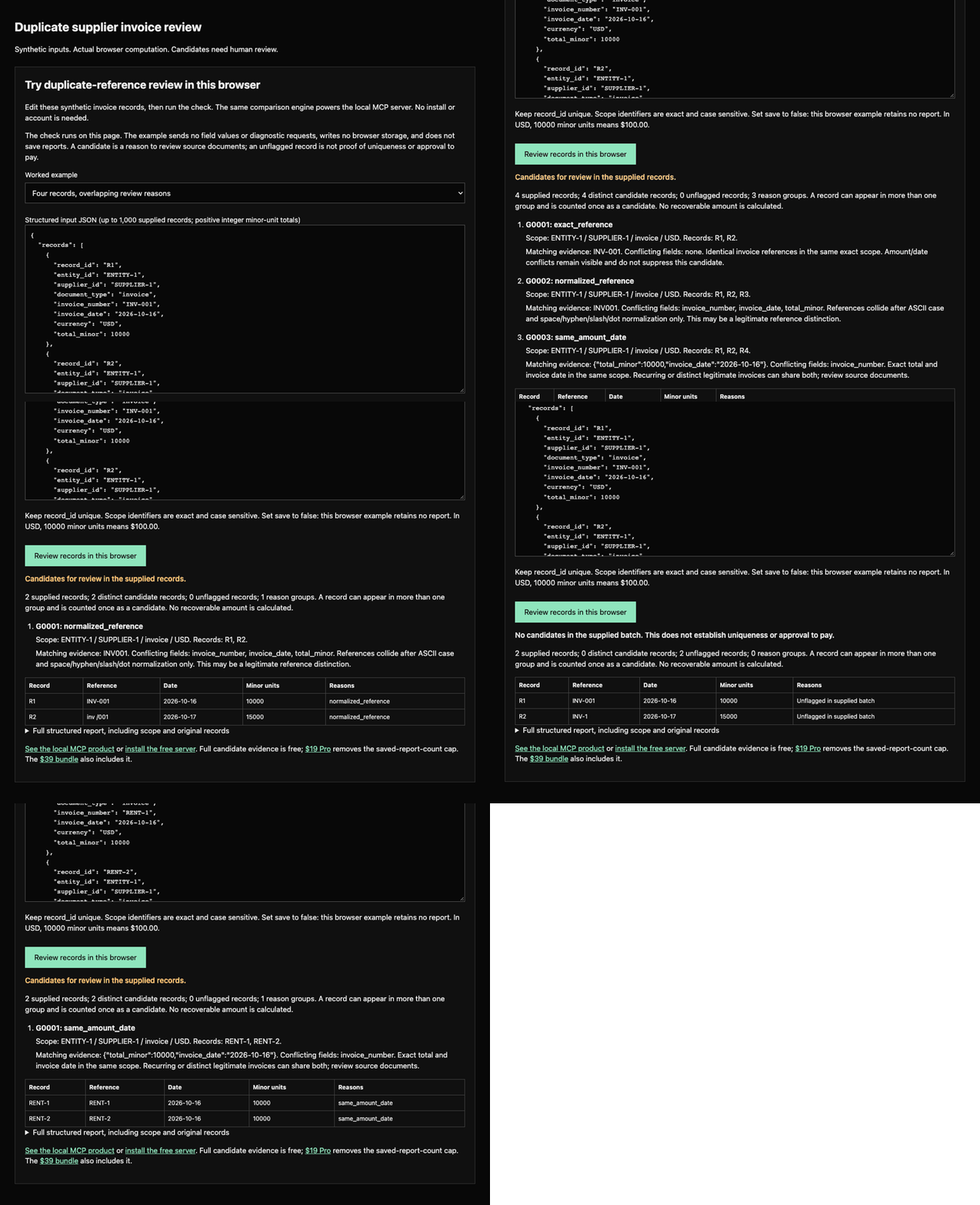
[Try the editable duplicate-invoice review in your browser](https://mcp.zovo.one/guides/check-duplicate-supplier-invoice-references-in-claude#duplicate-demo) before installing. Synthetic fields are checked locally in your browser without uploads. Candidates require review; they are not payment decisions.
## Install
**Claude Desktop, one click.** Download `duplicate-invoice-check.mcpb` from the [bundle catalog](https://mcp.zovo.one/downloads#duplicate-invoice-check) and double-click it.
**From source.** The mirror is self-contained: every `@theluckystrike/*` dependency is vendored, so a fresh clone builds with no extra setup.
```sh
git clone https://github.com/theluckystrike/mcp-duplicate-invoice-check.git
cd mcp-duplicate-invoice-check
npm install && npm run build
```
Then point your client at the built entry point:
```json
{
"mcpServers": {
"duplicate-invoice-check": {
"command": "node",
"args": ["/absolute/path/to/mcp-duplicate-invoice-check/dist/index.js"]
}
}
}
```
> `@theluckystrike/mcp-duplicate-invoice-check` is **not published on npm yet**, so an `npx -y @theluckystrike/mcp-duplicate-invoice-check` command will fail. The three paths above are the working ones and each is exercised by CI.
Read-only mirror of [mcp-servers/servers/duplicate-invoice-check](https://github.com/theluckystrike/mcp-servers/tree/main/servers/duplicate-invoice-check). See [MIRROR.md](MIRROR.md).
<!-- mirror-seo:end -->
Review a supplied batch of supplier invoices for repeated invoice numbers, conservative formatting variations, or identical amounts and invoice dates. This local MCP server returns complete grouped evidence and the exact reason each record needs review. Distinct legitimate invoices can share an amount and date. Candidates are not confirmed duplicates, fraud scores, recoverable money or payment decisions. It does not connect to an ERP, read PDFs, use OCR, or retrieve missing history.
Built by [theluckystrike](https://github.com/theluckystrike). MIT. Support: support@zovo.one.
## Install
Claude Desktop: download [duplicate-invoice-check.mcpb v0.22.8](https://github.com/theluckystrike/mcp-servers/releases/download/v0.22.8/duplicate-invoice-check.mcpb) and open it. SHA-256: `181379eb6dcff3d90b55e080dd9c180f6c96802e991872865a6b0ce422b3aaea`. Other clients can use the source instructions below.
Requires Node.js 18 or newer and an MCP client. No API key or account is needed for free use. The npm package is not published: build the source checkout, then use an absolute local path.
```sh
git clone https://github.com/theluckystrike/mcp-servers.git
cd mcp-servers
npm install
node scripts/bootstrap-timezone.mjs
npm run build --workspace @theluckystrike/mcp-license
npm run build --workspace @theluckystrike/mcp-duplicate-invoice-check
```
Claude Desktop: merge this entry into `mcpServers` in `~/Library/Application Support/Claude/claude_desktop_config.json` on macOS, or `%APPDATA%\Claude\claude_desktop_config.json` on Windows. Replace `/absolute/path` with the checkout location.
```json
{"mcpServers":{"duplicate-invoice-check":{"command":"node","args":["/absolute/path/mcp-servers/servers/duplicate-invoice-check/dist/index.js"]}}}
```
Claude Code:
```sh
claude mcp add duplicate-invoice-check -- node /absolute/path/mcp-servers/servers/duplicate-invoice-check/dist/index.js
```
Cursor: put this local entry in `.cursor/mcp.json` in your project or `~/.cursor/mcp.json`:
```json
{"mcpServers":{"duplicate-invoice-check":{"type":"stdio","command":"node","args":["/absolute/path/mcp-servers/servers/duplicate-invoice-check/dist/index.js"]}}}
```
VS Code: use `.vscode/mcp.json` with the top-level key `servers`:
```json
{"servers":{"duplicate-invoice-check":{"type":"stdio","command":"node","args":["/absolute/path/mcp-servers/servers/duplicate-invoice-check/dist/index.js"]}}}
```
Windsurf's legacy Cascade agent: merge the Claude Desktop `mcpServers` JSON into `~/.codeium/windsurf/mcp_config.json`. This file applies to Cascade; its newer Devin Local agent uses a different configuration route. The standalone server exposes eight tools.
Cline: open its MCP Servers panel, Configure tab, then Configure MCP Servers. Add this entry to the settings JSON (for the Cline CLI, the file is `~/.cline/mcp.json`):
```json
{"mcpServers":{"duplicate-invoice-check":{"type":"stdio","command":"node","args":["/absolute/path/mcp-servers/servers/duplicate-invoice-check/dist/index.js"],"disabled":false,"autoApprove":[]}}}
```
These are the six local stdio client configurations used by this project. There is no hosted endpoint or browser chat connector. If the client cannot find `node`, replace it with the absolute path printed by `which node`. After saving, reconnect the server (fully quit and restart Claude Desktop), call `license_status`, then run the example below. A `tools/list` result alone does not verify candidate checking.
## Tools
| Tool | Input and result |
| --- | --- |
| `duplicate_invoice_check` | `records`, optional `save` (false); complete grouped candidates, unique counts, source evidence and a free preview id. |
| `report_list` | Optional `offset` (0), `limit` (20, max 100); saved UUIDs and count summaries. |
| `report_get` | Saved `id`; source records, groups and reasons. |
| `report_page` | Saved or preview `id`, `section`, optional `offset`, `limit` (max 100), `group_id`; complete evidence pages. |
| `report_delete` | Saved `id`; delete one report and reuse its storage slot. |
| `report_export_csv` | Saved or preview `id`, optional `offset`, `limit` (max 1000); one row per source record, candidate reasons and group ids. |
| `license_status` | No arguments; offline tier and checkout link. |
| `license_activate` | `key`; verify and store an offline Pro license. |
## A repeated reference and a legitimate equal total
Call `duplicate_invoice_check` with synthetic records:
```json
{
"records": [
{"record_id":"A","entity_id":"UK-1","supplier_id":"S-9","document_type":"invoice","invoice_number":"INV-001","invoice_date":"2026-10-01","currency":"USD","total_minor":12500},
{"record_id":"B","entity_id":"UK-1","supplier_id":"S-9","document_type":"invoice","invoice_number":"INV-001","invoice_date":"2026-10-02","currency":"USD","total_minor":13000},
{"record_id":"C","entity_id":"UK-1","supplier_id":"S-9","document_type":"invoice","invoice_number":"inv /001","invoice_date":"2026-10-03","currency":"USD","total_minor":12500},
{"record_id":"D","entity_id":"UK-1","supplier_id":"S-9","document_type":"invoice","invoice_number":"SERVICE-02","invoice_date":"2026-10-01","currency":"USD","total_minor":12500}
],
"save": false
}
```
The result has four unique candidate records and three groups. `exact_reference` includes A/B despite their different dates and totals. `normalized_reference` includes A/B/C and exposes every conflicting field. `same_amount_date` includes A/D: two different legitimate services could have the same date and total, so this group is a review prompt. A appears in three groups but is counted once. No sum of possible losses is calculated. Changing C to `INV-1` excludes it from the normalized `INV001` group because leading zeros remain meaningful.
## Exact input contract
Supply 1–1000 records, each with unique `record_id`, exact `entity_id` and `supplier_id`, `document_type` (`invoice` or `credit_note`), `invoice_number`, real `YYYY-MM-DD` `invoice_date`, uppercase three-letter `currency`, and positive safe-integer `total_minor`. IDs and invoice numbers are 1–160 characters without surrounding whitespace or control characters. Optional `entity_label` and `supplier_label` are display-only text, up to 200 characters without controls. Unknown fields are rejected.
Amounts are integer currency minor units, never floating point amounts: USD 12500 means $125.00. Currency codes are checked for uppercase three-letter syntax, not against an external currency registry. Credit notes use positive absolute amounts and compare only with credit notes. No amounts are added, converted or interpreted as a financial loss. Year 0000, impossible calendar dates, duplicate record ids, zero/negative/decimal/unsafe money and over-limit batches are input errors.
Each rule groups only records with exactly equal `(entity_id, supplier_id, document_type, currency)`. Entity and supplier IDs are case-sensitive: similar names, different IDs and different entities never join. Multiple entities can appear in a batch, but each remains a separate scope. Display labels do not affect matching.
Three equality rules run independently:
1. `exact_reference`: the original invoice number matches exactly, even when amounts/dates differ.
2. `normalized_reference`: ASCII `a-z` becomes `A-Z`; only ASCII space, hyphen, slash and dot are removed. Leading zeros, accents, all Unicode characters, underscores, nonbreaking spaces, Unicode dashes and letter/digit lookalikes remain unchanged. Empty normalized keys do not collide.
3. `same_amount_date`: positive amount and invoice date both match exactly. This frequently has legitimate explanations.
Groups contain complete membership, exact scope and match key, an explanation and differing source fields. They are independent overlapping reasons, not transitive confirmed-duplicate clusters. `candidate_record_count` counts the union once. `no_candidates_in_supplied_batch` means these limited rules found none in the records supplied; it does not mean safe to pay. Missing history and reference, date or amount changes can evade these rules. Saved reports never become implicit cross-call history: include all records you want compared every time.
Source records and report groups are sorted deterministically; reordering the same input records produces the same diagnostic evidence. The computation groups keys instead of producing every pair: at most 3000 memberships for 1000 records, including overlap. The server performs no telemetry or network requests.
## Free evidence, paging and CSV
Every check returns a `retrieval.report_id`, including unsaved checks. Preview IDs are `preview:<UUID>`, local to the current server process. The last two previews remain available for 30 minutes. A third check, restart or expiry can evict a preview; resubmit the original free diagnostic. Saved UUIDs persist on disk.
`report_page` sections are `records`, `groups`, `record_summaries`, and `group_members`. Follow `next_offset` until null, with `limit` 1–100. Group pages return summary metadata and `member_count`; read all members using `section: "group_members"` and the exact `group_id`. Member pages contain complete original records. Records are stored once in the report; groups refer to their exact record ids. All pages and CSV exports are free, including after hitting the saved-report cap.
The encoded incoming stdio message must fit the SDK's 10 MiB receive buffer. Responses use an 8 MiB escaped text-envelope budget; a larger report returns an explicit paginated overview with the same free retrieval instructions. Current 1000-row/text limits fit that budget in transport tests, including worst-case quoting. CSV uses one row per record rather than repeating it for each group. It includes original source fields, candidate flag, reason codes and group ids. Formula-like leading text is escaped. Export returns text; it never writes to a caller-supplied filename. CSV pages can contain fewer rows than the requested limit when quoting would exceed the response budget. Follow the actual `next_offset` until null; `returned` always counts the rows in that page. Every CSV page repeats its header; retain one header when joining pages.
## Free and Pro
| Capability | Free | Pro |
| --- | --- | --- |
| All checks, source records, grouped reasons | Included, up to 1000 records/call | Same |
| Preview pages and CSV | Included | Same |
| Concurrent saved reports | 3 | No report-count cap |
| Total saved storage | 64 MiB | 64 MiB |
| Input/output, text and preview safety bounds | Same documented bounds | Same |
`save: true` at the free cap still returns the complete diagnostic and free preview with `saved: false`, `save_error: "free_saved_report_cap"`, and an upgrade link. Delete a saved report to reuse a slot. Storage failures also preserve diagnostics. Pro removes only the saved-count cap; it does not increase input, transport, preview or total storage bounds.
[Get Pro: $19 one time](https://mcp.zovo.one/buy/duplicate-invoice-check). [All servers: $39 bundle](https://mcp.zovo.one/buy/bundle). Set `MCP_LICENSE_KEY` or call `license_activate`. Keys verify offline.
All data stays local. Reports live under `${XDG_DATA_HOME:-~/.local/share}/mcp-servers/duplicate-invoice-check/`. `XDG_DATA_HOME` must be absolute and directory ancestry must contain no symlinks. Private JSON files use atomic writes and cross-process mutation locks; reads revalidate source records and recompute the evidence instead of trusting edited derived results. License activation writes the shared local license config. Manage local accounting-data access and backups yourself.
## Development
```sh
npm run build --workspace @theluckystrike/mcp-duplicate-invoice-check
npm test --workspace @theluckystrike/mcp-duplicate-invoice-check
```
Build Docker from the repository root: `docker build -f servers/duplicate-invoice-check/Dockerfile .`. Tests cover actual stdio calls, schema rejection, scope/Unicode/zero negatives, an independent 2000-batch pairwise oracle, grouped 1000-record transport, pages and CSV, cross-process save caps, recomputation, symlink/path rejection and aggregate storage boundaries. A local signed-key stdio test uses the operator's existing signer if present; it skips when that private signer is absent.
TDQS
Scored across 8 tools
The core duplicate_invoice_check tool is clearly distinct from the report and license management tools. The report tools mostly have separate purposes, but report_get and report_page overlap in reading report content/pages, which could cause some misselection despite clarifying descriptions.
All tools use snake_case with a consistent domain-prefix plus action pattern: duplicate_invoice_check, report_list, report_get, report_page, report_delete, report_export_csv, license_status, and license_activate. The convention is predictable even though duplicate_invoice_check has a longer domain prefix.
Eight tools are well-scoped for the server: one core duplicate-checking tool, five report lifecycle tools, and two license tools. There is no obvious bloat, and each tool appears to earn its place.
The server covers duplicate checking, report listing/reading/paging/deleting/exporting, and license status/activation. However, there is no explicit tool for creating or saving a report from a duplicate check preview, leaving a notable gap in the saved-report lifecycle that may force workarounds.