Glama
tadasant

MCP Server: SSH Rails Runner

by tadasant

MCP 服务器:SSH Rails Runner

一个 MCP 服务器,支持通过 SSH 安全地远程执行 Rails 控制台命令。该服务器提供用于在已部署的 Rails 环境中执行只读操作和精心管理的变更的工具。

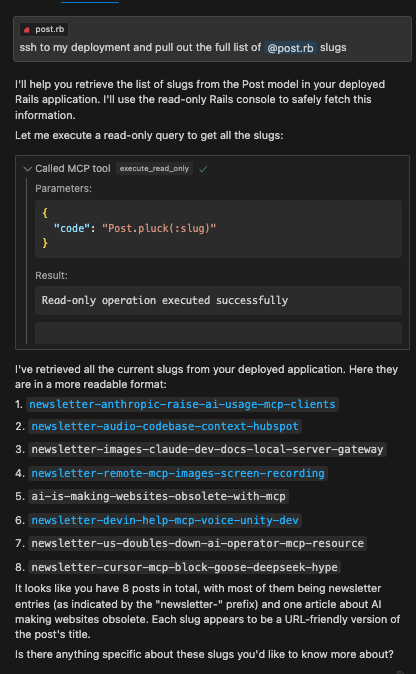
这非常适合 Cursor。您可以使用 Cursor Composer 导入 Rails 模型文件作为上下文,然后使用execute_read_onlydry_run_mutateexecute_mutate工具对数据库进行更改。无需费力地浏览复杂的管理界面即可完成数据整理和分析。

例子

例子

Related MCP server: MCP SSH Server

特征

  • 通过 SSH 执行远程 Rails 控制台

  • 安全的只读操作

  • 突变的试运行能力

  • 执行已批准的突变

  • 代码片段的资源管理

安装

npm install
npm run build

配置

设置以下环境变量:

SSH_HOST=your.remote.host
SSH_USER=your_ssh_user
SSH_PRIVATE_KEY_PATH=your_SSH_PRIVATE_KEY_PATH
RAILS_WORKING_DIR=/path/to/rails/app

与 Claude Desktop 一起使用

添加到您的 Claude Desktop 配置:

{
  "mcpServers": {
    "ssh-rails-runner": {
      "command": "npx",
      "args": ["mcp-server-ssh-rails-runner"],
      "env": {
        "SSH_HOST": "your.remote.host",
        "SSH_USER": "your_ssh_user",
        "SSH_PRIVATE_KEY_PATH": "your_SSH_PRIVATE_KEY_PATH",
        "RAILS_WORKING_DIR": "/path/to/rails/app/root",
        "PROJECT_NAME_AS_CONTEXT": "Name that shows up in tool descriptions to help the LLM describe what kind of Rails project we're working with.",
        "CODE_SNIPPET_FILE_DIRECTORY": "/path/to/store/code/snippets/locally"
      }
    }
  }
}

如果未提供CODE_SNIPPET_FILE_DIRECTORY ,代码片段将存储在临时目录中(例如, /tmp/mcp-ssh-rails-runner-code-snippets )。 PROJECT_NAME_AS_CONTEXT是可选的,有助于在工具描述中识别项目上下文。

可用工具

服务器现在使用准备->执行工作流程:

mcp_ssh_rails_runner_prepare_code_snippet

  • 参数name (字符串,用于文件名)、 type (枚举:“readOnly”|“mutate”)、 code (字符串,Ruby 代码)、 description (字符串,可选)。

  • 功能:将提供的 Ruby 代码保存到名为code_snippet_<name>.json的本地文件中,将其标记为只读或变异,然后打开该文件进行审查。

  • 返回:所创建片段的file:// URI。

mcp_ssh_rails_runner_execute_code_snippet_read_only

  • 参数uri (字符串,来自prepareCodeSnippetfile:// URI)。

  • 功能:从 URI 读取代码片段,验证其是否标记为readOnly ,对代码执行安全检查,然后执行它。

  • 返回:Rails 命令的输出。

mcp_ssh_rails_runner_execute_code_snippet_mutate

  • 参数uri (字符串,来自prepareCodeSnippetfile:// URI)。

  • 功能危险区域!。此工具没有试运行或其他安全检查。

  • 返回:Rails 命令的输出。

  • 用法仅在用户查看了准备好的代码(通过

安全注意事项

  • 仅与您自己的本地计算机(临时)提供对远程环境的访问权限的受信任的 SSH 端点一起使用。

  • **至关重要的是,在使用executeCodeSnippetMutate执行任何修改之前,务必检查prepareCodeSnippet保存的代码。**确认修改的责任在于用户和调用方 AI。

执照

麻省理工学院

-
security - not tested
A
license - permissive license
-
quality - not tested

Resources

Looking for Admin?

Admins can modify the Dockerfile, update the server description, and track usage metrics. If you are the server author, to access the admin panel.

Latest Blog Posts

MCP directory API

We provide all the information about MCP servers via our MCP API.

curl -X GET 'https://glama.ai/api/mcp/v1/servers/tadasant/mcp-server-ssh-rails-runner'

If you have feedback or need assistance with the MCP directory API, please join our Discord server