F
licenseB
qualityF
maintenanceConnects Claude AI to QGIS through the Model Context Protocol, allowing Claude to directly interact with and control QGIS for tasks like project creation, layer manipulation, and code execution.
15
1,131
-

Allows Claude to directly interact with and control QGIS through two-way communication, enabling project creation, loading and saving, layer manipulation (adding/removing vector and raster layers), execution of processing algorithms, running Python code in QGIS, and map rendering.
Click on "Deploy Server".
Wait a few minutes for the server to deploy. Once ready, it will show a "Started" state.
In the chat, type @ followed by the MCP server name and your instructions, e.g., "@QGISMCP add a vector layer from this shapefile path and zoom to it"
That's it! The server will respond to your query, and you can continue using it as needed.
Here is a step-by-step guide with screenshots.
QGISMCP connects QGIS to Claude AI through the Model Context Protocol (MCP), allowing Claude to directly interact with and control QGIS. This integration enables prompt assisted project creation, layer loading, code execution and more.
The main project based on the (https://github.com/jjsantos01/qgis_mcp). I am just updating some error that i found
This project is strongly based on the BlenderMCP project by Siddharth Ahuja
Two-way communication: Connect Claude AI to QGIS through a socket-based server.
Project manipulation: Create, load and save projects in QGIS.
Layer manipulation: Add and remove vector or raster layers to a project.
Execute processing: Execute processing algorithms (Processing Toolbox).
Code execution: Run arbitrary Python code in QGIS from Claude. Very powerful, but also be very cautious using this tool.
Related MCP server: QGISMCP
The system consists of two main components:
QGIS plugin: A QGIS plugin that creates a socket server within QGIS to receive and execute commands.
MCP Server: A Python server that implements the Model Context Protocol and connects to the QGIS plugin.
QGIS 3.X (only tested on 3.22 and 3.34)
Cloud desktop
Python 3.10 or newer
uv package manager:
If you're on Mac, please install uv as
brew install uvOn Windows Powershell
powershell -ExecutionPolicy ByPass -c "irm https://astral.sh/uv/install.ps1 | iex"Otherwise installation instructions are on their website: Install uv
⚠️ Do not proceed before installing UV
Download this repo to your computer. You can clone it with:
https://github.com/syauqi-uqi/qgis_mcp_modify1.gitYou need to copy the folder qgis_mcp_plugin and its content on your QGIS profile plugins folder.
You can get your profile folder in QGIS going to menu Settings -> User profiles -> Open active profile folder Then, go to Python/plugins and paste the folder qgis_mcp_plugin.
On a Windows machine the plugins folder is usually located at:
C:\Users\USER\AppData\Roaming\QGIS\QGIS3\profiles\default\python\pluginsand on MacOS:~/Library/Application\ Support/QGIS/QGIS3/profiles/default/python/plugins
Then close QGIS and open it again. Go to the menu option Plugins -> Installing and Managing Plugins, select the All tab and search for "QGIS MCP", then mark the QGIS MCP checkbox.
Go to Claude > Settings > Developer > Edit Config > claude_desktop_config.json to include the following:
If you cann't find the "Developers tab" or the
claude_desktop_config.jsonlook at this documentation.
{
    "mcpServers": {
        "qgis": {
            "command": "uv",
            "args": [
                "--directory",
                "#change this line to your directory#",
                "run",
                "qgis_mcp_server.py"
            ]
        }

    }
}In QGIS, go to plugins -> QGIS MCP-> QGIS MCP

Click "Start Server"

Once the config file has been set on Claude, and the server is running on QGIS, you will see a hammer icon with tools for the QGIS MCP.
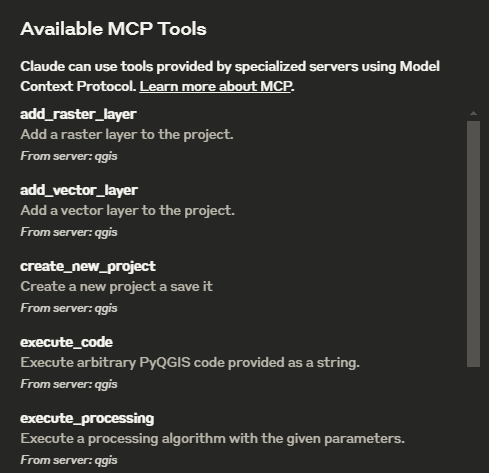
ping - Simple ping command to check server connectivity
get_qgis_info - Get QGIS information about the current installation
load_project - Load a QGIS project from the specified path
create_new_project - Create a new project and save it
get_project_info - Get current project information
add_vector_layer - Add a vector layer to the project
add_raster_layer - Add a raster layer to the project
get_layers - Retrieve all layers in the current project
remove_layer - Remove a layer from the project by its ID
zoom_to_layer - Zoom to the extent of a specified layer
get_layer_features - Retrieve features from a vector layer with an optional limit
execute_processing - Execute a processing algorithm with the given parameters
save_project - Save the current project to the given path
render_map - Render the current map view to an image file
execute_code - Execute arbitrary PyQGIS code provided as a string
This is the example I used for the demo: Or, for this updated version, see (https://www.linkedin.com/posts/syauqi-arka-yudisti-73b236288_qgis-ai-vibemapping-activity-7316248625045483524-hQdB?utm_source=share&utm_medium=member_android&rcm=ACoAAEXNN58BLMyjf4iZIy1KZZJBUFyiNlLtNSg)
You have access to the tools to work with QGIS. You will do the following:
	1. Ping to check the connection. If it works, continue with the following steps.
	2. Create a new project and save it at: "C:/Users/USER/GitHub/qgis_mcp/data/cdmx.qgz"
	3. Load the vector layer: ""C:/Users/USER/GitHub/qgis_mcp/data/cdmx/mgpc_2019.shp" and name it "Colonias".
	4. Load the raster layer: "C:/Users/USER/GitHub/qgis_mcp/data/09014.tif" and name it "BJ"
	5. Zoom to the "BJ" layer.
	6. Execute the centroid algorithm on the "Colonias" layer. Skip the geometry check. Save the output to "colonias_centroids.geojson".
	7. Execute code to create a choropleth map using the "POB2010" field in the "Colonias" layer. Use the quantile classification method with 5 classes and the Spectral color ramp.
	8. Render the map to "C:/Users/USER/GitHub/qgis_mcp/data/cdmx.png"
9. Save the project.You have access to the tools to work with QGIS. You will do the following:
1. **Ping to check the connection**. If successful, proceed.
2. **Create a new QGIS project** and save it to:
**"D:/PROJECT/MCP/claudemap.qgz"** (gunakan slash `/` untuk kompatibilitas).
3. **Load vector layers**:
a. Load **"D:/PROJECT/MCP/map (2).osm"** (OSM layers akan terbagi menjadi `points`, `lines`, `multilinestrings`, `multipolygons`).
b. Load **"D:/PROJECT/MCP/Bahan_Mundupesisir/aoi.shp"** and name it **"aoi"**.
4. **Zoom to the "aoi" layer** to set the initial extent.
5. **Remove/hide unnecessary layers**:
a. Remove layer **"map (2) — points"** (klik kanan > Remove Layer).
b. Hide layer **"aoi"** (untuk mempertahankan extent tetapi tidak menampilkannya di peta).
6. **Style layers**:
a. **"map (2) — lines"**:
- Line color: **#ff6201** (orange)
- Stroke width: **0.5 mm**
b. **"map (2) — multilinestrings"**:
- Line color: **#8bff07** (hijau neon)
- Stroke width: **0.8 mm**
c. **"map (2) — multipolygons"**:
- Fill color: **#fff65f** (kuning pucat)
- Stroke color: **#fff65f** (sama dengan fill)
- Stroke width: **0.3 mm**
- Transparency: **80%**
7. **Create Print Layout (A4 Portrait)**:
a. Tambahkan **Map Item** dengan ukuran A4 (210x297 mm).
b. Set **scale to 1:10,000** and enable **"Lock layers for map item"**.
c. Tambahkan **Title**:
- Text: **"PETA MUNDUPESISIR BY CLAUDE.AI"**
- Font: **Bold, 24pt**
- Posisi: Atas tengah.
d. Tambahkan **Scale Bar** dan **Legend** (opsional).
8. **Export to PNG**:
- Path: **"D:/PROJECT/MCP/claudemap.png"**
- Resolution: **600 DPI** (pastikan ukuran file tidak terlalu besar).
9. **Save the QGIS project**.Add a raster layer to the project.
| Name | Required | Description | Default |
|---|---|---|---|
| path | Yes | ||
| provider | No | gdal | |
| name | No |
Does the description disclose side effects, auth requirements, rate limits, or destructive behavior?
Annotations are absent, so the description must disclose behavioral traits. It provides none: no mention of side effects, access requirements, or behavior on duplicates. The agent learns nothing beyond the literal action.
Agents need to know what a tool does to the world before calling it. Descriptions should go beyond structured annotations to explain consequences.
Is the description appropriately sized, front-loaded, and free of redundancy?
The description is a single sentence, but it is under-specified rather than concise. It lacks necessary details, making it insufficient for effective tool selection and invocation.
Shorter descriptions cost fewer tokens and are easier for agents to parse. Every sentence should earn its place.
Given the tool's complexity, does the description cover enough for an agent to succeed on first attempt?
Given the complexity (3 parameters, no output schema, no annotations), the description is severely incomplete. It fails to mention supported formats, whether a project must be open, or what happens on error, leaving the agent blind.
Complex tools with many parameters or behaviors need more documentation. Simple tools need less. This dimension scales expectations accordingly.
Does the description clarify parameter syntax, constraints, interactions, or defaults beyond what the schema provides?
Schema description coverage is 0%. The description does not explain any of the three parameters (path, provider, name) or their roles. The agent must rely solely on parameter names and types, which are minimal.
Input schemas describe structure but not intent. Descriptions should explain non-obvious parameter relationships and valid value ranges.
Does the description clearly state what the tool does and how it differs from similar tools?
The description clearly states the action (add) and the object (raster layer) and scope (to the project). However, it does not differentiate from the sibling tool 'add_vector_layer' beyond the word 'raster', which limits clarity for an agent choosing between them.
Agents choose between tools based on descriptions. A clear purpose with a specific verb and resource helps agents select the right tool.
Does the description explain when to use this tool, when not to, or what alternatives exist?
No guidance is provided on when to use this tool versus alternatives like 'add_vector_layer' or any prerequisites. The description lacks context for appropriate usage.
Agents often have multiple tools that could apply. Explicit usage guidance like "use X instead of Y when Z" prevents misuse.
Add a vector layer to the project.
| Name | Required | Description | Default |
|---|---|---|---|
| path | Yes | ||
| provider | No | ogr | |
| name | No |
Does the description disclose side effects, auth requirements, rate limits, or destructive behavior?
No annotations provided, and the description only states the basic action. It does not disclose side effects (e.g., layer added to project, potential errors if file is missing), authentication needs, or resource requirements.
Agents need to know what a tool does to the world before calling it. Descriptions should go beyond structured annotations to explain consequences.
Is the description appropriately sized, front-loaded, and free of redundancy?
The description is extremely short (one sentence), but this is underspecification rather than conciseness. It omits essential details that would fit in a concise description.
Shorter descriptions cost fewer tokens and are easier for agents to parse. Every sentence should earn its place.
Given the tool's complexity, does the description cover enough for an agent to succeed on first attempt?
Given 3 parameters, no output schema, and no annotations, the description is severely lacking. It does not convey the tool's behavior, return value, or error conditions, making it insufficient for an agent to use correctly.
Complex tools with many parameters or behaviors need more documentation. Simple tools need less. This dimension scales expectations accordingly.
Does the description clarify parameter syntax, constraints, interactions, or defaults beyond what the schema provides?
Schema description coverage is 0%, and the tool description adds no information about the meaning or allowed values of parameters 'path', 'provider', or 'name'. The agent cannot infer what these parameters represent.
Input schemas describe structure but not intent. Descriptions should explain non-obvious parameter relationships and valid value ranges.
Does the description clearly state what the tool does and how it differs from similar tools?
The description specifies verb 'Add' and resource 'vector layer', which clearly distinguishes from sibling tool 'add_raster_layer' (adds raster layers). However, it does not elaborate on the source or format of the vector layer.
Agents choose between tools based on descriptions. A clear purpose with a specific verb and resource helps agents select the right tool.
Does the description explain when to use this tool, when not to, or what alternatives exist?
No guidance on when to use this tool versus alternatives like 'add_raster_layer' or 'load_project'. Missing prerequisites, such as whether the path must refer to a local file or a remote resource.
Agents often have multiple tools that could apply. Explicit usage guidance like "use X instead of Y when Z" prevents misuse.
Create a new project a save it
| Name | Required | Description | Default |
|---|---|---|---|
| path | Yes |
Does the description disclose side effects, auth requirements, rate limits, or destructive behavior?
With no annotations, the description must disclose behavioral traits. It only states the action but does not explain side effects (e.g., whether it overwrites existing files), required permissions, or error conditions.
Agents need to know what a tool does to the world before calling it. Descriptions should go beyond structured annotations to explain consequences.
Is the description appropriately sized, front-loaded, and free of redundancy?
The description is very short (one sentence), which is concise, but it contains a grammatical error and omits essential information. It is not well-structured for quick comprehension.
Shorter descriptions cost fewer tokens and are easier for agents to parse. Every sentence should earn its place.
Given the tool's complexity, does the description cover enough for an agent to succeed on first attempt?
Given the absence of annotations, output schema, and parameter details, the description is critically incomplete. It does not cover return values, error handling, or the exact behavior of the creation process.
Complex tools with many parameters or behaviors need more documentation. Simple tools need less. This dimension scales expectations accordingly.
Does the description clarify parameter syntax, constraints, interactions, or defaults beyond what the schema provides?
The input schema has 0% description coverage and the tool description does not mention the 'path' parameter or its format (file vs directory). The description adds no semantic value beyond the schema.
Input schemas describe structure but not intent. Descriptions should explain non-obvious parameter relationships and valid value ranges.
Does the description clearly state what the tool does and how it differs from similar tools?
The description clearly states the action (create a new project) and distinguishes it from siblings like 'load_project' and 'save_project'. The typo 'a save it' slightly reduces clarity but the purpose is still evident.
Agents choose between tools based on descriptions. A clear purpose with a specific verb and resource helps agents select the right tool.
Does the description explain when to use this tool, when not to, or what alternatives exist?
No guidance is provided on when to use this tool versus alternatives. For example, it does not differentiate between creating a new project and saving an existing one, nor does it mention prerequisites like path validation.
Agents often have multiple tools that could apply. Explicit usage guidance like "use X instead of Y when Z" prevents misuse.
Execute arbitrary PyQGIS code provided as a string.
| Name | Required | Description | Default |
|---|---|---|---|
| code | Yes |
Does the description disclose side effects, auth requirements, rate limits, or destructive behavior?
No annotations are provided, and the description does not disclose behavioral traits such as side effects, security risks, or what happens to the QGIS state after execution. Given the dangerous nature of arbitrary code execution, this is a significant gap.
Agents need to know what a tool does to the world before calling it. Descriptions should go beyond structured annotations to explain consequences.
Is the description appropriately sized, front-loaded, and free of redundancy?
The description is a single concise sentence with no unnecessary words. However, given the complexity and risk, a slightly longer description might be warranted, but it is still appropriately sized for a simple tool.
Shorter descriptions cost fewer tokens and are easier for agents to parse. Every sentence should earn its place.
Given the tool's complexity, does the description cover enough for an agent to succeed on first attempt?
With no output schema, no annotations, and a single parameter lacking description, the tool definition is severely incomplete. It fails to explain return values, error handling, or safety considerations, making it insufficient for an agent to use safely.
Complex tools with many parameters or behaviors need more documentation. Simple tools need less. This dimension scales expectations accordingly.
Does the description clarify parameter syntax, constraints, interactions, or defaults beyond what the schema provides?
The input schema has 0% description coverage for the 'code' parameter. The description only says 'provided as a string' without adding any constraints, expected format, or examples. It adds minimal value beyond the schema.
Input schemas describe structure but not intent. Descriptions should explain non-obvious parameter relationships and valid value ranges.
Does the description clearly state what the tool does and how it differs from similar tools?
The description clearly states the tool executes arbitrary PyQGIS code, which distinguishes it from sibling tools that perform specific QGIS operations like adding layers or rendering maps.
Agents choose between tools based on descriptions. A clear purpose with a specific verb and resource helps agents select the right tool.
Does the description explain when to use this tool, when not to, or what alternatives exist?
No guidance on when to use this tool versus alternatives like execute_processing. There is no mention of prerequisites, restrictions, or when not to use it.
Agents often have multiple tools that could apply. Explicit usage guidance like "use X instead of Y when Z" prevents misuse.
Execute a processing algorithm with the given parameters.
| Name | Required | Description | Default |
|---|---|---|---|
| algorithm | Yes | ||
| parameters | Yes |
Does the description disclose side effects, auth requirements, rate limits, or destructive behavior?
No annotations provided, and the description does not disclose any behavioral traits such as side effects, permissions, or whether the operation is read-only.
Agents need to know what a tool does to the world before calling it. Descriptions should go beyond structured annotations to explain consequences.
Is the description appropriately sized, front-loaded, and free of redundancy?
The description is a single sentence, which is concise, but it lacks necessary detail, making it under-specified rather than efficiently complete.
Shorter descriptions cost fewer tokens and are easier for agents to parse. Every sentence should earn its place.
Given the tool's complexity, does the description cover enough for an agent to succeed on first attempt?
With no output schema, no annotations, and only 2 parameters, the description is completely inadequate to fully understand what the tool does, how to use it, and what to expect.
Complex tools with many parameters or behaviors need more documentation. Simple tools need less. This dimension scales expectations accordingly.
Does the description clarify parameter syntax, constraints, interactions, or defaults beyond what the schema provides?
Schema description coverage is 0%, and the description adds no additional meaning beyond the schema. It simply repeats 'given parameters' without explaining the algorithm or parameters structure.
Input schemas describe structure but not intent. Descriptions should explain non-obvious parameter relationships and valid value ranges.
Does the description clearly state what the tool does and how it differs from similar tools?
The description states it executes a processing algorithm, which is clear but vague. It does not differentiate from sibling tools like execute_code, which also executes something.
Agents choose between tools based on descriptions. A clear purpose with a specific verb and resource helps agents select the right tool.
Does the description explain when to use this tool, when not to, or what alternatives exist?
No guidance on when to use this tool versus alternatives, nor any context on prerequisites or exclusions.
Agents often have multiple tools that could apply. Explicit usage guidance like "use X instead of Y when Z" prevents misuse.
Retrieve features from a vector layer with an optional limit.
| Name | Required | Description | Default |
|---|---|---|---|
| layer_id | Yes | ||
| limit | No |
Does the description disclose side effects, auth requirements, rate limits, or destructive behavior?
No annotations are provided, so the description bears full responsibility for behavioral transparency. It states only basic functionality and an optional limit, but it does not disclose what happens if the layer_id is invalid, whether features are returned in a specific format, or any side effects. The description is too sparse for full transparency.
Agents need to know what a tool does to the world before calling it. Descriptions should go beyond structured annotations to explain consequences.
Is the description appropriately sized, front-loaded, and free of redundancy?
The description is a single sentence that directly states the tool's purpose. It is concise with no wasted words, and the key information (action, resource, optional limit) is front-loaded.
Shorter descriptions cost fewer tokens and are easier for agents to parse. Every sentence should earn its place.
Given the tool's complexity, does the description cover enough for an agent to succeed on first attempt?
Given no output schema and a 0% schema description coverage, the description should provide more details about return values or error conditions. For a feature retrieval tool, the description is incomplete as it does not mention what the output looks like or how to handle failures. It barely meets the minimum for a simple tool.
Complex tools with many parameters or behaviors need more documentation. Simple tools need less. This dimension scales expectations accordingly.
Does the description clarify parameter syntax, constraints, interactions, or defaults beyond what the schema provides?
The input schema has two parameters with zero descriptions (0% coverage). The description only mentions 'with an optional limit', which adds no meaning beyond the schema's default value. It does not explain what 'layer_id' represents or how to specify it. The description fails to compensate for the schema's lack of documentation.
Input schemas describe structure but not intent. Descriptions should explain non-obvious parameter relationships and valid value ranges.
Does the description clearly state what the tool does and how it differs from similar tools?
The description clearly states the action 'Retrieve features' and the resource 'from a vector layer'. It distinguishes itself from sibling tools like get_layers (which lists layers, not features) and add_vector_layer (which adds layers). The verb and resource are specific and unambiguous.
Agents choose between tools based on descriptions. A clear purpose with a specific verb and resource helps agents select the right tool.
Does the description explain when to use this tool, when not to, or what alternatives exist?
The description implies usage when features need to be retrieved, but it does not provide guidance on when to use this tool versus other tools (e.g., get_layers vs. this). No when-not-to-use or prerequisite information is given. However, the context of sibling tools makes its role somewhat clear.
Agents often have multiple tools that could apply. Explicit usage guidance like "use X instead of Y when Z" prevents misuse.
Retrieve all layers in the current project.
| Name | Required | Description | Default |
|---|---|---|---|
No parameters | |||
Does the description disclose side effects, auth requirements, rate limits, or destructive behavior?
No annotations are provided, and the description only states 'Retrieve all layers' without any details on side effects, permissions, or return format. For a read-only operation, the description is minimal.
Agents need to know what a tool does to the world before calling it. Descriptions should go beyond structured annotations to explain consequences.
Is the description appropriately sized, front-loaded, and free of redundancy?
The description is a single, concise sentence with no wasted words, front-loading the core purpose.
Shorter descriptions cost fewer tokens and are easier for agents to parse. Every sentence should earn its place.
Given the tool's complexity, does the description cover enough for an agent to succeed on first attempt?
Given the tool has no parameters and no output schema, the description is minimally adequate. However, it could be improved by indicating the return format, such as 'returns a list of layer names or objects'.
Complex tools with many parameters or behaviors need more documentation. Simple tools need less. This dimension scales expectations accordingly.
Does the description clarify parameter syntax, constraints, interactions, or defaults beyond what the schema provides?
There are no parameters, so the description adds no parameter-specific meaning. Schema coverage is 100%, and baseline for zero-param tools is 4.
Input schemas describe structure but not intent. Descriptions should explain non-obvious parameter relationships and valid value ranges.
Does the description clearly state what the tool does and how it differs from similar tools?
The description clearly states the verb 'Retrieve', the resource 'all layers', and the context 'in the current project'. It distinguishes from sibling tools like add_raster_layer and get_layer_features.
Agents choose between tools based on descriptions. A clear purpose with a specific verb and resource helps agents select the right tool.
Does the description explain when to use this tool, when not to, or what alternatives exist?
The description implies usage when needing a list of layers but provides no explicit guidance on when to use this tool versus alternatives or any exclusions.
Agents often have multiple tools that could apply. Explicit usage guidance like "use X instead of Y when Z" prevents misuse.
Get current project information
| Name | Required | Description | Default |
|---|---|---|---|
No parameters | |||
Does the description disclose side effects, auth requirements, rate limits, or destructive behavior?
With no annotations, the description must fully disclose behavior. It only states a read-like operation ('Get'), but does not mention whether it has side effects, requires specific permissions, or if it relies on an active project. The lack of behavioral detail is a significant gap.
Agents need to know what a tool does to the world before calling it. Descriptions should go beyond structured annotations to explain consequences.
Is the description appropriately sized, front-loaded, and free of redundancy?
The description is extremely concise, containing a single short sentence with no wasted words. It is front-loaded with the core purpose, but could be slightly expanded to add value without losing efficiency.
Shorter descriptions cost fewer tokens and are easier for agents to parse. Every sentence should earn its place.
Given the tool's complexity, does the description cover enough for an agent to succeed on first attempt?
Given the simplicity of the tool (no parameters, no output schema), the description should provide at least some context about what information is included. The generic phrase 'project information' is insufficient for an agent to understand the return value or the tool's scope.
Complex tools with many parameters or behaviors need more documentation. Simple tools need less. This dimension scales expectations accordingly.
Does the description clarify parameter syntax, constraints, interactions, or defaults beyond what the schema provides?
The schema has zero parameters with 100% coverage, so the description adds no new details about parameters. However, it does confirm the tool takes no arguments. The implied meaning (no parameters needed) is already clear from the schema.
Input schemas describe structure but not intent. Descriptions should explain non-obvious parameter relationships and valid value ranges.
Does the description clearly state what the tool does and how it differs from similar tools?
The description 'Get current project information' clearly states the verb (Get) and resource (current project information). It distinguishes from siblings like 'get_layers' or 'get_qgis_info' by focusing on general project info, but it does not specify what kind of information is returned.
Agents choose between tools based on descriptions. A clear purpose with a specific verb and resource helps agents select the right tool.
Does the description explain when to use this tool, when not to, or what alternatives exist?
No guidance is provided on when to use this tool versus alternatives. The description lacks context about prerequisites or scenarios, e.g., whether a project must be loaded first or how it differs from get_layers.
Agents often have multiple tools that could apply. Explicit usage guidance like "use X instead of Y when Z" prevents misuse.
Get QGIS information
| Name | Required | Description | Default |
|---|---|---|---|
No parameters | |||
Does the description disclose side effects, auth requirements, rate limits, or destructive behavior?
No annotations are provided and the description does not disclose behavioral traits such as whether the operation is read-only, requires authentication, or has side effects.
Agents need to know what a tool does to the world before calling it. Descriptions should go beyond structured annotations to explain consequences.
Is the description appropriately sized, front-loaded, and free of redundancy?
The description is a single phrase, which is concise but underspecified. It could benefit from a brief elaboration without becoming verbose.
Shorter descriptions cost fewer tokens and are easier for agents to parse. Every sentence should earn its place.
Given the tool's complexity, does the description cover enough for an agent to succeed on first attempt?
Despite simplicity, the description fails to explain what 'QGIS information' entails. With no output schema, the agent lacks understanding of return values or behavior.
Complex tools with many parameters or behaviors need more documentation. Simple tools need less. This dimension scales expectations accordingly.
Does the description clarify parameter syntax, constraints, interactions, or defaults beyond what the schema provides?
The input schema has no parameters, so coverage is 100%. Per rubric, baseline is 3. The description adds no additional meaning beyond the schema.
Input schemas describe structure but not intent. Descriptions should explain non-obvious parameter relationships and valid value ranges.
Does the description clearly state what the tool does and how it differs from similar tools?
The description 'Get QGIS information' specifies a verb and resource but lacks specificity. It does not clarify what kind of information (e.g., version, settings, environment) is retrieved, and does not distinguish from sibling tools like get_project_info.
Agents choose between tools based on descriptions. A clear purpose with a specific verb and resource helps agents select the right tool.
Does the description explain when to use this tool, when not to, or what alternatives exist?
No guidance is provided on when to use this tool versus alternatives. There is no mention of context, prerequisites, or exclusions.
Agents often have multiple tools that could apply. Explicit usage guidance like "use X instead of Y when Z" prevents misuse.
Load a QGIS project from the specified path.
| Name | Required | Description | Default |
|---|---|---|---|
| path | Yes |
Does the description disclose side effects, auth requirements, rate limits, or destructive behavior?
With no annotations, the description carries full burden. It does not disclose what happens to the current project (e.g., replaces it?), potential side effects, or error states. For example, does it close the current project without saving?
Agents need to know what a tool does to the world before calling it. Descriptions should go beyond structured annotations to explain consequences.
Is the description appropriately sized, front-loaded, and free of redundancy?
Single sentence is concise but overly brief, lacking necessary detail. It is not front-loaded with key information beyond the basic action.
Shorter descriptions cost fewer tokens and are easier for agents to parse. Every sentence should earn its place.
Given the tool's complexity, does the description cover enough for an agent to succeed on first attempt?
Given the tool's simplicity (one parameter, no output schema), the description covers the basic purpose but lacks behavioral and parameter details. It is minimally complete but could be improved.
Complex tools with many parameters or behaviors need more documentation. Simple tools need less. This dimension scales expectations accordingly.
Does the description clarify parameter syntax, constraints, interactions, or defaults beyond what the schema provides?
The schema has 0% description coverage; the description only mentions 'from the specified path' without adding meaning about path format, existence requirements, or supported URI schemes.
Input schemas describe structure but not intent. Descriptions should explain non-obvious parameter relationships and valid value ranges.
Does the description clearly state what the tool does and how it differs from similar tools?
The description clearly states it loads a QGIS project from a path, using a specific verb and resource. It effectively distinguishes from sibling tools like create_new_project or save_project.
Agents choose between tools based on descriptions. A clear purpose with a specific verb and resource helps agents select the right tool.
Does the description explain when to use this tool, when not to, or what alternatives exist?
No explicit guidance on when to use this tool versus alternatives, or prerequisites like file existence. The purpose is clear enough, but guidelines are missing.
Agents often have multiple tools that could apply. Explicit usage guidance like "use X instead of Y when Z" prevents misuse.
Simple ping command to check server connectivity
| Name | Required | Description | Default |
|---|---|---|---|
No parameters | |||
Does the description disclose side effects, auth requirements, rate limits, or destructive behavior?
No annotations provided, so description carries full burden. It only says 'Simple ping command to check server connectivity' without detailing behavior like response format or latency. For a simple tool, this is minimally adequate but lacks depth.
Agents need to know what a tool does to the world before calling it. Descriptions should go beyond structured annotations to explain consequences.
Is the description appropriately sized, front-loaded, and free of redundancy?
Single concise sentence that completely describes the tool's purpose with no wasted words. Front-loaded and efficient.
Shorter descriptions cost fewer tokens and are easier for agents to parse. Every sentence should earn its place.
Given the tool's complexity, does the description cover enough for an agent to succeed on first attempt?
Despite simplicity, the description does not mention what the tool returns (e.g., success/failure) or any edge cases. For a tool with no output schema and no annotations, more context would be beneficial.
Complex tools with many parameters or behaviors need more documentation. Simple tools need less. This dimension scales expectations accordingly.
Does the description clarify parameter syntax, constraints, interactions, or defaults beyond what the schema provides?
No parameters in the input schema, and schema description coverage is 100%. Baseline for 0 parameters is 4, and the description adds no parameter info as none exist.
Input schemas describe structure but not intent. Descriptions should explain non-obvious parameter relationships and valid value ranges.
Does the description clearly state what the tool does and how it differs from similar tools?
Description clearly states the verb 'ping' and resource 'server connectivity', and the name itself is standard. It distinguishes well from sibling tools which are all notebook cell operations.
Agents choose between tools based on descriptions. A clear purpose with a specific verb and resource helps agents select the right tool.
Does the description explain when to use this tool, when not to, or what alternatives exist?
No explicit when-to-use or alternatives mentioned, but the tool name and description imply it's for connectivity testing. With unrelated siblings, the usage is implied.
Agents often have multiple tools that could apply. Explicit usage guidance like "use X instead of Y when Z" prevents misuse.
Remove a layer from the project by its ID.
| Name | Required | Description | Default |
|---|---|---|---|
| layer_id | Yes |
Does the description disclose side effects, auth requirements, rate limits, or destructive behavior?
The description indicates a destructive operation but does not disclose potential side effects, such as whether removal is permanent or if it affects dependent layers, annotations, or project state. With no annotations to clarify safety, this lack of transparency could lead to unintended consequences.
Agents need to know what a tool does to the world before calling it. Descriptions should go beyond structured annotations to explain consequences.
Is the description appropriately sized, front-loaded, and free of redundancy?
The description is a single, short sentence that is front-loaded with the key action and resource, making it easily parseable. Every word serves a purpose without redundancy.
Shorter descriptions cost fewer tokens and are easier for agents to parse. Every sentence should earn its place.
Given the tool's complexity, does the description cover enough for an agent to succeed on first attempt?
While the description covers the basic purpose and parameter use, it lacks details on output, side effects, and usage context. Given no output schema or annotations, a more complete description would include notes on irreversible actions or required permissions to fully equip the agent.
Complex tools with many parameters or behaviors need more documentation. Simple tools need less. This dimension scales expectations accordingly.
Does the description clarify parameter syntax, constraints, interactions, or defaults beyond what the schema provides?
The description clarifies that the layer_id parameter identifies the layer to be removed, which is not explicitly stated in the input schema (which only provides the parameter name and type). This adds minimal but necessary context for understanding how the parameter is used.
Input schemas describe structure but not intent. Descriptions should explain non-obvious parameter relationships and valid value ranges.
Does the description clearly state what the tool does and how it differs from similar tools?
The description explicitly states the action 'Remove a layer from the project' and the method 'by its ID', making the tool's purpose clear. This verb-resource combination distinguishes it from sibling tools like add_raster_layer or get_layers, as removal is a distinct operation.
Agents choose between tools based on descriptions. A clear purpose with a specific verb and resource helps agents select the right tool.
Does the description explain when to use this tool, when not to, or what alternatives exist?
The description provides no guidance on when to use this tool versus alternatives, such as when to hide a layer instead of removing it. There are no prerequisites or conditions mentioned, leaving the agent without context for decision-making.
Agents often have multiple tools that could apply. Explicit usage guidance like "use X instead of Y when Z" prevents misuse.
Render the current map view to an image file with the specified dimensions.
| Name | Required | Description | Default |
|---|---|---|---|
| path | Yes | ||
| width | No | ||
| height | No |
Does the description disclose side effects, auth requirements, rate limits, or destructive behavior?
With no annotations, the description carries the full burden of behavioral disclosure. It only states the basic action, omitting details like file format, overwrite behavior, and error handling.
Agents need to know what a tool does to the world before calling it. Descriptions should go beyond structured annotations to explain consequences.
Is the description appropriately sized, front-loaded, and free of redundancy?
The description is a single concise sentence with no redundancy. However, it could be slightly more informative without losing conciseness.
Shorter descriptions cost fewer tokens and are easier for agents to parse. Every sentence should earn its place.
Given the tool's complexity, does the description cover enough for an agent to succeed on first attempt?
Given no output schema, no annotations, and no parameter descriptions, the description is insufficiently complete. Important details like image format and behavior are missing.
Complex tools with many parameters or behaviors need more documentation. Simple tools need less. This dimension scales expectations accordingly.
Does the description clarify parameter syntax, constraints, interactions, or defaults beyond what the schema provides?
Schema description coverage is 0%, so the description must explain parameters. It only mentions 'specified dimensions' but does not describe 'path', which is required and critical.
Input schemas describe structure but not intent. Descriptions should explain non-obvious parameter relationships and valid value ranges.
Does the description clearly state what the tool does and how it differs from similar tools?
The description clearly states the verb 'render' and the resource 'current map view to an image file', specifying dimensions. It is distinct from sibling tools which focus on layers and projects.
Agents choose between tools based on descriptions. A clear purpose with a specific verb and resource helps agents select the right tool.
Does the description explain when to use this tool, when not to, or what alternatives exist?
The description provides no guidance on when to use this tool versus alternatives, nor does it mention prerequisites or exclusions.
Agents often have multiple tools that could apply. Explicit usage guidance like "use X instead of Y when Z" prevents misuse.
Save the current project to the given path, or to the current project path if not specified.
| Name | Required | Description | Default |
|---|---|---|---|
| path | No |
Does the description disclose side effects, auth requirements, rate limits, or destructive behavior?
No annotations provided, so description must disclose behaviors. It mentions saving to a path but omits details like overwrite behavior, error handling, or whether the project remains open. Critical gaps remain.
Agents need to know what a tool does to the world before calling it. Descriptions should go beyond structured annotations to explain consequences.
Is the description appropriately sized, front-loaded, and free of redundancy?
Single sentence, no redundancy, and directly to the point. Every word contributes to clarifying the functionality.
Shorter descriptions cost fewer tokens and are easier for agents to parse. Every sentence should earn its place.
Given the tool's complexity, does the description cover enough for an agent to succeed on first attempt?
For a simple tool with one optional parameter, the description covers the primary use case. However, it lacks details on error cases, file format, or success feedback, leaving some incompleteness.
Complex tools with many parameters or behaviors need more documentation. Simple tools need less. This dimension scales expectations accordingly.
Does the description clarify parameter syntax, constraints, interactions, or defaults beyond what the schema provides?
The description explains the single parameter 'path' effectively: it is optional, and the tool falls back to the current project path. This adds meaningful context beyond the schema (which only has type and default).
Input schemas describe structure but not intent. Descriptions should explain non-obvious parameter relationships and valid value ranges.
Does the description clearly state what the tool does and how it differs from similar tools?
The description clearly states the action (save) and resource (current project), and distinguishes from siblings like load_project and create_new_project by focusing on saving an existing project.
Agents choose between tools based on descriptions. A clear purpose with a specific verb and resource helps agents select the right tool.
Does the description explain when to use this tool, when not to, or what alternatives exist?
No explicit guidance on when to use versus alternatives (e.g., save vs. export) or prerequisites. The description implies the optional path but does not clarify when to specify it versus using the default.
Agents often have multiple tools that could apply. Explicit usage guidance like "use X instead of Y when Z" prevents misuse.
Zoom to the extent of a specified layer.
| Name | Required | Description | Default |
|---|---|---|---|
| layer_id | Yes |
Does the description disclose side effects, auth requirements, rate limits, or destructive behavior?
No annotations are provided, so the description carries full burden. It discloses the basic action but lacks details on side effects, permissions, or whether it modifies state. For a read-like operation, it should explicitly state it is non-destructive.
Agents need to know what a tool does to the world before calling it. Descriptions should go beyond structured annotations to explain consequences.
Is the description appropriately sized, front-loaded, and free of redundancy?
The description is a single concise sentence without unnecessary words. However, it could benefit from slight structuring, such as mentioning the parameter briefly.
Shorter descriptions cost fewer tokens and are easier for agents to parse. Every sentence should earn its place.
Given the tool's complexity, does the description cover enough for an agent to succeed on first attempt?
Given the simplicity of the tool (one parameter, no output schema), the description is too minimal. It lacks clarity on the format of layer_id and what 'extent' means, leaving an agent without enough context to use the tool correctly.
Complex tools with many parameters or behaviors need more documentation. Simple tools need less. This dimension scales expectations accordingly.
Does the description clarify parameter syntax, constraints, interactions, or defaults beyond what the schema provides?
The single parameter layer_id is only defined in the schema as a required string with no description. The tool description does not clarify what layer_id represents (e.g., name, UUID) or how to obtain it, failing to add meaning beyond the schema.
Input schemas describe structure but not intent. Descriptions should explain non-obvious parameter relationships and valid value ranges.
Does the description clearly state what the tool does and how it differs from similar tools?
The description 'Zoom to the extent of a specified layer' clearly states the action (zoom) and the resource (layer extent), distinguishing it from sibling tools like remove_layer or get_layers.
Agents choose between tools based on descriptions. A clear purpose with a specific verb and resource helps agents select the right tool.
Does the description explain when to use this tool, when not to, or what alternatives exist?
No guidelines on when to use this tool versus alternatives like get_layers or save_project. The description implies usage but provides no contextual guidance or exclusions.
Agents often have multiple tools that could apply. Explicit usage guidance like "use X instead of Y when Z" prevents misuse.
Recent tool additions, removals, and schema changes observed during successful MCP inspections.
add_raster_layeradd_vector_layercreate_new_projectexecute_codeexecute_processingget_layer_featuresget_layersget_project_infoget_qgis_infoload_projectpingremove_layerrender_mapsave_projectzoom_to_layerScored across 15 tools
Most tools have distinct purposes, such as add_raster_layer vs add_vector_layer, but some overlap exists: get_layers retrieves all layers, while get_layer_features retrieves features from a specific vector layer, which could cause confusion if an agent needs general layer info. However, descriptions clarify their differences, preventing major misselection.
All tool names follow a consistent verb_noun pattern using snake_case, such as add_raster_layer, execute_code, and get_project_info. There are no deviations in naming conventions, making the set predictable and easy to parse for agents.
With 15 tools, this server is well-scoped for QGIS operations, covering project management, layer handling, rendering, and code execution. Each tool serves a clear purpose without redundancy, fitting the typical range of 3-15 tools for a focused domain.
The tool set provides comprehensive coverage for core QGIS workflows, including project CRUD (create, load, save), layer management (add, remove, zoom), and information retrieval. A minor gap is the lack of tools for editing layer attributes or geometries, but agents can work around this using execute_code or execute_processing for advanced operations.
A comprehensive Model Context Protocol (MCP) server that enables AI assistants to interact with yo…
MCP server unifying ERPs, CRMs, APIs and knowledge base for Claude, ChatGPT and Gemini.
MCP server giving Claude AI access to 22+ NYC public-record databases for real estate due diligence
Hosted PostgreSQL MCP server for Claude, ChatGPT and Cursor, with each action switched per account.