
blobfish-mcp
by swayyaam
README.md
# Blobfish MCP
[](https://www.npmjs.com/package/blobfish-mcp)
[](https://github.com/swayyaam/blobfish-mcp/actions/workflows/ci.yml)
[](LICENSE)
[](package.json)
**Any OpenAPI spec. Zero config. Claude-ready.**
Blobfish is an MCP server that turns any REST API into Claude-callable tools — instantly, at runtime, with no manual adapter writing.
Point it at an OpenAPI/Swagger URL or a Postman collection. Blobfish parses every endpoint and generates typed MCP tools with names, descriptions, and input schemas. Claude can immediately discover, reason about, and call any endpoint — authenticated, parameterized, and live.
---
## Demo
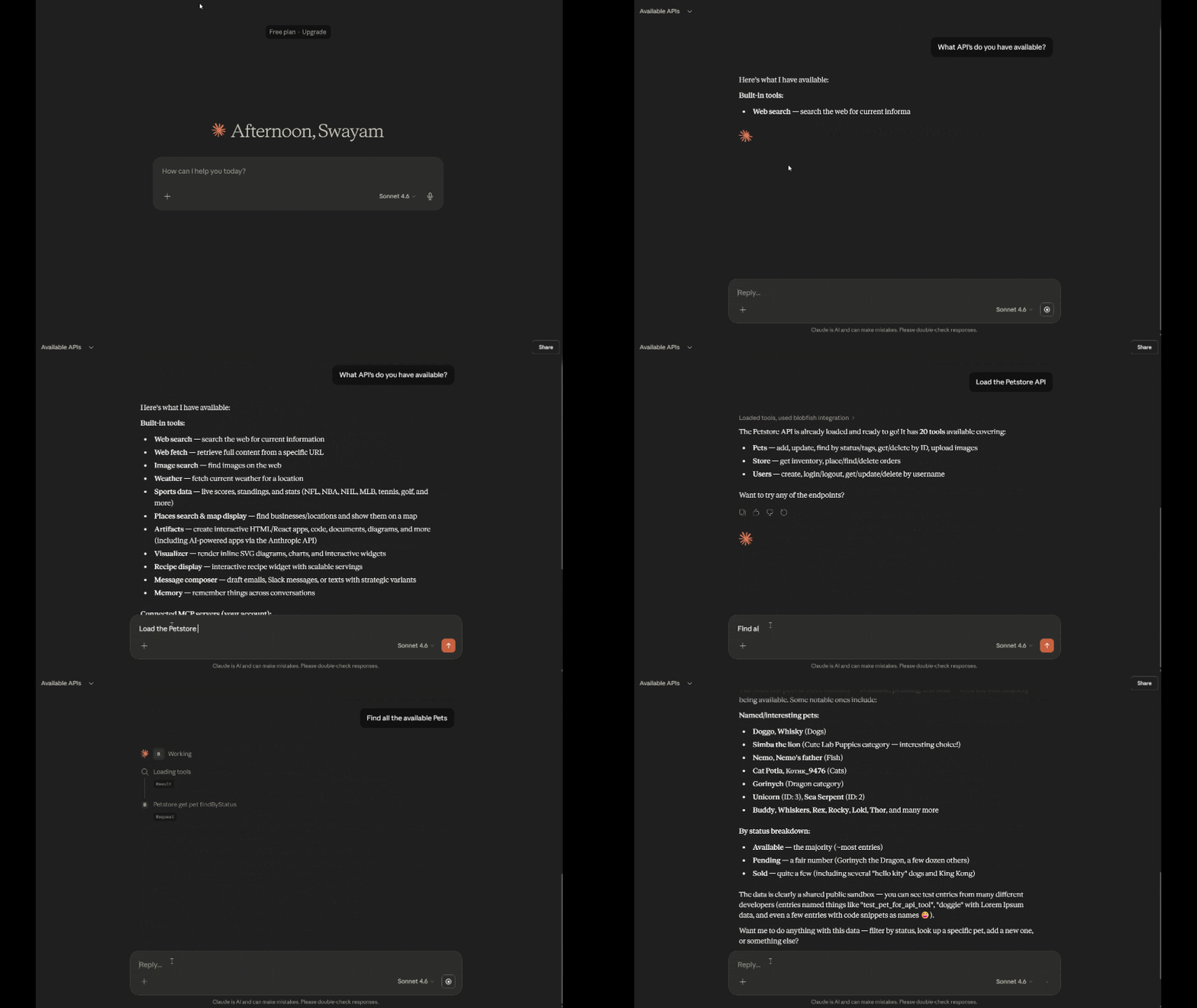
> *"I pointed it at a domain name. It found the spec itself, loaded 20 tools, and Claude was querying a live API in 10 seconds."*
---
## What's new in 1.3.0
**OAuth 2.0 client_credentials** — APIs that need OAuth (Salesforce, HubSpot OAuth apps, Auth0-protected APIs, most enterprise gateways) now work with zero token management. Give Blobfish a `token_url`, `client_id`, and `client_secret`; it fetches the bearer token, caches it, refreshes it before expiry, and retries once on 401 — all invisible to Claude.
```json
{ "type": "oauth2", "token_url": "https://login.example.com/oauth/token", "client_id": "${MY_CLIENT_ID}", "client_secret": "${MY_CLIENT_SECRET}" }
```
**Environment profiles** — run `npx blobfish-mcp --profile staging` (or set `BLOBFISH_PROFILE=staging`) to load `blobfish.staging.json` if it exists, and to select `auth_profiles.staging` credentials on each API entry. Same APIs, different keys, one flag.
<details>
<summary>What was new in 1.2.0</summary>
**Auto-.env loading** — if a registry API's key is in your `.env`, it loads automatically at startup. No `blobfish.json`, no `load_api` call.
```
STRIPE_SECRET_KEY=sk-live-... → Stripe tools appear in Claude on startup
GITHUB_TOKEN=ghp_... → GitHub tools appear in Claude on startup
OPENAI_API_KEY=sk-... → OpenAI tools appear in Claude on startup
```
This works for all 21 pre-built registry entries. Set `BLOBFISH_AUTO_LOAD=false` to disable.
**Tool annotations** — every generated tool now declares `readOnlyHint`, `destructiveHint`, and `idempotentHint` based on its HTTP method (GET = read-only, DELETE = destructive, etc.). Claude-compatible clients use these hints to decide when to confirm before calling.
**Workflow condition operators** — `run_if` now supports `>`, `<`, `>=`, `<=` in addition to `==` and `!=`.
</details>
---
## Install
```bash
# Run directly without installing
npx blobfish-mcp https://petstore.swagger.io/v2/swagger.json
# Configure Claude Desktop (no clone needed)
npx blobfish-mcp --setup
# Or install globally
npm install -g blobfish-mcp
blobfish https://petstore.swagger.io/v2/swagger.json
```
Requires Node.js 18+.
---
## Connect to Claude Desktop
The fastest way — no clone required:
```bash
npx blobfish-mcp --setup
```
Or if you've cloned the repo:
```bash
npm install
npm run setup # auto-detects config path and writes the entry
```
Then reload MCP config in Claude Desktop: **Help → Reload MCP Configuration**.
### Manual setup
Add to your Claude Desktop config (`%APPDATA%\Claude\claude_desktop_config.json` on Windows, `~/Library/Application Support/Claude/claude_desktop_config.json` on Mac):
```json
{
"mcpServers": {
"blobfish": {
"command": "node",
"args": ["/path/to/blobfish-mcp/server.js"],
"env": {
"API_KEY": "your-bearer-token-if-needed"
}
}
}
}
```
---
## Compatible clients
Works with any MCP-compatible client:
- **Claude Desktop** — primary target, setup via `npx blobfish-mcp --setup`
- **Cursor** — add to `.cursor/mcp.json` using the same config format
- **Windsurf** — add to `~/.codeium/windsurf/mcp_config.json`
- **Continue.dev** — add to `.continue/config.json` under `mcpServers`
- **Cline / Roo Cline** — add via Cline's MCP settings panel
- **Zed** — add to Zed's MCP settings
- **Smithery** — one-click install via `smithery.yaml`
For clients that use HTTP/SSE instead of stdio, start with:
```bash
blobfish --http # Streamable HTTP on http://localhost:3000/mcp
blobfish --sse # SSE on http://localhost:3000/sse
BLOBFISH_PORT=8080 blobfish --http # custom port
```
---
## How it works
Blobfish starts with **17 meta-tools** Claude can always call:
| Tool | Description |
|------|-------------|
| `list_registry` | List all pre-configured APIs — load any by name instantly |
| `discover_api` | Auto-find a spec from just a domain — probes 25 common paths |
| `load_api` | Load by URL, registry name, or local file. Supports `include_tags`, `exclude_tags`, `shallow`, `mock` |
| `set_api_auth` | Update credentials for a loaded API mid-conversation |
| `fetch_all` | Auto-paginate any endpoint — Link headers, cursor, offset |
| `save_workflow` | Save a workflow by name so it can be re-run with `run_workflow(name: "...")` |
| `list_workflows` | List all saved workflows and their step counts |
| `run_workflow` | Multi-step pipelines with `{{ template }}` syntax, `foreach`, and `run_if` |
| `get_last_request_log` | See the exact URL/body of the last N requests — use when debugging 400 errors |
| `rate_limit_status` | Show which APIs are rate-limited and when they reset |
| `cache_stats` | Cache hit rate, size, and entries |
| `clear_cache` | Clear cached responses |
| `test_connection` | Ping a loaded API and get status + response time |
| `inspect_tool` | Show the full input schema of any loaded tool |
| `api_summary` | Plain-English overview of a loaded API by capability group |
| `list_apis` | List all loaded APIs and tool counts |
| `unload_api` | Remove a loaded API and all its tools |
When Claude calls `load_api` or `discover_api`, Blobfish parses the spec and sends a `tools/list_changed` notification — new tools appear immediately.
---
## Workflows
Chain multiple API calls into a single operation. Reference earlier step results with `{{ steps.id.field }}` template syntax.
**Run inline:**
```
run_workflow(steps: [
{ id: "user", tool: "jph_get_users_id", args: { id: "1" } },
{ id: "posts", tool: "jph_get_posts", args: { userId: "{{ steps.user.data.id }}" } },
{ id: "first_comments", tool: "jph_get_posts_id_comments",
run_if: "{{ steps.posts.data.length }} != 0",
args: { id: "{{ steps.posts.data.0.id }}" } }
])
```
**Save and re-run:**
```
save_workflow(name: "user-posts", steps: [...])
run_workflow(name: "user-posts", input: { userId: "42" })
list_workflows()
```
**Pre-load from blobfish.json:**
```json
{
"workflows": {
"crypto-report": {
"description": "BTC/ETH prices + trending coins",
"steps": [
{ "id": "price", "tool": "coingecko_get_simple_price", "args": { "ids": "{{ input.coins }}", "vs_currencies": "usd" } },
{ "id": "trending", "tool": "coingecko_get_search_trending", "args": {} }
]
}
}
}
```
Per-step options: `foreach` (iterate over an array), `run_if` (conditional skip), `on_error: "continue"` (don't abort on failure).
Ready-to-use examples are in the [`workflows/`](workflows/) folder.
---
## blobfish.json config
Pre-configure APIs to load at startup. Create `blobfish.json` in the project root:
```json
{
"timeout": 30000,
"retries": 3,
"apis": [
{
"url": "https://petstore.swagger.io/v2/swagger.json",
"name": "petstore"
},
{
"url": "https://api.example.com/openapi.json",
"name": "myapi",
"auth": {
"type": "bearer",
"key": "${MY_API_TOKEN}"
},
"timeout": 10000
},
{
"url": "./local-spec.json",
"name": "localapi",
"mock": true
}
]
}
```
Values like `"${MY_API_TOKEN}"` are interpolated from environment variables at startup.
---
## Registry
21 pre-built registry entries ship with blobfish-mcp — no spec URL or auth config required.
**With auto-.env loading (1.2.0 default):** put the API key in your `.env` and the tools appear automatically.
**Without auto-.env:** ask Claude to load by name:
```
load_api(spec_url: "stripe")
load_api(spec_url: "github")
```
Or browse with `list_registry`.
| Name | API | Required env var(s) |
|------|-----|---------------------|
| `anthropic` | Anthropic API | `ANTHROPIC_API_KEY` |
| `coingecko` | CoinGecko API | *(none — public)* |
| `datadog` | Datadog API | `DATADOG_API_KEY` |
| `discord` | Discord API | `DISCORD_BOT_TOKEN` |
| `github` | GitHub REST API | `GITHUB_TOKEN` |
| `hubspot` | HubSpot CRM API | `HUBSPOT_ACCESS_TOKEN` |
| `jira` | Jira Cloud API | `JIRA_EMAIL`, `JIRA_API_TOKEN` |
| `linear` | Linear API | `LINEAR_API_KEY` |
| `notion` | Notion API | `NOTION_TOKEN` |
| `openai` | OpenAI API | `OPENAI_API_KEY` |
| `openmeteo` | Open-Meteo Weather API | *(none — public)* |
| `openweathermap` | OpenWeatherMap API | `OPENWEATHERMAP_API_KEY` |
| `pagerduty` | PagerDuty API | `PAGERDUTY_API_KEY` |
| `petstore` | Swagger Petstore | *(none — demo)* |
| `resend` | Resend API | `RESEND_API_KEY` |
| `shopify` | Shopify Admin API | `SHOPIFY_ACCESS_TOKEN` |
| `slack` | Slack Web API | `SLACK_BOT_TOKEN` |
| `spotify` | Spotify Web API | `SPOTIFY_ACCESS_TOKEN` |
| `stripe` | Stripe API | `STRIPE_SECRET_KEY` |
| `twilio` | Twilio API | `TWILIO_ACCOUNT_SID`, `TWILIO_AUTH_TOKEN` |
| `vercel` | Vercel API | `VERCEL_TOKEN` |
---
## Authentication
### Per-API auth in blobfish.json or via `load_api`
```json
{ "type": "bearer", "key": "sk-..." }
{ "type": "apikey", "key": "abc123", "header": "X-Api-Key" }
{ "type": "basic", "username": "user", "password": "pass" }
{ "type": "oauth2", "token_url": "https://login.example.com/oauth/token", "client_id": "...", "client_secret": "...", "scope": "read write" }
```
### OAuth 2.0 (client_credentials)
For `oauth2`, Blobfish exchanges your client credentials for a bearer token at `token_url`, caches it in memory, refreshes it 60 seconds before expiry, and retries once with a fresh token if the API returns 401. Optional fields:
- `scope` — space-separated scopes
- `audience` — required by some providers (e.g. Auth0)
- `client_auth` — `"body"` (default, credentials in the form body) or `"basic"` (HTTP Basic header), matching whichever your provider expects
Tokens never touch disk and are never logged.
### Environment profiles
Keep staging and production keys side by side with `auth_profiles` on any API entry:
```json
{
"url": "https://api.example.com/openapi.json",
"name": "myapi",
"auth": { "type": "bearer", "key": "${PROD_API_TOKEN}" },
"auth_profiles": {
"staging": { "type": "bearer", "key": "${STAGING_API_TOKEN}" }
}
}
```
Then run with `--profile staging` (or `BLOBFISH_PROFILE=staging`). If a `blobfish.staging.json` file exists, it is loaded instead of `blobfish.json` entirely. Without a profile, `auth` is used as-is.
### Global fallback
Set `API_KEY` in your environment or `.env` file for Bearer token auth across all APIs.
---
## Pagination
Use `fetch_all` to automatically retrieve all pages from a paginated endpoint:
```
fetch_all(tool_name: "petstore_get_pets", args: { status: "available" }, max_pages: 5)
```
Blobfish automatically detects and follows:
- `Link: <url>; rel="next"` headers (GitHub, Stripe style)
- `{ next_cursor, cursor, after, next_page_token }` fields
- `{ has_more: true }` + offset/limit
- `{ total, offset, limit }` patterns
---
## Environment variables
| Variable | Default | Description |
|----------|---------|-------------|
| `API_KEY` | — | Global Bearer token for all APIs |
| `BLOBFISH_AUTO_LOAD` | `true` | Set to `false` to disable auto-loading registry APIs from `.env` |
| `BLOBFISH_TIMEOUT` | `30000` | Request timeout in ms |
| `BLOBFISH_RETRIES` | `3` | Retry attempts on 5xx errors |
| `BLOBFISH_CACHE_TTL` | `60` | Response cache TTL in seconds |
| `BLOBFISH_LOG` | — | Log file path, or `true` for `./blobfish.log` |
| `BLOBFISH_PORT` | `3000` | Port for `--http` / `--sse` transports |
| `BLOBFISH_PROFILE` | — | Environment profile, same as `--profile` (e.g. `staging`) |
| `BLOBFISH_ALLOW_LOCAL` | `false` | Set to `true` to allow loading local file specs (dev only) |
---
## Mock mode
Load an API in mock mode to get example responses without making real HTTP calls — useful for testing or demoing without API keys:
```
load_api(spec_url: "https://...", mock: true)
```
Responses are generated from the `example` fields in the OpenAPI spec.
---
## Supported formats
- OpenAPI 3.x (JSON + YAML)
- Swagger 2.0 (JSON + YAML)
- Postman Collections v2.1
- Local files (`./path/to/spec.json`)
---
## Troubleshooting
**Blobfish doesn't appear in Claude Desktop**
- Make sure you fully quit Claude Desktop (tray icon → Quit), not just close the window
- On Windows Store install, config goes in `%LOCALAPPDATA%\Packages\Claude_*\LocalCache\Roaming\Claude\claude_desktop_config.json` — run `npm run setup` to find the right path automatically
- Check that `node` is in PATH: open a terminal and run `node --version`. If it fails, use the full path (`C:/Program Files/nodejs/node.exe`) in the config's `command` field
**`SSRF blocked` error when loading a spec**
- The spec URL resolves to a private/internal IP. This is intentional for security.
- If you're loading a local spec during development: set `BLOBFISH_ALLOW_LOCAL=true` in your `.env`
**`Spec generates N tools (max 500)` error**
- Use `include_tags` to filter: `load_api(spec_url: "...", include_tags: ["repos", "issues"])`
- Run `api_summary` first to see what tags are available
**Tools appear but calls return errors**
- Call `get_last_request_log` after the failed call — Claude can see the exact URL and body sent and self-correct
- Check `rate_limit_status` — you may be waiting for a rate limit to reset
---
## Built with
- [MCP SDK](https://github.com/modelcontextprotocol/typescript-sdk) — `@modelcontextprotocol/sdk`
- [swagger-parser](https://github.com/APIDevTools/swagger-parser) — `@apidevtools/swagger-parser`
- Node.js 18+ native `fetch`
- Node.js 20.6+ native `.env` loading (`--env-file`)
This server cannot be deployed
Maintenance
ActivitySlowing
ResponsivenessNo issues