
the-notebook-mcp
by svallory
README.md
[](https://pypi.org/project/the-notebook-mcp/) [](https://pypi.org/project/the-notebook-mcp/) [](https://pepy.tech/project/the-notebook-mcp) [](https://github.com/svallory/the-notebook-mcp/blob/main/LICENSE) [](https://pypi.org/project/the-notebook-mcp/) [](https://github.com/svallory/the-notebook-mcp/issues) [](https://github.com/svallory/the-notebook-mcp) [](https://coveralls.io/github/svallory/the-notebook-mcp?branch=main)  
# The Notebook MCP
A Model Context Protocol (MCP) server that enables AI agents to interact with Jupyter Notebook (`.ipynb`) files. Designed to overcome limitations with Cursor's AI agent mode, this tool allows AI assistants to directly manipulate notebook cells and structure through a secure, well-defined API.
**Current Version:** `0.9.0` - See the [CHANGELOG.md](CHANGELOG.md) for details on recent changes.
## Why Use This?
- **For Cursor Users:** Enables AI assistants to properly edit, create, and manipulate Jupyter notebooks.
- **For Data Scientists:** No more copy-pasting AI output manually into your notebooks.
- **For Developers:** Create complex notebook workflows with AI assistance while maintaining proper notebook structure.
Although originally designed for Cursor, this MCP server can be used with any MCP-compatible AI assistant tool, such as Claude Code.
## Quick Start (no install)
```bash
# Run (minimal example)
uvx the-notebook-mcp --allow-root /path/to/your/notebooks
# Too see command options...
uvx the-notebook-mcp help
```
## Video Walkthrough
[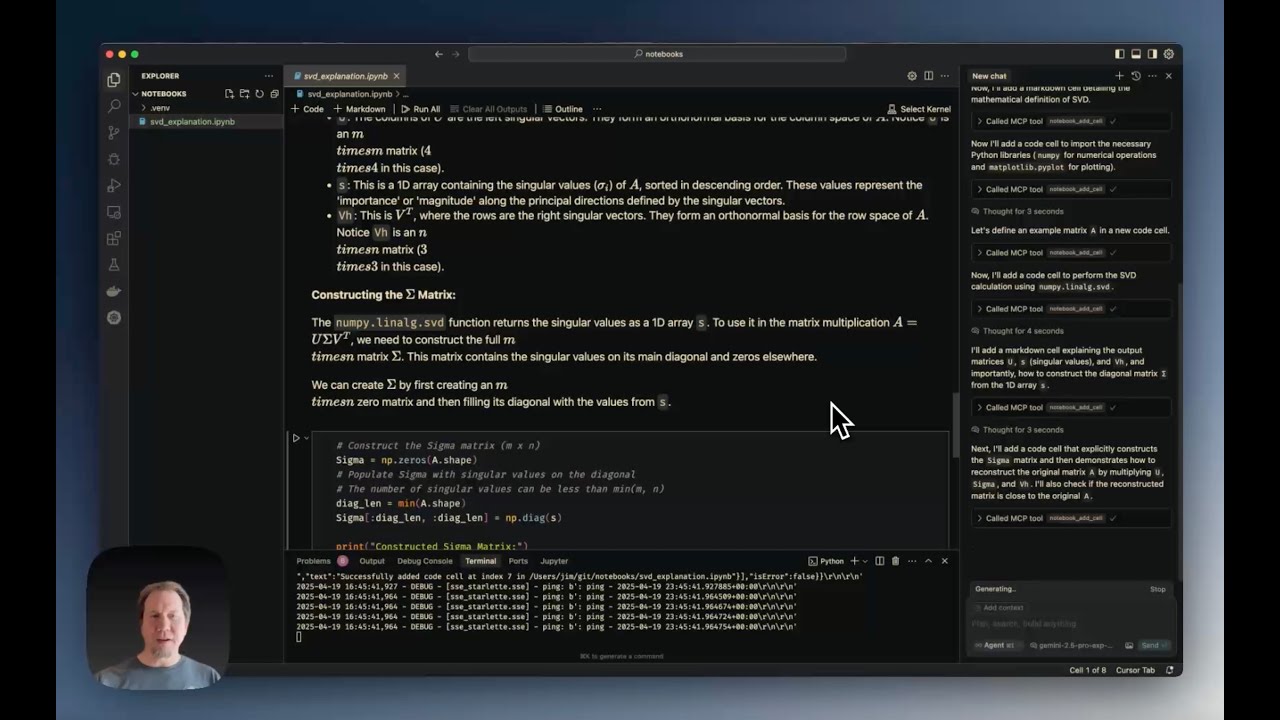](https://youtu.be/VOVMH-tle14)
[Cursor Jupyter Notebook MCP Server Tutorial](https://youtu.be/VOVMH-tle14) demonstrates:
- Installation and configuration
- Creating notebooks from scratch
- Using editing tools (edit, split, duplicate cells)
- Working with notebook metadata
- Exporting notebooks to Python
## Features
The server provides the following MCP tools:
### File Operations
* `notebook_create`: Creates a new, empty notebook file
* `notebook_delete`: Deletes an existing notebook file
* `notebook_rename`: Renames/moves a notebook file from one path to another
* `notebook_export`: Exports the notebook to another format (python, html, etc.)
* `notebook_validate`: Validates the notebook structure against the nbformat schema
### Reading Operations
* `notebook_read`: Reads an entire notebook and returns its structure as a dictionary
* `notebook_read_cell`: Reads the source content of a specific cell
* `notebook_get_cell_count`: Returns the total number of cells
* `notebook_get_info`: Retrieves general information about the notebook
* `notebook_get_outline`: Generates a structural outline of the notebook (headings, definitions)
* `notebook_search`: Searches for a string within all notebook cells
### Cell Manipulation
* `notebook_add_cell`: Adds a new code or markdown cell
* `notebook_edit_cell`: Replaces the source content of a specific cell
* `notebook_delete_cell`: Deletes a specific cell
* `notebook_move_cell`: Moves a cell to a different position
* `notebook_change_cell_type`: Changes a cell's type (code, markdown, or raw)
* `notebook_duplicate_cell`: Duplicates a cell multiple times
* `notebook_split_cell`: Splits a cell into two at a specified line number
* `notebook_merge_cells`: Merges a cell with the one immediately following it
* `notebook_execute_cell`: Executes a code cell and returns its outputs
* Note: Requires an active Jupyter server
* Example: `notebook_execute_cell('/path/to/notebook.ipynb', 1, server_url='http://localhost:8888', token='your-token')`
* Kernel state is preserved between calls, allowing variables defined in earlier cells to be accessed in later cells
### Metadata and Outputs
* `notebook_read_metadata`: Reads the top-level notebook metadata
* `notebook_edit_metadata`: Updates the top-level notebook metadata
* `notebook_read_cell_metadata`: Reads the metadata of a specific cell
* `notebook_edit_cell_metadata`: Updates the metadata of a specific cell
* `notebook_read_cell_output`: Reads the output list of a specific code cell
* `notebook_clear_cell_outputs`: Clears the outputs and execution count of a specific cell
* `notebook_clear_all_outputs`: Clears outputs and execution counts for all code cells
## Requirements
### Python Dependencies
* **Python Version:** ≥ 3.10
* **Core Dependencies:** (automatically installed)
* `fastmcp ≥ 2.3.3`
* `nbformat ≥ 5.0`
* `nbconvert ≥ 6.0`
* `ipython`
* `jupyter_core`
* `loguru ≥ 0.7.3`
* **SSE Transport:** (install with `uv pip install "the-notebook-mcp[sse]"`)
* `uvicorn ≥ 0.20.0`
* `starlette ≥ 0.25.0`
### External System Dependencies
For exporting to certain formats, you may need:
* **Pandoc:** Required for many non-HTML export formats ([installation instructions](https://pandoc.org/installing.html))
* **LaTeX:** Required for PDF export ([installation instructions](https://nbconvert.readthedocs.io/en/latest/install.html#installing-tex))
## Installation
### No Install!
You can run the server directly with
```bash
uvx the-notebook-mcp --allow-root $PWD
```
But if you prefer to install it...
```bash
# Basic installation (stdio transport only)
uv tool install the-notebook-mcp
# Using pip
pip install the-notebook-mcp
```
### Development Installation
1. Clone the repository:
```bash
git clone https://github.com/svallory/the-notebook-mcp.git
cd the-notebook-mcp
```
2. Create and activate a virtual environment:
```bash
uv venv
source .venv/bin/activate # On Windows use `.venv\Scripts\activate`
```
3. Install in development mode:
```bash
uv pip install -e ".[dev]"
```
4. Set up pre-commit hooks (recommended):
```bash
pre-commit install
```
See [Pre-commit Hook Setup](./docs/pre-commit-setup.md) for details.
## Running the Server
### Basic Usage
```bash
# stdio transport (default)
the-notebook-mcp --allow-root /path/to/notebooks
# SSE transport
the-notebook-mcp --transport sse --allow-root /path/to/notebooks --host 0.0.0.0 --port 8889
```
### Development Mode
Use one of these methods when working with the source code:
```bash
# Using poethepoet tasks
uv run poe start
# Using the Python module
python -m the_notebook_mcp.server --allow-root /path/to/notebooks
```
### Available Tasks (poethepoet)
The project includes these predefined tasks:
* `start`: Start the server with default settings
* `check-help`: Show help information
* `check-version`: Show version information
* `test`: Run the test suite
Example:
```bash
# Show help
uv run poe check-help
# Run tests
uv run poe test
```
## Command-Line Arguments
* **`--allow-root`**: (Required) Path to a directory where notebooks are allowed (can be used multiple times)
* **`--transport`**: `stdio` (default) or `sse`
* **`--host`**: Host for SSE transport (default: `0.0.0.0`)
* **`--port`**: Port for SSE transport (default: `8889`)
* **`--max-cell-source-size`**: Maximum bytes for cell source (default: 10MB)
* **`--max-cell-output-size`**: Maximum bytes for cell output (default: 10MB)
* **`--log-dir`**: Directory for log files (default: `~/.the_notebook_mcp`)
* **`--log-level`**: `DEBUG`, `INFO` (default), `WARNING`, `ERROR`, `CRITICAL`
## Cursor Integration
To configure Cursor to use this server, add settings to `~/.cursor/mcp.json` (global) or `.cursor/mcp.json` (project-specific).
### No-Install stdio Transport
> [!IMPORTANT]
> Cursor will expand the `"."` argument, but it does not expand `"./some/folder"`.
```json
{
"mcpServers": {
"the-notebook-mcp": {
"command": "uvx",
"args": [
"the-notebook-mcp",
"start",
"--allow-root",
"."
]
}
}
}
```
### stdio Transport
```json
{
"mcpServers": {
"the-notebook-mcp": {
"command": "the-notebook-mcp",
"args": [
"start",
"--allow-root",
"."
]
}
}
}
```
### SSE Transport (Recommended)
> [!NOTE]
> You'll need to run the server separately
```json
{
"mcpServers": {
"notebook_mcp": {
"url": "http://127.0.0.1:8889/sse"
}
}
}
```
## Limitations and Security
* **Security Measures:**
* Paths are restricted to allowed root directories
* Size limits on cell sources and outputs
* Input validation for file extensions and types
## Development & Testing
```bash
# Setup
uv venv
source .venv/bin/activate
uv pip install -e ".[dev]"
pre-commit install
# Testing
uv run poe test
```
## Known Issues
* **UI Refresh Issues:** Some operations may succeed at the file level, but the Cursor UI might not update immediately. To fix, close and reopen the notebook or choose "Revert" when prompted.
## Contributing
Contributions are welcome! Please:
1. Fork the repository
2. Create a feature branch
3. Make your changes with tests
4. Submit a pull request
See [GitHub Issues](https://github.com/svallory/the-notebook-mcp/issues) for existing bugs or feature requests.
## Acknowledgments
This project is based on the work of [Jim Beno](https://github.com/jbeno) in [cursor-notebook-mcp](https://github.com/jbeno/cursor-notebook-mcp).
## License
This project is licensed under the MIT License. See the [LICENSE](LICENSE) file for details.
## Author
Maintained by [Saulo Vallory](https://github.com/svallory).
This server cannot be deployed
Maintenance
ActivityInactive
ResponsivenessSyncing