


A
licenseC
qualityA
maintenanceMCP Server for automated reverse engineering with IDA Pro.
43
1,602 PyPI
12,620
MIT

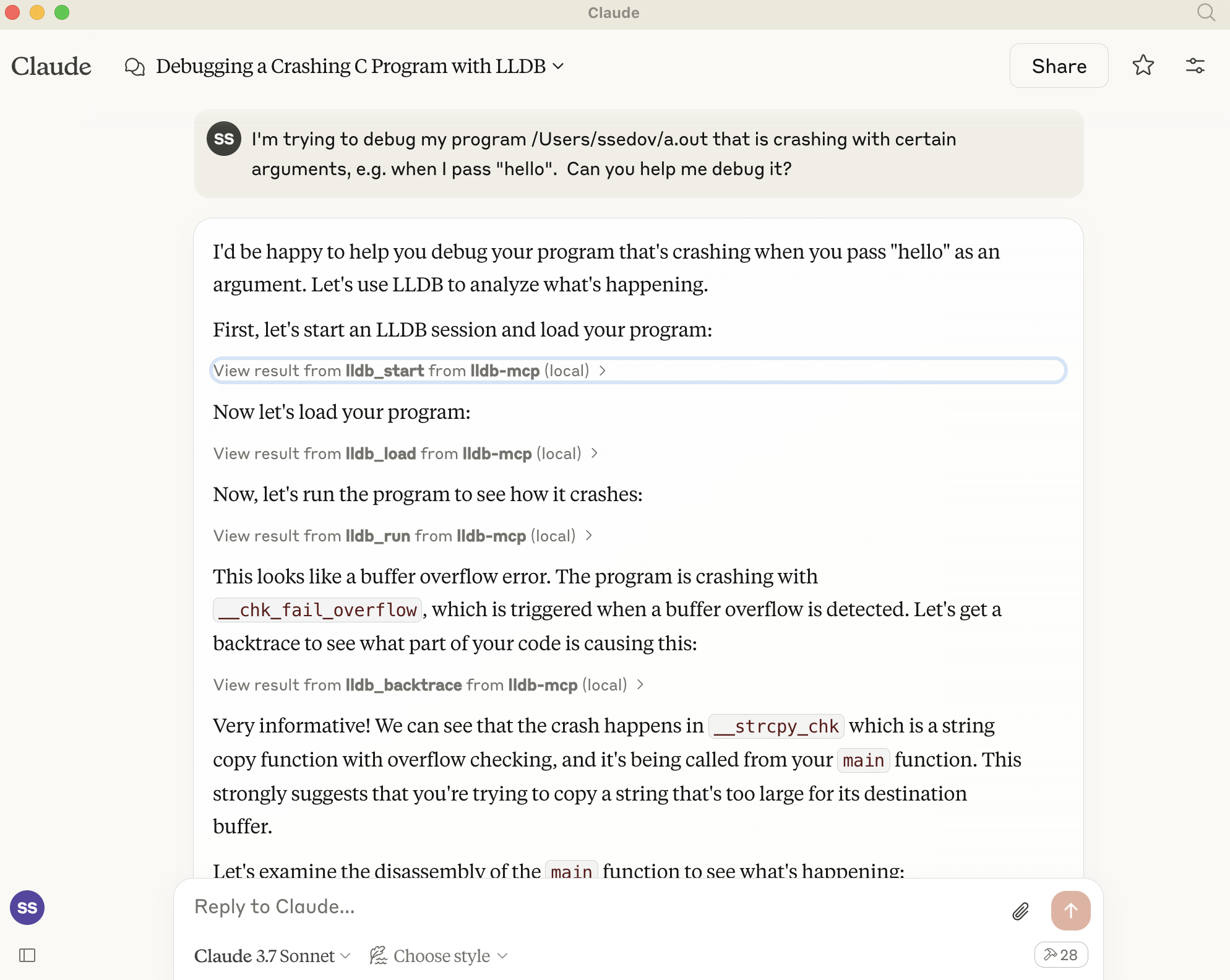
在这里的 acton 中查看它,自动调试缓冲区溢出: https://x.com/full\ _duplex/status/1904770477698277847
LLDB-MCP 是一款将 LLDB 调试器与 Claude 的模型上下文协议 (MCP) 集成的工具。这种集成允许 Claude 直接启动、控制 LLDB 调试会话并与之交互,从而实现 AI 辅助调试工作流程。
该工具提供了一套用于使用 LLDB 的全面命令,包括:
启动和管理 LLDB 会话
加载程序进行调试
设置断点和观察点
控制程序执行
检查内存、寄存器和变量
分析堆栈跟踪和程序状态
Related MCP server: ghidraMCP
创建和管理多个 LLDB 调试会话
加载可执行文件并附加到正在运行的进程
加载核心转储文件进行事后分析
执行任意 LLDB 命令
对程序执行的细粒度控制
内存检查与拆解
线程和堆栈框架检查
克隆存储库:
git clone https://github.com/stass/lldb-mcp.git
cd lldb-mcp
安装依赖项:
pip install mcp配置 Claude 使用 LLDB-MCP 服务器:
打开Claude桌面应用程序配置
将以下内容添加到您的 MCP 配置中:GXP3
一旦安装并配置完毕,您就可以使用自然语言通过 Claude 与 LLDB 进行交互。
启动新的 LLDB 会话
加载程序
设置断点
运行程序
检查变量和内存
控制执行(继续、步骤、下一步等)
完成后终止会话
以下是一些通过 Claude 与 LLDB-MCP 交互的示例:
“启动一个新的 LLDB 会话”
“加载程序‘/path/to/executable’”
“在主窗口设置断点”
“运行程序”
“显示回溯”
“打印变量‘count’的值”
“跨过下一行”
“检查地址 0x1000 处的内存”
“显示寄存器值”
“继续执行”
“终止进程”
“终止 LLDB 会话”
lldb_start :启动新的 LLDB 会话
lldb_terminate :终止 LLDB 会话
lldb_list_sessions :列出所有活动的 LLDB 会话
lldb_load :将程序加载到 LLDB
lldb_attach :附加到正在运行的进程
lldb_load_core :加载核心转储文件
lldb_run :运行已加载的程序
lldb_continue :继续程序执行
lldb_step :跳至下一行或下一条指令
lldb_next :跳过函数调用
lldb_finish :执行直到当前函数返回
lldb_kill :终止正在运行的进程
lldb_set_breakpoint :设置断点
lldb_breakpoint_list :列出所有断点
lldb_breakpoint_delete :删除断点
lldb_watchpoint :在变量或内存地址上设置观察点
lldb_backtrace :显示调用堆栈
lldb_print :打印表达式的值
lldb_examine :检查内存
lldb_info_registers :显示寄存器
lldb_frame_info :获取有关堆栈帧的详细信息
lldb_disassemble :反汇编代码
lldb_process_info :获取有关当前进程的信息
lldb_thread_list :列出当前进程中的所有线程
lldb_thread_select :选择特定线程
lldb_command :执行任意 LLDB 命令
lldb_expression :在当前帧中评估表达式
lldb_help :获取 LLDB 命令的帮助
example/overflow.c包含一个示例 C 程序,该程序在调用某些参数时会导致缓冲区溢出。使用cc overflow.c编译该程序,并让 Claude 使用生成的程序来调试问题:
I'm trying to debug my program a.out that is crashing with certain arguments, e.g. when I pass "hello".
Can you help me debug it?当您需要执行没有专用功能的 LLDB 命令时,请使用lldb_command
启动服务器时使用--debug标志启用调试模式以获取详细日志记录
服务器关闭时会话会自动清理
每个会话都有一个唯一的 ID - 确保在执行命令时使用正确的 ID
Python 3.7+
系统上安装的LLDB
支持 MCP 的 Claude 桌面应用程序
如果 LLDB 命令超时,请检查 LLDB 是否正确安装
启动新会话时验证 LLDB 的路径
附加到进程时检查权限问题
如果命令未正确执行,请查看调试日志
BSD 2 条款
This server cannot be deployed
MCP server for static security analysis of Android source code
An MCP server that provides read access to your cloud storage providers, bank accounts and more.
MCP server for Klever blockchain smart contract development.