
amem
# amem
[](https://www.npmjs.com/package/@iamem/amem)
[](https://www.npmjs.com/package/@iamem/amem)
[](https://github.com/sslugic/amem/actions/workflows/ci.yml)
[](LICENSE)
[](https://nodejs.org)
[](https://modelcontextprotocol.io)
[](#privacy-non-negotiable)
[](https://mcprush.com/to/sslugic-amem-mcp?ref=badge) [](https://glama.ai/mcp/servers/sslugic/amem)
**Personal agent memory that stays on your machine.** Works with Claude Code, Cursor, Claude Desktop, Copilot, Codex, Gemini CLI, Windsurf, Continue, Aider and Zed, on macOS, Linux and Windows.
```bash
npx @iamem/amem setup --platform claude # or cursor, codex, copilot …
```
[Website](https://getamem.com) · [Features](https://getamem.com/features) · [Why amem](https://getamem.com/why) · [How it works](https://getamem.com/what)
Coding agents forget between sessions. They re-read the same files, re-learn the same constraints and spend tokens rediscovering decisions you already made.
**amem** gives them a private memory that lives on your machine. The next session starts with what the last one learned.
## What you get
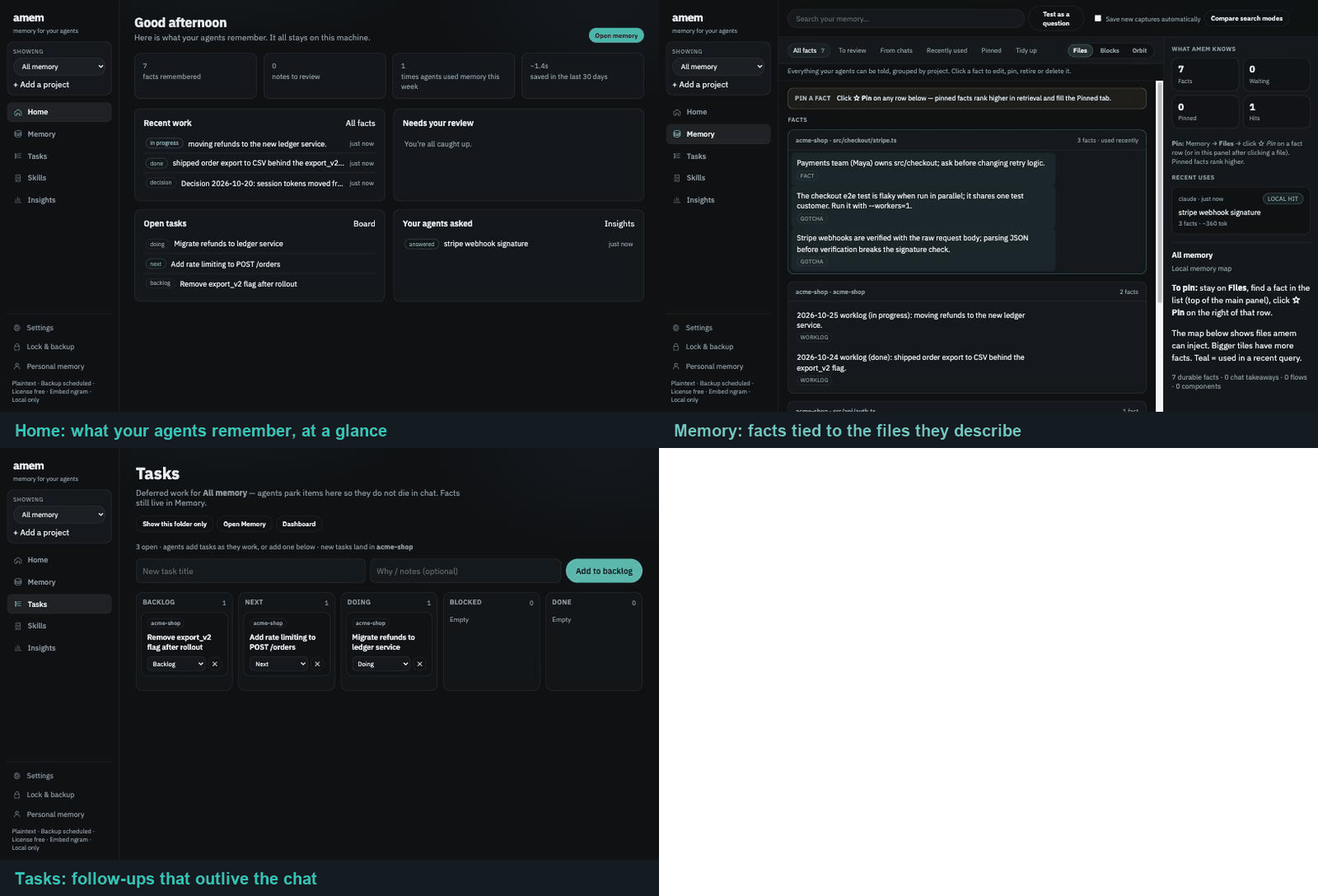
- **Memory:** short facts (constraints, gotchas, decisions, owners) tied to the files they describe. Facts are flagged stale when those files change.
- **Context on autopilot:** hooks hand your agent a small, ranked packet at session start and with each prompt. No pasting a project brief.
- **Skills:** repeatable procedures (release steps, deploy order, test setup), loaded only when they apply.
- **Tasks:** a Backlog → Next → Doing → Done board your agents update, so follow-ups survive the chat.
- **A dashboard:** `amem ui` shows what your agents remember, what needs review and open tasks. Retire or delete a fact in one click.
- **Live activity:** the Activity page shows every client talking to amem (Claude Code, Cursor, Codex, Claude Desktop, hooks, the CLI) as it happens: what they save, what context amem feeds back, errors, and the tokens it saved (measured where agents reported what they opened, estimate otherwise). `amem ui --panel` opens it as a small side panel, always on top with the desktop shell.
- **Private by design:** one SQLite file in `~/.amem`, a localhost-only UI, optional encryption and local backups.
Works with Claude Code, Cursor, Claude Desktop, Copilot, Codex, Gemini CLI, Windsurf, Continue, Aider, Zed and any other MCP client.
## Quick start
```bash
cd ~/code/your-project
npx @iamem/amem setup --platform claude # or: cursor, codex, copilot, windsurf … (amem platforms)
amem ui # open the dashboard at http://127.0.0.1:7843
```
Setup installs the `amem` CLI, adds the hooks, registers the amem MCP server (restart your client once) and seeds the repo with build, test and CI facts from its manifests, so the first question already has an answer. From then on your agent checks memory before exploring and saves what it learns. You can also do it by hand:
```bash
amem remember "Stripe webhooks must be verified with the raw body" --kind gotcha --anchor src/webhooks/stripe.ts
amem context "stripe webhook signature"
```
```markdown
### claim.remember_2f41c0c9e1ff
Kind: `gotcha`
Why: `keyword+12`, `fts+4.2`, `embed+5.4`, `kind:gotcha`, `fresh`
Stripe webhooks must be verified with the raw body.
Anchors: `src/webhooks/stripe.ts`
```
Any MCP client can use the same memory: `amem mcp --print-config` prints a ready-to-paste config.
Something off? `amem doctor --fix` rewires the current repo's client. To remove amem, run `amem uninstall` to see what it added, then `amem uninstall --yes`. Your memory stays unless you add `--purge`.
## How well it finds things
`npm run bench` loads 36 memories from a sample web shop and asks 32 questions phrased the way people ask, often without the memory's words. It also sends 8 vague prompts ("ok sounds good, go ahead") that name no topic. CI fails if these numbers drop.
| Path | Right memory first | Right memory in top 3 | Vague prompts given memory |
|---|---|---|---|
| Prompt hook (automatic) | 88% | 97% | 0% |
| `amem_context` (agent asks) | 81% | 94% | n/a |
The data is in [`bench/retrieval.json`](bench/retrieval.json). Add your own cases and run `npm run bench -- --misses` to see what it gets wrong.
## Privacy (non-negotiable)
- Memory never leaves your machine: no sync, no cloud embeddings, no "share with org" mode.
- The UI and HTTP MCP endpoint bind to `127.0.0.1` only, and `~/.amem` is created with mode `0700`.
- Credentials and tokens are blocked from being saved. Personal notes stay out of work projects unless you ask about them.
- Optional AES-256-GCM lock (`amem lock`) and encrypted local backups (`amem backup schedule`).
- The activity log behind the Activity page stores metadata only (client, action, in or out, size, time taken), never memory text, prompts or tool arguments. It keeps 30 days or 20,000 rows; `AMEM_ACTIVITY=off` turns it off.
- No network calls by default. If you opt in (`amem setup` asks once, or `amem telemetry on`), amem sends an anonymous ping at install and first run, then at most one a day with the version, OS and which parts ran (MCP, hooks, UI, CLI). No memory, repos, paths or names. `amem telemetry off` stops it; managed (IT policy) installs never send it.
## Learn more
- [Full guide](docs/guide.md): setup, the day-to-day loop, what gets stored, skills, savings, other clients, every command
- [Security & architecture FAQ](docs/guide.md#security--architecture-faq)
- [IT-managed installs](docs/enterprise-endpoint.md)
- [Website](https://getamem.com) · [Issues and ideas](https://github.com/sslugic/amem/issues)
## License
MIT, see [LICENSE](LICENSE).
TDQS
Scored across 16 tools
Tools are mostly distinct, but amem_context, amem_graph, amem_status, and amem_stats all touch the 'what does amem know' space, and amem_task_complete is explicitly documented as amem_task_update with status=done. Descriptions do the heavy lifting to draw boundaries (e.g. amem_recipe as a routing decision aid), so an attentive agent can pick correctly, but the overlaps require reading.
Every tool is prefixed with a consistent amem_ namespace, grouped sensibly (skill_*, task_*). The pattern mixes bare-noun names (amem_repos, amem_stats, amem_graph, amem_status) with verb_noun names (amem_task_add, amem_skill_save, amem_remember), so it deviates slightly from a single convention but remains readable and predictable within subclusters.
16 tools is at the upper edge, but the server spans four coherent subdomains (memory, skills, tasks, stats) so each tool carries weight. There is some redundancy (amem_stats vs amem_usage_report, amem_task_complete vs amem_task_update), but nothing gratuitous.
Core lifecycle is well covered: memory (remember/context/graph/supersede), skills (save/list/view), tasks (add/list/update/complete), plus reporting. Minor gaps exist—no delete/rename for skills, no delete for tasks, and no explicit fact-delete beyond supersession—but these are partly mitigated by the completion/supersede semantics.