Glama
spryker-community

Spryker Search Tool MCP Server

Spryker Search Tool

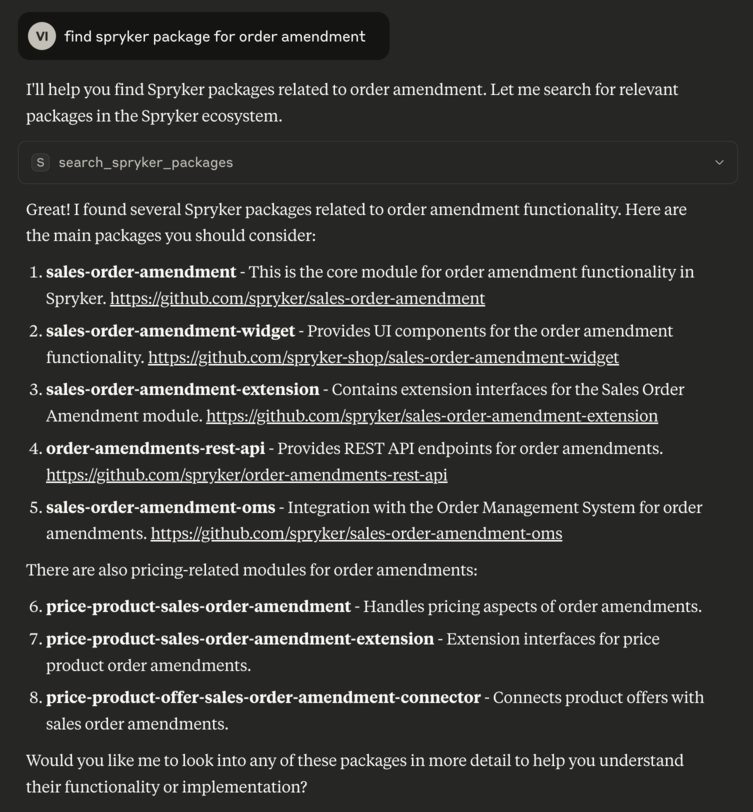
A command-line tool that initializes a Model Context Protocol (MCP) server to provide spryker search capabilities for Spryker GitHub repositories.

This tool allows you to search Spryker packages and documentation or their code contents using natural language queries. It supports filtering by specific GitHub organizations.


✨ Features

  • Search for Spryker packages on GitHub

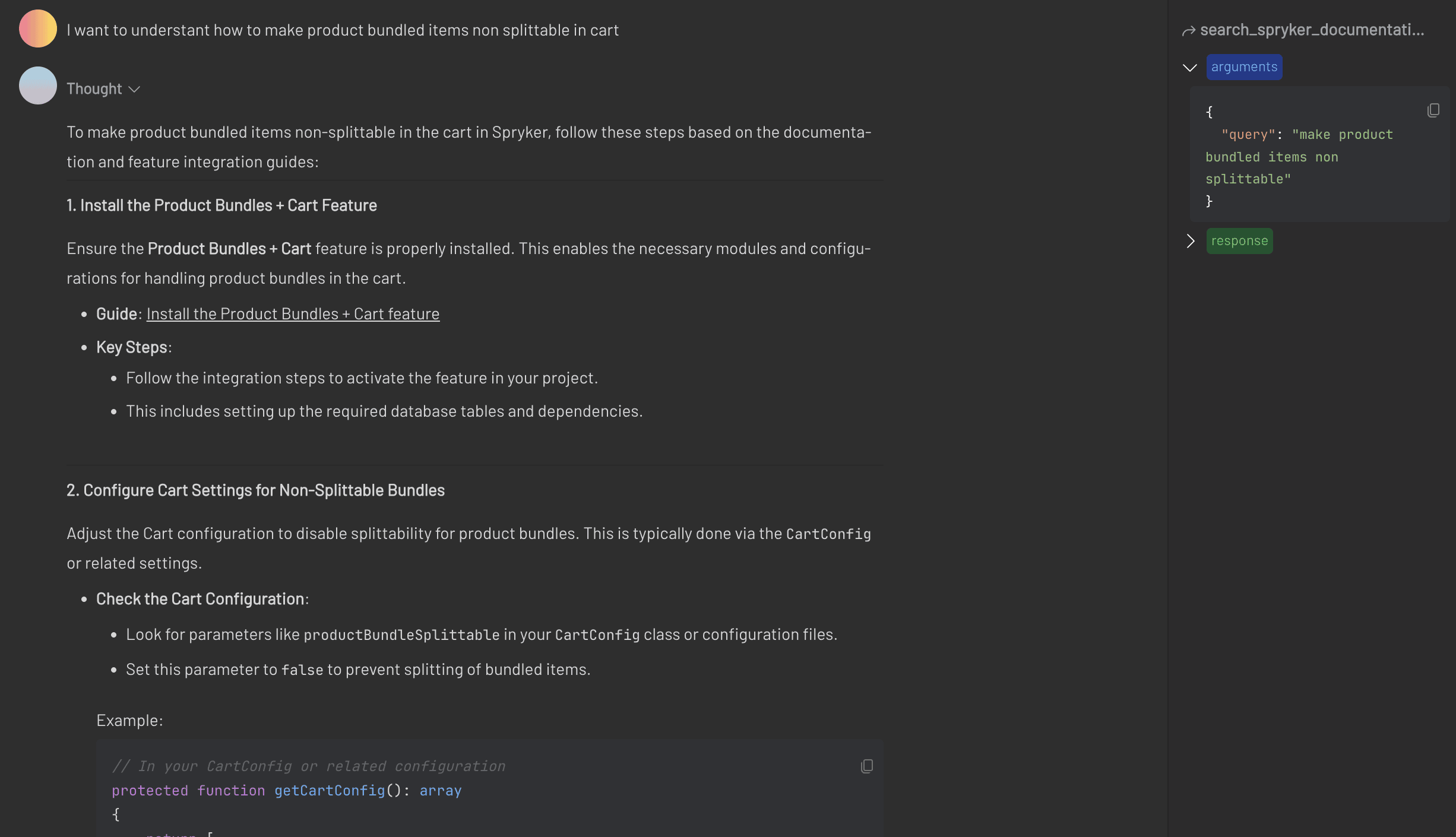
  • Search for Spryker public documentation https://docs.spryker.com/

  • Code-level search across Spryker repositories

  • Support for filtering by organization (spryker, spryker-eco, spryker-sdk, spryker-shop, spryker-community)

  • Runs as an MCP server using stdio transport


Example with Claude

https://5ire.app/

Example with Claude for docs

Related MCP server: Sourcegraph MCP Server

🚀 Installation

Ensure npm and npx are installed.

git clone
cd spryker-module-finder && npm install

MCP server makes the tool compatible with various AI agents to extend context with Spryker Project context

Tools:

Settings

You can add as many servers as projects, just by configuring them properly using the project name.

{
  "mcpServers": {
      "sprykerPackageSearch": {
          "command": "npx",
          "args": [
              "-y",
              "/FULL_PATH/spryker-module-finder"
          ],
          "env": {
              "GITHUB_PERSONAL_ACCESS_TOKEN":"token"
          }
      }
  }
}

Debug

npx @modelcontextprotocol/inspector npx node src/index.js

Test

npm test
npx eslint . --fix

🧠 Available Tools

search_spryker_packages

Searches for Spryker packages based on a natural language query.

Parameters:

  • query (string, required): The natural language query to search GitHub repositories.

  • organisations (array of strings, optional): List of GitHub orgs to filter by. Example: ["spryker", "spryker-eco", "spryker-sdk", "spryker-shop", "spryker-community"]

search_spryker_package_code

Searches for PHP code inside Spryker GitHub repositories.

Parameters:

  • query (string, required): The natural language query to search within code.

  • organisations (array of strings, optional): List of GitHub orgs to filter by. Example: ["spryker", "spryker-eco", "spryker-sdk", "spryker-shop", "spryker-community"]

search_spryker_documentation

Searches for Spryker documentation.

Parameters:

  • query (string, required): The natural language query to search Spryker documentation.

🧩 Architecture

Built with Model Context Protocol SDK

Uses StdioServerTransport for communication

Validates input with zod

Handles GitHub API integration for repository and code search

📄 License

MIT

👥 Authors

Available Tools

3 tools
search_spryker_documentationC

To search in Spryker documentation by query

ParametersJSON Schema
NameRequiredDescriptionDefault
queryYesThe natural language query to search Spryker documentation
maxTokensSizeNoThe maximum number of tokens to return to prevent lost context.It is recommended a half of context window and minium 16000.

TDQS

C2.9/5.0
Behavior2/5

Does the description disclose side effects, auth requirements, rate limits, or destructive behavior?

No annotations are provided, so the description carries the full burden of behavioral disclosure. It does not mention whether the tool is read-only, requires authentication, has rate limits, or discloses any side effects. For a search tool, the lack of safety or behavior cues is a notable gap.

Agents need to know what a tool does to the world before calling it. Descriptions should go beyond structured annotations to explain consequences.

Conciseness4/5

Is the description appropriately sized, front-loaded, and free of redundancy?

The description is a single sentence with no fluff, making it concise and front-loaded. While it is efficient, it could include an additional sentence about scope or behavior without becoming verbose, but for a simple search tool the length is appropriate.

Shorter descriptions cost fewer tokens and are easier for agents to parse. Every sentence should earn its place.

Completeness3/5

Given the tool's complexity, does the description cover enough for an agent to succeed on first attempt?

Given the low complexity, no annotations, and no output schema, the description is minimally adequate. It identifies the resource and action but does not specify the type of documentation (e.g., developer docs) or return format. Schema coverage is high, but the lack of output schema information leaves the agent uncertain about results.

Complex tools with many parameters or behaviors need more documentation. Simple tools need less. This dimension scales expectations accordingly.

Parameters3/5

Does the description clarify parameter syntax, constraints, interactions, or defaults beyond what the schema provides?

The input schema covers both parameters with clear descriptions (e.g., natural language query, token limit). The tool description adds minimal value beyond the schema, only restating 'by query.' With 100% schema coverage, the baseline is 3, and the description does not improve parameter understanding.

Input schemas describe structure but not intent. Descriptions should explain non-obvious parameter relationships and valid value ranges.

Purpose4/5

Does the description clearly state what the tool does and how it differs from similar tools?

The description clearly states the action (search) and resource (Spryker documentation). It uses a specific verb and resource, making the purpose understandable. However, it does not differentiate from sibling tools like search_spryker_packages or search_spryker_package_code, which could confuse an agent when choosing the appropriate tool.

Agents choose between tools based on descriptions. A clear purpose with a specific verb and resource helps agents select the right tool.

Usage Guidelines2/5

Does the description explain when to use this tool, when not to, or what alternatives exist?

The description provides no guidance on when to use this tool versus its siblings (e.g., for general documentation vs. package-specific searches). There is no mention of alternatives or exclusion criteria, leaving the agent without strategic context for tool selection.

Agents often have multiple tools that could apply. Explicit usage guidance like "use X instead of Y when Z" prevents misuse.

search_spryker_package_codeB

To search code in Spryker GitHub repositories

ParametersJSON Schema
NameRequiredDescriptionDefault
queryYesThe natural language query to search in code of Spryker packages
organisationsNoOptional array of organisations to filter by [`spryker`, `spryker-eco`, `spryker-sdk`, `spryker-shop`

TDQS

B3.1/5.0
Behavior2/5

Does the description disclose side effects, auth requirements, rate limits, or destructive behavior?

No annotations are present, so the description must disclose behavioral traits. The description only says 'search code' but does not mention whether the operation is read-only, destructive, or requires specific permissions. Given the lack of annotation, this is a significant gap.

Agents need to know what a tool does to the world before calling it. Descriptions should go beyond structured annotations to explain consequences.

Conciseness5/5

Is the description appropriately sized, front-loaded, and free of redundancy?

The description is a single sentence with no extraneous information, making it concise and easy to process.

Shorter descriptions cost fewer tokens and are easier for agents to parse. Every sentence should earn its place.

Completeness3/5

Given the tool's complexity, does the description cover enough for an agent to succeed on first attempt?

For a simple search tool, the description barely covers the purpose but lacks essential context such as whether results are returned, the format, pagination, or any output structure. Since there is no output schema, the description should compensate, but it does not.

Complex tools with many parameters or behaviors need more documentation. Simple tools need less. This dimension scales expectations accordingly.

Parameters3/5

Does the description clarify parameter syntax, constraints, interactions, or defaults beyond what the schema provides?

Schema documentation coverage is 100%, with clear descriptions for both parameters (query and organisations). The description adds no additional parameter information, but per guidelines, baseline is 3 when schema coverage is high.

Input schemas describe structure but not intent. Descriptions should explain non-obvious parameter relationships and valid value ranges.

Purpose4/5

Does the description clearly state what the tool does and how it differs from similar tools?

The description clearly states the tool searches code in Spryker GitHub repositories, which is a specific verb-resource combination. While it doesn't explicitly distinguish from siblings, the name 'package_code' and context from sibling names imply it is for code-level search, not package metadata or documentation.

Agents choose between tools based on descriptions. A clear purpose with a specific verb and resource helps agents select the right tool.

Usage Guidelines2/5

Does the description explain when to use this tool, when not to, or what alternatives exist?

No guidance is provided on when to use this tool versus alternatives like search_spryker_packages or search_spryker_documentation. The description only states the purpose without explaining how it differs or when to prefer it.

Agents often have multiple tools that could apply. Explicit usage guidance like "use X instead of Y when Z" prevents misuse.

search_spryker_packagesB

To search the Spryker package repository in Github

ParametersJSON Schema
NameRequiredDescriptionDefault
queryYesThe natural language query to search in Github
organisationsNoOptional array of organisations to filter by [`spryker`, `spryker-eco`, `spryker-sdk`, `spryker-shop`

TDQS

B3.2/5.0
Behavior2/5

Does the description disclose side effects, auth requirements, rate limits, or destructive behavior?

No annotations are provided, so the description carries full burden. It only states the purpose without disclosing behavioral traits such as read-only nature, rate limits, or authentication needs. The tool is essentially a black box.

Agents need to know what a tool does to the world before calling it. Descriptions should go beyond structured annotations to explain consequences.

Conciseness5/5

Is the description appropriately sized, front-loaded, and free of redundancy?

The description is a single, well-formed sentence that front-loads the purpose. It is concise with zero wasted words.

Shorter descriptions cost fewer tokens and are easier for agents to parse. Every sentence should earn its place.

Completeness2/5

Given the tool's complexity, does the description cover enough for an agent to succeed on first attempt?

Despite having only 2 parameters with full schema coverage, the description lacks details about return format, error handling, or prerequisites. For a search tool with siblings, more context on scope and output would be helpful.

Complex tools with many parameters or behaviors need more documentation. Simple tools need less. This dimension scales expectations accordingly.

Parameters3/5

Does the description clarify parameter syntax, constraints, interactions, or defaults beyond what the schema provides?

Schema description coverage is 100%, so the baseline is 3. The description does not add any additional parameter meaning beyond what the schema already provides.

Input schemas describe structure but not intent. Descriptions should explain non-obvious parameter relationships and valid value ranges.

Purpose5/5

Does the description clearly state what the tool does and how it differs from similar tools?

The description 'To search the Spryker package repository in Github' clearly states the verb (search) and resource (Spryker package repository), and it distinguishes from sibling tools that search code or documentation.

Agents choose between tools based on descriptions. A clear purpose with a specific verb and resource helps agents select the right tool.

Usage Guidelines2/5

Does the description explain when to use this tool, when not to, or what alternatives exist?

The description provides no guidance on when to use this tool versus alternatives like search_spryker_package_code or search_spryker_documentation. No when-not-to-use or context hints.

Agents often have multiple tools that could apply. Explicit usage guidance like "use X instead of Y when Z" prevents misuse.

TDQS

A3.6/5.0
Disambiguation5/5

Each tool targets a distinct source: packages (repositories), code within repositories, and documentation. No overlap in purpose.

Naming Consistency5/5

All tools follow a clear 'search_spryker_<noun>' pattern with consistent snake_case and verb placement.

Tool Count5/5

Three tools is well-scoped for a search-focused server, covering the key domains without unnecessary bloat.

Completeness5/5

The tool surface covers the primary searchable resources in the Spryker ecosystem: packages, code, and documentation. No obvious gaps.

Maintenance

ActivityInactive
ResponsivenessSyncing

Resources

Unclaimed servers have limited discoverability.

Looking for Admin?

If you are the server author, to access and configure the admin panel.

Related MCP Connectors

Related MCP Servers

  • A
    license
    Not graded
    quality
    F
    maintenance
    Provides AI-enhanced code search capabilities by integrating with Sourcegraph, allowing AI assistants to search across multiple repositories and codebases with advanced query syntax.
    40
    MIT
  • A
    license
    Not graded
    quality
    D
    maintenance
    Enables semantic code search across multiple repositories using natural language queries. Provides intelligent code discovery, symbol lookups, and cross-repo dependency analysis for AI coding agents.
    MIT
  • A
    license
    Not graded
    quality
    Not graded
    maintenance
    Provides AI-powered semantic code search across multiple repositories, allowing natural language queries to find code chunks and retrieve specific file contents through Dolphin AI embeddings.
    4
    2

Latest Blog Posts

MCP directory API

We provide all the information about MCP servers via our MCP API.

curl -X GET 'https://glama.ai/api/mcp/v1/servers/spryker-community/package-search-mcp'

If you have feedback or need assistance with the MCP directory API, please join our Discord server